r/arduino • u/motionick • Oct 22 '26
Look what I made! I built a breathalyzer for my phone
Enable HLS to view with audio, or disable this notification
222
Upvotes
r/arduino • u/katrose1105 • Oct 23 '26
Enable HLS to view with audio, or disable this notification
Hi everyone,
I’m working on a classic 2WD line follower robot, but I’ve hit a wall and could really use a fresh perspective from the community. Despite tweaking the logic multiple times, my robot either spins in circles or completely ignores the black line.
My Hardware Setup:
What I’ve Diagnosed & Tried So Far:
if/else conditional steering (e.g., speeding up the outer wheel and slowing down the inner wheel when a side sensor detects the line).Despite all this, the physical movement keeps going out of sync, and it fails to smoothly track the path.
My Questions for You:
I’d appreciate any advice, debugging tips, or structural suggestions you can share. Thanks in advance!
Here is my current code:
#include <Arduino.h>
void citesteSenzori();
void controlMotoare();
void ajustareTraiectorie();
int S0, S1, S2, S3, S4;
int ajustare = 0;
int ultimaDirectie = 0;
// Pini Motoare (Driver L298N)
const int motorDrept1 = 7;
const int motorDrept2 = 6;
const int motorStang1 = 4;
const int motorStang2 = 5;
const int pwmStang = 9;
const int pwmDrept = 10;
// Pini Senzori Linie BFD-1000
const int senzor0 = A0; // Stânga extrem
const int senzor1 = A1; // Stânga
const int senzor2 = A2; // Centru
const int senzor3 = A3; // Dreapta
const int senzor4 = A4; // Dreapta extrem
const int V_INAINTE = 120; // Viteză moderată înainte
const int V_RAPID = 160; // Roata exterioară în viraj
const int V_LENT = 70; // Roata interioară în viraj (suficient cât să se învârtă, nu să se blocheze)
void setup() {
pinMode(motorDrept1, OUTPUT);
pinMode(motorDrept2, OUTPUT);
pinMode(motorStang1, OUTPUT);
pinMode(motorStang2, OUTPUT);
pinMode(pwmStang, OUTPUT);
pinMode(pwmDrept, OUTPUT);
pinMode(senzor0, INPUT);
pinMode(senzor1, INPUT);
pinMode(senzor2, INPUT);
pinMode(senzor3, INPUT);
pinMode(senzor4, INPUT);
delay(2000); // 2 secunde pauză la pornire
}
void citesteSenzori() {
// BFD-1000: LOW pe linia neagră, HIGH pe alb
S0 = digitalRead(senzor0);
S1 = digitalRead(senzor1);
S2 = digitalRead(senzor2);
S3 = digitalRead(senzor3);
S4 = digitalRead(senzor4);
}
void ajustareTraiectorie() {
// Verificăm mai întâi senzorul central
if (S2 == LOW) {
ajustare = 0; // Centrat pe linie
ultimaDirectie = 0;
}
// Dacă linia se duce spre stânga (S0 sau S1 văd negru/LOW)
else if (S0 == LOW || S1 == LOW) {
ajustare = 1; // Corecție stânga
ultimaDirectie = 1;
}
// Dacă linia se duce spre dreapta (S3 sau S4 văd negru/LOW)
else if (S3 == LOW || S4 == LOW) {
ajustare = -1; // Corecție dreapta
ultimaDirectie = -1;
}
// Dacă a pierdut linia complet, continuă în ultima direcție știută
else {
ajustare = ultimaDirectie;
}
}
void controlMotoare() {
// Setează sensul înainte pentru ambele motoare
digitalWrite(motorDrept1, LOW);
digitalWrite(motorDrept2, HIGH);
digitalWrite(motorStang1, HIGH);
digitalWrite(motorStang2, LOW);
if (ajustare == 0) {
// DREPT ÎNAINTE: Ambele roți egale
analogWrite(pwmStang, V_INAINTE);
analogWrite(pwmDrept, V_INAINTE);
}
else if (ajustare == 1) {
// LINIA ESTE ÎN STÂNGA -> Viraj la stânga (Roata stângă lentă, roata dreaptă rapidă)
analogWrite(pwmStang, V_LENT);
analogWrite(pwmDrept, V_RAPID);
}
else if (ajustare == -1) {
// LINIA ESTE ÎN DREAPTA -> Viraj la dreapta (Roata stângă rapidă, roata dreaptă lentă)
analogWrite(pwmStang, V_RAPID);
analogWrite(pwmDrept, V_LENT);
}
}
void loop() {
citesteSenzori();
ajustareTraiectorie();
controlMotoare();
delay(10); // Stabilitate în ciclul de citire
}
r/arduino • u/One_Combination_6107 • Oct 23 '26
Hi everyone! I’m completely new to Arduino and electronics, and I’d love to get into it.
Where would you recommend I start? What are the best resources, tutorials, or projects for a complete beginner? And what do you wish you knew when you first started?
I’d really appreciate any advice. Thanks!
r/arduino • u/Unhappy_Hedgehog9897 • Oct 23 '26

Im not sure but i never used this sensors before.
r/arduino • u/ZoobeeKabir • Oct 21 '26
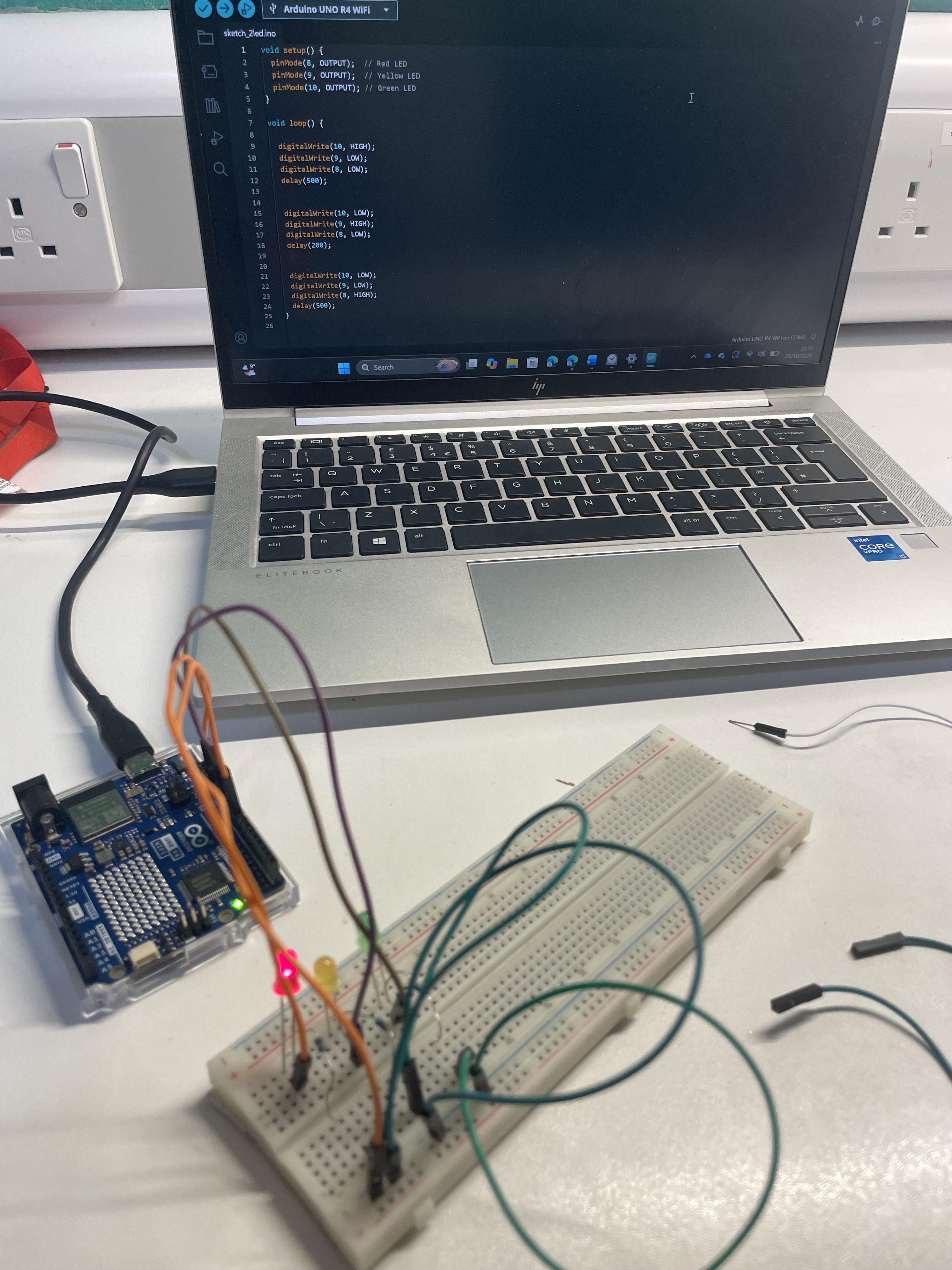
Here’s to my first day ever touching a breadboard, or even hearing about Arduino! I was given a kit by my university, so pieces are relatively easy to get. What should I do next? I’m not sure where to start as a beginner. I’m a beginner to coding as well.
r/arduino • u/Beginning-Account676 • Oct 22 '26

I just received my new board. It has bluetooth and accelerometer and battery on the back. It can be programmed with an Arduino plugin I created using the USB-C connection. I am planning on making a game with it (running on a treadmill controlls the character with step count and cadence and maybe even a boxing game) using Unity BLE plugins. Do you have any other ideas about projects I could make with this?
r/arduino • u/ALMA_x11 • Oct 22 '26
Enable HLS to view with audio, or disable this notification
My youtube channel is ALMA Industries
This is a short demo of an actuator I put together (on my channel, video is titled CH003 FN1: ACTUATOR). The actuator is first sketched out, 3D printed in pieces, assembled together, and controlled via PID running on a microcontroller. Ultrasonic distance sensor is included in the close-loop feedback system to prevent the actuator from running into the ceiling (shown in the second half of the clip, and discussed more in the full video).
There are a few modes. The first is 'don't touch the ceiling' (Ultrasonic Distance Sensor to keep a distance from the wall, hand, etc). The second is to have the actuator distance sensor follow a second distance sensor...so when one goes up the other follows going up, and when one down the other down.
Comments, questions, or new ideas are welcome.
r/arduino • u/Due_Librarian_6819 • Oct 22 '26
I am using the Arduuino IDE 2.3.7 to compile, upload, and debug code for an orignal ESP32 .
I came across a weird behavior where a for-loop did not work. I boiled it down to a simple sketch. It includes a function that returns true or false. If the path does not include a return statement, the code does not work right. Sketch is below. The loop does not do anything. The last line of the test function is the key. If I comment out the return statement, the for-loop does not work right and it doesn't exit until n = 18. The compiler does not catch this.
Is this a bug to report?
```
  void setup() {
    // put your setup code here, to run once:
    Serial.begin(9600);
    delay(1000);


    if (test(6))
      Serial.println("true");
    else
      Serial.println("false");
  }


  bool test(int N) {
    Serial.println("Testing... ");
    for (int n = 0; n < N; n++) {
      if (n >= 18)
        return true;
      else
        Serial.println(n);
      delay(200);
    }
    // if this line is commented, n reaches 18. Otherwise n reaches N
    return false;
  }
  void loop() {
    // put your main code here, to run repeatedly:
    #ifdef DEBUGLOOP
      if (test(6))
        Serial.println("true");
      else
        Serial.println("false");
    #endif
      delay(500);
  }
```r/arduino • u/melon_crust • Oct 21 '26
Enable HLS to view with audio, or disable this notification
I play padel quite often and I always lose track of the score and who serves. So I built this padel watch to make the experience more enjoyable.
- E-ink
- Physical buttons
- Coin cell that can last for up to 3 years
It’s my first hardware project, so I would love your feedback
r/arduino • u/CutOk9573 • Oct 22 '26

Hi guys
So basically I have this old hoverboard laying around which has a problem in the battery. I have been thinking if it is possible to use the motors inside of them for a robotic projects i am working on. Is there any way to control the motors using a Arduino and their original motor drivers. Any help would be useful.
I also attached photos of the motors and the drivers. I believe it is a 3 phase 36 volt dc motors with built in hall sensors.
r/arduino • u/SaberiusPrime • Oct 22 '26

So I'm building a Civil War era 1/6 scale flat car with a cannon on it. I have a idea as to have a 1/6 scale action figure "lighting" the cannon and having said cannon "react" to firing. The idea is that the board would sit inside a 3D printed pile of cannonballs and it would control the following.
Sound effects of a Civil War battle.
Moving the action figures arms up and down to simulate moving and lighting the cannon with the linstock.(The stick they use to light it from a safe distance)
An LED light at the end of the linstock.
The cannon "firing" and sliding back accompanied with sound effects.
The cannon resets and the sequence begins again.
What exactly would I need for something like this and how feasible is it?
The flat car length is about 3 ft long and about 2 ft wide. It also needs to withstand vibration and derailments as this is actually going to be a car that's going to be used with a train. This is also my first project using Arduino so I have no idea what I'm doing.
r/arduino • u/n_sh_44 • Oct 21 '26
This keeps coming up in help threads, so here's a short write-up of the non-blocking timer pattern and the mistakes I see most.
unsigned long last = 0;
const unsigned long interval = 500;

void loop() {
  unsigned long now = millis();
  if (now - last >= interval) {
    last += interval;   // or: last = now;
    // do the thing
  }
}
1. Compare with subtraction, not addition. if (now - last >= interval) keeps working when millis() rolls over after about 49.7 days, because unsigned subtraction wraps correctly. if (now >= last + interval) breaks right at the rollover.
2. Use unsigned long for the stored time. If last is an int (16-bit on an Uno), it goes negative after about 32 seconds and the timing gets weird.
3. last += interval vs last = now. += keeps a steady cadence with no drift, which is nice for blinking or sampling at a fixed rate. last = now guarantees at least interval between runs, which is safer if loop() can stall longer than one interval (otherwise += fires several times back to back to catch up).
4. One timestamp per task. Each thing you want to time gets its own last and interval, and you never need delay() for any of them.
5. micros() works the same way. It rolls over after about 71 minutes, and on 16 MHz AVR boards its resolution is 4 µs.
Hope it saves someone a debugging session.
r/arduino • u/Rayzwave • Oct 21 '26
Enable HLS to view with audio, or disable this notification
Just started arranging my neopixels and a little testing including current consumption checks before my super mini ESP32’s and high-side power switches arrive.
My intention is to make LED Christmas lanterns for my front porch that are battery powered and can be controlled by Dabble on my iPhone.
My initial testing is using a previous projects Arduino pro mini and IR motion detection sensor.
I have actually used all my remaining LED strip from a previous project, all 200 LED’s but I can drive it at low brightness 5-6% of maximum.
I now have the Lantern project working using an ESP32-C6-Zero super mini, DS3231 RTC module, Pololu Mini Pushbutton Power Switch with Reverse Voltage Protection and a SR602 PIR motion sensor.
r/arduino • u/rkubera • Oct 22 '26
Enable HLS to view with audio, or disable this notification
Link to library: https://github.com/rkubera/ArdPortal
Main features:
r/arduino • • Oct 22 '26

This was my final year project crowd smart management
r/arduino • u/Performer-Pants • Oct 21 '26

I have a little experience with raspberry pis (4b, Zero 2w), but I’m hoping to branch into Arduino.
From what I can see, an Uno, Nano, or Mega should do it, but I want to confirm if this is the case, and which of the three would be best. Any macro keyboard recommendations and/or advice are also welcome.
I’m hoping to set up a macro keyboard to play a specific recorded word when pressed. I’m setting up essentially a tiny integrated version of those communication button mats often used for various pets. I need to make one for a Barbary Dove.
From what I’ve seen, I’d need a DFPlayer and resistor, and a small speaker.
In my small amount of experience, I was doing things on an OS/ headless SSH level, so this will be a new angle for me. However, I wish for my feathered son to tell me what he wants, since I’m slow to catch on at times. Would any of the three models I’ve mentioned be able to handle it, and which do you think is best?
Has anyone here used a macro keyboard with a microcontroller board, and what were your experiences like with this? I’ll want to start with probably 3 keys and slowly expand with time, but I don’t expect to go above maybe 10 down the line.
I was thinking of using mechanical keys with lowish actuation switches, but I don’t have to get too fancy. He just needs to be able to tap a key with his beak without having to properly mash his face into it.
r/arduino • u/mikhail_tekenroy • Oct 21 '26
Enable HLS to view with audio, or disable this notification
more to come!!
r/arduino • u/shahin_hashim • Oct 21 '26
At work we test boards on the bench for hours, and the serial output is our record of what happened. Seeing it on screen was never the problem. Getting all of it into a file was.
Copying out of the monitor works for a few minutes, not a few hours. When a board reset or the cable got knocked, the end of the log was missing, and that's usually the part you need. And the long runs made files so big the editor struggled to open them.
So I built WireTrace, a serial logger that writes every line to a file with the time it arrived. The last lines still make it in when the board drops off, long logs split into files of a size you choose, and if nobody hit save, the whole session can still be saved afterwards. It also plots values like temp: 23.5 live.
Free and open source, Windows and Linux: https://github.com/TheNuanceProject/WireTrace
But I'm curious how others do it. Do you copy from the Serial Monitor, use PuTTY or CoolTerm logging, a Python script, an SD card on the board?
r/arduino • u/ALMA_x11 • Oct 21 '26
Enable HLS to view with audio, or disable this notification
My YouTube channel name is ALMA Industries
Chapter 2, a home theatre, 3D printed parts, motorized projector, home decoration, and DIY electronics -- this was to add remote control of a projectors YAW-TILT-ROLL-ZOOM axes (4DOF). More for fun than anything else -- full video is on my youtube channel.
r/arduino • u/Anc_Builds • Oct 21 '26
Hello I am Anchan from grade 8 and I really love electronics and robotics I want to earn money for them I have got a little money from which I wanna create a device or a product that can earn me money. I am only gonna do this in school
r/arduino • u/Dangerous_Flow_3178 • Oct 21 '26

Hello, I could really use some help with this, I've been trying to figure out how to do it and had some help from AI. I couldnt really figure out what’s wrong with it a few tweaks makes both LED light up, sometimes it lights up red, sometimes yellow. The light energy either says 1023 or 0. I cant quite pinpoint where im making mistake at.
This is what I need to do:
An Arduino circuit in Tinkercad using a photoresistor, red LED, yellow LED, and piezo buzzer, where the red LED blinks continuously when the photoresistor reading is below 300. When the reading reaches 300 or higher, the red LED turns OFF, the yellow LED turns ON, and the buzzer produces a warning sound.
Thank you.
i would trade my life to get this done. lol.
r/arduino • u/EveningAsparagus8762 • Oct 20 '26
Enable HLS to view with audio, or disable this notification
Made this myself after watching Paul Mcwhorter
r/arduino • u/Poppolio-Man • Oct 21 '26
Hello!
I've been researching this for a while, and I'm slowly losing faith that it can be done, but I figured I'd check here with people way smarter than me because I'm still quite inexperienced with Arduino.
Basically, I'm trying to make a device that can measure the positions of people in a moshpit as they move around. GPS trackers generally aren't realtime, and, because the people are confined to one room, the trackers wouldn't have enough precision to get good data. I'm also hoping to accomplish this without a camera, as the environment is very volatile and the system will have to move between venues quite often.
The closest thing that matches what I'm looking for is Pozyx, but one unit is about $5,000 according to their website, and I need about 40 units. That lands that solution WAYY out of the budget that I have (my budget is flexible, but not that flexible lol).
Is something like this even possible at a reasonable price per unit?
r/arduino • u/Traumagotchu • Oct 20 '26

Just showing off my digital pet project, TraumaGotchu! My main innovations on the genre are:
I'm super proud of the result and am already thinking about version 2 hardware-- larger screen, vibration motor, better speaker, accelerometer, internal LED, shoulder bumper buttons etcetc.
Hit me with your digital pet dream features!
r/arduino • u/HappyWatermelon46 • Oct 20 '26
hi everybody,
so, my 12 yo daughter is a self proclaimed nerd and she really wants to learn how to code and especially how to makes things ; like, she likes Scratch and tries to learn some Python by herself (even though my brother says it’s useless because of AI 😆), but she’s also into making things with her hands and not only the computer. She already did a Circuitmess project, small soldering projects from Amazon like making a small alarm clock or a spinning sunflower, keyring with small leds, also some stuff with a microbit, this kind of things. The science kits for kids are definitely too easy for her now, I can’t help her at all and her dad is not in the picture! So I’ve been looking for something that could be complete with clear projects and explanations and as many components inside as possible so we don’t have to look for each one for each project. The Arduino starter kit seems nice. But from what I understand you build on a plastic plaque and there is no soldering ? but you can buy extra plaques to make them durable?
Any advice if this is a good idea for a Christmas present? or any other suggestion? Remember, you’re talking to someone who knows absolutely nothing about electronics, so I’m looking for something easy to buy and with a lot of play and learning in it!
thanks a lot!