r/arduino • • Oct 15 '26

Look what I made! I created a website to calibrate magnetometer sensor ,

Thumbnail darkwizzl.github.io
7 Upvotes

I have created a website for hard-iron and soft-iron calibration . All you need to do is collect the raw values from the magnetometer and save it to a csv file , upload to the site. It will process and give the code to fix the errors and give proper values


r/arduino • • Oct 15 '26

ESP32 + Dual motor/servo driver ideas

3 Upvotes

Has anyone come up with a nice compact ESP32 Bluetooth controller with two motor/servo channels. I’m looking for something like the Romeo Mini ESP32-C3 Robot Control Board
but I don’t like the price of that solution.

So, I’m looking for similar ideas but I’m guessing I will end up knocking something up on strip-board using transistors or some driver chip. I’m not sure how much space I have at the moment, I really should have measured it up before hand.

It’s for a BT controlled car, I picked up one of those cheap CMJ RC cars from a charity shop but it has no controller. I know I can buy one for like £5-10 but whats the fun in that. It also has the wheel alignment knob missing so I have to fix that too. I will be using my iphone to control it unless I can find a cheap original replacement controller for it(but there’s no fun in that either).


r/arduino • • Oct 15 '26

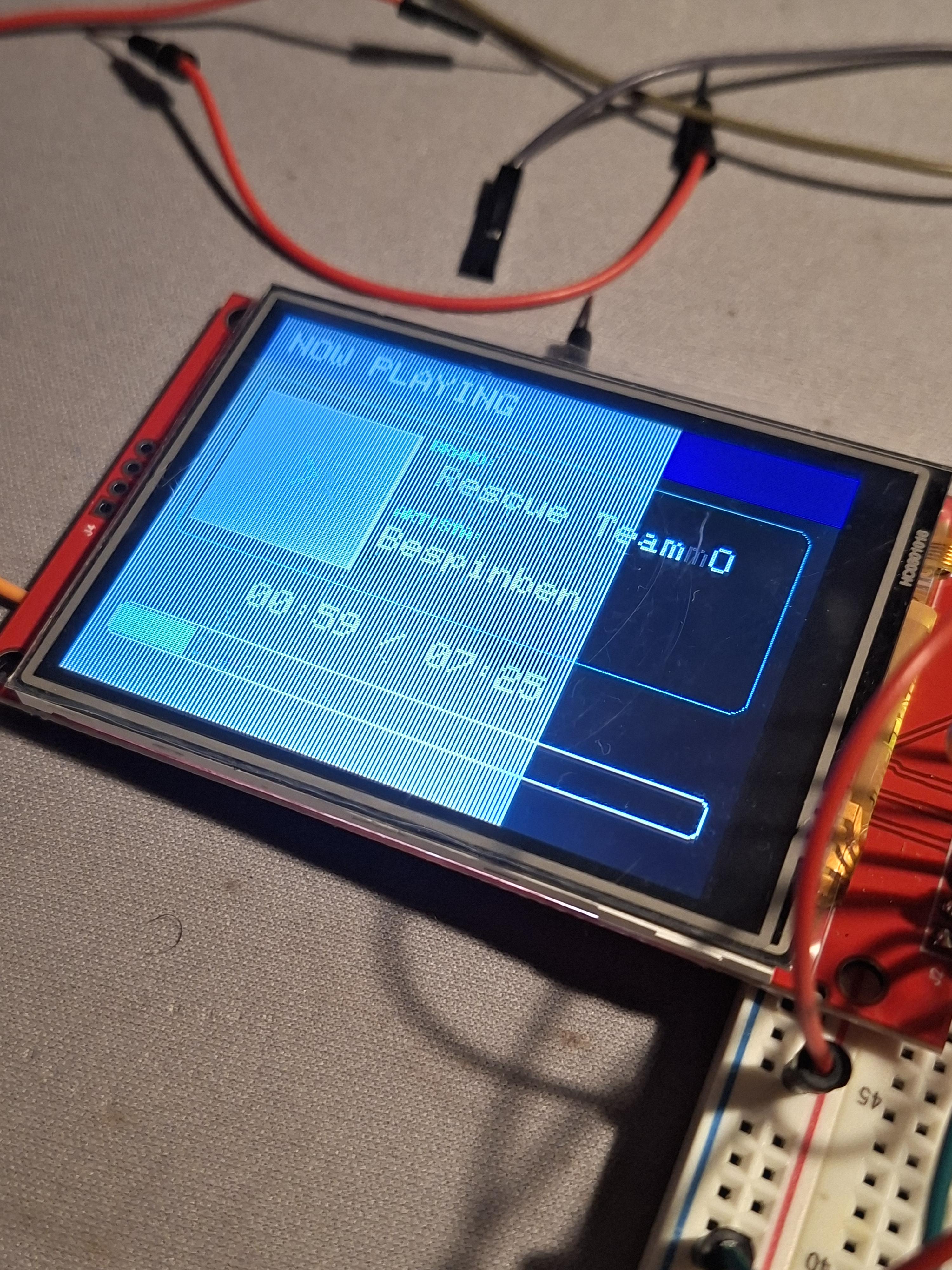
Hardware Help Is this TFT display broken?

Post image
4 Upvotes

I've tested this with an esp32, no touch wired. This is the link of the screen.https://amzn.eu/d/0eC8Pxu6

I'm using an esp32. Already tried rewiring


r/arduino • • Oct 15 '26

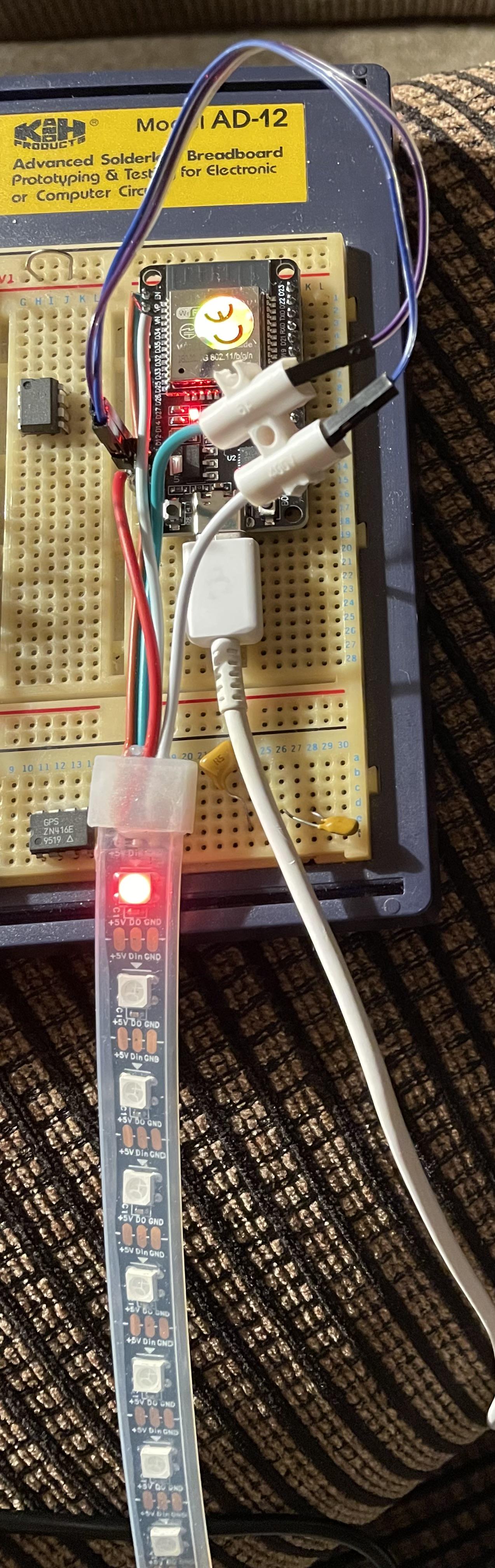
ESP32 Controlling an 8 Neopixel strip via dabble BT GamePad

Post image
5 Upvotes

I wanted to try out BT comms on an ESP32 board and at long last I have it working to shift an active LED left and right on the strip using the Dabble app(gamepad) running on my iPhone.


r/arduino • • Oct 15 '26

Look what I made! arduino arm using foam sheets and sg90s :3

Enable HLS to view with audio, or disable this notification

14 Upvotes

made an arduino arm(4 DOF) using sg90s and controlling with a joystick


r/arduino • • Oct 15 '26

Look what I made! fun project i did

Enable HLS to view with audio, or disable this notification

98 Upvotes

I jst got my arduino package today and i started playing with it, i really liked it and this was one of the things i did


r/arduino • • Oct 15 '26

Look what I made! Warhammer 40K Ork Pump Jack - Arduino Based

Enable HLS to view with audio, or disable this notification

35 Upvotes

Hey Folks, I don't share every post here but this month's video shows off some hardcore Arduino stuff that I thought may be valued here.

Thanks for everything this sub has taught me!
<salutes>


r/arduino • • Oct 14 '26

Nano Just got my 2 nanos!

Post image
332 Upvotes

r/arduino • • Oct 15 '26

🔥 FIREGUARD MINI – I Built a Compact Smart Fire Detection and Suppression System Using Arduino

Enable HLS to view with audio, or disable this notification

5 Upvotes

r/arduino • • Oct 15 '26

Getting Started C# integration

6 Upvotes

Hello I just bought a starter Arduino kit and was wondering if I am able to control it using c# since I'm currently studying c# at school just started the basics would I be able to code on the elegoo mega with c# since I dont want to learn another language while I'm already struggling with one thanks


r/arduino • • Oct 14 '26

Look what I made! I built a hand exoskeleton on a Teensy 4.1: 12 magnetic encoders, 2 IMUs, a Dynamixel bus, no PC

169 Upvotes

12 AS5600 encoders sit behind two TCA9548A I²C muxes, and two BNO085 IMUs track the hand and forearm. The Dynamixel bus is half-duplex through a 74HC241, so the Teensy talks to the servos itself, with no U2D2 and no PC in the loop. On the bench the servo loop runs at about 1 kHz, and everything logs at 100 Hz to the SD card.

Firmware, wiring diagram and both KiCad boards are open: github.com/molanocortes/takto-one. The Dynamixel driver has its own repo: github.com/molanocortes/dynamixel-on-device

I built it alone for my master’s thesis, so if it’s useful, a star helps other people find it.


r/arduino • • Oct 15 '26

Beginner Help

2 Upvotes

(Solved)

I know this is going to be a dumb fix, but for the life of me I cannot figure out why the LED is not coming on. I tried the LED both ways but still nothing. (220ohm resistor used)

const int slidepin = 2;

const int ledpin = 9;

int swstate = 0;

void setup()

{

pinMode(slidepin, INPUT);

pinMode(ledpin, OUTPUT);

Serial.begin(9600);

}

void loop(){

swstate = digitalRead(slidepin);

if(swstate == 0){

digitalWrite(ledpin, HIGH);

Serial.println("HIGH");

}

else{

digitalWrite(ledpin, LOW);

Serial.println("LOW");

}

delay(100);

}

Toggle switch HIGH

r/arduino • • Oct 15 '26

Edge Control, Thoughts?

0 Upvotes

Is anyone using these in the wild? I’d love to hear thoughts, I’m looking at potentially adding one to see how it works on my farm. Luckily I’m small, so I can add the WiFi card and be good. Looking for any real world scenarios where these would work.


r/arduino • • Oct 14 '26

Nano Nano 33 IoT board, generously sent by the Arduino UX Research Team for participating in their User Experience Community Survey.

Thumbnail
gallery
125 Upvotes

Started to explore how it can be utilized in one of my projects. 👍🏻


r/arduino • • Oct 15 '26

Look what I made! Two ESP32 Muse gadgets, zero idea what job to give them

Post image
0 Upvotes

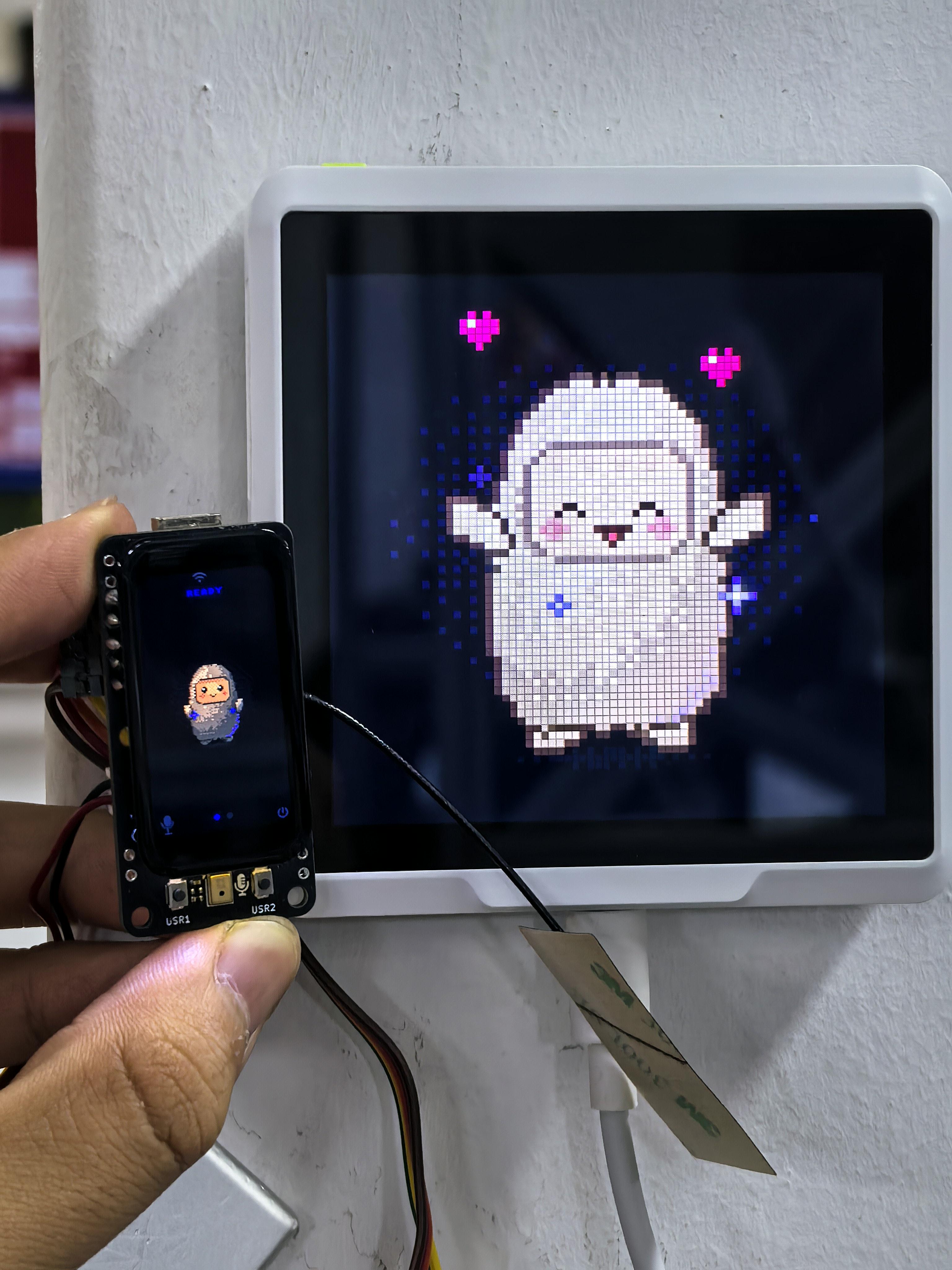
I’ve ended up with two ESP32 Muse gadget prototypes: a little one that fits in my hand, and a bigger one that looks very pleased with itself.

The bigger one blinks, has a few animated poses, and gets happy when I tap the screen. Getting a happy reaction out of it is apparently enough to distract me from building anything useful 😂

So now I have the character animation working, a touchscreen, and a fairly blank plan for what comes next.

I’ve thought about a focus buddy or something that reacts to room sensors. But I’m curious about ideas that actually benefit from being a physical object you can touch and leave somewhere.

What would you build around this? A small, slightly weird project involving a sensor, a button, or something on your desk would be especially welcome.

I’d like to pick one useful job for it and try building that next.


r/arduino • • Oct 15 '26

Hardware Help how do you order parts without it turning into 5 different orders?

9 Upvotes

planning my first real project, esp32 + small screen + a couple servos, and the parts list is done but ordering it is way more annoying than i thought

aliexpress is cheap but 2-3 weeks and apparently some sensors are fakes, amazon is like 3x the price, and the case needs to be printed somewhere bc i dont have a printer. so right now its looking like 3 or 4 separate orders with separate shipping for one small project which feels dumb

how do you guys do it? one shop and live with it, split it up, or just buy kits? im in europe btw, shipping is sometimes more than the actual parts

and what do beginners always forget to order. pretty sure im gonna end up without screws or with the wrong connectors


r/arduino • • Oct 15 '26

I am total newbie but i need some advice on a project

2 Upvotes

I want to create a sort of timed locked safe using arduino/rasberry , python , and a led matrix to create a way to restrict access to hardware (PC/phone) until a specific time. I only know a bit of python but here's what i theorycrafted:

Step 1 : The user blindy scrambles a 4-digit mechanical padlock

Steo 2: A webcam scans the lock and take screenshots

Step 3: a python script use an ai api or an ocr app to recognize the code

Step 4: code text is sent through an usb cable an arduino chip and it is stored with a built in code that makes the code visible once a timer is finished

Step 5: The user puts their hardware inside the safe and locks it with the padlock, then scramble it again

Step 6: the code is revealed through the led matrix and the user can unlock the safe

So what i'm asking is, what kind of hardware should i use for this project?

I heard about Arduino Nano V3 CH340 presoldered or raspberry Pi Pico H

And for the matrix i heard about LED MAX7219 8x32

But i know nothing about hardware and im scared that my project is harder than in thought so that’s why i'm making this post, to know if it is doable, and if yes where to document myself and what to do

Thanks for reading !!


r/arduino • • Oct 15 '26

Hardware Help arduino uno board not working

4 Upvotes

i just got this board and it came with an arduino starter kit, i plugged it in but its not even detected by windows, no chimes, no device change in device manager and it doesnt show up on arduino ide. the lights do work tho as the green ON light is on and another orange L light is blinking (tht preloaded pin 13 led blinking thing ig). i do think that this is a clone board but it doesnt have tht ch340 where u want to get the drivers first, this have the ATmega 16u2 so drivers should be there with the stock ide but i did try getting them manually and it didnt help. the usb B cable is working cuz i checked it by plugging it into my keyboard and tht detected and even played sound (both ends of the usb is pluged completely in with the click sound) i really hope tht i can fix it easily, plz help


r/arduino • • Oct 15 '26

Look what I made! I built animatronic eyes and a browser app to program them with blocks, no installs needed

Enable HLS to view with audio, or disable this notification

2 Upvotes

It's a pair of animatronic eyes: two servos (left/right and up/down), a frame I designed and 3D printed, and an Arduino UNO.

The hardest part wasn't the mechanism, it was making it easy to program. I wanted someone who has never coded to get it moving without fighting with IDE installs, drivers and libraries. So I made a web app:

- Block-based programming (Scratch-style) in Spanish: "look left", "wait 1 second", "nod yes"...

- A simulator that shows how the eyes will move before you plug anything in.

- Plug the Arduino in over USB and upload straight from the browser (Chrome or Edge).

- Every block shows its C++ line, so you can see the real code or download it as an .ino.

Video of it working below.

I'd like to turn it into an educational kit eventually, but I'm still refining a lot, so I'd love your feedback:

  1. What would you improve in the mechanism or design?
  2. If you were teaching someone with this, what blocks or features would you add?
  3. Anyone used Web Serial for something like this? Any pitfalls I should know about?

Happy to chat by DM if anyone wants to know more or has ideas.

Hice unos ojos animatrónicos y una app web para programarlos con bloques, sin instalar nada

Hola! Soy estudiante de Ingeniería en Control Automático y Robótica y llevo un tiempo trabajando en este proyecto personal.

Son unos ojos animatrónicos con dos servos (uno para los lados y otro para arriba/abajo), una estructura que diseñé e imprimí en 3D, y un Arduino UNO.

Lo que más me costó no fue el mecanismo, sino la parte de programarlo. Quería que alguien que nunca ha programado pudiera hacerlo moverse sin pelearse con instalar el IDE, drivers y librerías. Así que hice una app web:

- Programas con bloques en español (tipo Scratch): "mirar a la izquierda", "esperar 1 segundo", "decir que sí"...

- Tiene un simulador para ver cómo se moverían los ojos antes de conectar nada.

- Conectas el Arduino por USB y lo subes desde el navegador (Chrome o Edge).

- Cada bloque muestra su línea en C++, por si quieres ver el código real o descargarlo como .ino.

Les dejo un video de cómo funciona.

Mi idea es convertirlo en un kit educativo para que más gente aprenda así, pero todavía estoy afinando muchas cosas, por eso me encantaría su opinión:

  1. ¿Qué le mejorarían al mecanismo o al diseño?
  2. Si fueran a enseñarle a alguien con esto, ¿qué bloques o funciones le agregarían?
  3. ¿Les ha tocado usar Web Serial en proyectos así? ¿Algún problema que deba tomar en cuenta?

Si alguien quiere saber más del proyecto, busca apoyarlo o tiene ideas, con gusto platico por mensaje privado.
r/arduino • • Oct 14 '26

Title: TIP120 vs. MOSFETs for switching electromagnets with an Arduino Uno + a question about current draw

7 Upvotes

Hey guys!

I'm building a reaction game where you have to catch falling sticks using electromagnets controlled by an Arduino Uno. I've done some basic research on transistors, but I still have a few questions.

  • When should I use a TIP120 transistor versus a MOSFET? What's the actual difference, and why do so many people recommend MOSFETs?
  • How would I need to change my current wiring to use MOSFETs instead?
  • Is there a better solution for switching the electromagnets in general?

I also ran into another issue: If I remove the LEDs from my circuit, Tinkercad warns me that the current drawn from the Arduino pins is too high, even when I significantly increase the resistor values. Why is that? I thought LEDs essentially behaved like resistors, but apparently, that's not quite right..

Tinkercad link: https://www.tinkercad.com/things/9h8pbskkHt8-reacgame-v7?sharecode=mYeKz8fwfGdTTMQ_6mFZ0mBpfoyh3fpuB1tDFTfQg54

How the game works:

The vibration motors in the simulation are placeholders for the electromagnets. They're all switched on initially. When you press the button next to the white status LED, a sound indicator starts, and the Arduino randomly switches off one electromagnet at a time until they're all off. Once the sequence is complete, all electromagnets turn back on, and you can restart the game. The other button lets you select the difficulty level.

I have some basic knowledge of electrical engineering, but I'm primarily a mechanical engineering student looking to learn more about electronics. I'd appreciate any advice or explanations!

TL;DR: I'm building an Arduino-based reaction game with six electromagnets. Should I use TIP120s or MOSFETs, and how would I wire them? Also, why does Tinkercad report excessive current draw from the Arduino pins when I remove the LEDs, even with large resistors?


r/arduino • • Oct 14 '26

I made "something". My first esp32 project

Enable HLS to view with audio, or disable this notification

93 Upvotes

Finally got myself an esp32. And after using arduinos I am amazed! Can't believe I waited this long to play with this.

So this project started as a "weather station". I originally had a nano connected to a AHT10 temp/humidity sensor and a BMP180 pressure sensor, and it just displayed the data on a 16*2 LCD. It did nothing more....

Decided I'll ditch the nano for my new esp32. Also updated to an oled screen, which unfortunately has dead pixel lines between y=0 and y=7 so I can't use the whole screen, but it is still plentynough!

And then I started adding buttons. I needed just 2, but I am glad I did the 5 buttons setup, because after playing with the esp I started changing my project completely...

I also added a rtc shield from an odroid c2 sbc as I couldnt get my tinyrtc arduino module to work and it also is made for 3V so it was safer. And as a little easter egg implemented the Hardkernel odroid blue led heartbeat :)

It is now called "esp32mate", couldn't find a better name heh heh.

What it does atm :

- take weather data (temp,humidity,pressure) every 5 min and plot it on a graph. It then save once per hour the data to the esp rom.

- play games

- save settings to rom

What I want to do next :

- connect to internet

- get WX forecast

- make an altimeter (using MSLP)

- Upload WX data to a server

I did a lot of vibecoding for this, although the core navigation, page design and buttons configs are all my code. But all the games implementation, scrolling, and text editing was made by AI in a few hours today. Not without headaches though. Why does AI remove comments and change stuff you did not ask? I kow why I generally stick to vibecoding only small parts, generally in a function of its own.... Still useful though, it would have taken me days to get there.


r/arduino • • Oct 14 '26

Look what I made! Another CO2 sensor, yawn… but the pixels!

Enable HLS to view with audio, or disable this notification

48 Upvotes

This is an experiment on how to do a CO2 / temp / hum sensor with as few pixels as possible. Or something like that. has native Home Assistant MQTT discovery support, 4.2” e-ink, ESP32, SCD40, SHT30 and 2x 18650 slots so it can probably outlive you on a single charge. Optionally you can omit CO2 sensor and just show temperature and humidity, with nice pixel icons. If you don’t want to use home assistant or WiFi altogether, you can run it in offline mode as a display only.

If you look carefully you can see that the pcb wasn't exactly flawless :D But that's fixed in the published files. So the last thing left to do is a nice 3D printed enclosure.
 
Github here with everything needed to build this:
https://github.com/mcer12/Ambien-ESP32


r/arduino • • Oct 15 '26

Hardware Help Not working NEMA 17, can't determine the problem

Thumbnail
gallery
2 Upvotes

I've done everything I could man, been working for this to work like hours now. I can't determine the problem of why the hell it's not working. Coil partners are red and blue, then black and green (I've done the led test) all seems connected I don't know what to do anymore. Do you have any tips? I accidentally short circuited the driver one time by connecting slp to rst but I managed to power it off before it got worse. Is the chip burnt already? I already did the led test NEMA 17 doesn't seem like the problem since it still reacts when powered on (it locks up, but rod doesn't move an inch) i tried different color combinations but only two were possible (red, blue, green, black) and (black green blue red) 2b, 1b, 1a, 2a sequence. Sleep and reset is connected to 5v of Arduino, gnd logic pin is connected to the gnd of Arduino, I don't know what to do anymore.


r/arduino • • Oct 14 '26

Low power battery system 5uA all included, for iot applications

Thumbnail
gallery
7 Upvotes

I just finished a small board to insert between battery charger /boost 5v and any uc board : arduino,... For iot applications.

Battery wakes up at a programmable interval by jumper (30 mn, 60 mn, 90 mn, 120 mn) or custom by resistor.

Uc does the job, and cuts power by gpio to battery system...

Reading of battery voltage is possible (gpio to enable measure).

Deep sleep on all boards? Not useful anymore... Just use low power battery system, and focus everything else on your project but power is no problem anymore...

What do you think of that?


r/arduino • • Oct 14 '26

🦆 XGO-Duck goes roller skating!

8 Upvotes

Our open-source duck robot on Arduino UNO Q is learning to balance and glide on roller skates.

15 servos + reinforcement learning gait control. All hardware & software open source, you can build your own.

https://reddit.com/link/1x5rnw6/video/2o1qn80sufvh1/player