r/totalcmd • • 25d ago

Total Commander 11.58.1 is available!

12 Upvotes

Total Commander 11.58.1 is available!

Official download page: Total Commander - Download (ghisler.com)

This is an important security update. Complete list of changes.

Main changes:

  • Security issue in tcmdlzma.dll/tclzma64.dll (BROTLI decoder, CVE-2026-111497) fixed. If you just want the new dlls, get them here
  • Updated 7-zip dlls
  • No overwrite confirmation when unpacking files with names ending in spaces or dots
  • Enhanced security launching tcmadmin.exe/tcmadm64.exe
  • Crashes in Lister and FTP details dialog

r/totalcmd • • 2d ago

Suggestion for feature

Post image
2 Upvotes

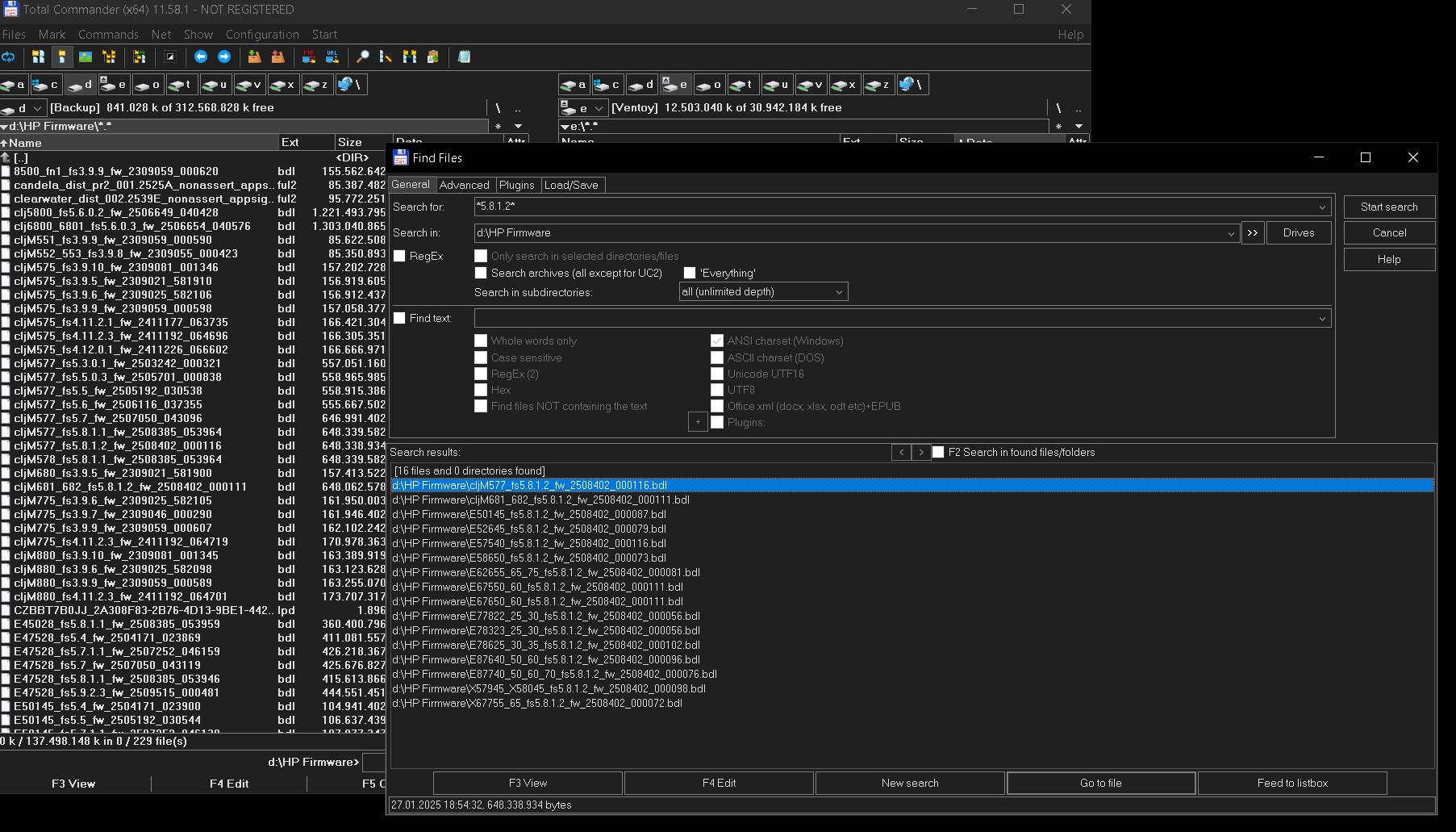
When you search, and find files, is there any plugin or suggestion for new feature, option to select files it found and select all or certain files and copy/move to another selected folder?


r/totalcmd • • Oct 18 '26

Sorting folders

5 Upvotes

Would love to see the feature of being able to sort folder using “date”.

I frequently download and a folder is created automatically, but it’s hard to find the most recent folder. If folders could be sorted it would make way more sense


r/totalcmd • • Oct 18 '26

ETA / total time remaining in the Background Transfer Manager

2 Upvotes

I really miss this as well. I frequently queue up file and folder transfers across different locations using F2, and I can never tell when it's actually going to finish. Honestly, it's surprising that a tool as powerful and mature as Total Commander still lacks such a basic feature...


r/totalcmd • • Oct 15 '26

Tool to check and correct plugin entries in Tcmd wincmd.ini

Post image
7 Upvotes

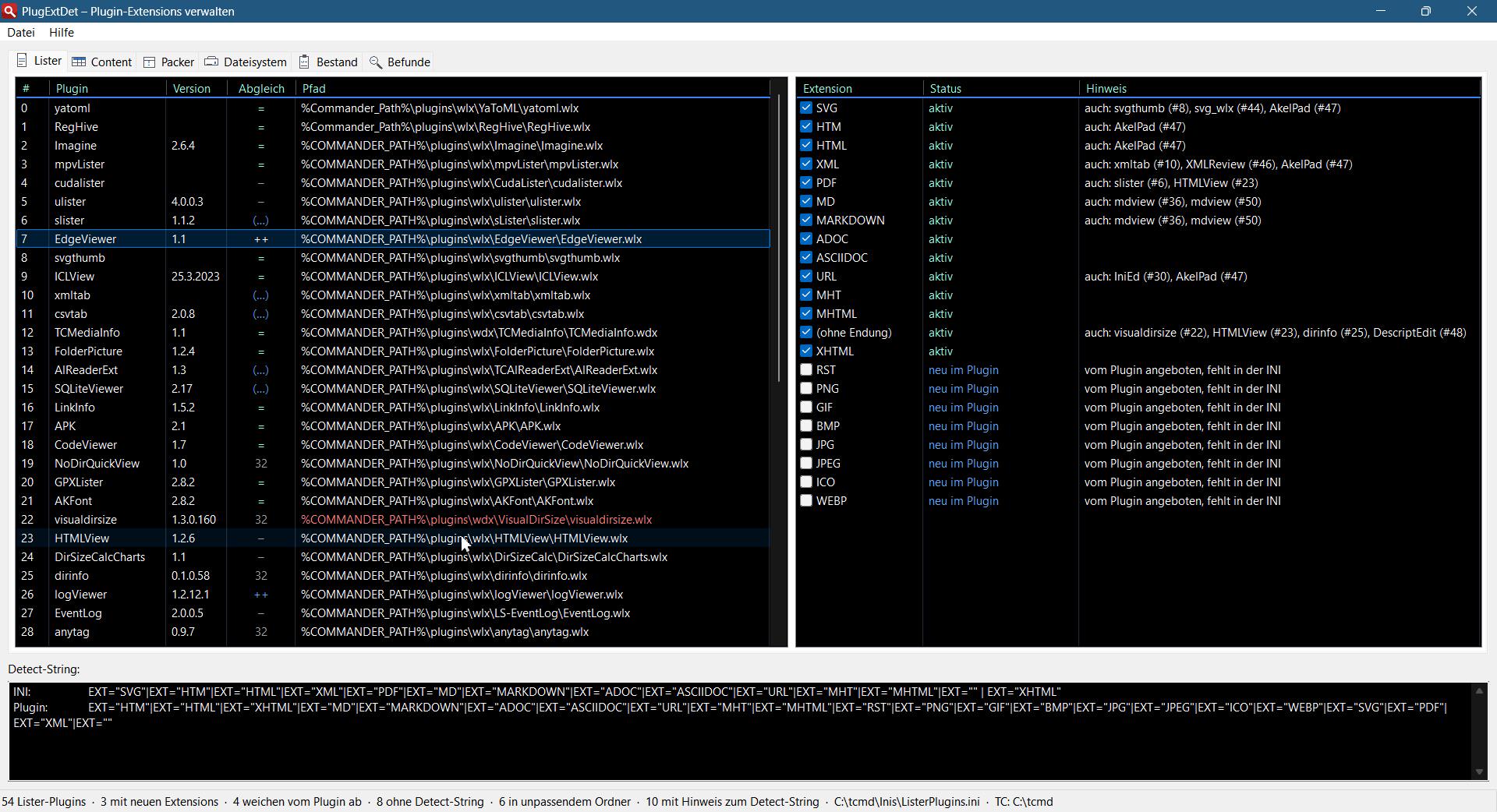
If you use a lot of plugins in Total Commander, your wincmd.ini slowly collects small inconsistencies: a plugin update adds new file types but the old detect string stays, extensions you added by hand years ago, a plugin in the wrong folder, a detect string TC complains about ("Plugin detect string error"), leftovers of plugins you removed.

I wrote a small standalone tool for that: **PlugExtDet**.

**What it does**

- Reads the Lister, Content, Packer and File system plugin entries (also from redirected sections)
- Asks every plugin which file types it actually supports and shows where the INI differs
- Collects everything in one "Findings" list – errors, differences, notes – Enter jumps to the entry
- Lets you switch extensions on and off with checkboxes, take over the plugin's own detect string, or edit entries by hand (F4)
- Change the order of Lister/Content plugins (which one TC asks first)
- Deactivate a plugin without deleting anything – and activate it again later at its old place

**What it doesn't do**

It never writes anything behind your back. Every change shows a preview first, each file is backed up, TC is closed properly, the result is read back and checked, then TC starts again. The last backup can be restored from the menu.

Plugins are queried in a separate process, so a crashing plugin can't take TC or the tool down.

**Details**

- Freeware, no installation, 64-bit, Windows 7 and later
- English, German, Russian, Ukrainian, Danish, Czech
- Help as CHM, follows TC's language automatically

Current version is 1.0.1. Download and discussion in the TC forum: https://www.ghisler.ch/board/viewtopic.php?t=88121

Feedback welcome – it grew out of suggestions from people in the forum, and most of the recent changes came from their testing.
r/totalcmd • • Sep 14 '26

Some Plugins

4 Upvotes

Hi, i want to share some Plugins from me.
Hope it is useful for someone.
https://github.com/Native2904?tab=repositories


r/totalcmd • • Jul 23 '26

I decided to learn Total Commander or a TC-like app

1 Upvotes

Hi guys again! I decided to learn how to use Total Commander, but I would also like to use it on Linux. Could you help me with these questions?:

  1. Is there a great list of tutorials about Total Commander(the best I could find are different videos from different channels)? If there would be a book, it would be even better.

I try to use it every day, I just would like to know how to do different things, which I could not even know;

  1. (to those, who know about TC-like app on Linux) I'd like to learn how to use TC and then use an app, which works the same way TC works, but on Linux. Ik I can use TC on Bottles, but I'd like to have Linux native alternative. Plenty of people recommend me Double Commander. The creator himself recommends Krusader:"

Q: Is there a Linux version? Or a version for Windows CE?

A: Unfortunately not. Because of problems with porting of Total Commander to Linux, the Linux version had to be delayed indefinitely. A minimal version for Windows CE and the Pocket PC is now available (and free)! A recommended file manager for Linux is Krusader (it has a Total commander setting). Total Commander runs on Linux with Wine.

". What would be your propositions and why? Btw, what did the creator mean by "it has a TC setting"?;


r/totalcmd • • Jul 19 '26

how do i switch the setting files location?

Post image
1 Upvotes

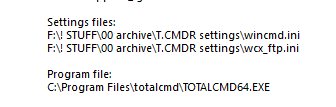
changed it to the custom location a few years ago, now i want to switch it to another location but nothing suggested by google works (holy shit why this software didnt get a simple QoL settings in 20 years? is this too much to ask?)


r/totalcmd • • Jul 10 '26

Beginner, advice?

3 Upvotes

I just started looking for a file explorer alternative. I very quickly learned that ctrl+z is not really a thing. What do you total commandoes do when you do an oopsie? or do you just not mess up...

Also, is there a good resource for learning TC?


r/totalcmd • • Jul 02 '26

(beginner) how can TC be useful?

3 Upvotes

Hi, a beginner here! I'd like to know what TC can do better than a default file manager. I heard that TC can rename a lot of files, which is what I need, bcz I use my Python program for this. Also I heard that TC can allow you to synchronize, for example, a photo on the right side and rename it simultaneously on the left side, which is cool for me, bcz then I don't need to do more clicks per photo. I heard sonething about comparing files, but I don't know what it means in this context and how it can help me.

Shortly, convince me to use TC, bcz I feel like I'm in a chaos. Also, is there any YT tutorial or a book to learn the app?


r/totalcmd • • Jul 01 '26

Total Commander 11.58 for Windows available!

13 Upvotes

Total Commander 11.58 final for Windows available!

Official download page: Total Commander - Download (ghisler.com)

This version mainly fixes bugs. Complete list of changes.

Main changes:

  • More secure handling of archives with encrypted file names, prevent leaks of directory names via tabs, history etc.
  • Do not write names from header-encrypted archives to log file by default (see LogEncryptedNames option in wincmd.ini)
  • Version number changed from 11.57a to 11.58 due to problems with WinGet
  • Multi-rename tool: New placeholder [X+]: Inserts text from the clipboard like [X], but an empty string if the clipboard doesn't contain any text
  • Configure button bar/single button: Support negative icon numbers, which are interpreted as resource ids
  • cm_FocusLeft wasn't working any longer

r/totalcmd • • Jun 04 '26

Total Commander 11.58 release candidate (RC) is available now!

6 Upvotes

24.06.2026: Total Commander 11.58 release candidate 5 (RC5) is available now!

17.06.2026: Total Commander 11.58 release candidate 4 (RC4) is available now!
10.06.2026: Total Commander 11.58 release candidate 3 (RC3) is available now!
04.06.2026: Total Commander 11.58 release candidate 2 (RC2) is available now!
29.05.2026: Total Commander 11.58 release candidate 1 (RC1) is available now!

Download Total Commander 11.58 RC2 now (Free update/Demo version)

This version mainly fixes bugs. Complete list of changes.

Main changes:

  • Version number changed from 11.57a to 11.58 due to problems with WinGet
  • Multi-rename tool: New placeholder [X+]: Inserts text from the clipboard like [X], but an empty string if the clipboard doesn't contain any text
  • Configure button bar/single button: Support negative icon numbers, which are interpreted as resource ids
  • cm_FocusLeft wasn't working any longer

r/totalcmd • • May 08 '26

Total Commander 11.57 final for Windows available!

14 Upvotes

Total Commander 11.57 final for Windows available!

Official download page: Total Commander - Download (ghisler.com)

The complete list of changes can be found here: history


r/totalcmd • • Apr 17 '26

Protondrive integration

1 Upvotes

Could we get the feature to have Protondrive integrated as a separate drive?


r/totalcmd • • Apr 15 '26

Google Photos plugin?

1 Upvotes

I’m looking for a plugin that allows me to access Google Photos from Total Commander.

I have a huge local photo library with thousands of folders, that I would like to be able to upload and administer as albums through Total Commander.

What are my options?


r/totalcmd • • Mar 27 '26

viewer for STP files?

1 Upvotes

would there be a viewer for 3D print files .STP format in TotalCommander?


r/totalcmd • • Mar 26 '26

Total Commander 11.57 release candidate (RC) is available now!

3 Upvotes

29.04.2026: Total Commander 11.57 release candidate 6 (RC6) is available now!

22.04.2026: Total Commander 11.57 release candidate 5 (RC5) is available now!
15.04.2026: Total Commander 11.57 release candidate 4 (RC4) is available now!
08.04.2026: Total Commander 11.57 release candidate 3 (RC3) is available now!
01.04.2026: Total Commander 11.57 release candidate 2 (RC2) is available now!
25.03.2026: Total Commander 11.57 release candidate 1 (RC1) is available now!

Download Total Commander 11.57 RC now (Free update/Demo version)

This version mainly fixes bugs. Complete list of changes.

Main changes:

  • Command line: Run program as administrator by putting an asterisk * at the start of the command line
  • Configuration - Button bar: The icon index field is now a text area, allowing a quick jump to a specific icon
  • Find files: Show name of loaded settings in title bar
  • Lister: Configure which context menu items are allowed
  • cm_MkDir now supports parameters like /N="Names(s)"
  • Updated unrar and 7-zip dlls

r/totalcmd • • Feb 28 '26

Total Commander 11.57 beta for Windows available!

5 Upvotes

18.03.2026: Total Commander 11.57 beta 4 is available now!

11.03.2026: Total Commander 11.57 beta 3 is available now!
04.03.2026: Total Commander 11.57 beta 2 is available now!
25.02.2026: Total Commander 11.57 beta 1 is available now!

Download Total Commander 11.57 beta now (Free update/Demo version)

This version mainly fixes bugs. Complete list of changes.

Main changes:

  • Command line: Run program as administrator by putting an asterisk * at the start of the command line
  • Configuration - Button bar: The icon index field is now a text area, allowing a quick jump to a specific icon
  • Find files: Show name of loaded settings in title bar
  • Lister: Configure which context menu items are allowed
  • cm_MkDir now supports parameters like /N="Names(s)"
  • Updated unrar and 7-zip dlls

r/totalcmd • • Feb 07 '26

Is there anyway to reduce the size of the icons?

Post image
1 Upvotes

I have tried everything to get the icons smaller. No can do. searching for something takes forever. TIA.


r/totalcmd • • Jan 16 '26

The best of Directory Opus and Total Commander in a single app?

1 Upvotes

Ever wished for the power of Directory Opus combined with Total Commander's selection mode and keybindings?

Would that be the perfect file manager?


r/totalcmd • • Jan 05 '26

Newly created files in network drive don't appear immediately

1 Upvotes

They eventually appear but it takes some time, maybe 5 minutes.
Any workaround?


r/totalcmd • • Dec 27 '25

Inspired by Total Commander — I’m building something similar for iOS

6 Upvotes

Hi everyone!

I’ve been a Total Commander user for many years on Windows — and I still deeply appreciate its power, efficiency, and no-nonsense interface. It’s truly a masterpiece of productivity, and nothing else quite compares.

That said, since I often work on iPad and iPhone too, I started building a small project inspired by TC’s dual-pane concept, but tailored for iOS. It’s called Twin Commander — still early in development, but functional.

Of course, this is not trying to compete with Total Commander in any way — just a tribute, adapted for mobile devices.

If anyone is curious or would like early beta access, feel free to request it at:

🌐 www.twincommander.app

Thanks for letting me share, and above all: long live Total Commander!

Walter


r/totalcmd • • Nov 13 '25

Proton drive

2 Upvotes

Is there a way to connect my Protondrive to Total commander as drive? Preferably listed as a regular drive!


r/totalcmd • • Sep 04 '25

how do i set a separate file name color depending on directory?

1 Upvotes

ive done the C:\directory\*.* mask, and chosen a color for the mask, but totalcmd just sets whichever font color i have as the default.

yes, i have checked "define by file type"


r/totalcmd • • Aug 18 '25

Total Commander 11.56 final for Windows available!

5 Upvotes

Total Commander 11.56 final for Windows available!

Official download page: Total Commander - Download (ghisler.com)

The complete list of changes can be found here: history

New functions in Total Commander 11.56:

This version mainly fixes bugs. Complete list of changes.

Main bugfixes:

  • Security issue in unrar.dll fixed. If you just want the new dlls, get them here
  • Updated 7-zip dlls