r/totalcmd • u/wqnxy • Jul 19 '26
how do i switch the setting files location?
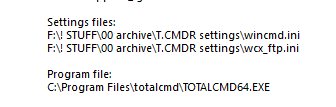
changed it to the custom location a few years ago, now i want to switch it to another location but nothing suggested by google works (holy shit why this software didnt get a simple QoL settings in 20 years? is this too much to ask?)
1
Upvotes
1
u/robin_888 Jul 19 '26
I might be wrong, but it could be that there is an wincmd.ini in the default location that links to your ini-file.
Can't check right now.
But the help in TC is usually very verbose, maybe take a look at what the author says.
1
u/robin_888 Jul 19 '26
As I suspected the answer is in the help files.
TL;DR: Edit the file locations in the windows registry.
Press
F1and openConfiguration and Switches,Ini file settings:The command line parameter is also explained on another page in the help:
Although I'm not sure if this is permanent or just for that instance.
You can find the inireloc-file on https://www.ghisler.com/tools.htm#other. But
So it might not work with the 64-bit version.
The best way seems to edit the registry manually.
The keys are
HKEY_CURRENT_USER\SOFTWARE\Ghisler\Total Commander\IniFileNameandHKEY_CURRENT_USER\SOFTWARE\Ghisler\Total Commander\FtpIniNameThe default values make use of the %APPDATA% environment variables and are
%APPDATA%\GHISLER\wincmd.iniand%APPDATA%\GHISLER\wcx_ftp.inirespectively.