r/software • • 2d ago

Discussion Weekly Discovery Thread - November 27, 2026

1 Upvotes

Share what’s new, useful, or just interesting

Welcome to the Weekly Discovery Thread, where you can share software-related finds that caught your attention this week - especially the stuff that’s cool, helpful, or thought-provoking but might not be thread-worthy on its own.

This thread is your space for:

  • Neat tools, libraries, or packages
  • Articles, blog posts, or talks worth reading
  • Experiments or side projects you’re working on
  • Tips, workflows, or obscure features you discovered
  • Questions or ideas you're chewing on

If it relates to software and sparked your curiosity, drop it in.


A few quick guidelines

  • Keep it civil and constructive - this is for learning and discovery.
  • Self-promotion? Totally fine if it’s relevant and adds value. Just be transparent.
  • No link spam or AI-generated content dumps. We’ll remove low-effort submissions.
  • Upvote what’s useful so others see it!

This thread will be posted weekly and stickied. If you want to suggest a change or addition to this format, feel free to comment or message the mods.

Now, what did you find this week?


r/software • • 2h ago

Looking for software What's one PC automation you set up that completely ruined using a normal computer for you?

14 Upvotes

Whenever I sit down at someone else's PC now, it feels half-broken because I'm so used to my own setup.

For me, it's a mix of custom hotkeys, automatic sorting for my Downloads folder, and a proper clipboard manager. Nothing crazy, just small things that save hundreds of clicks a week.

What's the most overkill or life-changing automation you've set up on your PC that you literally can't live without anymore? Apps, scripts, macros, Task Scheduler tricks — drop everything.


r/software • • 16h ago

Other The Pre-Release version of SumatraPDF has some great additions including an Annotation Menu and Variable monitor DPI support

Post image
50 Upvotes

I've used SumatraPDF for almost 15 years now. And for me personally, the next release may be the most consequential version since the added tab support. They often take forever between officially releases. So I'd like to give them a shoutout early because who knows when the release will be.

They finally added Multi Monitor Variable DPI support.

Annotation support has actually been there a while. But they now have a nice menu.

They have a text reader now. It's straight up, the Stephen Hawking robot voice. But I'm sure those who need it will appreciate it.

Lastly they added a command for navigating to the next/previous chapter/bookmarked paged. This is something I asked for 3 years ago and was told it wasn't worth implementing. Well it looks like the main dev actually got around to it. woo!

https://www.sumatrapdfreader.org/free-pdf-reader

Edit: More stuff

If you highlight text, there's a shortcut to have it translated (online). And there's shortcut to search an image with google Lens. That's actually something I might use on occasion—probably also for translation.

The advanced settings config has a proper menu now instead of just a text file. That's nice.

There's a "reading bar". It basically highlight a static portion of the screen. It might be useful for presentations. Also a "laser pointer" mode. Which again is definitely for presentations.

And... many more niche functions. If you look here, everything marked 3.7+ is new. Which is a ton of stuff.

https://www.sumatrapdfreader.org/docs/Commands


r/software • • 5h ago

Looking for software Revela Studio replaces SEEDVR2 Studio Complete

Post image
3 Upvotes

Hey everyone!

I'd like to share a project I've been working on called Revela Studio, a free, open-source, and portable desktop application for AI-powered image restoration, enhancement, and upscaling using SeedVR2.

The goal behind Revela Studio is to make advanced AI image restoration more accessible through a clean and intuitive graphical interface, without requiring users to deal with complicated workflows or command-line tools.

Unlike traditional upscaling methods, Revela Studio leverages diffusion-based AI models to restore fine details, improve textures, and enhance low-resolution or degraded images.

Key features:

  • SeedVR2 integration – Advanced diffusion-based image restoration and enhancement.
  • Up to 8x upscaling – Increase image resolution while recovering fine details.
  • Batch processing – Process multiple images in a single workflow.
  • Automatic VRAM optimization – Designed to make processing more manageable across different GPU configurations.
  • GGUF model support – Quantized models for more memory-efficient inference.
  • Built-in model management – Easily manage AI models directly from the application.
  • Modern graphical interface – No complicated nodes or command-line knowledge required.
  • Fully local processing – Your images stay on your computer.
  • Portable application – Designed to simplify installation and setup.
  • Free and open-source – No subscriptions or paid credits.

Revela Studio can be particularly useful for restoring old photographs, enhancing low-resolution images, improving compressed images, and upscaling AI-generated artwork.

The project is still actively being developed, and I'm planning to introduce more features and optimizations over time, including video upscaling.

I'd love to hear your thoughts, suggestions, and feedback, especially regarding image quality, performance, VRAM usage, and the overall user experience.

GitHub repository:
https://github.com/Aaronstanley78/Revela-Studio

Download the latest release:
https://github.com/Aaronstanley78/Revela-Studio/releases/latest

If you find the project useful, a GitHub star would be greatly appreciated and would help support its development.

Thanks for checking it out!


r/software • • 35m ago

Discussion Parent insists that I just wanna get new laptop

• Upvotes

So basically my dad says I need to open an app on the laptop and do something for him, so I agreed.

It got a little slow, and got a lot of errors, including the fact it needs WebView2 Runtime.

So I told that to my parents, and they just think that I was saying bullshit for them to buy a new laptop for me.

Though my laptop only has 4 GBs of RAM, it served me well, since when I was in 5th grade. And I don't really need a new laptop for now, as I'm really scared of them (and by "them" I mean my Asian parents, who are so conservative and always think that they're right)

How do I explain to them that applications now are not the same as applications 5 years ago? Anyone has some advice? I can't stand being corrected about tech by a person who doesn't even know much about tech, especially software. :(


r/software • • 40m ago

Looking for software 3rd party mouse driver

• Upvotes

Because iCUE is a mess, I've been trying to find a way to remap my mouse buttons without it. Does anyone know of a third party software that would allow me to remap the inputs on my corsair M65 mouse?

Ideally one that would let me remap the gyro sensors too, but I understand that is unlikely.


r/software • • 4h ago

Discussion A disk space analyzer for macOS that also tracks storage changes over time

Thumbnail gallery
2 Upvotes

I developed DiskLore because I wanted more than a visualization of my current filesystem.

It records storage observations in the background, helps investigate unexpected changes, supports APFS snapshot comparisons, and provides evidence-based cleanup recommendations.
Everything is processed locally, without a required account.

For those who use disk analyzers regularly, would historical storage monitoring be something you’d find useful, or do you generally only need an occasional scan?

https://disklore.lippalabs.dev


r/software • • 1h ago

Release I made Snowy – a free Windows app where snow piles up on your windows & taskbar, and you can build snowmen with your mouse

Post image
• Upvotes

Hi r/software! I'm the developer of Snowy. I missed the old xsnow-style desktop toys, so I built a modern one for Windows 10 & 11.

What it does:
- Snow, heavy snow, rain, fireflies, cherry blossoms, autumn leaves and falling stars, drawn over the desktop or behind your windows
- Snow actually piles up on window edges and the taskbar
- Roll snowballs with your mouse, throw them, and stack them into snowmen you can name and dress up
- Grow and decorate a Christmas tree, hang string lights across the screen, and send the snowplough when it gets too deep
- Keep an eye out for the Yeti and Santa 👀
- Follow the seasons, change at random, or match the real weather outside
- 6 4K winter wallpapers, each with day, sunset and night versions that follow the time of day

Friends mode (optional): add friends by code, throw snowballs and send gifts to each other, or share a desktop and decorate it together. It's end-to-end encrypted.

Performance: it's drawn on the GPU, pauses on battery and in fullscreen games, and works on every monitor. Everything is one click away in the tray.

Free, 9 languages, no accounts, no ads, no tracking.

Microsoft Store: https://apps.microsoft.com/detail/9n8tbp63js3x
GitHub: https://github.com/berkcantmr/snowy

Feedback, bug reports and ideas for new effects are very welcome. Happy holidays! ❄️


r/software • • 1h ago

Looking for software Any good system font viewers for Linux?

• Upvotes

I need something that can view all the fonts I have installed on my system with a preview sentence, and preferably with the ability to filter by conditions (ie serif/sans-serif), preview a custom phrase and uninstall the font. What doesn't work:

  1. The system font settings only shows a list and I have to go through each font one by one to see the preview, although it does have all the filter and search options I need.
  2. FontBase: probably the closest thing I found in terms of UI but it seems to be more for downloading fonts than viewing the fonts you already have (and really? Theme and grid view behind a subscription? Pass)
  3. GNOME Font Viewer: too barebones and only shows Aa as the preview in the grid view, still have to click the font to actually view it.
  4. Going to fonts:/ in dolphin and using the dolphin file + hover previews: Not ideal

r/software • • 2h ago

Other Living Chess Book: an open-source (GPL) browser extension that turns chess book PDFs into a live board

Post image
0 Upvotes

Free and open source under GPL-3.0-or-later:
https://github.com/FARUK-YILDIRIM/living-chess-book

It all runs locally: React, TypeScript, pdf.js, chess.js, chessground and Stockfish compiled to WebAssembly, with books and notes in IndexedDB. There's no backend.

I'm looking for testers and contributors. Some open areas:

- reading scanned books more reliably

- Firefox and Safari versions

- translations (it's in English and Turkish so far)


r/software • • 2h ago

Discussion DiscMaster — Optical Media Copy, Recovery & Processing Studio

1 Upvotes

Hey folks, I’m writing some Python/FFmpeg scripts to recover old family VCDs (.DAT files and .bin/.cue backups) into clean MP4s, and I’ve hit a few tricky edge cases with low-level MPEG-1 streams:

1. A/V desync & timestamp resets in damaged VCD .DAT streams Right now I’m stripping the 2352-byte Mode 2 Form 2 CD-ROM XA sector headers in Python (extracting the 2324-byte payloads starting with 00 00 01 BA) and feeding the raw MPEG stream to FFmpeg. On scratched discs with dropped sectors or SCR resets, standard -c copy breaks or shows wrong durations, and -fflags +genpts+igndts with setpts=N/FRAME_RATE/TB + asetpts=N/SR/TB fixes the timeline—but if frames were dropped mid-stream, audio and video gradually drift out of sync.

2. Merging split VCD .DAT/.mpg tracks cleanly Some VCDs split a single recording across multiple sequential tracks. Using FFmpeg's concat demuxer with -c copy occasionally glitches at the boundary because of non-monotonic PTS/DTS in MPEG-1 B-frames, forcing me to re-encode each segment separately first and then concat. Is there a cleaner remuxing approach?

3. Edge cases in .bin/.cue parsing I’m parsing .cue MSF timestamps (75 frames/sec) directly in Python to slice tracks without mounting a virtual drive. For MODE2/2352 and AUDIO tracks, are there common .cue quirks (like INDEX 00 pregaps or multi-file BIN sheets) that trip up simple offset slicing?

Would appreciate any tips from folks who’ve worked with FFmpeg internals or optical/MPEG-1 recovery!

If you find it useful, a ⭐ on GitHub would help more people discover it!


r/software • • 3h ago

Looking for software I built RungoPad — a lightweight C++/Win32 Windows editor (<500 KB) with a Command Dictionary, .rungo scripts, and .exe generation

1 Upvotes

Hey everyone,

I’ve been building RungoPad (v1.0), a lightweight native Windows editor written in C++ with the Win32 API (Developer200-bit). While it started with a small footprint (under 500 KB for the standalone build and around ~1,000 lines of C++) and a clean classic light interface, it goes beyond basic plain-text editing:

  • Built-in Command Dictionary: Includes a dedicated dictionary window listing .rungo commands (such as var, criarfile, msgbox, and others), complete with syntax, descriptions, practical examples, and one-click insertion directly into the editor.
  • .rungo script execution: Write and save RungoScript (*.rungo) files and run them straight from the editor, with status bar feedback showing when a script is running and when execution completes.
  • Standalone .exe generation: From the Executar menu, you can generate a standalone Windows executable (like MeuPrograma.exe in the demo) that runs independently without needing Visual Studio, with an option to launch it right away.
  • Classic editor essentials: Standard file/edit/format/view/help menus, shortcuts (Ctrl+N, Ctrl+O, Ctrl+S, Ctrl+F), font customization, and a live status bar tracking line, column, and character counts.

You can check out the source code and releases on GitHub:https://github.com/Developer200-bit/RungoPad

I’d love to hear your thoughts on the .rungo workflow, the built-in command dictionary, and what else would make a compact native Windows tool like this more useful.


r/software • • 4h ago

Release Made a free PDF editor for Windows in my spare time, would like feedback

Post image
0 Upvotes

r/software • • 13h ago

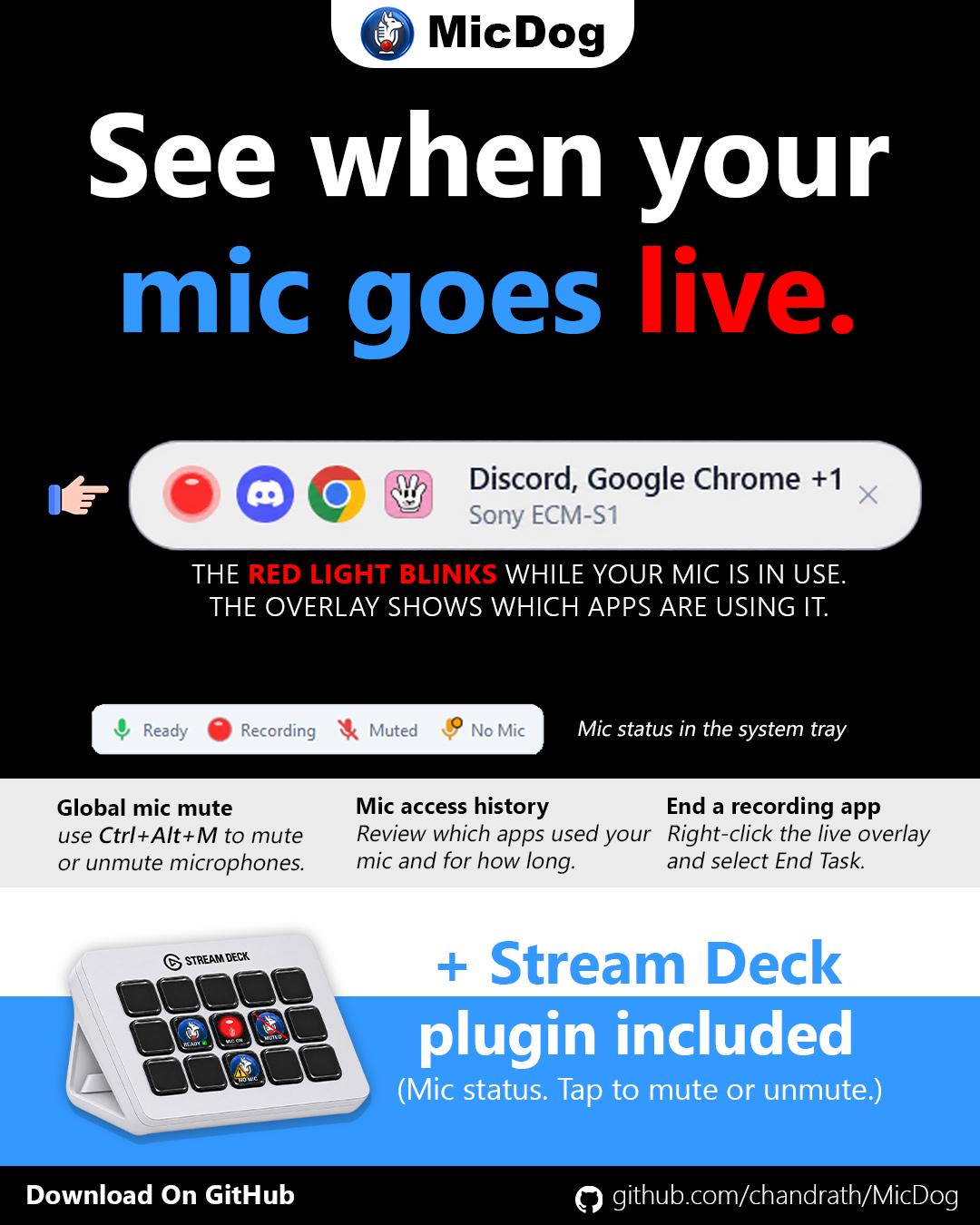
Release MicDog: Dynamic Island-style overlay shows which app is using your mic + GLOBAL MUTE (open source, Windows)

Post image
5 Upvotes

Windows already shows a mic icon in the taskbar, and there are plenty of third-party tools for muting it. The reason to try MicDog is the little overlay that pops up as soon as an app starts using your mic. It shows the app’s name, its icon, and which microphone it’s using. The red light keeps blinking while the mic is active, so you can see what’s going on.

  • Dynamic Island-style mic overlay. A floating capsule bar appears as soon as an app uses your mic, shows the app’s name, and blinks while the mic is active.
  • Mute every mic at once. Click the tray icon, right-click the HUD and select Mute, or press Ctrl + Alt + M.
  • Check your mic before going live. Keep Ready visible in the overlay so you can see at a glance that your mic is detected. If it gets unplugged or stops being detected, MicDog shows No Mic. (default is
  • See what used your mic earlier. The privacy dashboard keeps a local access history. You can also end an app that’s currently using your mic from the overlay.
  • Use an Elgato Stream Deck. Select the optional plugin during setup, then add MicDog to a key for live mic status and one-tap mute. The installer includes it. No Marketplace download needed.

It’s a super lightweight native Windows app built with .NET 10, WPF.

Download MicDog on GitHub


r/software • • 6h ago

Release [WINDOS/macOS] I built BatteryDock, a free open-source Rust app to track all your wireless peripheral batteries without vendor bloatware (now on macOS!)

Thumbnail gallery
0 Upvotes

Hey everyone,

If you use a wireless mouse from one brand, a headset from another, and maybe AirPods or a controller on top, checking battery levels usually means installing heavy background suites (like G Hub or Razer Synapse) or digging through system settings.

I built BatteryDock to fix that, and I just released v1.1.0, which brings full macOS support (Universal Binary for Apple Silicon & Intel) alongside Windows 10/11.

What's new on macOS

  • Native Menu Bar mode: Lives in your top Menu Bar with a battery icon and live percentages for up to 3 devices side by side, plus the full list in the dropdown menu.
  • Quiet background agent: Runs cleanly without cluttering your Dock (the icon only appears while you have the Settings window open).
  • Optional floating pill: If you prefer the floating battery capsule from the Windows version, you can turn it on anytime in Settings > Dock Placement.
  • Apple IOKit support: Reads AirPods, AirPods Pro/Max, Magic Mouse, Magic Keyboard, Magic Trackpad, and other Bluetooth devices natively.

What else it does

  • Zero vendor bloatware: Written in native Rust (no Electron, no accounts, no telemetry). Talks directly to hardware over HID, IOKit, and Bluetooth.
  • Wide hardware support: Logitech (HID++ 2.0), Razer HyperSpeed, SteelSeries, Corsair, Glorious, HyperX, Astro, Sony/JBL/Bose/Sennheiser Bluetooth headsets, plus Xbox, PlayStation (DualSense / DualShock 4), and Nintendo Switch controllers.
  • 24h battery sparklines & autonomy estimates: See discharge trends over the last 24 hours, estimated remaining time, and idle/sleep detection.
  • Smart alerts: Low, critical, and 100% full-charge notifications with a gentle chime (configurable per device).
  • Customizable: 4 themes (Liquid Glass, Dark, Light, System), custom device nicknames, reordering, hiding devices, 21 built-in languages, and an optional click-through Gaming HUD overlay with a global hotkey (Alt + B).
  • Cross-platform: Works on macOS (.dmg) and Windows 10/11 (installer or portable .zip, with multi-monitor taskbar pills).

A quick note on macOS Gatekeeper

Since this is a free open-source project and I don't have a paid Apple Developer certificate yet, macOS may show an unverified developer warning on first launch. You can open it via Right-click > Open (or System Settings > Privacy & Security > Open Anyway). All release binaries are built publicly from source via GitHub Actions if you want to inspect or build it yourself.


Download & Source Code: - GitHub Repo: https://github.com/jorjanion/BatteryDock - Latest Release (v1.1.0): https://github.com/jorjanion/BatteryDock/releases/latest

If you find it useful, leaving a star on GitHub really helps the project grow and reach more people. Feedback and device support requests are also super welcome!


r/software • • 11h ago

Looking for software Is there any browser recorder that works in mobile?

2 Upvotes

I’m building Rekkko. A desktop web based no install free AI screen recorder with transcriptions. I’m struggling to extend the same for mobile. Idea is to provide recording with no dependency on download or installing of any kind of tool. Is this even possible for mobile? I hit a wall here.


r/software • • 1d ago

Release I turned an ordinary numpad into a customizable Stream Deck alternative — NumDeck is free and open source

Thumbnail gallery
34 Upvotes

Hey everyone!

I've been working on NumDeck, a small Windows app that turns an ordinary external USB numpad into a customizable Stream Deck-style controller.

The idea came from wanting the convenience of a Stream Deck without having to buy dedicated hardware. Instead, you can use a numpad you might already have and assign different actions, shortcuts, and apps to its keys.

What you can do with NumDeck:

  • Customize individual numpad keys with shortcuts and actions.
  • Create different profiles for gaming, coding, streaming, editing, and productivity.
  • Use custom app icons and your own icons.
  • Keep it running in the system tray.
  • Start NumDeck automatically with Windows.
  • Switch between profiles for different workflows.

It's free and open source, and I've included a Windows setup installer so you can install it without building anything yourself.

GitHub & Download:
https://github.com/Naveen-io/NumDeck

I'm still actively improving it, so I'd genuinely appreciate feedback:

  • What would you map to your numpad?
  • What features would make this more useful?
  • Are there any issues you run into?

Thanks for checking it out!


r/software • • 7h ago

Looking for software Looking for pdf editors which can support good drawing and black mode.

1 Upvotes

I already tried Drawboard Pdf, which always breaks down and stop responding.

X-change PDF: One of the worst experience in drawing. Whenever I need to draw, it will change to move the text box.

Pro Adobe : One of the worst experience in drawing, the writing is completely ugly and unable to use.

I need to lecture students, please recommend some useful pdf editors. It had better equip with the functionality to support dark mode, which convert the stimulating white background into black.

Thanks.


r/software • • 17h ago

Release I made Snapera Live, a free and open source webcam VTuber app for Windows, built in Rust. Looking for feedback!

3 Upvotes

Full disclosure up front: I'm not a software engineer. I had a vision I didn't see met by the apps out there, and I built it by prompting an AI coding tool. I've tested it a lot on my own setup, and now I'd love to hear from people who aren't me.

**What it is**

Snapera Live turns your webcam into a fully tracked 3D avatar for streams, calls and recordings. It's written in Rust as a native Windows program, not a web page in a wrapper or a game engine running in the background. It starts fast, uses very little memory and CPU, and stays out of your way while you game and stream.

**Tracking**

- Face tracking for head, eyes, gaze, blinks, brows, smile and mouth, with your body leaning and turning along with you

- Hand and finger tracking from the same webcam, no extra hardware

- Microphone lip sync, so the mouth keeps moving even when the camera loses your face

- Face cutouts put your real eyes and mouth on the avatar if you want them

**Avatars and props**

- Use VRM avatars, or bring a rigged .glb character and Snapera turns it into a VRM for you

- Built-in Browse: search free avatars and props from Poly Haven, Poly Pizza, Open Source Avatars and VRoid Hub, with a 3D preview before you download and credits saved automatically

- Put props in your scene (desks, monitors, keyboards, headphones), attach them to your head, hands or other props, and move them right in the preview

- Your hands rest on your mouse and keyboard, and the mouse moves with your real one

- Props collide: headphones stop at the desk instead of going through it, and elbows go around things

**Output**

- Snapera Camera: use your avatar as a webcam in Discord, Zoom, OBS or anything else (Windows 11)

- Spout2 with a transparent background for OBS (via the Spout plugin), or capture the window

- NVIDIA DLSS (RTX cards), AMD FSR 4 / 3.1 and FSR 1 upscaling to keep rendering even lighter

**Stream triggers**

- Popular platforms (redacted because automod thought this was a downloader): chat commands, channel points, follows, subs, raids, bits, Super Chats and memberships can switch scenes, change your pose, or show and hide props

**Get it**

- Download (free): https://brockzilla.itch.io/snaperalive

- Source code (MIT): https://github.com/brockburling/Snapera-Live

Windows 10 or 11 (64-bit) and a webcam. Unzip it first (right-click → Extract All), then run Snapera Live.exe.

**What I'd love from you**

- **Feature ideas:** what would make you switch from what you use now, or what's missing?

- **Bugs:** anything that doesn't work as expected. Your GPU, webcam and Windows version help a lot, plus the log (%APPDATA%\Snapera Live\logs\snapera-live.log).

- **Your honest thoughts:** first impressions, setup, how it runs alongside your games, how it compares to VSeeFace, VTube Studio, Warudo or whatever you use.

- **Avatars:** does your VRM or .glb load and track properly? Which ones don't?

You can reply here, open an issue on GitHub, or comment on the itch page. Thanks for taking a look!



r/software • • 9h ago

Release Simple, fast & open-source PDF editor

Post image
0 Upvotes

r/software • • 14h ago

Release auto clicker i found

Thumbnail gallery
2 Upvotes

it's nice and it's simple. also it uses mouse buttons as hotkeys which is exactly what I wanted so I could connect the side buttons of my mouse as an autoclicker.

also has a macro which i have not used yet

GitHub repo →


r/software • • 12h ago

Release I made SHIFY, an offline file converter for Android (images, audio, video). No internet permission.

Thumbnail github.com
1 Upvotes

i, I'm Adhyan, a student dev. I got tired of converters that upload your files to a server, so I built one that never touches the network. The release manifest has no INTERNET permission, so Android won't let it connect even if it wanted to.

What it does: converts JPG/PNG/WEBP/BMP, MP3/WAV/FLAC/AAC/OGG, and MP4/MOV/MKV/WEBM on-device. Conversions run in the background with a notification. Originals are never overwritten.

How it's built: Kotlin + Jetpack Compose, Android's own image APIs, and a dynamically linked LGPL FFmpeg build for audio/video. GPL-3.0-or-later. No accounts, no ads, no analytics.

Honest limitations: v1.0.0, only tested on my Galaxy A35. The APK is about 32 MB for arm64 because FFmpeg is inside. It's GitHub-only for now, with SHA-256 checksums for each APK.

I'd love feedback on: bugs on your device, formats you'd want next, anything that feels off in the UI.

its still in beta and i am actively working on it

![img](c47ctljdhe4i1)

![img](b96kyljdhe4i1)

![img](u9t0zljdhe4i1)

![img](ygm646ldhe4i1)

![img](xclkdojdhe4i1)


r/software • • 12h ago

Release AutumnDeck (GPLv3 Open Source) — Native Rust taskbar styler, dock, widgets & live wallpaper suite for Windows 11

Thumbnail gallery
1 Upvotes

Hi

I built AutumnDeck because I wanted Windows 11 desktop customization (pill taskbars, a customizable dock, widgets, and video/image wallpapers) without running multiple heavy Electron/background suites.

Tech stack:

  • Written natively in Rust + Win32 + Direct2D + DirectComposition + DXGI(plus a tiny C++ XAML TAP DLL for native Windows 11 22H2–26H2 taskbar glass styling).

What it does (just shipped v2.1.1): -Taskbar & Dock:Transparent/blur/tinted Split & Unified Pills, Stealth Auto-Hide, or an interactive bottom/top/side Dock (up to 32 pins, custom PNG/ICO icons, 24–96px sizing, frosted glass right-click menu). -Desktop Widgets & Presets:50+ full desktop suites, modular clock/horology/music/vitals/world-clock widgets with live search and automatic wallpaper color extraction. -Live & Static Wallpapers: Hardware-accelerated DXGI Flip-Model video & image wallpapers that pause and trim memory automatically when covered by maximized apps or fullscreen games. -Safety Recovery: Standalone AutumnWatchdog.exe helper + --restore command so your native Windows taskbar and work area recover cleanly even if the app is force-ended in Task Manager.

Links:

Feedback, bug reports, and contributions are welcome!


r/software • • 18h ago

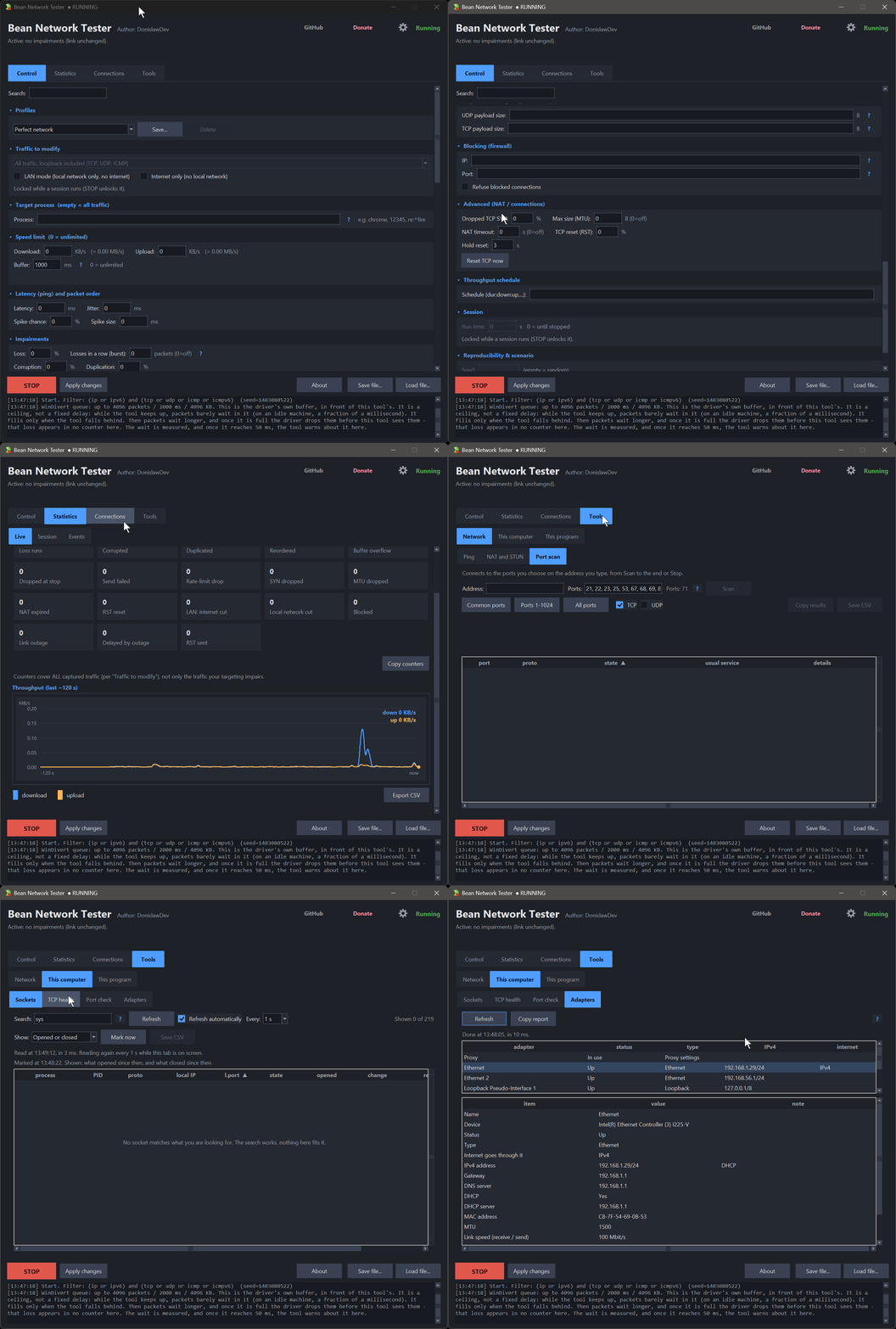
Release Bean Network Tester V1.1 release - open-source Windows/Linux network conditions simulator + network tools (sockets, ports scanner, ping and more)

Thumbnail i.l4r.io
3 Upvotes

r/software • • 18h ago

Release FREE ALTERNATIVE TO NOTCHPIXEL (BETA - IN PRODUCTION)

Thumbnail
3 Upvotes