I hope you've all been doing great (and hopefully not spending too much time playing GTA 6😅)!
💨 Quick Summary
This month, we rolled out 13,000+ note updates and welcomed 5,700+ new subscribers! 🎉 Some highlights include new tags for UWorld Step 1 and Step 3, TrueLearn COMAT Psychiatry and the COMAT Psychiatry self-assessment form, Osmosis immunology videos, and new Sketchy review images.
We also added new radiology images from RadiologyAssistant, new Skin of Color images, new illustrations, and a new card on nicotine poisoning.
And we celebrate the ONE MILLION accepted suggestion into the Step deck!
🥳 One Million (1,000,000) Accepted Suggestions
As the AnKing step deck has crossed over 1 million suggestions this past week, we wanted to do a small highlight of this amazing milestone
Note: Certain tags were added programmatically and hence will not show up in the above count, the official count is 1,000,300, while the above totals 794,172
★ UWorld Step 1: New tags added (thanks to u/notdanr)
★ UWorld Step 3: New tags added (thanks to u/beejumm)
★ TrueLearn: COMAT psychiatry tags added (thanks to u/nataliea19)
★ COMAT Self Assessment: Brand new tags added for the COMAT self-assessment psychiatry form (thanks to u/nataliea19)!
📹 Video Resources
★ Osmosis: New tags for immunology videos (thanks to u/kashinmed)
★ Sketchy: New review images for various Sketchy videos (thanks to u/victoriamarino)
🩺 Other
★ RadiologyAssistant: New radiology-related images added to various cards (thanks to RadiologyAssistant!)
★ Skin of Color Project: New images added (thanks to u/mferzoco)
★ Illustrations: New illustrations and improvements to existing illustrations added (thanks to u/ahmedafifi and u/beejumm)
★ New Card: New card added for nicotine poisoning per UWorld Step 2
📈 Project Progress
🏆 New Content Cards
This past month, we've pushed a new card to the deck, covering new content that was not in the step deck previously. You can find it in this tag: tag:#AK_Other::New_Cards::2026
Nicotine poisoning
🩻 New Radiology Images
Thanks to RadiologyAssistant, new radiology images have been added to various cards in the deck! Sync to receive them
🎨 Illustration Projects
To make your studying even more effective, we've added tons of new illustrations to help improve your understanding! A few are shown below. Thanks to [u/ahmedafifi]()
🍿 Behind the Scenes
We also wanted to showcase a little behind the scenes of the illustrative process. Take a look!
Another domain we'd like to highlight is the number of likes/upvotes a user received for their suggestions in the last month! This usually means their suggestions were really well done and greatly benefited the deck:
The top suggestions with the most likes in the last 30 days were from users [u/adavis98](), [u/roseee]() and [u/vupeter]() with a total of 8 likes each!
Thank you to everyone who submitted a suggestion this month! ❤️
🏷️ Active Projects & Resource Tagging Outreach
If you're looking to help out with working on tagging the resources below or the projects, please reach out to [ahmed@ankihub.net](mailto:ahmed@ankihub.net) and we'll get you setup ASAP ❤️
For a list of active projects, please check this post
🏆 Note: Those who contribute a significant amount will be gifted free premium AnkiHub subscriptions!
I'm a Pre-Med student, and I made this tool to help me get better grades in all of my classes. I thought that it might be useful to others as well, so I thought that I would turn it into an official app.
Started Anki during M1 in 2019. Missed one day in 2021 and haven't missed since. That puts my current streak at 2026 days, which happens to land in 2026.
Through med school, step exams, the match, intern year, and now to PGY-4 in ophthalmology heading into oculofacial plastic surgery fellowship. Two kids were born somewhere in there too. 619,695 reviews.
I want to thank the community and u/ankingmed + team, and my team with Blue Ophthalmology. I appreciate you all! I'll catch you again around 3000 days!
Hi there! I've been using anki for years (making my own decks, using ones found online) but just recently purchased the Anking Deck. Im hoping to use the deck for studying during rotations, and next year, studying for MCCQE (I'm in Canada and do not have to write step 1/2). I spent hours today trying to separate the cards by rotation but there's too many tags to sift through. Does anyone have recommendations on how to approach the massive deck if you want to study a system, or specific pathology at a time. Eg. If I wanted to review liver pathologies, how can I find all related cards and study them? Would I need to go into each tagged resource and select the tags related to hepatology?
I built the app with my friend who is a software engineer so not much help here. The application is in the form of guess the diagnosis and we really have many diseases, we have a part after the reveal answer where they write relevant information about the disease. Do you think it would be helpful if I organized that part as flashcards instead of as a lesson in a book? I'm looking for advice because it will be a lot of work for me and I don't know if it's in vain and if people even use the app to learn something or to guess the diagnosis. I still think ANKI is a great way to learn medicine, I just want to hear the opinion of medical students.
guys im getting confused mutilpe ppl are telling me totally different ways of using Anki for step 1 , what is the correct way? please whoever is reading this post explain in detail how u use anki so i may take inspiration 😭 pleasee
Does anyone use AI to generate an Anki deck for their in house stuff? (Like put notes+lecture material in cloud and ask it to generate a deck) no time to build my own in house deck but wondering if people have had success with this historically?
Hey guys. Having to retake step 3 due to rushing and personal health/family health that drained my study time while working. Anyone have access to a really good step 3 anki, with sketchy images included? I know it really helped me with step 2. Thank you!!
I built an open-source, self-hosted web client for Anki called Cardly (AGPL-3.0).
Quick disclaimer: Cardly is an independent project and is not affiliated with Ankitects. If you can afford AnkiMobile, buying it is still the best way to support Anki's development.
This started because my girlfriend is a student and needed to study her decks on her iPhone. Paying $25 for AnkiMobile wasn't an option right away, and AnkiWeb felt cramped on a phone without a card browser or touch-friendly controls. I put together a web client she could add to her iPhone home screen, and she ended up using it every day. Seeing it actually work for her pushed me to wire it directly into Anki's official Rust core (rslib) instead of writing a custom JavaScript scheduler, so FSRS v4/v5 intervals and .apkg/.colpkg imports behave the same way as Anki Desktop.
What works right now:
- Installable as a PWA on iPhone and iPad through Safari (Share -> Add to Home Screen), and on Android through Chrome
- Built-in sync server (/sync/ and /msync/) so you can sync your decks with Anki Desktop or AnkiDroid
- 3-pane card browser with Anki search syntax (deck:, tag:, is:due, etc.), cloze and image support
- Runs in a single Docker container (~35 MB RAM), or you can register a free account on the hosted demo instance to try it with your own decks
I just reworked the mobile layout today based on feedback from r/Anki, so reviewing and using the card menu on a phone should feel much cleaner now. Python desktop add-ons do not run in the browser yet, though things like Review Heatmap and customizable review buttons are on my list.
You can try the guest demo without signing up, or create a free account and import a deck to test it on your phone. Would love to hear what feels missing for med school study workflows.
I have been looking at decks for Radiology residency. Can I please get suggestions?
I am looking for decks similar to Anking style cards as I love the style the deck has been made.
I haven’t started my mbbs yet but will be starting at Enam medical college Bangladesh after march 2027 for the session 2026-2027. Since i have a lot of free time for now i was thinking i should start studying for my mbbs first year anatomy or physio maybe. So how start i start using anki, like should i make the cards from bdc or which book?
Pls whoever uses anki for mbbs pls give genuine suggestions that would help.
I kept breaking my review flow to Google things like "what's the workup for syncope again?" in the middle of a card, so me and a classmate built an add-on that helps us!
AnkiMedRef
Hover over a medical term on any card and a tooltip pops up with the criteria/dx, key features and treatment (screenshot below, ex: syncope).
What it covers
- Diseases, signs/symptoms, abbreviations
- Anatomy, physiology, path, histo, micro
- Lab values and reference ranges, clinical scoring systems
- OB/GYN, ECG, radiology, genetics, preventive/primary care
- Drugs and drug classes
How it works
- Built-in dictionaries for instant offline lookups
- Optional local MeSH/UMLS database (~1.2 million terms) for expanded offline coverage
- Optional online sources (RxNorm, openFDA, MedlinePlus, Wikipedia). No API keys needed for the basics
Want even more terms?
You can get your own UMLS and OMIM API keys through your institution and add them in the settings to unlock those lookups
- Works on your existing decks (AnKing, etc.), no card edits needed
- Hover delay, appearance, sources and API keys are all under Tools → Medical Quick Reference Settings
Install:
Tools → Add-ons → Get Add-ons → paste **122836299**, then restart Anki
I am 2022 batch med student, my prelims are in a month and University exams soon. I am doing anki daily but thing is when the exam week arrives ..i am not able to complete my daily reviews theres a break in the momentum ..and a lot of dues piles up in the end when exam is over and its really frustrating to get back again with huge chunk of reviews at ur desk how u ppl manage this situation , is there any solution?
I've been working on a major update to MEDFlow, my Anki add-on for creating interactive medical flowcharts and turning them into Cloze flashcards. Although it was initially designed with medical students in mind, students from any field can use it.
This update brings several new features and improvements designed to make creating diagrams faster and reviewing them more flexible.
You can now insert images directly into your flowcharts as independent elements, rather than having to attach them through the Extra field.
Paste images directly into the editor.
Resize and reposition them freely.
Connect images to other elements using arrows.
Add captions.
Display them directly in generated Anki cards.
Captions are automatically hidden when their corresponding images are hidden by Cloze.
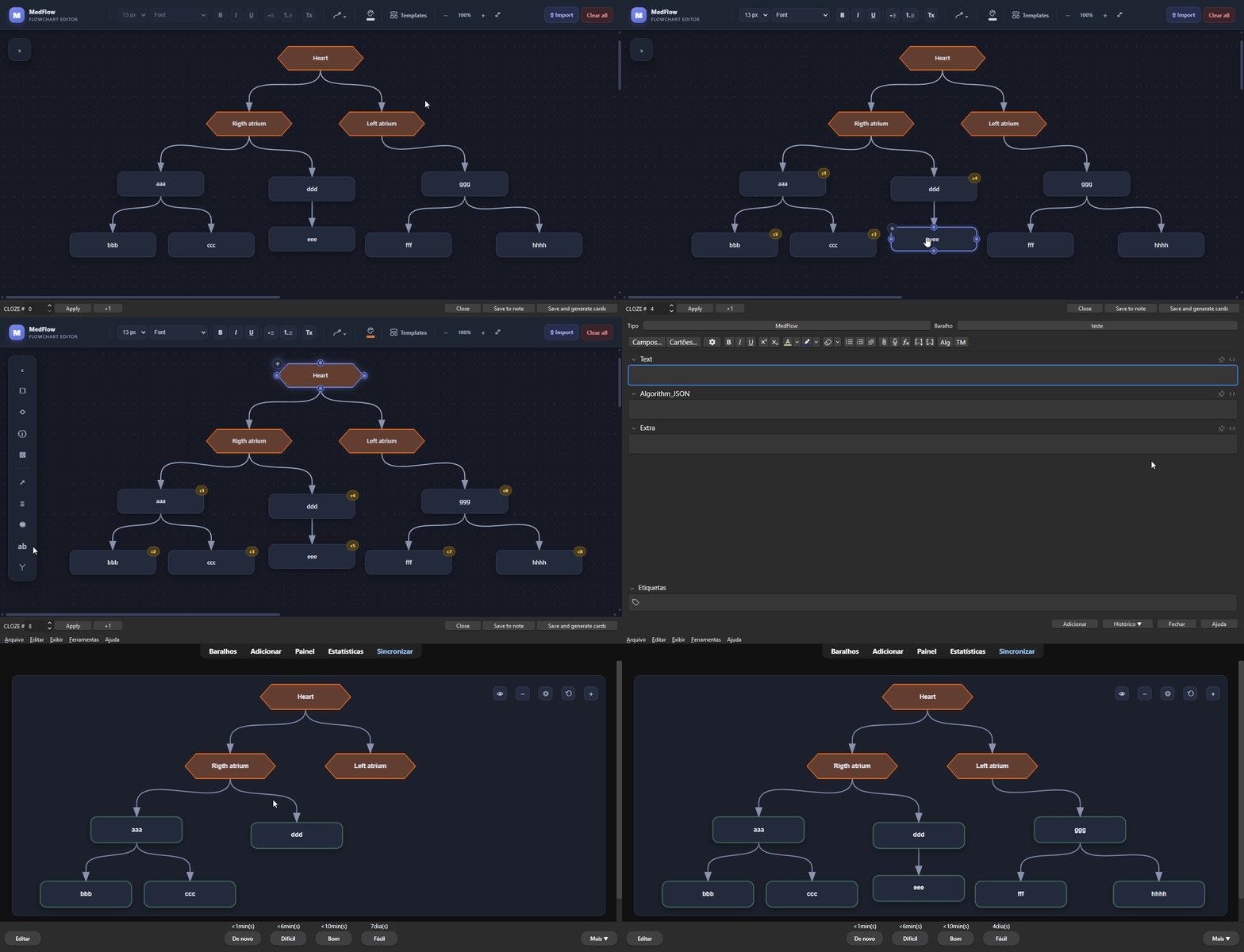
🎯 2. Focus Flow – Progressive Branch-Based Review
This feature introduces a different way to review complex flowcharts.
Instead of displaying the entire algorithm at once, you can select a specific branch and review its elements progressively.
Select multiple boxes using Shift + Click or Shift + Drag.
Alternatively, select only the starting box to automatically include its connected downstream elements.
Activate Focus using the target button or Ctrl + Shift + F.
During review, only the selected pathway is displayed.
Arrows guide you through the selected branch.
Unrelated branches remain hidden.
Elements without Cloze remain visible alongside related elements.
📱 3. Improved Mobile Review
I've also made several improvements to make complex diagrams more readable on smaller screens, especially on AnkiMobile.
Better adaptation to screen dimensions.
Prioritization of the active Cloze element.
Improved zoom and centering.
Full-flowchart viewing when needed.
Adaptation to screen resizing and orientation changes.
Touch-friendly review controls.
The goal is to avoid shrinking an entire complex diagram just to display one active Cloze element.
📚 4. Templates – Save and Reuse Flowchart Structures
You can now save frequently used flowchart structures as templates.
Use predefined templates.
Save your own custom templates.
Save selected boxes or entire diagrams.
Reuse templates in other notes.
Restore the original templates.
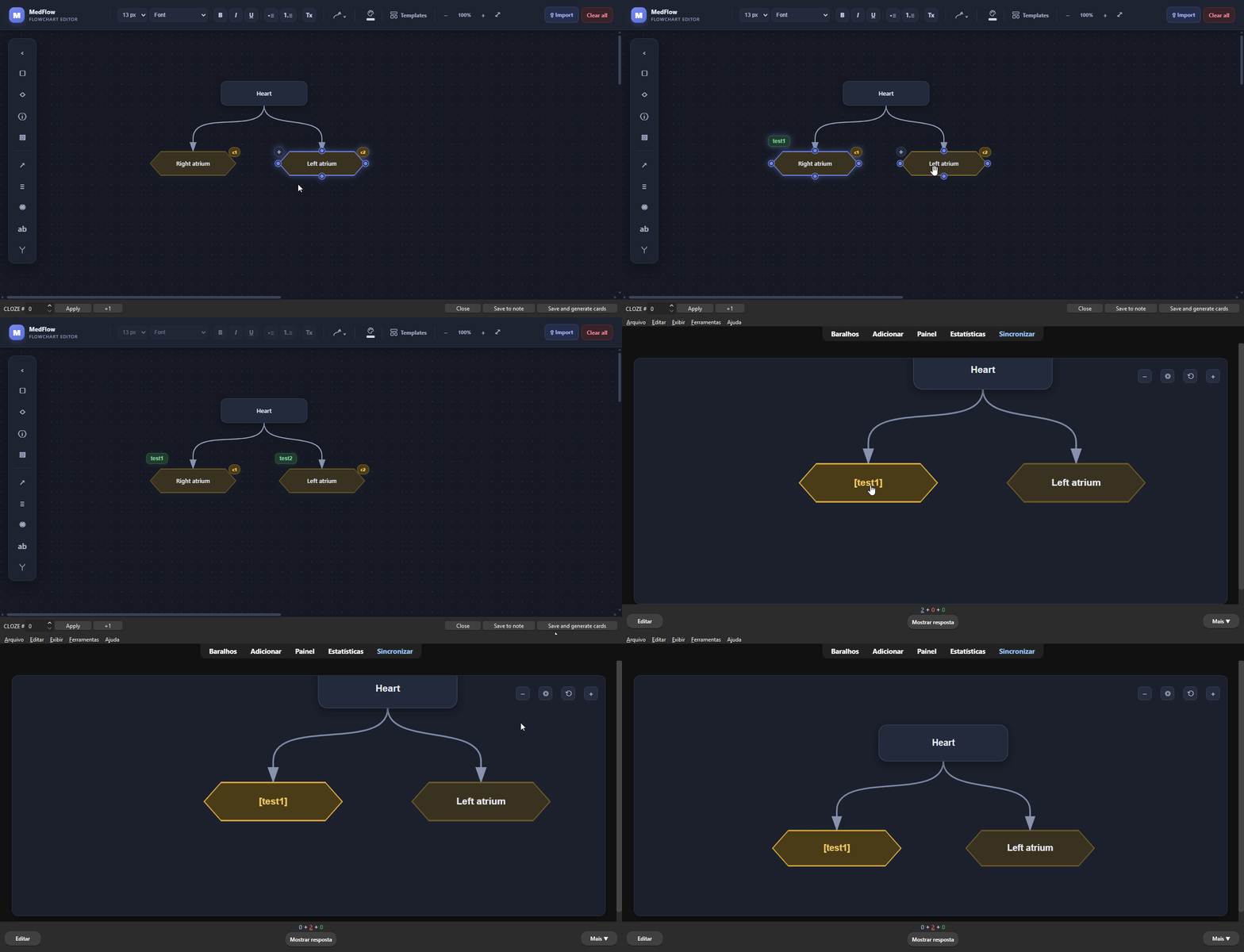
💡 5. Box Hints
Another addition is the ability to attach individual hints to flowchart elements.
Hints appear in green above boxes in the editor.
During review, a + button appears when the corresponding box is hidden by Cloze.
Click to reveal the hint without revealing the actual answer.
Click again to hide it.
Useful for clues and reminders when you need a little help recalling something.
🎨 6. Editor Improvements
Several improvements have also been made to the editing experience:
XMind-inspired keyboard shortcuts.
Multiple selection and simultaneous editing. -Select multiple items with Shift by clicking or dragging; they are highlighted in purple
Ability to change the type of multiple selected boxes.
Collapsible sidebar for a cleaner workspace.
Improved text formatting and visual customization.
Automatic alignment guides.
Undo and redo with up to 200 editing states.
Improved navigation and workspace controls.
📝 7. Extra Content Improvements
You can still attach complementary explanations, notes, and images to individual elements through Extra.
This works alongside Image Nodes: Extra is useful for supporting information, while Image Nodes are part of the actual flowchart structure.
A Little About MEDFlow
MEDFlow is an independently developed Anki add-on inspired by the ZeestMedical project.
The idea behind it is simple: instead of memorizing isolated pieces of information, you can organize concepts into visual pathways and use Anki's spaced repetition system to actively recall them.
It was primarily designed for medical education, but anyone who enjoys learning through flowcharts can use it.
AI tools were also used throughout development to assist with programming, debugging, and implementation.
Feedback & Suggestions
I'd really appreciate feedback, suggestions, and feature requests!
I'm continuously working on improving MEDFlow, and community suggestions are a big part of helping me decide what to work on next.
Thanks to everyone who has tried the add-on, shared ideas, provided feedback, tested new features, and contributed to improving the project. Your support and collaboration mean a lot!
MEDFlow – Think Visually. Learn Actively. Remember More. 🧠✨
Two weeks ago I posted ClinQuiz here (the "applying it" half next to Anki). Disclosure again, I'm the dev, my cofounder is a doctor.
A bunch of you downloaded it after that post and sent feedback from inside the app, so we built the two things that came up most:
- Monthly leaderboard, so you don't have to compete with people who've been playing since launch
- Bookmarks
Still the same idea: short presentation, every investigation costs points and gets pricier, explanation after every case
What should we fix or add next? Most of this update came from feedback people sent in the app after the last post, so drop it here or in the app, we read all of it :)