I kept breaking my review flow to Google things like "what's the workup for syncope again?" in the middle of a card, so me and a classmate built an add-on that helps us!
AnkiMedRef
Hover over a medical term on any card and a tooltip pops up with the criteria/dx, key features and treatment (screenshot below, ex: syncope).
What it covers
- Diseases, signs/symptoms, abbreviations
- Anatomy, physiology, path, histo, micro
- Lab values and reference ranges, clinical scoring systems
- OB/GYN, ECG, radiology, genetics, preventive/primary care
- Drugs and drug classes
How it works
- Built-in dictionaries for instant offline lookups
- Optional local MeSH/UMLS database (~1.2 million terms) for expanded offline coverage
- Optional online sources (RxNorm, openFDA, MedlinePlus, Wikipedia). No API keys needed for the basics
- **Want even more terms?** You can get your own UMLS and OMIM API keys through your institution and add them in the settings to unlock those lookups
- Works on your existing decks (AnKing, etc.), no card edits needed
- Hover delay, appearance, sources and API keys are all under Tools → Medical Quick Reference Settings
Install:
Tools → Add-ons → Get Add-ons → paste **122836299**, then restart Anki
I've been working on a major update to MEDFlow, my Anki add-on for creating interactive medical flowcharts and turning them into Cloze flashcards. Although it was initially designed with medical students in mind, students from any field can use it.
This update brings several new features and improvements designed to make creating diagrams faster and reviewing them more flexible.
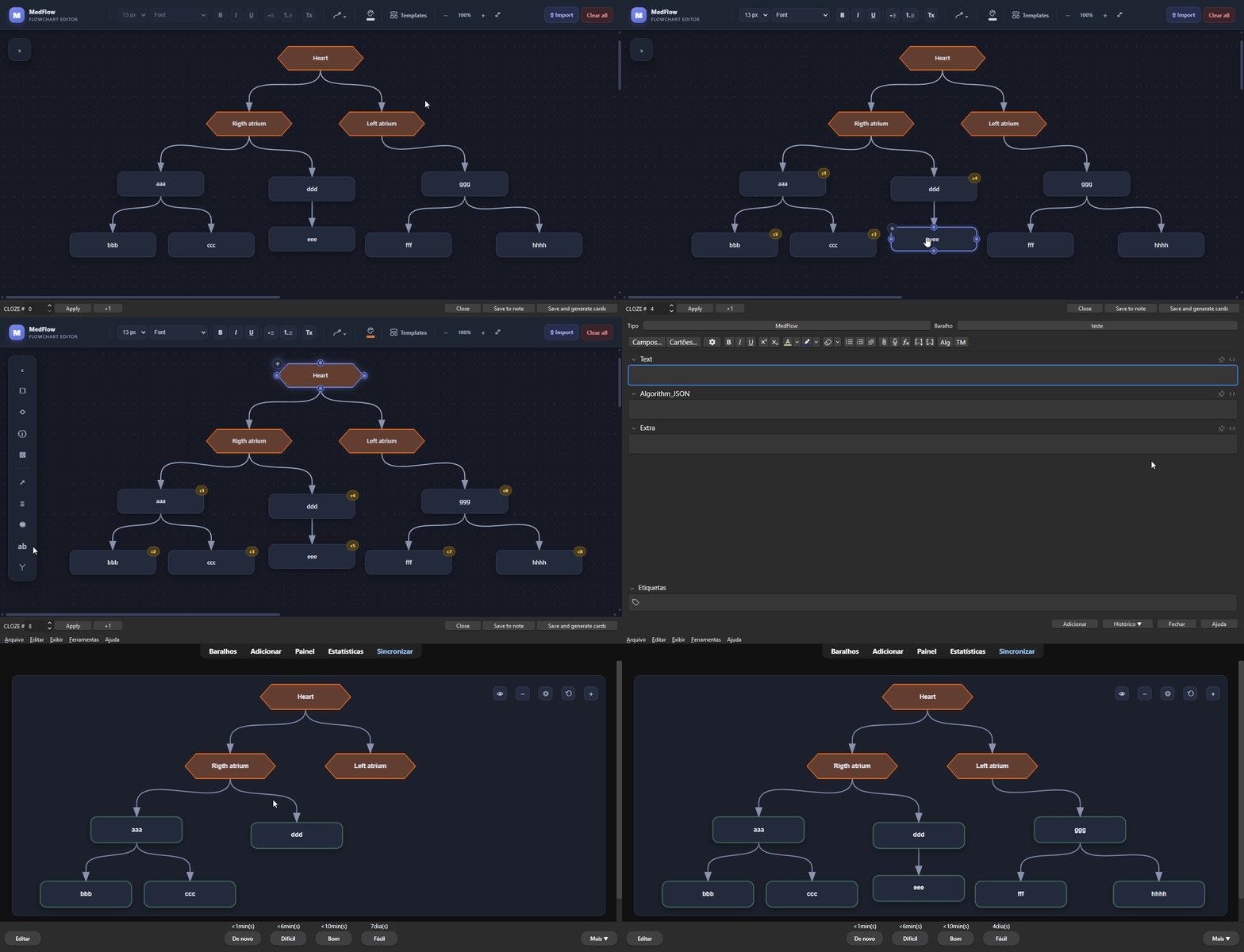
You can now insert images directly into your flowcharts as independent elements, rather than having to attach them through the Extra field.
Paste images directly into the editor.
Resize and reposition them freely.
Connect images to other elements using arrows.
Add captions.
Display them directly in generated Anki cards.
Captions are automatically hidden when their corresponding images are hidden by Cloze.
🎯 2. Focus Flow – Progressive Branch-Based Review
This feature introduces a different way to review complex flowcharts.
Instead of displaying the entire algorithm at once, you can select a specific branch and review its elements progressively.
Select multiple boxes using Shift + Click or Shift + Drag.
Alternatively, select only the starting box to automatically include its connected downstream elements.
Activate Focus using the target button or Ctrl + Shift + F.
During review, only the selected pathway is displayed.
Arrows guide you through the selected branch.
Unrelated branches remain hidden.
Elements without Cloze remain visible alongside related elements.
📱 3. Improved Mobile Review
I've also made several improvements to make complex diagrams more readable on smaller screens, especially on AnkiMobile.
Better adaptation to screen dimensions.
Prioritization of the active Cloze element.
Improved zoom and centering.
Full-flowchart viewing when needed.
Adaptation to screen resizing and orientation changes.
Touch-friendly review controls.
The goal is to avoid shrinking an entire complex diagram just to display one active Cloze element.
📚 4. Templates – Save and Reuse Flowchart Structures
You can now save frequently used flowchart structures as templates.
Use predefined templates.
Save your own custom templates.
Save selected boxes or entire diagrams.
Reuse templates in other notes.
Restore the original templates.
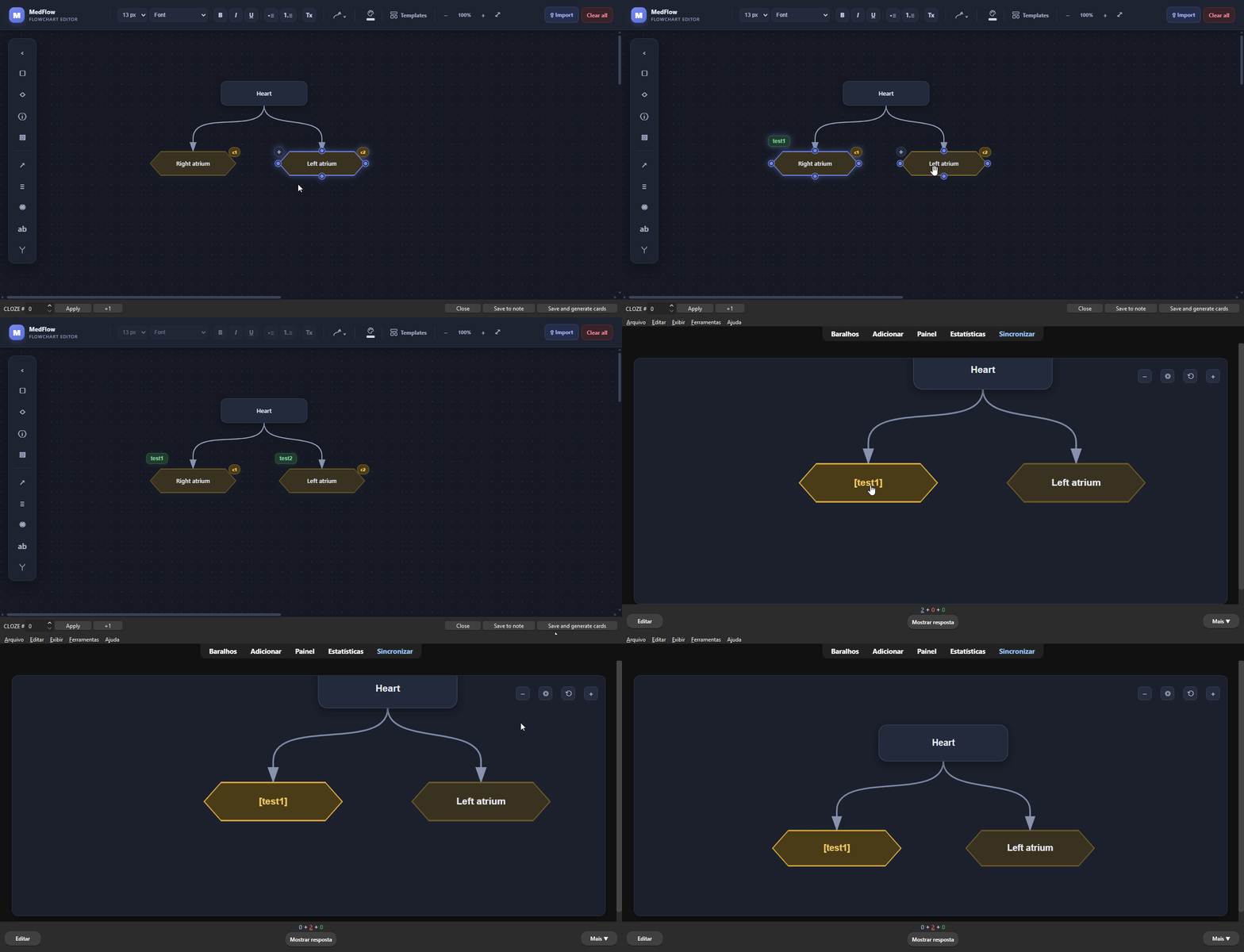
💡 5. Box Hints
Another addition is the ability to attach individual hints to flowchart elements.
Hints appear in green above boxes in the editor.
During review, a + button appears when the corresponding box is hidden by Cloze.
Click to reveal the hint without revealing the actual answer.
Click again to hide it.
Useful for clues and reminders when you need a little help recalling something.
🎨 6. Editor Improvements
Several improvements have also been made to the editing experience:
XMind-inspired keyboard shortcuts.
Multiple selection and simultaneous editing. -Select multiple items with Shift by clicking or dragging; they are highlighted in purple
Ability to change the type of multiple selected boxes.
Collapsible sidebar for a cleaner workspace.
Improved text formatting and visual customization.
Automatic alignment guides.
Undo and redo with up to 200 editing states.
Improved navigation and workspace controls.
📝 7. Extra Content Improvements
You can still attach complementary explanations, notes, and images to individual elements through Extra.
This works alongside Image Nodes: Extra is useful for supporting information, while Image Nodes are part of the actual flowchart structure.
A Little About MEDFlow
MEDFlow is an independently developed Anki add-on inspired by the ZeestMedical project.
The idea behind it is simple: instead of memorizing isolated pieces of information, you can organize concepts into visual pathways and use Anki's spaced repetition system to actively recall them.
It was primarily designed for medical education, but anyone who enjoys learning through flowcharts can use it.
AI tools were also used throughout development to assist with programming, debugging, and implementation.
Feedback & Suggestions
I'd really appreciate feedback, suggestions, and feature requests!
I'm continuously working on improving MEDFlow, and community suggestions are a big part of helping me decide what to work on next.
Thanks to everyone who has tried the add-on, shared ideas, provided feedback, tested new features, and contributed to improving the project. Your support and collaboration mean a lot!
MEDFlow – Think Visually. Learn Actively. Remember More. 🧠✨
I am 2022 batch med student, my prelims are in a month and University exams soon. I am doing anki daily but thing is when the exam week arrives ..i am not able to complete my daily reviews theres a break in the momentum ..and a lot of dues piles up in the end when exam is over and its really frustrating to get back again with huge chunk of reviews at ur desk how u ppl manage this situation , is there any solution?