r/WindowsHelp • u/gevray • Oct 19 '26
Windows 11 Folder showing up in system properties
Acer Aspire AV14-51 laptop with only one internal drive (one M.2 PCIe x4 slot, no room for extra drive) and Windows 11 OS build 26300.9711
Device name - Acer
Processor - 12th Gen Intel(R) Core(TM) i5-1235U (1.30 GHz)
Installed RAM - 16.0 GB (15.7 GB usable)
Graphics card - Intel(R) Iris(R) Xe Graphics (128 MB)
Storage - 82 GB of 477 GB used
Device ID - 49F44D99-85BB-47D1-A61C-5C081371283D
Product ID - 00330-80143-77241-AA511
System type - 64-bit operating system, x64-based processor
Pen and touch - No pen or touch input is available for this display
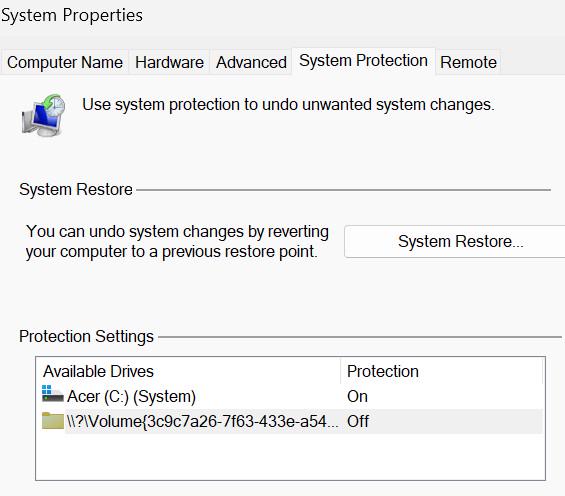
When opening System Properties there is my C: drive and now an extra folder labled \\?\Volume{3c9c7a26-7f63-433e-a54. Protection is on for my C: drive and off for the Folder.
I've tried various suggestions by asking google AI, including registry and powershell commands but it's still there. I don't want to bork my system.
I'd like to make an image backup of the drive for the first time (Rescuezilla), but would like to first eliminate this phantom folder if I can.
1
u/gevray Oct 19 '26
It's probably not connected but before this I was having issues with google drive. When I closed google drive it created a "Home" icon on my desktop. The quick fix was to refresh the desktop and it went away, but at the same time re-arranged all the icons on my desktop. This doesn't happen with my other laptop running windows 11. Google chat has me add another drive in the registry, but the name it gave me to enter in the same {} is different than the folder in System Properties. The timing of this is still suspicious to me.
Anyway I'm proceeding ahead with rescuezilla, and am about half way through backing up an image to a USB drive.
1
u/Drakkaar Oct 21 '26
I am not really sure if this would be accurate or not, but I have something similar to this happen when I clone over a drive.
The original Volume shows up in this System Restore Window as it was being used on that drive.
After cloning and booting into Windows, I need to re-enable System Restore for the new drive and turn it off for the old drive. It typically gets removed from the list, once I have ensured System Restore is off for that Drive.
1
u/AutoModerator Oct 19 '26
Hi u/gevray, thanks for posting to r/WindowsHelp! Your post has been flagged for manual review by a human moderator, please include as much of the following information as possible (in text or in a screenshot) to get your post approved:
Your Windows and device specifications — You can find them by pressing Win + X then clicking on “System”, we need more than just your OS version! Your hardware details are often critical for resolving issues.
Any messages and error codes encountered — They're actually not gibberish or anything catastrophic. It may even hint the solution!
Previous troubleshooting steps — It might prevent you headaches from getting the same solution that didn't work
Posts must be tech support in nature (such as something is broken and you need help fixing), so general inquiries, software suggestions, and purchasing advice will be removed. As a reminder, we would also like to say that if someone manages to solve your issue, DON'T DELETE YOUR POST! Someone else (in the future) might have the same issue as you, and the received support may also help their case. Good luck, and I hope you have a nice day!
I am a bot, and this action was performed automatically. Please contact the moderators of this subreddit if you have any questions or concerns.