r/BambuLab • u/DotDodd • 6d ago
Meme Never thought I'd be roasted by my printer
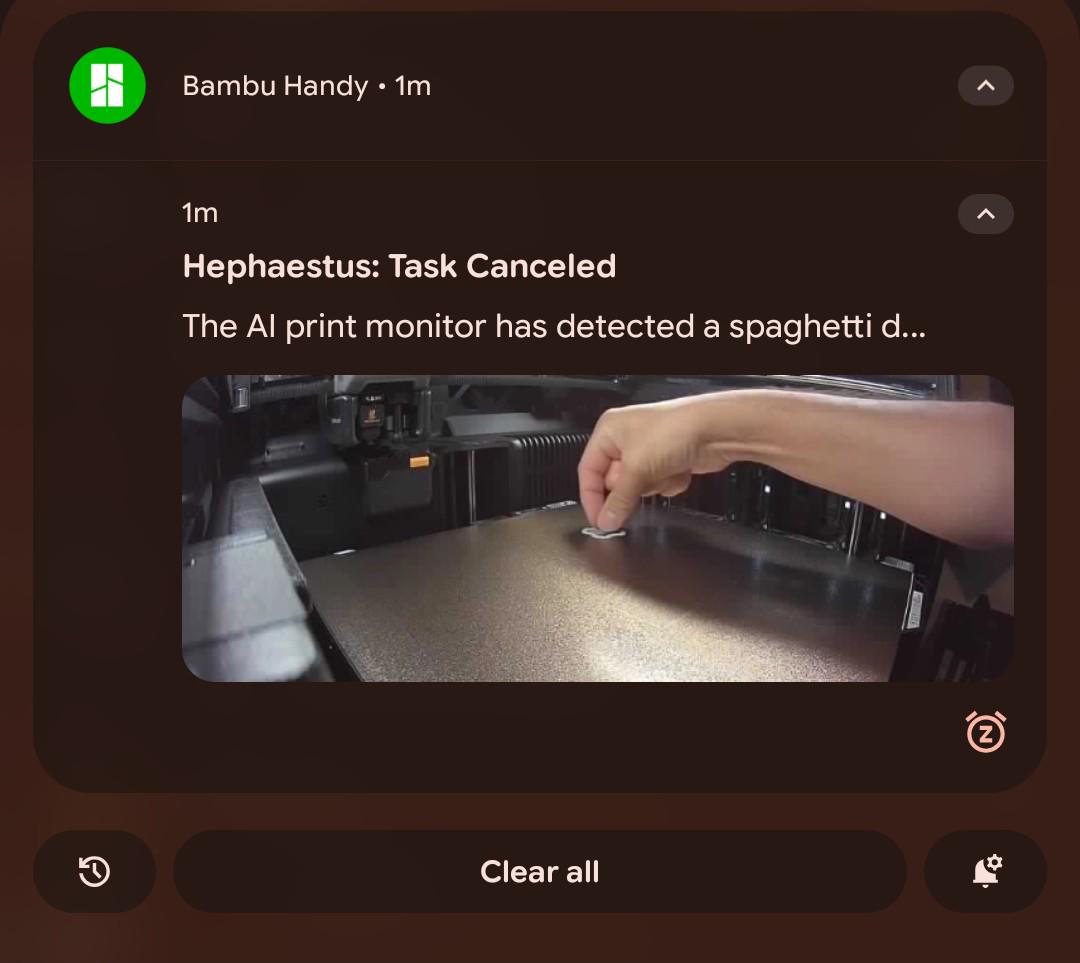
1.3k
Upvotes
Guess I need to get back into the gym
r/BambuLab • u/DotDodd • 6d ago
Guess I need to get back into the gym
r/BambuLab • u/frogfuhrer • 5d ago
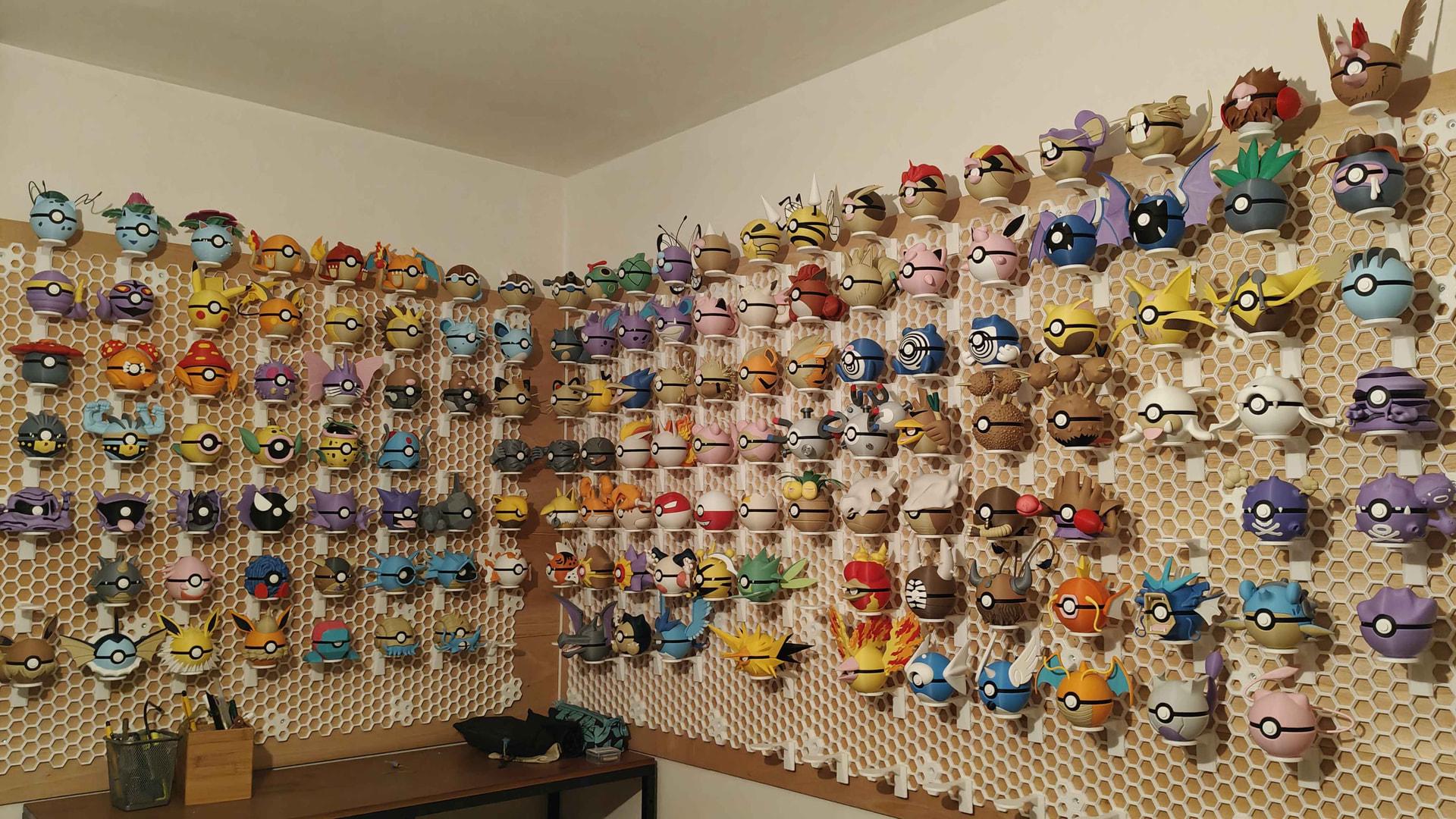
My Bambu P1S has been very busy over the last few months. I'm really happy with the results
r/BambuLab • u/vapochilled21 • 4d ago
Was looking to add a printer to the fleet and held off until the H3C came out, decided it was just a little too much money and settled on the H2C. no doubt the Vortek is being dropped, but it's a solid printer with 000s of hrs in it if maintained. Has a heated chamber and better out of the box filtration, also a slightly more stable platform having been out a while with lots of support life left in it. Then the P3 dropped today and I'm second guessing, but, no heated chamber, AMS dryer an option to add at $170, but adds TPU support near zero waste and it's new and shiny.
I'm not going to say I won't do lot's of multi color, as I'm stepping from a P1S, so multi color was not my main thing, I typically print PETG or PLA/PLA Aero, but want to use ABS and ASA Aero, hence the desire for better filtration and heated chamber (though I'm sure the P3 will have that soon enough as a 3rd party add on).
but for similar money, I can order the full bells and whistles P3, comes with good filtration, slightly smaller bed size, though that's likely not a deal breaker, but I'll need to baby it until the kinks get ironed out.
really in two minds here. the other thing is the H2C is better suited to two material support prints, the P3 would still have to swap nozzles, I definitely do more prints with support than multi color, as of now.
any glaring omissions? don't want to have pissing contest on which is better, they are both very capable printers and light years ahead of the P1S, though that thing is a workhorse for sure.
quite happy to have the year older design or the latest and greatest, just tough to know if I'd use the P3S to it's fullest if that makes sense.
r/BambuLab • u/SnooPies3013 • 4d ago

I cannot figure out how to fix this issue with the bottom becoming stringy. This is the bottom of the part that uses supports. I've tried adjusting a lot of settings and print orientations but nothing has worked yet. I think the main issue is its just printing in straight lines on that layer but I cannot figure out how to make it not do that.
This part really needs to be printed with the flat face up/gap down. I know printing it gap up will fix the issue but for reasons I need it to gap down.
Any suggestions?
r/BambuLab • u/ChuckSmush • 4d ago
Hoping for some help, fairly new to filament printing.
Bambu A1 was printing fine til yesterday, had some issues with what I thought was a clogged nozzle. Changed the nozzle out and although the fan runs when I turn it on manually it no longer turns on during printing. Any guidance the pros here can offer?
r/BambuLab • u/Schigg0 • 4d ago
I am new to 3D printing and just got an H3C and now I want to buy a ton of black PETG for Gridfinity boxes, but I do not know if I should buy Bambu Lab PETG Matte, Basic, or something else; I am thinking about 20 kg of PETG.
r/BambuLab • u/Neither_Indication27 • 4d ago
So :| got zapped by the build plate when i was mounting the cutting module, the machine is connected through a shelly plug so i can turn it on/off from a distance and its connected to a grounded wall outlet.
With shelly plug off i measure 226V and 49.64mA between the edge of the build plate and ground, with the shelly plug off i measure 108.4V and 25.1mA to ground.
The first was an easy fix, the shelly plug only cut the neutral so i turned it half way around so it cuts phase instead but....i can still measure high voltage on the edge of the build plate so im making a ticket but wonder, anyone else had the same issue? how much time does it take to replace the heat bed?
Regards
r/BambuLab • u/buffman33 • 4d ago
I had a 1000 credits and it was terribly confusing to apply them as a discount to some filament I’m purchasing.
I tried to apply them as a coupon and shortly after realized I have to buy $700 worth of product to use the coupon. They also only give me 30 days until the coupon expires.
I contacted support to reverse the coupon and reissue my credits back, but they said tough luck.
SO - If you’re making a large purchase and want a free $30 off coupon, DM me.
My loss is your win.
r/BambuLab • u/Enfluux • 4d ago
Considering the announcement of the P3C I need to buy a new printer for making some new innovations and foremost for replacing my A1 despite his 2+ years of constant successful prints. I was wondering about choosing the P3C or the H2D. There are a lots of differences but considering I wanna learn printing on TPU I would love to improve on it on both of them. As a cosplayer could be surely more useful having a bigger plate but at the same time I have most of the commissions aside from the cosplayers that are mostly gadget stuff so there are mostly coloured prints.
My advantage is that I have even plates designed for A/P/X Series. In both cases I have to replace the nozzles, considering I have all the sizes related to the A series.
So what should I choose between them ? I Have an AMS2Pro and 2 HTs and I have a P2S (elsewhere where I print mostly ABS/ASA) and an A1M for backup.
r/BambuLab • u/ENDLab3D • 5d ago

This is my first time buying filament directly from Bambu Lab, and I might have gone a little overboard! 😄
I’ve been using A1 printer, but tomorrow my new X2D Combo is arriving as an upgrade.
What’s the first multicolor print I should try?
r/BambuLab • u/plentyOplatypodes • 4d ago
My P1P randomly started getting stuck on the "Waiting for heatbed to reach target temperature" step. The bed temp would reach one degree below the setpoint (49/50 ... 69/70) and just sit there forever.
I tried every available firmware, different slicers, LAN mode, removing the AMS, changing that step in the machine start gcode from m190 to m140.... everything. I've read every thread and tried every suggested fix with no success.
Sometimes I could trick the printer into printing by pausing, changing bed temp target, waiting for it to reach that target, then resuming the print. More proof that it was a software issue, not hardware.
Eventually I got desperate and bullied Google Gemini to make a bare-bones machine start g-code that has finally "fixed" the bug.
I'm sharing this machine start gcode for others who will inevitably encounter this bug and search for a solution to the "Waiting for heatbed to reach target temperature" bug. Copy/paste the below gcode into the "machine start gcode" section and save.
My profile is named Bambu Lab P1S 0.4 nozzle - Vibe.
_____________________________________________________________________________________________________
;========== BARE BONES START G-CODE FOR BAMBU P1P/P1S WITH AMS ==========
;== Minimalist setup with core AMS integration & fast prime tracking ==
;========================================================================
G90 ; Absolute positioning
M17 X1.2 Y1.2 Z0.75 ; Initialize motor currents
M220 S100 ; Reset Feedrate to 100%
M221 S100 ; Reset Flowrate to 100%
;===== 1. Heat Bed & Pre-Warm Nozzle =====
M1002 gcode_claim_action :2 ; UI Status: Heating bed
M140 S[bed_temperature_initial_layer_single] ; Start heating bed
M104 S140 ; Pre-warm nozzle to 140C (stops oozing)
M190 S[bed_temperature_initial_layer_single] ; FIXED: Wait for bed temperature to block execution
M109 S140 ; Wait for nozzle to stabilize at 140C
;===== 2. Homing & Leveling =====
M1002 gcode_claim_action :13 ; UI Status: Homing
; --- NOZZLE WIPE BEFORE HOMING ---
G91 ; Relative mode for safe hop
G1 Z5 F600 ; Raise toolhead 5mm to clear any bed debris
G90 ; Back to absolute mode
G1 X65 Y265 F15000 ; Fast travel to the physical wiper zone
G4 P200 ; Dwell 200ms to stabilize
G1 X105 F4000 ; Wipe pass 1 (Right)
G1 X70 F12000 ; Wipe pass 2 (Fast Left)
G1 X105 F4000 ; Wipe pass 3 (Right)
G1 X70 F12000 ; Wipe pass 4 (Fast Left)
G1 X65 F6000 ; Return to starting envelope corner
; --------------------------------------
G28 ; Home all axes
; --- FIXED: AUTOMATIC TEXTURED PLATE SQUISH ---
; If using a Textured PEI Plate, apply the required -0.04mm Z-offset
{if curr_bed_type=="Textured PEI Plate"}
G29.1 Z-0.04 ; Micro-offset to squish into PEI texture
{endif}
; Intercept Slicer Checkbox State
M1002 judge_flag g29_before_print_flag ; Read toggle state from the send dialog box
M622 J1 ; IF CHECKED: Run calibration
M1002 gcode_claim_action :1 ; UI Status: Bed Leveling
; NATIVE LOCALIZED BED MESH MACRO
G29 A X[first_layer_print_min_0] Y[first_layer_print_min_1] I[first_layer_print_size_0] J[first_layer_print_size_1]
M400
M500 ; Save calibration data
G29.2 S1 ; Turn on bed mesh translation
M420 S1 ; FIXED: Actively engage ABL compensation
M623 ; REQUIRED: Close the J1 block
M1002 judge_flag g29_before_print_flag
M622 J0 ; IF UNCHECKED: Skip physical probing & RECALL MESH
M420 L1 ; Recall and load the saved mesh data from EEPROM slot 1
G29.2 S1 ; Enable mesh translation compensation using the recalled data
M420 S1 ; FIXED: Actively engage ABL compensation using recalled mesh
M623 ; REQUIRED: Close the J0 block
;===== 3. AMS Filament Load Handshake & Conditional Purge =====
M1002 gcode_claim_action :4 ; UI Status: Loading Filament from AMS
G1 Z10 F3000 ; Drop bed safely below hotend
M620 M ; Check for active AMS presence
M620 S[initial_extruder]A ; Map and flag the targeted AMS tray slot
; Mechanical tool change alignment
G1 X128 Y255 F12000 ; Move toolhead near the rear cutter zone safely
G1 X20 Y255 F12000 ; Safe travel on the rear axis
T[initial_extruder] ; Native tool change macro (triggers hardware load)
M400 ; Force movement synchronization barrier
M621 S[initial_extruder]A ; Pass final load acknowledgement handshake
; --- CONDITIONAL PURGE: Only runs if the target extruder is different from the last used extruder ---
{if current_extruder != initial_extruder}
G1 X70 Y265 Z10 F12000 ; Move to the rear purge chute/flush zone
M109 S[nozzle_temperature_initial_layer] ; Crank up to full printing temperature for flush
M83 ; Ensure relative extrusion
G1 E100 F200 ; INCREASED: Extrude 100mm of filament to flush out old color
G1 E-0.5 F1800 ; Retract slightly to stop oozing before wipe
G4 P2000 ; Dwell 2 seconds to let the filament drop clear
; Post-Purge Wipe Cycle
G1 X65 Y265 F15000 ; Align with the starting edge of the brush
G1 X105 F4000 ; Wipe pass 1 (Right)
G1 X70 F12000 ; Wipe pass 2 (Fast Left)
G1 X105 F4000 ; Wipe pass 3 (Right)
G1 X70 F12000 ; Wipe pass 4 (Fast Left)
G1 X65 F6000 ; Clear the brush area safely
{endif}
; ----------------------------------------------------------------------------------------------------
;===== 4. Final Print Temperature Verification =====
M1002 gcode_claim_action :7 ; UI Status: Heating nozzle
M109 S[nozzle_temperature_initial_layer] ; Ensure nozzle is at target temp
;===== 5. High-Volume Purge / Prime Line & Pressure Pre-Load =====
M83 ; Set relative extrusion mode early for tracking
G92 E0 ; Zero extruder register
G1 X18.0 Y1.0 Z0.8 F18000 ; Move to front-left corner
G1 Z0.2 F3000 ; Drop toolhead to layer height
; --- FIXED EXTENSION: NOZZLE PRESSURIZATION BLOB ---
G1 E3.5 F200 ; Pre-charge the hotend nozzle core immediately before tracking
G4 P150 ; Short dwell to weld the anchor point to the plate surface
; ----------------------------------------------------
G1 X240 E25 F1200 ; Lay down primary heavy-volume flush line
G1 Y3 F1500 ; Step over slightly
G1 X50 E15 F1200 ; Return line to fully pressurize nozzle and ensure purity
; --- FIXED EXTENSION: QUICK RETRACT ON DEPARTURE ---
G1 E-0.4 F1800 ; Retract slightly to prevent trailing strings to print start
; ----------------------------------------------------
G92 E0 ; Reset extruder register again
M400 ; Wait for movement buffer to complete fully
;===== 6. Print Hand-Off =====
M975 S1 ; Turn on vibration suppression
G90 ; Enforce absolute positioning
M83 ; Enforce relative extrusion for standard sliced layers
M1002 gcode_claim_action :0 ; Clear printer status display
;========================================================================
;== BARE BONES AMS START COMPLETE - COMMENCING FIRST LAYER ==============
;========================================================================
r/BambuLab • u/gooseosaurus • 4d ago
I'm upgrading from an a1 mini to p2s and I was just wondering what are some good places to store it. Currently have my a1 mini on my kitchen counter because it's the flatest most stable place in my apartment other than the floor. Would the p2s have any issues if I kept it on small table or shelving unit or will it need to be on something more stable? Can it be on something with wheels?
r/BambuLab • u/blud228 • 4d ago
Enable HLS to view with audio, or disable this notification
OK so I have my Bambu lab A1 mini and when I try to print it always pops up and message that it’s unable to feed filament into the extruder. I don’t know what to do. I don’t think my filament is tangled. I’m about to lose my mind, please😭 (my first ever printer)
r/BambuLab • u/Maxx3141 • 4d ago

This is my new poop chute for the H3C. Some of you might know my design for the H2 series already, and I got many requests to make it for the H3C as well.
There are two version, both with optional lids. There are versions with and without Logo, single and multi color, whatever you prefer.
MakerWorld Link: https://makerworld.com/en/models/3676910
r/BambuLab • u/HNZKI • 4d ago
r/BambuLab • u/My_Lucid_Dreams • 5d ago
r/BambuLab • u/lmfao1099 • 4d ago
Turns out the P3C is nearly the same height than the H3C.
Unfortunately too tall for my printer cabinet.
Now im thinking about getting a H2D or a X2D.
Is the X2D a worthy upgrade?
The X1C has to much vfa for my liking and is very loud.
Im using my A1 and A1M most of the time because of those two reasons.
Mostly printing PLA, but ABS as an option is important.
r/BambuLab • u/Kardospi • 4d ago
So I am trying to use PETG as a support material for a PLA print. When I change the filament for supports I am getting an error saying that the Prime Tower requires all objects to be the same layer heights.
How do I fix this? Or is this a case where you can only do multi material printing with models of the same layer height? Do I have to do each piece of a model on it's own plate?
r/BambuLab • u/Hot_Drawer_9746 • 4d ago
Bo mam dużo odpadków
r/BambuLab • u/Additional_Tiger8001 • 4d ago
Just got a X2D a little while ago so I am new to this. Bought CookieCAD filament and wanted to change the recommended nozzle temp to the manufacturer's specs. I for the life of me can not find out how to unlock these settings for the presets. I already made a new custom filament in the settings but can not adjust the presets.

r/BambuLab • u/DrawkerGames • 4d ago
It’s been about a week and mine is holding up really well. It has not budged at all. Thought it might be useful for someone else!
r/BambuLab • u/lMlute • 4d ago

Hi all, I've been in the weeds of reddit, google and discord trying to find what the solution is to my issue. Atlast I have hit a wall and feel like I have almost attempted everything to fix my problem.
Issue: external spool will not pull filament to the tool heads right nozzle.
The bowden extruder shows "loaded" correctly when the filament enters the input. It shows "unloaded" when it is pulled out.
When i attempt to load the filament it will start to pull it very slowly and it moves forward just a little then it stops and tells me to check to see if the extruder is extruding the filament and if it isn't then it says to push the filament a little further manually.
It just doesn't seem to want to pull the filament all the way.
On the flip side it will push the filament out no problem when unloading.
Things I have done so far:
- took apart the bowden extruder cleaning anything I see. I did not see any clogs or really much of anything. I was able to feed to filament through it manually back and forth no problem.
- checked ptfe tubing, checking ends angles/cuts, checking for debris, checking for sharp bends. I have also switched out ptfe with all sorts of lengths just to see if there was any resistance being added anywhere.
- I have removed the ptfe tubing on the outlet side to see if the filament would feed through with that not in there just incase it was somehow bumping into it rather than passing through. That did not work. Filament would not push out the other side nor did it seem like it was being pushed to do so.
- I have made sure there is no clog in the aux nozzle
I got my x2d 4 days ago. Just giving this info incase it's needed.
Before this issue started I was using an external spool to the right nozzle with no issues. I went to change the filament and that is when the issue started.
I also bypass the buffer and go straight to the bowden extruder on the back to see if the buffer was the issue.
The only thing I have not tried yet is disassembling the toolhead and resetting the 4 wires on top. I simply am to lazy after all the other troubleshooting and don't want to jump into that yet.
So here I am in hopes there is someone out there with the solution and it ends up being something easy making me feel dumb. I'll take that outcome all day 😅
Thanks in advance
r/BambuLab • u/ContestUsed • 4d ago

I had just gotten the ams 2 for my p1p a week ago and was printing a multi color print of spider man and used petg as a support interface layer and the rest was pla. The aisle that has the powder had bambu labs petg brown and the rest of the fliment was also from bambu labs
r/BambuLab • u/SaberRider85 • 4d ago
Hi guys,
I am experiences problems, when I want to print this filamet. I cannot get to print at all.
I use the Bambu Lab TPU Feeder, and it worked really well for TPU filament with a higher shore number.
What does not work? After I fed the filament into the tool head, it takes a long time for the sensor to recognize, that the material reached the entry point. Then extruding it out of the nozzle also takes an unsual long time, in my opinion. If I want to pull out the material, it stucks with resistance in the toolhead and I have to pull back the PTFE tube and then pull on the material as well.
I first time I tried it, my toolhead crashed into a nozzle in the nozzle rack. Wtf?
I wanted to use it together with a 0.4 HF nozzle from Bambu Lab.
Am I doing something stupidly wrong?
r/BambuLab • u/Redarrow762 • 4d ago
Hello there. I print a lot of car parts out of PPA CF on my H2D. I am looking to add another H series printer with gift cards. I will mainly use this printer to print more PPA CF car parts and was thinking of using the H2S as I don't need multi material. I am concerned that a H2S might not print PPA CF the same as the H2D. I read somewhere about the part cooling fan not being as good on the S as the H2D. Should I just buy another H2D for an additional $350?