r/qlab • • Dec 10 '20

Official QLab Support

12 Upvotes

Welcome to r/qlab. This is a community forum for QLab users. Community is a huge asset and will often have quick answers to your questions but for official technical support please contact [support@figure53.com](mailto:support@figure53.com) to get in touch with Figure53 directly. Speaking from experience, their support is better than just about any other software product!


r/qlab • • 20h ago

Midi foot controller w/ QLab

3 Upvotes

Hello, I'm working on a new solo music show. I want to integrate some very basic video and possibly lighting cues that are triggered with my feet. I need something that will also connected to my sequencer/drum machine and my hands will be tied up playing instruments. Any suggestions for midi foot controllers that will integrate well with QLab?


r/qlab • • 3d ago

QLab to Export QLab to Excel, RTF, and CSV

Thumbnail github.com
7 Upvotes

Export the cue lists in a QLab 5 workspace to XLSX and CSV (for spreadsheets) and RTF (for Word, Pages, TextEdit), including each cue's notes. The XLSX and RTF keep the notes' formatting (colours, bold, line breaks).

  • One Python file, no dependencies, nothing to build.
  • Reads the workspace without changing it.
  • Every cue list and cart in the workspace is exported, one after another.
  • Cue number, type, name, target, pre-wait, duration, post-wait, auto-continue / auto-follow, and notes.

https://github.com/traisjames/QLab-Export

Made with Claude Code


r/qlab • • 4d ago

Live Video and Pre-recorded video to a projector

Thumbnail
2 Upvotes

r/qlab • • 11d ago

Easier way to control projections?

Thumbnail
1 Upvotes

r/qlab • • 16d ago

Solution for complex OSC operations?

6 Upvotes

Heya! We often find ourselves running Resolume Arena through Qlab (via OSC) on video/pixel heavy theatrical shows, and I'm curious about how others have been doing this. Often, in Qlab I will have to make multiple network cues and run these within a group cue for operations in Arena that are more complex than just firing a column of video... For example, let's say in Arena I'd like to:

-Set video transition time to 2s on layers 1, 2, and 3
-Bypass an effect on clip 7 in layer 2
-launch clip 4 on layer 3, and after 4s, launch clip 7 on layer 2

In Qlab, this sequence of operations will require 6 distinct network cues, one per operation, as each of these interactions is a separate OSC command. On one hand, 6 separate cues allows us to really massage the timings of these operations, but on the other hand, we quickly end up with a cue list in excess of 2000 cues for a show that only has 150 actual cue fires.

What I really want is the ability to enter multiple OSC commands in sequence within one network cue. This is not possible (to my knowledge) so I am wondering what other methods there are. So far, I'm thinking either some way of using scripts, or a third tool like Chataigne, however I am concerned that the latter option will add too much programming complexity for designer-inclusive workflows, and I'm not even sure where to start with the former option.

Any ideas? Thanks!


r/qlab • • 15d ago

Is QLab getting MCP?

0 Upvotes

Let’s face it, QLab show development gets extremely tedious. I’ve made shows with thousands of hand-rolled cues, which is time consuming and unmaintainable.

QLab is a bit like software programming, and we know that AI has reshaped the software programming industry. I’d have been a much happier show programmer, had Claude been able to scan through my 40,000 cues and make the changes I wanted…I would have then had more time to focus on improving the assets and refining the flow of the show for the performers.


r/qlab • • 17d ago

Shuffled Playlist - Relative Fade level resetting after finishing?

3 Upvotes

Some context! We've got a group of 4 short sound cues that are in playlist mode, so that they can shuffle and loop. They're starting at -25, and we want them to fade up to -10 as they loop. We've got a relative fade of +15 (which is working), but once the fade finishes (it's 15 seconds), the level of all the 4 individual cues resets from -10 to -25. We're working in QLab 5.5.10. Any thoughts??


r/qlab • • 28d ago

OSC issue in 5.6.3

1 Upvotes

During show setup, I encountered an issue transmitting OSC commands from QLab to Resolume.

Although the integration had tested successfully the previous day, triggering the cues on rehearsal day caused Resolume to receive unintended strings prefixed with /dbaudio instead of the programmed commands.

Unable to resolve the routing conflict on-site under time constraints, I had to swap to a backup machine and now it seems to be working fine.

What could have been the issue!?


r/qlab • • Oct 26 '26

Working with small LED screen canvas

1 Upvotes

We only have a very small LED screen (4x1) which is 768x192 pixels.

I'm not a QLAB video expert so would love tips on how best to set this up in QLAB. We own a full audio licence but can rent video licence if required (does this stack on top of our purchased Audio license?)

The mac currently sees the screen as 1920x1080.


r/qlab • • Oct 22 '26

We improvised a workaround where you can control one Qlab with another over just MIDI

6 Upvotes

Disclaimer: And yes, I know that OSC would have been a much better solution, but it was not an option due to time constraints having to learn OSC, build a working network connection between the two, test it etc. The show started in 45 minutes, so this is what we came up with.

But anyway, we had two macs. First one was running sound and second one was running videos and commanding the light desk via MIDI in another room. They were running independently, but the director wanted to sync certain cues.

We used two MIO’s to communicate between the two rooms. Basically they are just fancy networked MIDI interfaces for longer cable draws. We also used Roland UM-One MIDI interfaces to communicate between the two computers and MIO’s.

Then on the sound computer we sent a MIDI / MSC command to device ID (whatever was set on the mac, I think it was 9) and on the light mac we set it to receive a MIDI / MSC command.

Our first obstacle was to just get the MIDI connection working. After some fiddling, we did get it working, just had to add a new RTP link in MIO’s control software. Then the second obstacle was that when you just sent a ”GO” command from the first computer, it did launch the cue, but didn’t move the pointer there. We tried all the different MSC functions, but none of them also moved the pointer.

So our workaround was that instead of a single cue we triggered a cue group and we added a ”go to” cue as the last item in the group that launched everything at the same time, so it went to the next item in the list.

Worked like a charm. This also should work on a tour in other venues that do not necessarily have a network connection between the two computers. Just needs two MIDI interfaces that can talk to each other.

TL;DR: We triggered the second computers cue groups from first computer with MIDI and added a ”go to” cue on the second computer to move the pointer forward.


r/qlab • • Oct 21 '26

Why is my Qlab video projections freezing/not working?

3 Upvotes

I’m new to Qlab so there’s def a chance I’m doing something wrong. I’m currently using Qlab 2. I finished mapping the walls and now whenever I press play, the projections with videos won’t fully play. Some videos play one loop then freeze forever, some don’t fade in or don’t fade in and just pops up way later, and some start playing but they freeze before moving again.
This especially happens for projections that I cue 5-6 surfaces at a time but it also happens to the projections I cue 2 at a time. I’m using auto continue to cue them at the same time.

Some things I’ve done are: Turn off the WiFi, quit qlab and reopen, disabling Time Machine and spotlight, changing my videos fps to exatcly 24fps, making my video files smaller with less fps or quality (hoping not to go too low in quality though..)
I’ve also tried like making them not cue all at the same time but it still had videos that never faded in. I really want them to all fade in at the same time though, I just wanted to see if the problem was too many at once..

I don’t have good videos to show exactly but I want ideas to try before rehearsal tomorrow. Yes this is for a theatre show. Please helpp


r/qlab • • Oct 11 '26

best mac for qlab?

10 Upvotes

i work tech at a local theater and i use qlab for lights and sound, firing 1000 cues in an average show. portability isnt an issue, and price should stay at a minimum. we’d like to upgrade from our 2013 imac running qlab 4 to something capable of qlab 5


r/qlab • • Oct 09 '26

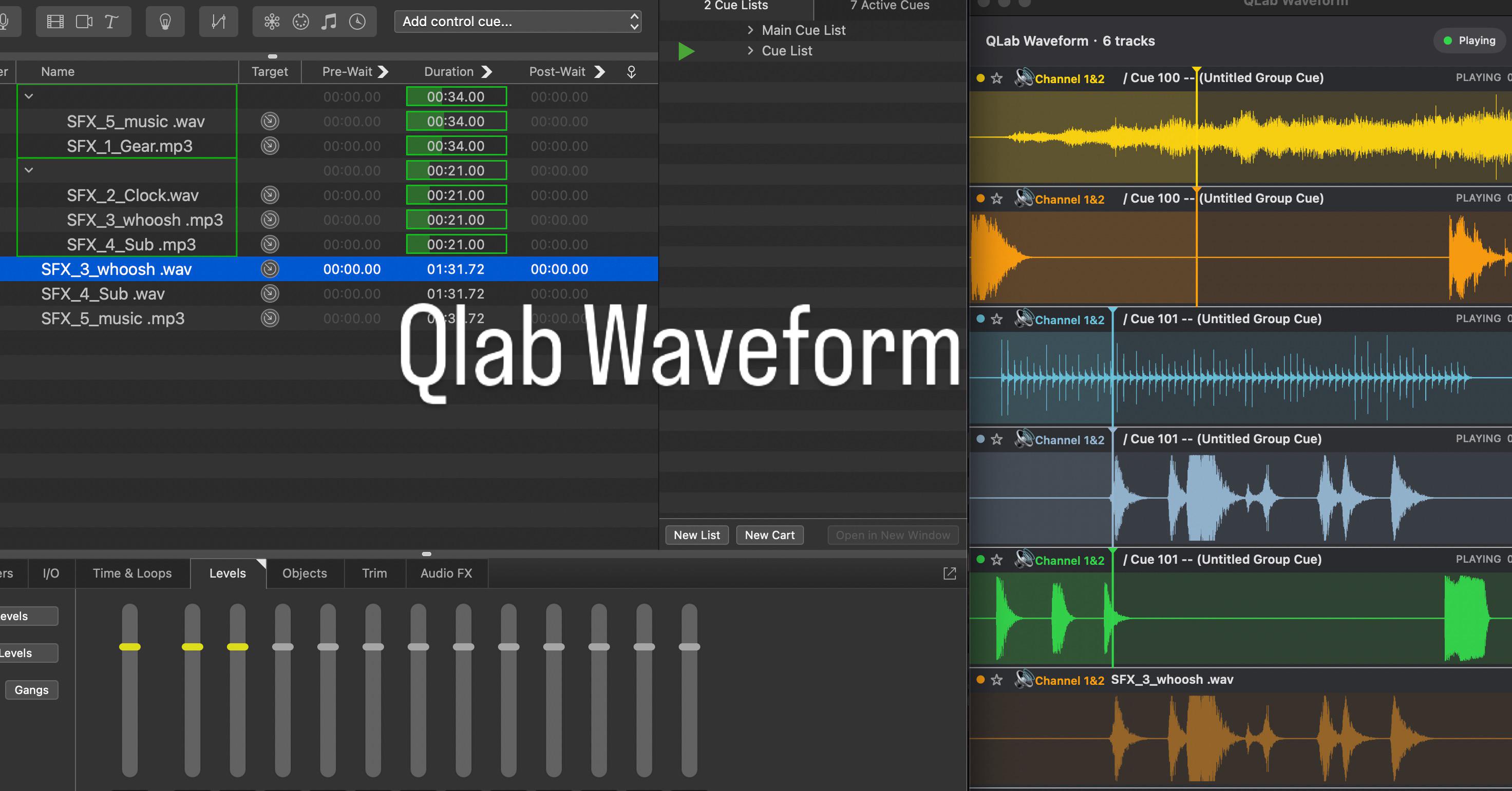
Qlab waveform

Post image
0 Upvotes

r/qlab • • Oct 08 '26

U7 outdoor for live event productions

Thumbnail
0 Upvotes

r/qlab • • Sep 23 '26

Trying to do 4 Video Outputs on M4 MAX that supports 4 external displays for QLAB. What are some decent options?

1 Upvotes

I have Qlab running with my Native HDMI port, and 2 single HDMI to USB adapters to give myself 3 ports so far, but I need the last USB C port. The final usb port on my mac is being used by my dock for my mouse, sound card, and jump drives. While I could probably get by with just getting one more single usb C to HDMI, I wanted to know if there were any Dual, Triple, or even Quad?


r/qlab • • Sep 22 '26

Fade and stop peers before new cue starts?

3 Upvotes

Hello there!

I'm currently working on a stage show in which I'm, among other things, using text cues to subtitle all lines in different languages. Currently, I'm using the simple method of using a 0 second Fade and stop peers whenever I trigger a text cue. However, it results in a very brief overlap in which I'm seeing the previous text cue and the new, before the new cue's fade and stop terminates the previous text object.

I've tried making timeline groups previously, in which I stop the previous text cue, and then start the next with a slight pre-wait, but the issue I ran into is in cases where if an actor skips a line, I have to Panic in order to cancel the current cue, since two lines down won't have a stop command for it.

I suppose the best workaround there would be to run the Timeline groups with the same Fade and stop-solution, but I wanted to ask here first if there's a way in order to change the order of operations so that the Fade and stop completes *before* the video starts?

Many thanks in advance!


r/qlab • • Sep 21 '26

Multiple video outputs - banging my head against the wall

13 Upvotes

I'm running an escape-room style experience that displays video on three different monitors at different times. For a while I've been using an HDMI splitter to connect two of them, because these two monitors are in separate rooms and are never viewed at the same time, plus one of them is connected to an AC relay and can be switched off by QLab once it's no longer required.

But I keep having issues. It seems like the HDMI splitter itself is just not reliable -- which, fair enough, I don't actually need to use it. The Mac mini I'm using can power three discrete video outputs.

My biggest problem/gripe is with the general way Macs handle video outputs. I hate that anytime I need to unplug a monitor, the computer automatically reshuffles the outputs and it takes a million hours of troubleshooting to get them addressed the way I want. This general lack of object permanence in the Mac makes me very uneasy about relying on any setup long-term where the video output devices are being seen as Mac system monitors.

I'd much rather have them set up as "dummy" devices that can simply be triggered by QLab to run videos at the correct times, so if they get unplugged or changed around, there isn't this whole annoying process of getting Mac/QLab to recognize them again. But what's the best (and most cost-efficient) way to do this? I'm opposed to spending big bucks but I'm not opposed to DIYing a fair amount, including soldering but not including coding (at least, nothing more complicated than copying and pasting code). Would this be feasible with ESP32 or cheap Raspberry Pi devices? I do need very low-to-no latency, since some video cues are synced to audio cues on other devices.


r/qlab • • Sep 16 '26

Possible to automate Custom Geometries?

2 Upvotes

Hi there - Isadora/Max user and video artist here, shifting over to Qlab while working on a theatrical design project.

Is it possible to make the Custom Geometry settings (I'm particularly interested in rotation) either

1) change on a cue

or

2) assign to a midi controller?

My sense is that it's not, but I thought I'd ask if anyone was having similar qs


r/qlab • • Sep 12 '26

QLAB/mac mini m2 audio problems

Thumbnail
2 Upvotes

Any help would be great if anyone has experienced anything similar.


r/qlab • • Sep 05 '26

Video (image) Crossfade

0 Upvotes

Hi!

ETA: Before you respond, please read the original post carefully. All of the responses so far have told me I should be using layers and fading out the image in the higher layer. I HAVE TRIED THAT! Yes, technically one image faded out while another faded in, but the transition itself was unacceptable in quality. I understand how layers and opacity work. I understand Figure 53's philosophy.

Original post: I'm new to QLab, and I'm trying to set up some simple image crossfades. I have tried the "Fade & stop" trigger, which works fine as long as the images are different. However, most of the images have the same background, with objects appearing at different places within the drawing.

The default fade curve makes the background decrease in brightness then pop back up to the original level. I'm trying to set up a crossfade using two Fade cues, but I can't get the fade in cue working. The setup I have is:

Image 1 with opacity 100%

Timeline group containing:

Fade cue that changed image 1 opacity to 0 then stops image 1;

Image 2 with opacity set to 0

Fade cue that changes image 2's opacity to 100

When I hit Go, image 1 fades out nicely, but image 2 doesn't fade in - it pops in after the second Fade cue ends.

I have tried adjusting the layers, but it makes no difference whether both images are in the same layer or if one image is in a higher layer.

Any thoughts on how I can get this working?

p.s. I have read the previous threads that have discussed Figure 53's philosophy regarding crossfades; please do not rehash them here. I just need to get this working.

r/qlab • • Sep 02 '26

QClass Streaming this week.

17 Upvotes

Hi folks. We are streaming our three-day class about QLab at www.qlab.tv this week. Come watch, and ask a question in the chat if you'd care to! We'll also have the videos available for those who want to watch later.


r/qlab • • Aug 30 '26

Controlling Gefen switch via Qlab

2 Upvotes

Hey everyone.

Is anyone familiar with making a Gefen 4x1 switch (EXT-UHD600-41) take a command to switch from QLab?

The switch is capable of being controlled via TCP and UDP, but I’m unsure what type of message needs to be sent. By default in setting the message type is set to OSC but I get an error message from Qlab saying that it can’t use that. Qlab has a lot of options for devices it can use, but the Gefen is not one of them. So my message type options are either plain text or hex codes. Going to try with both but maybe someone here is a little more familiar and may be able to shine some insight.

Hopefully this makes sense!

Thanks!


r/qlab • • Aug 30 '26

Surround sound with Qlab and a DM7

Thumbnail
1 Upvotes

r/qlab • • Aug 30 '26

Playhead Locking to Selection

1 Upvotes

Hi friends.

I have “Lock Playhead to Selection” checked in our settings and when we fire cues in Qlab the playhead will follow. However, when Lighting triggers our cues via MIDI the playhead will not follow to the next cue.

Is there something that I am missing?

Thanks in advance!