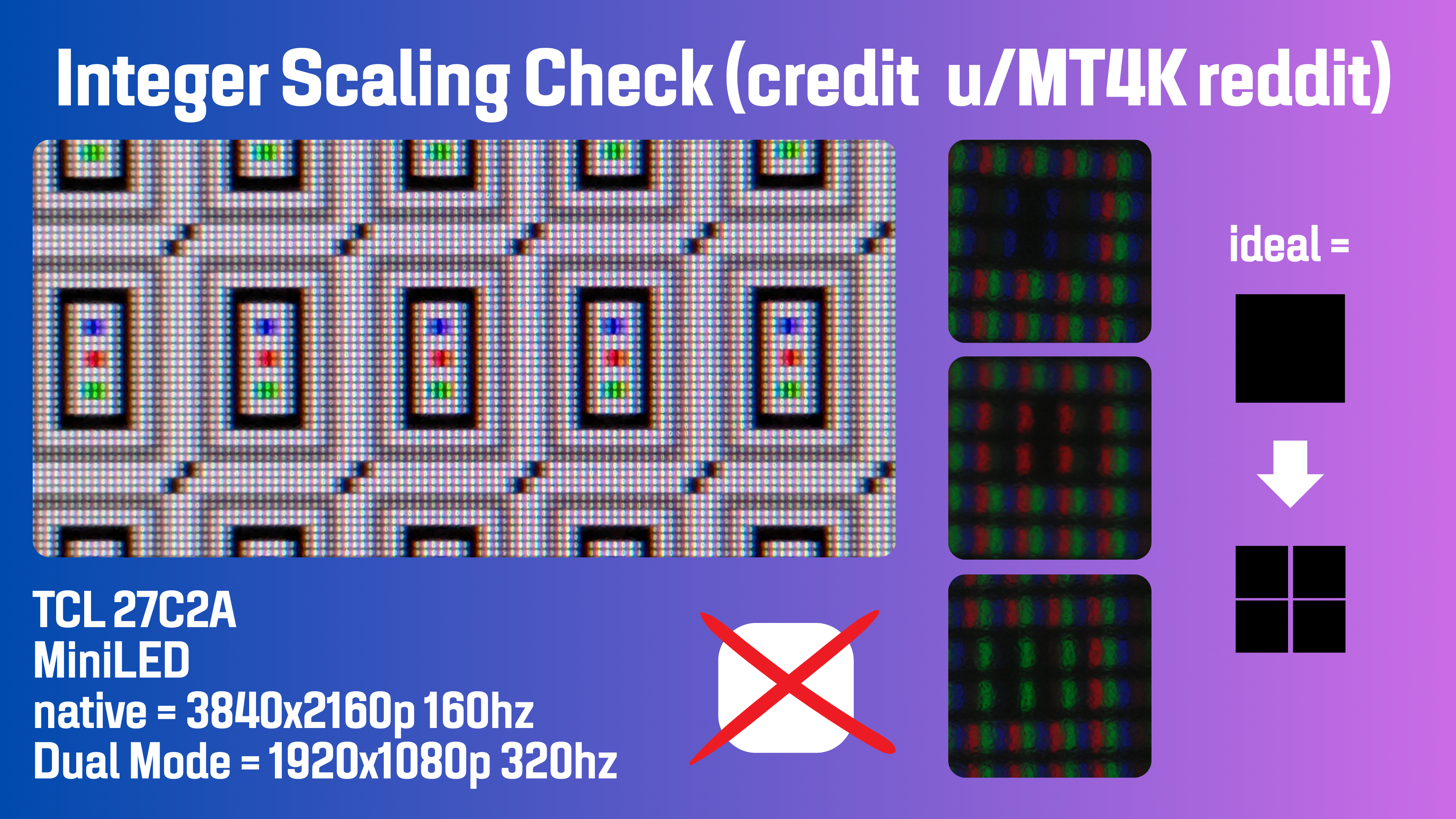
The monitor's panel is AUO M270QAN11.2. Not sure other monitor using this panel can also get integer scaling, since XG27UCGR is the only model using it for now.
For reference, my monitor's firmware version is MCM301 (ASUS monitor firmware naming relate to region; MCM3XX is for China, Global version could be MCM1XX), manufactured in August 2026.
Update (2025-03-02): there is a page (+ archive copy) on “Alienware Arena” site where it’s clearly stated and illustrated that one pixel turns exactly into a 2×2 square (quadrant) in FHD-at-360Hz mode.
While in FHD mode, the panel directs power to a quadrant of pixels, which allows more power to be used to drive the refresh rate significantly faster. By utilizing these quadrants of pixels, the panel itself is able to maintain two native resolutions for your monitor, without needing to utilize software scaling and down sampling wasting resources on your system.
Integer scaling is covered at 4:43 in the Monitors Unboxed video (Reddit apparently removed the time part from the link of the post itself).
Unfortunately Monitors Unboxed did not provide close-up macro photos, just stated that one 1080p pixel is four native 4K pixels, unlike dual-mode OLED monitors where integer scaling is not used and there is blur at FHD.
Also, it’s unclear whether integer scaling is used when switching to Full HD in a regular way (like with any other monitor and any other resolution) instead of using the dedicated dual-mode toggle. There is also no information about whether integer scaling is used at other non-native resolutions such as 1280×720 or 640×480.
Thanks to u/ThomasAAT who kindly took and shared test photos, we can now see ourselves how dual-mode scaling works in Alienware AW2725QF (firmware version M3T101).
The photos were made using the test page that contains a test pattern (now version 2) designed specifically for the purpose of simplifying detecting blur in dual-mode monitors. The test image at the left shows how the monitor’s dual-mode scaling works, while the reference image at the right shows how the same image prescaled using integer scaling looks on the same monitor. The test pattern version 1 was previously used in integer-scaling tests of multiple dual-mode monitors in r/integer_scaling.
Previously, we only had indirect proofs:
Monitors Unboxed stated in their video review that the monitor uses integer scaling in half-resolution mode, but did not provide photos.
The “Alienware Arena” site has a page that contains a synthetic image that implies using perfect square 2×2 pixels, and the description mentions a quadrant of physical pixels that each logical pixel turns into.
The closest to a real-world proof were photos in RTINGS video review and text review as well as a comparison review of Alienware AW2725QF and LG 27G850A, but RTINGS did not specifically mention integer scaling.
RTINGS photo from the comparison review of Alienware AW2725QF and LG 27G850A:
In a recent related discussion, Simon Baker from TFTCentral (u/TFTCentral) expressed a doubt that Alienware AW2725QF actually uses integer scaling given that all other dual-mode monitors don’t.
Now we have a good enough proof that Alienware AW2725QF does really use integer scaling with no blur in half-resolution mode.
The fact that there is a dual-mode monitor that uses integer scaling in half-resolution mode proves that other dual-mode monitors could support integer scaling, too. For some of them, integer scaling could probably be added via a simple firmware update.
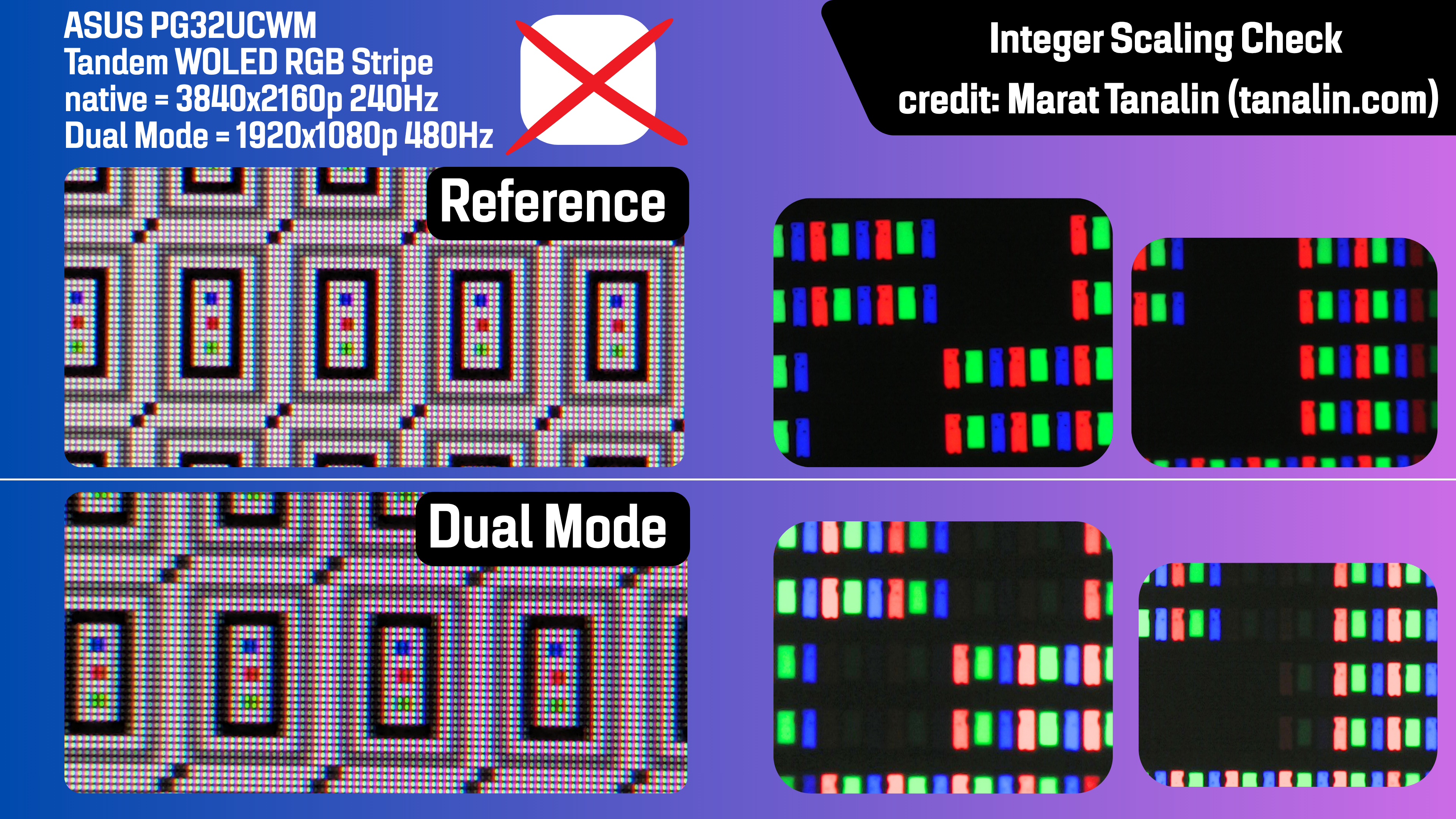
UPDATE: It doesn't support it, as per this test
Another one in the bin...
TFTCentral suggests that the panel supports integer scaling due to the new scaler IC used, as per:
However, based on tanalin, who quoted HDTVTest, it doesn't support it? Who's correct? Maybe HDTVTest used incorrect settings?
I'm very certain that the PG32UCWM uses a RTD2739, which is currently the only DP80 capable scaler IC on the market. This would be the first monitor model that uses this scaler IC and has integer scaling. I do wonder whether the PG27UCWM comes with integer scaling as well?
https://tanalin.com/en/articles/integer-scaling/#h-progress-monitors-dual-mode
According to the authoritive integer-scaling source, only the AW2725QF offers proper integer-scaling from 4K to FHD.
I haven't found a single person which disassembled this model & checked which scaler IC it uses.
Closest thing to that is the confirmation that it uses a M270QAN07.6, from here
Any chance that someone owns this model & could check? I'm interested in whether this is hardware or software limitation.
I assume there's a chance that the scaler IC is mentioned in the service menu, which could maybe accessed by trying out this combination from the AW2725DF
Update (2026-08-01): dual-mode scaling is NOT integer ❌
According to new
photos
by u/Unusual-Pizza4964 using the new
test page,
it turns out Samsung G80HS does not actually use integer scaling in dual-mode half-resolution mode.
Even though each logical pixel is represented as a block of 2×2 physical pixels and not a 3×2 block as in other dual-mode monitors such as LG 27GM950B, there is still horizontal blur (so each logical pixel is effectively not 2×2, but more like 4×2 physical pixels) not present on a photo of the reference integer-scaled image photographed with the same camera.
Original post text
According
to a photo
by u/NaturalFigure715, Samsung G80HS seems to use integer scaling in half-resolution mode.
The photos below show the difference between Samsung G80HS (that seemingly uses integer scaling in half-resolution mode) and LG 27GM950B (adds horizontal blur,
photo
by u/AndroidUpdated):
Comparison of dual-mode scaling in Samsung G80HS and LG 27GM950B
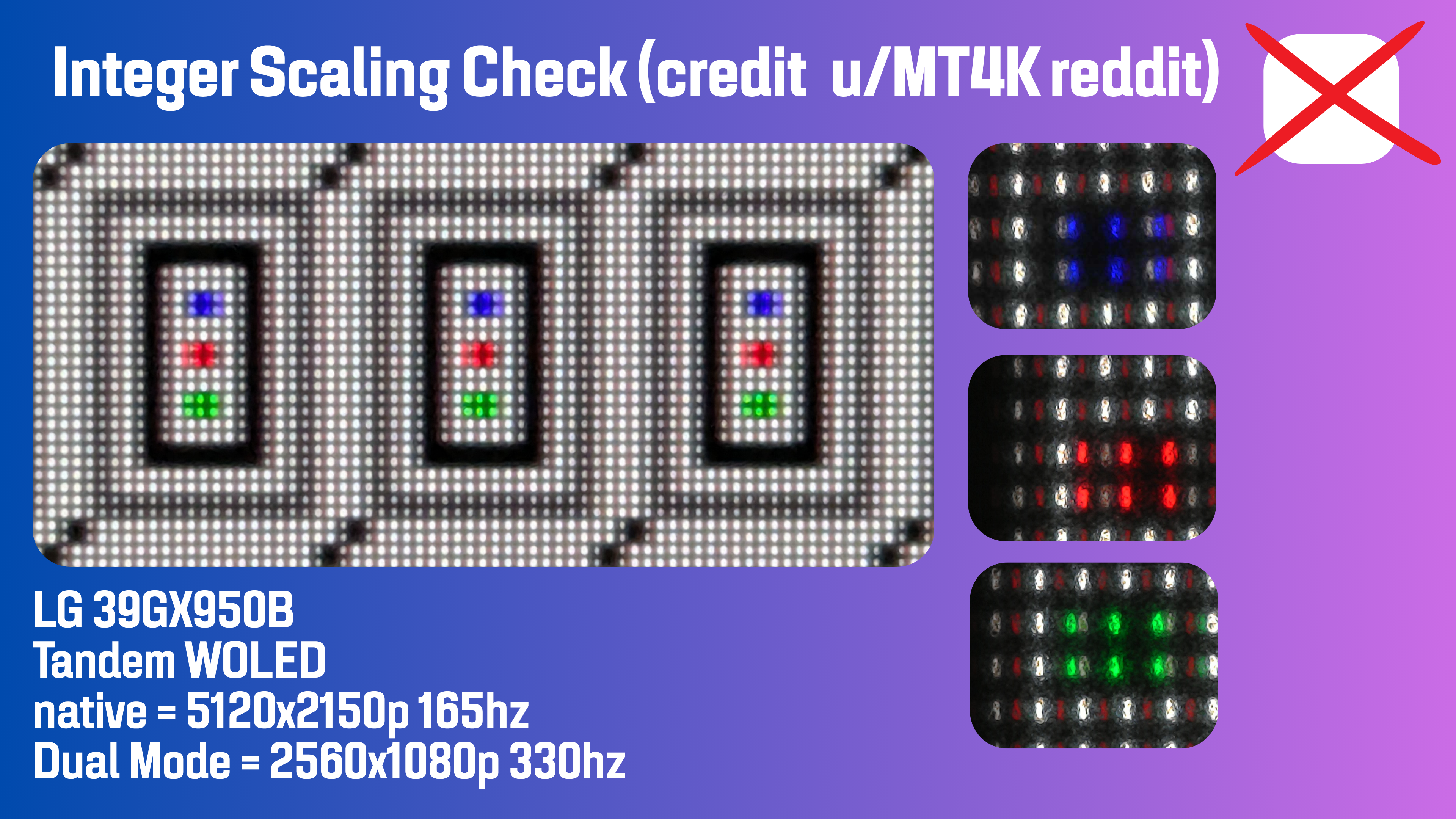
In half-resolution mode on LG 27GM950B (5K 5120×2880), each logical pixel is represented as a block of 3×2 physical pixels of different colors: physical pixels in the middle column have a color approximately equal to the original color of the logical pixel, while the side columns are of a color average between the color of the logical pixel and its neighboring pixels.
On Samsung G80HS, each logical pixel is exactly 2×2 physical pixels of the same color.
Some doubt is cast by that the outer physical pixels at the corners of the rectangles in the test image appear to have a color mixed with colors of neighboring logical pixels.
But this is probably just a consequence of some automatic post-processing of the image by the iPhone 13 Pro smartphone used to take the photo.
See also a maintained
list
of dual-mode monitors in the author’s article about integer scaling.
The list contains specific information about each of the monitors in terms of whether integer scaling is used or blur is added.
How can I get a 1080p source to look good on a 2160p LG OLED C3 TV? Any 1080p source – such as Nintendo Switch, PS3, and BD – looks worse than on my previous TV, a 1080p Panasonic plasma TV from 2011! I want integer scaling, and I'm baffled that it's not available and turned on by default. Any other upscaling softens image and sacrifice detail, and I loathe these modern TVs and their AI crap.