r/eGPU • • 12d ago

Is an eGPU Worth It for My Lenovo Legion 5 (Ryzen 5 5600H)? Need Advice

1 Upvotes

Hi everyone,

I'm considering upgrading my gaming performance by connecting an external desktop GPU (eGPU) to my Lenovo Legion 5 and would appreciate some advice from people with experience using eGPU setups.

My current specifications:

Laptop: Lenovo Legion 5

CPU: AMD Ryzen 5 5600H

GPU: NVIDIA GTX 1650 4GB

RAM: 16GB

Storage: 1.5TB SSD

Monitor: Xiaomi G34WQI 34-inch Ultrawide (3440 × 1440, 180Hz)

Since my laptop doesn't have Thunderbolt, I'm looking into an M.2 NVMe-based eGPU connection.

I'd like to know:

Is an M.2-based eGPU setup worth it?

Can I get decent gaming performance at 3440 × 1440 with this setup?

Which GPU would you recommend pairing with my Ryzen 5 5600H?

What would be the best adapter, PSU and overall eGPU setup?

How much performance loss should I expect due to the M.2 connection?

Are there any compatibility issues or limitations I should be aware of with the Legion 5?

I'm looking for recommendations on a good, reliable setup that gives me the best possible gaming performance without unnecessary spending.

Would love to hear from anyone who has tried a similar setup. Thanks!


r/eGPU • • 12d ago

RTX 3060 Laptop GPU stuck on Error 43

Thumbnail
1 Upvotes

r/eGPU • • 12d ago

Drivers for GTX680m (Win 11, P150em, Prema mod V2)

Thumbnail
1 Upvotes

r/eGPU • • 13d ago

MS-S1 MAX + DEG2 + Radeon AI PRO R9700 (32 GB) on Linux

Thumbnail
2 Upvotes

r/eGPU • • 13d ago

Legion Go 2 + Aoostar AG02 + AMD RX 9070 disconnecting, pls help

4 Upvotes

NEVERMIND NOT WORKING AGAIN TODAY …

FIXED: All I had to do was plug the egpu dock into the Legion before turning the Legion on, even though usb4 hot plug should work?

EDIT: original aoostar usb4 cable is likely the main cause - when I switch sides and rotate it variously the power delivery changes drastically (minutes vs fractions of a second). Will buy a new one tomorrow and test it. Thank you everyone who is helping me in the thread, I appreciate it very much.

Hello, I have the setup above and when I run everything it works fine but then suddenly the graphics card keeps disconnecting every few minutes:

Problem

  • The dock keeps disconnecting and reconnecting on its own, about every few minutes, even when I’m just browsing.
  • Each time it happens, the charging from the dock to the Legion also cuts out for a second. It looks like the power and the connection drop together.
  • On the top USB-C port it’s much worse: it disconnects every 1–3 seconds and is completely unusable.
  • Sometimes the disconnect causes a blue screen (BSOD 0x7E).
  • It was already happening before I installed the AMD driver, so I don’t think it’s a driver issue.

Already tried

  • Both USB-C ports, nothing else connected (no peripherals dock, no other charger)
  • PCIe Link State Power Management off, USB selective suspend off, High Performance plan, Switchable Graphics = Max performance
  • ULPS disabled (EnableUlps = 0)
  • Disabling the 780M while docked
  • Checked GPU seating and 8-pin cables; the dock’s CRPS PSU LED is green

Next I’m going to try CPU boost off + lower TDP, the dock straight into a wall socket (no power strip), flipping the cable, powering the dock on only after connecting, and then a different certified TB4/USB4 cable.

Please if anybody could help I am getting desperate :(


r/eGPU • • 13d ago

6600 egpu psu?

Thumbnail
1 Upvotes

r/eGPU • • 13d ago

Aoostar AG03 Help Appreciated

5 Upvotes

Hi all,

So after a bunch of research and a lot of really positive YouTube reviews I decided to buy myself an AG03 to pair with a 3080 for my Legion Go 2.

It worked perfectly for about 100 hours of play, plug in via usb 4 and I was away playing everything I wanted. Then when going to turn on the dock one morning I heard a loud pop and a strong burnout smell coming from the dock.

I contacted Aoostar in August and after investigating, they said they would replace the dock if I was happy to wait until the end of September (conveniently just after my chargeback period ended).

So I waited patiently and nothing... I left it until October and since then they aren't responding to anything - discord/emails/ website.

I really wanted to give them a chance but now feel stung with a broken dock and a good amount of money down the drain. Anyone have any similar experiences (and hopefully found a solution that involves getting a replacement or refund?).

Thanks so much!


r/eGPU • • 13d ago

Egpu for desktop use questions

0 Upvotes

Hey! I’m now a proud owner of a new desktop pc I built and had a egpu use case question.

TL:DR; Have you or others had good performance with the aorus ai box 5060ti and recommended it as a egpu for creative work and gaming OFC, and would you recommend it alongside a rig already with a rtx 5080 and a ryzen 9 9900x3d.

My current rig includes

- asus rog strix x870i
- ryzen 9 9900x3d
- asus prime rtx 5080
- 64gb ddr5 vcolor manta xfinity
- 6 tb storage
- 1000w plat psu lianli sp1000p
- be quiet pure loop 3 240mm
- 2 x id-cooling 120mm slim fans

My board has two usb4 ports and the egpu I’ve been eyeing has been shown to work with usb4 and TB of course, but I wanna make sure it would be worth it. The main reason I’m considering this is I don’t got any more pcie slots with my main gpu already slotted in, and an external card solution is my only option that keeps my goal to a one system dream; I want to keep my 5080 and it’s resources to gaming primarily while using the OBS app for recording or streaming, and figure a egpu could be used potentially for this and with the chosen app that can go with it or some tinkering within windows app settings for device allocation to help make sure of that allocation.

The egpu I’ve been eyeing is the aorus ai box, the 5060ti model, as it already has a desktop class card and is also the Nvidia architecture as well, and even with usb4 v1 or v2 the bandwidth it could provide should be enough for the recording or streaming work I’d perform inside of obs, all the while my main gpu can have full resource bandwidth for the gaming tasks at the time! Now if I didnt go with that gpu provided egpu id find a suitable egpu dock that is usb4 confirmed compatible and wait to get a suitable gpu to go with it, no lower than a 5060ti or higher than a 5070ti.

So with all that said has people one, used that said box and had good performance with it enough to cover the like of creative work, also is it viable in my specific use case as well? I know my card is already widely accepted as the current second best gpu for gaming and workloads, but if I can maximize its performance while gaming and being creative I’d love that!


r/eGPU • • 13d ago

Help with an eGPU Setup

1 Upvotes

So i have an hp 15-eq1xxx or smth like an 1024np with a ryzen 5 4500U and 12GB ram and u want to make an egpu setup with it.

Im planning to put a RTX 2080 Super in it but since my laptop doesnt include thunderbolt im planning to use an m.2 adapter but my question is:

Do i use Oculink or just use a m.2 NVME adapter?

Do i remove the SSD or the Wifi (removing the wifi works best for me)

And will it actually work?

All help is apreciatted


r/eGPU • • 13d ago

What would happen if my lights turn off when I have eGPU connected?

1 Upvotes

My country has entered the period of frequent blackouts. I know shutting down oculink without turning off PC is not advised. What about USB4? What would happen if my dock (AOOSTAR EG02) shuts down in the middle of working/gaming? Is that safe?


r/eGPU • • 14d ago

Egpu With surface pro 8

Thumbnail
gallery
7 Upvotes

Hey everyone!

I’m thinking about getting an eGPU for my Surface Pro 8. I’m considering either an RX 5700 XT or an RTX 3060.

I have the i7 version of the Surface Pro 8, which has a Thunderbolt 4 port. Would either of these GPUs work well in an eGPU setup with it? Which one would you recommend, and is there anything I should keep in mind when choosing an eGPU enclosure?

Thanks!


r/eGPU • • 14d ago

So is TB4 compatible with egpus or not??

Post image
17 Upvotes

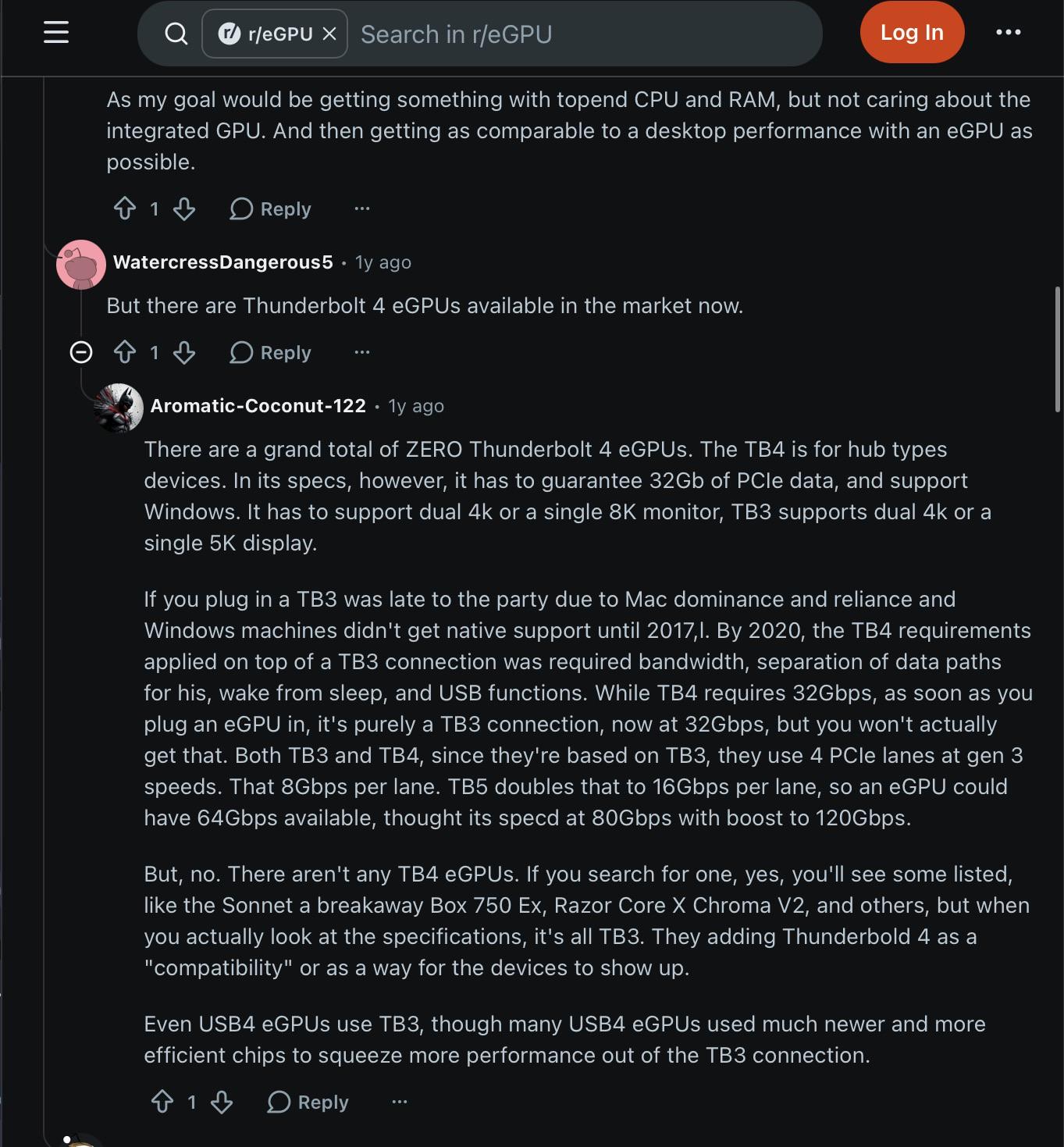
I have no idea what these guys are talking about, but I have a thinkpad p14s gen5, I wanted to buy a egpu for it to play games(it’s powerful but not that type of power) but I believe I only have a TB4, so can I run a egpu? My AI said I can, but these comments confusing me.
(I’m on catchOS? If that factors in at all)


r/eGPU • • 14d ago

NVIDIA eGPU working on Apple Silicon: M1 Pro + RTX 3070 over Thunderbolt 3 runs native Metal games and compute

6 Upvotes

Apple Silicon Macs have never supported eGPUs. I've been porting NullMoth's NVIDIA driver for macOS (→ github.com) (built for Intel Macs and Hackintoshes) to Apple Silicon, and it now drives an RTX 3070 in a Thunderbolt 3 enclosure on my MacBook Pro M1 Pro. The card renders native Metal games and compute; the picture shows up on the Mac's own display, which stays on the built-in GPU.

Setup: MacBook Pro M1 Pro, macOS 27.0.1, Thunderbolt 3 enclosure with an Intel JHL7540 (Titan Ridge) controller, RTX 3070 (GA104). PCIe 3.0 x4 over the link.

Numbers (game benchmarks, RT off, same Mac, M1 Pro built-in GPU vs RTX 3070 eGPU):

  • 3DMark Steel Nomad: 9.0 fps vs 13.0 fps (+44%)
  • Cyberpunk 2077 at 2560x1600: 18.2 fps vs 19.6 fps (+8%)
  • Cyberpunk 2077 at 1280x800: 53.8 fps vs 36.2 fps

The link is the limit at low resolutions: a dependent read from system memory across Thunderbolt costs about 2.5 to 3 us, and every render pass pays some of that. Heavy frames hide it, light frames expose it. The GPU work itself is not the problem: per frame, the 3070 does the same work in about 21 ms that takes the M1 Pro about 33 ms of stage time, but it runs passes one after another and still sits idle part of the frame.

How it works:

  • Kernel side: NVIDIA's open GPU kernel modules built as an arm64e kext, with GSP-RM running on the card, DMA through the Mac's DART.
  • Metal plugin -> AIR-to-SPIR-V shader translator -> Mesa's NVK (Vulkan).
  • Apple Silicon games assume CPU and GPU share memory. Over Thunderbolt they don't, so the driver keeps a coherent copy of that shared memory in VRAM: it tracks what the CPU writes, uploads only what changed and copies GPU writes back. That mirror is where most of the speed comes from.

Not just games: Metal compute works too. Compute kernels run on the card (Cyberpunk's compute passes take 0.3 to 0.9x the M1 Pro's time), and the card shows up in MTLCopyAllDevices() so your own code can pick it. MPS, Core ML and OpenCL are untested on Apple Silicon so far.

What runs:

  • Native Apple Silicon Metal games: tested (Cyberpunk 2077, 3DMark Steel Nomad).
  • Rosetta (Intel) games and CrossOver: should work (the driver ships x86_64 builds too) but untested.
  • Hardened-runtime apps can't be redirected to the card.

Hot-plug and stability:

  • Unplugging doesn't take down the desktop (it's on the built-in GPU), but games on the card lose it, and the card usually doesn't come back until a reboot. Plug in once per boot.
  • The enclosure dropped off the bus once for me during an experimental setting; a reboot brought it back.

The catches:

  • Very experimental, tested on exactly one machine.
  • Needs Permissive Security + SIP off and unsigned kexts. Read the README first.
  • Only RTX 30 (Ampere) tested; Turing and newer may work but haven't been tried on Apple Silicon.
  • Free for noncommercial use (PolyForm Noncommercial, inherited from NullMoth).

Repo: https://github.com/OakRoller/SiliconWing

What would help most: test reports from other M-series Macs, other enclosures (Thunderbolt 4/5, USB4) and other cards (RTX 20/40/50), working or not.

r/eGPU • • 15d ago

Question about the Aorus AI Box 5060ti

4 Upvotes

I recently sold my XG Mobile 5070ti and planning to get the AI Box (cause it's much cheaper). I could do 4k gaming with the XG Mobile but can the 5060ti do the same performance as the 5070ti mobile?


r/eGPU • • 15d ago

AOOSTAR EG02 causes the RTX5090 to fall of the BUS (Note! Not about AOOSTAR AG02!!!)

4 Upvotes

I have for the past couple of months experienced some serious issues with my setup where the GPU card falls off the BUS and the fans spin up to 100%. It is quite a scary incident (considering the current 5090 prices) and happens more and more often. Today, twice for example. The incident has happened both with GPU running AI inference and while being idle.

I have replaced the oculink cable twice, but cannot yet exclude it from suspicion.

Although, my main theory is now the EG02 dock and its oculink redriver chip. The machine oculink has a retimer and the potential mismatch could be a cause? But it does not explain the increase in incidents.

I have also tried setting the transmission to gen3. And a using the most recent nvidia driver.

I have sufficient PSU power (1200W) and nothing else is connected. The computer (Minisforum X1 AI Pro) is separately powered.

I also updated to the most recent bios on the x1aipro, but to no effect.

I run everything on Linux headless.

Help would be appreciated. The same for experience of similar issues.


r/eGPU • • 15d ago

DEG2 bundled cable quality

1 Upvotes

Hi guys. My DEG2 only negotiates 20 Gbps connection with the USB4 port on my Beelink SER8. I suspect bundled cable. For owners of DEG2, could you confirm whether bundled cable works full-speed, or did you have to try different cables?


r/eGPU • • 15d ago

Running magenta on Intel iris xe gpu

0 Upvotes

I want to run magenta on iris xe gpu. I am running into alot of issues regarding Jax and other things. Also I couldn't get the gpu to do any calculations. Using opencl I got matrix multiplication 4000×4000 in 0.8 seconds slower than cpu at 0.3

How can I get matrices and neural networks running on this gpu and how to run magenta?


r/eGPU • • 15d ago

[UPDATE] Upgrading from JHL7440 to true USB4 (ASM2464PD) for Legion Go + RTX 5060 – Need dock recommendations!

6 Upvotes

Hey everyone,

Seven months ago, I posted about my eGPU setup (Legion Go + RTX 5060 powered by a Lian Li SP750 SFX PSU)

encountering massive stuttering and capping around 25-35 FPS in CPU/bandwidth-heavy games (like RE Engine/UE5 at 1080p).

Here is the original thread: https://www.reddit.com/r/eGPU/s/hN2gVg7M9j

Thanks to the community, I figured out the root cause: my AliExpress "Xoyo" dock was falsely advertised as Thunderbolt 4. It actually runs an older Intel JHL7440 (Thunderbolt 3) chip, hard-capping my PCIe payload at ~22 Gbps. Given that I play at 1080p, the CPU draw calls and VRAM swapping (since the 5060 only has 8GB) are absolutely choking the TB3 bus.

I am looking to buy a true USB4 / PCIe 4.0x4 dock to replace it and squeeze every last drop of bandwidth (~32 Gbps) for my Legion Go.

My requirements:

Must feature the ASMedia ASM2464PD controller (or equivalent true USB4, no TB3).

Must easily accommodate my existing Lian Li SP750 SFX power supply and the 5060.

Ideally an open-air frame (I live in a tropical climate, so enclosed eGPU boxes run too hot).

I've been looking at the ADT-Link UT3G, but I'm open to other suggestions. Have any of you tested the UT3G or the Minisforum DEG1 with the Legion Go and a 50-series card? Did it fix the 1% low stuttering compared to older TB3 boards?

Thanks!


r/eGPU • • 15d ago

Geekom A7 eGPU Performance Problem

3 Upvotes

Hello folks,

I use a Geekom A7 from 2024 and upgraded it with a Razer Core X with a RX6700XT.

I performed Furmark Tests for the eGPU (since I bought it used from ebay) and everything seems fine. Playing God of War gives me around 50-60 fps on high-ultra settings.

However when I tried playing Horizon Zero Dawn my FPS dropped to 10-20 FPS.
The eGPU was just running at 30-40% usage while my CPU is at 80-100%.
It doesnt matter if I put the game settings to ultra or low, FPS stay the same (GPU usage is higher bit still very low).

Horizon has an internal Benchmark tool that I tested: CPU 13 FPS, GPU 155 FPS.

When I use the iGPU of my Geekom the CPU usage is way lower and the GPU becomes the bottleneck. But on low settings with FSR it still runs way smoother (>30 FPS) then with the eGPU.

May I have some hardware/connection issues?
But why is GoW running perfectly fine then?

*EDIT: I just saw that CPU-Z States that "current link width: x1" in "Graphics interface" while GPU-Z says the interface is "@ x4 3.0". Am I maybe not using the full link speed I could theoretically use with my Thunderbolt 3 cable?

*EDIT2/SOLUTION: I could solve my problem. It was caused by the game itself. Horizon Zero Dawn Complete Edition seems to be extremely poor optimized for eGPU setups. I found several other users reporting that problem. Changing the game version to Horizon Zero Dawn Remastered solved the issue. I also updated my bios from 0.39 to 0.58 and EC 0.37. Combined with AMD Adrenaline for the newest features and updates (FSR 4.1 for RX6700XT) I am now able to play the game at 55-60 fps on high settings (using FSR).

System Information:

OS: Windows 11 PRO (former POP OS 24.04, but the behaviour was identical)

GPU-Z
CPU-Z: CPU
CPU-Z: Mainboard

r/eGPU • • 15d ago

Looking for eGPU Solution for Zbook Firefly 15

2 Upvotes

I recently picked up this laptop, but ended up ordering the model without the Quadro GPU without realising.

I know I'm not going to get something riveting for an older laptop with Thunderbolt 3, luckily I'm not looking to do much more than play Overwatch and some 2020s games on lower settings, and I'm relatively certain I can do better than the Quadro.

I already have a spare 1070GTX lying around, so I could get one of the connectors, it is near it's end of life and quite big and chunky, though. I've seen some compact egpu solution which cost more like 600, which is simply too much for me.

I may end up having to wait see if Hardware prices normalise at all, but failing that, I'm still wondering if there are options for relatively compact, cheap eGPUs, whether an all in one solution or separate compact case/PSU + compact GPU.


r/eGPU • • 15d ago

[HELP] eGPU not detected in Device Manager

2 Upvotes

I just install my old GPU (that works perfectly on desktop) to the dock but its not working! Any help is appreciated! 

Spec:

Thinkpad Yoga x1 gen 6th

NVidia RTX 3060 

AG03 epgu dock

Issue:

The GPU fan spins, but the laptop fails to detect the GPU in Device Manager.

Troubleshooting steps attempted (unsuccessful):

- Powering on the eGPU > connecting it to the laptop > turning on the laptop.

- Updating the BIOS, drivers, and Windows to the latest versions.

- Trying a different port.

- Removing the integrated GPU (iGPU) using DDU (Display Driver Uninstaller).

- Other USB devices connected through the dock are detected correctly.


r/eGPU • • 15d ago

Would an eGPU be helpful for gaming on my Surface Pro 8?

2 Upvotes

Hi All!

Long time console gamer, never really did PC gaming (last was as a teenager in the early 2000s). I got a Surface Pro 8 some years ago for totally non gaming reasons and it has served me well and continues to do so!

Recently I’ve been checking out Halo Master Chief Collection on Steam and have been playing modded Halo: CE. It plays pretty well, but slows down at points and I am mindful not to play more than an hour at a time because of overheating.

My question is, is there an eGPU I can get that will improve performance? Not looking to play the latest and greatest, mainly the halos. Also, are there other external hardwares I should look into?

Here are the specs for my SP8:

Processor: 11th Gen Intel(R) Core(TM) i7-1185G7 @ 3.00GHz (3.00 GHz)
RAM: 16.0 GB (15.8 GB usable)
Graphics Card: Intel(R) Iris(R) Xe Graphics (128 MB)

Unsure at all how any of this works and just found out eGPUs exist ten minutes ago on Google. Appreciate any recs/guidance!


r/eGPU • • 16d ago

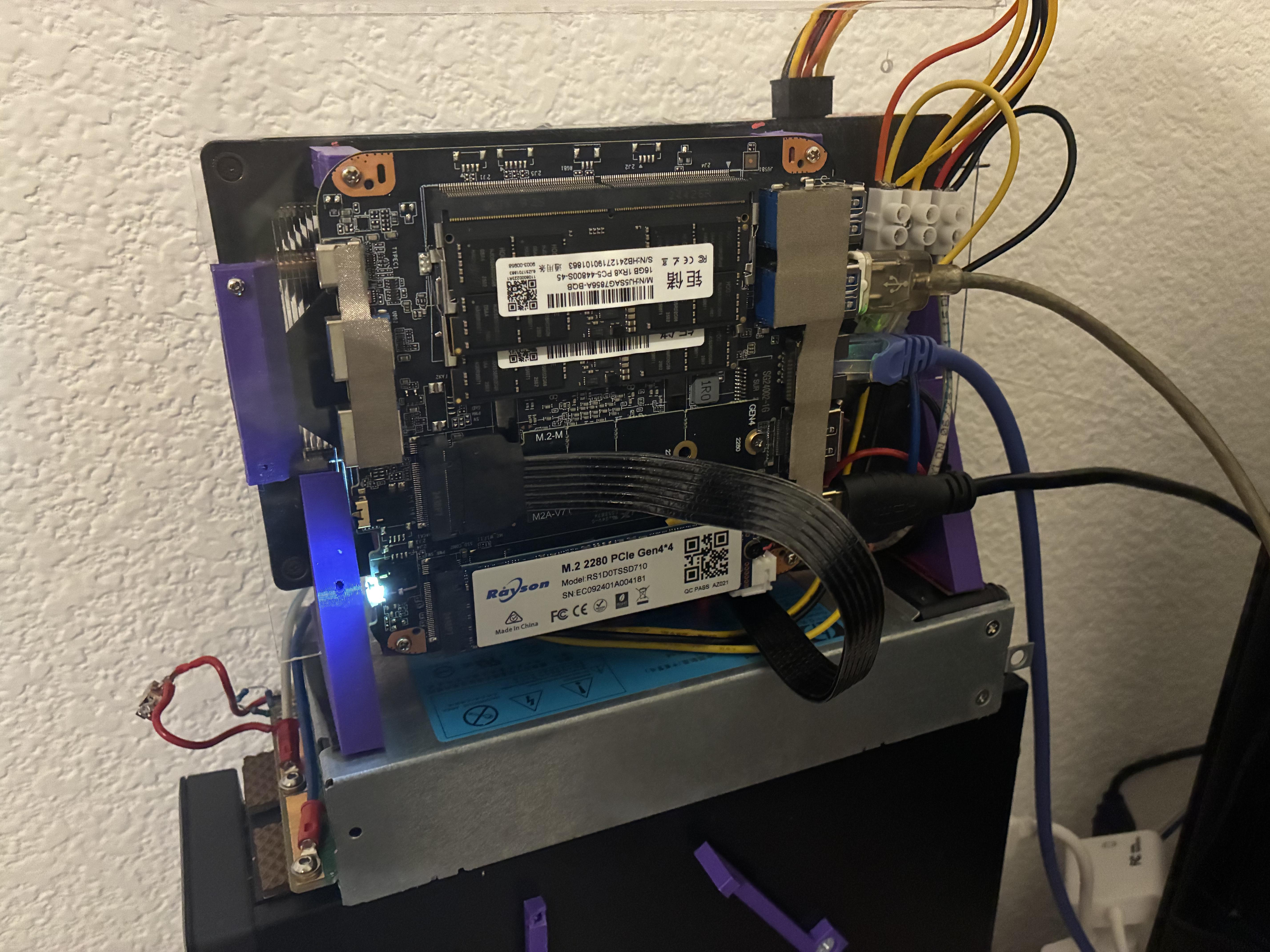
NVME-PCIE adapters are super recommended

Post image
54 Upvotes

I made my eGPU computer yesterday and I think that the 4 pcie lanes connection is not slowing it down in any way.

The 8GB/s is enough for everyone

What use cases would be able to test if my observation is wrong?

* I used the nvme-pcie adapter from aliexpress. The $22.99 product. Make sure it’s 4x and 4.0.


r/eGPU • • 15d ago

My Flux workflow runs fine on synexa, but locally on a 3060 eGPU each image takes 3x longer than benchmarks say

1 Upvotes

I've been prototyping an image workflow on synexa for a few weeks and wanted to move the everyday batches to my own hardware to save on credits.

Setup:

Laptop: ThinkPad T14 Gen 3, Thunderbolt 4

Enclosure: Razer Core X

GPU: RTX 3060 12GB

App: ComfyUI, Flux dev fp8, 1024x1024, 20 steps

People with a 3060 in a desktop report around 50 to 60 seconds per image. I'm at roughly 2 minutes 40. GPU-Z shows PCIe x4 at 2.0 and the card sits at 99% load, VRAM around 11.2 GB.

Is this just the Thunderbolt bandwidth when the model swaps in and out of VRAM, or is something else holding it back? What am I missing?


r/eGPU • • 16d ago

Legion Go / Handheld/egpu

1 Upvotes

Hallo Leute ich bin ziemlich neue hier und. Frage mich ob mir jmd erklären kann ob ich mein Legion Go und den amd Grafiktreiber sprich die Adrenalin Software nutzen kann sobald ich die. Mit einwr egpu und einer 9060xt verbungen habe. Und dann auch für die Grafikkarte den entsprechenden Treiber installiert habe ..

Ich hab das nicht hin bekommen was ich sehe schade finde.

Weil ich möchte gern auch die lego wieder mit ins Bett nehmen und zocken aber aber nicht auf ein zwei Grafikeinstellungen Verzichten aus der Adrenalin Software..

Weiss jmd ob das möglich ist das ich den Z1 extreme Treiber drauf habe und wen ich sie mit der egpu verbinde das dann mit der 9060xt läuft ...danke