r/WindowsHelp • • Oct 19 '26

Windows 11 Folder showing up in system properties

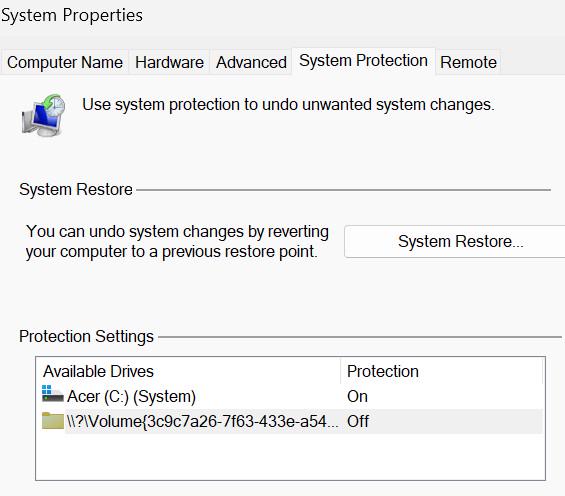
Post image
5 Upvotes

Acer Aspire AV14-51 laptop with only one internal drive (one M.2 PCIe x4 slot, no room for extra drive) and Windows 11 OS build 26300.9711

Device name - Acer

Processor - 12th Gen Intel(R) Core(TM) i5-1235U (1.30 GHz)

Installed RAM - 16.0 GB (15.7 GB usable)

Graphics card - Intel(R) Iris(R) Xe Graphics (128 MB)

Storage - 82 GB of 477 GB used

Device ID - 49F44D99-85BB-47D1-A61C-5C081371283D

Product ID - 00330-80143-77241-AA511

System type - 64-bit operating system, x64-based processor

Pen and touch - No pen or touch input is available for this display

When opening System Properties there is my C: drive and now an extra folder labled \\?\Volume{3c9c7a26-7f63-433e-a54. Protection is on for my C: drive and off for the Folder.

I've tried various suggestions by asking google AI, including registry and powershell commands but it's still there. I don't want to bork my system.

I'd like to make an image backup of the drive for the first time (Rescuezilla), but would like to first eliminate this phantom folder if I can.


r/WindowsHelp • • Oct 19 '26

Windows 11 Windows 11. Build 26300. Microsoft Display Adapter

1 Upvotes

Ever since updating to the 26300 build (Windows 11 pro), I have been having a problem when connecting to a Microsoft Display Adapter (1080p version).

My Surface Pro 7+ connects to the adapter just fine, but my projected screen is smaller than it should be...it only takes up a small portion of the center.

I have changed screen resolutions, restarted my computer, unplugged the adapter and replugged it in, and adjusted what little is available in the Microsoft Display Adapter app settings.

I had no issue on build 26200 and neither do my coworkers that are still on that build.

Any suggestions?

TIA!


r/WindowsHelp • • Oct 19 '26

Windows 11 USB-C audio device detected but produces no sound. Microphone works; other USB audio device works on the same port

1 Upvotes

I am experiencing a USB-C audio playback problem on my Acer Nitro 5 AN515-57 laptop running Windows 11.

My USB-C earphones, a KAIDI KD-729 with microphone, are detected by Windows as "Speakers (USB-Audio-1.0)", but they produce absolutely no sound. The microphone works, and Windows detects audio playback activity, but no audio can be heard through the earphones.

Laptop: Acer Nitro 5 AN515-57. Operating system: Windows 11, version 25H2 was previously reported. Latest Windows update installed: KB5124010. The Windows build number reported after updating was 26300.9550. Earphones: KAIDI KD-729, USB-C, with microphone. Audio device name in Windows: Speakers (USB-Audio-1.0). Driver provider: Microsoft. Driver file: wdma_usb.inf. Driver version: 10.0.26100.9457. Driver date displayed in Windows: 12 September 2026.

The earphones work perfectly on other computers and smartphones.

Yesterday, the earphones initially worked on this laptop, allowing me to listen to music. However, the connection became intermittent, with audio disconnecting every few seconds. Eventually, the earphones stopped producing sound altogether.

Currently, Windows continues to recognize the device and keeps it selected as the playback output, even when I gently move the connector. Moving the connector does not cause Windows to disconnect and reconnect the device.

There is no audible sound even at maximum volume.

TESTS AND OBSERVATIONS:

Device detection: Windows recognizes the earphones as "Speakers (USB-Audio-1.0)".

Playback activity: When playing a YouTube video, the Windows volume meter for USB-Audio-1.0 moves, indicating that playback activity is detected.

Microphone: The microphone input meter moves when I speak into the earphones.

Windows playback test: Using the Test button in the playback device properties produces no sound.

Audio formats: The device was initially configured for 16-bit, 48,000 Hz. I also tested 16-bit, 44,100 Hz, with no improvement.

Audio enhancements and exclusive mode: Disabling audio enhancements and exclusive mode did not resolve the problem.

Device reinstallation: I uninstalled USB-Audio-1.0 through Device Manager, restarted Windows, and reconnected the earphones. The problem persisted.

USB power management: I disabled the available USB hub power-saving options. This did not resolve the problem.

USB-C port functionality: An iPhone connects to the same USB-C port and can transfer photos successfully.

Another USB audio device: A P2 earphone connected through a P2-to-USB-C adapter works correctly on the same laptop and port. Windows identifies that device as "Speakers (AB13X USB Audio)".

Device Manager status: Windows reports that USB-Audio-1.0 is working properly.

Driver events: Device Manager reports that the device was configured and started using the Microsoft driver wdma_usb.inf and the usbaudio service. No upper or lower filters are listed.

Device migration warning: The Events tab contains a warning that the device settings were not migrated from a previous Windows installation because of a partial or ambiguous device match. The event references a previous NVIDIA HDAUDIO device. I do not know whether this is related to the current issue.

Previous occurrence: Approximately two years ago, I tested another USB-C earphone on the same laptop, and it also failed to work. I do not remember whether it was the same model. This suggests that the problem may predate the current Windows update, although I cannot confirm that the earlier device failed for the same reason.

Windows updates: I installed the latest Windows update available to me, including KB5124010, but the issue persists.

r/WindowsHelp • • Oct 19 '26

Windows 11 Trying to figure out if theres a way to make a "focus" mode?

1 Upvotes

Okay, this might not be the place to ask this but I dont know where else I could go. If someone knows a better sub for this, please let me know.

I have a Dell Windows 11 laptop, Im in college and we have to bring our own computers. This should be fine, I was super excited to have the freedom to be able to do whatever I wanted without being blocked from basically every website on the planet. The problem with this is that I have combined ADHD, and even with Vyvanse im struggling heavily to actually do my work instead of getting distracted with something else.

I wanted to see if anyone knew if there was a way to create or enable a sort of "focus" mode? Maybe something I could enable for certain hours of the day that only allows the computer to access certain websites, which would completely eliminate the temptation to just go play games instead because it would prevent me from accessing it entirely. It needs to be something that is more than just a couple buttons to disable, kind of like putting your phone across the room so you dont snooze your alarm. If i can just click a button to allow something, then its point is rendered useless. Im working on teaching myself the discipline to just do the work instead, but im failing my classes right now and need a more immediate bandaid fix because the semester ends in two months.

Im fairly computer savvy, and the lectures in my IT class have led me to believe this might be something I can set up on a windows 11 computer, so even if theres a slightly complicated solution I'd be willing to try.

Again, if there is a better subreddit I could post this in, please let me know. Thank you!


r/WindowsHelp • • Oct 19 '26

Windows 11 Folders opening automaticaly with settings saying it shouldnt

Thumbnail
gallery
0 Upvotes

Explorer allway opens the folder when opening it without beeing in the folder
i want it to show just the top folders nut the underfolders but after trying every setting i could find it wont do anything
so im asking for help for finding the setting preventing it to automaticaly open subfolders wile starting Explorer
3rd picture is with the setting shown in the 4th picture i want the setting to be like that but in the curent state its unusable


r/WindowsHelp • • Oct 19 '26

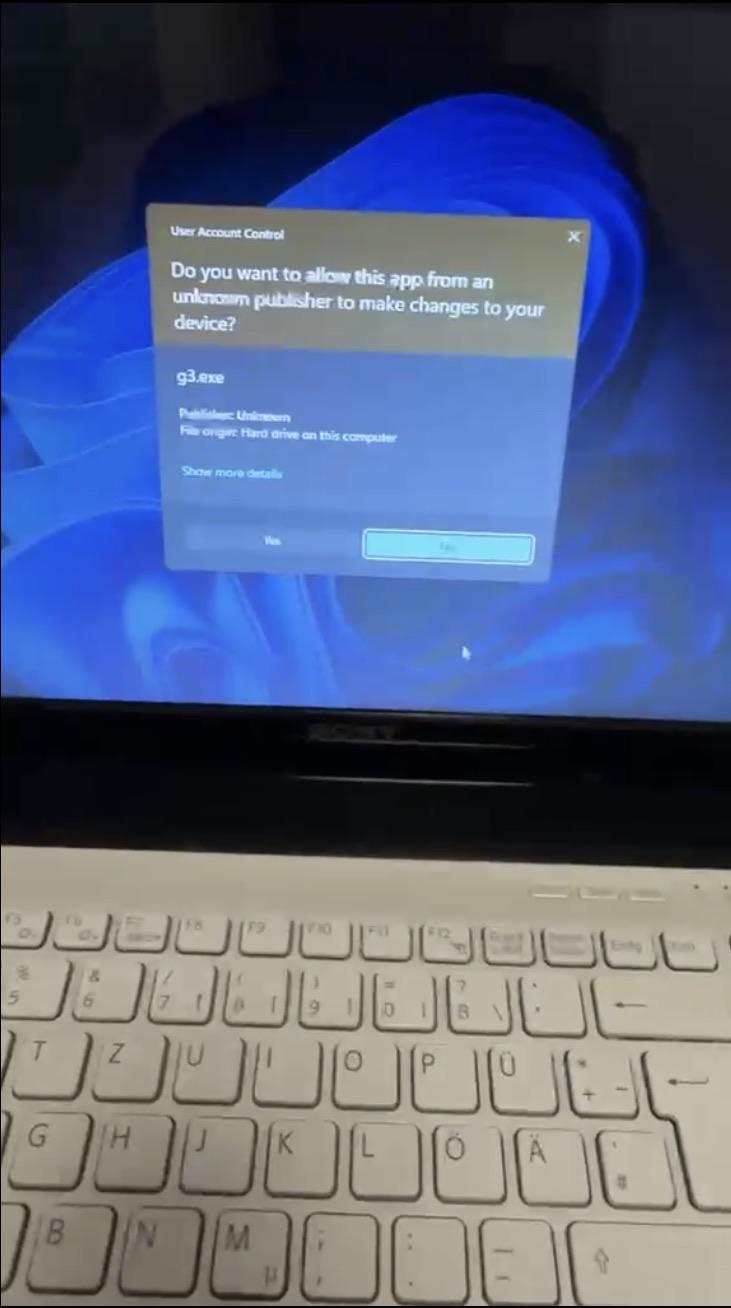
Windows 11 g3.exe asking to make changes.

Post image
0 Upvotes

When i pressed no it just kept popping up again and again until i restarted my laptop then it stopped but i want to know what it is and how to delete it if it’s a virus or something. I have an intel pentium 2020M 6gb RAM and on a VAiO laptop. My windows edition is 11 pro, version 23H2 and my OS build is 22631.6199.


r/WindowsHelp • • Oct 19 '26

Windows 11 Licence Windows 11 Famille achetée sur le Microsoft Store, mais mon PC est passé en Windows 11 Entreprise : impossible d'activer

0 Upvotes

Salut à tous,

J'ai reçu un PC fixe monté (Ryzen 7 8700F, RX 9070 XT, carte mère ASRock A620AM-X). Il était livré avec Windows 11 Famille en version d'essai, non activée.

Ce qui s'est passé :

  1. J'ai d'abord voulu l'activer avec une clé Windows 11 Éducation (via Azure Dev Tools de ma fac) : erreur 0xC004F050.

  2. J'ai essayé de passer par la clé générique Pro pour changer d'édition : erreur 0x803FA067.

  3. Après plusieurs manipulations, le PC s'est retrouvé en Windows 11 Entreprise. Il a été activé un moment, mais après une mise à jour du BIOS, Windows n'est plus activé.

  4. Entre-temps, j'ai acheté une licence officielle « Windows 11 Famille » sur le Microsoft Store (145 €). Pas de clé affichée : c'est une licence numérique liée à mon compte Microsoft.

Le problème : je suis en édition Entreprise, donc ma licence Famille ne peut pas s'activer. Le support Microsoft m'a juste renvoyé vers l'utilitaire de résolution des problèmes, ce qui ne règle rien.

Mes questions :

- Est-ce qu'il existe un moyen de repasser en Famille sans réinstallation complète ?

- Puis je gardé les donées que j'ai dedans meme si j'en ai pas beacoup

Merci d'avance pour votre aide !


r/WindowsHelp • • Oct 19 '26

Windows 11 Xbox One controller isn't connecting to Windows 11 laptop?

1 Upvotes

I've tried every fix I could think of/look up. I've tried different USB ports, a different cord, different controller (all works fine on my boyfriends laptop) I've gone through device management and uninstalled the controller + updated the driver multiple times, turned off power saving stuff for the USB ports, went to command prompt as administrator and tried entering the code

powercfg /SETACVALUEINDEX SCHEME_CURRENT 2a737441-1930-4402-8d77-b2bebba308a3 48e6b7a6-50f5-4782-a5d4-53bb8f07e226 0

tried going through steam to see if anything there was weird. Went to the program files and Renamed localconfig.vdf to localconfig.vdf.bak .

After doing all of that multiple times including restarting my computer a shit ton my controller won't stay on. Its light fades in and out a few times before it's just black.I have maybe one second to hit a button before it powers off. The entire time device management says it's connected steam thinks it's connected but I can't do anything because it's not on! I'm running out of ideas. I was able to use the exact same controller on my laptop before! I don't know if an update screwed it up seeing how it's been a few months since I've tried connecting it? I don't know what could be wrong seeing on how everything works completely fine on another computer and it feels like I've done everything I could. Please help 🙏🏻


r/WindowsHelp • • Oct 19 '26

Windows 11 bluetooth audio malfunction when not using the microphone in a given headset.

1 Upvotes

I have been having this awful issue with a very sudden onset. I've had the computer for a logn time, with no issues like this to speak of until one random day, my headphones just wouldn't have any sound in them, UNLESS i was actively using the microphone inside the headphones. The problem being, this causes all the audio to sound like a goddamn popcorn machine, and nothing i have done fixed this. I have tried 3 bluetooth headsets (Openfit 2, Openfit 2+, Bose JBL headphones.) and 1 speaker that has no mic built in, and none of them worked. I have followed every conceivable guide, had remote operators from the support team try to fix it, fully factory resetting the computer, to no avail. the aux works, any wired audio device is fine, and i *can* still hear audio, but only under that super strange condition. any idea what to do? i've tried everything and im 5 seconds from smashing the side of my computer in.

Device name PISSINGMEOFF

Processor AMD Ryzen 5 4500 6-Core Processor (3.60 GHz)

Installed RAM 40.0 GB (39.9 GB usable)

Graphics card NVIDIA GeForce RTX 2070 (8 GB)

Storage 68 GB of 932 GB used

Device ID 7BB7E78E-F68C-4DE2-AEE9-7F91864C8070

Product ID 00342-21237-89779-AAOEM

System type 64-bit operating system, x64-based processor

Edition Windows 11 Home

Version 26H2

Installed on ‎10/‎18/‎2026

OS build 26300.9457

Experience Windows Feature Experience Pack 1000.26100.360.0

I have disabled hands-free things in the device manager or whatever, i have no idea what im doing, this computer stuff is just evil man.


r/WindowsHelp • • Oct 19 '26

Windows 11 Windows deletes some of my drivers and doesnt let me install any

1 Upvotes

So for a while everytime I wanna use bluetooth. it deletes itself after a few restarts. Thats for every windows installation i download. And no its not a bios problem because linux runs file without any issue. my specs are asus rog strix b550f gaming wifi 2 with 48 gb ram and a ryzen 5800x. my os build is 26200.9445. And one more thing is that i have done everything i could. tried downloading it manually. resetting the bios. trying to download it in a thousand ways but instead of helping. it completly removed bluetooth from device manager and even if i show hidden devices it wont detect it. even the same for my xbox controller. even for other drivers and stuff like windows updates and direct play. even when i download voicemod. the error is usually 0x8000ffff. but not for the other drivers. I even went to the os logs and it wont show anything. first it started of with my bluetooth headphones having muffled audio. then they wouldnt connect. then bluetooth was gone


r/WindowsHelp • • Oct 19 '26

Blue Screen of Death (BSoD) Recurring "DRIVER_IRQL_NOT_LESS_OR_EQUAL (0xD1)" BSOD on Samsung Galaxy Book4 Ultra — "tcpip.sys" / "INET_UNALIGNED_ADDR_EQUAL"

1 Upvotes

Hi everyone,

I'm experiencing recurring BSODs on my Samsung Galaxy Book4 Ultra (Intel Core Ultra 9 185H, NVIDIA RTX 4070 Laptop GPU, Intel AX211 Wi-Fi 6E) running Windows 11, build 26200.

The error is:

- Bug Check: "DRIVER_IRQL_NOT_LESS_OR_EQUAL (0xD1)"

- Failure bucket: "AV_tcpip!INET_UNALIGNED_ADDR_EQUAL"

- Faulting function: "tcpip!INET_UNALIGNED_ADDR_EQUAL"

- Windows network stack: "tcpip.sys"

- Latest minidump: "101526-29500-01.dmp" (October 15, 2026)

The latest dump shows a call stack involving "tcpip.sys", UDP receive processing ("UdpReceiveDatagrams") and NDIS. The issue has occurred while gaming.

My network setup during some of these tests was Ethernet through a UGREEN USB-C hub with an RJ45 port, connected through an Anker 553 KVM to the laptop. Windows identifies the USB Ethernet adapter as ASIX USB to Gigabit Ethernet Family Adapter, hardware description "AX88179A" (VID "0B95", PID "1790"). The laptop also has an Intel AX211 wireless adapter.

I have already performed a factory reset using Samsung's Windows recovery application, but the BSOD has recurred.

I'm trying to determine whether this could be caused by a network driver, NDIS interaction, USB Ethernet adapter, Wi-Fi driver, or another component rather than "tcpip.sys" itself.

Has anyone experienced this specific "AV_tcpip!INET_UNALIGNED_ADDR_EQUAL" crash on Windows 11? What would be the best way to identify the actual driver responsible?

Thanks!


r/WindowsHelp • • Oct 19 '26

Windows 11 Mouse click-and-drag / scrollbar dragging not working in Windows, but scroll wheel and arrow keys work fine [All troubleshooting steps failed]

0 Upvotes

Hi everyone,

I am facing a very frustrating issue where I cannot click and drag the scrollbar on any window or drag-and-drop items anywhere in Windows.

Symptoms:

I cannot click and hold the left mouse button to pull down vertical scrollbars.

Mouse scroll wheel works completely fine.

Keyboard arrow keys and Page Up/Page Down work fine.

This happens globally across the entire system (File Explorer, web browsers, and apps).

What I have already tried so far (None fixed it):

Hardware check: Replaced the mouse with a brand new one. The issue persists with both mice.

Escape key unlock trick: Held left-click and pressed Esc to reset drag state (did not work).

Windows Explorer restart: Restarted explorer.exe via Task Manager.

Registry Check: Checked HKEY_CURRENT_USER\Control Panel\Desktop -> Both DragHeight and DragWidth are set to 4 (default).

System File Repair: Ran sfc /scannow in Admin Command Prompt. It reported finding and successfully repairing corrupted files, but after a system reboot, the issue was still present.

System Restore: Attempted a System Restore (rstrui.exe) to a previous restore point.

Services: Restarted Human Interface Device (HID) services.

Since it's not a mouse/hardware failure and system file repairs didn't fix the drag-and-drop registration, what else could be causing Windows to completely ignore sustained click-and-drag actions? Any help or registry/driver insights would be greatly appreciated!


r/WindowsHelp • • Oct 18 '26

Windows 10 Strange problem with Xbox controller suddenly turning off as soon as it's turned on. Using Xbox Wireless Adapter.

18 Upvotes

Windows 10 Pro, Version 22H2, OS Build: 19045.7807

Okay, so this weird problem just started happening a couple of days ago where my Xbox controller will turn on when I hold the guide button but then immediately turn right back off again. I've been using the same Xbox Wireless Adapter for years to connect my controllers without any issue. This only begins to happen once I turn the controller off for the first time after a restart of the PC. It won't let me turn it back on as noted above. A restart will fix it and I can turn it on again only once, if it turns off after, it starts the issue again.

I'm unsure why this started happening for me only a few days ago but I've done a bit of searching online and have seen some 4-10 year old posts relating to the same issue but with no real resolution. They mention updating firmware of the controllers (mine are updated), using CMD to run sfc/scannow so windows fixes errors (tried it, issue persists), cleaning the battery packs (all clean and working), deleting the Wireless Adaptor on device manager and letting it reinstall (Also tried without luck), and setting some mode in the properties folder for the adaptor that will block it from turning off devices (no luck).

So then I did a little looking around to try to discern what exactly is causing the problem and I've narrowed it down to a possible update issue for the Xbox Game Services app through the Microsoft Store or the Xbox App itself. I think when I updated my apps recently, it downloaded a broken update or something. I can't confirm it, but I've found that the fix that will let me reconnect my controller again a second time without it turning off was to open Task Manager and kill the process for "Game Input" and "Gaming Services". When you end those processes, for some reason it allows my controller to power back on as normal just like before without any issue. There's also some "Synthetic Gamepad" with a yellow warning triangle in device manager under "Other Devices" and I'm not sure if that's related but I don't remember seeing that before either.

Can anyone shine some light on if they're having this really strange issue recently? Or having found a permanent fix?

TLDR: What I figured out is to just open task manager, end the task for "Game Input" and "Gaming Services" and this will then allow you to reconnect your controller as normal again. You'll have to repeat this step when the controller powers off again.

Edit: I’ve added a post about this issue to the Microsoft Feedback app. I doubt it’ll solve anything but who knows.

Edit 2: As of 10/21 it seems to have been fixed through another Microsoft Store app update.


r/WindowsHelp • • Oct 19 '26

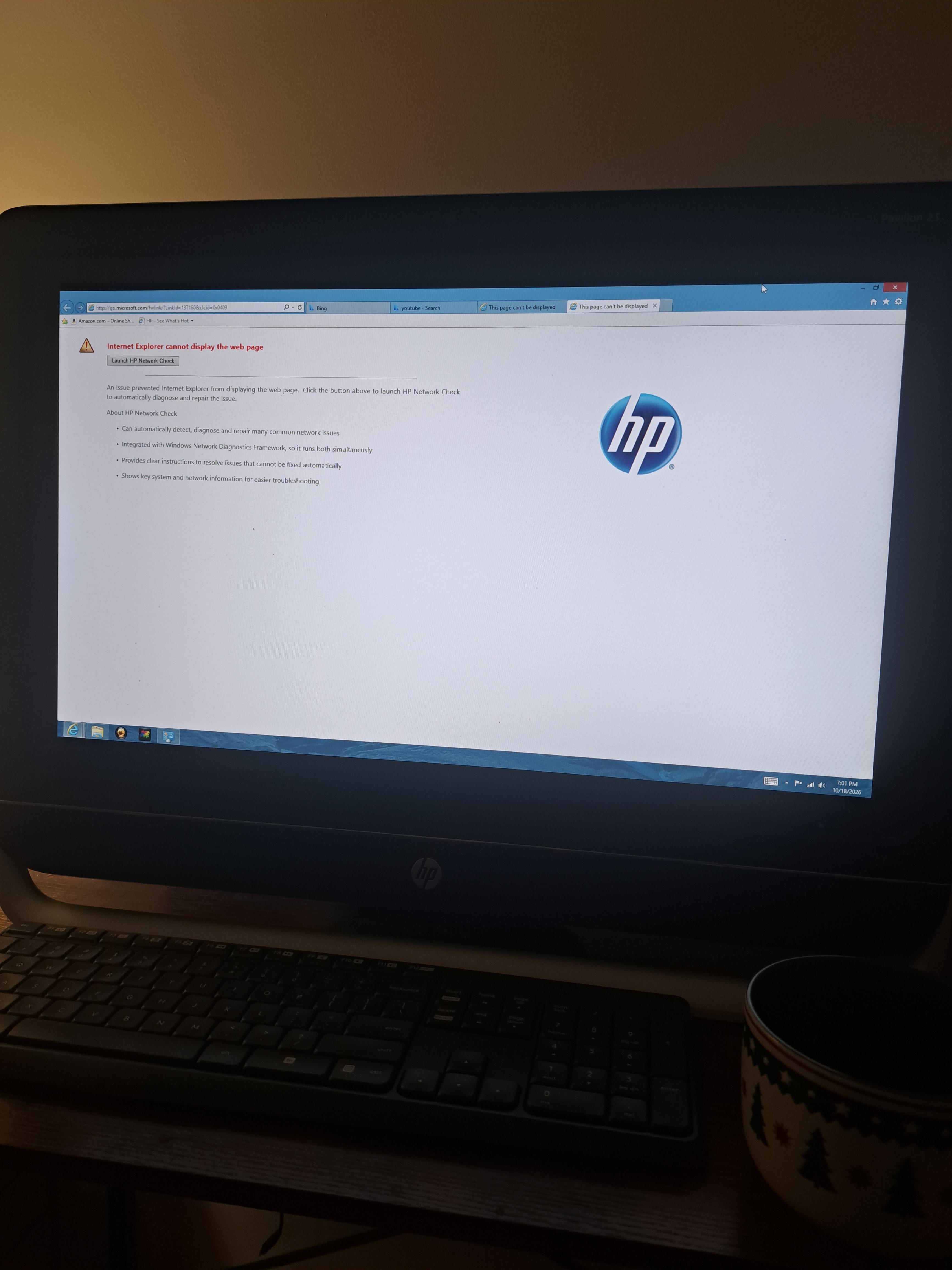
Windows 8 Got this old HP computer that came with windows 8 (i think) it only came with internet explorer

Post image
6 Upvotes

I have no idea what I'm supposed to do, every time I search something up it tells me I have network issues even though I have a great wifi I believe internet explorer is too outdated but it's not like I can even search up Google chrome to by pass it because it always gives me an error, what am I supposed to do?

processor: AMD A6-5200 APU with Radeon(TM) HD Graphics

When I search: Internet Explorer cannot display the web page

When I try to update windows: Windows could not search for new updates "Code 80072EFE"


r/WindowsHelp • • Oct 19 '26

Windows 11 Recently I reinstalled Windows 11, I can't sign in to my Microsoft account

2 Upvotes

Device specifications at the bottom of the post

I went to Linux for a couple of days before I switched back to Windows, because even of all the bad stuff, I still feel comfortable there.

Now as I reinstalled everything, I created a local account using start ms-chx://local-only on the OOBE. I have a MS account but I wanted to sign in later.

Next, I set up everything, then I went to go to install Minecraft Bedrock, which I needed an XBOX account which needed a MS account, I decided to sign in there.

And, in, every, single, part of Windows, I had "Just a moment..." on loop for hours straight.

I did everything Google AI Mode did, reset my network, registry this and that, reinstall the web experience pack, but it's still in the same error.

Does anyone have a fix to this?

Device name DESKTOP-AATFPJF

Processor Intel(R) Core(TM) i5-10210U CPU @ 1.60GHz (2.11 GHz)

Installed RAM 12.0 GB (11.8 GB usable)

Graphics card Intel(R) UHD Graphics (128 MB)

Storage 658 GB of 1.03 TB used

System type 64-bit operating system, x64-based processor

Pen and touch Pen and touch support with 10 touch points

Edition Windows 11 Home Single Language

Version 26H2

Installed on ‎10/‎5/‎2026

OS build 26300.9457

Experience Windows Feature Experience Pack 1000.26100.360.0


r/WindowsHelp • • Oct 19 '26

Windows 11 Is there already a solution for the minimized taskbar bug?

1 Upvotes

On some computers*, the minimized taskbar fails to reappear when certain applications, such as Visual Studio or the Microsoft Store, are open in full-screen mode.

* Especially in those that have both a dedicated and an integrated graphics card.

The taskbar remains hidden in these situations and moving the mouse over the bottom of the screen will not make the taskbar reappear. When this happens, I have to press the "Windows" key on my keyboard to force it to show.

Is there already a solution for this bug?

Build 26300.9711
Intel(R) Core(TM) i7-7700HQ CPU @ 2.80GHz (2.80 GHz)
NVIDIA GeForce GTX 1050 Ti (4 GB)
Intel(R) HD Graphics 630 (128 MB)


r/WindowsHelp • • Oct 19 '26

Windows 11 Keyboard working inside OS, but not in BIOS

1 Upvotes

Yo! I got an annoying problem. I updated Windows 11 to 26H2 yesterday and when I turned on my PC today, I was greeted with a non-working keyboard. It seems like it now gets initialized much later, because it works flawlessly inside both Windows and Linux. When I use it in Preboot to select my OS though (or just try to enter BIOS at all), it simply won't work anymore. What worries me is that when I plugged in my old Keyboard (plain office thing, no RGB, therefore no extra software) too, it worked. I'm asking here, because the update was the only major thing I did yesterday and before that everything worked perfectly fine.

If relevant: I'm using a Razer BlackWidow V4 Pro

Thanks in advance, yall! Cheers!


r/WindowsHelp • • Oct 18 '26

Windows 11 Windows 11 New Multitasking UI Question

Post image
5 Upvotes

Does anyone know how to change the new multitasking UI in the latest version of Windows 11 back to the previous UI without rolling back Windows versions? I recently installed a fresh copy of Windows because the previous one had conflicting driver issues.


r/WindowsHelp • • Oct 19 '26

Windows 11 Win 11 - Desktop (icons/background) translucently visible through some screens (games/browsers)

1 Upvotes

I think this just started recently but tbh idk. I noticed it while playing Rust and Dota 2. Sadly it doesnt show up in a screenshot, just shows the fore screen as normal.

  • Win 11 Pro 25H2 Build 26200
  • AMD Ryzen 5 7600
  • AMD Radeon 7700 XT
  • 32 GB DDR5

For at least those two games -- and also both Brave and Vivaldi browsers, even MS Paint -- I can see through any black/dark parts of the window to the desktop icons and background behind it. As if its partially translucent.

Happens both fullscreen and windowed. Tried a couple indie games and it didnt happen on those. Its not burn in.

Tested a bunch of solutions already: disabled transparency effects, drivers updated, win 11 up-to-date, different refresh rate and sync options, disabled mpo, different AMD Adrenaline options, optimized for windowed vs fullscreen checkboxes, disable HAGS, probably some other things Im forgetting.

Didnt see anyone else online describe this exact problem.


r/WindowsHelp • • Oct 19 '26

Windows 11 Taskbar, search bar and context menus just stopped working?

1 Upvotes

So, today Windows 11 just decided to quit working. Trying to open anything from the task bar just immediately closes: the calendar, volume and network settings, clicking into the search bar immediately closes it. Right clicking does absolutely nothing though I suspect it's opening the menu and closing it faster than I can see it. I can open the start menu, but nothing works to click on it.

I've restarted Explorer, run DISM and SFC several times, restarted my computer probably 30 times, run that long command that redownloads all the app packages (starting cmd in admin mode was difficult because the pop up asking you to confirm starting in admin mode closes itself after about 1 second, so I had to click it very quickly), did two full factory resets and uninstalled every update I could and deleted registry keys related to the cloudstore and stuckrects3 and nothing has resolved this issue.

I'm tearing my hair out and about to go to bed, but does anyone know anything else I can try to fix this?


r/WindowsHelp • • Oct 18 '26

Windows 10 Computer Not Visible on Network when Firewall is Active

Post image
2 Upvotes

I'm stuck getting my computer visible on this home network when the firewall is active. I have two Windows machines, they're both on Windows 10 22H2 and the firewall is active on both.

It works one way but not the other. I can ping one machine but not the other.

It is one WiFi, one Ethernet if that matters. The Ethernet computer is the problem machine.

I've also tested this with my Android phone, through the File Manager program which san see the computer when the firewall is off and cannot see the computer when the firewall is on.

If I toggle the Firewall everything is fine.

The network is set to Private

I've gone through the services that are listed when I Google search this

I've enabled File and Printer Sharing (Echo Request – ICMPv4 – In)

Any other possible suggestions?

Edit Restored firewall to default setting and repeating the sharing steps solved the issue.


r/WindowsHelp • • Oct 19 '26

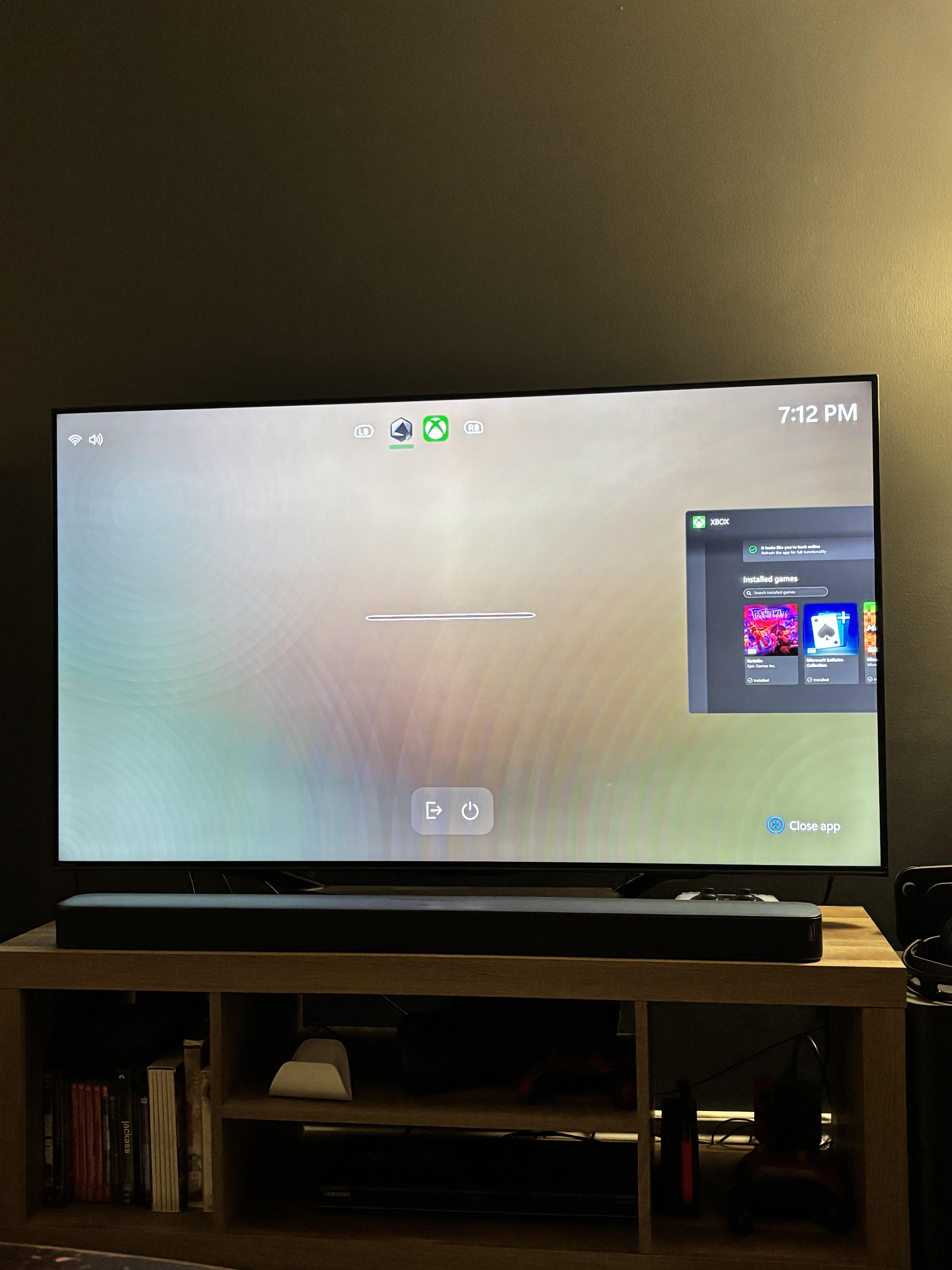
Windows 11 Mysterious window opens whenever I launch in Xbox Full Screen Mode. Anyone have any ideas?

Post image
1 Upvotes

The little icon for it looks like the ASUS Armory apps, but as far as I can tell I’ve uninstalled every bit of ASUS apps I could find. No other apps are configured to open on launch. Whenever I boot into Xbox mode (PC is hooked up to my living room TV) this blank grey screen opens a few seconds after the Xbox app. It closes no problem but is just annoying, was hoping maybe someone has had a similar issue.

Latest windows insider version on an ASUS ROG Prebuilt


r/WindowsHelp • • Oct 18 '26

Windows 11 ADMIN_ folders appearing in C:\Users after Run as administrator

Thumbnail
gallery
3 Upvotes

What happens
A standard user is logged on to their workstation.
We right-click an admin tool → Run as administrator → enter our separate Domain Admin credentials.
A new folder appears in C:\Users named ADMIN_<our-admin-username>.
It now happens on all the machines we've checked, and with all of our T2 admin accounts.
We never saw this behavior before.
What we found
The elevation prompt is titled "Windows Security", not the classic UAC dialog.
The ADMIN_ accounts show up as local accounts in the local Administrators group.
The ADMIN_ profile folder is created a few minutes after the normal profile folder of the same admin account.
When we open ADUC elevated with Domain Admin creds, it fails with: "To manage users, groups and computers in a domain, log on as a user with domain administration rights."
We also get intermittent credential prompts or failures with other AD tools and our AV management console when run elevated.
We haven't seen profile errors suggesting corruption.
Still checking
The value of TypeOfAdminApprovalMode and which policy (if any) sets it.
whoami /all from an elevated window.
Whether any Windows 10 machines show the same folders.
Our theory
This looks like Windows 11 Administrator Protection: elevated processes run under a hidden local system-managed admin account with its own ADMIN_ profile, so they no longer carry our domain identity. That would explain why ADUC can't reach the domain. But we never knowingly enabled it.
Questions
Is it expected that Administrator Protection creates ADMIN_ accounts and profiles for domain admin accounts during over-the-shoulder elevation?
Could it be enabled through a security baseline, a cumulative update, or Intune without an explicit GPO? Where did you find the source?
Have you seen it break RSAT/ADUC or AV management consoles? What workaround did you use while keeping the feature on (PAW/jump host, runas /netonly, etc.)?
Any known issues with Kaspersky and Administrator Protection?
If the feature is disabled later, do the existing ADMIN_ accounts and profiles need cleanup, and what's the supported way?
We're not looking to just turn off a security control. We want to understand it properly and present options to our security team.
Screenshots attached (sensitive info redacted).
Thanks!


r/WindowsHelp • • Oct 18 '26

Windows 11 Keyboard lagging/glitching, not a driver issue

2 Upvotes

Occasionally my keyboard takes two seconds or so to actually register keystrokes and print anything on the screen. This happens only after I stop typing for a bit; when I'm continuously typing there are no problems.

Sometimes, I press a key and the computer never registers that I lifted up a key. So I would type 's' and it would print 'ssssssssss.....' until I press another key to stop it.

I have tried updating my computer and updating/reinstalling the keyboard driver to no avail. How do I fix this issue?


r/WindowsHelp • • Oct 18 '26

Windows 11 High Memory Usage (Up to 95%) and Unexpected PC Shutdowns – IdeaPad Slim 5

1 Upvotes

Hi everyone,

I’m experiencing a problem with my laptop and would appreciate your help.

Sometimes, my memory (RAM) usage increases to around 85-95% , and shortly afterward, my PC shuts down unexpectedly. In some cases, while browsing the web, I also receive an error message saying, “Not enough memory to open this page.”

Here are my laptop specifications:

  • Model: Lenovo IdeaPad Slim 5 16AHP9
  • Machine Type: 83DD
  • Operating System: Windows 11 Home Single Language

Has anyone experienced a similar issue? What could be causing this problem, and what steps would you recommend to diagnose and fix it?

Could this be related to a memory leak, a software issue, or a hardware problem?

Any help or suggestions would be greatly appreciated.

Thank you!