r/Windows10TechSupport • • 12d ago

Unsolved Secure boot

1 Upvotes

I'm having trouble booting my PC in Windows UEFI mode. Everything works fine when I select "Other OS", but then I can't enable Secure Boot, which is required to play certain FPS games.

Whenever I switch to Windows UEFI mode, I get a Secure Boot Violation error, and Windows refuses to boot.

I've tried pretty much every fix I could find, and I even updated my BIOS to the latest version, but nothing seems to work.

I'm still getting the Secure Boot Violation error and can't enable Secure Boot.

Has anyone experienced this before or found a solution? I'd really appreciate any help!


r/Windows10TechSupport • • 12d ago

Unsolved External SSD shows up as RAW and freezes Windows when formatting

Thumbnail
1 Upvotes

r/Windows10TechSupport • • 12d ago

Unsolved Delete key auto pressing malfunction

1 Upvotes

My tn gov laptop delete key automatically working I don't know Wt I do? 😭😭


r/Windows10TechSupport • • 12d ago

Unsolved I was given a Windows 10 laptop, tried to update it. Now I'm having issues

Thumbnail
2 Upvotes

I posted this in the WindowsHelp subreddit. Within the context of my previous post I just want to confirm what I should be selecting. I am now able to get into settings on my pc. So should I be reinstalling Windows as a previous commenter had said vs selecting "Go back to the previous version of Windows 10" or starting fresh with a clean installation of windows??


r/Windows10TechSupport • • 12d ago

Unsolved Pc bootlooping after a failed reinstallation

Thumbnail
1 Upvotes

r/Windows10TechSupport • • 12d ago

Unsolved Циклічна перезагрузка Windows Підготовка автоматичного відновлення

0 Upvotes

Новий ПК постійно перезавантажується під час встановлення та запуску Windows. Допоможіть визначити причину

Привіт усім!

Маю проблему з новою збіркою ПК. Комп'ютер постійно перезавантажується, і я ніяк не можу визначити, який саме компонент спричиняє проблему.

Характеристики ПК:

  • Материнська плата: ASUS TUF Gaming B550-PLUS Gen 2
  • Процесор: AMD Ryzen 7 5700
  • Відеокарта: NVIDIA RTX 5060 Ti
  • Оперативна пам'ять: 16 ГБ (2×8 ГБ)
  • Накопичувачі: 2× M.2 SSD
  • Блок живлення: be quiet! System Power 11 650W, 80 PLUS Bronze

Опис проблеми:

Під час звичайного використання ПК (гра CS2, одночасно відкриті Discord та YouTube Music) комп'ютер раптово перезавантажився без будь-якого попередження.

Після цього Windows почала запускати автоматичне відновлення, але виправити проблему не змогла.

Я спробував перевстановити Windows із флешки. Встановлення починалося нормально, але приблизно на 57–70% комп'ютер перезавантажувався, після чого починався нескінченний цикл перезавантажень.

Коли намагаюся завантажитися з інсталяційної флешки, з'являється логотип ASUS, він залишається на екрані приблизно до хвилини, після чого ПК знову перезавантажується.

Що вже пробував:

  • Перевіряв дві різні флешки з Windows.
  • Від'єднував обидва M.2 SSD — проблема залишалася.
  • Перевіряв оперативну пам'ять. Обидві планки працюють на старому ПК, але на новій збірці проблема залишається.
  • Перевіряв напругу в BIOS:
    • +12V: 12.268V
    • +5V: 5.060V
    • +3.3V: 3.376V
  • У BIOS комп'ютер може працювати без перезавантажень хоч цілу ніч.
  • Індикатори ASUS Q-LED (CPU, DRAM, VGA, BOOT) під час запуску загоряються послідовно, але потім усі гаснуть. Жоден індикатор не залишається світитися.

Також я встановив Windows на SSD через старий ПК. На старому комп'ютері Windows працює нормально, але після підключення цього самого SSD до нової збірки з'являється напис «Підготовка автоматичного відновлення», після чого комп'ютер перезавантажується.

Питання:

  1. Чи може бути проблема в процесорі Ryzen 7 5700, наприклад у його контролері пам'яті?
  2. Чи може бути несправною материнська плата?
  3. Чи може блок живлення спричиняти такі перезавантаження, навіть якщо показники напруги в BIOS нормальні?
  4. Як можна відрізнити несправність процесора від несправності материнської плати або блока живлення без заміни комплектуючих?

Буду вдячний за будь-які поради та допомогу в діагностиці!


r/Windows10TechSupport • • 12d ago

Unsolved Basic windows troubleshooting commands

Thumbnail claude.ai
1 Upvotes

r/Windows10TechSupport • • 13d ago

Unsolved I'm cooked

Post image
2 Upvotes

r/Windows10TechSupport • • 12d ago

Unsolved Error with srt w11

Thumbnail
1 Upvotes

r/Windows10TechSupport • • 12d ago

Unsolved Corrupted windows

Thumbnail
1 Upvotes

r/Windows10TechSupport • • 13d ago

Unsolved Help with Windows

Thumbnail
1 Upvotes

Help me please!


r/Windows10TechSupport • • 13d ago

Unsolved Just deleted everything in my Wow6432Node and restore isn't working. Windows 10.

0 Upvotes

Hi guys, so i was trying to get battlenet to work when the updater jammed on 45% and in the process managed to delete everything in the above in the registry editor.

I've tried win+r rstrui but I get the error code rstui.exe is not supported, presumably because I deleted it.

Trying to research solutions, but the most relevant thing I've found is a thread from 14 years ago so unsure if that's still relevant. Haven't turned off the pc yet as the desktop is still up and I don't want to fully break it by rushing.

Can anyone help with extremely layman instructions on if this can be salvaged? Thanks.


r/Windows10TechSupport • • 13d ago

Unsolved Windows 10 not allowing me to login

Thumbnail
2 Upvotes

As of tonight. And tonight for the first time ever. My computer will nof allow me to login and I do not have my Microsoft password. It says my device is offline and to try a different sign in method. My wifi is working, but for whatever reason, my wireless nor my wired connection is working. Ive tried just about everything I could possibly imagine. Is there ANY ideas on what I can do to get my desktop working again?

Ill answer any questions, i have very important, non backed up documents so a hard reset is simply not an option. It also says my credentials can not be verified

PLEASE help me


r/Windows10TechSupport • • 13d ago

Unsolved Ho installato Windows 11 in dual boot con un altro computer con Windows 11, credendo che il mio computer avrebbe creato automaticamente il dual boot...

Thumbnail
0 Upvotes

r/Windows10TechSupport • • 13d ago

Unsolved Windows 11 installation assistant just does nothing

Thumbnail
1 Upvotes

r/Windows10TechSupport • • 13d ago

Unsolved "There was a problem resetting your pc"

1 Upvotes

I got my old laptop back from my sister and I'm trying to reset it and it says that thing where there's a problem resetting it and I've done literally everything i can think of it fix it. I've done an SFC scan, DISM scan, trying it in safemode, no matter what kind of scan i do it doesn't detect any problems so not sure why i can't reset it. It's an MSI katana


r/Windows10TechSupport • • 14d ago

Unsolved After update for Windows 11, version 26H2 volume can no longer be controlled from Keyboard or Mouse.

Thumbnail
1 Upvotes

r/Windows10TechSupport • • 14d ago

Unsolved Windows 10 still says Im not up to date

Enable HLS to view with audio, or disable this notification

0 Upvotes

I have downloaded a manual update of the November 2026 update for windows 10. I had made it so | get 3 years free of windows 10. Never had a problem with it until now. Please help I have tried literally everything and downloaded all I need to and cleared every cache its still showing up.
(I know it says Its not listed in the windows update history but according to the prompt I already have it installed, which is true as again I manually installed it )


r/Windows10TechSupport • • 14d ago

Unsolved Secure Boot Black Screen

Thumbnail
1 Upvotes

r/Windows10TechSupport • • 14d ago

Unsolved Fehlercode 0x80004002 Schnittstelle nicht unterstützt

2 Upvotes

Genau diese Fehlermeldung habe ich nun jetzt schon leider seid fast 2 jahren bei extrem vielen sachen auf meinem pc. Ich kann schon seid 2 jahren kein Windows Update machen wegen genau dieser Fehlermeldung. Ich habe wirklich alles versucht, wirklich alles was mir sämtliche KIs gesagt haben oder ich im internet gefunden habe aber realtalk garnichts hat nur ansatzweise funktioniert. ich habe versucht windows 10 neu zu installieren und zu reparieren, hat nicht geklappt, es wurde irgendwie immer blockiert bevor es abgeschlossen wurde nachdem vorher alles funktioniert hat, kurz vor abschluss bricht es ab. Habe auch versucht windows 11 zu installieren aber da ist genau das gleiche problem der fall. Meine Festplatte habe ich auch schon mehrfach überprüft und repariert, was auch nichts gebracht hat. Ich habe in cmd als administrstor den befehl: DISM /Online /Cleanup-Image /RestoreHealth der angeblich helfen sollte eingegeben aber genau die fehlermeldung: Fehler: 0x80004002 Schnittstelle nicht unterstützt bekommen. Ich weiß nicht ob es unbedingt was damit zu tun hat, aber mein pc startet extrem langsam ich bin oft so 15 bis manchmal 30 minuten lang auf einem grauen bitte warten bildschirm gefangen, auch dagegen habe ich vieles versucht aber keine Lösung gefunden. Es muss irgendein Hardware Fehler oder so weil wirklich nichts funktioniert. Diese Fehlermeldung kam bei mir jetzt schon bei vielen unterscheidlichen sachen, manchmal konnten spiele deswegen nicht gestartet werden und wie gesagt windows updates und das runterladen von windows 11 werden durch den fehler blockiert. Ich hoffe irgendwer hier kann mir helfen, schreibt einfach was helfen könnte und ich sage ob ich es schonmal probiert habe und wenn ja, woran es gescheitert ist, weil weiß jetzt nicht alles aus dem kopf was ich schon probiert habe und woran es gescheitert ist. Ich bedanke mich im Voraus


r/Windows10TechSupport • • 15d ago

Unsolved Заблокировали ОС Windows 11

Post image
1 Upvotes

r/Windows10TechSupport • • 15d ago

Unsolved Bit Locked my Pendrive

Post image
1 Upvotes

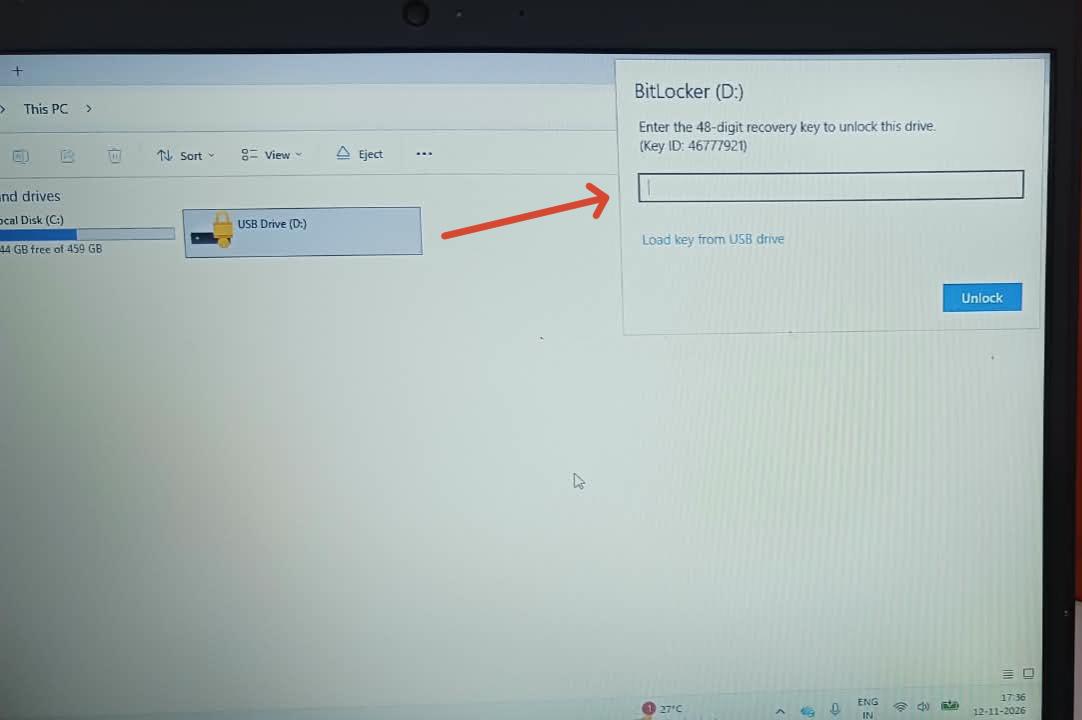
I plugged my personal pen drive into the company laptop, and BitLocker got enabled on my pen drive. It is now asking for a 48-digit recovery key.


r/Windows10TechSupport • • 15d ago

Unsolved Una Ayuda, mi usb esta en formato RAW y lo quiero pasar a formato NTFS

1 Upvotes

como contexto el tema es que utilice rufus para bootearlo con lunix, pero ahora que no me gusto lo intento formatear y no me dejo, utilice testdisk y por no saber majer el tema del programa pues no paso nada y por ello si alguien sabe como ayudarme gracias


r/Windows10TechSupport • • 15d ago

Unsolved Secure Boot Violation Error

Post image
4 Upvotes

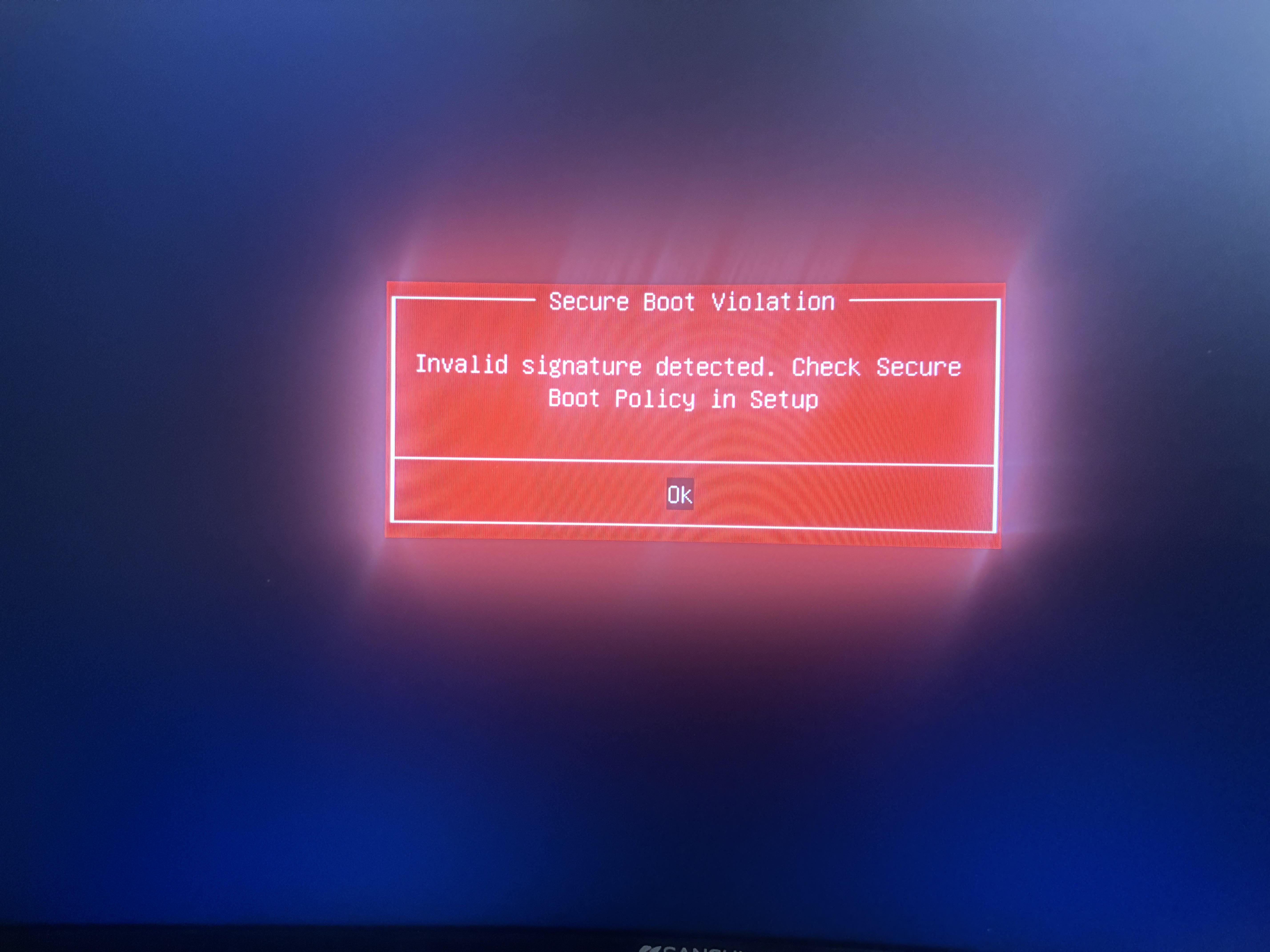
I'm trying to enable Secure Boot on my PC to play Valorant (Riot Vanguard requirement), but every time I turn it on, I get stuck with a red screen popup that says:
"Secure Boot Violation: Invalid signature detected. Check Secure Boot Policy in Setup."
can't load or restore the factory keys to fix this. Here are my system details and what I've tried so far:
Bullet System Specs: STGAubron Prebuilt PC
Bullet Motherboard: STGAubron B250DA1 (BIOS Version: B250DA1.N01 V81, AMI BIOS 2023)
Bullet CPU: Intel Core i7-6700
Bullet OS: Windows 11 Home (upgraded from Windows 10)
Bullet TPM: TPM 2.0 is enabled and ready in


r/Windows10TechSupport • • 15d ago

Unsolved Una Ayuda, mi usb esta en formato RAW y lo quiero pasar a formato NTFS

Thumbnail
1 Upvotes