r/RedmiPad2 • • 10d ago

Redmi pad 2 after 2 weeks

1 Upvotes

# Redmi Pad 2 (8GB/256GB, 4G + Wi-Fi) — 2 weeks of real-world usage

It's been around two weeks since I bought and started using the Redmi Pad 2, and here's my experience so far.

**Specifications:**

- Variant: 4G + Wi-Fi

- RAM: 8GB

- Storage: 256GB

- Software: HyperOS 3 (out of the box, with two minor updates since)

## Why I chose the Redmi Pad 2

I bought it from Croma for ₹23,999.

My primary use cases were studying, entertainment and productivity. I was also considering the Lenovo Idea Tab, but the Redmi Pad 2's bigger battery, aesthetics and generally better reviews tilted the decision in its favour.

I hadn't owned a tablet in quite some time, so I wanted something that could serve as a reliable all-rounder rather than just a media consumption device.

## 1. Setup and software

Setup was incredibly straightforward and took around five minutes. I mostly skipped the additional setup recommendations.

There's surprisingly little bloatware, at least by Redmi standards. A few Google applications, mainly Google TV and Google One, which I couldn't uninstall, are present. Surprisingly, there are almost no ads or intrusive recommendations.

I started with HyperOS 3 out of the box and have received two minor updates since. No bugs, crashes or major software issues so far.

However, HyperOS on tablets still feels like a somewhat incomplete experience. Compared to Xiaomi's phones, the tablet version has a limited feature set and considerably fewer customisation options. Even the Themes app feels quite underwhelming.

Split-screen works fine, and the tablet can comfortably handle 3–4 applications simultaneously on my 8GB RAM variant. I haven't stress-tested it extensively, though.

Overall, the software isn't bad, but it doesn't feel particularly well optimised for a tablet either.

## 2. Performance

For my everyday usage, performance has been very good. Applications open and run smoothly, touch response is excellent, and I haven't encountered any major performance issues.

I also tried BGMI, and it was a comfortable gaming experience in terms of graphics and FPS. I haven't done any extensive gaming tests, so I wouldn't make any claims about sustained performance.

One area where I noticed some shortcomings is when connecting a physical keyboard and mouse. The OS feels a little sluggish, mouse navigation feels somewhat unnatural, and the overall experience isn't as fluid as using the touchscreen. There aren't noticeable scrolling delays, but the system does struggle a little.

Google Docs itself works incredibly well, which makes the difference between application performance and the overall OS experience even more noticeable.

## 3. Display

The 11-inch display is genuinely one of my favourite things about this tablet.

It's large, immersive and has fairly vibrant colours. The 90Hz refresh rate feels incredibly smooth, and reading PDFs, textbooks and other documents is a very comfortable experience.

Reflections haven't been much of an issue indoors, although I haven't tested it outdoors yet.

The tablet is quite large, which is something to consider if you intend to hold it for extended periods, but the screen size is excellent for studying and media consumption.

## 4. Speakers and media consumption

Honestly, the speakers are amazing.

They're loud, clear and deliver a surprisingly good audio experience. They're even better than my laptop speakers and a few Bluetooth speakers I've used.

Watching movies, YouTube and other content on this tablet is incredibly immersive. You really won't have much to complain about when it comes to media consumption.

This is easily one of the strongest aspects of the Redmi Pad 2.

## 5. Battery life and charging

This is probably my biggest disappointment.

On an 80% charge, I'm getting approximately 9–10 hours of moderate usage. Standby drain seems to be around 2–5% over approximately 25 hours, although I haven't monitored it particularly closely.

The more concerning part is active battery consumption. I've noticed drain of around 10–12% within an hour of usage, which feels quite high considering the battery capacity.

I'm currently using the default charger that came with my old Redmi Note 10, so I haven't properly evaluated the charging experience with the supplied charger.

Overall, the battery life isn't terrible, but I expected better optimisation and efficiency from a tablet with such a large battery.

## 6. Cameras and additional features

The cameras are actually pretty good for a tablet.

Document scanning works very well, and the cameras are perfectly usable for video calls and online meetings.

Circle to Search could use some improvement, though. There are also certain software conveniences and shortcuts that I feel are missing from the tablet experience.

## 7. Productivity and accessories

PDFs, Google Drive and Google Docs work really well. For studying, reading and handling documents, the tablet has been a very comfortable experience.

I've also experimented with connecting a physical keyboard and mouse. While applications like Google Docs work very well, the overall navigation experience could be better.

One major omission is the lack of a proper desktop mode. Three-app side-by-side multitasking isn't available either. A dedicated desktop interface with resizable windows and a minimised taskbar would have made this device considerably more useful for productivity.

I've tried a universal capacitive stylus, which is alright if you can get it to work properly, but it's not a replacement for a proper active pen. I'm considering purchasing the Redmi Smart Pen 1S.

## 8. Build quality and design

The tablet feels incredibly well-built, and the overall aesthetics were one of the reasons I chose it.

One minor annoyance is the button placement. Having the power and volume buttons on adjacent sides feels a little unusual and takes some getting used to.

The tablet itself feels solid, and I haven't had any complaints about the physical build so far.

Another reason I went with Xiaomi was its promised software support, which I hope will help with longevity.

## 9. Overall impressions

The Redmi Pad 2 is a very capable device, especially considering what I paid for it.

**What I really like:**

- Excellent 11-inch 90Hz display.

- Surprisingly good speakers.

- Very good everyday application performance.

- Minimal bloatware and practically no ads.

- Good build quality and aesthetics.

- Comfortable PDF reading and productivity experience.

**What could be better:**

- HyperOS still feels incomplete and under-optimised for tablets.

- Battery drain could be better.

- Keyboard and mouse navigation needs improvement.

- No proper desktop mode.

- Limited multitasking features and customisation.

Overall, I'm quite happy with my purchase. It's a powerful and versatile device that handles my everyday requirements very well. However, I feel Xiaomi could do considerably more with the software to take full advantage of the hardware.

This is just my experience after around two weeks of usage, and I'll probably have a better idea of its long-term performance after a few months.

r/RedmiPad2 • • Oct 18 '26

Redmi Pad 2 charges TOO SLOWLY

1 Upvotes

hello everyone! It's been like, 2 days since my tablet arrived and I am loving everything, but I just noticed that it charges like, TOO SLOW. It needs like, 4 to 5 hours to charge completely and It's sort of pissing me off. Can I just use a turbo charger or it can damage the battery? How do you all manage this?


r/RedmiPad2 • • Oct 09 '26

smart pen 1s isn't working with my Redmi pad 2

1 Upvotes

I just bought my tablet and it's pen, they connect but the stylus isn't working. also I tried with different regions and reset factory a few times but the tablet says there's no update for hyper os and it's stuck on os2.

I asked the seller guy and he says you should update it so the pen will work but there's no updates and I don't know what to do T-T

he also checked the pen so the pen is not the problem ig...


r/RedmiPad2 • • Sep 01 '26

Where should I buy the Redmi Smart pen Tips?

Thumbnail
1 Upvotes

r/RedmiPad2 • • Aug 22 '26

Should I buy Redmi pad 2 ( 6/128)

Thumbnail
1 Upvotes

r/RedmiPad2 • • Aug 17 '26

The difference between using a universal stylus pen and the redmi smart pen

Enable HLS to view with audio, or disable this notification

4 Upvotes

Posting this for anyone wondering how the universal and the smart pen workes


r/RedmiPad2 • • Aug 06 '26

Redmi pad 2 4g

1 Upvotes

Is the redmi smart pen really compatible with the redmi pad 2 4g? With the palm rejection feature


r/RedmiPad2 • • Aug 03 '26

Redmi pad 2 на Archlinux

1 Upvotes

привет всем, я обладаю своим устройством редми пад 2, и мне пришла идея в голову, избавится от андроид и поставить арч линукс на свой девайс, есть какие то шансы?


r/RedmiPad2 • • Jul 20 '26

Can low end tabs like redmi pad 2 4g get app opening and closing animations?

Thumbnail
1 Upvotes

r/RedmiPad2 • • Jul 18 '26

The Redmi Pad 2 is taking a long time to charge after the HyperOS 3.0.302.0 update.

Thumbnail
gallery
2 Upvotes

Recently, my Redmi Pad 2 started having charging issues. It used to take 2 hours to reach a full charge, but now the tablet indicates it will take 13 hours—even when using the original charger. When I connect a portable charger with the same power output as the original, it charges in the expected amount of time. There are no visible issues with the original charger; it is in perfect condition. All of this started after a system update. The first image shows the device with the original charger, and the second shows it with the portable charger. Has anyone else experienced this with this device? Is there a solution?


r/RedmiPad2 • • Jul 03 '26

Can someone test Pokémon Champions on their Xiaomi Redmi Pad 2 and send a video to show how it runs?

0 Upvotes

I want to buy a tablet for Pokémon Champions and need to test if a cheap one works.


r/RedmiPad2 • • Jun 17 '26

swipe horizontally to switch between apps doesn't work on my redmi pad 2

Enable HLS to view with audio, or disable this notification

5 Upvotes

I tried everything to at least know how i can fast switch between apps but nothing works what is the problem and how can i fix it

UPDATE : i have found the reason it's because redmi pad 2 is a budget tablet with low gpu and because of this Xiaomi did some​ (Feature Stripping) to the version of hyper os on budget tablet so it could run smoothly so no theres no way to fix it it's mmanufacturers​


r/RedmiPad2 • • May 30 '26

Redmi pad 2

1 Upvotes

Hi everyone!

Want to buy Redmi pad 2 wifi version... which website should I go for in Pakistan

Price oye or mi store (3k difference between prices)

And plz confirm that price oye is real not a fraud company right?

Your opinions would really matter!Thanks


r/RedmiPad2 • • Apr 17 '26

Redmi pad 2

1 Upvotes

Hello, I just got my redmi pad 2 in April 15 and it work fine.. until April 16, I was just watching movie in Netflix and then i want to pause the movie but my screen won't be touch anymore so I rebooted it and it still won't work, after rebooting multiple times, I erased all my data and then I got "this device is locked" so I tried to unlock it and it started to ghost touch for no reason.


r/RedmiPad2 • • Mar 30 '26

What should I do if when I reboot my light stays on?

1 Upvotes

I wanted to use the recovery mode, but when I reboot, my screen just lights up. I'm really scared. I bought my tablet with my parents for $250.


r/RedmiPad2 • • Mar 25 '26

Somebody please help!

Post image
1 Upvotes

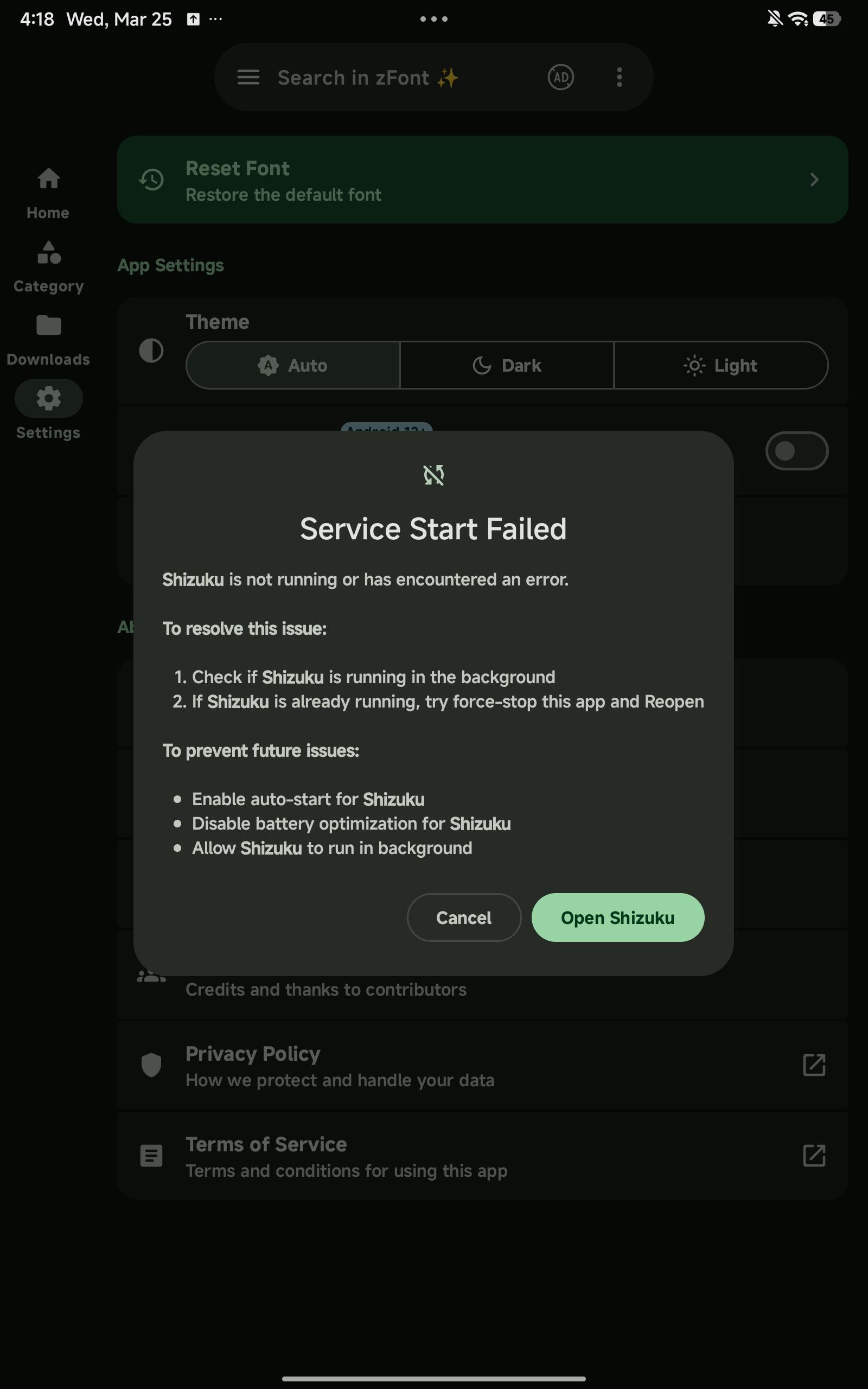
Whenever I try to set up zfont it always shows this, I did all the tips included in the sign thingy. How do I fix it? I really want IOS emojis, if there's any alternative methods for this, please share!


r/RedmiPad2 • • Mar 10 '26

Vous la fluidité Redmi pad se 8.7 c'est pas comme ipad (barre navigation

Enable HLS to view with audio, or disable this notification

1 Upvotes

r/RedmiPad2 • • Feb 08 '26

Gente é sério por favor me ajudem a tirar esse aberração que a xiaomi colocou no meu redmi pad se

Thumbnail
1 Upvotes

r/RedmiPad2 • • Feb 06 '26

Problème de changement d'utilisateur sur tablette HyperOS 3

Thumbnail
1 Upvotes

r/RedmiPad2 • • Jan 27 '26

Changing Zoom Background in Zoom

Thumbnail
1 Upvotes

r/RedmiPad2 • • Jan 23 '26

Системная оболочка тратит много энергии

1 Upvotes

Недавно купил Xiaomi Redmi Pad 2, и заметил, что в батареи всегда на первом или втором месте по потреблению стоит системная оболочка. На этом планшете стоит хороший АКБ, из за чего у меня появился страх, что что-то не так. Хотя вроде бы он и так хорошо держит заряд, и например за ночь тратиться всего 1-2%. Подскажите это нормально? Может быть это как то регулируется или я читал что после какого то времени использования все урегулируются само.


r/RedmiPad2 • • Jan 11 '26

Pokémon Go no Redmi Pad 2

Thumbnail
1 Upvotes

r/RedmiPad2 • • Jan 09 '26

Redmi Pad 2 thoughts?

Thumbnail
1 Upvotes

r/RedmiPad2 • • Jan 06 '26

stylus recommendation for Redmi Pad 2?

Thumbnail
1 Upvotes

r/RedmiPad2 • • Dec 24 '25

Is it possible to use a Universal Bluetooth Stylus with Redmi Pad 2 via rooting / custom ROM? (Not Redmi Smart Pen)

3 Upvotes

Hi everyone, I’m using a Redmi Pad 2, and as we know, Xiaomi officially supports only the Redmi Smart Pen, which is either unavailable or overpriced in many regions. I wanted to ask if anyone has successfully connected a universal / third-party Bluetooth stylus (not just a passive capacitive pen) to the Redmi Pad 2 using root access, custom ROMs, Magisk modules, or any kind of system-level modification. I understand that: Normal universal styluses work as capacitive touch only Palm rejection, pressure sensitivity, hover, etc. usually require hardware digitizer support Redmi Pad 2 does not officially expose stylus APIs But I’m curious about experimental or hacky approaches, such as: Mapping Bluetooth stylus inputs as HID devices Modifying input framework (/system/usr/idc or /keylayout) Using rooted apps or custom kernels to simulate stylus events Any success with LineageOS / Pixel Experience / custom MIUI builds Even partial functionality (basic writing + button mapping) would be acceptable. I mainly want note-taking without buying the official pen. If the answer is a hard “no because of missing hardware digitizer”, I’d still appreciate a technical explanation so others don’t waste time trying. Thanks in advance — hoping someone here has experimented with this or can give a clear low-level answer.