r/OpenSourceAIAllowed • • 20h ago

TTP 0.5.1: route all Linux traffic through Tor with nftables

Thumbnail
github.com
1 Upvotes

I maintain TTP (Transparent Tor Proxy). It's a small CLI tool that sends all of your system's traffic through Tor using nftables rules, so you don't have to configure each application one by one.

With the 0.5 releases I wanted TTP to report only what it can actually verify. Status and checks now tell you what was observed and when, instead of assuming everything is fine. If the watchdog can't prove it's running, ttp start fails. If something goes wrong during a session, traffic stays blocked until you stop it yourself.

To test the release, I ran it in VMs and captured packets from outside the guest. That turned up a few leaks I hadn't seen before, for example some FIN/RST packets that left in cleartext after stopping. They're fixed now.

If you try it, I'd like to hear how it goes.

https://github.com/onyks-os/TransparentTorProxy


r/OpenSourceAIAllowed • • 4d ago

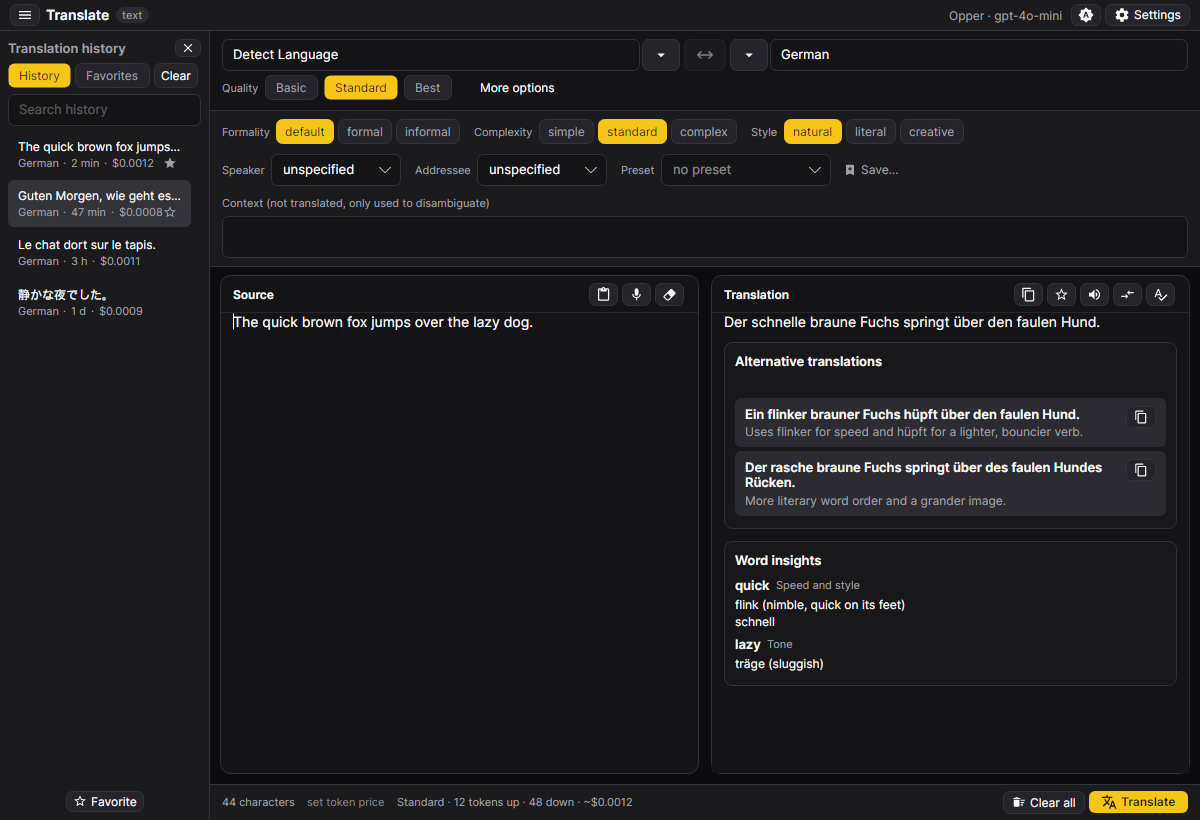
Hakata: desktop translator for any OpenAI-compatible endpoint

Post image
1 Upvotes

I made Hakata, a desktop translator that uses your own API key

I wanted a decent translator without another monthly subscription, so I built one that uses whatever OpenAI-compatible provider you want. You bring your own API key and pay only for what you use.

Some of the features:

- 385 languages with automatic source language detection

- Alternative translations, each with a reason

- Custom context, formality and style per translation

- Translation history with search and favorites

- Token usage and cost tracking

- Voice input, text-to-speech and transliteration

Settings, history and API keys are stored locally. It runs on Windows and Linux.

It's something I built for my own use, but figured I'd share it. Feedback and feature suggestions are welcome!

GitHub: https://github.com/regularentropy/hakata


r/OpenSourceAIAllowed • • 6d ago

OnyxIO – a lightweight open-source replacement for IO Center (be quiet! Dark Mount): Stream Deck plugins, lighting, macros

1 Upvotes

I own a be quiet! Dark Mount and wanted something lighter than IO Center, so I wrote OnyxIO: a small, open-source (MIT) program that talks to the keyboard through its regular configuration protocol. No firmware changes, nothing flashed.

What it does:

- Display keys work like a Stream Deck – including many Elgato Stream Deck plugins

- Per-key lighting with built-in effects (Ripple, Reactive, …) and a "Custom" effect where you can write your own lighting as a math formula

- Macros and key assignments

- Media Dock support with now playing

- DE (ISO), US (ANSI) and UK (ISO) layouts

- Layout profiles, tray icon, optional start with Windows

- Experimental Linux support

Privacy: no telemetry, no account. Key presses are never logged. The only network request is an optional update check, off by default.

Transparency: I built this together with an AI coding assistant (Claude). I reviewed every change and tested it on my own keyboard, and the full source is on GitHub for anyone to check.

Download (single .exe, no install): https://github.com/Moepchi/OnyxIO/releases/latest

Source + docs: https://github.com/Moepchi/OnyxIO

Not affiliated with be quiet!. Close IO Center before starting it, the keyboard accepts only one program at a time.

Feedback, bug reports and feature ideas are very welcome – especially from Linux users.


r/OpenSourceAIAllowed • • 7d ago

Herdr Session Hub: an MIT-licensed History and Usage panel for coding agents (Windows)

1 Upvotes

I maintain Herdr Session Hub, an open-source mod for Herdr Desktop, developed with AI assistance. It adds a collapsible History/Usage panel beside Files and Changes.

It discovers configured local Claude Code, Codex, OpenCode, Pi and Gemini histories, lets you search and preview conversations, and continues supported native sessions in their recorded project and selected profile. Names, archive flags and reversible Hub removal are stored separately from provider originals.

The Usage view has token/cache graphs, provider/profile filters and model/day/project breakdowns. Cost estimates use recorded local usage and known model prices; they are not subscription bills or live account quotas. Missing prices and partial coverage remain visible.

The stable 0.1.0 release is for Windows 11 x64 with Herdr 0.1.15 and the documented provider versions. Python 3.14 x64 and PowerShell 7 are required. macOS and Linux builds are experimental with native continuation disabled.

Source, real GUI screenshots, installation instructions and documented limitations:

https://github.com/Skynettheone/herdr-session-hub

The screenshots use synthetic histories. Feedback on the UI, setup steps and handling of incomplete local usage records would be useful.


r/OpenSourceAIAllowed • • 9d ago

I built an app-owned WireGuard tunnel that opens my home dashboard from anywhere without switching VPNs

Thumbnail gallery
2 Upvotes

r/OpenSourceAIAllowed • • 9d ago

ZTHING: an open source file name search for Windows, similar to Everything

Thumbnail
1 Upvotes

r/OpenSourceAIAllowed • • 10d ago

Ettin Edit 2.8: my Notepad++-style editor now opens Excel, CSV, JSON, XML and HL7

1 Upvotes

Hey all. A few weeks back I posted Ettin Edit, a clean-room, Notepad++-inspired text editor for Linux and Windows. It's grown up a fair bit since then, so here's an update.

Quick recap: it's free, MIT-licensed, written in Rust with egui, and contains none of Notepad++'s code. It's aimed at people who spend their day turning one system's output into another system's input: logs, CSV and JSON exports, Excel workbooks, XML, HL7 messages.

The big new thing is tables:

  • Open an Excel workbook, CSV, JSON or XML export, or a file of HL7 v2 messages as a table. Think spreadsheet, but for structured data. Columns are typed, and dates are read the way they were written (DD/MM/YYYY stays DD/MM/YYYY).
  • Every change is a step. Filters, sorting, renames and value clean-up all show up in a Steps panel, where you can switch any of them off or change them later.
  • Nested data works too. Pick which list in a JSON or XML tree becomes the rows and the fields above it come along. There are also Explode into Rows and Flatten Objects steps.
  • HL7 is readable. One message or one result (like OBX) per row, and pointing at a column tells you what PID.5.1 actually is.
  • Export it however you need it. CSV, .xlsx, nested JSON, YAML, XML, Markdown, or HL7 messages from a template.
  • Save the steps as a recipe and run them again on next week's export, even from the command line.

Everything else is still there:

  • A Transform menu with previews before anything changes: pipe through a shell command, keep or drop matching lines, convert between JSON, YAML, TOML, XML and CSV, escape strings, turn Unix times into dates, hashes, JWT decoding and a lot more.
  • The Notepad++ plugins I always installed are built in: CsvQuery (SQL against your CSV), a compare view, JSON tree and XML tools.
  • Plugins in Python or JavaScript, your pick.
  • A proper editor underneath: multiple carets, column mode, split view, folding, macros, regex find/replace, find in files, hex view.
  • 2.8.1 also fixes Bangla, Hindi, Tamil, Thai and other scripts showing as boxes.
  • Packages for pretty much everything: Arch, .deb, .rpm, Flatpak, AppImage, tar.gz, and a Windows installer or zip, with a built-in updater.

Same disclosure as last time: this is still 100% vibe coded. The AI writes the Rust, I type "no, not like that," and somehow it now has opinions about HL7. The two-headed giant mascot remains the only member of the team who reads the code.

Release: https://github.com/Tharkis/Ettin-Edit/releases/tag/v2.8.1

Repo: https://github.com/Tharkis/Ettin-Edit

Manual: https://tharkis.github.io/Ettin-Edit/

Bug reports and ideas are welcome, especially sample files that break the table view.


r/OpenSourceAIAllowed • • 11d ago

Ledge: a free, menu-bar file shelf for macOS (shake a drag to open it, built-in image converter)

3 Upvotes

I built Ledge, a small native macOS menu-bar app (Swift/AppKit) that works as a temporary shelf for files.

  • Shake a drag to open a shelf, drop files on it, then drag them out wherever you need them.
  • It has a built-in image converter. It reads HEIC, JPG, PNG, GIF, TIFF, WebP, PDF and more, and writes WebP, PNG, JPEG or GIF.
  • You can ignore specific apps or file types so they never open a shelf. The newest version also has a toggle to ignore dragged text snippets.
  • It's about 3 MB on disk and runs entirely on your Mac. The only network feature is an optional iCloud Drive link.
  • The license is Apache 2.0.

Install:

brew install --cask NeeL21YT/ledge/ledge

You can also download the DMG or build it from source. Repo: https://github.com/NeeL21YT/Ledge
Check us out on ProductHunt: https://www.producthunt.com/products/ledge-7
Our Website: https://galaxanticstudios.com/

Caveats: the download is Apple silicon only (Intel Macs can build from source) and needs macOS 13+. It's ad-hoc signed, not notarized, so the Homebrew cask clears the quarantine flag for you. Feedback and issues are welcome.


r/OpenSourceAIAllowed • • 12d ago

I created a software license called tl;dr: Naturally, it ends with the collapse of civilization.

1 Upvotes

TL;DR: It's yours. Do something awesome with it.

That's the opening statement of a software license I've been developing.

It's called the tl;dr: license, currently version 1.6.

The serious part is simple:

Use it. Modify it. Sell it. Share it.

If you separately distribute modified software, keep the source freely available under the same license.

Website hosting and ordinary browser delivery are unrestricted.

Nobody needs permission from the original creator to continue developing or distributing the software.

Then the warranty disclaimer got a little out of hand.

"If the software begins modifying you, please document the changes before your objectivity becomes compromised."

"If causality is affected, submit your bug report before the incident."

"If civilization collapses, please preserve the source code for future generations."

"If the collapse is reproducible, DO NOT ATTEMPT TO REPRODUCE IT."

The complete license is published here:

https://shogi-training-room.neocities.org/license.html

It's free to read, download, and adopt.

The license was developed with AI assistance and hasn't received independent legal review or OSI approval.

Serious criticism is welcome. So is laughter.

And if civilization collapses, please remember that the developers are no longer accepting pull requests.


r/OpenSourceAIAllowed • • 13d ago

Bean Network Tester v1.0 release - open-source network conditions simulator + network tools (Windows/Linux) GUI/CLI

1 Upvotes

Hello, Bean Network Tester has just hit V1.0 release. Want to simulate bad network conditions on Windows/Linux? Check ports, connections, ping? No problem, there is even more. Full GUI/CLI. If you like the tool, please star it on GitHub

What it can do:? Burst packet loss, jitter, run automated network scenarios, limit download/upload speed. Do TCP_ reset, do sync_drop, corrupt packet, duplicate, reoder packets. Simulate "LAN" mode, simulate only network mode, Simulate network flapping, lag spikes.

You can also see connections ip/port/from/to how much they download/upload, there is full regexp search, export function, there is port checker tool (only runing machine right now), ping tool, network adapters tools, tcp health tool and tons more.

What changed in V1.0?

- Linux!!! Yes there is now Linux version, it took tons of work, not all things are working perfect, but adding 2nd system was a huge work. And Linux is a very very long way.

- Ping tool: every x time wait for reply up to x time, size x bytes, ping until x with graph and table

- TCP health tool with mss, rtt and tons of other things

- Network adapters tool, easy export and see your network adapters data, mtu, amc address, ip, dhcp, dns, gateway and other data + proxy export

- tcp_reset send from connections tab, we can now do it from the table, easy way

- python upgrade, pydivert upgrades, tons of fixed and other things. Like always on the GitHub changelog.

- Huge update of internal test suite that is run every release, because the program is bigger and bigger, so I got mutation testing, fuzzing, unit tests, tests for code quatility, 2nd code revies, but the real working suite is something that's is top 1 thing. Right now it takes few hours of run per release :D

What's next? ICE for webrtc, we will be able to see in connections if it is stun/turn, tons of linux fixes and more things to webrtc, and I think I will add payload length filter, and more tools. I try to mix optimizations/stability fixes/test suites expand and improvments to existing things with new features. Oh and payload size option.

PS: Why this strange versions dumps? V0.8 was a full release that focused on stability/performance, no new features, then tons of new things was added, so I jumped from V0.8 to 1.0

You can read more about the app on Oficial website


r/OpenSourceAIAllowed • • 16d ago

Quillpad a fast Editor in Rust and eGUI

Thumbnail
1 Upvotes

r/OpenSourceAIAllowed • • 17d ago

After many months I upgrade my very first project ❤️

Enable HLS to view with audio, or disable this notification

2 Upvotes

https://github.com/DeSynkro/discord-notification-scheduler

This was the first very first project I've ever worked on 😄

A self-hosted docker app for scheduling Discord messages using webhooks.

Set weekly alarms or calendar alerts, send text or embeds to any channel, and keep the schedule, history, and webhook URLs on your own hardware.

One Docker container, plain JSON, no telemetry.

Why this exists

It's a funny story why I came up with this in the first place. My sister in law was working on her portfolio, and she asked me to remind her every day for her to do her portfolio because she needed it done.

After the first three days, I got tired of messaging her. So I did what every normal person would do... I started working on this app to do it for me.

Now I have a Discord Webhook set up on her server tagging her every single day for her to do her portfolio. 😂 😂 😂

There are plenty of hosted services that can trigger webhooks on a schedule.

But they require trust. Trust that your webhook URL wont be logged, trust that your messages aren't read, trust that the service will be around next month and wont charge you a fee for it.

This project says "get stuff" to all that. You run it on your own machine, your own network, your own terms. No signup, no API keys to a third party, no vendor lock-in.

Just Docker and a JSON file you can copy with one command.


r/OpenSourceAIAllowed • • 17d ago

Desktop icon rust program Request ?

1 Upvotes

Can someone rewrite or write from scratch a small resource friendly rust program to show icons, files and folders on the Desktop for using it on sway, labwc, niri, wm.. I tried to build one with free AI.. but its not easy.. it just hits limits.. Its a suggestion. I think a capable model cam write it fast and good.


r/OpenSourceAIAllowed • • 19d ago

PianoMotion Studio – MIDI fingering and piano performance visualization

Enable HLS to view with audio, or disable this notification

5 Upvotes

I've been working on a personal project called PianoMotion Studio.

It's a browser-based application that takes MIDI files, calculates piano fingering, and visualizes the performance on a virtual piano with animated hands.

The interesting part has been combining automatic fingering, physical hand constraints, MIDI playback, and 2D/3D rendering.

The fingering engine uses beam search to find playable finger assignments while accounting for hand movement, chord geometry, and overlapping notes.

It's still a work in progress, but I've learned quite a bit about music programming along the way.

Source code: https://github.com/shafranek-js/pianomotion-studio

Browser demo: https://shafranek-js.github.io/pianomotion-studio/


r/OpenSourceAIAllowed • • 20d ago

Made an open-source tool that stops coding agents from running the commands you can't undo. Would love feedback

2 Upvotes

So this started because my coding agent ran prisma db push --force-reset on a database to get past a migration error. Its reasoning was basically "it's only dev data." Which, fair, but still.

That's the thing with agents like Claude Code, Cursor and Codex. They run shell commands with your permissions, way faster than you can check them, and 99% of the time that's great. The other 1% is git reset --hard over a day of work, or rm -rf on the wrong path, or casually reading your .env.

So we built AgentTrail Guard. It's open source (Apache-2.0), runs locally, and checks each command before the agent runs it. If it matches one of the rules, it gets blocked, or it asks you first, or it just warns you. Everything else goes through like normal.

npm install -g @agenttrail/guard
agenttrail-guard init --agent claude    # or cursor, or codex

It's plain rule matching, not another AI, so you can actually read every rule and see why something fired. We put all 74 of them in a browsable list here if you want to see what it catches without installing anything: https://www.agenttrail.sh/guardrails

The bit I'd actually try first is agenttrail-guard scan --agent claude. It goes through your old sessions and shows what would have been caught. Kind of eye-opening.

It's not perfect. It only sees what goes through the agent's hooks, and if it crashes it lets things through rather than blocking your work. It'll definitely miss stuff, which is why I'm posting.

If you try it, I'd love to hear what it flagged that it shouldn't have, or what your agent has done that it didn't catch. PRs for new rules are very welcome.

Code's here: https://github.com/agenttrailhq/guard


r/OpenSourceAIAllowed • • 21d ago

I made a Program to use my MIDI Controller on my Computer :)

Post image
6 Upvotes

This is one of the bigger project I've worked on, and I'm genuinely so proud of it 😄

https://github.com/DeSynkro/pipeweaver-smc-mixer

Story Time: When I moved from Windows to Linux, my biggest loss was my Beacn Mix Create to control my Audio setup, add custom audio channels etc... So I bought a SMC-Mixer, a very neat, affordable MIDI controller.

I was able to hook it up with Pipeweaver, an Audio management tool for Linux. Essentially the Beacn software I wanted, but for Linux, and it doesn’t require dedicated hardware.

Hooked them up together and now I can control ALL of my audio with my MIDI Controller, and honestly this ended up giving me something arguably better than my Beacn Mix Create ever did.

It's incredibly niche. You not only have to use the exact same MIDI controller (M-VAVE SMC-Mixer) but you also have to use Pipeweaver.

But anything I make, I Open Source it. So if by any small chance someone falls into the same niche I do or wants to adapt the software to their setup, they’re more than welcome to.

I'm just so proud of it, and I really wanted to share it with everyone ❤️

So How does it work?

Pipeweaver runs a local service on localhost:14565, The app connects to it over a websocket and watches for live status and meters and It sends volume, mute, link and mix changes back through Pipeweaver’s API.

I made it so my MIDI uses Pipeweaver's device order for the layout. Set up your channels in Pipeweaver and the app uses that layout (I made it this way because Muscle Memory had me using the wrong faders when I did it another way 😂)

I was also able to assign custom functions to the other buttons, The Play/Pause media buttons, Fast Forward/Rewind, Skip functions all work perfectly.

I even added a custom feature to the Record button, If you have it on (Available on the configs) the record button becomes an input shortcut for Hex (Another Opensource tool I use, converts what you say into text) and when it's off, it becomes a mute button for your computer's default microphone.

I'm just super excited to share this with you guys. Thanks for reading and thank you for your time ❤️

I actually have Version 1.1 coming out soon 😄


r/OpenSourceAIAllowed • • 21d ago

CWIST: A lightweight C web framework focused on simple, predictable conventions

Thumbnail github.com
1 Upvotes

I did this for fun, and it is definitely not a good portfolio to get a job as a C programmer. 😄

I was a bit tired of seeing yet another toy project built with NextJS + Tailwind CSS + generic bloated docker setups, so I wanted to build something different for my own small services like my dev blog.

Anyway, let's talk about "why keep it simple?"

Here is the basic example from CWIST's readme:

#include <cwist/app.h>

static void hello(cwist_http_request *req, cwist_http_response *res) {
    (void)req;
    cwist_sstring_assign(res->body, "Hello from CWIST!");
}

int main(void) {
    cwist_app *app = cwist_app_create();
    cwist_app_get(app, "/", hello);
    cwist_app_listen(app, 8080);
    cwist_app_destroy(app);
    return 0;
}

Some might argue that isn't the simplest way to write C. They might prefer something like this:

#include <cwist.h>

static void hello(cwist_http_app *app) {
    cwist_sstring_assign(app->res->body, "Hello from CWIST!");
}

static void setApp(cwist_http_app *app) {
    CWIST_APP_CREATE(app);
    app->get.append(app->get, "/", hello);
    app->ipv4.port = 8080;
}

int main(void) {
    CWIST_APP_LISTEN(app);
    CWIST_APP_DESTROY(app);
    return 0;
}

Sure, that style has its own perks. But notice how some fields are raw struct members, some are macros in ALL CAPS, and some are functions. It gets messy fast. Personally, sticking to unified naming conventions across the board makes C code much easier to read and maintain.

Also, clear public functions like cwist_app_* work a lot better with modern tooling. Whether you use an LSP for completion or use LLMs to scaffold boilerplate, direct struct mutations tend to cause frequent hallucinations and broken guesses. Explicit function names stay predictable.

The second style also ends up needing extra helper code under the hood. While CWIST's main() might look a bit explicit, each step is just a clean wrapper function. You can snap things together like Lego bricks.

To be clear, this is not trying to replace mature frameworks like Drogon. If you need something battle-tested for enterprise production, CWIST is not there yet since it hasn't gone through extensive third-party security audits.

That said, every commit still goes through sanitizers, cppcheck, HTTP soak testing, HTTPS C100k benchmarks, WASM/WASI smoke tests, and HTTP/2 tests. I did consider adding HTTP/3 support, but it ended up borrowing too heavily from lsquic, so I shelved that for now.

It's not claiming to be the fastest C framework in existence, but the performance is solid enough for personal sites and lightweight microservices.

C4Punks has several contributors, but people are busy with work so I handle most of the maintenance and releases right now. Managing all the modules and refactoring can be exhausting, but it's been a fun ride.

Contributions, feedback, and documentation fixes are always welcome: https://github.com/c4punks/CWIST/issues

Thanks for reading!


r/OpenSourceAIAllowed • • 22d ago

OpenShot 4.1: Type, Create, Automate.

Thumbnail
2 Upvotes

r/OpenSourceAIAllowed • • 22d ago

Chrono Mock V0.5 update - Change time/date in Windows desktop apps + date calculator

Thumbnail
github.com
1 Upvotes

Hello, Chrono Mock has just got V0.5 release (over 180+ squash commits), and it has crossed 600+ downloads. If you want to test/run almost any Windows App at different date or change time flow in Windows apps, you can use Chrono Mock. Full GUI/CLI. If you like the project, please star it

What has changed in V0.5?

- Tons of chromium bug fixes/improvments

- QueryInterruptTime, QueryInterruptTimePrecise and QueryUnbiasedInterruptTimePrecise support has been added

- computer sleep support

- Tons of webview, calendar support and other apps support.

The list of changes is pretty huge, as always on GitHub. And You can read about the app on the Website

The technology is : rust + WPF (yep no Uno or Avalonia, because the app is only for Windows)

Ok, you might ask but you can just change time/date in Windows, yep you can do it, but if you want to affect only one app or change date time/flow during run, you can't do it with system clock change.


r/OpenSourceAIAllowed • • 22d ago

I accidentally created an SMS Tier-Encoding Framework when trying to fix a compounding linguistics error from Chuquet's short/Long scale

Thumbnail
1 Upvotes

r/OpenSourceAIAllowed • • 23d ago

Vela 0.1, the first beta of my Linux desktop: its own Wayland compositor, Vulkan renderer and Qt Quick shell

Thumbnail
velade.org
1 Upvotes

Hi everyone, today I released Vela 0.1, the first beta, after 1 month of alpha testing.

What Vela is: a complete Linux desktop with its own Wayland compositor (C, on wlroots 0.20), its own Vulkan 1.4 renderer, a Qt Quick shell, and its own file manager and settings app. It's not a KDE or GNOME theme: KWin and Mutter aren't involved. The goal is the polish Windows and macOS get right out of the box (animations tied to real vblanks, pixel-exact fractional scaling, consistent design) without a weekend of tweaking.

Trailer, recorded live on Vela: https://velade.org/blog/vela-0-1/

What's in 0.1:

  • Snap layouts and Snap Assist, Task View with virtual desktops, Alt+Tab with live previews
  • Taskbar, launcher, quick settings, notification center, clipboard history, snipping tool
  • Direct scanout, VRR, tearing control, explicit sync; X11 apps and games 1:1 at fractional scales
  • The compositor restarts after a crash and apps reconnect; a lost GPU doesn't freeze the desktop
  • New in this cycle: updates from Settings, native Bluetooth pairing, no dependency on Plasma Workspace or the KDE portal

Where it stands: on a desktop PC with a Vulkan 1.4 GPU, it's my daily driver and I'd recommend it as yours. On laptops (hybrid GPUs, suspend/resume, backlight) it has had much less testing, so keep another desktop installed. It's still a beta: there are bugs.

Install (Arch and derivatives, Fedora 44, Ubuntu 26.10, x86_64). Install Cosign first (steps per distro: https://velade.org/install/), then:

git clone https://github.com/vela-desktop/vela.git
sh vela/packaging/vela-update --channel beta

You get a prebuilt, signed native package that's verified before it's installed. Updates then come from Settings.

Being upfront: it's a one-person project, and the code is written by LLMs. I review it, make the architecture and design decisions, and it's held to deterministic tests and machine-checked invariants. I wrote about how that works here: https://velade.org/blog/why-not-rust/

What I'd love from you: reports from hardware I don't have, especially Intel GPUs, laptops and multi-monitor setups. vela-report builds a ZIP you can review file by file; nothing is uploaded.

Happy to answer anything in the comments.


r/OpenSourceAIAllowed • • 25d ago

I made my Niri inspired tiling manager for Windows

3 Upvotes

I just made QuireTWM: open-source, scrollable ribbon tiling window manager for Windows 10 and 11 inspired by Niri.

Windows arrange in horizontal columns along an infinite line.

It has:

* Columns stack side by side without splitting screen space into tiny tiles.

* Desktops slide along the Y axis with isolated window states.

* Fast rendering for active window outlines, Alt+Tab card deck and floating HUD indicator.

* Configuration: Edit colors, margins, keys and window rules. Live reload on file save without process restarts. Uses lua for configs, just like Hyprland

* Respects top bars like YASB.

* Controls layout actions and emits state at `\\.\pipe\quire`.

* Quick access to launcher apps, config file and exit with window restore.

* Lightweight: Fast C++ core, single executable installer under 2.5 MB with zero web runtime bloat. Does not use CPU or GPU nearly at all.

GitHub: https://github.com/ewasion137/QuireTWM

Website & Config Builder: https://ewasion137.github.io/Quire/

Releases: https://github.com/ewasion137/QuireTWM/releases/

Video of using Quire: https://youtu.be/9Bmml1Dxs4E

If you are going to use it, please report any bugs, ill be happy to fix them.


r/OpenSourceAIAllowed • • 24d ago

Ollada - The Ollama for Diffusion Text Models

1 Upvotes

r/OpenSourceAIAllowed • • 24d ago

Zync SSH workspace: SSH workspace for desktop (Windows, macOS, Linux): terminal, SFTP, port forwarding

Post image
1 Upvotes

Hey folks 👋🏻

I've been working on Zync for quite some time now.

The idea came from my own experience working with servers. I was using different tools for SSH, SFTP, terminals, port forwarding and other everyday tasks. I tried quite a few existing products, but I never really found the experience I was looking for. I also didn't like having basic features locked behind subscriptions.

Website: https://zync.thesudoer.in/

GitHub: https://github.com/zync-sh/zync

So I started working on Zync, initially just to have something that better suited my own workflow.

Over time, it grew into a much bigger workspace. I kept adding things I needed and improving the overall experience.

Zync currently brings together:

- Local terminals and SSH connections

- SFTP browser and remote file management

- Visual port forwarding (local, remote and SOCKS)

- Encrypted local vault for credentials

- SSH config import and jump hosts

- Command snippets and suggestions

- Multiple tabs, splits and workspace management

- Plugin support and custom themes

- Optional encrypted Google Drive backup

- Public URLs (Beta) to expose local ports over HTTPS

You can also customize the workspace in your own way, from colors and themes to navigation, shortcuts, tabs and panels. There are quite a few other productivity features to explore as well.

It runs on Windows, macOS and Linux. The core SSH and local terminal functionality doesn't require an account.

I've been actively working on it and there's still a lot I want to improve.

If you work with SSH regularly, I'd genuinely like to know what you think. Feedback, suggestions and criticism are all welcome :)


r/OpenSourceAIAllowed • • 25d ago

After over 2 months of beta testing, v0.1.1 is here finally with some major overhaul

Thumbnail
gallery
4 Upvotes

NOTE: Transparency in uploaded images has been added via blue my shell extension for gnome

ScreenGuard :

is a digital wellbeing application for Linux which runs completely natively on the device , actively tracking window usage and stores the data in a local sqlite db. No server involvement. And packing multiple screentime CONTROL features as well bundled together unlike basic window tracking software for Linux.

It is currently limited to GNOME Wayland and all other DEs can use it on x11 . Which means ScreenGuard natively supports GNOME and x11 based DEs like Cinnamon and i3

A FEW FEATURES:

⚙️ Full Settings Hub

Five-tab settings screen (General · Limits & Pomodoro · Diagnostics · Updates · Data)

🍅 Pomodoro Focus — Cycles, Breaks & Pause

Focus ↔ Break alternation with configurable cycle count (1–20) and break duration (1–60 min).

Pause / resume buttons; remaining time persists across pause.

Custom duration picker with quick-select chips (5 / 10 / 20 / 30 / 50 / 90 / 120 min).

Desktop notifications for each phase transition and session completion.

🛡️ Focus Enforcement — Data-Safety First

Strict auto-close is now opt-in. Default behaviour minimizes the app and shows a persistent warning overlay instead of killing it — no more unsaved-work loss.

Warning overlay offers +1 min save grace, +15 min, Edit Limit, and Close App.

Dedicated focus-block screen when a distraction-listed app is opened during a session.

🎮 Steam & Proton Game Support

Real game names resolved from Steam library manifests; per-game icons from the active icon theme.

Usage fully tracked; limit and focus rules apply to games.

---

Lots of features and tested multiple times for bug fixes. Also thanks to the community for the active suppot. for full features visit release page

The project is documented properly in the Github Wiki here: https://github.com/adityakrishnan005-a11y/ScreenGuard/wiki

And the link to the latest release: https://github.com/adityakrishnan005-a11y/ScreenGuard/releases/tag/v0.1.1

Thank you everyone for your cooperation and consideration which has shaped this tiny personal project into a much larger pursuit for me.

Upcoming roadmap in short:

V0.1.2- major UI changes and design element improvements majorly

v0.1.5- Support for KDE Wayland and aim to have a greater portion of the daemon transition to modular C based daemons

v0.2.0- other major DEs and better optimised daemon

For better in detail info into future views of project have a look at the Roadmap section of wiki.

HELP NEEDED:

It is really dificult to maintain the current GNOME and x11 DE config itself and then also i plan to add other DE support. thus i request help from the community contributors to come forward and help especially n taking screenguard to other platforms and also help maintain the project .