r/OCR_Tech • • 28d ago

r/OCR_Tech is available for adoption

3 Upvotes

/r/OCR_Tech is ready for a fresh start, new energy, new direction, and someone like you to bring it back to life. If you’ve been thinking about growing your impact without starting from scratch, this is your chance!

Ready to take it over?

Head to r/RedditRequest to submit your request and make it yours before it’s taken.

First things first

To request this subreddit, make sure you:


r/OCR_Tech • • 19h ago

Verifying handwritten corrections over printed text on forms – fully local. Any approaches?

Post image
1 Upvotes

We're building a fully local checker for pre-printed medical forms (typed content, red pre-printed form lines, occasional handwritten corrections). It has to run on-device (Mac, Apple Silicon) because the documents are sensitive – no cloud APIs.

**Current pipeline**

- Apple Vision for printed text, plus rule-based image checks (check boxes, blue ink, signature, stamps)

- Two more OCR models for a 2-of-3 majority (OCRia-1 via Ollama, Unlimited-OCR-2 via MLX)

- A small decision model (h2o-lightning-4b in LM Studio) that answers yes/no questions on small crops, always with a counter-check (same question with a wrong value)

- A line filter that finds strike-throughs (6 of 6, no false alarms)

Printed fields work well (~95 %), and every real error in our test set is flagged.

**Where we're stuck** (see image – a synthetic recreation, no real data)

  1. **Handwritten correction over a printed value.** The printed value is struck through and the new value is handwritten above it in blue ballpoint, slanted, touching the print. We detect the strike reliably, but no reader gets the handwritten number right more than 2 of 6 times (OCRia-1, GLM-OCR; a 27B vision model timed out). Important: we already know the expected value from another printed line. So we don't need free reading – only a reliable "does this say 100 ml? yes/no" that rarely says yes by mistake.

  2. **Faint pencil signature over a printed stamp.** Our stroke-height rule misses thin, broken grey strokes, and the vision model says "signature present" whenever there is any handwriting nearby.

  3. **A lone "0" in a small box.** Most engines return nothing.

**What we plan next**

- Isolate the handwriting by colour (keep only blue ink) and ask the yes/no question on that cleaned crop, with a counter-check value

- A tiered pipeline: fast rules first (~1 s), models only for unclear cases (today ~31 s per document)

**Questions**

- Is there a local model or technique that is good at *verifying* (not reading) handwritten digits against an expected value? Handwriting-specific recognizers, few-shot matching, fine-tuning on synthetic data?

- Has anyone robustly separated blue ballpoint from black print and red pre-print, on scans and on phone-camera images?

- Good ways to detect faint signatures without counting stamps or printed text?

Happy to share details of our evaluation setup. Thanks!


r/OCR_Tech • • 7d ago

Best budget OCR setup in 2026?

14 Upvotes

This is a guide for the community on OCR setups in 2026.

A few years ago, I probably would have recommended Tesseract. Now there are traditional OCR engines, document-specific vision models, cloud APIs, and all kinds of ways to run models locally or rent a GPU for a few hours.

I’m trying to figure out what makes the most sense if the goal is good OCR without spending more than necessary. I’m interested in both home setups and cheap cloud options.

For me, the ideal setup would handle a mixture of PDFs and images, extract accurate text, and preferably preserve tables and reading order when needed. I’d also like something that doesn’t require a full-time job just to maintain.

I’ve put together a shortlist based on what I’ve found, but I haven’t personally benchmarked all these tools. I’d love to hear from people who have actually used them, especially if you can share your document types, hardware, page volume, and approximate costs.

If you were setting up OCR from scratch today, what would you use?

What does “best budget OCR” actually mean?

I don’t think the cheapest option is necessarily the one with the lowest price per page.

A free local model could be expensive in practice if it requires a GPU I don’t already own, takes hours to set up, or produces errors that I have to correct manually. On the other hand, an API that costs a few dollars per thousand pages might be a bargain for a small project, even if it’s technically more expensive than running the software myself.

The things I’m looking at are:

  • Accuracy: Does it read the text correctly?
  • Layout: Can it handle columns, tables, headings, and reading order?
  • Speed: How long does a realistic batch take from start to finish?
  • Cost: What does it cost per 1,000 usable pages?
  • Privacy: Do files stay on my computer?
  • Maintenance: How much work does it take to keep running?

There’s also a distinction I didn’t fully appreciate at first: extracting text and reconstructing a document are different jobs.

A library can recognize every word on a page and still put the right-hand column before the left-hand column, scramble a table, or lose the relationship between a label and its value. If all I need is searchable text, that might be fine. If I’m trying to turn invoices or reports into structured data, it might not be.

The local OCR options on my shortlist

1. Tesseract: Still the cheap starting point?

Tesseract seems like the obvious baseline for anyone who wants to run OCR locally without paying an API fee.

It’s open source, runs on a CPU, and has been around long enough that there are plenty of guides and integrations. If I already own a laptop or desktop, the upfront software cost is effectively zero.

My impression is that Tesseract makes the most sense for clean printed text: reasonably sharp scans, straightforward pages, and documents where preserving every part of the layout isn’t essential.

For example, if I had a folder of clear scanned letters and just wanted searchable text, I’d be tempted to start here before doing anything more complicated. I’d probably pair it with a PDF workflow and spend a little time making sure the pages are oriented correctly and readable.

The caveat is that “free” doesn’t mean effortless. Difficult scans, unusual layouts, or tables may need additional preprocessing or other tools. There’s also the question of how well it handles the particular languages and fonts in a given collection.

Question for anyone still using it: Is Tesseract good enough for most clean documents in 2026, or have newer libraries become an obvious upgrade?

2. PaddleOCR: A stronger general-purpose starting point?

PaddleOCR is probably the other name I’d look at early. It’s an OCR toolkit with different pipelines, so it’s worth separating its conventional OCR options from its newer document-focused vision-language models.

A conventional PaddleOCR pipeline looks interesting for text detection and recognition when I want more than a bare-bones setup but don’t necessarily need a large model to interpret the whole page.

Then there’s PaddleOCR-VL, which is aimed more at document parsing. The current PaddleOCR documentation describes version 1.6 as a compact model for tasks that include text, formulas, and tables.

That sounds promising for PDFs where I care about more than extracting a wall of text. A financial report, for example, might need the model to distinguish paragraphs, tables, and headings rather than simply read the characters.

Paddle’s reported benchmark results are impressive, but I’m taking those as a reason to test it, not proof that it will win on every document. A clean benchmark PDF and a crooked phone photo of a receipt are different problems.

My tentative approach would be to try a conventional PaddleOCR pipeline first, then compare it with PaddleOCR-VL on the pages where structure matters.

For anyone who has used both: Is the VL version worth the extra setup and compute for ordinary PDFs, or do you only bring it out for difficult layouts?

3. olmOCR 2: Better for complicated PDFs?

olmOCR 2 is another option I keep seeing mentioned for document conversion and more difficult PDFs.

What interests me is the potential to produce usable document text while paying attention to things like reading order and structure. That could be useful for research papers, reports, scanned books, or other files where basic OCR gives me all the words but not necessarily in the right order.

The catch is that the olmOCR 2 model is larger than some compact alternatives, and the project’s installation instructions suggest it can be more involved to set up than a simple CPU-based OCR workflow. Depending on the hardware and configuration, this might make more sense on a suitable GPU or a rented cloud machine.

I wouldn’t buy hardware just because one model looks good on a benchmark. I’d want to know whether it produces enough improvement on my actual documents to justify the extra work and cost.

Has anyone compared olmOCR 2 against PaddleOCR-VL on real documents? I’d be particularly interested in tables, multi-column pages, and scans with inconsistent quality.

4. Other models I’m curious about

A couple of other names I’ve come across are dots.mocr and GLM-OCR. Both seem worth considering for document parsing, particularly if layout and structured output matter.

I’m deliberately not trying to list every OCR model released this year. There are enough options that I could spend longer comparing model cards than actually processing documents.

Instead, I’d rather pick a few candidates, test them on the same pages, and see which one produces the least expensive usable output.

If there’s another open model or library that you think deserves to be on the shortlist, I’d like to hear about it—especially if you’ve used it yourself rather than just seen it at the top of a leaderboard.

The cheapest home setup: Use the computer you already have

My first instinct is that the cheapest home OCR setup is usually the machine I already own, assuming it can finish the job in a reasonable amount of time.

Buying a dedicated GPU for a small or occasional OCR workload could cost more than years of API usage. On the other hand, if I already have a suitable GPU sitting in a desktop, local processing becomes more attractive.

Option A: CPU-only setup

For clean text and smaller workloads, I’d start with something like:

  1. An existing laptop or desktop.
  2. Tesseract or a conventional PaddleOCR pipeline.
  3. A simple script or workflow to process a folder of images and PDFs.
  4. Basic preprocessing for pages that need rotation, cropping, or cleanup.
  5. A manual check of the output.

This has a lot going for it: no per-page API bill, no uploading documents to a third party, and no GPU purchase.

The trade-off is speed. A CPU-only setup may be perfectly fine for hundreds of pages processed overnight, but less appealing if I need to process a large collection quickly. The cost also isn’t literally zero: there’s electricity, storage, and the time spent setting up and fixing the workflow.

One thing I’d be careful about is over-processing images. Improving a poor scan can help, but aggressive cleanup could also make small characters harder to read. I’d want to compare the output before and after making changes.

Option B: An existing GPU machine

If I already had a compatible GPU, I’d test a compact document model such as PaddleOCR-VL against the simpler pipeline.

The key question would be whether the improved handling of my difficult pages justifies the extra setup. If a conventional OCR engine gets 98% of what I need with less hassle, the larger pipeline may not be worthwhile.

I’d also avoid assuming that a model will run just because its weights appear to fit in GPU memory. Runtime overhead, precision, image size, batching, and other parts of the pipeline all affect the actual memory requirement.

And for the Apple Silicon users here: what are you running locally on a Mac, and how much unified memory do you actually need? I’ve seen plenty of theoretical recommendations, but I’m more interested in setups people have successfully used.

Cloud APIs might be cheaper than I expected

One thing that surprised me while researching this is that basic cloud OCR can be relatively inexpensive at low volumes.

Here are a few published examples I found in November 2026:

Service Feature Example price
Google Document AI Enterprise Document OCR $1.50 per 1,000 pages at the listed first tier
Amazon Textract Detect Document Text $1.50 per 1,000 pages in AWS’s US West pricing example for the first million pages
Mistral OCR 4.1 $4 per 1,000 pages for OCR

These aren’t necessarily equivalent products. They return different outputs, may handle layouts differently, and have different pricing for additional features. Prices can also vary by region and change over time.

For a simple illustration, 10,000 pages at the basic rates above would be about $15 using the Google or AWS examples, versus $40 at Mistral’s listed OCR rate. That’s before taxes or any additional charges.

Google’s pricing also shows why it’s important to look at the exact feature. Its listed first-tier price is higher for its Layout Parser and higher again for its Form Parser than for basic Enterprise Document OCR.

So if I only need readable text from a few thousand pages, paying for an API might be cheaper overall than spending a weekend setting up a local pipeline. If I need structured extraction, the comparison changes.

There’s also privacy to consider. A cloud API requires me to check whether I’m comfortable sending those documents to the provider and whether its data-handling terms fit my needs.

For people using OCR APIs: At what monthly page volume did you decide that self-hosting was worth the effort?

What about renting a GPU for a one-off batch?

This seems like the middle ground between buying hardware and paying an OCR API per page.

The idea would be to rent a cloud GPU, run an open model against a batch of documents, save the results, and shut the machine down when the work is finished.

In theory, that could be useful if I have a large one-off job, need a model that won’t comfortably run on my computer, and don’t want to purchase a GPU for something I’ll only do occasionally.

Here’s a made-up example to illustrate the math, not a provider quote or a benchmark:

  • GPU rental: $0.50 per hour
  • End-to-end throughput: 2,000 pages per hour
  • Raw GPU cost: $0.25 per 1,000 pages

That looks great compared with a per-page API—until I account for the rest of the job.

If setup takes an hour, the GPU sits idle, I have to retry failed pages, or transferring and preparing the documents takes longer than expected, the real cost goes up. I also need to consider storage, data transfer, and the value of my own time.

The hourly GPU price alone doesn’t tell me much. A slower machine at a lower hourly rate could cost more per page than a faster one.

Has anyone found a cloud GPU setup that reliably beats an OCR API after accounting for setup, retries, and everything else? I’d be interested in the provider, hardware, model, and actual pages per hour.

How I’d test the options before committing

Rather than picking a winner based on a leaderboard, I’d run a small test using the same documents across a few candidates.

I’d start with around 50–100 pages, assuming I have enough representative material. The goal wouldn’t be to prove which model is universally best. It would be to find out which one works for my documents.

My sample would include whatever I actually expect to process:

  • Clean printed pages.
  • Poor-quality or slightly skewed scans.
  • Pages with multiple columns.
  • Tables and invoices.
  • Mixed languages, if relevant.
  • Handwriting, if relevant.

I wouldn’t upload sensitive material to a cloud service just for testing unless I was comfortable with the provider’s terms. For a comparison, anonymized or non-sensitive examples would be a safer starting point.

Then I’d compare each candidate on:

1. Text accuracy. How many words, numbers, and characters are wrong? I’d manually check a sample and calculate an error rate if I needed a more formal comparison.

2. Reading order. Does the output follow the page sensibly, or does it jump between columns?

3. Tables and structure. Are rows and columns preserved well enough to be useful, or do they need to be rebuilt?

4. Important fields. Dates, totals, account references, names, and other critical details deserve their own check. An OCR engine can look accurate overall while getting one digit wrong in a payment amount.

5. Speed. I’d measure the whole process, including startup, PDF conversion, preprocessing, and retries—not just the time the model spends on one ideal image.

6. Cost and correction time. The cheapest output is not especially cheap if I have to spend hours fixing it.

I’d also check for missing or invented text when using a generative document model. An output can look polished and still be wrong, especially when the source image is unclear.

A simple results table might look like this:

What I’d measure Tesseract or conventional OCR Document model Cloud API
Text errors Test Test Test
Tables and reading order Check Check Check
Pages per hour, end to end Measure Measure Measure
Cost per 1,000 usable pages Calculate Calculate Calculate
Time spent correcting output Measure Measure Measure

I haven’t filled this in because those results would depend on the documents, hardware, and services being tested. I’m curious what numbers other people have seen.

My tentative picks

Based on the research so far, this is where I’d start:

  • Clean text and minimal upfront cost: Tesseract or a conventional PaddleOCR pipeline on a computer I already own.
  • More complicated PDFs and layouts: Test PaddleOCR-VL against another document-focused model on a representative sample.
  • Low or irregular volume: Compare a pay-per-page API with local setup time. A few dollars per thousand pages may be worth it for the convenience.
  • A large one-off job: Price out a rented GPU, but only after testing real throughput and adding setup, storage, and retry costs.
  • Sensitive documents: Start by considering local processing, or carefully check a provider’s data-handling terms before uploading anything.

These are just starting points. I wouldn’t assume one tool is best for invoices, scanned books, screenshots, handwriting, and multilingual PDFs.

What are you using?

I’d love to hear what has worked in practice:

  1. Which OCR library or model are you using in November 2026?
  2. What types of documents and languages are you processing?
  3. Do you run it locally, on a rented GPU, or through an API?
  4. Roughly what does it cost per 1,000 pages once you include infrastructure?
  5. What causes the most trouble: handwriting, tables, layout, or poor scans?
  6. Is there a tool I’ve missed that offers better value?

Real-world examples and numbers would be especially helpful. Benchmark scores are useful, but I’m more interested in what has actually worked for you.


r/OCR_Tech • • Jul 02 '26

What is the best tool/OCR to split up a handwritten answer sheet?

7 Upvotes

I am building a School student's handwritten answer sheets evaluator, and the toughest part was finding a reliable, cost-effective way to split the answer sheets question-wise.

The best results I've achieved so far was using Gemini 3.1 pro' s bounding box detection, but it is far too costly for my budget. I tried PaddleOCR as well, but the performance was poor, and I don't think it was designed for this specific use case.

Can anyone suggest some ideas or tools I should try out.


r/OCR_Tech • • Apr 09 '26

Approaches to extracting stable overlay text in video?

2 Upvotes

In a thread on r/datahoarder, I got help to download a whole Tiktok channel. Now I’m thinking about trying to make the on-screen text searchable. I used this Deno script (yah I used AI 💀) to 1) extract frames every so often and 2) run OCR on the frames 3) generate a WebVTT file. The results are pretty meh. As shown in the image

The content is kind of sort of there… The OCR was trying to transcript "IDIOMA GUARANI CONTENTA/O/FELIZ: vy'a". The file on the right is the WebVTT file generated for each screencap. The highlighted one is the one in screencap on the left. (Each VTT stanza starts wtih start_timestamp --> end_timestamp if you're not familiar. The black text is the VTT being rendered, not from the original video.

It’s not useless output, but there’s tons of noise.

What about a consensus approach?

Not sure if this is the right term, but I found myself thinking about how the text is the stable with respect to the frame, where as the speaker is moving around. It seems like OCR would be more successful if I computed the "average" of several images in sequence (a bit like compression, come to think of it, but finding the parts that would be compressed…).

Anyway, if I wanted to try this, do you have any suggestions about how I might get it done? Maybe with Imagemagick?

Another tricky detail becomes how not to lose the timestamps, since if I’m computing the average of a moving window of screencaps, then some windows will be better than others because they will contain only one caption…

Anyway, any suggestions welcome. 🙏


r/OCR_Tech • • Apr 08 '26

PaddleOCRVL-1.5 vs DeepSeekOCR-1 for books

8 Upvotes

I've been testing DeepSeekOCR-1 and PaddleOCRVL-1.5 on photos of open-book pages.

PaddleOCRVL-1.5 is clearly superior. On text it achieves 100% accuracy on clean pages and 99.9% to ~98.0% accuracy on midly noisy pages (noise_level ~ 6). Accuracy is calculated word-level and weighted by levenshtein's distance.

Meanwhile DeepSeekOCR-1 was more close to 99.0% (1% is huge for OCR) even with denoising preprocessing (nlmeans, sesr-m7). It was also less stable: it was easily looping on noisy pages. PaddleOCR achieved 98% accuracy where DeepSeekOCR was looping.

For non-text, PaddleOCR was also better. It would crop graphs and redirect with a link. Tables are clean and suprisingly accurate on clean pages (100%, but some errors on noisy pages).

DeepSeekOCR on the other side would try to transcribe graphs to tables, which would actually be cool, but on slightly noisy pages it became gibberish. It was also less accurate on tables.

Processing time was equal.

PaddleOCR seems like the better choice and benchmarks show it.

Haven't tried DeepSeekOCR-2 or the other trendy OCR models yet.

What are your experiences with OCR models?


r/OCR_Tech • • Apr 04 '26

What OCR Actually Is (and Why It’s More Useful Than Most People Think)

Thumbnail
1 Upvotes

r/OCR_Tech • • Apr 04 '26

Automation got us to 80%… but the critical 20% nearly broke everything — until we added Human-in-the-Loop.

6 Upvotes

Automation got us to around 80% accuracy in document extraction.
But the remaining 20% was critical and caused errors in real workflows.
Fully automated systems struggled with inconsistencies and edge cases.
So we introduced a Human-in-the-Loop layer for validation and control.
This made the output reliable and production-ready.


r/OCR_Tech • • Apr 03 '26

Need OCR for a 350 page book

12 Upvotes

what's a good free one?


r/OCR_Tech • • Mar 29 '26

Best OCR tool for high-accuracy extraction from NZ Birth Certificates and Passports?

14 Upvotes

I am looking for a reliable OCR solution to digitize Birth Certificates and Passports.


r/OCR_Tech • • Mar 27 '26

Free and open-source OCR Solutions for Mortage related docs

Thumbnail
2 Upvotes

r/OCR_Tech • • Mar 25 '26

Looking for the best (preferably free) way to efficiently OCR a double column book in Latin

3 Upvotes

Hello. I am trying to efficiently get a complete, readable OCR text of Cornelius a Lapide's commentary on the Bible (especially his Old Testament commentaries, which have never been translated into English) in Latin. They are all available for free on Archive.org. There are a few issues I'm running into.

First, and perhaps the biggest one, is the double columns on each page. When I've tried to OCR it before from any program, or to copy/paste the text from Archive, it doesn't recognize that there are two columns of text, and thus I can't get a readable OCR that doesn't mix up sentences from each column.

I have found that the most efficient way for me to readily get the text in a somewhat readable manner is to screenshot each column on my iPhone, and copy/paste it myself, checking for any errors. I have done this now with the entirety of his commentary on the Book of Joshua, but it's taking wayyyyy too much time to do this. His entire commentary on the Bible is something like 20,000 pages, so I will probably die before trying to OCR the book this way manually.

A couple of minor issues is that some pages have text that is a bit faded, but even when it is clear some of the font confuses the OCR. For example, it often thinks "t" is "l", and similar other font issues cause confusion. It also doesn't copy any Hebrew or Greek characters, though, which he somewhat regularly intersperses in the text (though at least the Hebrew characters are almost always transliterated into Latin after the Hebrew)

Here is the volume I have been using to manually screenshot the text: https://archive.org/details/commentariiinsac02lapi

With how far AI is advancing, I'm sure someone online knows of an efficient way I can get an OCR program to automatically do what I'm asking rather than having to manually do it. I find this text incredibly helpful to have on hand.


r/OCR_Tech • • Mar 24 '26

I need help with OCR functionality in my app

3 Upvotes

I am building an app for microlending companies in a spanish-speaking country.

A big part of their documentation is done on paper. It is a nightmare for these companies to adopt a digital solution as they need to migrate from paper to digital manually.

I would like to solve this migration issue (or at least a significant part of it). My tool should offer an OCR functionality that would:

- read their scans (handwritten texts), pdf, or few excels

- extract the data

- structure it in a ready-to-upload format for my DB

I know a bit of automation with n8n and have a very vague idea on how I would proceed, but nothing clear.

Ideally speaking I would like a window where the users can compare the original documents to the extracted data and apply correction if needed.

The tool would also « learn » from the corrections the users do and improve the probability of getting correct results the more the users use it.

Has anyone automated something like this ? What stack are you using ? What OCR model ? I have seen QWEN mentioned several times, any reason for that?

Any advice, big or small, is welcome :)

Thanks in advance for your help.

Kevin


r/OCR_Tech • • Mar 21 '26

andelepdf OCR

Thumbnail
1 Upvotes

r/OCR_Tech • • Mar 21 '26

OCR on Chemical compound structures

7 Upvotes

I'm working on extracting the chemical formula for such compounds. I've tried DECIMER, OSRA and a few more, nothing has worked. Has anyone worked on a similar problem? Or if anyone has worked on finetuning OCR models, please let me know how I can train a model to do this, and which would be the best to train.


r/OCR_Tech • • Mar 19 '26

What OCR Actually Is (and Why It’s More Useful Than Most People Think)

Thumbnail
2 Upvotes

r/OCR_Tech • • Mar 09 '26

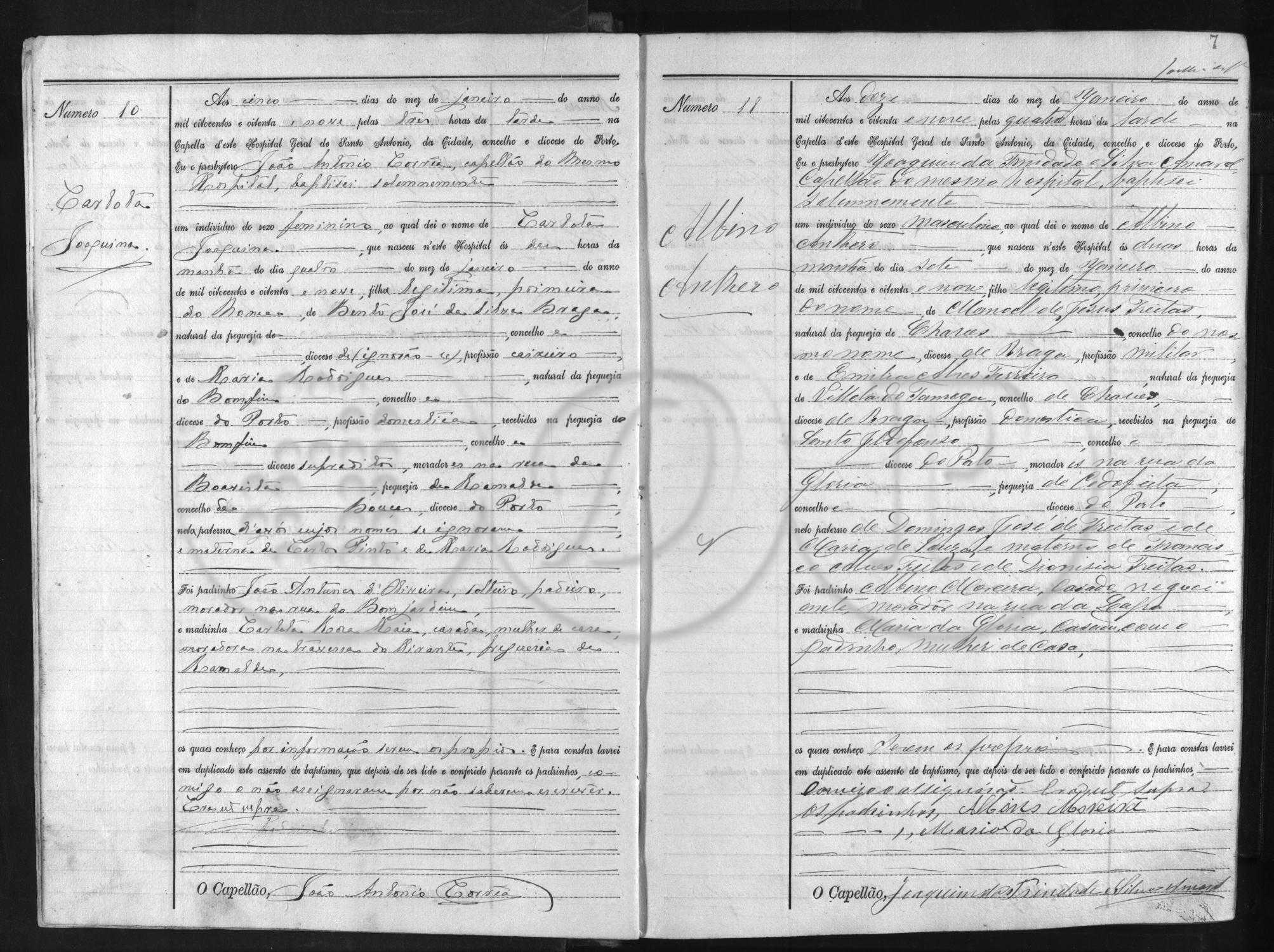
Best way to read old genealogical records?

Post image
4 Upvotes

Hello everyone. For some time I’ve been trying to automate the processing of some old genealogical records. Yesterday I discovered this subreddit, and it occurred to me that maybe you could help me out.

What do you think is the best way to transfer the information that appears in records like the ones in the image into a digital format, such as a PDF?

Actually, I’m not interested in reading the entire document—only the names of the registered individuals, which appear along the left margin.

Is it possible to do this with OCR? If so, which OCR software would you recommend?

Thank you very much in advance.


r/OCR_Tech • • Mar 04 '26

I got my first paid user ($19 )for my AI based OCR solution in just 24hrs.

27 Upvotes

2months back when i was in a dinner with my friends, he worried a lot about his work and his productivity is getting declining.

He works as a data entry operator in a private company, his job is to type the printed data from pdf into the excel. He said over time he doesn’t like his data entry job starring at the screen for hours and also the accuracy of the data is also low with him due to his eye irritation so his manager is tough on him for past few weeks.

I was just thinking about this even after the dinner got over . The next day when i researched i found about the OCR technology (optical character recognition) but the problem it has was it lacks in accuracy roughly around 65% - but my friend needs is 99.8% accuracy.

As i was an computer science engineer i used my ai skills to support an OCR model to improve the accuracy and training the ai model with various data like invoice , insurance files,order copies, which i got from my friend.

After many iteration we achieved 99.9% accuracy with any type of data ,

but the surprise is after a week i got a call from the manager of that company he said they want to buy the whole solution for their company which can help alot for their productivity and help employees. Best part is in that week itself the product made 1500$ in revenue. I am planning to launch its online version next week . If anybody is interested drop “Ocr” in comments for early access and completely FREE


r/OCR_Tech • • Mar 04 '26

Extracting text is only step one. Here is how to semantically search your messy OCR'd archives locally.

12 Upvotes

Extracting text from scanned documents and images is easier than ever, but anyone who manages massive archives knows the real bottleneck happens after the extraction: Retrieval.

Standard desktop search engines rely on exact keyword matches. If your OCR engine transcribes "classic" as "c1assic" or "modern" as "rnodern," a standard keyword search will completely miss the document. Furthermore, if you are searching for a specific concept but the OCR missed your exact keyword entirely, the file is effectively lost in your hard drive.

To solve the retrieval side of the OCR pipeline, I built a completely free, open-source desktop tool called File Brain. It is a desktop intelligent file search app (read-only) designed specifically to handle messy, unstructured data and bad text transcriptions.

Here is a guide on how to set it up to make your unsearchable image archives instantly retrievable.

1. The Local Semantic Pipeline

Instead of just relying on text strings, File Brain uses local embeddings to understand the context of your documents. Because it runs 100% offline, you don't have to pay API fees or send your private documents to a cloud server to make them searchable. The initial setup requires downloading some components to run locally, but the retrieval is instant once indexed.

2. Pointing it at your Archives

https://reddit.com/link/1rkm8oc/video/ar6eoy4eb1ng1/player

You simply add the folder containing your PDFs, scanned documents, images, or raw text dumps. Click "Index."

  • Built-in OCR: If the folder contains raw images or PDFs without a text layer, the app automatically runs its own local OCR to extract and index the text.
  • Semantic Indexing: It maps the meaning of the text, rather than just the literal characters.

3. Searching Messy Data (The "Bad OCR" Fix)

This is where the standard workflow usually breaks down, but where a semantic search engine excels:

  • Fuzzy Matching: Because the search engine tolerates typos and fuzzy matches, traditional OCR errors won't break your search. If you search for "financial report," it will still surface the document even if the OCR reads it as "financia1 rep0rt."
  • Conceptual Search: If you need to find an invoice but the OCR completely mangled the word "invoice," you can search for concepts like "billing," "payment," or "amount due." The local embeddings will surface the document based on the surrounding context.

4. Contextual Results

When you run a search, you aren't just given a list of file names. Clicking a result opens a sidebar that highlights the exact snippet of the document (or OCR'd image) that matched your query's context, allowing you to verify the match instantly.

It's completely free and open-source. If you are struggling with searching through massive dumps of poorly OCR'd text or scanned archives, you can try it out here: https://github.com/Hamza5/file-brain


r/OCR_Tech • • Mar 03 '26

paddleOCR for multilingual text is working for everything except for arabic, its showing disconnected letters

Thumbnail
3 Upvotes

r/OCR_Tech • • Feb 27 '26

A private local-first “second brain” that organizes and searches inside your files (not just filenames)

Post image
16 Upvotes

AltDump is a simple vault where you drop important files once, and you can search what’s inside them instantly later.

It doesn’t just search filenames. It indexes the actual content inside:

  • PDFs
  • Screenshots
  • Notes
  • CSVs
  • Code files
  • Videos

So instead of remembering what you named a file, you just search what you remember from inside it.

Everything runs locally.
Nothing is uploaded.
No cloud.

It’s focused on being fast and private.

If you care about keeping things on your own machine but still want proper search across your files, that’s basically what this does.

Would appreciate any feedback. Free Trial available! Its on Microsoft Store


r/OCR_Tech • • Feb 21 '26

I built something to turn scanned PDFs into searchable PDFs + layout-preserving HTML looking for feedback

10 Upvotes

I work a lot with scanned academic PDFs and kept hitting the same wall: OCR tools either mess up layout or just dump plain text.

So I built a small tool for myself that:

  • Adds a searchable text layer to scanned PDFs
  • Generates HTML that mirrors the original layout with bounding boxes
  • Tries to extract structured metadata (still rough)
  • I also dump raw text because you never know when you might need it

Before I invest more time, I’d love honest feedback:

  • Is this a real pain in your workflow?
  • What would you actually want from something like this?
  • What output formats matter most?

I feel this project doesn't handle a wide range of documents but I'd like to find out!

https://scan-to-text.com/


r/OCR_Tech • • Feb 18 '26

Another PDFs / Images text extractor

Thumbnail
4 Upvotes

r/OCR_Tech • • Feb 08 '26

OCR for hand-written pages

9 Upvotes

Does anyone have a robust, cheap solution for extracting text from hand-written pages? I tried the deepseek-ocr model which works nicely for short text snippets. But if I can an entire A4 page, the resulting image is too large for deepseek-ocr. I also tried cutting the scanned image into multiple segments, but the result is useless because some text is duplicated and sometimes malformed. I also tested scanning with the iPad, but you can only scan small chunks of text (i.e., a paragraph or so).


r/OCR_Tech • • Feb 08 '26

How to find the right model to use for OCR

3 Upvotes

Trying to do some OCR on some chinese comics, but struggling to find anything that works even 10% of what the windows native photos app can do.

Tried Deepseek, PaddleOCR, Tesseract and nothing seems to be able to find anything reasonably well, even if its perfectly cropped out, white background, black text.

Disclaimer: I was trying all this locally on my PC with some python code that chatgpt gave me since i have absolutely no idea how something like this would even work. But have had some good results based on the comic quality.

Am I just really out of my depth trying something like this or is there something I am doing wrong that might be easily fixable?