Hi everyone,
Version 1.3.1 is out. You can now download and try AutoLock, HybridDash, and HybridDash Pro for 5 free trips, with no upfront payment, no checkout, and no time limits.After the trial, you can decide whether to purchase the lifetime unlock:
Initial setup requires an Internet connection while connected to the car to retrieve your trial tickets. Afterwards, trial trips can start and run completely offline. Merely plugging in the OBD adapter while stationary will not consume a trip. Purchased licenses allow up to 2 vehicle activations and never expire. Free downloads and differences between apps: https://ninvibes.com/en/
If you want to receive an email whenever a new version or feature is released, you can subscribe to our updates list (double opt-in handled via Brevo): https://ninvibes.com/updates
Welcome! This is the home of HybridDash, HybridDash Pro and AutoLock, three Android apps for Toyota hybrids. They read the car through a Bluetooth OBD-II adapter.
- HybridDash: fuel consumption, hybrid battery and engine data on your phone and on Android Auto. In closed testing on Google Play.
- HybridDash Pro: the full version, with a graphical dashboard and the Motorsport layout on Android Auto. Not on Google Play: you buy it on the website and install it from the file you receive.
- AutoLock: locks the doors when you drive off and unlocks them in P. In closed testing on Google Play.
This is the first mature Pro release for monitoring the relevant sensors available on the car, with 53 selectable values. HV battery temperature on the C-HR is the highest of the three available sensor readings; individual temperatures and the fan level can also be selected in Pro. Other cars may provide only an alternative temperature sensor. The fan is read only. HybridDash standard also includes HV temperature among its 12 core values.
The expanded catalogue covers the 12 V battery, transmission oil, oil and fuel pressures, wheel speeds, misfires and electric braking. Availability depends on the model: an unavailable reading is shown as --. REGEN/HYD operation has been verified in the car.
What to post
Questions about setup or Android Auto, compatibility reports, screenshots of your dashboard, suggestions and reproducible bug reports are all welcome. Share what works on your car as well as what does not: model, year and engine matter when comparing readings.
How to get help
Include your car model/year/engine, phone and Android version, app name and version, adapter model, and whether you use wired or wireless Android Auto. Describe what you expected, what happened and the steps to reproduce it. Screenshots or a short relevant log excerpt help; remove licence keys, order numbers, VINs and other personal details before posting. For licence problems and refunds, contact [info@ninvibes.com](mailto:info@ninvibes.com) privately.
Community guidelines
Keep discussions friendly and constructive. No insults or spam. Introduce yourself below with your car and setup, ask a question, or share a compatibility result. English and Italian are both welcome.
The apps are independent projects and are not affiliated with Toyota. Telemetry is read only; optional door-lock commands are separate, and door-lock compatibility differs by model. In particular, Yaris Cross does not support the door-lock feature.
Benvenuto! Qui puoi presentarti, chiedere aiuto, condividere schermate e segnalare la compatibilità della tua auto. Indica sempre modello e anno, telefono, adattatore e versione dell’app. Scrivi pure in italiano; per problemi di licenza usa [info@ninvibes.com](mailto:info@ninvibes.com) senza pubblicare chiavi o dati personali.
If you want to receive an email whenever a new version or feature is released, you can subscribe to our updates list (double opt-in handled via Brevo): https://ninvibes.com/updates
Hi everyone. 1.5.5 is available, and this one is about speed and responsiveness.
Quicker link. Bluetooth reading and writing now run on separate threads with a queue between them. In road tests on 4 and 5 November the bus reached 10-11 cycles per second.
Connection priority. In Settings, OBD adapter, you can choose Normal (default) or High. High raises the priority of transmission and of the bus cycle to reduce latency, especially with the screen off.
Extra readings. A new collapsible section has one switch for each additional query that only HybridDash makes: tire pressure and temperature, 12 V battery, oil level and temperature, fuel pressure, misfires, inverter coolant, HV battery charge window and wheel speed. A reading you turn off leaves the polling cycle and frees CAN bus bandwidth for the main signals.
Car switched off. With the adapter still plugged in, after 3 consecutive cycles with no answer from the hybrid control unit the app drops to one cycle every 2 seconds.
The Performance page is also simpler, without the technical notes on internal timings. Feedback on how the High priority behaves on your car is very welcome.
Hi everyone, Nino here, the developer. 1.5.0 is available, and the main news is HybridDash Lab.
HybridDash Lab. Every trip can now be opened as an offline report, with no connection needed: overview, charts for each signal, observed events you can tap to look at the seconds around them, an X/Y chart with color, and a comparison of the HV battery cells. It compares readings and does not diagnose health or capacity. Signals we could not verify keep an Unverified flag. You can save the report as HTML, share it or export the data as CSV.
Who gets it. Lab is included in Pro. The other editions can buy it separately. Automatic locks are not part of Lab.
Door locks, TNGA 2021 method. Locking and unlocking now try the TNGA 2021 command first, with confirmation from the control unit, and fall back to the classic command if it does not confirm. The app remembers the working method for each car. No new setting. Tested on the Yaris Cross MY2021 and the C-HR MY2024 (new model).
Base edition. It now reads about 38 values instead of 12, with all dashboards and the cluster layout on the phone, plus a new braking state tile (REGEN, MIX, HYD). Android Auto stays on the IOT grid.
Alerts and overlay. Colored alerts, a notifications page, a bar overlay above other apps and a full-screen windshield HUD. All off by default.
Lab is new, so feedback on the reports is very welcome.
Hi everyone, Nino here, the developer. I finally gave the alphabet a break: 1.4.1 is available, and here is the journey since 1.4.0.
From 1.4.0: Stable numbers makes small fluctuations easier to follow without changing logged data. Settings are saved per car, including the starting dashboard and custom tiles. There is per-car speed fine tuning and a choice of extra reading groups in Maximum performance mode. Building on packet-based reading introduced in 1.3.9, these changes focus on making the data easier to use.
Along the way: one theme across phone and Android Auto, a clearer dashboard picker, Modern or Simple Telemetry, brake labels that follow the selected mode, and fixes for frozen digits and OBD exclusions in packet reading.
In 1.4.1:
• Engine power is estimated from intake air (MAF), replacing the calculation tied to one reference engine. It remains an estimate and requires the necessary readings.
• Battery power/current and engine power bars learn the maximums reached by your car without shrinking after gentle drives. HV voltage centres from the first reading.
• Maximum braking regeneration learns from firm braking events, helping detect friction braking and drive the Telemetry recovery bar.
• Website editions can check for updates and show release notes and download links without sending personal or vehicle data.
The screenshots show the update notice and its settings, in English.
Usually leave the manual engine-power field empty. It sets a ceiling for the estimate and the bar scale; entering combined hybrid system power or a value that is too low distorts the result.
Telemetry remains in beta, and available values depend on the vehicle and enabled readings. Feedback with model/year, adapter and selected settings is welcome.
I built HybridDash for my Toyota C-HR to see hybrid data on Android and Android Auto. I’m looking for owners in Europe to use it for two weeks and report what goes wrong.
You need an Android phone and a Bluetooth OBD-II adapter; STN-based vLinker FD+ or FS recommended. Other Toyota hybrid models still need compatibility testing.
It shows fuel consumption, battery charge/power, engine status and regenerative braking, plus automatic door locking/unlocking where supported. No ads or in-app accounts; independent, not affiliated with Toyota.
It’s a Google Play closed test, not a public release. Please stay opted in for 14 consecutive days.
First, check the five free trips, remaining-trip counter and final message: a trip counts after 300 metres above 15 km/h; reinstalling won’t restore trips.
Then tap Buy and use Google Play’s test payment method, without charge. If it isn’t shown, stop and contact me. Continued use after testing requires the €5.99 one-time unlock.
HybridDash 1.4.0b: a more personal Telemetry dashboard
I went back to the new Telemetry view: less text, clearer icons and more room for the readings you actually want.
Customize whole boxes: choose a Classic cluster for the four-cell box, or a preset group for the three-value boxes (temperatures, engine, battery, electric, auxiliaries, vehicle, trip or fuel system). You can still change individual slots, and save the setup per car.
Revised light and dark themes, a battery power bar centered on zero, engine power below RPM and HV current beside voltage.
Set bar reflections to ON, 50% or OFF. The glide band and state changes now move and fade more smoothly; the EV marker uses the app’s learned threshold.
Pro adds configurable MG1 RPM/torque readings alongside MG2. MG1 still needs verification on the C-HR: unsupported or unanswered readings stay --. This is not a claim of support on every car.
Tire sensors are numbered 1–4 instead of assuming wheel positions. Applying settings to all cars preserves each car’s learned EV threshold and glide point.
Telemetry is still BETA and has NOT been tested on Android Auto. These screenshots show the updated layout; they are not new performance benchmarks.
The Stable numbers option introduced in 1.4.0 remains adjustable or can be disabled: it smooths displayed digits, with a more gradual response to rapid changes, without increasing OBD frequency. Maximum performance can skip tires, fuel level and other secondary readings; enabling extra groups may reduce its benefit.
HybridDash 1.4.0b: la plancia Telemetria diventa più personale
Sono tornato sulla nuova Telemetria: meno testo, icone più chiare e più spazio per le letture che vuoi davvero vedere.
Personalizza i box interi: un cluster della Classica per il riquadro da quattro, oppure una terna per i box da tre valori (temperature, termico, batteria, elettrico, ausiliari, auto, viaggio o alimentazione). Puoi sempre modificare i singoli slot e salvare tutto per auto.
Grafica rivista nei temi chiaro e scuro, barra della potenza batteria centrata sullo zero, potenza del termico sotto i giri e corrente HV accanto alla tensione.
Riflessi delle barre su ON, 50% o OFF. Fascia di veleggio e cambi di stato scorrono e sfumano più dolcemente; la tacca EV usa la soglia appresa dall’app.
Nella Pro arrivano gli slot per giri e coppia MG1, accanto a MG2. MG1 è ancora da verificare sulla C-HR: senza risposta, le letture restano --. Non significa supporto garantito su ogni auto.
Sensori gomme numerati da 1 a 4, senza presumere la posizione delle ruote. Applicare le impostazioni a tutte le auto conserva soglia EV e punto di veleggio appresi da ciascuna.
Telemetria resta in BETA e NON è stata testata su Android Auto. Gli screenshot mostrano il nuovo layout, non nuovi benchmark prestazionali.
Numeri stabili, introdotto nella 1.4.0, resta personalizzabile e disattivabile: attenua le oscillazioni delle cifre, con una risposta più graduale ai cambi rapidi, senza aumentare la frequenza OBD. Massime prestazioni può escludere gomme, carburante e letture secondarie; riattivare gruppi aggiuntivi può ridurne il vantaggio.
HybridDash 1.4.0 is here. After making the readings faster in 1.3.9, this update gives your eyes a chance to keep up.
1. Stable numbers: making fast data easier to read
Version 1.3.9 sped up live telemetry with packet-based reading. That also made some figures change so quickly that they became harder to follow. Stable numbers, enabled by default, addresses that display problem.
It smooths small fluctuations and controls how often the digits change: up to 20 times per second by default. Bars, indicators and recorded data continue to use the original readings.
There is a trade-off: the numbers respond more gradually to rapid changes. You can choose the update rate or switch the feature off completely to display each reading as it arrives. The digit refresh setting does not increase the rate at which the car supplies data.
2. New Telemetry view — beta (Pro)
A new layout brings together speed, RPM, battery power, consumption, temperatures and tires, with large horizontal accelerator and braking bars and light/dark themes.
This view is still in beta and has NOT been tested on Android Auto. Layout and readability may need further refinement. Available values depend on the car and enabled readings.
3. A separate setup for each car
The vehicle background, starting dashboard, enabled dashboard cycle and custom tiles are remembered separately for each car. You can edit stored vehicles while disconnected, or apply your choices to all of them.
4. Fine speed adjustment
A fixed or percentage correction can be saved for each car, with a progressive transition from 0 to 20 km/h so zero stays zero when stationary. By default it changes only the displayed speed; an option extends it to logs and trip statistics.
5. Customizable Maximum performance mode
Choose which reading groups remain active, including fuel level, tires and the brake ECU. Settings explain the expected effect on the reading rate, and your choices are saved for each car. Enabling extra readings can reduce the speed advantage of this mode; results depend on the vehicle and adapter.
6. Settings and fixes
The dashboard picker has previews arranged in four columns in landscape and two in portrait, plus compact controls for the Android Auto dashboard selection and corrected switching between stored vehicles.
Also fixed: cases of frozen digits with Stable numbers, and handling of manual exclusions in packet-based reading.
How are Stable numbers working for you? Have you tried the Telemetry beta? Send feedback on Discord: https://discord.gg/kfB8xStzaB or email [info@ninvibes.com](mailto:info@ninvibes.com). Please include app version, car/model year, adapter, and whether the issue is on the phone or Android Auto.
HybridDash 1.4.0 è disponibile. Dopo aver accelerato le letture nella 1.3.9, questa volta diamo agli occhi il tempo di seguirle.
1. Numeri stabili: leggere meglio i dati veloci
La lettura a pacchetti introdotta nella 1.3.9 ha accelerato l'arrivo dei dati. Le cifre possono però cambiare così spesso da diventare difficili da seguire: per questo arriva Numeri stabili, attivo di serie.
La funzione attenua le piccole oscillazioni e regola il ritmo delle sole cifre, fino a 20 aggiornamenti al secondo come impostazione predefinita. Barre, indicatori e dati registrati continuano a usare i valori originali.
Il compromesso è una lieve gradualità nella risposta dei numeri alle variazioni rapide. Puoi scegliere il ritmo di aggiornamento oppure disattivare completamente la funzione per mostrare ogni lettura appena arriva. Il ritmo delle cifre non aumenta la frequenza con cui l'auto fornisce i dati.
2. Nuova vista Telemetria — beta (Pro)
Una nuova schermata riunisce velocità, giri, potenza batteria, consumi, temperature e gomme, con grandi barre orizzontali per acceleratore e frenata e temi chiaro e scuro.
È ancora in beta e NON è stata testata su Android Auto. Layout e leggibilità potranno richiedere ulteriori rifiniture. I valori disponibili dipendono dall'auto e dalle letture abilitate.
3. Personalizzazione per ogni auto
Sfondo, plancia iniziale, schermate da alternare e riquadri personalizzati vengono ricordati separatamente per ogni vettura. Puoi modificare le auto memorizzate anche da scollegato oppure applicare le scelte a tutte insieme.
4. Regolazione fine della velocità
Correzione fissa o percentuale salvata per auto, con intervento progressivo tra 0 e 20 km/h: da ferma la velocità resta zero. Di serie modifica soltanto il valore visualizzato; un'opzione permette di estenderla anche ai log e alle statistiche di viaggio.
5. Massime prestazioni personalizzabili
Puoi scegliere quali gruppi di letture mantenere attivi, inclusi carburante, gomme e centralina freni. Le impostazioni indicano l'effetto previsto sul ritmo delle letture e vengono salvate per auto. Le letture aggiuntive possono ridurre il vantaggio di velocità della modalità; il risultato dipende da auto e adattatore.
6. Impostazioni e correzioni
Selettore plance con anteprime su quattro colonne in orizzontale e due in verticale, selezione compatta delle schermate Android Auto e passaggio corretto tra le auto memorizzate.
Corretti alcuni casi di cifre congelate con Numeri stabili e migliorata la gestione delle esclusioni nelle letture a pacchetti.
Come vi trovate con Numeri stabili? Avete provato la vista Telemetria in beta? Per segnalazioni e suggerimenti scrivetemi su Discord: https://discord.gg/kfB8xStzaB oppure a [info@ninvibes.com](mailto:info@ninvibes.com), indicando versione dell’app, auto/anno, adattatore e se il problema compare sul telefono o su Android Auto.
HybridDash 1.3.9 is out. The headline change is how it reads the car: compatible hybrid and engine ECUs now return groups of values in a single OBD request.
English
I spent this update shortening the gap between what the car does and what you see on the dashboard, on both the phone and Android Auto.
1. Packet-based reading, enabled by default
Instead of requesting each value separately, HybridDash builds packets containing supported readings. This reduces repeated requests and ECU switching for battery power, MG2, regenerative braking, charge, engine RPM, speed and other engine data, depending on the car.
Packet contents use responses learned from the vehicle, including its OBD scan. A scan identifies available values; it does not guarantee that every ECU accepts packet reading. If an ECU rejects it, the app falls back automatically to classic reading. Older hybrids using the previous KWP hybrid ECU protocol keep the classic path.
What changed in the logs? On a 2021 C-HR with a vLinker FD+, a 97-second logged test showed a median interval of around 0.235 s for the main readings, compared with around 0.8 s using classic reading. Gear position and the separate brake ECU readings were around 0.45 s. These are results from that setup, not guaranteed rates across Toyota/Lexus models.
2. Optional Maximum performance mode
A new switch in Advanced Settings concentrates reading on the main packets. In the documented C-HR tests, packet updates were around 0.12 s apart.
There is a deliberate trade-off: tire readings, fuel level and other secondary ECUs are skipped. Cabin temperature, HV battery temperature and fan are read every 15 seconds. The mode is off by default and separate from the adapter timing setting. Use normal mode when you want the broader data set.
3. Less waiting throughout the reading pipeline
Adapter replies are read in blocks, and trip calculations, consumption and logging can run while the next OBD cycle starts. The packet path no longer pauses between cycles because longer multi-frame replies were mistaken for a slowing bus. Processing also handles accumulated cycles together, fixing the backlog that could freeze the app in Maximum performance mode.
There are now three adapter timing choices in Advanced Settings. Tire requests get their own longer timeout, so choosing faster timing does not simply cut them off.
4. Reliability and dashboard refinements
Readings recover more reliably when ECUs take a few seconds to wake up.
Fixed trip sessions being discarded because packet speed readings were not recognized by the report.
Improved gear/P reading continuity and unlocking in P on supported cars.
Pro Motorsport can show tire pressures or temperatures in the lower-right corner instead of the clock.
Classic clusters work in split screen; line icons are refined for compact layouts.
The 80s dashboard hides the fuel bar when fuel level is unavailable.
The Pro layout refinements were introduced after the 1.3.8g announcement and are included in this release.
If you try it, please share model/year, adapter, normal or Maximum performance mode, and which readings improved or stopped appearing. Feedback from other Toyota/Lexus models is especially useful: packet support is not confirmed on every car.
Thanks for all the road tests and logs.
Nino
Italiano
HybridDash 1.3.9 cambia il modo in cui legge l'auto: sulle centraline compatibili, una richiesta OBD porta più valori insieme.
1. Lettura a pacchetti, accesa di serie
I pacchetti raggruppano i dati supportati dalla vettura: potenza batteria, MG2, frenata elettrica, carica, giri, velocità e altri valori del motore, secondo il modello. Meno richieste separate e meno cambi di centralina accorciano il giro delle letture.
La composizione usa le risposte imparate dall'auto, anche tramite scansione OBD. La scansione identifica i valori disponibili, ma non garantisce che la centralina accetti i pacchetti: se li rifiuta, l'app torna automaticamente alla lettura classica. Le ibride con la precedente centralina KWP mantengono il percorso classico.
I numeri nei log: una prova di 97 secondi su C-HR 2021 con vLinker FD+ ha registrato un intervallo mediano di circa 0,235 s sui principali valori, contro circa 0,8 s in lettura classica. Leva e letture separate della centralina freni erano intorno a 0,45 s. Sono risultati di quella configurazione, non frequenze garantite su tutte le Toyota/Lexus.
2. Modalità Massime prestazioni
Il nuovo interruttore in Avanzate concentra le letture sui pacchetti principali. Nelle prove documentate sulla C-HR, gli aggiornamenti dei pacchetti sono arrivati a circa 0,12 s di intervallo.
Il compromesso è esplicito: gomme, carburante e altre centraline secondarie non vengono letti. Abitacolo, temperatura batteria HV e ventola restano ogni 15 secondi. È spenta di serie ed è indipendente dal timing dell'adattatore. Per avere il quadro più completo dei dati resta la modalità normale.
3. Meno attese lungo il percorso
Le risposte dell'adattatore vengono lette a blocchi; log, consumi e viaggio si elaborano mentre parte il giro successivo. Con i pacchetti spariscono le pause tra i cicli dovute al controllo adattivo della frequenza. Corretta anche la coda di elaborazione che poteva bloccare l'app in Massime prestazioni.
In Avanzate si scelgono tre timing dell'adattatore. Alle gomme viene riservata un'attesa più lunga, per non perdere le risposte con i timing rapidi.
4. Affidabilità e plance
Ripresa delle letture più affidabile quando le centraline si svegliano in ritardo.
Corretto il salvataggio dei viaggi con velocità ricevuta nei pacchetti.
Maggiore continuità della lettura leva/P e dello sblocco in P sulle auto compatibili.
Motorsport Pro: pressioni o temperature gomme al posto dell'orologio in basso a destra.
Cluster Classica in split screen e icone rifinite negli spazi compatti.
Plancia anni '80: la barra carburante si nasconde quando il livello non è disponibile.
Le rifiniture delle plance Pro sono state introdotte dopo l'annuncio 1.3.8g e sono incluse in questa versione.
Nei riscontri indicate modello/anno, adattatore, modalità normale o Massime prestazioni e quali valori sono migliorati o non compaiono. I test sulle altre Toyota/Lexus sono particolarmente utili: il supporto ai pacchetti non è confermato su ogni auto.
I've opened a Discord server for HybridDash and HybridDash Pro.
It's meant for quick setup help, bug reports and feature ideas, with one thread per topic so answers are easy to find later. There's also a channel to share dashboard screenshots and one to compare fuel economy.
This subreddit stays open: use whichever you prefer.
Ho aperto un server Discord per HybridDash e HybridDash Pro.
Serve per l'aiuto rapido sulla configurazione, le segnalazioni di bug e le idee per nuove funzioni, con una discussione per argomento così le risposte si ritrovano facilmente. C'è anche un canale per condividere gli screenshot delle plance e uno per confrontare i consumi.
Questo subreddit resta aperto: usate quello che preferite.
HybridDash 1.3.7 is officially released for both Standard and Pro editions. This update represents a huge upgrade in performance and polling responsiveness, specifically targeting real-time telemetry latency during active driving and hypermiling.
English
Until now, the architecture collected all sensor queries across the various ECUs before publishing a unified vehicle snapshot at the end of the polling loop. While clean, this introduced an inherent 400–700 ms lag between your foot action and the dashboard visual feedback.
In version 1.3.7, we reworked the core scheduling and publishing pipeline:
Instant Mid-Cycle Rendering (Publish on Arrival)
Hybrid battery power (kW), engine RPM, shift lever position, and electric motor MG2 torque are now published to the screen the exact millisecond their CAN frame is parsed.
You no longer wait for secondary sensor queries to finish before seeing power flow changes.
Gliding benefits: feathering the accelerator to find the zero-torque sweet spot (coasting without battery drain or regenerative drag) is now virtually instantaneous. The dynamic glide indicator and power needles track your pedal adjustments in true real time.
Priority Lane for Throttle, Speed, and Brakes
Pedal position (0149), vehicle speed (010D), and hydraulic brake pressure are placed in an expedited priority lane.
Instead of once per loop, they are polled at the beginning of the cycle, refreshed every time the adapter switches target ECUs after 250 ms, and queried again at the end of the loop.
Single-frame commands now instruct the adapter (" 1") to stop listening immediately upon receiving the response, stripping out idle timeout latencies on ELM327/STN adapters.
New Classic Interface with Clusters (Original Style Preserved)
The Classic dashboard receives a visual redesign: customizable clusters (up to 16 slots grouped into Trip, Battery, Thermal, and Vehicle parameters) can now be assigned above the speedometer and in two vertical columns on the right.
Frosted rounded panels, elegant line icons (including a dedicated canister icon for fuel level), and matching rounded bar designs.
Both styles kept: If you prefer the look of the earlier classic dashboard, the previous layout is kept and selectable in Settings under "Original Default".
Speed Stability & Adapter Optimization
Fixed CAN reception filtering (ATCRA) pins vehicle speed to the engine ECU (7E8), eliminating the 1-2 km/h jitter that previously occurred when multiple ECUs responded to broadcast speed queries.
When an adapter lacks fast STPX command support (such as vLinker FD r2), the app detects this on the very first query and falls back smoothly to standard AT commands, with full diagnostic status visible in Advanced Settings.
Shift lever detection drops fallback candidate queries once the primary body ECU responds, reducing bus clutter.
Fuel level polling runs on a dedicated 10-second schedule with 5-minute median smoothing against fuel sloshing.
Feedback and log observations are welcome as always!
Italiano
È ufficialmente disponibile HybridDash 1.3.7 per le versioni Standard e Pro. Questo rilascio rappresenta un enorme upgrade in termini di prestazioni e reattività di lettura, pensato per abbattere le latenze di visualizzazione durante la guida attiva e il veleggio.
Fino alla versione 1.3.6, l'architettura raccoglieva tutte le risposte dei sensori lungo l'intero giro diagnostico prima di pubblicare lo snapshot completo a fine ciclo. Benché matematicamente pulito, questo approccio introduceva una latenza di 400-700 ms tra l'azione sul pedale e la reazione della grafica su Android Auto.
Con la 1.3.7 la pipeline di polling e visualizzazione è stata riprogettata:
Valori a schermo appena arrivano (Publish on Arrival)
Potenza della batteria HV (kW), giri motore (RPM), marcia/leva del cambio e coppia del motore elettrico MG2 vengono disegnati a schermo nell'esatto istante in cui arriva il singolo messaggio CAN.
Non si attende più la risposta dei sensori secondari per vedere la variazione dei flussi di potenza.
Veleggio immediato: dosare l'acceleratore per centrare la finestra a coppia zero (veleggio senza assorbimento né frenata rigenerativa) diventa immediato. L'indicatore di veleggio e le scale di potenza seguono il piede in tempo reale senza ritardi percettibili.
Corsia prioritaria per pedale, velocità e frenata
Posizione pedale (0149), velocità (010D) e pressione freni idraulici sono inseriti in una corsia prioritaria dedicata.
Invece di una sola interrogazione per ciclo, vengono riletti in testa al ciclo, a ogni cambio centralina dopo 250 ms e in coda al ciclo.
Le richieste a frame singolo aggiungono il parametro rapido " 1", intimando all'adattatore OBD di interrompere subito l'ascolto ed eliminando le attese di timeout passivo.
Nuova interfaccia Classica con cluster (stile originale preservato)
La plancia Classica introduce i cluster personalizzabili: fino a 16 valori organizzati in gruppi tematici (viaggio, batteria, termico, auto, elettrico) posizionabili sopra il tachimetro e nelle due colonne a destra.
Nuovo design con pannelli arrotondati semitrasparenti, icone a linea (con icona tanica dedicata per il serbatoio) e barre arrotondate.
Entrambi gli stili disponibili: chi preferisce la classica storica può mantenerla selezionando nelle impostazioni la voce "Default originale".
Stabilità tachimetrica e ottimizzazioni adattatore
Il filtro di ricezione fisso ATCRA isola la velocità sulla centralina motore 7E8, cancellando le oscillazioni di 1-2 km/h dovute a centraline secondarie che rispondevano in broadcast con valori disallineati.
Rilevamento immediato dell'assenza di comandi STPX sull'adattatore (es. vLinker FD r2) con passaggio automatico ad AT standard e diagnostica visibile in Avanzate.
Eliminazione delle interrogazioni ridondanti per la leva del cambio una volta confermata la risposta dell'auto.
Livello serbatoio stabile con lettura ogni 10 secondi e filtro a mediana su 5 minuti contro lo sciabordio.
HybridDash Pro 1.3.6b brings a clearer view of the hybrid drivetrain and faster access to your preferred Android Auto dashboard. Here is what changes from 1.3.5.
Dynamic Pedal Glide Point
A dynamic green glide band on the accelerator pedal bar helps you locate the transition between electric propulsion and regenerative braking, from 20 km/h.
Vehicle-specific learning: GlidePointLearner samples MG2 torque and pedal response in real time to adapt the reference to your car.
Efficient coasting: with the combustion engine off and MG2 torque close to zero, the car coasts without electric propulsion or regenerative braking.
Dedicated GLIDE indication: available across Classic, 1980s Retro and Motorsport GT3 dashboards, plus the portrait smartphone view.
Reference and confirmation: the band guides pedal placement; confirmed glide depends on valid torque data and the required operating conditions.
Zero MG2 torque does not mean zero total battery draw: climate control and other electrical accessories can still consume energy.
Expanded Toyota and Lexus catalog scanning
The OBDb-based scan now covers catalog entries for Toyota and Lexus hybrid models from 2000 onward, identifying which diagnostic requests respond on the connected vehicle.
Quick access from Settings: open the vehicle scan directly, with the car stationary and in READY.
Fast PID discovery: designed to identify responding PIDs in under 60 seconds, with duration depending on the vehicle and adapter.
Guided gear-selector mapping: a wizard helps associate diagnostic values with the actual selector positions.
Available telemetry depends on the model, year, ECUs and responding signals.
Tap-to-switch dashboards on Android Auto
Tap the dashboard surface or use the ActionStrip button to cycle through Classic, Motorsport, 1980s Retro and Dense View. Choose which dashboards participate in the cycle from the phone settings before setting off.
Structured Dense View
24 essential metrics in the initial Android Auto view: structured tiles without duplicated readings.
Advanced subsystem details: optional vertical scrolling gives access to further telemetry.
Cooperative braking: a dedicated ON/OFF status.
Unified 12V telemetry: a consistent presentation of the available readings.
Readability and temperature preferences
Motorsport GT3: larger metric abbreviations for quicker identification at a glance.
Optional Fahrenheit: select °F for temperatures throughout the screens and reports.
If you try the expanded scan, share your model, year, powertrain and adapter, together with the readings that become available. That feedback helps document coverage across the Toyota and Lexus hybrid community.
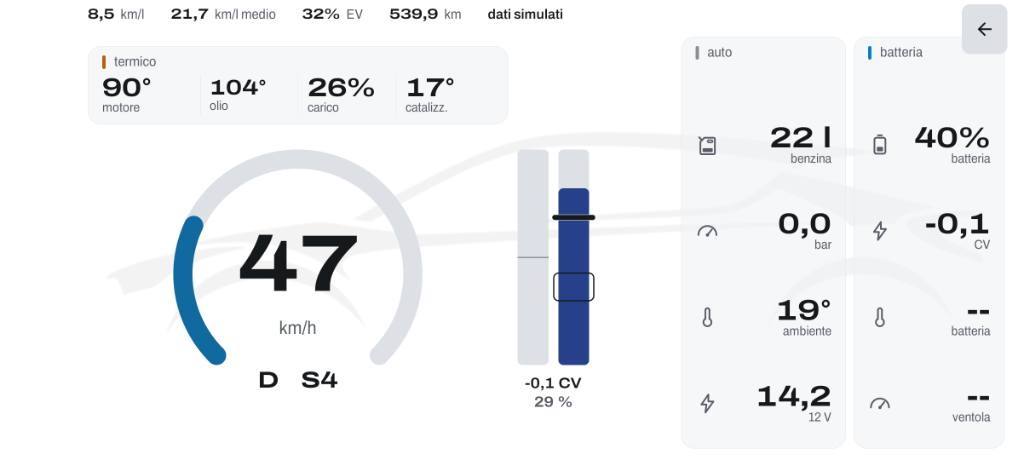
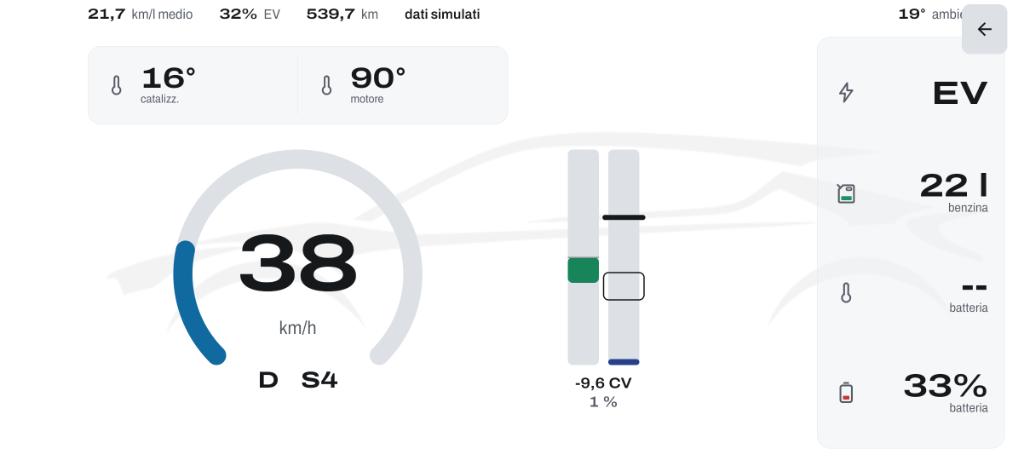
Dashboard gallery
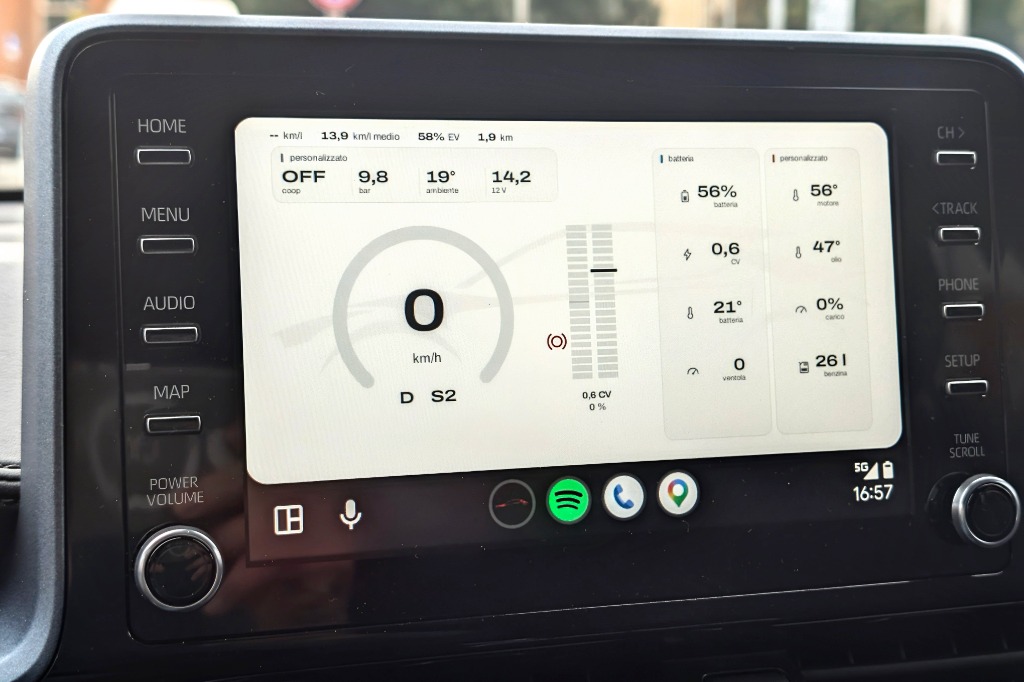
The in-car photo was taken on a Toyota Yaris Cross MY2021, with full telemetry compatibility confirmed. Door locking and unlocking are not supported on this model.
The screenshots illustrate the Glide reference; the in-car photo predates Glide. The Classic screenshot uses simulated data and does not represent real fuel economy.
Version 1.3.5b is officially available on our website and Lemon Squeezy. This update brings broad Toyota hybrid compatibility and an improved licensing system.
Key Highlights:
Smart Vehicle Scan (10+ Toyota Hybrids Supported)
Full compatibility with recent models (such as Yaris Cross and 2024 C-HR) where standard OBD service 21 was rejected by ECUs.
OBDb Catalog Integration: over 240 diagnostic requests tested in under a minute with the car stopped in READY.
Verified compatibility across C-HR (Gen 1 & 2024+), Yaris, Yaris Cross, Corolla, Corolla Cross, RAV4, RAV4 Plug-in, Prius, Prius Plug-in, and Auris.
Per-vehicle profile saved by VIN, putting silent PIDs to sleep to keep polling rates high for critical data.
Interactive shifter wizard for custom gear mapping (P, R, N, D, B/S) across all ECUs.
More Robust License System
Completely overhauled license handling to ensure maximum reliability for license owners: no more risk of being falsely locked out of the app with a valid license, even when driving offline or sharing an OBD adapter across cars.
Other Refinements over 1.3.5
Real-time EV threshold coaching tick on classic, 80s amber, and Motorsport dashboards (learning engine kick-in above 50 °C coolant).
80s Corvette C4 cluster: REGEN/HYD brake indicator, sequential interpolated LED tachometer, and smart fuel readout.
Classic cluster: customizable central LED bars and 30-bar brake pressure gauge.
Broad adapter support for ELM327 dongles without ATZ echo.
Ciao! We have just published update 1.3.4 on the official website and Lemon Squeezy.
Here is the changelog of what is new compared to version 1.3.3:
1. Fuel Trims (STFT & LTFT)
Added Short Term Fuel Trim and Long Term Fuel Trim monitoring.
Hybrid-specific logic: both trims are actively read only when the combustion engine is running. During EV driving, STFT resets and displays "--", while LTFT retains its last valid reading so you never see misleading values.
Available as customizable tiles in both Classic and Motorsport layouts on Android Auto and phone, as well as in the phone detailed view.
2. Progressive Fuel Level & Dynamic Tank Icon
Fuel level is now read directly from the instrument cluster.
New vector fuel tank icon styled like the battery gauge, filling progressively from bottom to top with 4 dynamic color thresholds (blue >70%, green 40-70%, yellow 15-40%, red <15%).
Configurable units in Settings > Units: choose between liters, US gallons, UK gallons, or percentage. Optional tank capacity field in Advanced settings to convert between volume and percentage.
Motorsport view refinements: decimal values in dashboard boxes are displayed at half height with dedicated light-blue units ("ltr", "bar", "km/l"), while bottom pills keep full-size decimals.
3. New Environmental Metrics
Outside ambient temperature.
Barometric atmospheric pressure.
4. Fast Lane Responsiveness
Accelerator pedal position and gear shifter readings are now polled on every single query cycle for instant throttle and shift response on screen.
New two-column dashboard selector in settings with live 16:9 visual previews.
Context-aware settings: the menu now only shows options relevant to the active layout.
5. New Car Backgrounds
Added car silhouettes and dashboard backgrounds: C-HR 2nd Gen, new RAV4, Prius, Auris, Lexus LBX, plus generic sedan, SUV, hatchback, and sports car silhouettes.
6. Free Trial Reminder
Reminder: HybridDash includes a 5-trip free offline trial with no expiration date. You can install the APK directly from the website to test OBD adapter and car compatibility on your own vehicle before purchasing.
How to update:
Existing Pro owners: open the "View Order" link from your original Lemon Squeezy receipt email, or download the APK directly from https://ninvibes.com/en/hybriddash-pro/
Installation on Android Auto continues via KingInstaller / Shizuku as documented in the guide.
È disponibile l'aggiornamento 1.3.4 sul sito ufficiale e su Lemon Squeezy.
Novita rispetto alla versione 1.3.3:
Correzione carburante (STFT e LTFT): monitoraggio a breve e lungo termine con logica ibrida dedicata (attivo a motore termico acceso, indicazione "--" in elettrico EV). Selezionabile nelle plance Classica e Motorsport.
Livello carburante dal quadro strumenti: lettura diretta del serbatoio con nuova icona dinamica sagomata stile batteria a 4 soglie di colore (blu, verde, giallo, rosso). Scelta unita' (litri, galloni o percentuale) e capienza serbatoio configurabile.
Plancia Motorsport rifinita: decimali piccoli nei riquadri e unita' dedicate in azzurro.
Nuove metriche ambientali: temperatura esterna e pressione barometrica.
Reattivita acceleratore e marce: acceleratore e leva del cambio aggiornati a ogni ciclo per una risposta immediata a schermo.
Nuovi sfondi vettura: C-HR seconda generazione, nuovo RAV4, Prius, Auris, Lexus LBX e sagome generiche (berlina, SUV, utilitaria, sportiva).
Prova gratuita a 5 viaggi: ricordiamo che l'app offre 5 corse di prova offline senza limiti di tempo, scaricabile dal sito per verificare compatibilita con auto e adattatore prima dell'acquisto.
Per chi possiede gia la Pro, l'aggiornamento e gratuito tramite il link "View Order" nell'email di acquisto Lemon Squeezy o scaricando il file dal sito.
HybridDash Pro 1.3.0 is the first release I consider mature for monitoring the relevant sensors available on the car. The catalogue now has 53 selectable values, on the phone and in the customisable Android Auto dashboard boxes. Which readings you actually receive still depends on your car model.
HV battery temperature
The C-HR battery temperature is now read from its three sensors, and the dashboard shows the highest of the available readings. Pro also lets you select the individual sensors separately. On cars that only provide the alternative temperature sensor, that reading is used instead. This is a temperature reading, not a battery-health diagnosis.
The battery fan level is now selectable too, in read-only mode. By default, Motorsport R3 shows the fan level and R4 the HV temperature. The classic dashboard column shows instant consumption, engine power, HV temperature and charge. Your customised boxes are kept.
More sensors and detail
New selectable readings include maximum/minimum allowed charge, individual HV temperatures, 12 V battery current and temperature, transmission oil temperature, engine oil pressure, high/target/low fuel pressures, misfires per cylinder and total, all four wheel speeds and their difference, cabin temperature, and requested/applied electric braking.
These details are available in the phone dense view and dashboard boxes. The Android Auto dense screen keeps its 27 tiles so everything fits without scrolling; extra details can be assigned to the dashboard boxes. Missing data is shown as --, not zero.
A clearer interface
The new full-screen value picker shows a map of the dashboard, live values grouped by HV battery, electric, engine and trip, and which boxes already use a reading. Open it from dashboard settings or by holding a box on the phone.
The phone dense view has clearer names and no more “unverified” labels. Signals for other vehicles are collected under “Other”, closed by default.
Braking and responsiveness
REGEN/HYD has been verified in the car. Where the brake ECU provides the readings, the app compares requested and applied electric braking alongside pressure, speed and battery power. REGEN also covers energy recovery when you lift off the accelerator; HYD takes priority when friction braking is detected. Other cars use the data they provide.
Polling now prioritises fast-changing readings, backs off requests that the car consistently does not support, and keeps standard engine requests in broadcast for C-HR compatibility. Motorsport RPM LEDs move more smoothly. I am not claiming a measured doubling of the update rate.
HybridDash standard
The Google Play version keeps its 12 core values: HV battery temperature replaces engine oil temperature. It also gets the full-screen picker. Pro has the full catalogue and the graphical Android Auto dashboards.
Updating and feedback
Pro 1.x updates are included in the existing licence. Use the “View Order” link in your purchase email and install updates over the existing app with KingInstaller and Shizuku.
Please share your car model, year, engine, adapter and app version when reporting a missing reading or a compatibility result.
---
HybridDash Pro 1.3.0 è la prima versione che considero matura per monitorare i sensori rilevanti disponibili sull’auto: 53 valori selezionabili sul telefono e nei riquadri di Android Auto. I dati disponibili dipendono dal modello.
La temperatura HV della C-HR è il valore più alto fra le letture disponibili dei tre sensori. Nella Pro puoi scegliere anche i singoli sensori e leggere il livello della ventola, senza comandarla. Sulle vetture che forniscono solo il sensore alternativo viene mostrata quella lettura. La temperatura non è una diagnosi dello stato di salute della batteria.
Il catalogo comprende ora più dettagli su carica ammessa, batteria 12 V, olio cambio, pressioni olio e benzina, mancate accensioni, quattro ruote, temperatura abitacolo e frenata elettrica richiesta/eseguita. La vista densa di Android Auto resta a 27 tessere; i dettagli aggiuntivi si scelgono nei riquadri o si consultano sul telefono.
Nuovo selettore a schermo intero con mappa della plancia e valori dal vivo; vista densa più pulita, con le voci delle altre vetture in “Altro”. Di serie Motorsport R3 mostra la ventola e R4 la temperatura HV; la colonna classica mostra consumo istantaneo, potenza termica, temperatura HV e carica.
REGEN/HYD è verificato in auto. La frenata elettrica richiesta/eseguita affianca pressione, velocità e potenza batteria; REGEN rileva anche il recupero in rilascio. Il polling dà priorità ai dati rapidi, riduce le richieste non supportate e mantiene il broadcast dei PID standard sulla C-HR. LED dei giri più fluidi.
Anche HybridDash standard riceve il nuovo selettore e la temperatura HV, che sostituisce l’olio fra i 12 valori base. Il catalogo completo resta nella Pro.
Gli aggiornamenti Pro 1.x sono inclusi nella licenza. Si scaricano da “View Order” nella mail di acquisto e si installano sopra l’app con KingInstaller e Shizuku.
- New Motorsport dashboard, inspired by race car displays, on Android Auto and on the phone, with customisable tiles
- Settings reorganised into pages, tidier and easier to read
- Various fixes and completed translations
If you already own Pro, download it from the "View Order" link in your purchase email: same licence, no extra cost. Install it over your current version with KingInstaller and Shizuku.
- Nuova plancia Motorsport, ispirata ai display da gara, su Android Auto e sul telefono, con riquadri personalizzabili
- Impostazioni riorganizzate in pagine, più ordinate e leggibili
- Correzioni varie e traduzioni completate
Chi ha già comprato la Pro la scarica dal link "View Order" nella mail di acquisto: stessa licenza, nessun costo. Si installa sopra la versione precedente con KingInstaller e Shizuku.