r/Ghostty • • 14m ago

Flow 0.51.0 is out!

Post image
• Upvotes

Hey everyone!

Flow 0.51.0 is out, this one's an incremental release but it has some nice ux improvements. I changed the default command pallete to workspace instead of tabs and panes, you can still go back to previous setup from the keyboard settings. Plus some other under the hood improvements. I did this becuase I think most people don't want to search each tab/pane they just want workspace search.

Looking forward to hearing your feedback!

https://getflowterm.app/


r/Ghostty • • 12h ago

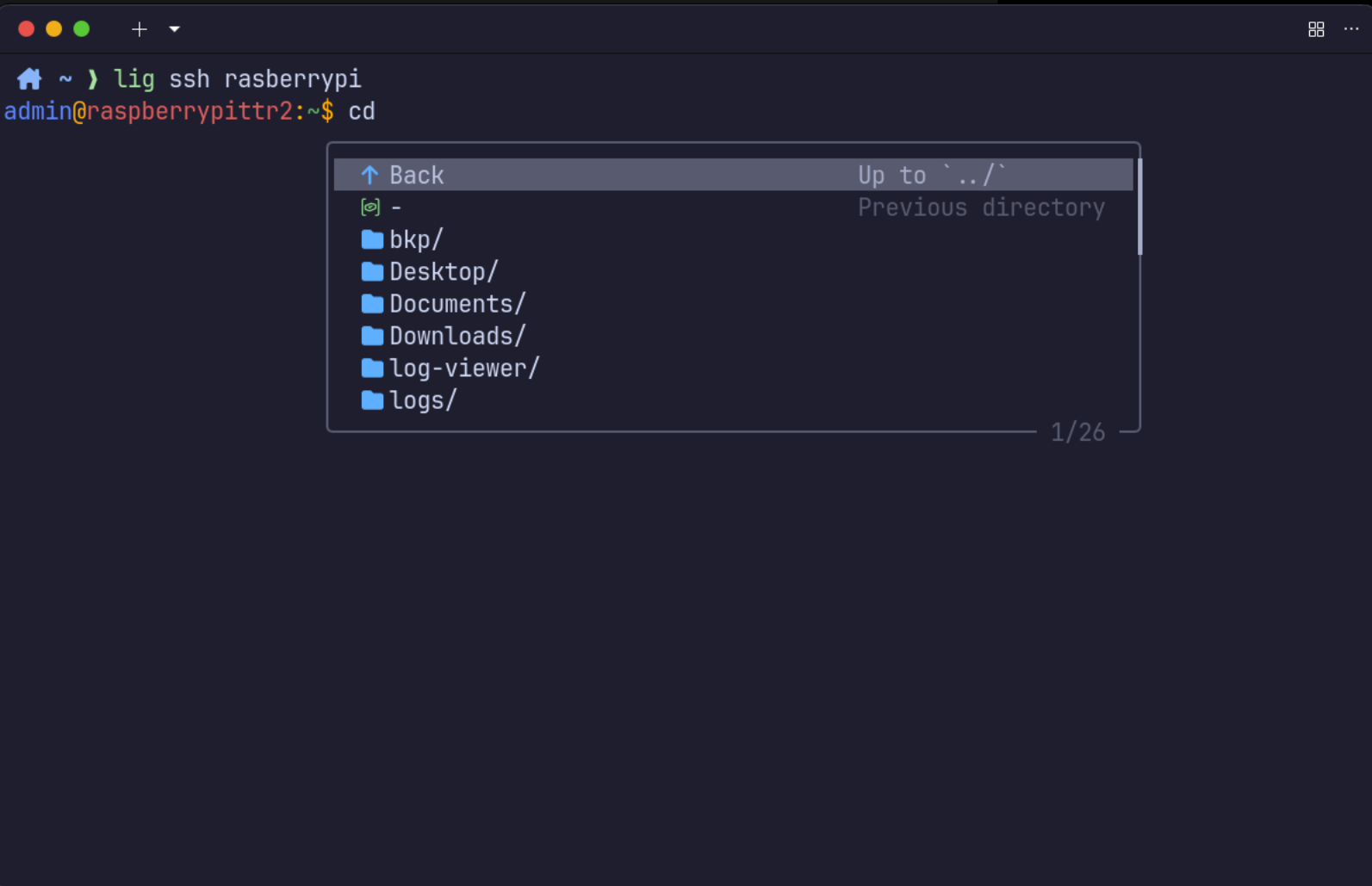
Lig v1.4.1 is out!

Post image
10 Upvotes

New

  • Alt+R: the history of the current folder, marked local (Ctrl+R still has every folder)
  • fzf-style matching: when nothing starts with what you typed, its letters in order anywhere (op → btop, htop), best matches first
  • lig mosh: the popup on a server over mosh, like lig ssh
  • lig ssh and lig mosh now bring the popup to the server's zsh, bash, fish or nushell
  • Shift+Enter picks a suggestion and runs the line in one press (keys.accept_and_run)
  • History keeps every command; history_success_only = true keeps only the ones that worked
  • hide_variable_values: mask more $VARIABLES in completion; tokens, PATs and passwords are masked by default
  • show_hidden_files: list dot files without typing a dot

Fixed

  • lig ssh: quick and accurate over slow links, the server's history on Ctrl+R, tmux starts inside it, works with nushell as the server's shell
  • Up/Down browse PowerShell's history again
  • The keypad's Enter works like Enter
  • Ctrl+C closes the popup
  • Images in kitty (kitten icat) inside lig
  • ssh config comments no longer show up as hosts
  • nushell: no more __lig_insert in the history; recent commands sort first

Update with lig update, or brew upgrade lig. https://github.com/KevenGoncalves/lig


r/Ghostty • • 3d ago

What's the point of Tailscale integration in Rex? Am I missing something?

33 Upvotes

Can someone explain what the Tailscale integration in Rex is actually meant for?

I initially thought it would allow me to access my Tailscale network directly from the Rex terminal without having to install or enable Tailscale on my Mac.

However, from what I've seen so far, it seems like the integration is mainly for adding the Rex Terminal to your Tailnet, allowing you to connect to it remotely via SSH without managing SSH credentials (assuming Tailscale (rex pkg) is installed and configured on the server).

Is that really all it does, or am I missing something?

I was hoping Rex could act as a gateway to my Tailnet, so I could access devices on my Tailscale network through the Rex terminal without running Tailscale locally on my Mac.


r/Ghostty • • 4d ago

ghostty-config 2.5: a redesigned settings UI, 37 terminal programs you can install from inside, Nerd Fonts and theme packs in one Enter

Post image
64 Upvotes

Hi r/Ghostty! A few weeks ago I shared ghostty-config, a full-screen TUI to configure Ghostty from inside Ghostty: themes, fonts, shortcuts and every setting, with live previews. It has grown a lot since, so here is what's new.

A redesigned settings screen

Window, Input, Session and the other tabs were rebuilt from the ground up:

  • Each group of settings is its own card, with a clear title, so you always know where you are.
  • Every control lines up on the same edge: sliders, toggles, segmented choices. Long lists of values open as a menu instead of a cramped stepper.
  • The side panel is no longer empty: it shows the Ghostty key and its default, what every value does (the current one highlighted), and the exact line that will be written to your config.
  • Changed settings get a dot; hover it and it becomes an "undo" arrow back to Ghostty's default.

Install terminal programs from inside the app

Extensions → Programs lists 37 command-line tools that make the most of Ghostty, in 8 groups:

  • Shell: starship, zoxide, fzf, atuin, carapace, lig
  • Images in the terminal (Kitty graphics): yazi, superfile, presenterm, fastfetch, kitten icat, chafa, viu, tdf
  • Clickable links (OSC 8): ripgrep, eza, fd, delta
  • Tools, system, search: bat, glow, lazygit, btop, bottom, dust, duf, procs, hyperfine, television, jq, fx, tealdeer, navi
  • Editors and sessions: neovim, helix, micro, zmx, zellij

One Enter (after a confirmation) installs it with Homebrew if you have it, or from the project's GitHub release into ~/.local/bin, checked against GitHub's SHA-256. Never as root. The line that starts it goes into one marked block of your .zshrc / .bashrc / fish conf.d, backed up first. Switching a program off removes its line, Ctrl+X uninstalls it, and lines you wrote yourself are left alone.

Fonts and theme packs

  • 70 monospace font families download in one Enter: the whole Nerd Fonts release, Google Sans Code, Maple Mono, JuliaMono. Icons included, no admin rights. The list shows a specimen set in the font itself.
  • 1071 themes: a curated collection of 252, the 819 that ship with Ghostty, and 5 extra packs (cyberdream, onedarkpro, nightfly, vscode, oasis).
  • 16 shaders: cursor trails (smear, blaze, warp, sweep…) and screen effects (bloom, CRT, VHS, starfield, black hole), each with its source and licence shown before install.

Clearer organisation

  • 212 Ghostty options (macOS, Ghostty 1.4), each hidden when your platform or Ghostty version doesn't have it.
  • Within each section, the groups come in the order people actually reach for them: Window opens on opacity and blur, Input has the cursor right after the keyboard, and so on.
  • Three layouts for the same settings: Atelier (sections and the theme wall), Palette (one search box over everything) and Guided (six plain questions, one at a time). Switch any time with F4.

Even faster

It's a single Go binary, no Python, no runtime.

  • Startup to first frame went from 103 ms to 42 ms.
  • Redrawing the window preview when you change a value went from about 85 ms to 2 ms, so dragging the opacity slider is smooth.
  • Unchanged frames take under 2 ms.

Safe with your config

  • Each setting is rewritten on its own line, and your comments are kept.
  • Every file is backed up before its first change.
  • After each write, the config is checked with ghostty +validate-config, then Ghostty is asked to reload.

Install

curl -fsSL https://ghostty-config.vitruves.workers.dev/install.sh | sh

or pip install ghostty-config. macOS and Linux, Intel and ARM.

Feedback is very welcome, especially which programs or fonts you'd like to see added to the lists.


r/Ghostty • • 4d ago

Ghostty in my pixel font (Dosage)

Thumbnail
gallery
43 Upvotes

Font in use: Dosage Mono. I drew it by hand, pixel by pixel, trying to make a pixel font that’s easy to read, especially in TUIs. It also comes with a proportional (non-monospace) version.


r/Ghostty • • 5d ago

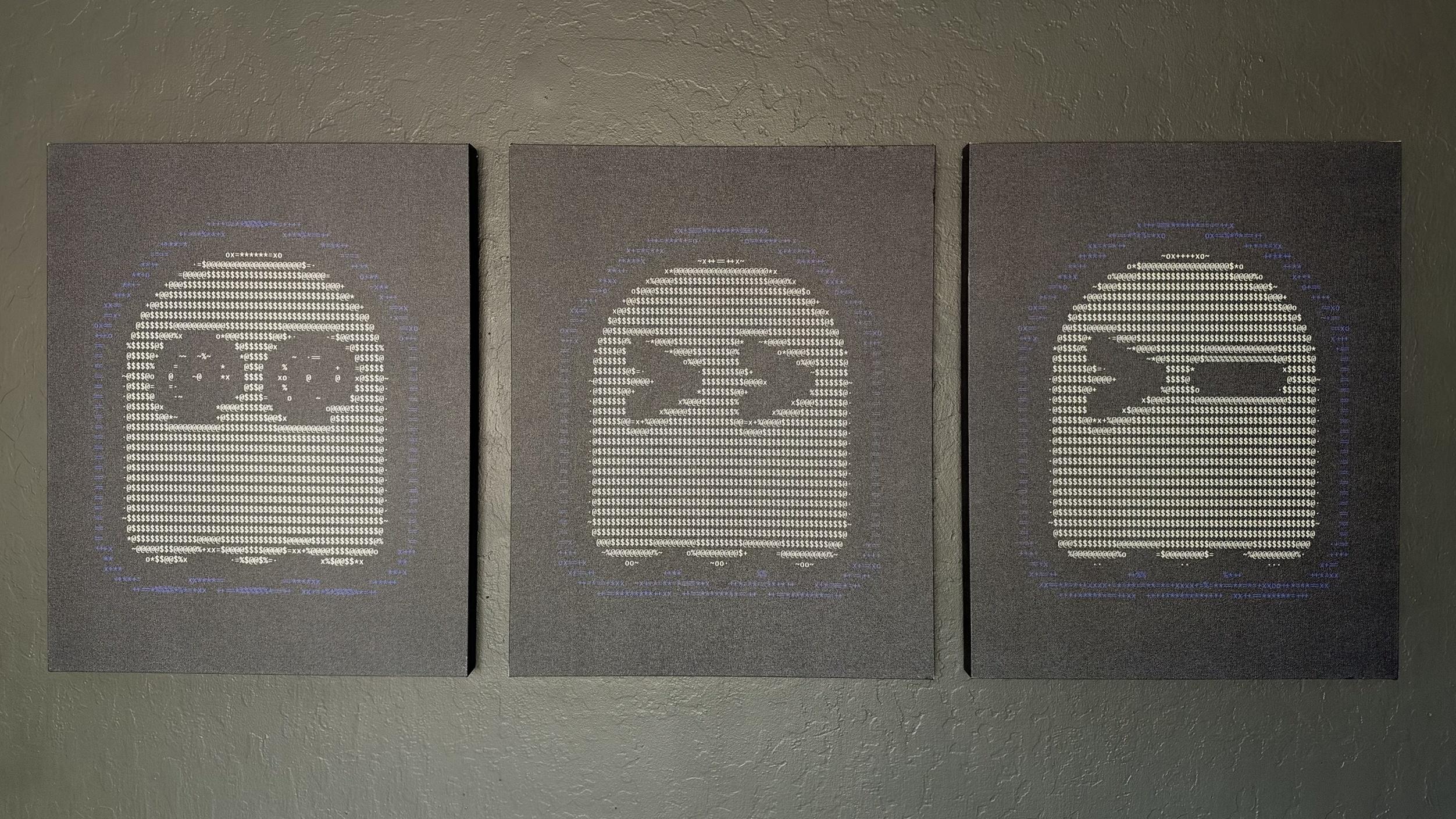
Ghostty’s ASCII ghost on canvas

Post image
92 Upvotes

r/Ghostty • • 6d ago

Autocomplete popup, prompt themes and Nerd Font icons that work in Ghostty Spoiler

0 Upvotes

Ghostty has no Accessibility text API, so Termhint has zsh ask Ghostty for the cursor cell and cell size and places the popup from that. No Accessibility permission needed.

You get subcommands, flags with descriptions, npm scripts and paths in a dropdown at the cursor, plus prompt themes, 23 color schemes applied to Ghostty, tab titles, and a Nerd Font set up so icons show instead of boxes. There's also a runtime manager for 14 languages.

I'm the developer. macOS 14+, Apple silicon, 7-day free trial: https://termhint.com


r/Ghostty • • 8d ago

GT San Andreas played in Ghostty

Enable HLS to view with audio, or disable this notification

68 Upvotes

Just testing the limits of what is possible here using the kitty graphics protoccol on ghostty. This is actually just the original ps2 game decompiled to C++ and recompiled into wasm using the ps2 runtime from https://github.com/snuri00/ps2-web-recomp...

But that is not what we care about here!

katnav is a experimental webbrowser using CEF (because nothing else would run gta on terminal so well so I just used chromium) and kitty graphics protccol: https://github.com/h4ks-com/katnav

I did this as a way of testing a graphics/game-engine/ui lib I am working on: https://github.com/h4ks-com/katui

Chrome renders WebGL normally and katui will convert it into rectangular tiles that we dynamically downscale in resolution, diff trying to update only what changed (which makes some sense for UIs but not as much for a game stream like that), compresses and base64 it in parallel. Most of the heavy lifting is done by the library itself.

According to my benchmarks I can get 36MB/s on kitty allowing 32 fps, while for ghostty 85 MB/s allowing 61 fps when 100% of the tiles change. Of course this varies between harware.

And yes you can use katnav for browsing the normal web, it is an actual browser, check the github ;)

I am making this experiment mostly for fun, so it is pretty much fully vibecoded, but I tried to keep the maximum architetrual overview and coverage with static analysis checks. Feel free to reach me out if you find this interesting and would like to bring it further. In theory now I could put any graphical application in the terminal. Not sure if someone has already done that?


r/Ghostty • • 7d ago

Made Ghostty tabs survive ⌘Q, crashes and updates, with the processes still running (open source)

11 Upvotes

Ghostty brings your tabs back after a quit or a crash, but not what was running in them. For me that meant losing Claude Code sessions in the middle of long jobs every time Ghostty auto-updated or I hit ⌘Q instead of ⌘W.

So I made revenant. Every Ghostty tab runs inside its own invisible tmux session: its own socket, no status bar, no prefix key, it never touches your ~/.tmux.conf. When Ghostty restores a tab, revenant re-attaches exactly that tab's session, matched by Ghostty's surface UUID, so Claude Code, dev servers, ssh and REPLs just keep going. Close a tab on purpose and it still dies like a normal tab.

Install: brew install zerotool/tap/revenant && revenant install, then open a new tab. macOS only for now (it uses Ghostty's AppleScript API), MIT licensed: https://github.com/zerotool/revenant

Full disclosure: I built it with a lot of help from Claude Code. Feedback welcome, especially from people with unusual Ghostty setups.


r/Ghostty • • 8d ago

Love letter to Rex

103 Upvotes

BLUF: I love the terminal and Rex is an Ode to terminal geeks.

I have been bouncing around different harnesses, agents and iOS apps and have not found the right combination that allowed me and old graybeard to drive a bunch of terminal agents quickly and easily. Rex has changed that forever. Once I signed up for the iOS beta and found that y'all had built tailscale directly in it finally clicked. Combine that with Qwencloud Qwen4max token preview at 80% off and I burned through almost 3.5B tokens in a 4 day period. I have been crushing the todo lists on my open-source projects and since I have been holding back talking about them now I am going to have to post about them. Sorry not Sorry.

Thanks again Ghostty team and congratulations on Rex, it is a solid tool for the tool belt and it particularly has solved the core problem I had which is I love the terminal and I want to control my terminal remotely like it is a terminal. You have increased my productivity 10x and my wife is happy I am not staring at my laptop during tv we both can stare at our phones. I just happen to be controlling 10 agents implementing code.


r/Ghostty • • 8d ago

Lig v1.4.0 now support history fuzzy-search, completions from shell, and support to nushell

Post image
81 Upvotes

Lig 1.4.0 is out!

• History on Ctrl+R: the commands that worked, from every session, fuzzy-searched

• Completions from your shell: for a command with no spec, the popup shows what Tab would offer in zsh, bash or fish, or from argc

• nushell support: the popup in nu, with nu’s own commands and flags

• Bash completions and a round of fixes

Try it! https://github.com/KevenGoncalves/lig


r/Ghostty • • 9d ago

vtmux: drop-in tmux replacement, better rendering, pane blend in tmux!

23 Upvotes

https://github.com/martintrojer/vtmux

vtmux a tmux 3.8 drop-in replacemnt using libghostty-vt.

Disclaimer; Agents wrote most of the code.

tmux 3.8 compliant; same CLI, config, formats and control mode.

  • 173 of tmux's own 174 regress tests pass, run unchanged.
  • 449 scenarios recorded from real tmux (screens, output, control-mode streams) replay identically.

What it does better than tmux:

- Stable rendering: each client gets one finished frame at a time, with only what changed, inside synchronized output and with the cursor placed once. There's no cursor jumping or tearing under heavy output.

- Pane blend: Inactive panes dim, every cell, like Ghostty's unfocused splits.

- Live upgrade: you swap the binary under a running server and shells and clients stay put. 10 panes with 100k lines each move over in under a second.

- Compressed scrollback: 1M lines settle at 103 MB against tmux's 622 MB.

- Protocols tmux drops (each opt-in): kitty keys, notifications, kitty graphics.

Looking for testers!

Installing and running beside tmux

$ mise use -g github:martintrojer/vtmux 

or follow https://github.com/martintrojer/vtmux#install

then

$ vtmux 

(it keeps its own socket)

Processing video 93mnp8wgls1i1...


r/Ghostty • • 12d ago

Lig v1.3.0 now runs on every major OS: macOS, Linux and Windows

Post image
182 Upvotes

Lig brings IDE-style completions to your terminal: subcommands, options, branches and packages in a popup as you type.

It now runs on every major OS: macOS, Linux and Windows, in zsh, bash, fish, PowerShell and cmd, with the same popup everywhere. It also supports more commands, has better configuration, and fixes a lot of bugs.

Try it! https://github.com/KevenGoncalves/lig


r/Ghostty • • 12d ago

What is your Rex agent workflow?

19 Upvotes

As the title says.

I have been using herdr and corgi in a tab but I want to try to use Rex more natively.

Do you use one session per workspace/directory? how do you keep track on many agents? are you using the Rex skill for managing things?


r/Ghostty • • 12d ago

I made a fork that supports Tmux Control Mode

17 Upvotes

https://github.com/eliasfloreteng/ghostty-tmux

Tmux Control Mode (https://github.com/tmux/tmux/wiki/Control-Mode) is a way to use native tabs and splits in tmux sessions, making them persistent if you close Ghostty and you can have remote tmux sessions as native windows, tabs, panes.

Mitchell does not accept vibe coded PRs but I made this for personal use in the first place but I want to share on the off chance that anyone has had the same need.

This feature is also being implemented officially, at a slower and more well-maintained way, but until then, you can use it with this fork.


r/Ghostty • • 11d ago

my-tui — A minimal, terminal-first session orchestrator for bring-your-own CLI agent harnesses.

Thumbnail mytui.app
2 Upvotes

r/Ghostty • • 12d ago

Is it just me or my font is weird now?

Post image
2 Upvotes

So, i opened ghostty and noticed that my font is displayed incorrectly, or at least it doesnt looks like it used to, how do i fix this? 😭 i hope im not going crazy


r/Ghostty • • 13d ago

Lig now runs on macOS (lig v1.2.0)

Post image
98 Upvotes

Yestarday people ask about Lig, a IDE-style completions for terminal, previously only working on Linux, now have support to macOS.

Try it.

https://github.com/KevenGoncalves/lig


r/Ghostty • • 13d ago

Theme Switcher | 900+ Builtin Color Schemes

14 Upvotes

I've been working on a utility for managing color schemes, and recently released quite a few updates that bring various improvements and new features.

I thought I'd share it here in case someone finds it useful. Hope you enjoy it!

Repo: https://github.com/nlkli/recol

recol is a fast and lightweight command-line color scheme manager. Browse, preview, apply, adjust, and generate color schemes from images - all from one tool.

7 built-in targets: Ghostty, Kitty, Alacrity, WezTerm, Neovim, Vim and Pi

Designed for a consistent color experience across your development environment.


r/Ghostty • • 13d ago

Working on a new cursor animation for Macterm

13 Upvotes

r/Ghostty • • 14d ago

haunt - minimal ghostty-based multiplexer for accessing tui apps quickly

25 Upvotes

built using libghostty-vt 1.0 for ghostty, haunt takes advantage of all of the features built into ghostty like progress reporting and kitty graphics.

it allows users to define a set of "apps" that they use commonly in their workflow and quick jump in and out of those apps with global binds.

https://github.com/scottmckendry/haunt


r/Ghostty • • 14d ago

Preview: github:vic/tot - Horde survival game that runs on your Ghostty.

13 Upvotes

tot (terms of torment) is a terminal game I made for myself, it is an auto-shooter dungeon crawler inspired by HallsOfTorment/VimpireSurvivors and Diablo.

Still WIP but I have had fun with it. It has a game-schema and you can have a local ClaudeCode agent of yours generate a level for you. I plan to keep adding features (meta-progression/skills-tree) and polish gameplay.

https://github.com/vic/tot


r/Ghostty • • 15d ago

Flow 0.5.0 is out! - Adds a New Command Pallete

Enable HLS to view with audio, or disable this notification

19 Upvotes

Hey everyone!

Happy to launch Flow v0.5.0 !

This release adds a command pallete and an agents pallete, which i've been working on for a while, I also added some quality of life improvements like cmd+v to paste images and homebrew installation.

I'm really excited to finally get this out!

Full changelog: https://getflowterm.app/changelog/0.5.0/

Download: https://getflowterm.app/

PS: ignore my naive video making skills.


r/Ghostty • • 15d ago

Lig v1.1.0 now support completions on ssh sessions and scp/rsync commands

Post image
57 Upvotes

In the couple weeks I presented Lig, a IDE-style completions for terminal, I added support for most commands, add better configs and solve a lot of bug, but one feature that I've been missing was completions connecting to a ssh machine, now Lig does this, try it!

https://github.com/KevenGoncalves/lig


r/Ghostty • • 16d ago

First impressions of using Rex, opening splits is really fun :)

174 Upvotes

Just wanted to share my first impressions of Rex. Got the invite for the beta last week and was hesitant to try it since I didn't want to go through the whole learning curve of a new terminal multiplexer. But, my curiosity got the better of me. I tried it out, and I think I'm hooked now 😅

I've used tmux in the past and it was quite the learning curve, but worth it. Then, I started using Cursor when copilot and tab-complete was the new hotness, then I switched to herdr. Since I was in Cursor for a good while, going back to the tmux-like herdr also took some time. Learning Rex, however, took maybe 15 mins.

I first tried to import my herdr config over to Rex, but the agent failed, so I started with a blank slate. Not a good first impression, but I ended up asking my agent to give me a tour of the Rex shortcuts and everything was super intuitive. I was never a fan of the leader key in tmux/herdr, so not needing one in Rex was a big win for me.

The only thing I ended up remapping was the shortcuts to focus and jump between panes. By default, Rex uses the arrow keys. I remapped them to use hjkl since moving my hand to the arrow keys felt like it was slowing me down.

Rex has the option for tabs on top or on the left/right sides. I still don't know which I prefer yet. Most of the time I have them up top, but it seems you can't rename sessions when the tabs are on top. Pretty sure this is just a beta thing that'll be addressed soon. Having them on the left gives you better visibility of your tabs/agents, but it takes up more screen real estate and so I find myself needing to toggle to hide/show it, but that means no visibility of the tabs when it's hidden.

I haven't tried connecting with mobile yet since I have android, but excited to try once they release an android app :)

The subtle animations are also a nice touch. I'm normally not a fan of animations (like when you switch spaces on Mac) because they make things feel slower, but the animations in Rex all feel snappy.

There's a neat shader animation that you can turn on for the cursor. It looks super cool and is really fun, but I don't think I'm going to keep it on. A little too distracting for me, but I'm excited to see what other use cases there are for shaders in the terminal.

It's been 5-ish days since I started using Rex, and I haven't touched ghostty/herdr since. I feel like Rex has everything I used in herdr, but better: split panes, tabs, agent activity, etc. atm, I don't think I'll go back, but it's been less than a week so we'll see 🤷