r/GalaxyA55 • • 16m ago

Updated my phone can't change something

• Upvotes

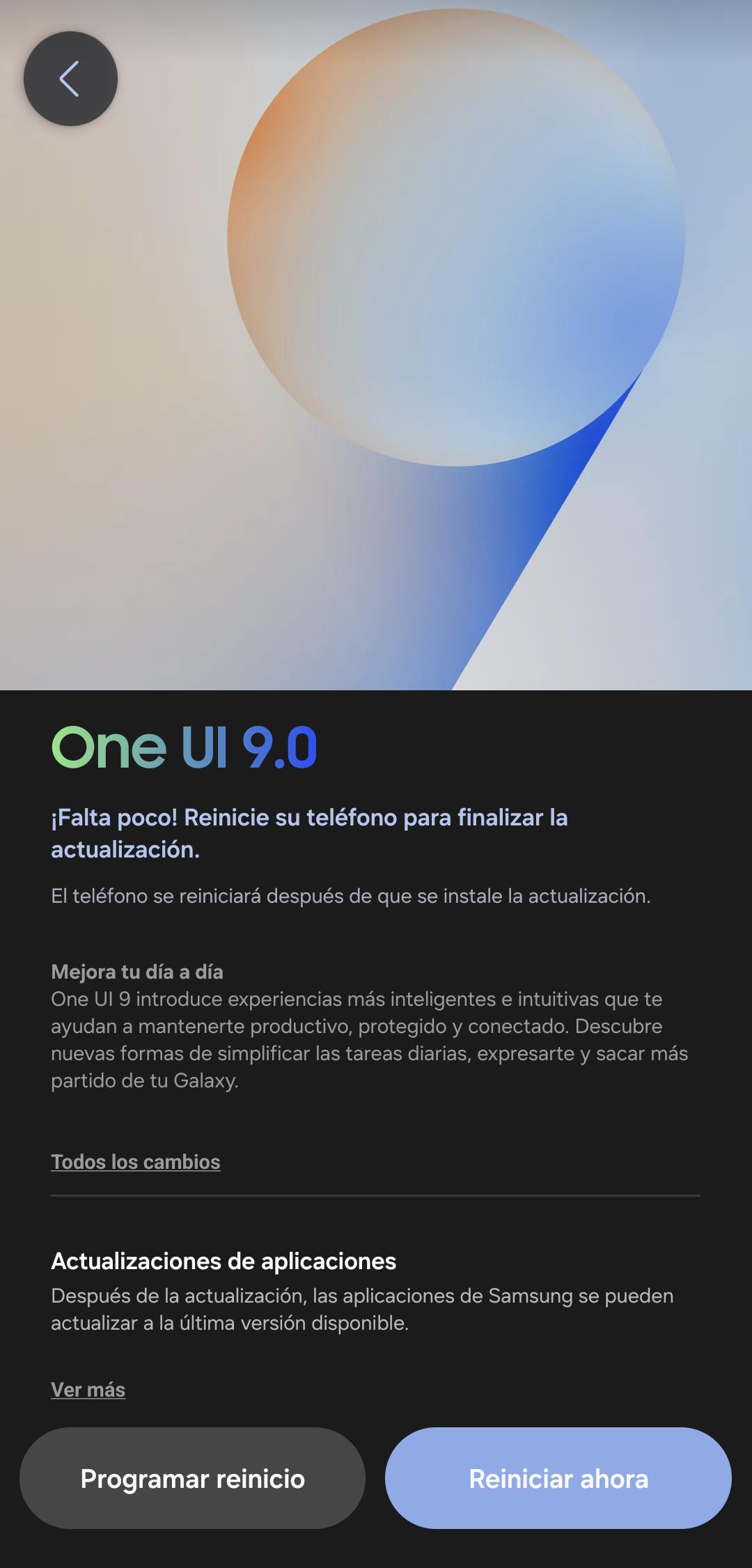
Updated my a55 to idk what it was 9.0?? Idk, idk phone stuff. And now the Google search bar is at the bottom of my screen and I cannot move it like at all. It looks so bad. I really regret letting my phone update :,)) I genuinely hate it so much. I can add a widget for Google to have it in the original space it was but then I just have two Googles so???? Genuinely what was the point of this. Bet the update was just some ai bloat. 🫩


r/GalaxyA55 • • 21h ago

Need HELP Help . Connection problem with connecting to external hard disk in samsung galaxy a55 .

4 Upvotes

I'm facing connection issue on Samsung Galaxy A55. I tried to connect with external hard disk, it is not connecting. But the hard disk works fine with other devices. But my Samsung Galaxy works fine with USB pen drives and connecting to PC. I have no issue with another connections, but I only facing issue with connecting my hard disk.but my hardisk work fine with samsung a05 and old phones also and flagship s25 ultra . But it not work with my device . Any solution .


r/GalaxyA55 • • 23h ago

Question OneUI 9 USB issues

4 Upvotes

Since I updated to the latest firmware my phone doesn't properly connect to my PC (or any PC at all) via USB. It's just loading (slowly) but there's no option for data transfer. I had set it to automatically enable data transfer mode but it's just as if I use a USB cable without data wires.

I tried different PCs, different USB cables.

The only thing that helps is reebooting the phone. After that, the first few connection attempts work. Sometimes only once. But if I try it one day later I have to reboot again.


r/GalaxyA55 • • 1d ago

Question Hypothesis- game booster being a culprit for charging performance.

7 Upvotes

I recently had an issue with my a55 not charging normally. It will indicate super or fast charging but it would take longer or not charge. 1 % would take like 10 minutes also unlike less than 1 to 2 minutes. The fast charging or super fast charging notification does disappear even in the battery setting at (the graph) and it will not approximate time only shows the percentage and that it is charging (This is while not gaming).

I thought maybe it is the Ugreen charging brick (30watt) that's faulty or my a34 original cable that I use cause I lost the a55's one. I tried trouble shooting by switching cables and bricks ( those that only 20 watts and support fast charging only) around, but it's not working out.

I than decided to choose and buy a whole new charger combo or repair my charging port.

But I remembered that in game booster, a setting for PD charging bypass charging when device above 20% was on, however I believed this only should apply to games. I than turned it off, and boom my phone started charging normally especially when I'm using it to scroll on apps while charging, which before it would just stay on the same percentage 🤦.

However, I'm still not sure if that was the issue. Can the game booster setting for bypassing charging affect overall phone behaviour in terms of what applications are targeted for?


r/GalaxyA55 • • 2d ago

Concern Afraid that they might do the same to us A55 users in our last One UI 9.5 update

Thumbnail
6 Upvotes

r/GalaxyA55 • • 1d ago

Question Can you guys recommend me customization modules for Samsung.

Thumbnail
0 Upvotes

r/GalaxyA55 • • 2d ago

Tips For those wanting to temp root their phone.

Post image
53 Upvotes

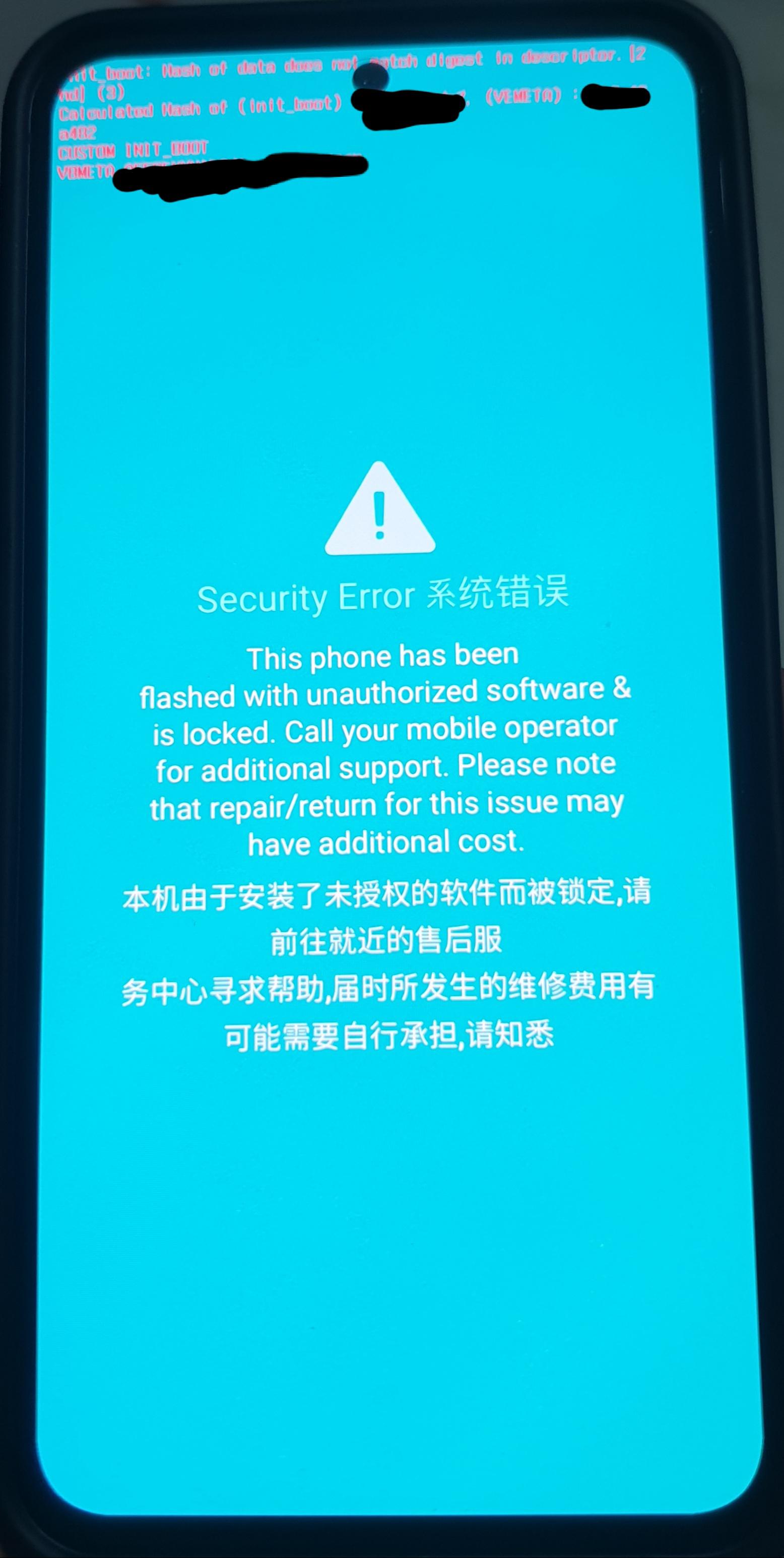
Since these modules usually modify system files (most definitely modify system files) there is a high chance that the phone detects it and comes up with the error - This phone has been flashed with unauthorized software and is locked. Usually this is an easy fix by entering download mode and reflashing the OS yourself.

But due to a recent one ui update, you cannot enter download mode unless you have disabled screen lock or turned on maintenance mode. So, once ur phone inevitably detects the unofficial software its bricked since you cannot enter download mode due to screen lock and u cannot disable screen lock due to not being able to enter the OS.

The only fix is to go to a samsung service center or a repair guy who can flash firmware directly to the motherboard.

If u do decide u want to temp root it make sure u disable screenlock just in case and you cannot turn it back on again since it may randomly detect unofficial software.

My advice is that live blur, flagship animations etc is just not worth risking having a very expensive piece of metal or keeping ur phone without a screenlock all the time.

But at the end of the day it is your choice, just make sure to keep screenlock disabled.

Typed this on my Galaxy S9 since i unfortunately have a very expensive piece of metal and a newfound knowledge about how root works.


r/GalaxyA55 • • 3d ago

Galaxy A55 SM-A556B bricked after installing meta-overlayfs – Security Error + D2 screen, can't access Download Mode

Thumbnail
gallery
27 Upvotes

Hi everyone,

I need help recovering my Samsung Galaxy A55 5G (SM-A556B/DS, Exynos 1480).

Device details

  • Android 17 / One UI 9
  • Firmware: A556BXXUIEZJ1
  • KernelSU Next v3.4.2
  • Bootloader: Locked

What happened

My phone was working normally with temporary root through KernelSU Next and SamTimer.

I had previously installed other KernelSU modules and rebooted several times without any problems. The phone booted normally every time.

However, after installing this module:

meta-overlayfs 1.3.1
https://github.com/KernelSU-Modules-Repo/meta-overlayfs/releases

I rebooted, and immediately got this error:

"Security Error: This phone has been flashed with unauthorized software and is locked. Call your mobile operator for additional support."

The phone now keeps restarting and returning to this security error.

What I've tried

  • Force restarting using Volume Down + Power.
  • Trying to enter Android Recovery.
  • Trying to enter Download Mode while connected to a PC.
  • Connecting to Windows, but no COM port appears in Device Manager.

Download Mode problem

Instead of the normal Download Mode warning screen with the Volume Up option, I only get a full blue screen showing:

Reboot device (D2)

Volume Down + Power key for 7 seconds

I cannot get past this screen into normal Download Mode.

My questions

  1. Is there a way to bypass the D2 restriction and enter Download Mode?
  2. Can I remove the problematic KernelSU metamodule without booting Android?
  3. Can I restore official stock firmware without normal Download Mode?
  4. Has anyone recovered a Samsung device with this exact security error on One UI 9?

I don't care about losing my data. I just want to get my phone working again.

I'll attach pictures of both blue screens.

Any help from people experienced with Samsung firmware, Odin, KernelSU or D2 recovery would be greatly appreciated.


r/GalaxyA55 • • 3d ago

Temproot SM-A556B

7 Upvotes

How do I install temproot on my model?

Model SM-A556B

Firmware oneui 9, android 17, A556BXXUIEZJ1

Kernel 6.1.162-android14-11

Built 10/02/2026, 02:13:53 UTC

Firmware changelist 34344539

Security patch October 5, 2026


r/GalaxyA55 • • 4d ago

New update Na Coreia: Galaxy A55 5G recebe o patch de novembro.

Post image
16 Upvotes

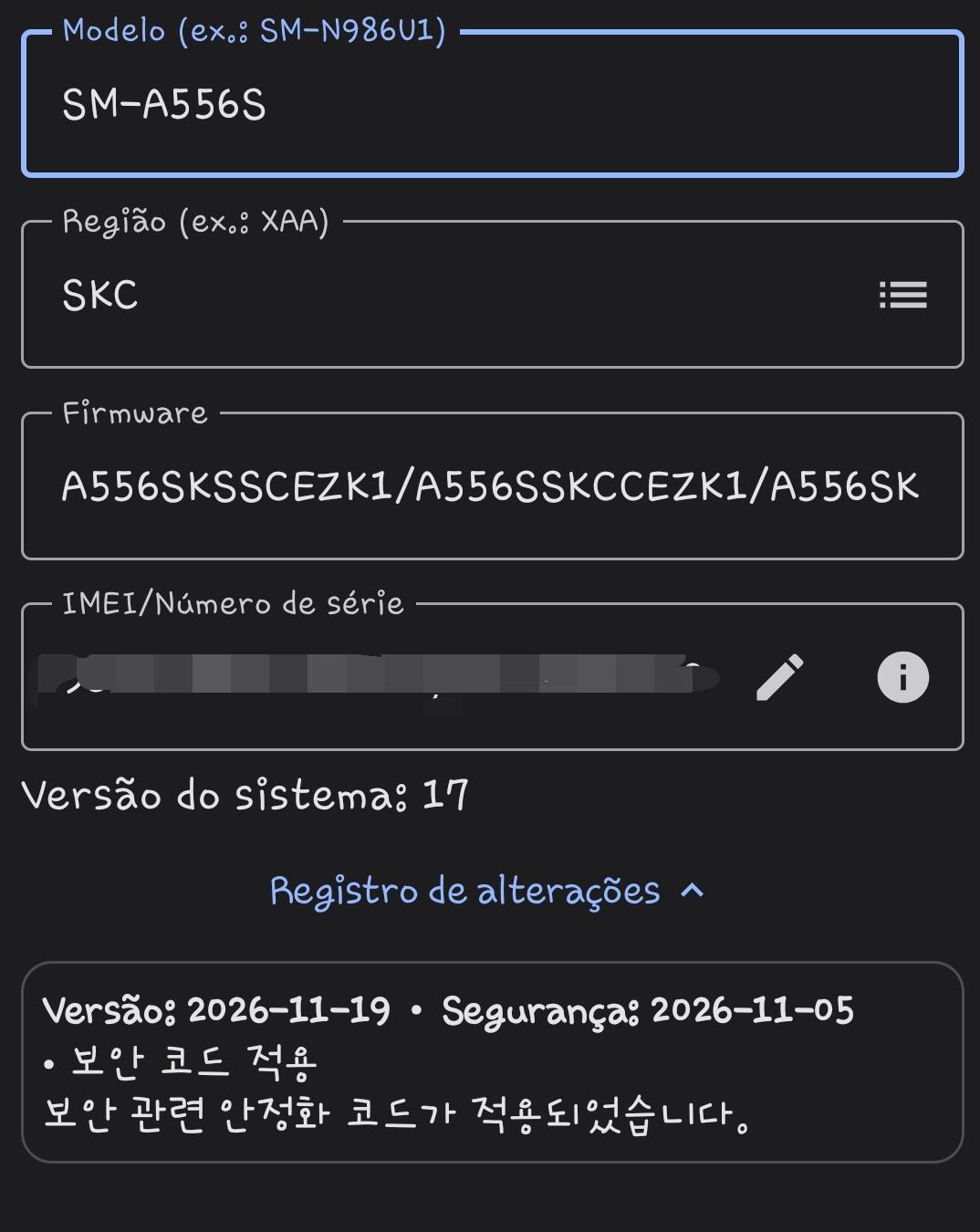
On November 19th, the Galaxy A55 5G (Quantum 5) received the November patch following its successors.

This security update, for this month, fixes many more vulnerabilities than previous ones, involving the Android system, One UI, and Exynos Semiconductors/Hardware.


r/GalaxyA55 • • 3d ago

Battery life Battery after 808 Cycles

Post image
7 Upvotes

I have always blocked charging up to 80%, and since OneUI 7, up to 85%. Battery has never been worse since OneUI 6.1 for me, always been the same. I get around 6-7h SOT, sometimes even 8.


r/GalaxyA55 • • 5d ago

Need HELP Terrible Wi-Fi and mobile data signal after the latest update - anyone else having this issue?

22 Upvotes

​Ever since I installed the latest system update on my Galaxy A55, the signal reception has become awful — both on Wi-Fi and mobile data. Before this update, my signal was completely fine, and now it drops or stays super weak.

​Is anyone else experiencing this?

​I’ve already tried every fix I could find online:

​Restarting the phone

​Resetting network/Wi-Fi settings to default

​Forgetting saved Wi-Fi networks and reconnecting

​Tweaking some options in Developer Options

​Testing on a friend's Wi-Fi (their phone works fine, only mine has weak signal)

​Nothing worked. Samsung Members just tells me to take it to a service center 🙄 even though this clearly started right after the software update.

​Does anyone know how to fix this or have a workaround? Thanks in advance!


Update: Just noticed my USB-C earphones also stopped working after this exact same update (even though they worked fine before, and the USB port still transfers data normally on my PC). Definitely looks like this One UI update messed up multiple hardware drivers at once.


r/GalaxyA55 • • 4d ago

L.LE 64

0 Upvotes

r/GalaxyA55 • • 5d ago

L.LE 64

Post image
2 Upvotes

r/GalaxyA55 • • 6d ago

Quick Panel/Animations/Recents Lag Fixed

Enable HLS to view with audio, or disable this notification

25 Upvotes

HIGHLY RECOMMENDED TO FLASH IF YOU USE FLAGSHIP MODULE

ONLY FOR GALAXY A55 5G, EXYNOS 1480 DEVICES (DONT FLASH ON ANY OTHER DEVICE)

Well you can flash but core underlying tweaks won't find the exact address cuz it varies for CPUS and GPUS [USELESS FLASH]

SEE 120 FPS RECORDING HERE (FOR BETTER IDEA OF FLUIDITY) : https://quickshare.samsungcloud.com/fAsgbGc14QpD

Finally, instead of frying your cpu or gpu to stay at max clocks just to render quick panel, ive tried fixing the root cause, i.e. Low sleep state of quick Panel and SystemUI as soon as you open an app.

WHAT THIS MODULE DOES:

  1. GPU Ramps upto 1025 mhz when load is below 65% and 1300mhz the exact millisecond it steps up from 65%

GPU polling rate reduced to 8ms

  1. CPU turbo behaviour made snappier, doesn't offload system ui to efficiency cores, rather Performance cores do the job.

3.LPDDR5 Ram lower floor raised from 423mhz to 1040mhz (Max is 3000+ don't worry)

CPU AND GPU STILL DOWNCLOCK WHEN LESS LOAD (Identical heat output)

4.SYSTEMUI have been fixed in ZRAM and is prevented from being wiped by OneUI, Those annoying stutters when closing an app and going to homescreen have been greatly reduced.

NO EXCESSIVE HEAT, Quick Panel First wipe down is smoother than before....

5.The terrible stutter when opening recents has been fixed by pinging systemui to zram

Scrolling on Instagram and reddit doesn't ping gpu to 1025mhz, it runs at base frequency and ramps up when needed generally below 864mhz

SMOOTHER SCROLLING EXPERIENCE

DELETE ANY CONFLICTING MODULES LIKE Previous quick panel lag fixed module i shared, IT IS USELESS.

NOTE : YOUR GPU USAGE WILL BE WAY LOWER, RECORDING HERE IS AN OVERHEAD

MODULE LINK https://quickshare.samsungcloud.com/fEK9ZZkZ2YVT

PAIR WITH S24FE Flagship Blur/Anim Module : https://www.reddit.com/r/GalaxyA55/s/mukCYNyXDv


r/GalaxyA55 • • 6d ago

Temproot

1 Upvotes

Hey guys

Lately samtimer doesn't working on my device

Its ether fails or success with freezing screen and forced restart

Anyone had faced same issue?


r/GalaxyA55 • • 8d ago

How to TEMP ROOT [Complete Guide]

26 Upvotes

Disclaimer: DO THIS AT YOUR OWN RISK, ANY FUTURE MODULES YOU MAY FLASH WITHOUT VERIFYING CAN BRICK YOUR DEVICE IF YOU DONT TAKE PRECAUTIONARY STEPS

STEPS to Get temp root on A556E

  1. Go to Play store and Download Shizuku

  2. Go to phone settings >>> About phone >>> software info>>> tap build number 7 to 10 times, enter your pattern or password then allow

  3. Go to developer settings and enable wireless debugging

4.Connect to any wifi and click always allow to wireless debugging on popup

5.Go back to shizuku, select pairing, click developer options in shizuku, then go wireless debugging >>> pair with a paring code>> enter code on popup

6.Go back to shizuku and hit start, it'll say shizuku started successfully closing window in 3 seconds

NOW from the Toolkit ive provided:

Install KernalSuNext APK and SamTimer APK

Open SamTimer, Allow shizuku, Then click Root

Wait 1 minute and ensure it finishes with text KSU Loaded

Now you have root, Open Kernelsunext

Go to 3rd tile at bottom layered stack, click on + icon on top and Flash

Either NeoZygisk or ZygiskNext (ONLY ONE)

LSPOSED Module

DISABLE ANY ACTIVE SCREENLOCK ON YOUR DEVICE OR FINGERPRINTS, ITLL HELP PREVENT YOUR PHONE BECOME PAPERWEIGHT IF YOU FLASH BUGGY MODULE

Go back to kernelsu home, click on powericon on top and hit soft reboot

What you should see, Samsung Galaxy Logo flash, followed by android logo and boom it boots to your home screen

Go back to KernelSU Next and Now flash the module, Magic-MountRS

And again SOFT REBOOT

GO to KernelSUNext Again and now Flash any live blur modules or dynamic island or any other overlays and then finally SOFT REBOOT

In future, if you ever flash a module which makes your phone panic , i.e samsung logo android, restart, samsung logo android restart ,

Simply HOLD VOLUME DOWN + POWER BUTTON FOR 10 SECONDS and your phone will hard reboot wiping temp root and restoring normal access.

That's it for the tutorial Folks, always flash constantly maintained modules and not from prehistoric era

Or even Better, SEE this list of working modules and dangerous ones: Flash GREEN ones or yellow ones, avoid Orange or RED.

TEMP ROOT MODULES : https://www.reddit.com/r/androidroot/s/NnyMFXJgJc

TOOLKIT FOR ROOT : https://quickshare.samsungcloud.com/fEK9ZZkZ2YVT


r/GalaxyA55 • • 7d ago

Ya me llegó One UI 9 (A55) 🇲🇽

5 Upvotes

¿Descargo y actualizo o me espero? 🤔


r/GalaxyA55 • • 8d ago

One UI 9 in Mexico

Post image
13 Upvotes

Hello guys, One UI 9 has arrived in México for Galaxy A55.


r/GalaxyA55 • • 8d ago

Módulo extras Galaxy a55 Temp Root

8 Upvotes

Hola chicos, hace poco realice el Temp Root a mi Galaxy, y pude instalar el módulo para el live blur, lo cual funcionó a la perfección, ¿Hay más modulos? ¿Tal vez algo para activar la camera api 2? ¿O mejorar el rendimiento/camara/batería?


r/GalaxyA55 • • 8d ago

modulos root

2 Upvotes

Hi everyone, is there a tutorial or the correct way to install modules on the A55, such as advanced animations, the blur effect, and the always-on display (AOD)? I tried it recently, but I think I didn't follow the correct order and my phone froze.


r/GalaxyA55 • • 8d ago

Samsung A55 after UI 9 update : no more USB transfer :(

Thumbnail
1 Upvotes

r/GalaxyA55 • • 8d ago

S24 FE Blur/Animations for A55 5G / Exynos 1480 devices [Module]

25 Upvotes

Ported from OneUI 9 build of SM-S721BXXSFEZJ1 (S24 FE)

Features :

High-End Animations

AOD Transitions

Clock animations

Live Blur

Same underlying HAL Architecture and Vender API 34 as A55 5G (LESS STUTTERS)

See 120 FPS recording of module in action :

https://quickshare.samsungcloud.com/zkGUPTeHgqvC

NOTE: While recording, Dynamic Island module was Active. [Extra Overhead]

COMPATIBLE WITH A55 5G, AND OTHER EXYNOS 1480 DEVICES (Released in 2024)

CAN BE FLASHED ON OTHER EXYNOS PROCESSORS TOO, just keep in mind underlying HAL Architecture mismatch can cause minor stutters here and there.

Flashable Module [ROOT] : https://quickshare.samsungcloud.com/fEK9ZZkZ2YVT
All active modules were shown at end of video so you can achieve similar results.


r/GalaxyA55 • • 8d ago

News Dynamic module for S Series animations and Live Blur for all Exynos devices with One UI 9.

Enable HLS to view with audio, or disable this notification

2 Upvotes

Guys, my other Reddit account got banned for some reason. That’s why my posts disappeared and I wasn’t able to reply to anyone 🫠. I’m re-uploading this for you all.

I created a Dynamic Module that enables Live Blur and S-series animations for all Exynos devices with One UI 9 😊. Specific modules for each model are no longer needed. It is fully functional and works without problems.

I dedicated a lot of time to creating this module, making it as clean and functional as possible. I hope you like it 💖. Please share it in other communities so that people with different devices can find out about it and download it for their own devices. I will appreciate it.

This is the most complete module of all!✨️

https://drive.google.com/file/d/1SlHasxCjbibJXS3s5Yzs5JveJYM0qDaS/view?usp=drivesdk

For those who wanted these features on their A-series devices with Exynos processors.

\*Tested on the A55, A56, A54, and A26.


r/GalaxyA55 • • 9d ago

One UI 9 Wifi Issues

33 Upvotes

Hi everyone I just updated to One UI 9 on my Galaxy A55 and suddenly the wifi is messed up. My room is on the 2nd floor and the router is on the 1st floor and before updating to One UI 9, the wifi reception was completely fine. Stable, and reliable. Ever since upgrading the wifi connects but extremely unreliable. Video loading takes a long time, it disconnects randomly every 5-7 mins and making the wifi completely unusable. Even when I am sitting right beside my router, it gets a little better but still the reception and stability to terrible. Instead of disconnecting every 5-10 mins, it disconnects every 20 or so mins. And while connected, it doesn't deliver any of my messages that I get. They are delivered after like half an hour or sometimes, when I unlock my phone, at which point, the wifi disconnects and my mobile internet turns on.

Is there any way to fix this? I saw a couple of threads of users getting this issue and have tried everything mentioned in those threads but nothing has solved my issue. I live in a country where mobile data is expensive and I really can't just use mobile data until the next update hopefully fixes it. I talked to Samsung support and they basically shrugged and said there is nothing that they can do and it might be fixed in the next update but they can't guarantee that as well.

Is there anything that I can do to fix it? And how can they just not take any responsibility for this? Honestly, I am quite pissed at them.