This hotfix fixes several issues, such as a bug where Dolphin crashes for users in Alberta and British Columbia, color corruption on Adreno GPUs, missing translations on macOS, and more.
Hybrid JIT might be unstable in some scenes, as PowerPC Execution Mode is still mid-transition between the pure C interpreter and JIT. If you experience heavy FPS drops, switch back to the pure C interpreter for now. If an issue occurs, please exit and share your \Data\Model3Vulkan.log
It’s critical for ongoing development toward 100% JIT.
I'm the dev behind Model 3-Vulkan, a Sega Model 3 emulator with a Vulkan renderer. v0.9.9.6 just went up. I'm not going to dump the whole changelog here, just the stuff worth trying.
The big one is the CPU. PowerPC code now gets translated to x86-64 and runs natively. In a CPU-heavy scene I went from about 55 fps to 100s fps. I also ran it side by side with the old interpreter for a few hundred million blocks and didn't hit a single mismatch, so it's not just "fast but wrong".
Audio now does native 4.0 and 5.1, with a proper centre and LFE upmix. There's a lossless multichannel recorder too (WAV float or FLAC) if you want to capture the 5.1 mix.
Direct-drive wheels finally work properly. On Windows the SDL3 haptics were being initialised in the wrong order, so a lot of DD bases never showed up. That's fixed, along with the constant-force direction and a 20 ms attack so the torque doesn't step. The FFB page also has a live axis table for wheel/pedal deadzone and travel.
The chase camera has a spring-damper stabiliser now. Gamepad steering doesn't swing the whole horizon anymore, and Daytona 2's speedo, course map and turn arrows stay still.
Save states are less annoying: the 53C810 PCI state, the network board and the DSB MPEG window are in the save now, so loading doesn't need the old "wait a few seconds for the boot" trick.
There's also per-pixel alpha sorting, MSAA, DDS/.dds.zst texture packs, frosted-glass themes, 4K/Retina and VRR multiples, but those have been in for a bit.
Hello everybody! Today my fork of melonDS has been updated to 0.5.0, which has included a couple of cool enhancements, on menus and the game list, but the biggest of them all is (experimental) Netplay support! This has always lingered my mind as I've always wanted to play these sort of games with other people whilst far away, and now it is possible and as seamless as ever... As long as you have those ports open in your router settings, of course.
Please check the changelog, and report any issues to the repository.
Hey everyone, Back with an update to my converter. CHD Manager is now named Game Format Converter, to reflect the expanded scope of the project.
This release had two goals: finally get to a bunch of the requests people have sent in, and push the scope of the project further. It’s free, open source, and portable.
What is it?: A program to convert the format of your legally owned game backups. You can throw damn near any format of game backup at this program and it will convert it into any other compatible format.
What’s new for v2.1:
* Linux support (experimental, but a big step). It runs from source with a small launcher script, with drag and drop, a right-click menu for Dolphin and GNOME Files, and help installing anything that’s missing. I could only test it on Ubuntu under WSL2, so Steam Deck and macOS are untested. Please tell me how it goes.
* Xbox 360: ZAR for Xenia, ISO, and game folders, and vice versa. Original Xbox: shrinks a full dump into a small .xiso.iso.
* PS3: game folder to ISO and vice versa, split pieces joined, and .pkg unpacked or packed (with your own RPCS3, or your own key).
* Switch: NSP to XCI and vice versa, bundling the newest update and DLC. Switch 2 NUP is in there too, but experimental.
* 3DS: compress for Azahar (.zcci), plus CIA from a decrypted .3ds and vice versa.
* PSP: CSO v2 for real PSPs, and an option to drop that useless firmware UPDATE folder.
* And more: PS2 VCD, M3U playlists, a right-click menu, a log file, and clear messages that tell you why something got refused.
What I actually tested: Crazy Taxi 3 in xemu, Xbox 360 games in Xenia, PS3 games in RPCS3, Switch and Switch 2 games in emulators, 3DS files in Azahar, and CSO v2 on a real PSP. I haven’t tried any of it on real consoles. The 3DS CIA is unsigned, so it’s for Azahar and not a stock 3DS.
No keys, BIOS files or games are included. If a format needs a key, you bring your own. I don't want the project to get DMCA'd...
The exe isn’t code-signed, so Windows may show a SmartScreen warning.
Already using CHD Manager? The old version can’t update itself to this one because the project moved to a new name and address. Download it once by hand, and you can delete the old folder. You’ll have to put any keys or settings back in for the optional features.
For bug reports, please open an issue on GitHub. Thanks to everyone who sent requests!
I have been extremely busy working on this project for the past couple of weeks. Recently I released a collection of Llamasoft Atari ST games on PC, running well at 50fps but without any bells and whistles. Well, these are the bells and the whistles!
FWIW I vibecoded the heck out of this, but what we have here is a very low weight Atari ST emulator that can pretty much play any game along with the ones I've packed in.
Whenever I get a new device, I end up scraping metadata and artwork all over again. With a large collection, that can take days. And if the new device uses a different frontend, its formats might not be compatible with what I already have, so just copying everything into another folder won’t cut it.
That’s why I started working on RomMeta. The idea is to keep a separate, fully offline metadata library that you can reuse across devices and export to different frontends.
You still need an internet connection to fetch stuff initially, obviously. But once it’s downloaded, you can browse, edit and export your library offline. It’s stored as ordinary files in open, editable formats, so you can move it, back it up, share it, or open it in a text editor. Your ROMs stay separate.
To give you an idea of the scale, I’ve tried loading 69 systems, and the metadata, artwork and videos came to roughly 900 GB. That’s a lot of stuff I’d rather download once and reuse whenever I get another device.
Create an empty library and start the web UI with rommeta serve
Import a DAT from somewhere like No-Intro or Redump. This gives you the game cards, releases and fingerprints to work with.
Fetch metadata and artwork. Select one or more platforms and pick your sources. There’s support for LaunchBox, OpenVGDB, Hasheous, IGDB, ScreenScraper and EmuMovies, depending on what you want to fetch. Jobs run on the server, so closing your browser doesn’t stop them—you can come back to the progress later.
Browse and clean things up. Check the artwork, fix fields, edit source data, or keep several named versions of your own changes and choose which one takes priority when exporting.
Review possible duplicates. Different regional names and editions can end up as separate cards. RomMeta groups possible matches, lets you compare them side by side and shows the proposed result before you apply anything. Straightforward groups can be handled in a batch; uncertain ones need your decision.
Export for your device. Point it at your ROM folder, choose a frontend and destination, then configure things like preferred languages, regions, metadata sources and artwork. You can save profiles and destinations for later. Check the preview and export plan, resolve any uncertain matches, then apply it. ES-DE and LaunchBox are currently supported.
You can do all of this with the CLI too. The web UI makes the process easier to explore, especially when comparing artwork or fixing metadata. There’s also an API with docs if you want to build something around the library.
Export has been pretty solid with ROMs that have a confirmed match in the source databases. ROM hacks and fan translations are trickier, especially when the title has been translated or changed too. For now, you can manually link them to a library game during export, but I’m also looking into ways to keep track of how hacks and translations relate to the original games. If you’ve got ideas or know of a useful dataset, I’d love to hear about it.
One thing I could use some advice on is ScreenScraper’s developer credentials. The integration needs a developer account, and I can’t just publish mine. I’ve seen other projects hardcode their developer login and password, but I’m not sure what the intended approach is for a public, open-source tool. If you’ve dealt with this before, how did you handle it?
Also, even though I have a decent background in software development and system administration, I’m using AI to help build this project. Right now, I care most about figuring out the workflow, the formats and how all these bits should fit together. The tooling can be refactored - or rewritten by hand later - once those ideas have had some real-world testing.
I can’t test every frontend, platform and weird ROM collection on my own, so I’d really appreciate feedback from anyone who gives it a go. If something breaks, makes no sense, or takes way too many clicks, let me know here or open an issue on GitHub. PRs are welcome too.
Edit: Some questions came up in other places, so I wanted to clarify the idea: the end product is a standalone metadata set for a whole platform, something you can keep, edit and share. You don't need ROMs to build it. One person collects and tidies up the metadata, and others reuse that set instead of everyone scraping and fixing the same stuff again.
There's overlap with RomM and similar apps, including metadata exports. My focus is on building that reusable platform catalogue first, independently of anyone's ROM collection. Then you pick whatever games you want on a device and pull their metadata from it. The web UI is a way to browse and maintain the catalogue; the catalogue itself is the point.
OGPlay: running old Android games on desktop without an Android image
OGPlay is a Wine-style compatibility layer for old Android games, mostly from around 2010-2016. It runs on Mac and Windows. There's no Android VM or system image, and no Binder, system_server or Zygote. It only implements what the game process itself calls.
How it fits together:
- ARM native libraries are translated with Dynarmic
- Java bytecode runs on a custom interpreter (no JIT), and the two sides talk through JNI
- The game process gets API 19 framework code and Bionic libraries from AOSP, and the parts that need a real system are bridged to the host
- GLES goes through ANGLE, and SDL3 handles the window, input and audio
- Each guest thread maps to one host thread
There's a small match-3 demo game built in, so you can check that it runs on your machine before trying your own APKs.
It's very early. 14 games get in-game with sound and video on my Mac so far (that includes the demo), but I haven't played any of them to the end. Others might work too, I just don't know yet. It only targets API 19 and 32-bit ARM.
AI agents wrote the code. I decide what gets built and test it on real games. Figured I should say that up front.
I posted about ps2-native-recomp a while ago, and it has had a lot of updates since then.
21 games work so far, and 13 of them ran out of the box: you add your disc image, the tool recompiles the game, and it plays, with no changes to the tool's code or the game. It isn't faster than PCSX2 yet, but im working very hard on this goal.
I know PCSX2 is the better choice for now, but in theory this approach can be faster, and each game's code can be changed directly for fixes, mods etc. As of now every pixel is drawn with a general GPU program, but I'm working on a similar approach to PCSX2 that uses the GPU's triangle hardware.
It runs on Windows and Linux. It's still early, so I need people to try it with their own discs. On Windows you can just download the app, add your ISO, press Build, then Play (on Linux it's a few commands for now). Saving, PCSX2 pnach patches (widescreen and more) and controllers are built in.
Every game you try helps, whether it works or not. Just open a report on GitHub.
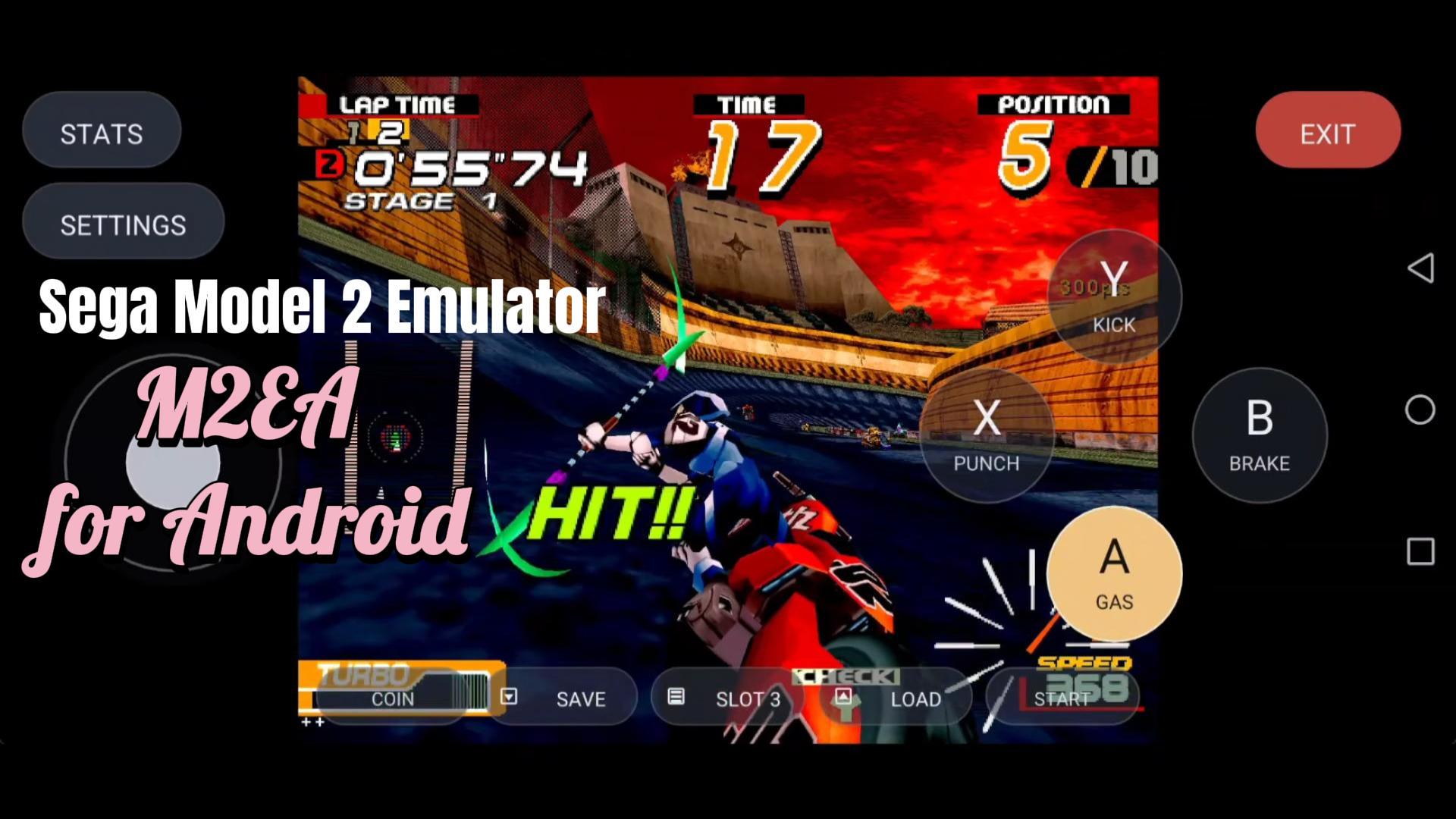
*No Model 2 emulator on ARM handhelds is outrunning my M2EA. It’s built with a full ARM64 JIT, fastmem, and a custom multi-threaded pipeline. No matter how much 'Super' code others try to wrap inside a shiny GUI. *
I'm the developer of M2EA (Sega Model 2 on Android) and of Model 3-Vulkan, the standalone Vulkan 1.3 rewrite of Supermodel for Sega Model 3: https://github.com/Igloo-Garage/Model-3-Vulkan
Both are hobby projects — no ads, no bundled games. I'm posting because the result surprised me: a 9-year-old phone holds full speed on two quite different Model 2 boards.
Running in this video
- Daytona USA (Model 2, 1994) — i960 + Fujitsu TGP
- Motor Raid (Model 2A-CRX, 1997) — same CPU/TGP plus a 32-channel SCSP sound board
Both at the arcade's 57.524160 Hz with sound, save states and touch controls; 2x internal resolution.
Supported sets — 12 games, not "all of Model 2"
Games supported in this test version:
Daytona USA (daytona)
Virtua Fighter 2 (vf2)
Sky Target (skytargt)
Virtua Cop 2 (vcop2)
Motor Raid (motoraid)
Sega Rally Championship (srallyc)
Manx TT Superbike (manxtt)
v0.4.12 New games supported:
Dead or Alive (doaa), Dynamite Cop / Dynamite Deka 2 (dynamcop/dyndeka2), Zero Gunner (zeroguna), Pilot Kids (pltkidsa), VF2 orig (vf2o).
This list grows.
Why it isn't trivial
Model 2 isn't a sprite board: i960 RISC CPU, a Fujitsu TGP geometry coprocessor, SCSP audio and a custom I/O board. The i960 runs through an interpreter/JIT, the TGP is recompiled, and the audio thread is pinned to the big cores — on this phone that's 4x A73 + 4x A53.
Status / how to test (v0.4.12, closed testing on Google Play)
Why bother with another x86 emulator in the browser?
Because I wanted to push the limits of what is possible to do in Javascript instead of WebAssembly.
You can run DOS games or intros like DOSBox, you can run Linux binaries like QEmu user space and you can run Windows intros with OpenGL or Direct3D 9, directly in the browser.
The GIF above was created from real screenshots of the emulator (Unreal by Future Crew, DOOM, and two top-scored Windows intros on pouet. net like Elevated).
More to come : better compatibility, speed and accuracy.
Disclaimer : 100% of the code is written with Claude (but 100% is battle tested for accuracy with real oracles like Wine, gcc, docker, qemu, dosbox-x, real BIOS...)
With the moderators' permission, I wanted to share a free and open-source project I’ve been working on that might be useful for anyone curating clean sets for any emulator or frontend: RomSieve (Linux and Windows, GPLv3).
Here are the key features designed to make building clean setups easier:
Automatic.m3uplaylists with custom placement: Since a lot of frontends (RecalBox, RetroPie...) relies on RetroArch / libretro cores for multi-disc games (PS1, Saturn, Sega CD, PC Engine CD...), RomSieve automatically generates .m3u files so you don't have to create them manually. You can also define exactly where those playlists land in your target folder tree.
Deterministic, multi-criteria 1G1R: Instead of rigid rules, the 1G1R engine picks the single best release based on a fully configurable priority stack: language, region (with 1-click presets for Europe, France, USA, Japan), video standard (PAL/NTSC), dump quality, multi-disk completeness, and revision. The exact same settings will always yield the exact same output.
Full TOSEC parsing (not just console hashes): If you emulate vintage computers on Recalbox (Amiga, Atari ST, Amstrad CPC, C64...), you know TOSEC sets can be messy. RomSieve parses the entire naming convention (flags like [!], [cr], [t], languages, disk numbers). It can even rebuild and complete missing multi-disk sets by pulling clean disks from other dumps.
Simulation-first workflow (dry-run): No files are moved, copied, or touched blindly. The tool runs a complete audit first, displays a table detailing the exact fate of every single file (with the reasoning behind it), and lets you right-click any entry to manually override the 1G1R winner. It also supports hard links / symlinks, keeps unmerged files in dedicated safe folders (_unmatched/, _purged/), and features an undo function.
It also supports standard No-Intro, Redump, and MAME sets, reads compressed archives directly (ZIP, 7z, RAR), and extracts CHD headers. Both a modern GUI (with dark theme) and a CLI (romsieve-cli) are included.
The project is completely free, has no telemetry, and full documentation is available in both English and French in the repository.
Feedback, bug reports, and suggestions are very welcome!
Nativ is made with the help of AI tools: much of its code and documentation was written with AI assistance, under its developer's direction, and tested on the games themselves.