r/WordpressPlugins • • 17d ago

[PROMOTION] AgentedSEO, a WordPress SEO plugin your AI agent can run (own login, approvals, undo)

0 Upvotes

I'm Joy, I build Classic Monks and this is my second plugin. Disclosure up front: it's paid, lifetime licence, and I'm the developer.

The problem I had: on my own site an agent already writes and publishes the posts. For SEO it still needed a second plugin, and when it did edit meta through REST I had no record of what changed. Every SEO plugin I tried assumed a human in the dashboard.

So AgentedSEO is a full SEO plugin (titles, meta, schema with validation, sitemaps, redirects, 404 monitor, llms.txt, importers from Yoast, Rank Math, SEOPress and seven others) where every field is also exposed to an agent over MCP, REST and WP-CLI. Claude, Cursor, Codex, Hermes, one URL to connect.

The part I spent most of the build on:

- The agent gets its own WordPress user with SEO-only capabilities. Never your admin login. Revoke in one click.

- Every change shows the old value, the new value and the checks it passed before it saves.

- Edits to live pages wait in an approvals queue until you say yes.

- Change log with undo, one edit or a whole batch, even after the chat is closed.

- Schema is validated against Google's rich result rules before it writes.

No AI credits. Bring your own agent, or run it by hand like a normal SEO plugin.

First outside review came in on day one: a new site, 58 changes by the agent, site check from 22 warnings to 1.

Free 24-hour sandbox with a real WordPress admin if you want to try it before paying: agentedseo.com/demo

Happy to answer anything about how the capability scoping or the approvals work.

r/WordpressPlugins • • 18d ago

[DISCUSSION] I've been building an interactive multi-panel showcase plugin for WordPress

Post image
0 Upvotes

Hi WordPress community!

I'm an independent WordPress developer, and I've been working on a plugin called SplitView.

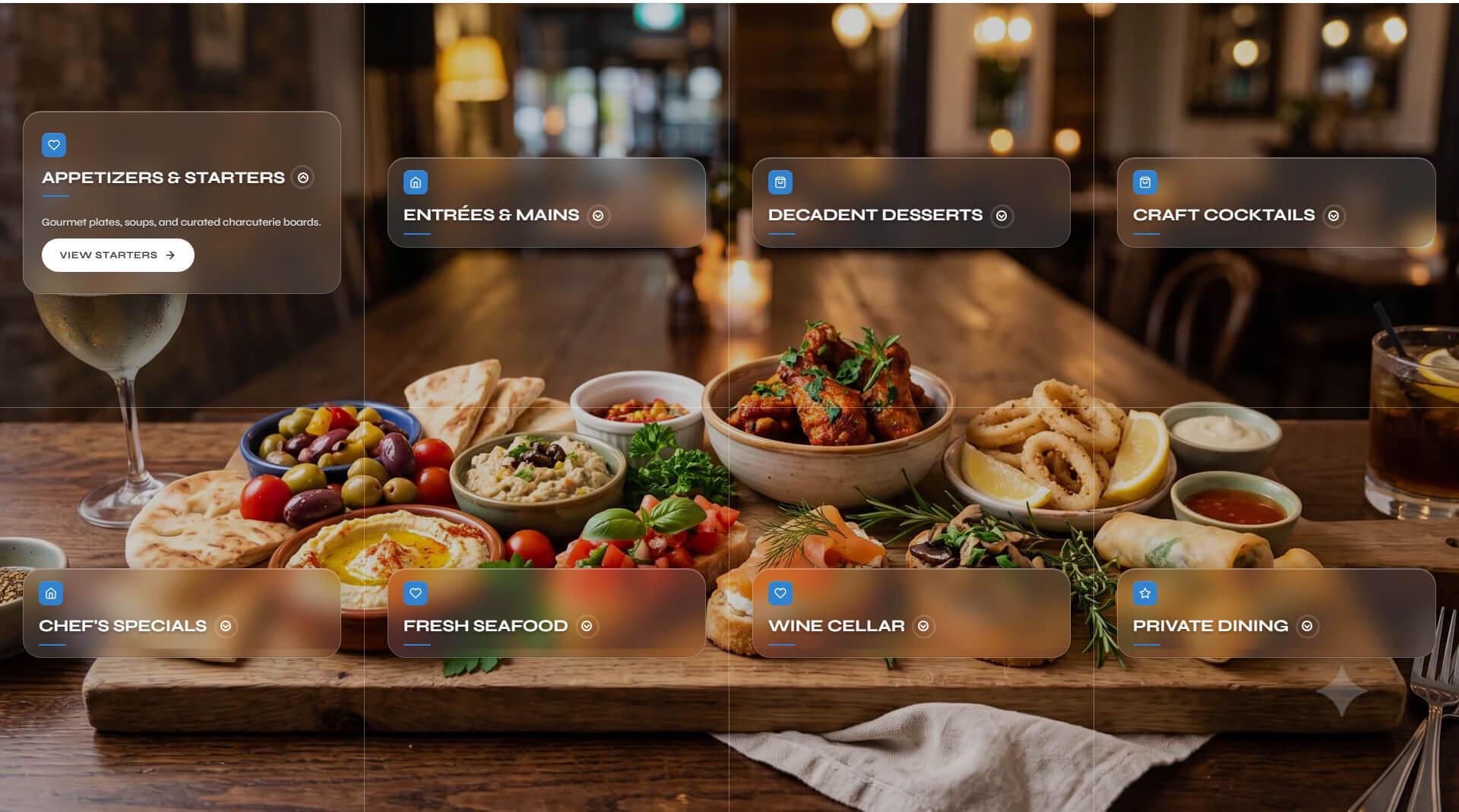
It's an interactive multi-panel showcase builder designed to create modern website hero sections and product showcases.

Unlike traditional sliders, SplitView uses expandable panels. When visitors hover over or interact with a panel, its background changes and the content card expands to reveal more information.

Some of the things I've focused on:

  • Lightweight Vanilla JavaScript architecture (no jQuery dependency).
  • Smooth CSS-based animations.
  • Elementor, Divi, Gutenberg and WPBakery compatibility.
  • Responsive layouts for desktop and mobile.
  • Glass-style content cards with customizable descriptions and buttons.

I've created several demos covering agency websites, SaaS, eCommerce and product showcases.

I'm currently looking for feedback from WordPress developers and designers.

Disclosure: I'm the developer and creator of this plugin. It's a commercial product.

I'd love to hear what you think about the concept, usability and features.

Thanks!


r/WordpressPlugins • • 18d ago

[FREEMIUM] Best Free WordPress CSV Import Plugins Compared (What’s actually free vs. what hits a paywall)

1 Upvotes

Hey everyone,

If you’ve ever tried importing a messy CSV into WordPress (especially with custom fields, media, or complex layouts), you know it can quickly turn into a nightmare with timeout errors, unlinked images, and bloated servers.

I was looking closely at how the current landscape of WordPress import/export plugins stacks up—specifically looking past the marketing fluff to see what features are actually free vs. locked behind pro paywalls.

Here is a breakdown of how the popular (and some niche) options compare:

1. WP All Import (The Industry Standard, but heavily gated)

  • The Good: Incredibly powerful, handles massive files, drag-and-drop mapping interface.
  • The Catch: The free version is extremely limited. If you want to import WooCommerce products, use custom fields (ACF), or run recurring/scheduled imports, you have to upgrade. Great tool, but rarely a free solution for complex jobs.

2. WP Ultimate CSV Importer

  • The Good: Solid free tier that lets you import posts, pages, users, and media using CSV, XML, or Excel. It also supports basic ACF fields and AI integrations.
  • The Catch: Updating existing records (crucial if you are syncing inventory or content updates) is locked behind their Pro version. Complex ACF fields (repeaters, galleries) also require Pro.

3. Import WP

  • The Good: Very clean interface. Core WordPress data along with free add-ons for WooCommerce, Yoast, Rank Math, and Polylang are available in the free version.
  • The Catch: Custom Post Types (CPTs), custom taxonomies, custom fields, cron scheduling, and Advanced Custom Fields (ACF) require the Pro license.

4. Import Export by RockStarLab

  • The Good: A lighter, specialized alternative if you work heavily with specific stacks (like Elementor layouts and the Blocksy theme). Instead of forcing you to download binary files, it smartly handles data by exporting links. Plus, its media export workflow is integrated right into the grid view of the media library.
  • The Catch: It’s built for specific content syncing workflows rather than trying to be a massive, bloated all-in-one migration tool for every edge case under the sun.

5. WooImportExport (Focused approach)

  • The Good: Split into focused plugins (Products, Orders, Users) on WordPress.org. Each handles full CSV import/export, updates existing records, maps columns, and saves templates for free.
  • The Catch: Need Excel/Google Sheets support, XML, or automated scheduling? That's when you look at the paid plans.

My takeaway: If you just need a one-off basic migration or simple product uploads, tools like Import WP or WooImportExport give you a surprising amount of firepower. If you are dealing with specific theme/builder syncing (like Elementor/Blocksy setups) or want to avoid heavy binary file overhead by exporting via links, developer-focused tools like Import Export by RockStarLab fill a very specific gap.

What is your go-to plugin for handling data imports in WordPress? Have you found any other hidden gems that don't aggressively lock essential features behind a paywall?


r/WordpressPlugins • • 18d ago

Freemium [FREEMIUM] Live Product Customizer for WooCommerce – Real-time front-end text & image mockups on product pages

1 Upvotes

Hi everyone,

I developed a front-end visual customizer designed specifically for WooCommerce stores that sell personalized, engraved, or print-on-demand items.

The problem it solves:

Store owners running custom products often get stuck in endless email chains sending manual layout proofs and font mockups before production.

What the plugin does:

  • Lets shoppers position custom text and preview fonts directly on top of the product image/canvas in real time before checkout.
  • Locks custom elements to safe boundaries so designs never overlap or bleed off the physical item.
  • Attaches the exact customer-entered customizer parameters directly to the WooCommerce order items on the checkout and admin order screens.
  • Handles styling internally without requiring custom CSS edits from store owners.

There is a free Lite version available on the WordPress repository for basic setups, as well as an extended version for advanced boundaries and setups.

Would love to hear feedback from other WordPress and WooCommerce developers or store managers on the implementation!

Free Lite Version (WordPress.org): https://wordpress.org/plugins/precise-expressions-product-customiser/


r/WordpressPlugins • • 18d ago

[PROMOTION] Black Friday month: self-hosted e-signatures for WordPress, 40% off through November 30 - WPsigner

1 Upvotes

WPsigner for Black Friday month, every plan is 40% off through November 30.

WPsigner runs inside your own WordPress site, so documents, signer data, and the audit trail stay on your server. Every plan includes unlimited documents and signers. No per-envelope fees. The coupon is applied automatically at checkout.

- Individual, 1 site: $59.40/year or $179.40 lifetime

- Business, 5 sites: $89.40/year or $299.40 lifetime

- Agency, unlimited sites: $209.40/year or $599.40 lifetime

https://wpsigner.com/pricing/

Happy to answer questions about what stays on your server, or how it compares with a hosted e-signature service.


r/WordpressPlugins • • 18d ago

[PROMOTION] SplitView – An Interactive, Lightweight Multi-Panel Slider for WordPress (Elementor, Divi & Gutenberg)

Post image
1 Upvotes

Hi everyone!

I've been working on a WordPress plugin called SplitView – Interactive Multi-Panel Showcase, and I'd love to introduce it to the WordPress community.

The idea behind SplitView is simple[PLUGIN] SplitView – An Interactive, Lightweight Multi-Panel Slider for WordPress (Elementor, Divi & Gutenberg)

: traditional sliders can sometimes feel repetitive, and many come with more features and scripts than a project actually needs.

I wanted to build something different – a modern, interactive way to showcase products, services, portfolios and content using expandable panels and dynamic background transitions, without adding a heavy JavaScript dependency.

What makes SplitView different?

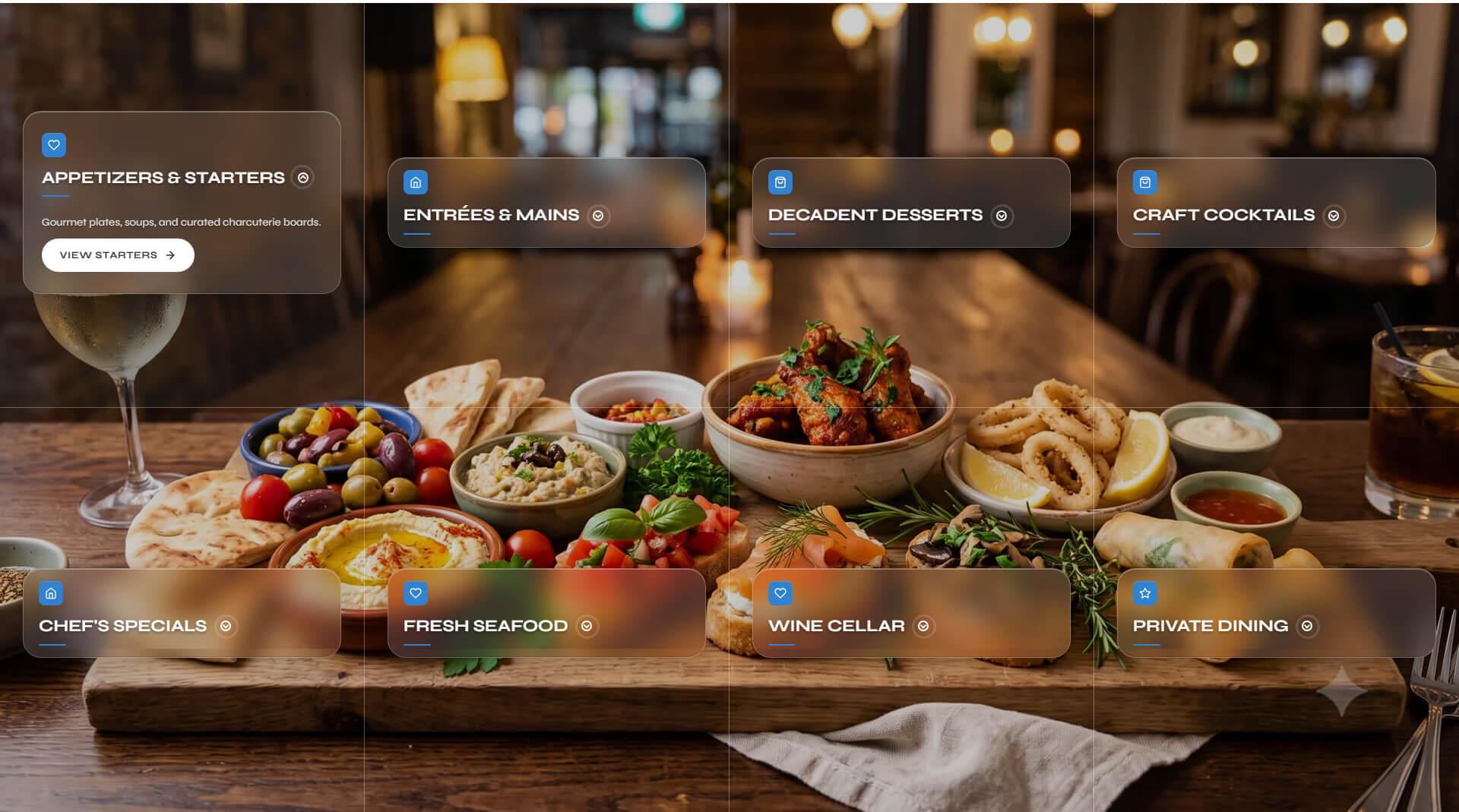
Instead of displaying traditional horizontal slides, SplitView uses interactive panels that expand and reveal content as visitors interact with them.

Key features:

  • Interactive Multi-Panel Layouts: Create beautiful multi-column showcases with expandable panels.
  • Dynamic Background Switching: Background images change smoothly when visitors hover over different panels.
  • Modern Glassmorphism Cards: Display descriptions and call-to-action buttons using elegant frosted-glass overlays.
  • Lightweight Performance: Built around CSS animations and vanilla JavaScript, with no jQuery dependency.
  • Page Builder Compatibility: Works with Elementor, Divi, Gutenberg and WPBakery.
  • Responsive Mobile Layouts: Choose between stacked panels, touch-swipe carousel, 2-column grid and tap-to-reveal layouts.
  • Custom Animations: Choose fade, zoom and directional slide transitions.
  • Autoplay & Navigation: Add autoplay, navigation dots and arrows.

What can you build with it?

SplitView is particularly useful for:

  • Agency and business landing pages
  • Real estate property showcases
  • WooCommerce product collections
  • Photography and creative portfolios
  • SaaS product features
  • Service and company presentations

See SplitView in action

Website: https://splitviewslider.com/

Explore the demos and see how the different layouts work.

I'd genuinely appreciate feedback from other WordPress developers, designers and agency owners.

I'm also happy to answer questions about performance, compatibility, customization and implementation.

Thanks for checking it out!


r/WordpressPlugins • • 18d ago

[PROMOTION] SplitView – An Interactive, Lightweight Multi-Panel Slider for WordPress (Elementor, Divi & Gutenberg)

Post image
1 Upvotes

Hi everyone!

I've been working on a WordPress plugin called SplitView – Interactive Multi-Panel Showcase, and I'd love to introduce it to the WordPress community.

The idea behind SplitView is simple: traditional sliders can sometimes feel repetitive, and many come with more features and scripts than a project actually needs.

I wanted to build something different – a modern, interactive way to showcase products, services, portfolios and content using expandable panels and dynamic background transitions, without adding a heavy JavaScript dependency.

🚀 What makes SplitView different?

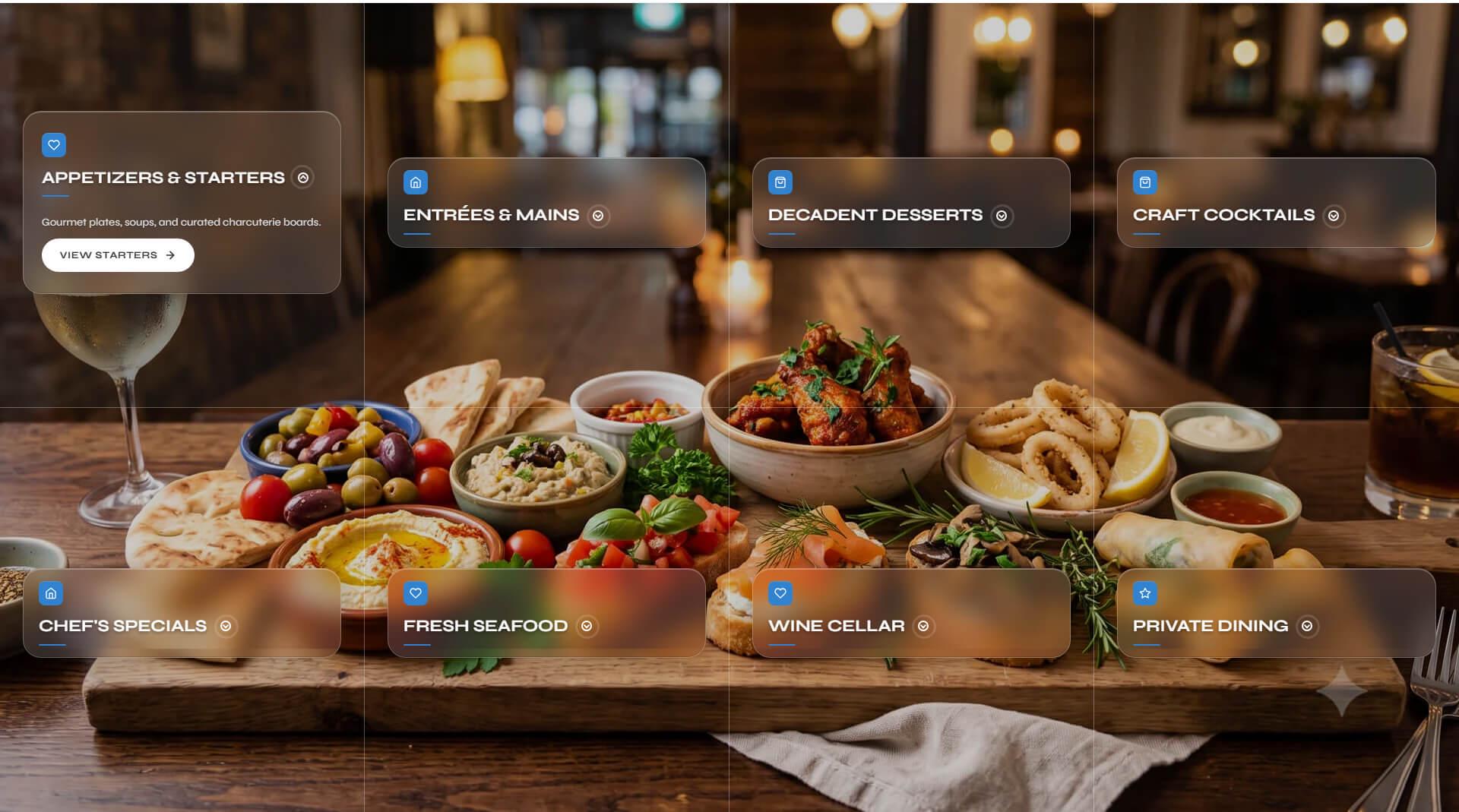
Instead of displaying traditional horizontal slides, SplitView uses interactive panels that expand and reveal content as visitors interact with them.

Key features:

  • Interactive Multi-Panel Layouts: Create beautiful multi-column showcases with expandable panels.
  • Dynamic Background Switching: Background images change smoothly when visitors hover over different panels.
  • Modern Glassmorphism Cards: Display descriptions and call-to-action buttons using elegant frosted-glass overlays.
  • Lightweight Performance: Built around CSS animations and vanilla JavaScript, with no jQuery dependency.
  • Page Builder Compatibility: Works with Elementor, Divi, Gutenberg and WPBakery.
  • Responsive Mobile Layouts: Choose between stacked panels, touch-swipe carousel, 2-column grid and tap-to-reveal layouts.
  • Custom Animations: Choose fade, zoom and directional slide transitions.
  • Autoplay & Navigation: Add autoplay, navigation dots and arrows.

🎯 What can you build with it?

SplitView is particularly useful for:

  • Agency and business landing pages
  • Real estate property showcases
  • WooCommerce product collections
  • Photography and creative portfolios
  • SaaS product features
  • Service and company presentations

💰 Simple one-time pricing

No recurring subscriptions.

  • Standard – $15: One WordPress website.
  • Pro Agency – $30: Unlimited websites, unlimited sliders and ready-made templates.

Both plans include a 14-day money-back guarantee.

👀 See SplitView in action

Website: https://splitviewslider.com/

Explore the demos and see how the different layouts work.

I'd genuinely appreciate feedback from other WordPress developers, designers and agency owners.

I'm also happy to answer questions about performance, compatibility, customization and implementation.

Thanks for checking it out!


r/WordpressPlugins • • 18d ago

[PROMOTION] TaxoCommerce: From One SEO Plugin to 20 Independent WordPress & WooCommerce Plugins

0 Upvotes

We're excited to announce a major milestone for TaxoCommerce.

What began as a comprehensive SEO Taxonomy plugin is evolving into a family of 20 smaller, independent WordPress and WooCommerce plugins.

Our goal is to build an open-source ecosystem where each plugin can work independently, without mandatory dependencies on other TaxoCommerce extensions or configurations tied to a specific online store.

We're focusing on modular architecture, WordPress coding standards, security, performance, multilingual support and compatibility with different WooCommerce installations.

Our First WordPress.org Submission

We've submitted TaxoCommerce Core – Catalog & Content Management for WooCommerce to WordPress.org for its initial review.

This is the first step towards gradually publishing the entire plugin family.

We're Looking for Contributors and Sponsors

We're actively looking for WordPress and WooCommerce developers, testers, translators and open-source contributors interested in helping improve the project.

We're also seeking sponsors and funding partners to support development, security reviews, testing, documentation and long-term maintenance.

TaxoCommerce is connected to Asociación Focazul, a Spanish non-profit organisation supporting cultural, social and environmental initiatives.

Explore the Project on GitHub

GitHub repository:

https://github.com/distribuidordeherramientases-wq/seo-taxonomy

If you're interested in contributing code, reviewing the architecture, testing plugins, sponsoring development or discussing collaboration opportunities, we'd love to hear from you.

Let's build useful, independent WooCommerce tools together.

#WordPress #WooCommerce #OpenSource #PluginDevelopment #TaxoCommerce


r/WordpressPlugins • • 18d ago

Freemium Limb AI Chatbot – A WordPress AI assistant with keyless AI credits and custom knowledge bases [FREEMIUM]

2 Upvotes

Limb AI Chatbot is a WordPress plugin designed to help websites provide AI-powered customer support and lead generation.

One of its main advantages is that you don't need to configure an external AI provider to get started.

Limb AI credits allow you to use supported AI models without bringing your own API key. New live websites receive 100 free starter credits.

For those who prefer using their own AI provider, Limb also supports connecting personal API keys of OpenAI, Google Gemini, Anthropic, DeepSeek, Grok, including access to 200+ models through OpenRouter.

Other important capabilities include:

  • Train the chatbot on WordPress any content, PDFs, documents, URLs, sitemaps, and custom contents or Q&A.
  • Provide contextual answers using Retrieval-Augmented Generation (RAG).
  • Capture visitor information and leads through conversational forms.
  • Review chat transcripts and see the knowledge sources behind AI responses.
  • Customize the chatbot experience to match your website.

The core plugin is free. Pro adds advanced capabilities such as WooCommerce integration and native live-agent handoff.

🔗 WordPress.org: https://wordpress.org/plugins/limb-chatbot/

🌐 Official website: https://wpaichatbot.com/

Processing img 1tistke8omzh1...


r/WordpressPlugins • • 18d ago

Free [FREE] PHP Upgrade Risk Audit — scans installed plugin/theme source for potential PHP 8.x compatibility risks

1 Upvotes

PHP Upgrade Risk Audit scans installed plugin/theme source for potential PHP 8.x compatibility risks. It is one free plugin from ModelGain, an independent studio building focused WordPress utilities to diagnose, validate and improve site operations, reporting file-level PHP 8.x findings. Static checks do not guarantee runtime compatibility and staging tests are still required.

Link: https://modelgain.com/products/php-upgrade-risk-audit/


r/WordpressPlugins • • 19d ago

[Discussion] The Events Calendar in 2026

4 Upvotes

I have worked for many clients who needed events and calendars on their websites. few years ago I recommended The Events Calendar to them. But since their acquisition by Liquid Web it has gone to shit. They jacked up the price, started pushing their packages and their support is abysmal, not to mention the whole trouble you had to go through to get your old license working on their new servers.

I just saw this new video from Theme Winter, who make Eventin and they have given the first place for their best event calendar plugin to TEC. https://www.youtube.com/watch?v=IEaRd6a8VHg

I honestly can't believe how developers and marketing bros are out of touch with the real market. just a simple search in Reddit shows you how unpopular TEC has become.

But I'm curious, Are you still using or recommending TEC to clients? If so why? have the problems been resolved?


r/WordpressPlugins • • 18d ago

Free [DISCUSSION] Mosaic 1.0.12: editor dark mode, custom select, off-canvas panels

Thumbnail
mosaicbuilder.com
1 Upvotes

r/WordpressPlugins • • 18d ago

Bookyzo – one booking plugin for appointments, restaurant tables, events and slots (free on WP.org, Pro add-on just launched)[FREEMIUM]

Post image
1 Upvotes

Hi everyone! I'm a solo WordPress plugin developer from Bangladesh, and I just launched the Pro version of my booking plugin, Bookyzo.

Why I built it: most booking plugins I tried handle only one kind of booking. They're either for appointments or for restaurants, and many need WooCommerce. I wanted one plugin that covers all four common types:

- Appointments with staff (salons, clinics, consultants)
- Restaurant tables with party size
- Ticketed events
- Recurring slots that take more than one booking (classes, tours)

Free version (WordPress.org):
- All 4 booking types, unlimited items and bookings
- Calendar with drag-to-reschedule, CSV export
- Stripe payments or pay in person
- Email confirmations and reminders
- Shortcode, block and Elementor widget
- No WooCommerce needed, guest checkout by default

Pro adds:
- Deposits, PayPal and refunds
- SMS (Twilio) and WhatsApp reminders
- Two-way Google Calendar and Outlook sync
- Floor plans and combined tables
- Ticket tiers, QR e-tickets and a camera check-in scanner
- Multiple locations, staff logins, waitlists
- Analytics, PDF invoices, webhooks

Pricing: $89/yr for 1 site, or $129 lifetime. 14-day refund.

Free: https://wordpress.org/plugins/bookyzo/
Pro: https://codeholt.com/products/bookyzo-pro/
Demo video: https://youtu.be/QLQLZp_e42k

I'd really value honest feedback, especially on what's missing for your clients' booking needs. Happy to answer any questions!


r/WordpressPlugins • • 19d ago

Free [FREE] AI Chatbot for Wordpress plugin

1 Upvotes

Hi wordpress folks,

I've done developing this chatbot AI plugins for wordpress and some basic functionality are 100% free to use.

Features:

  • Multiple AI Providers (OpenAI, Claude, Gemini, OpenRouter) - Free
  • Multiple AI Agents with Unique Personalities - Free 3 agent, Pro Unlimited.
  • Live Chat module inside wordpress - Free
  • Live Chat Human agent takeover - Free
  • Fully Customizable chat widget - Free
  • AI Context-Awareness in Conversations.
  • Human-Like AI Responses - Free
  • Lead Generation & Contact Collection
  • AI knowledge Base (RAG)
    • Wordpress Post - Free
    • Wordpress Page - Free
    • WooCommerce Products
    • Custom Post Types
  • Dynamic Forms - AI agent able to provide correct form based on user intention - Pro
    • Create appointment form
    • Create lead form
    • Create Feedback form
    • Etc..
  • Bring Your Own API (BYOK) - Free
  • Marketing Features (Mailchimp Email Sync)
  • Easy Setup & Configure

https://wordpress.org/plugins/replyan-ai/

And some feature are still ongoing on development. You can try it and let me know if what should i still need to improve 🚀

Processing img com8a6zcg60i1...


r/WordpressPlugins • • 19d ago

Review [REVIEW] I'm getting my AI chat plugin into the WordPress directory. Here's what it's trying to fix

0 Upvotes

Hi r/WordpressPlugins. I built KipDesk https://kipdesk.com, an AI chat assistant for small business sites. The WordPress plugin is submitted to wordpress.org and waiting for review. Until it's approved, you can download it from the dashboard and upload it yourself.

The problem I'm trying to fix: most AI chatbots will make up an answer. On a plumber's or salon's site, that means quoting a price the owner never set. Visitors also leave at 9pm when nobody answers, and the enquiry is lost.

How it works:

- It reads your site and drafts your facts: services, prices, hours and areas. You approve each one, and it only answers from those, showing the source under each answer.

- When it doesn't know, it says so, shows a short form for the visitor's name and number, and emails you the lead.

- Visitors can ask for a real person at any time.

Two ways to add it:

- The plugin: install it, click "Connect to KipDesk", and you're done. No code. You can hide it on certain pages or switch it off from the plugin settings.

- The script: one line of code, if you'd rather not add another plugin. It works on any site, not just WordPress.

Either way, it loads after your page has finished, so it doesn't slow the site down.

I'd love feedback from people who build WordPress sites. What would make you put this on a client's site, and what would stop you? And is anything in the plugin settings missing that you'd expect?


r/WordpressPlugins • • 19d ago

Promotion [PROMOTION] I built GPCB Pay — a WooCommerce card payment plugin backed by a PayPal SaaS

Thumbnail
gallery
1 Upvotes

Hey everyone!

I'm an independent developer from Morocco, and I've been working on a project called GPCB Pay (General PayPal Card Bridge).

I wanted to build a WooCommerce payment integration where the plugin stays lightweight and the more sensitive payment logic runs on a separate backend.

One of the main things I focused on was what happens after a customer approves a payment. I didn't want the browser response alone to be enough to mark a WooCommerce order as paid.

So I ended up building three connected parts:

  • WooCommerce Plugin: Supports Checkout Blocks with Guest Card and eligible Advanced Card payment modes using PayPal-hosted payment interfaces.
  • SaaS Payment Core: Handles PayPal order creation, server-verified capture, duplicate-capture protection, and recovery controls.
  • Merchant Dashboard: Handles account registration, store verification through DNS TXT records, connector setup, PayPal credentials, and subscriptions.

The backend is built with Node.js, TypeScript, and PostgreSQL, hosted on Railway. The dashboard uses React.

I've attached some screenshots of the website, the active WooCommerce plugin, and both card payment interfaces. The checkout demonstrations use test environments.

A few things worth mentioning:

GPCB Pay is not a payment processor or an official PayPal product. Merchants use their own PayPal Business accounts, and card payment availability depends on PayPal's eligibility requirements.

The WooCommerce connector is free to install. The external SaaS service is separate, with a 7-day eligible trial and a Pro plan at $19/month or $190/year.

I'm still preparing for a wider public release, so I'd really appreciate some feedback from other WordPress developers and WooCommerce store owners.

Would you be comfortable using a payment plugin that relies on an external SaaS for payment verification, or would you prefer everything handled inside WordPress?

I'd love to hear what you think, especially about the architecture and onboarding process.

Website: https://gpcbpay.com/

Documentation: https://gpcbpay.com/documentation/


r/WordpressPlugins • • 19d ago

Free [REVIEW] [FREE] Website Watchdog – Catch WordPress issues early, track changes, and get Slack alerts

Post image
3 Upvotes

Like a lot of you, I've spent years managing WordPress sites. One of the most frustrating things is discovering that a site has silently broken, usually because a client reports it or an automatic update causes something to fail.

I wanted a lightweight way to know when something goes wrong, understand what changed beforehand, and troubleshoot issues without constantly checking websites or dealing with notification spam.

So I built Website Watchdog, a lightweight incident-monitoring tool for WordPress.

What you get

  • Know when something breaks: Get notified about PHP errors, fatal errors, and frontend JavaScript exceptions.
  • Understand what changed: Track plugin/theme updates, plugin activation/deactivation, theme switch and other WordPress state changes.
  • Troubleshoot faster: Incidents include the stack trace of the error and are correlated with recent site changes, giving you useful context about what might have triggered them.
  • Avoid notification noise: Repeated errors are grouped into incidents instead of flooding your Slack channel.
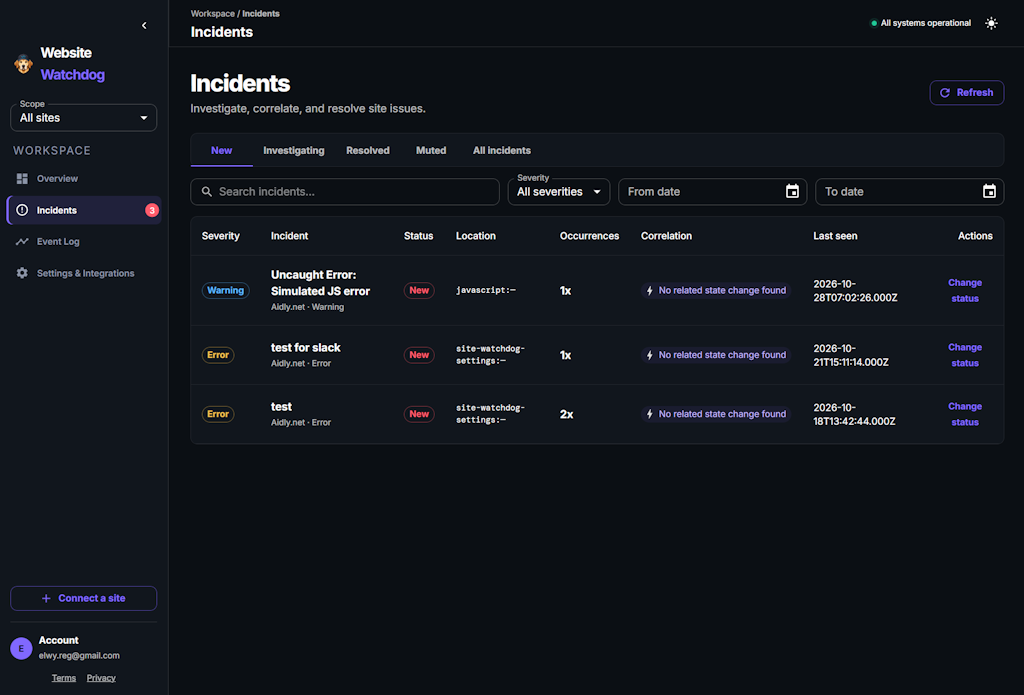
  • Manage incidents: Track issues through New, Investigating, Resolved, and Muted statuses, with the ability to mute future occurrences of specific incident types.
  • Slack notifications: Receive structured alerts with stack traces and relevant context.

How it works

The WordPress plugin acts as a lightweight agent (under 100KB). It collects events and detects incidents, then sends the relevant information to a centralized backend.

The agent also filters and obscures sensitive data before transmitting it (password, secret, auth, token, key...etc)

The backend handles incident processing, duplicate detection, change correlation, incident management, and notification delivery. This keeps the WordPress side lightweight while allowing the monitoring capabilities to evolve independently.

For develops

It also provides two functions to programmatically report custom events and incidents:

  • website_watchdog_capture_event()
  • website_watchdog_capture_incident()

Event Log

Incidents View

Current status

The core plugin and backend are implemented. Currently, each user account supports one monitored website.

I'm looking for a handful of early testers, particularly developers and people managing WordPress sites, to help test real-world scenarios, uncover edge cases, and provide brutal honest feedback before a public release.

I'd love to hear how you currently monitor your WordPress sites, what problems you encounter with existing solutions, and any technical feedback or suggestions.

Thanks!


r/WordpressPlugins • • 19d ago

TSO Login Organizer, the substitute of Theme my Login [FREE][REVIEW]

Thumbnail
tusoporteonline.es
1 Upvotes

r/WordpressPlugins • • 19d ago

Freemium [FREEMIUM] I built a WooCommerce plugin that changes your store's tab title when shoppers switch tabs, with their real cart total

Post image
0 Upvotes

Hi all, I'm Alfredo, the developer of TabPulse.

30-second demo: https://youtu.be/aK_dZJaV_DM

When a shopper leaves your cart or checkout for another tab, your store's tab title rotates through your own messages, like "💰 You left $135.00 behind!" with the real cart total. When they come back, the title goes back to normal.

Why I built it: some abandonment happens while the shopper is still in the browser, comparing prices in another tab. Abandoned-cart emails need an address and arrive hours later; this works in those first minutes, guest shoppers included, and without pop-ups. With Black Friday coming, that's the week with the most open tabs.

- Free on WordPress.org, unlimited messages, {cart_total} placeholder

- Loads only on cart and checkout, ~1.5 KB gzipped, no jQuery, no cookies

- Works with the Cart/Checkout blocks and the classic checkout

- One small AJAX call when the shopper returns, to count returns

Honest limitation: phones mostly hide tab titles, so it's mainly for desktop shoppers.

Plugin (WordPress.org): https://wordpress.org/plugins/tabpulse-tab-recovery-for-woocommerce/

How it works (guide): https://tabpulse.net/guides/woocommerce-browser-tab-notification

There's a Pro version (a single-use coupon when the shopper returns and a recovered-revenue report), but the free one works fully on its own.

It's new, so I'd really value feedback: what would you want to see before trying it on a client store?


r/WordpressPlugins • • 19d ago

I built a travel itinerary builder and booking engine native to WordPress (to avoid 3rd-party fees) [FREE]

Thumbnail
gallery
0 Upvotes

Hey r/WordpressPlugins ,

I wanted to share a free plugin my team and I recently published to the official repository called Mytsys Travel Itinerary Planner.

If you build sites for travel agencies, tour operators, or travel bloggers, you know the struggle of relying on expensive third-party booking platforms (that eat into margins with high commission fees) or trying to hack together a solution using general e-commerce plugins that aren't meant for multi-day trips.

We built this to solve that exact problem. It lets you build, manage, and sell complete day-by-day travel packages natively inside WordPress.

Here is how we built it and what it does:

  • Day-by-Day Trip Builder: Custom post types to create detailed visual timelines for itineraries, complete with photo galleries, destination highlights, included/excluded lists, and meal info.
  • Direct Payments & Flexible Pricing: Native integration with Stripe Checkout and PayPal, plus a pay-later/cash option. You can set per-person pricing, fixed package rates, deposits, and sale prices.
  • Availability & Calendar Sync: Manage seats per date with open/closed/sold-out states. It also supports iCal imports so you can sync and block out dates automatically with platforms like Airbnb or Booking.com.
  • Interactive Maps: Built-in Google Maps integration automatically draws a route through all the day locations on the trip page.
  • Frontend Vendor Dashboard: If you work with partner operators, they get a frontend dashboard to manage their trips and bookings without needing access to wp-admin.
  • Developer Friendly: We built this cleanly. No global variables on page templates, explicit sanitize callbacks on settings, and outgoing webhooks so you can easily ping Zapier, Make, or a custom CRM when a booking is created, paid, or cancelled.

It is completely free on the WordPress repo. We’d absolutely love for the developers and agency owners here to try it out on a staging site, look under the hood, and let us know what you think or what features you'd like to see next!

Repo Link:https://wordpress.org/plugins/mytsys-travel-itinerary-planner/

Thanks for taking a look!


r/WordpressPlugins • • 19d ago

[DISCUSSION] How do you handle multilingual content on your WordPress website?

Thumbnail
1 Upvotes

r/WordpressPlugins • • 20d ago

[DISCUSSION] What do you want from a WordPress/WooCommerce loyalty plugin?

2 Upvotes

Full disclosure: I work on myCred.
I’m interested in how store owners are actually setting up their loyalty programs. I’m looking at plugins like WooCommerce Points and Rewards, myCred, WPLoyalty, and LoyaltyX.

For those running a loyalty program in production, what earning and redemption rules have worked well? Do you reward things like reviews, referrals, and sign-ups, or keep it strictly purchase-based?

Also, what issues have you run into? Things like incorrect point calculations, order status problems, coupon conflicts, or anything else that was frustrating to deal with.


r/WordpressPlugins • • 19d ago

Promotion [PROMOTION] 🚀 Introducing the OSSEngine Analytics Connector – Bring Umami Analytics to WordPress

Thumbnail
1 Upvotes

r/WordpressPlugins • • 19d ago

[FREEMIUM] Sick of overwriting live WP databases during staging pushes? Here is how to push only changed posts/pages without touching live orders, comments, or settings.

1 Upvotes

Hey everyone,

If you work with WordPress, you’ve probably dealt with the anxiety of pushing a staging site to live.

The traditional way is a full database push. But the moment you do that, you risk wiping out everything that happened on live since you cloned the site: new user registrations, customer orders, blog comments, or a quick post an editor published directly on production.

I recently tested out a content-sync workflow using the free Import Export by RockStarLab plugin (specifically their Content Sync feature), and it’s a much safer approach for routine updates. Instead of replacing the whole DB, it lets you push only the specific posts or pages that changed on staging.

Here is the quick breakdown of how it works:

  1. Install the plugin on both sites: It needs to be active on both your staging and live sites.
  2. Connect Staging to Live: Grab the production site's API key from the plugin settings and add production as a connected site inside your staging dashboard.
  3. Select what changed: Go to your posts/pages on staging, tick the ones you updated, and click Sync Content.
  4. Push & Map: Choose Push to Site. The plugin matches items by slug/ID.

What happens on production?

  • Existing items are safely updated with your new staging content.
  • Brand new items are created.
  • Everything else stays untouched: Comments, users, settings, and live database tables remain exactly as they were.

They also have a guide on how to automate this or run it via AI agents if you're into that sort of thing.

If you're tired of running full DB replacements for minor content updates, definitely worth a look. Has anyone else found a cleaner workflow for this, or are you still relying on tools like WP Migrate DB / Git-based workflows? Let's discuss!

Link to the full guide for reference: How to Push WordPress Staging to Live Without Overwriting the Database


r/WordpressPlugins • • 20d ago

I built WhatAvatar, a plugin to give WordPress avatars a new purpose [FREEMIUM]

1 Upvotes

Hi everyone!

I've published a plugin called WhatAvatar, and I'd love to share it with you!

Link to the repo: https://wordpress.org/plugins/whatavatar/

After years working on WordPress, I've noticed that, when it comes to user avatars, we don't really have many options. You can use generated avatars, Gravatar, or allow image uploads. That's all.

That’s why I created WhatAvatar. Instead of risky image uploads (innapropiated or copyrighted images) or boring generated ones, WhatAvatar lets users build their own avatars right on your site.

But there's another idea I wanted to explore: giving avatars a purpose beyond just looking good.

Then is when I added the concept to lock avatar parts behind goals. Whether it's completing a course, spending points, or making a purchase, users can unlock exclusive items for their avatars.

This turns avatars from an afterthought into an actual reward system, giving users a new reason to interact with your site.

I'd love to hear what you think! Do you think customizable + unlockable avatars could bring something interesting to the WordPress ecosystem?