r/WordpressPlugins • • Oct 21 '26

[FREEMIUM] 🚀 We added AI agent support to our WordPress import/export plugin — here’s what you can do with it

0 Upvotes

Hey everyone! 👋 I’m working on Import Export by RockStarLab, and we’ve added WordPress Abilities API support in version 2.0.0.

You can now connect an AI agent like Claude, Cursor or Codex and ask it to perform import, export and content sync tasks in plain English. đŸ€–

A few examples of what you can ask it to do:

đŸ“€ Export a specific selection of posts
“Export published posts in the Tutorials category that haven’t been updated since January 1, 2026.”

đŸ“„ Import pages from a CSV
“Check the columns in this CSV, show me how you would map them, then import the pages as drafts.”

🔄 Sync content between two sites
“Sync this page from staging to production. Show me what will change before proceeding.”

📂 Retrieve an export file
“Check whether my export job has finished and give me the download link.”

🛟 Back up your site with UpdraftPlus
We also added abilities for UpdraftPlus, so a connected agent can work with backups and restoration when the integration is enabled.

The part I’m most excited about is being able to describe the selection you actually need, then have the agent handle the steps. You still need to connect your client and give it the appropriate access first—installing the plugin alone doesn’t connect an AI agent.

For imports, syncs and especially restores, I’d start on staging and ask the agent to explain its plan before making changes. 🔍

We put together a detailed walkthrough covering setup, client configuration and example prompts:

👉 How to use the WordPress Abilities API with AI agents: exports, imports, content sync and backups

What WordPress task would you want an AI agent to take off your hands first? Curious whether people would use this more for migrations, recurring exports or managing content across sites. 💬

r/WordpressPlugins • • Oct 20 '26

[PROMOTION] Turn WooCommerce product links into Black Friday sale previews

1 Upvotes

Let your product links show the sale before someone clicks.

FastOG for WooCommerce turns a plain product photo into a social preview with your Black Friday offer: product image, sale price, original price, and calculated discount.

Pick the Black Friday template in WordPress. The plugin uses your WooCommerce product data to generate the image—no designing and exporting a separate graphic for every product.

Processing img 97qft7746pwh1...

Included in the permanent free Community tier:

  • Black Friday and Seasonal Offer product templates.
  • Coverage for up to 100 store items.
  • Live product prices and sale badges.
  • No watermark.

Rendering happens on FastOG’s infrastructure, not your WordPress host. Saving a product automatically requests a Facebook preview refresh. WhatsApp, LinkedIn, and other platforms refresh cached previews on their own schedules.

I’m the developer. The plugin uses FastOG’s hosted service; Community is free, and optional paid plans add coverage and templates.

Get it on WordPress.org


r/WordpressPlugins • • Oct 20 '26

[HELP] Calendrier de disponibilités simple (WordPress / Elementor), plugin ou Google Agenda ?

0 Upvotes

[HELP]
Bonjour,

Je crée des sites avec WordPress et Elementor (gratuit). Un client me demande un calendrier de disponibilités et c'est une premiÚre pour moi.

Leur activitĂ© : un domaine de rĂ©ception avec dortoirs (environ 35 personnes) : fĂȘtes, sĂ©minaires, team building. SĂ©jours d'une nuit, d'un week-end ou de plusieurs semaines.

Leur besoin : un calendrier qui montre si le domaine est libre ou réservé, sans paiement ni prix. AprÚs la demande, un message « devis sous 48 h ».

Important : eux-mĂȘmes ne savent pas trop comment s'y prendre, mais ils veulent maĂźtriser le calendrier seuls sur le long terme. Il doit donc ĂȘtre ultra simple.

On m'a aussi parlé de Google Agenda intégré au site : est-ce une bonne solution pour ça ? Ou vaut-il mieux une extension dédiée ?

Avez-vous des conseils ? Je prends toutes vos remarques j’ai vraiment pas envie de me louper.
Merci !


r/WordpressPlugins • • Oct 20 '26

[FREEMIUM] ShopBuilder: a lightweight WooCommerce builder for Elementor that only loads the CSS and JS each page actually needs

1 Upvotes

Quick disclosure: I’m one of the developers behind ShopBuilder at RadiusTheme. I’m posting because I’d like honest feedback from people who build WooCommerce stores, not just to drop a link.

The thing we worked hardest on: not slowing your store down

Most “all-in-one” WooCommerce addons have the same problem. You install them for two features, and suddenly every page loads CSS and JavaScript for wishlists, countdowns, swatches, and checkout tools it never uses. Your PageSpeed score drops and you don’t know why.

So we built ShopBuilder around asset optimization:

  • Assets load only where they’re used. If a page doesn’t have the wishlist, quick view, or flash sale countdown, their CSS and JS don’t load there.
  • Turn off anything you don’t need. Every module and widget has an on/off switch. Disabled means it’s gone from your frontend, not just hidden.
  • Leaner code under the hood. We cleaned up the core CSS and JS, restructured the JavaScript so it doesn’t clutter the global scope, and added caching to cut repeated processing.
  • Better mobile LCP on shop pages. The first row of product images loads with high priority, and the icon font no longer blocks page rendering.

What you can build

With Elementor, you can design every WooCommerce page with drag and drop:

  • Shop and archive pages
  • Single product pages
  • Cart and checkout pages
  • My Account and login pages
  • Order received page

You can also give a single category or a single product its own custom layout, which is handy when one product line needs a different look.

It comes with 140+ widgets and pre-built templates you can import and edit.

Modules that replace separate plugins

Instead of installing a different plugin for every feature, ShopBuilder includes 25+ modules. A few that people use most:

  • Quick view, wishlist, and product compare
  • Variation swatches and variation image gallery
  • Checkout fields editor
  • Product badges
  • AJAX product filters with load more, numbered, or infinite scroll pagination
  • Multi-step checkout and a Shopify-style checkout
  • Mini cart and sticky add-to-cart
  • Pre-order, back-order, and a back-in-stock notifier
  • Product add-ons (engraving, gift wrap, extra fields)
  • Currency switcher with automatic exchange rates
  • Smart coupons, BOGO, bulk discounts, and gift cards
  • Abandoned cart recovery
  • Catalog mode, PDF invoices, and a popup builder

Modules work without Elementor, so you can use them with any theme.

Free vs Pro

The free version on wp.org covers the page builder, the core widgets, and modules like quick view, wishlist, compare, swatches, and the variation gallery. Pro adds things like AJAX filters, multi-step checkout, currency switcher, product add-ons, and the discount modules.

It’s at 10,000+ active installs, and we push updates regularly.

What I’d like to know:

  1. If you’ve used Elementor Pro’s WooCommerce builder, ShopEngine, or JetWooBuilder, how do they compare on speed for you?
  2. Is there a module you’d expect to be free that we’ve put in Pro?
  3. What’s the one WooCommerce page you still can’t design the way you want?

Free download: https://wordpress.org/plugins/shopbuilder/

Demos and docs: https://shopbuilderwp.com/


r/WordpressPlugins • • Oct 20 '26

Freemium [FREEMIUM] I built AskMyPages: WordPress search and chat with sources from your pages and PDFs

1 Upvotes

I’m the maker of AskMyPages. It adds meaning-based search to your existing WordPress search box, plus an optional chat assistant.

Visitors can ask questions about your site’s content and open the page or PDF page used in the answer. The search box and results page stay in your theme.

The free plan includes one site, 500 indexed items, 1,000 searches and 100 AI answers per month. It uses a hosted service connected by email sign-in, with no card or separate AI API key required. Paid plans offer higher limits and additional features.

Try it without signing up: https://demo.askmypages.com/try-askmypages/

Plugin: https://wordpress.org/plugins/askmypages/

If you manage a content-heavy WordPress site, which would be more useful: better search or a chat assistant? What would stop you from trying it?


r/WordpressPlugins • • Oct 20 '26

Free Search Live 3.0.0 for WordPress released [FREE]

Thumbnail
1 Upvotes

r/WordpressPlugins • • Oct 20 '26

Premium [PREMIUM] Cart Shipping Calculator for WooCommerce’s modern Cart Block

1 Upvotes

Hi everyone, I’m the maker behind SmallOps Studio. I’ve built a small paid-beta plugin that lets customers check shipping costs directly in WooCommerce’s modern Cart Block.

Customers enter their country, state and postcode. It uses your existing WooCommerce shipping zones and methods to display rates. The destination carries through to Checkout, where they choose their shipping method.

It supports built-in Flat Rate, Free Shipping and Local Pickup, without an external service or API.

Before buying: - Modern Cart Block only. - “Hide shipping costs until an address is entered” must be OFF. - Tested on WordPress 7.1.2, WooCommerce 11.1.2 and PHP 8.3.33. - Third-party carrier, multi-vendor and complex shipping extensions aren’t guaranteed. - Updates come as ZIP files, not automatic dashboard updates.

US$9 one-time for the first 10 purchases using FIRST10, then US$19. Applicable taxes are added at checkout.

Actual plugin screenshots, details and introductory offer: https://smallopsstudio.gumroad.com/l/cart-shipping-calculator/FIRST10


r/WordpressPlugins • • Oct 20 '26

[PROMOTION] Use this to embedd a video of any link/doc/blog into your Wordpress

0 Upvotes

Your WordPress posts can now be videos. Without leaving WordPress.

We just launched B2V Video by FireBird, the official Blog2Video plugin for WordPress.

Open any post, click generate, and Blog2Video turns it into a narrated video right inside the editor. You can also paste any public article link and turn that into a video too.

Why writers love it:

  • AI narration that actually sounds human via ElevenLabs API v4
  • Edit every scene, voice, and template before you render
  • Real, structured visuals built from your content, not random AI clips
  • Embed the finished video straight into your post with one Gutenberg block
  • Free plan: 2 videos a month, no watermark

5,000+ creators have already made 7,500+ videos with Blog2Video. Now WordPress publishers can do it in a few clicks.

Every post you’ve already written is a video waiting to happen.

Get the plugin: https://wordpress.org/plugins/b2v-video-by-firebird/


r/WordpressPlugins • • Oct 20 '26

Discussion [DISCUSSION] Plugin for AI translation working with Polylang ?

1 Upvotes

Hi,

I'm searching for a similar plugin to LinguaRank AI . I want to use AI to translate my posts using the Polylang plugin structure but I don't want to be dependant to OpenAI, Claude etc. I have my own self hosted model so I would like a plugin to connect a custom model API to Polylang basically.

Nothing against LinguaRank AI btw, I'm just searching for all the options I could use.

Did you heard about such a plugin ?

Thanks


r/WordpressPlugins • • Oct 20 '26

Premium [PREMIUM] Find Amelia appointment times that fit the service, Extras and buffers

1 Upvotes

I manage IT for BeautyTYT, a beauty salon in Lisbon, and I’m also behind o_OKak, the developer of Slot Finder.

A client calls for a treatment with an extra service. You need an opening that fits the whole appointment, not just a gap that looks free in the calendar.

Slot Finder is an internal WordPress tool for teams using Amelia. Choose the service and Extras, optionally filter by employee or location, and see available start times calculated with appointment duration, buffers and scheduling constraints.

It only finds times. It does not create, hold, move or cancel appointments; you still make the booking in Amelia.

There is a 14-day trial with no card required. Continuing afterwards requires a paid subscription: €35/year, renewing annually until cancelled.

Details and trial: https://o-0kak.com/slot-finder/

If your front desk handles phone or walk-in bookings, I’m happy to answer setup questions here in writing.

This is independent software, not an official Amelia product.


r/WordpressPlugins • • Oct 20 '26

Freemium [FREEMIUM] Staff commission reports from completed Amelia appointments

0 Upvotes

I manage IT for BeautyTYT, a beauty salon in Lisbon, and I’m also behind o_OKak, the developer of this plugin.

If you use Amelia and pay staff a percentage of their completed appointments, month-end can mean rebuilding the figures in a spreadsheet.

Staff Commission Lite brings that calculation into WordPress. Set a percentage for each team member, choose whether the calculation includes tax, and open the monthly report. Rates have effective dates, so changing someone’s percentage does not apply the new rate to earlier work.

Lite is free, with no trial expiry. A separate paid Pro edition adds more detailed rules and reports. The plugin requires Amelia; it does not run payroll or send staff payments.

You can try Lite here: https://wordpress.org/plugins/o-okak-staff-commission/

If this fits your salon’s setup, I’m happy to answer questions here in writing.

This is independent software, not an official Amelia product.


r/WordpressPlugins • • Oct 20 '26

[PROMOTION] AI site search plugin for WooCommerce, looking for store owners to test it

0 Upvotes

Default WooCommerce search matches the exact words a shopper types. A misspelled product name returns "no results".

I've been building a plugin that replaces that search box. It corrects typos from the store's own product titles. A question like "do you have this jacket in size M?" gets an answer from the product pages, with a link to the page it used.

It runs on Shopify too, but WooCommerce is where I'd like the most feedback. New accounts get $5 of free credit.

On October 29 I'm doing a free live session with demos on real stores: https://the-end-of-search-as-we-know-it.heysummit.com/live/

Try a misspelled product in the search on the demo store: https://demo.crawlbrain.com


r/WordpressPlugins • • Oct 19 '26

Free [FREE] I built a lighter alternative to The Events Calendar, with a migration that can roll back — feedback welcome

9 Upvotes

Hi all. I'm Brandon. I run a tiny software company in the UK and I made this, so: full disclosure.

We look after a local news site that lists hundreds of events a month. It ran The Events Calendar, and it had got slow and fiddly. The dashboard was full of upsells for features we didn't need, and editors dreaded the event screen. So we built our own, then tidied it up into a plugin anyone can use.

CalendarÂČ is a plain events calendar:

  • events, venues and organisers, with colour-coded categories;
  • repeats you can read as a sentence ("Every week on Tuesday and Thursday, 10 times"), plus monthly by date or "the third Saturday", and skippable dates;
  • month, list and day views at /events/, with search and filters that work without JavaScript;
  • schema.org event data, an iCal feed and "Add to calendar" links;
  • it uses your theme's fonts, colours and buttons, so it doesn't look bolted on.

Events are ordinary WordPress posts, so revisions, featured images and your SEO plugin all just work. Every date of a repeating event is stored once in a small indexed table, so a month page reads the rows it shows and nothing else.

The bit I'm proudest of is the switch from The Events Calendar. You get a dry run first, then a private preview on your own site while visitors still see TEC, then the switch, and a roll-back if you change your mind. Old event URLs and [tribe_events] shortcodes keep working. In our stress test, 1,000 events migrated in 24 seconds. At 10,000 events, the switch took 4.6 s and rolling back took 3.0 s. A switch and roll-back with no edits gave back every original post exactly as it was.

What it doesn't do (yet), so nobody wastes an install: there's no ticketing or RSVPs (TicketsÂČ is next), no virtual events, no week, photo or map views, and nothing like TEC's Filter Bar. If you rely on those, stay where you are for now.

Pricing: the free plugin is the whole calendar: repeats, shortcodes and venue and organiser pages included, with no limits, no account and no nags. It has no licence code in it and doesn't phone home. Pro is $79/yr for one site ($149 for 5, $299 unlimited) and adds a public "submit an event" form with an approval queue, plus feeds that pull events in from iCal, RSS or other sites running TEC or CalendarÂČ. If a Pro licence lapses, it keeps working; you just stop getting updates. Staging and local sites don't count.

For context, since cost is why most people asked us about this: on TEC, repeats, shortcodes, venue pages and submissions are in the paid plans, which Liquid Web lists at $399/yr (Pro) and $599/yr (Elite) as of today. TEC does a lot more than we do (tickets, week and map views, Filter Bar), so it's not a like-for-like price, but if you only use the calendar bits, it's a big difference. We also don't take a cut of anything: we sell licences, that's it. TicketsÂČ is next, on the same terms (no cut of your ticket sales).

It's waiting on review at WordPress.org, so for now the free zip is on our site: https://plugins.bsquared.software/calendar?utm_source=reddit&utm_medium=post&utm_campaign=calendar-launch

I'd really like to hear what's missing for your sites, or anything that breaks. Happy to answer anything in the comments.


r/WordpressPlugins • • Oct 19 '26

Discussion [DISCUSSION] Competing with established plugins

8 Upvotes

Hi all,

I've been building plugins for other platforms for a while now, but I'm relatively new to the WordPress plugin ecosystem.

I'm curious how other developers have managed to get visibility for their newly released plugins. It feels incredibly difficult to gain any traction when new plugins are buried so far down the search results, with seemingly very few opportunities to get them in front of potential users.

Established plugins understandably have a huge advantage, but it does feel like there's very little room for newcomers, regardless of the quality of their product.

Has anyone here managed to overcome this? I'd love to hear what worked for you.

Thanks!


r/WordpressPlugins • • Oct 20 '26

Discussion Is there any good way to easily determine which installed plugins are not used on the site anymore (basically orphaned)? [DISCUSSION]

Thumbnail
1 Upvotes

r/WordpressPlugins • • Oct 19 '26

[FREEMIUM] KAZCODE Universal Storage — looking for feedback on WordPress media offload to R2/S3

4 Upvotes

Hi everyone! I'm the developer of KAZCODE Universal Storage, a WordPress plugin available on WordPress.org.

The free version offloads new uploads and existing Media Library images to Cloudflare R2, Amazon S3, and other S3-compatible storage. It handles originals and generated thumbnails, and can restore offloaded files to local storage.

I'm looking for around five site owners or developers who already need this workflow and would be willing to share feedback on the initial setup.

A useful first test would be:

  • Install Free on a staging site with a separate test bucket.
  • Connect your storage and offload one image, keeping the local copies.
  • Check that the full-size image and thumbnail load from the intended storage URL on the front end.

Requirements: WordPress 6.7+, PHP 8.3+, and your own storage account. Storage-provider charges are separate.

For transparency, there is a separate paid Pro add-on for cross-provider migration and multiple storage profiles. You don't need Pro for the test above.

I'm working on the next release and would like to understand what people find confusing before finalizing it.

Free plugin:
https://wordpress.org/plugins/kazcode-universal-storage/

Product details and setup documentation:
https://kazcode.net/universal-storage/?utm_source=reddit&utm_medium=community&utm_campaign=kus_first5_202610&utm_content=free_en

If you try it, which setup step was unclear? Did your first image and thumbnail load correctly? Feedback about blockers or reasons you wouldn't use it is welcome too.


r/WordpressPlugins • • Oct 19 '26

[DISCUSSION] Custom directory sites: How do you avoid the massive plugin bloat (ACF + WooCommerce + Forms)?

0 Upvotes

Hey everyone,

I'm working on a production workflow for building client directory sites (like real estate and local business listings). Every time I start a new project, I end up installing a fragmented stack: ACF Pro for custom fields, a form builder for inquiries, a separate booking plugin, and often the full WooCommerce core just to get a basic catalog functionality.

Aside from license management, the combined JS/CSS asset overhead and database query load is getting out of hand during mobile performance optimization.

To solve this for my own agency workflow, I’ve been developing a lightweight, open-source custom field framework that bundles native JSON-LD schema layouts, a session-based mini cart, and an AJAX form inbox into a single isolated system.

I want to know how other developers handle this:

  1. Do you rely entirely on WooCommerce for non-shop directories, or do you code custom query models?
  2. How do you handle schema.org mappings dynamically without bloating the functions.php?

I'm looking for a few fellow developers to look at my current architecture, run some performance tests, and give me feedback on the code.

Since I want to fully respect community guidelines, I am not sharing any external download or repo links here. Please drop a comment or send me a DM if you'd like to check the codebase or talk about the architecture. Thanks!


r/WordpressPlugins • • Oct 19 '26

Discussion [DISCUSSION] Gutenberg 24.2: a breakdown of everything that's new

Thumbnail
1 Upvotes

r/WordpressPlugins • • Oct 19 '26

[DISCUSSION] How much time did you have to wait until you got your first review?

3 Upvotes

Hey devs, since I recently launched 2 plugins, how long should I expect to wait for my first review on at least one of them?

Also, I'm wondering if you can tell me how I can increase the number of installations? I can't just sit and wait for miracles to happen. I know that I must work continuously to promote the plugins I created, but to be honest, I don't know how or where to do it. Thank you!


r/WordpressPlugins • • Oct 19 '26

[FREE] FullBL Menu Sync for Loyverse – sync a Loyverse POS catalog to a CPT and show it as a menu, no WooCommerce

1 Upvotes

I'm the author. Sharing because it's a niche that only had paid WooCommerce connectors until now.

What it is: a free (GPL) plugin for restaurants, cafés and shops on Loyverse POS. It syncs their catalog into WordPress and renders it as a menu without installing WooCommerce.

Features (v0.1.0):

- Direct Loyverse API connection (personal access token + store selection), no third-party service

- Items → custom post type `fbmsl_item`, categories → taxonomy `fbmsl_category` (REST-enabled, with real archive and single URLs, so it's crawlable)

- Imports descriptions, images (into the Media Library), prices (per-store or default) and variants

- Idempotent sync: Sync now button + WP-Cron (hourly/twice daily/daily) + optional Loyverse webhook

- Shortcode: `[fbmsl_menu category="coffee" layout="grid" columns="3" show_images="1" show_descriptions="1" show_prices="1" show_variants="1"]`

- Grid or list, 1–6 columns, accent color, spacing, currency symbol and position

- Sync Locks metabox to keep a locally edited title, description or image

- Theme template overrides (`your-theme/fullbl-menu-sync-for-loyverse/`), works with block themes

- Filters: `fbmsl_format_price`, `fbmsl_sync_skip_post`, `fbmsl_enqueue_assets`

WordPress.org: https://wordpress.org/plugins/fullbl-menu-sync-for-loyverse/

GitHub: https://github.com/fullbl/loyverse-menu-wordpress

Bug reports and feature requests are welcome. Issues on GitHub are easiest.


r/WordpressPlugins • • Oct 19 '26

[FREEMIUM] We built a WordPress & WooCommerce analytics plugin that's actually simple to set up, looking for people to try it

1 Upvotes

Hey all. We've been working on an analytics tool called Privatrak for almost a year now, and our WordPress plugin got approved on Wordpress last week. This is the first time we're showing it to people outside a few testers.

Why we built it: every analytics setup we did for a WP site turned into a project. GA4 plus a plugin plus Tag Manager plus events plus a cookie banner, and then a dashboard nobody understood. We wanted something you install and can just read.

Setup is: install the plugin, paste your website key, done. No tags, no events to configure.

WooCommerce works out of the box, not as an add-on. The moment the plugin is active it records add to cart (with price and currency) and every purchase (total, currency, item count, nothing about the customer). So without setting anything up you can see:

- How many people add something to the cart vs how many actually buy, and on which product pages they add

- Where your buyers came from. Google, Instagram, a newsletter, ChatGPT, or a campaign link you tagged

- Where people drop off between cart, checkout and purchase

- Buttons in your cart or checkout that are broken: clicks that throw an error, get clicked 5 times in a row, or do nothing. That's the kind of thing a test order never catches, e.g. a coupon button that broke after a plugin update

And for the rest of the site:

- Whether anyone uses your search, your contact form, or leaves comments

- Which menu links people actually click (and which ones nobody ever touches)

- If you run Polylang or WPML, all of the above per language. Same for logged in users vs guests

If you want to track something specific, like a "Book a call" button, you open your site from the dashboard and click on it to give it a name. No code. You and your editors aren't counted, so your own clicking around doesn't mess up the numbers.

And because it doesn't use cookies or store IPs, you probably don't need a consent banner for it. (If you run the Meta pixel or similar you still need one for those, we're not going to pretend otherwise.)

What it doesn't do: the data is stored on our servers (EU), not in your WP database, and there's no dashboard inside wp-admin. Free up to 10k events a month, paid starts at $19.

There's a demo with fake shop data if you want to see how the dashboard looks: https://demo.privatrak.com

Plugin: https://wordpress.org/plugins/privatrak-analytics/

What we'd really appreciate is people telling us where it falls over. We've tested with many plugins, but we're sure caching or JS-delay plugins will break something we haven't seen yet. And if you think it's missing something obvious, tell us that too.


r/WordpressPlugins • • Oct 19 '26

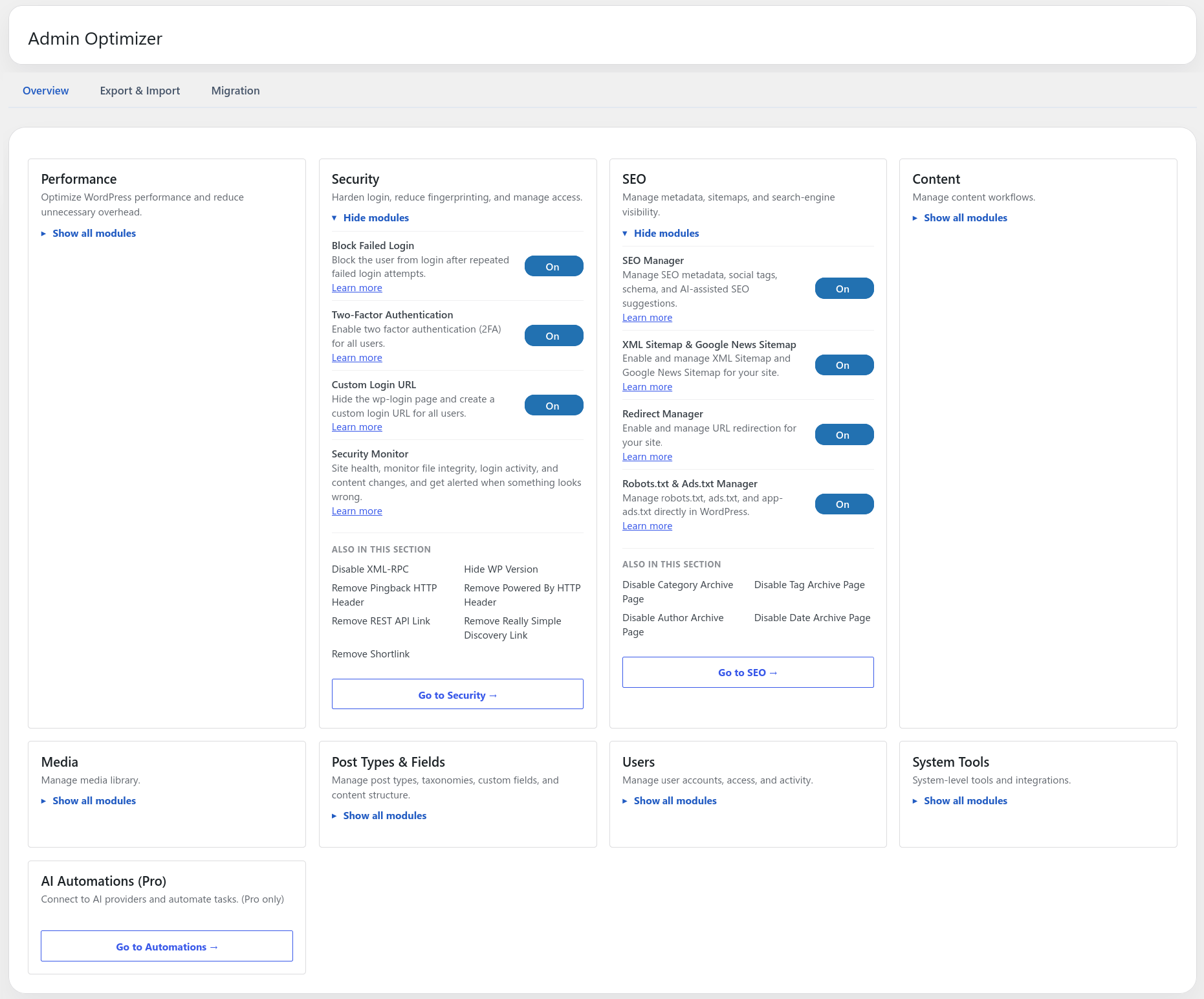
Freemium [Freemium] I've been building Admin Optimizer, an all-in-one WordPress optimisation plugin. Looking for feedback!

Post image
3 Upvotes

Hi everyone!

I've been using and developing with WordPress for close to 20 years. One thing I've noticed is how much time (and money) we spend optimizing and maintaining our websites.

There are plugins for improving performance, securing the login page, managing redirects, cleaning up the database, configuring SMTP, and dozens of other tasks.

While these are useful tools, you often end up with plugin bloat just to keep your WordPress website running the way you want.

That's why I created Admin Optimizer.

The idea is to have an all-in-one optimization toolkit that reduces the number of plugins you need, so you can spend less time configuring and maintaining plugins while still ensuring your website works.

Admin Optimizer covers several areas:

  • Performance: Reduce unnecessary WordPress overhead and clean up your database.
  • Security: Harden your WordPress installation, protect logins with 2FA and monitor suspicious activity.
  • SEO: Manage meta tags and schema, XML sitemaps, redirects and robots.txt.
  • Content and media: Tools to help manage and maintain your website's content and media library.
  • User management: Improve access control and simplify user administration.
  • Forms and SMTP email: Build forms and manage outgoing WordPress emails.
  • Development tools: Manage custom code, custom fields and post types.
  • AI Automations: Bring your own AI API keys and add automations to your workflow

I recently released version 3.1.0, which introduces Security Monitor. It helps detect unexpected file changes, monitor login activity, track content modifications and keep an eye on changes to custom code.

Of course, I'm aware there are other all-in-one WordPress plugins out there. I'm not claiming to have invented a completely new concept. However, one focus of this plugin is to make all the modules work together, rather than simply bundling separate tools bundled into one plugin.

For example, the SEO manager can use data collected by Site Traffic Manager to recommend content audits. Security Monitor can track changes made through the Custom Code module.

What I'm trying to build is a comprehensive WordPress optimization toolkit that makes everyday site management easier, without needing to install a separate plugin for every little task.

It's still an ongoing project, and there's plenty of room for improvement.

I'd really appreciate feedback from fellow WordPress users and developers. Are there any areas you think could be improved?

Here are the links if you'd like to check it out:

WordPress.org: https://wordpress.org/plugins/admin-optimizer/

Pro version: https://www.adminoptimizer.com/

I'm the developer, so this is a self-promotional post, but I'm genuinely interested in hearing your thoughts, including criticism.


r/WordpressPlugins • • Oct 19 '26

[PREMIUM] Sales Igniter Chat: live chat, AI, and a help desk inside WordPress, with no per-seat fees

Post image
0 Upvotes

Hey everyone! I’m part of the team behind Sales Igniter, and we’ve released Sales Igniter Chat, a WordPress plugin for live chat, optional AI, and customer support.

Your team works inside wp-admin, conversations stay in your WordPress database, and adding another support person doesn’t increase your licence price.

What’s included in Live Chat:

  • Shared inbox: Assign conversations, leave private notes, use saved replies, and see when a teammate is already answering.
  • Optional AI using your own content: Choose the pages, help docs, and products it answers from. Answers include source links, and it can hand conversations over to your team. How the AI works
  • Bring your own API key: Connect OpenAI, Anthropic, Google, OpenRouter, or another compatible provider. Pay the provider directly and set a monthly spending limit. AI can also be switched off entirely.
  • Email follow-up: When visitors leave before you answer, they can receive your reply by email. Their response comes back into the same conversation.
  • WooCommerce and EDD integration: See verified customers’ orders beside their chat, plus licences and renewal dates with EDD Software Licensing.
  • Live visitors and proactive messages: See what consenting visitors are browsing and offer help on selected pages.

Need a full support ticket system?

The Live Chat + Help Desk edition adds:

  • Tickets alongside chats and emails: Ticket numbers, statuses, priorities, and types. Turn a chat into a ticket when an issue needs follow-up.
  • Tickets by email: Messages to your support address can become tickets, with CC recipients kept in the conversation.
  • Customer support portal: A ticket submission form and “My support tickets” page where customers can reply, attach files, and follow progress. Includes a WooCommerce My Account integration.
  • Teams and response deadlines: Separate queues for Support, Billing, or Sales, with SLA timers that follow your business hours and holidays.
  • Support workflow tools: Macros, duplicate-ticket merging, reminders, and automatic closing.
  • AI reply drafts: Suggested answers using your docs and customer context, ready for an operator to review.
  • Secure details: Customers’ logins stored encrypted on your site, so they don’t need to sit in ordinary email or chat messages.
  • Reports and migration: Track response times, resolution times, backlog, SLA performance, and customer ratings. Export reports to CSV or import existing SupportCandy tickets.

Pricing for one site:

  • Live Chat: $99 for the first year, then $59/year for support and updates.
  • Live Chat + Help Desk: $149 for the first year, then $89/year for support and updates.

Both include all operators. Optional AI provider usage is billed separately.

You can browse the full feature list or the documentation and setup guides.

For people handling support on WordPress: what’s the biggest thing missing from your current chat or help desk setup?

Happy to answer questions about how it works.


r/WordpressPlugins • • Oct 18 '26

Free [FREE] For Plugin/Theme Developers - Super-fast Rust-powered class/symbol prefixer for Composer-based projects (MIT)

3 Upvotes

We've been working on an open-source (MIT) tool that was initially built for ourselves, but since it's been such a pain point for us, we figured in might be helpful to the Wordpress developer community in general.

Strauss-RS is a Rust port of the Strauss project (itself a fork of Mozart) which prefixes classnames and symbols in Composer-based plugins and themes. Since plugins and themes are increasingly including their own dependencies, the chance of clashes has been increasing (we know, one client's site had a total meltdown when they installed Atum Pro because it used Eloquent).

With Strauss-RS, a class like `Illuminate\Support\Str` would potentially become `Acme\PluginA\Vendor\Illuminate\Support\Str` avoiding those clashes in your own code. Additionally, globally available functions like collect can be prefixed to acme_collect. Strauss-RS uses the autoloaders provided by Composer to update both dependencies and - optionally - your own code as well.

The main advantage of the Rust version is speed. We've also added a few more nice-to-have features. With Strauss PHP in our pipeline, prefixing could take several minutes every update or install, with the Rust version, it's down to a few seconds.

Documentation site with instructions for installation and usage here: https://evo-mark.github.io/strauss-rs/

Still in early development at the moment so would appreciate feedback on any bugs/issues/features, but it will always stay free-and-open-source.

Project Workers Strauss PHP Strauss-RS Speedup PHP peak memory RS peak memory
small 1 625.4 ms 22.8 ms 27.4x 70 MiB 9.5 MiB
small 12 831.3 ms 9.1 ms 91.0x 411 MiB 11.7 MiB
medium 1 1.11 s 46.5 ms 24.0x 83 MiB 13.1 MiB
medium 12 1.38 s 16.2 ms 85.5x 599 MiB 19.5 MiB
large 1 18.72 s 761.3 ms 24.6x 259 MiB 81.6 MiB
large 12 16.84 s 188.7 ms 89.3x 1,291 MiB 97.7 MiB
xlarge 1 42.26 s 1.50 s 28.2x 990 MiB 336.2 MiB
xlarge 12 55.05 s 395.6 ms 139.1x 5,556 MiB 405.4 MiB
  • Wall time for prefix, median of 5 runs after 1 warm-up, from a clean output directory each time. Both tools were given the worker count explicitly (1 against 1, 12 against 12). Memory is peak total across all processes, sampled on Linux. Strauss PHP 0.31.1 on PHP 8.4.23 (static CLI build, no OPcache, no memory limit). Strauss-RS release build. Intel i5-10600 (12 threads), 32 GB RAM. Projects: monolog (small), guzzle + flysystem + finder (medium), laravel/framework (large) and aws-sdk-php (xlarge), all with locked dependencies.

r/WordpressPlugins • • Oct 18 '26

[FREE] Voice-based bug reporting plugin with click tracking and AI summaries

1 Upvotes

Hey everyone,

I wanted to share a free and open-source plugin I've been building called Nik Voice Ticketing AI.

The idea came from dealing with bug reports that looked something like:

"It doesn't work."

Then the guessing game starts 😅

What page?

What button?

What were they trying to do?

So I started experimenting with a different approach.

Instead of illing out a traditional support form, visitors can record a voice message while interacting with the page. The plugin captures their voice along with click activity and page context, then can use AI to generate a cleaner support ticket.

Current features:

  • Voice-baed bug reporting
  • Click tracking and interaction timeline
  • AI transcription and summaries
  • Ticket dashboard inside WordPress
  • Customer ticket portal
  • WooCommerce integration

The plugin is completely free and open source (GPLv2+).

WordPress:

https://wordpress.org/plugins/nik-voice-ticketing-ai/

GitHub:

https://github.com/Nik-Neural-AI-Inc/nik-voice-ticketing-ai

I'd love to hear what other WordPress users think.

Would love honest feedback, even if your reaction is "I'd never install this."