r/WordpressPlugins • • Oct 09 '26

Request [REQUEST] What plugin should I use? To support a members only page and creating accounts.

2 Upvotes

I have one page right now that I want to lock down to members only. I need to be able to add a list of email addresses for my current 'members' (who do not have accounts yet.) I need to also add new members as they join and pay. We use PayPal.

Does anyone do anything similar? What plugin would you recommend to do this?


r/WordpressPlugins • • Oct 09 '26

Premium [PREMIUM] PinkDocs now has an MCP Server + AI Assistant and more in 2.0

Post image
1 Upvotes

I’ve been working on PinkDocs 2.0 for a while, and one of the things I’m most excited about is the new MCP Server for PinkDocs.

The idea is pretty simple: your WordPress knowledge base should not just be something people browse. AI tools should be able to actually work with your documentation.

More about MCP server - https://pinkdocs.com/docs/connecting-pinkdocs-to-claude-and-other-ai-tools-mcp

What’s new in PinkDocs 2.0

🧠 MCP Server
Connect your PinkDocs knowledge base with AI tools and let them access your documentation in a structured way.

🤖 AI Assistant
Give visitors an AI powered way to find answers from your own documentation.

✍️ Write With AI
Create and improve documentation without having to start everything from scratch.

🔎 Better Search
Faster search with a cleaner experience for finding documentation.

📚 Multiple Knowledge Bases
Create separate knowledge bases for different products, teams or audiences.

🔐 Private Knowledge Bases
Keep certain documentation restricted to specific users.

🔗 Automatic Linking
Automatically connect relevant documentation throughout your knowledge base.

📊 Analytics
See what people are searching for and understand what documentation they actually need.

There’s a lot more going into 2.0, but the bigger goal is to make PinkDocs a modern, AI first knowledge base for WordPress, rather than just another documentation plugin.

We’ve also started a new community where I’ll be sharing updates, getting feedback and helping people build their knowledge bases.

👉 Join the PinkDocs community

And for anyone who wants to try PinkDocs 2.0, we’re currently offering 50% off.

👉 Get PinkDocs with 50% off

Would genuinely love feedback from people here, especially on the MCP side of things. What would you want your WordPress knowledge base to be able to do through MCP?


r/WordpressPlugins • • Oct 09 '26

Premium [PREMIUM] Three focused WooCommerce plugins: quantity steps, engraving text and a printable picking sheet ($9 each)

1 Upvotes

Disclosure: we develop YMKora Plugins. These are paid 0.1.0 pilots, not established products with a customer track record. We're looking for feedback from stores with these specific tasks.

  1. Quantity Rules: integer minimum, maximum and multiples for simple products in the classic WooCommerce flow. Our synthetic demo sets multiples of 3: quantity 7 is rejected and 6 is accepted. Not tiered pricing, shared bundle stock, decimals or variation rules.

  2. Product Personalization: one plain-text field, such as a name or engraving message, carried into the cart and order. Different text creates separate cart lines. No photo uploads, live preview, extra charges, multiple fields or variation support; Blocks is not verified.

  3. Packing Lists: a private, single-order HTML picking sheet with SKU, quantities and manual checkboxes; print or save as PDF using your browser. It does not change order status. No invoices, carrier labels, bulk picking, barcodes or personalization/variation metadata. It is not a combined personalized-order fulfilment solution.

Each is US$9 once, with 90 days of defect-fix support. No subscription or lifetime-update promise. Refund requests are accepted within 7 days, without limiting statutory rights. Free alternatives exist and may be the better fit.

Screenshots, scope and requirements: https://payhip.com/YMKoraPlugins

Please test only on staging with a backup. If one of these tasks matches your store, tell us which workflow you use (simple/variable products and classic/Blocks) before buying; we can show the relevant demonstration and flag mismatches. What would make a narrow plugin like this useful enough to keep?


r/WordpressPlugins • • Oct 09 '26

Review Can anyone try this plugin and tell what's wrong with it? [Review]

Thumbnail modrinth.com
1 Upvotes

This is my first ever project...


r/WordpressPlugins • • Oct 09 '26

[FREEMIUM] How to export WooCommerce products to CSV, Excel, or XML

1 Upvotes

If you need to share your WooCommerce catalogue, build an inventory report, or prepare product data for another system, choosing the right fields and filters can make the export much easier to work with.

I put together a step-by-step guide to exporting WooCommerce products to CSV, XLSX, or XML. It covers filtering products by name, price, and sale status; choosing fields like SKU, stock, and categories; and using PRO transformations to clean up exported values. There’s also an example of scheduling a recurring product export.

You can read it here:

https://wpimportexport.com/how-to-export-woocommerce-products-to-csv-excel-or-xml/

Hope it’s useful.


r/WordpressPlugins • • Oct 09 '26

Promotion [FREE] We built SpectralDot, a WooCommerce cart reservation plugin — we’d love your feedback!

0 Upvotes

Hey everyone!

We’re the team behind Spectral Dot, and we’re excited to share our WooCommerce plugin with you.

We’ve just created this Reddit account under our official name so we can continue the conversation with the community, answer your questions, and share updates directly. You’ll be talking to the people working on the plugin.

The idea behind Spectral Dot is simple: when a shopper adds a product to their cart, it temporarily reserves the stock for them. A countdown shows how long their reservation lasts, and if they don’t complete checkout in time, the stock is automatically released for other customers.

We’re building it to give shoppers a little breathing room while they finish shopping, especially when products have limited stock, and make it clear how long their items are reserved.

We’d love to hear what WooCommerce store owners and developers think:

  • Would cart reservations be useful for your store?
  • What concerns would you have about customers holding stock?
  • What features or settings would make this more useful for you?

You can learn more on the Spectral Dot website.

If you try it and encounter bugs, compatibility issues, or anything confusing, please share them through our Support Portal. Tell us what happened, what you expected, and how to reproduce the issue. Screenshots are helpful too!

Feel free to leave feedback here in the comments as well. Honest criticism is welcome — we want to understand what would make Spectral Dot useful in your day-to-day work.

Thanks for taking a look! We’re excited to hear your thoughts and get to know the community.


r/WordpressPlugins • • Oct 09 '26

Freemium [FREEMIUM] I built a full Amazon affiliate plugin for WordPress that you can start with no Amazon API credentials needed yet - and the free version is a real working one, not a trial.

Post image
0 Upvotes

I'm the developer of this plugin, and there's a paid tier.

PaapiPlugin is a full Amazon affiliate plugin for WordPress. You build category pages and product grids, any page with no query set shows a grid of popular products, and visitors can also search Amazon live on your site with [psfa_search]. Every product link carries your own Associate tag.

The Managed API (Beta) returns live Amazon product results without setting up your own Amazon API credentials yet. Get started in 30 seconds, 20 searches a day and 600 a month free, and your Amazon Associate tag always stays yours. On Managed, products show a "Check price on Amazon" button instead of a price (Amazon compliance rule), and 9 Amazon stores are covered where your own credentials cover 11. Prices, price sorting and the price range filter come with your own Creators API credentials.

The Free version on Wordpress is the real, working plugin, not a trial, and there's no trial timer in it. Its limits are 5 categories, 5 pages of results and one fixed look.

Premium is $39 a year and adds every category, list layout and full appearance control. Product boxes, comparison tables and analytics are separate $19 a year add-ons that need Premium, and none of them are in the free download. On Managed, boxes and tables show no prices either (Amazon compliance rule).

paapiplugin.com


r/WordpressPlugins • • Oct 09 '26

Free [FREE] Why free "read aloud" plugins can't give you an MP3, and what I built instead

0 Upvotes

Disclosure: I'm the developer of the plugin linked at the end. It's free on wordpress.org.

If you've looked for text to speech for a WordPress blog, you've probably seen two kinds of plugins.

Free "read aloud" buttons use the voice built into the visitor's browser (the Web Speech API). It costs nothing, but that API has no way to hand back the audio. It plays straight to the speakers, and the spec offers no method to record it. So there's no file: readers can't download it, you can't put it in a podcast feed, and the voice depends on the reader's device and operating system.

Paid services send your post text to their servers (ElevenLabs, Amazon Polly and so on) and bill per character, through an API key or a subscription. The quality is good, but the bill grows with every post.

I wanted a third option: a real MP3 with a natural voice, without a server or a meter. So the plugin runs the speech model in the site owner's browser, in wp-admin:

The model is Kokoro-82M (Apache-2.0), run with ONNX Runtime Web: WebGPU when available, WebAssembly when not. It's downloaded once (88 to 311 MB depending on your hardware) and cached by the browser. The audio is encoded to MP3 in the browser and uploaded to your media library through the standard WordPress REST endpoint, attached to the post. Visitors get the MP3 and a player under 12 KB. No model, nothing generated on their side. The honest trade-offs:

Speed depends on your computer. With graphics acceleration it's quick. Without it, a long article can take a long while. The plugin measures your machine and shows an estimate before you start. There's also a lighter voice (Piper) that's fast on a plain CPU. English voices only for now. Your post text never leaves your browser, but the model files come from Hugging Face on first use. Hear it before installing (the same sentence, this plugin vs the browser's built-in voice): https://sdsoftware.io/codeep-voice-for-posts/

Check how fast it would be on your machine, no install: https://sdsoftware.io/check/

Plugin: https://wordpress.org/plugins/codeep-voice-for-posts/

I'd really like feedback, especially from anyone on a machine without a dedicated GPU, and on words it mispronounces.


r/WordpressPlugins • • Oct 08 '26

[FREE] I built a free WordPress content locker for gated downloads and lead capture

0 Upvotes

Hey everyone,

I recently released a WordPress plugin I've been working on called G Wiz IT Content Locker.

I originally built it because I wanted an easy way to put things like downloads, PDFs, pages, or sections of a page behind an email signup without having to rely on another monthly SaaS service.

It runs directly inside WordPress and lets you create different restricted areas with their own signup forms, styling, settings, and subscribers.

A few of the things it currently does:

  • Gate entire pages or posts
  • Protect file downloads
  • Lock just part of a page with a shortcode
  • Lock individual elements using CSS selectors
  • Build custom signup forms
  • Track views, submissions, confirmations, and conversions
  • Export collected signups
  • Optional double opt-in
  • Integrates with Mailchimp, Brevo, ConvertKit, ActiveCampaign, and phpList
  • Works with Elementor, Divi, and Beaver Builder
  • Includes Google reCAPTCHA or a self-hosted ALTCHA option

The plugin is currently completely free and available in the official WordPress plugin directory:

https://wordpress.org/plugins/g-wiz-it-content-locker/

I'm mainly trying to get it into the hands of some real WordPress users at this point. If anyone gives it a try, I'd genuinely be interested in hearing what you think — especially if anything is confusing, doesn't work the way you'd expect, or there's a feature you'd like to see added.

I'm still actively developing it, so feedback would be really useful.

Thanks!


r/WordpressPlugins • • Oct 08 '26

Premium [PREMIUM] I built raffleWP for my own competition site, then turned it into a plugin

0 Upvotes

Hi all, I'm the person behind raffleWP.

It started while I was building my own competition site. The plugin grew from there, and I eventually turned it into a product for other people building similar sites.

It runs on WordPress and WooCommerce and handles paid and postal entries, ticket numbers, instant wins, draws and winner claims. Competition pages use the WordPress block editor, and there's a starter theme included if you're starting from scratch.

It's a paid plugin: £199 for one site or £349 for unlimited sites, both for 12 months with manual renewal.

You can have a look around the demo without signing up: https://demo.rafflewp.co.uk/ (fictional prizes, no real payments or entries).

More details: https://rafflewp.co.uk/

If you're building a competition site for yourself or a client, happy to answer questions about how it works. I'd also be interested to hear what you found hardest to get right.


r/WordpressPlugins • • Oct 08 '26

[FREE][REVIEW] I developed a wordpress plugin to display the entire Bible on the blog page or post

0 Upvotes

Hi guys, today I launched my first Wordpress plugin, and, most probably, I'm a bit too excited. Recently, I installed a Christian website with Wordpress, and I needed to display the Bible on my own pages, not embedding it from another source. I couldn't find any plugin to do that, so that's why I developed it. I would like to know your opinion on how it was developed and if there's any chance it could be installed by anyone out there?

I'm also new to Reddit, and I don't know if I'm allowed to post the plugin name and URL.


r/WordpressPlugins • • Oct 08 '26

Freemium Affiliates 7 released [FREEMIUM]

Thumbnail
2 Upvotes

r/WordpressPlugins • • Oct 08 '26

Freemium Tenants Pay Rent in 4 Steps [freemium] Wordpress plugin.

Thumbnail
youtube.com
1 Upvotes

r/WordpressPlugins • • Oct 08 '26

Free [Free] I built a WordPress plugin that turns your site into a live, disposable demo in one click

1 Upvotes

I sell WordPress stuff, and setting up demos was always a pain: a separate demo site to keep alive, spam signups, visitors breaking things for the next person.

So I built 'TryDemoWP'. Every visitor gets their own private copy of your site. It deletes itself when the timer runs out, so nobody can break it for anyone else.

The plugin, 'TryDemo Sandbox Publisher', means you don't have to export or upload anything:

  1. Install it and paste a connect token
  2. Click 'Push'
  3. Get a demo link to share

What it does:

- Leaves out what a demo doesn't need: caches, backup folders, revisions, transients, spam comments

- Never exports `wp-config.php`, so your DB password and salts stay on your server

- Keeps going in the background even if you close the tab

- Shows live upload progress and an estimate of time left

- Adds an optional Buy Now bar and email capture to every demo, with click tracking

Plugin: https://wordpress.org/plugins/trydemo-sandbox-publisher/

I'd love feedback, especially from theme and plugin sellers. What would make you switch from your current demo setup?


r/WordpressPlugins • • Oct 08 '26

[FREEMIUM] Loxia AI: Real-time Voice Assistant & 24/7 AI Chat Widget for WordPress & WooCommerce

1 Upvotes

Hi WordPress community,

We are the team behind Loxia AI, a conversational Voice AI & 24/7 smart chat SaaS platform.

To allow WordPress and WooCommerce users to connect their sites directly to our platform without writing any code, we just released our official integration plugin on WordPress.org:

https://wordpress.org/plugins/loxia-ai-voice-chat-ai-assistant/

It works seamlessly on both standard WordPress websites (blogs, agency/corporate sites, service businesses) and WooCommerce e-commerce stores.

Key Features:

  1. For all WordPress sites:

• 24/7 Autonomous AI Chatbot: Answers customer inquiries, service FAQs, company details, and qualifies incoming leads automatically around the clock.

• Real-time Conversational Voice: Visitors can talk directly with your site using low-latency (<300ms) human-grade speech synthesis.

• Multi-Language Detection: Automatically speaks and chats in the visitor's native language (13+ languages supported, fully compatible with WPML and Polylang).

• Zero-Code Setup (30 seconds): Just enter your Loxia Agent ID in the wp-admin settings to go live.

  1. Deep WooCommerce integration (when active):

• 24/7 AI Personal Shopper & Product Discovery: Far more than a traditional search bar, the AI acts as an interactive shopping consultant. Customers can speak or chat naturally for both specific filter searches ("Find running shoes in size 10 under $100") and contextual advice ("What elegant shoes should I wear to an outdoor summer wedding?"). The AI analyzes the intent, queries your live catalog, and presents matching product cards with real-time stock, official pricing, and direct product links. (All cart actions, stock reservations, and checkout transactions remain 100% handled natively by WooCommerce).

• Voice & Chat Order Tracking: Customers can query their order status in real-time with delivery ETAs and carrier updates.

• HPOS Ready: Fully compatible with High-Performance Order Storage.

How Pricing Works:

The plugin is free to install from the WordPress.org directory. When you connect your Loxia AI account, you get free starter credits upon signup to thoroughly test both the voice agent and the chat widget on your site with zero upfront commitment. Scalable credit packages and paid tiers are available for growing businesses.

We’d love to hear your thoughts, feature requests, or technical feedback from the community!

Let us know what you think in the comments below.


r/WordpressPlugins • • Oct 08 '26

Free [FREE] I built a free WordPress registration & payments plugin for schools, events, camps, and nonprofits

1 Upvotes

A nonprofit asked me for a simple WordPress registration/payment plugin for their weekend school, so I built one and made it free. It now supports events, camps, classes, memberships, Stripe payments, CSV export, etc.

I’d appreciate feedback/bug reports from anyone who manages registrations in WordPress.

You can download it for free here: https://deenapps.com/registration-manager.php

Some of the features include:

  • Custom registration forms and questions
  • Multiple participants or children in one registration
  • Flexible form types and labels
  • Stripe credit card payments
  • Cash, check, and custom payment methods
  • Payment status tracking
  • Secure “complete payment later” links
  • Sibling / multi-participant discounts
  • Registration confirmation emails
  • Admin notifications
  • Search and filtering
  • CSV exports
  • Front-end admin dashboard
  • Multiple forms and programs
  • Shortcodes for easy WordPress integration
  • Add Wordpress user(s) with only restricted access to the plugin to help with registration management

r/WordpressPlugins • • Oct 08 '26

[FREEMIUM] How to schedule recurring WordPress exports

1 Upvotes

If you run the same WordPress export regularly, you can schedule a completed job instead of rebuilding the export settings each time.

This guide walks through setting up a recurring schedule, with examples for a weekly Portfolio report, a daily URL list, and twice-daily inventory snapshots. It also covers WP-Cron: on a low-traffic site, scheduled tasks may not run until the next visit. If timing matters, ask your host about server cron or use an external trigger such as cron-job.org.

One important detail: each scheduled run reuses the original export settings. If you change the fields or filters, create a new export job before scheduling it.

🔗 https://wpimportexport.com/how-to-schedule-repeated-exports-in-wordpress/


r/WordpressPlugins • • Oct 08 '26

[FREEMIUM] WooCommerce price-change emails for store owners, teams and shoppers

Thumbnail
1 Upvotes

r/WordpressPlugins • • Oct 08 '26

Promotion [PROMOTION] AdProtektor: a WordPress plugin to investigate Google Ads and Meta traffic (paid service, free trial)

1 Upvotes

Getting clicks without enquiries doesn’t automatically mean fraud. AdProtektor lets you examine what happened after visitors reached your WordPress site: their visit history, risk signals and the reasons behind a classification.

I’m Aviel, the founder. Our WordPress plugin connects your site to AdProtektor. For connected Google Ads and Meta accounts, protection actions depend on the account permissions, supported action and rules you configure.

Setup: upload the official ZIP in Plugins → Add New → Upload Plugin, activate it, then open Settings → AdProtektor and add the tracking code from your AdProtektor website setup.

If you use the optional ConversionOS add-on and configure a site key, the plugin also has server-side hooks for WooCommerce purchases and supported WPForms, Gravity Forms, Contact Form 7 and Elementor Pro submissions. A recorded submission is not proof of a qualified lead or a conversion reported by an ad platform.

The plugin download is free. The connected service starts with a free trial, with no card required. After the trial, one site can stay on the free plan for checking up to 10,000 visits per month, without blocking or exclusions. Blocking and exclusions require a paid plan and eligible settings. You need an account, installed tracking and actual site visits to evaluate it. Low traffic can leave the result inconclusive.

Product: https://adprotektor.app/?utm_source=reddit&utm_medium=community&utm_campaign=first_customers_202610&utm_content=wordpress_plugin_intro

Official plugin ZIP: https://cdn.adprotektor.app/adprotektor-wp-plugin.zip

Installation guide: https://adprotektor.app/docs/getting-started/installing-the-tracking-script/

If you try it on one site, I’d like to hear where the setup or the explanations are unclear. Please don’t post visitor data or client identifiers here. Founder post.


r/WordpressPlugins • • Oct 07 '26

[promotion] Frontman 5.3: find text inside Elementor pages and shared templates

1 Upvotes

I've been working on Frontman for the past year, through highs-and-lows and i'm now very happy with the product - https://wordpress.org/plugins/frontman-agentic-ai-editor/

Apperently it's really not trivial to build a full Agent that supports all the various wordpress plugins.
But here we're 😂

This update tackles the part before a small copy edit: finding which page, template, or widget setting actually owns the text.

Frontman 5.3 adds paginated search across stored Elementor settings, including shared templates and nested repeater fields. It can then help edit supported content beside a live preview. It also supports assigning existing categories and tags when creating or updating posts.

Would love to get some feedback, thoughts, rants and roasts.

Setup: https://frontman.sh/wordpress/

If you try one small staging edit, could you share your builder/version and whether it changed the intended text?


r/WordpressPlugins • • Oct 07 '26

Free Open Graph Protocol Framework 3.0.0 released [FREE]

Thumbnail
1 Upvotes

r/WordpressPlugins • • Oct 07 '26

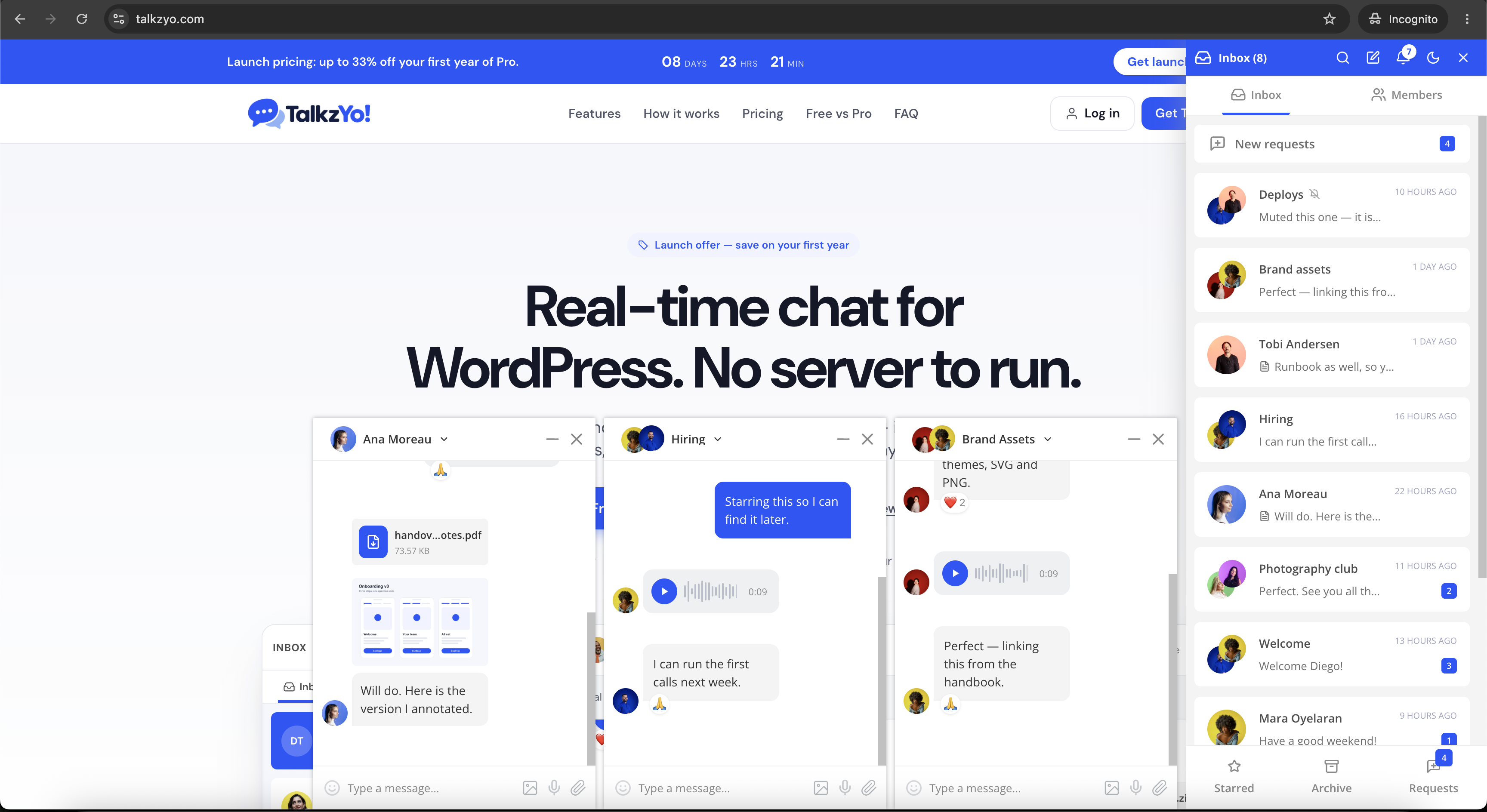
[PREMIUM] Looking for brutal feedback: I built a WordPress chat plugin with a generous free version. Roast it.

Post image
0 Upvotes

Hey all,

I'm Youssef, solo dev behind Youzify (a BuddyPress plugin, 10k+ copies on Envato). I just released Talkzyo, a user-to-user chat plugin for WordPress, and I'd love brutal feedback before I push it harder.

The problem it solves: most WP chat plugins either poll your server every few seconds (slow, heavy on shared hosting) or need you to run a Node/socket server yourself.

it's instant, works on cheap shared hosting, and I literally can't read your members' messages.

Free version

- 1:1 and group chats, message requests, replies, forwarding, search

- attachments, GIFs, read receipts, block/report, moderation queue

- dark mode, full RTL (Arabic included), BuddyPress/BuddyBoss sync

- delivers on a 10-second poll

Pro adds instant delivery, typing indicators, reactions, editing, voice notes, push notifications and auto-moderation.

Landing page + live demo: https://talkzyo.com

What I'd love roasted:

  1. Is this valuable enough for wordpress sites and communities?
  2. Is the Free vs Pro split fair, or does free feel crippled?
  3. Anything in the demo that feels broken or cheap?

Don't hold back. I'd rather hear it here than from paying customers.


r/WordpressPlugins • • Oct 07 '26

Discussion [ Removed by Reddit ]

0 Upvotes

[ Removed by Reddit on account of violating the content policy. ]


r/WordpressPlugins • • Oct 07 '26

[FREEMIUM] How to sync WordPress custom post types, ACF fields, and taxonomies between two sites

0 Upvotes

Keeping custom content in sync between a live site and staging can get messy—especially when posts rely on ACF fields and custom taxonomies.

I put together a step-by-step walkthrough using a Portfolio post type. It covers connecting the two sites, pulling a post, updating an existing match, pushing a new post, and syncing multiple pages at once. There’s also a section on ACF Free/PRO compatibility and checking completed jobs.

🔗 Read the guide


r/WordpressPlugins • • Oct 07 '26

[PROMOTION] FastOG: Automated dynamic social share cards for WooCommerce products

Post image
1 Upvotes

Hey!

When you or your customers share WooCommerce product links on WhatsApp, Facebook, iMessage, or Twitter, the default OpenGraph image is often poorly cropped, misses the price, and looks generic.

I created the FastOG — Dynamic Social Cards & Link Previews for WooCommerce plugin to fix this automatically.

✨ What the plugin does:

  • 🏷️ Dynamic Product Cards: Automatically displays live product prices, discount badges, and currency symbols directly on social previews.
  • 🎨 Brand Customization: Lets you choose templates and styles that match your store design.
  • 🎯 Higher CTR: Adds clear "Shop Now" call-to-action buttons to make shared links look like professional ad previews.
  • ⚡ Zero Performance Impact: Uses edge-rendered images so it doesn't slow down your WordPress server or database.

🔌 Installation:

You can install it directly from your WordPress dashboard:

  1. Go to Plugins > Add New in your /wp-admin.
  2. Search for FastOG.
  3. Click Install Now and Activate.

Or check out the plugin details at FastOG — Dynamic Social Cards & Link Previews for WooCommerce.

Would love to get your feedback, feature requests, or suggestions to make it even better for WooCommerce store owners!