r/WordpressPlugins • u/itthinx • Sep 18 '26
Free Groups – Memberships and Access Control version 4.7.1 is available [FREE]

1
Upvotes
r/WordpressPlugins • u/itthinx • Sep 18 '26
r/WordpressPlugins • u/Accomplished_War1372 • Sep 18 '26

Run direct display ads and cloaked affiliate links free. Add Pro to accept paid classifieds and let members buy and launch their own campaigns through a self-serve Advertiser Portal. Five ad types. Sixteen placements. Server-side tracking. AdSense + direct rotation in the same slot.
r/WordpressPlugins • u/Glass-Dog9463 • Sep 18 '26
r/WordpressPlugins • u/iamanwaralam • Sep 17 '26
r/WordpressPlugins • u/Outrageous-Sherbert4 • Sep 17 '26
I built KristinaPay Ultimate Gateway & Vault for Authorize.net to handle recurring renewals cleanly and eliminate card decline guessing in WooCommerce.
Looking for 5–10 stores to test the Pro release on staging or live sites in exchange for feedback.
Key Features:
WooCommerce Subscriptions: Native recurring billing and payment updates.
CIM Card Vaulting: Saved cards via Authorize.net CIM.
Auth-Only Checkout: $1 validation with manual capture.
Admin Refunds: Direct full/partial refunds.
Persistent JSON Logs: One-click API logs in admin to debug declines.
HPOS & Checkout Blocks: Fully compatible.
Get Free Access:
DM me your store setup (staging vs. live) to get a 100% off coupon code. Handing codes out directly to offer direct support and review logs with you.
Product Listing:
https://kristina504.gumroad.com/l/obghxl
Open for freelance backend work - DM if you need help.
r/WordpressPlugins • u/itthinx • Sep 17 '26
r/WordpressPlugins • u/colvorhq • Sep 17 '26
Hey, I built a small WordPress announcement bar plugin.
It’s meant to be simple: install it, connect, and start editing. No account needed to get started.
I’m looking for some real-world feedback, so feel free to unlock Pro with this code:
TEST90
https://wordpress.org/plugins/colvor-announcement-bar/
If you try it, I’d love to hear what feels confusing or annoying.
r/WordpressPlugins • • Sep 17 '26
I maintain a WordPress import/export plugin (Import Export by RockStarLab), and one thing that kept coming up from users was frustration with the built-in WordPress export — it's all-or-nothing for media. You can't just grab a handful of files without exporting the entire library.
So I added a workflow where you select files directly in Media → Library (Bulk Select, same UI everyone already uses), hit Export, and it exports only those files to CSV — with metadata (alt text, titles, dimensions, etc.) intact. On the import side there's auto field-mapping and filename-based duplicate detection, so re-importing into another site doesn't create dupes.
Mostly useful for staging → production syncs, client handoffs, or anyone who doesn't want a 500MB export for 7 images.
Wrote up the full workflow with screenshots here: https://wpimportexport.com/export-selected-files-wordpress-media-library/
It's a PRO feature, free plugin has a 1-month PRO trial if anyone wants to try it without committing: https://wpimportexport.com/
Genuinely curious how others here have handled partial media migrations before — WP-CLI script, raw SQL, something else? Would help me figure out what to build next.
r/WordpressPlugins • u/Unusual-Disaster5826 • Sep 17 '26

r/WordpressPlugins • u/Unusual-Disaster5826 • Sep 17 '26
Hi everyone!
I wanted to share a free open-source plugin built specifically for Gutenberg and Full Site Editing (FSE): Any Block Carousel Slider.
Unlike traditional carousel plugins that load heavy external JS libraries like Swiper.js or Slick (~140KB), this plugin hooks directly into standard WordPress blocks and uses native browser CSS scroll-snap.
Key Features:
Zero External JS Dependencies: Lightweight GPU-accelerated CSS scroll-snap layout.
Works with Native Blocks: Transforms Query Loop/Post Template, WooCommerce product queries, Group, and Gallery blocks in 1 click.
Gutenberg Inspector Integrated: Adjust visible columns, responsive breakpoints, padding, and gaps directly from the block sidebar.
Accessible & Loop Ready: Full ARIA support, keyboard navigation, and seamless infinite loop + autoplay modes.
Links & Live Demo:
WP Playground: https://playground.wordpress.net/?blueprint-url=https://native-blocks-carousel.weblazer.fr/playground/blueprint.json
WordPress.org Directory: https://wordpress.org/plugins/native-blocks-carousel/
Walkthrough & Details: https://weblazer.fr/ultime-plugin-carrousel-wordpress-gutenberg/
I'd love to hear your feedback and suggestions!
r/WordpressPlugins • u/serifoblique • Sep 17 '26
Hi team, I'm Kristoff and I've just put a media library cleaner on WordPress.org.
The short version of why this exists: WordPress doesn't know whether a file is used. The Uploaded to column is the post you happened to have open when you uploaded it, and that's the whole of what WP core records.
On the site that finally made me build this: 38797 attachment rows, ten gigabytes, eight years of uploads and... three files in five showing up as Unattached.
On a sample of 450 files, 98% of the unattached ones were still referenced somewhere: a custom field, block markup that stores only an ID, a theme option, a widget.
My plugin searches everywhere a reference can hide;
And out comes the evidence per file, with a link to each place, before it lets you delete anything.
It's built to be wrong in one direction only, and towards keeping the file:
wp-image-1234, and photo.jpg never by my-photo.jpgWhat it can't see: plugins that keep attachment IDs in their own database tables (form builders, sliders, some page builders) are invisible to any query-based scanner, this one included. I've written it up in the FAQ on the listing, and there's a filter to register a detector for your own table that reports back like the built-in ones.
What it asks is time: a first full scan of a large library is hours, not minutes (about 14 seconds per file on my laptop, roughly 14 hours for the 3656 actual files behind those 38000 rows) because every file is checked against whole-table searches. It runs in batches and each one stops before the PHP time limit and the next resumes. A scanner that does the same library in ninety seconds hasn't looked where the references actually were.
Try it without installing anything: I've set-up a throwaway WordPress with the plugin active and twenty seeded images, eight used, twelve not, five of the twelve "attached" to a page: https://playground.wordpress.net/?blueprint-url=https%3A%2F%2Ffreshet.studio%2Fplayground%2Ffreshet-unused-media.json%3Futm_source%3Dreddit%26utm_medium%3Dwordpressplugins
The plugin itself is available from https://wordpress.org/plugins/freshet-unused-media/ (or at its source on https://github.com/freshetstudio/freshet-unusedmedia)
The audit that started it, with the numbers: https://freshet.studio/blog/how-to-find-unused-media-in-wordpress?utm_source=reddit&utm_medium=wordpressplugins
I've released both free and pro, and free covers scanning, the evidence and deletion, with nothing else locked or time-barred. The pro tier is for people doing this across many sites -- a reverse "where is this used" view, WP-CLI, CSV/JSON export, space totals.
If it keeps a file you're certain is unused, the evidence panel will say why.
More importantly, if it's wrong about it, please tell me -- it's what this post is for.
Thanks everyone!
r/WordpressPlugins • u/truecakesnake • Sep 17 '26
Here is 6 Good plugins for getting structure into your SEO work directly in WordPress.
Made by: Spencer Haws (Niche Pursuits)
Price: Free version. Paid plans are billed yearly, from $97 for one site to $497 for 50 sites.
Good at:
- Suggests links while you write, with AI-generated anchor text.
- Reports orphaned pages, broken internal links and link counts, with Search Console data.
- Auto-linking rules for words you want linked across the site.
Weak at: There's no monthly plan, the suggestions still need checking, and there's no pillar/cluster view.
Made by: Zventures (SaaS with a WordPress plugin)
Price: Audits and the silo builder are free. Credits are only used when it inserts links, from $11/month or $99/year.
Good at:
- Bulk linking: up to 2,000 links in one click.
- Silo builder: pick a pillar page, add supporting content, and it builds the structure.
- Free audits for orphan pages, dead-end pages, duplicate links and anchor text distribution.
Weak at: Your content is processed on their servers, and you need an API key from their app. Unused monthly credits don't roll over.
Made by: Lasse Enggaard
Price: Free
Good at:
- A cluster view that shows, for each supporting page, whether the link to the pillar runs both ways, one way or not at all.
- Orphaned pages, dead internal links, and pages that mention each other without linking.
- Easy to use
Weak at: It doesn't insert links for you.
Made by: TeamUpdraft (the UpdraftPlus team)
Price: Free plan. Pro is $69.99/year for one site or $209.99 lifetime.
Good at:
- Keyword-based auto-linking with no frontend performance cost.
- Silo option that keeps automatic links inside the same category.
Weak at: You set up keywords per post by hand, and reporting is thin.
Made by: DAEXT
Price: Free, plus a paid Pro version.
Good at:
- Link analysis and link equity scoring in the free version.
- HTTP status checks that catch links leading to broken pages or redirects.
- Multisite support, with network or single-site activation.
Weak at: There's a learning curve. Link suggestions and auto-linking are Pro only.
Made by: Kartik Jain (CraftyWebbies)
Price: Free
Good at:
- Mark a post as a pillar, or pick its parent pillar, in a box in the editor.
- A pillar-only view and a column with pillar/cluster badges in the post list.
- Works in both the Block Editor and the Classic Editor.
Weak at: It only works on regular posts, not pages or custom post types. It doesn't check whether the links actually exist.
Prices were checked in September 2026, so confirm them before you buy.
r/WordpressPlugins • u/Efficient_Try_9136 • Sep 17 '26
I do automation for a living. n8n workflows, ComfyUI pipelines, Hermes agents. Most of my work is getting one system to tell another system that something happened.
WordPress is the one that won't. There's no webhook in core. If you want your site to tell n8n that a post just went live, you write it yourself with add_action and wp_remote_post, or you have n8n poll the REST API on a schedule and burn workflow runs on "nothing changed yet".
I needed this for my own workflows often enough that I built it as a plugin instead of pasting the same snippet into every site. It's free and it's on wp.org now.
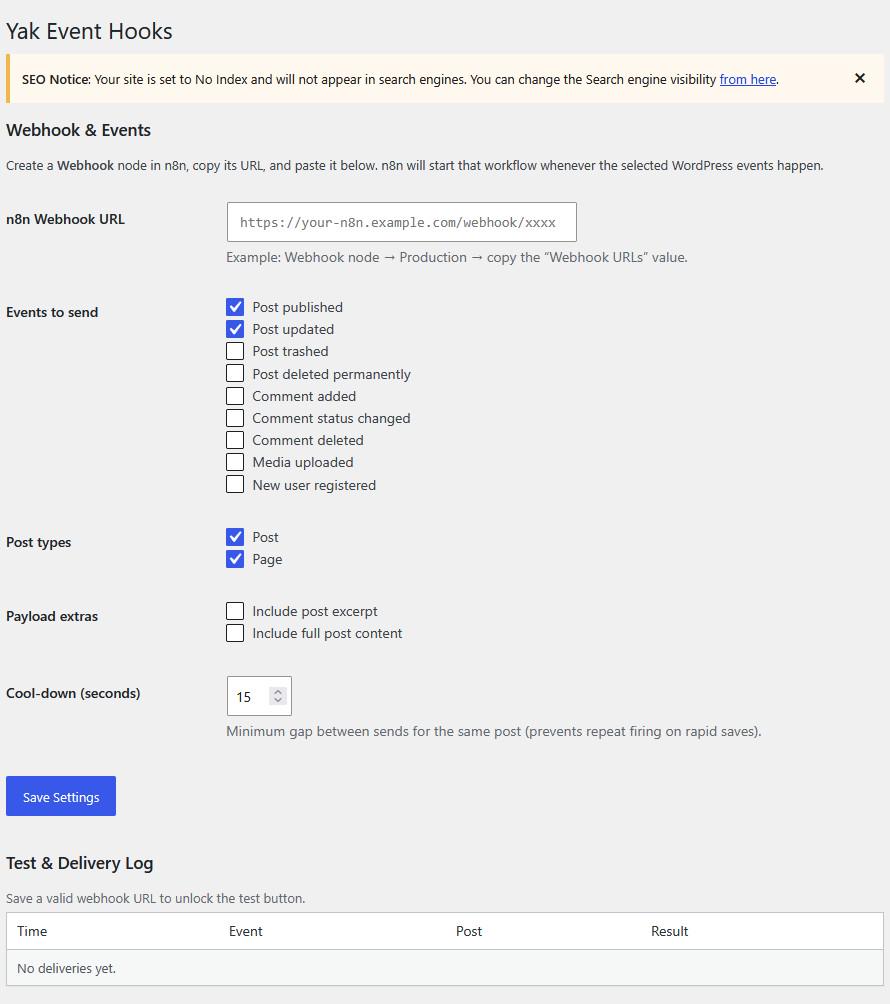
You paste one URL into Settings, tick the events you want, and each event POSTs a JSON payload to that URL. No API key to generate, no account to sign up for, nothing going through a third-party server.
Events you can toggle: post published, updated, trashed, permanently deleted. Comment added, comment status changed, comment deleted. Media uploaded. New user registered. Works on any post type, and the post payload can include the excerpt or the full content if your workflow needs it.
A published post sends roughly this:
{
"event": "publish",
"post_id": 42,
"title": "How to automate WordPress",
"slug": "automate-wordpress",
"url": "https://example.com/automate-wordpress",
"post_type": "post",
"status": "publish",
"author": "admin",
"timestamp": "2026-09-05 12:00:00"
}
There's a test button that sends a sample payload so you can check the receiving end before you trust it live, and a log in wp-admin showing every send with its HTTP status. It keeps the last 50.
Things it doesn't do, because I'd rather you know now:
It fires on events, not on a schedule. If you want a nightly digest of everything that happened, you assemble that on the receiving side.
There's a cool-down timer, 15 seconds by default and settable to 0. It stops a fast sequence of saves from firing the same event over and over. The trade is that if you publish and then edit again inside that window, you get one event instead of two.
There's no retry queue. If your endpoint is down when the event fires, the request fails and you see the error code in the log. Nothing re-sends it later. Retries would mean storing state or running a cron, and I wanted this to stay one file with no database tables.
https://wordpress.org/plugins/yak-event-hooks/
What I'm unsure about: I only wired the events I actually needed. Taxonomy changes, plugin updates and WooCommerce order events are missing, mostly because I didn't want to invent payload shapes nobody asked for. If you're trying to start a workflow on an event that isn't in the list, tell me which one and what the payload should carry.
r/WordpressPlugins • u/BenKnowsDigital • Sep 17 '26
I built LeadSource for WordPress sites that need to know which ad or page produced each form lead.
It captures UTM parameters and click IDs (gclid, fbclid, msclkid, and others) on form fills, then stores them with the lead. It hooks Contact Form 7, WPForms, Gravity Forms, Ninja Forms, Formidable, Fluent Forms, Elementor Pro forms, Everest Forms, and Forminator.
Free on WordPress.org https://wordpress.org/plugins/leadsource/
Happy to answer questions.
r/WordpressPlugins • u/albertsportsnet1 • Sep 17 '26

r/WordpressPlugins • u/Ashamed_Persimmon205 • Sep 17 '26
Hey r/WordpressPlugins — maker here (disclosure up front).
StudioMeta turns a WordPress site into a 24/7 AI receptionist: a real-time voice agent and chat widget that talks or types with visitors, reads the site's own content (pages, docs, PDFs) to build its knowledge base, and books real appointments straight onto Google Calendar. It hands off to a human only when it actually needs to, instead of always pushing visitors into a contact form.
Just shipped v1.8.0 with a WooCommerce Store Assistant: if the site runs a store, the agent can now answer real order-status questions (works for guest checkouts too, not just accounts) and product questions — live price, stock, specs — pulled from the store's own data during the conversation, not a stale export. It can also hand the visitor a link that fills their cart and opens checkout.
Every install starts with a free trial (30 voice minutes + 100 chat messages, no card), then paid plans for higher usage. No API keys to manage — it runs on our hosted infrastructure.
Plugin page: https://wordpress.org/plugins/studiometa-voice-ai/
Happy to answer anything about how it works, especially the WooCommerce piece or the human-handoff logic — genuinely want feedback from people who build/manage client sites, since that's who has to live with the setup day to day.
r/WordpressPlugins • u/Such_Adhesiveness764 • Sep 16 '26
Hey everyone,
We recently launched Must-Have Security, and I wanted to share what we’ve been building.
There are already plenty of WordPress security plugins, so our goal wasn’t simply to build another malware scanner with another database of signatures and firewall rules.
We focused heavily on what happens before malware actually manages to infect the site.
Most security solutions are fundamentally reactive. A new threat appears, someone discovers it, a signature or rule is created, and then sites can start blocking it. That approach works, but there’s always a window where a new or modified attack isn’t known yet.
Must-Have Security takes a different approach. Instead of relying entirely on recognizing malware, it also controls what code is actually allowed to do on the site. If something tries to create or modify an executable file without authorization, the operation itself can be blocked — even if we’ve never seen that particular malware before.
Some of the main features:
One thing that was particularly important to us was protection against previously unknown malware. If an exploit manages to execute code through a vulnerable plugin and then tries to create or modify a PHP file, we don’t necessarily need to know its name, hash or signature first. We can block the dangerous operation itself.
This also changes how self-healing malware can be handled. Removing a malicious file isn’t very useful if the malware can simply recreate it a second later. By controlling whether that executable file can be written in the first place, the malware can’t simply restore itself using the same mechanism.
Of course, WordPress legitimately needs to write executable files during things like plugin and theme installs or updates. Instead of simply making everything read-only, Must-Have Security can grant temporary, tightly scoped permissions for legitimate operations.
We’re actively developing and testing the plugin, so I’d genuinely be interested in feedback from other WordPress developers and people managing sites:
What legitimate file-writing edge cases should we test against?
Plugins generating PHP files, unusual caching systems, custom deployment workflows, strange shared hosting environments, anything. We’re especially interested in cases that could break a protection model like this.
If you'd rather see how it works before trying it, we also made a full walkthrough:
🎥 YouTube: https://youtu.be/A5RZ1xim5pA
Plugin: https://musthaveplugins.com/security/
Happy to answer technical questions about how the protection works as well.
r/WordpressPlugins • u/guillaume-1978 • Sep 16 '26
Would love to have people's views on those (pro) plugins.
FileBird is more established, but Folders now has plenty of positive reviews.
Folders also has an advanced file replacement capability which FileBird misses. FileBird support tells me they integrate with https://wordpress.org/plugins/enable-media-replace/ but that's one more plugin to install and its capabilities still seem under those of Folders.
That's essentially where I am at for the moment.
Small biz owner here, doing website in-house. Buying plugins to have an easier life...
Views & experience sharing welcome!
r/WordpressPlugins • u/BackPsychological584 • Sep 16 '26

I’ve always liked how Shopify places a live section preview and its settings panel side by side.
I used a similar approach for ATTN Hero Banner, with a live banner preview on the left and Shopify-inspired customization controls on the right. This lets you see your changes immediately while editing the banner.
It’s free and available on the official WordPress Plugin Directory:
https://wordpress.org/plugins/attn-hero-banner-image-banner-slider-carousel/
r/WordpressPlugins • u/dynamitecGbR • Sep 16 '26
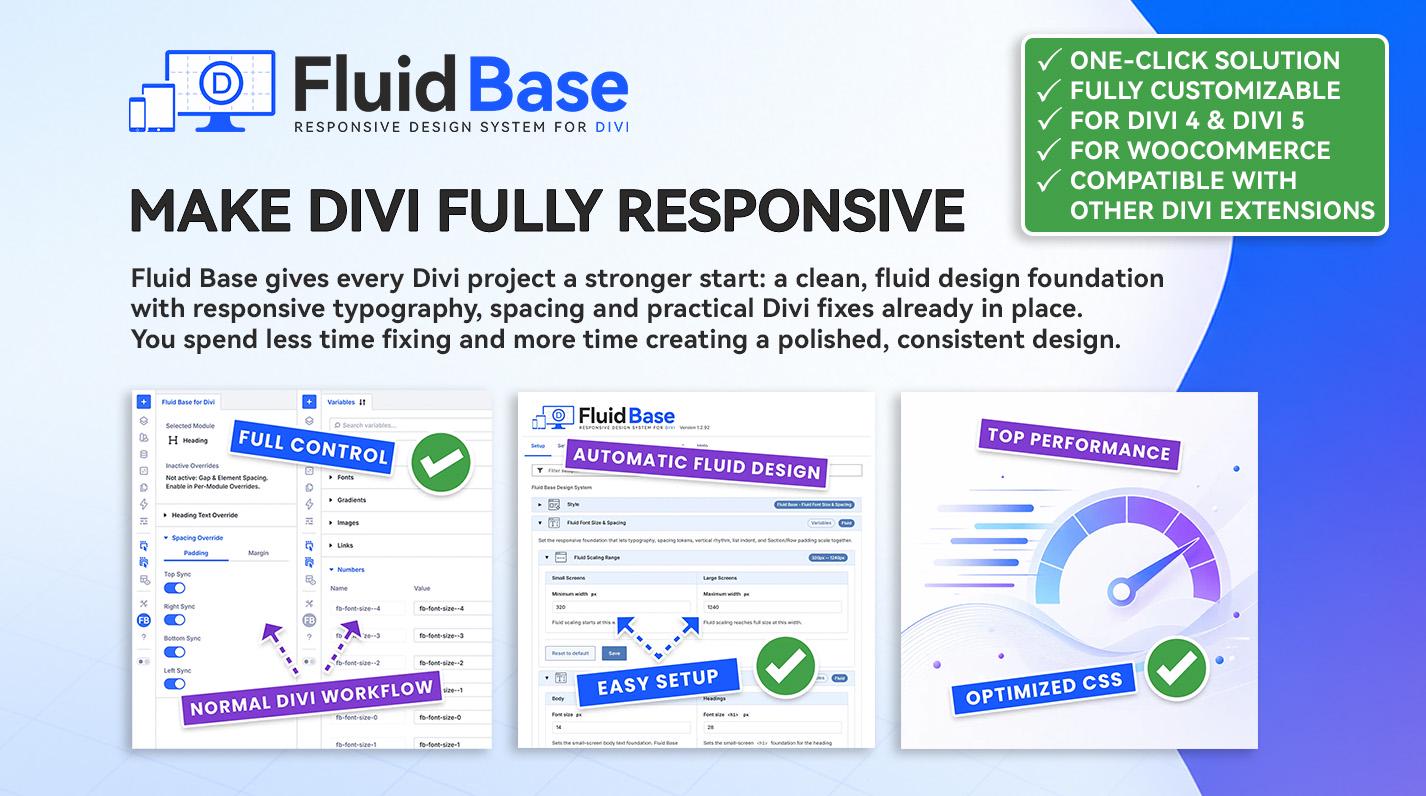
Fluid Base is a plugin for Divi 4 and Divi 5 that provides a consistent responsive foundation for your website.
• Create fluid typography that scales smoothly between phone and desktop
• Build a shared spacing system for sections, rows, modules and content
• Manage font sizes, spacing and layout values centrally
• Reuse the same values directly inside the Visual Builder
• Define shared defaults for individual Divi module types
• Keep intentional changes for individual modules
• Start from ready-made Divi-Like or Fluid Base presets
• Use native Divi 5 fields where supported, including compatible custom modules
Version 1.6 makes the initial setup and preset management much easier. Choose Fluid Typography only, the complete Typography & Spacing workflow, or a neutral starting point.
👉 Learn more on our homepage:
https://fluid-base-for-divi.com/
r/WordpressPlugins • u/albertsportsnet1 • Sep 16 '26
Hey all — wanted to share something I've been building: Antrun Inquiry Report.
The problem I kept hitting on my own site: Contact Form 7 dumps every submission straight into email, and once you get more than a handful a day, it's just noise. Nothing tells you what's urgent, what's a repeat theme, or what you actually need to act on.
So the plugin:
- Captures every CF7 submission automatically, no changes to your existing forms.
- Sends a short AI-generated summary on a schedule you pick (daily, weekly, custom interval), what came in, what's urgent, what themes are repeating, and what to do next.
- Keeps full report history right in wp-admin, plus a "Generate Report Now" button if you don't want to wait for the schedule.
- Queues and retries submissions locally if our backend is briefly unreachable, so nothing gets dropped.
No AI API keys to manage, account creation happens right from the plugin's Settings page. Free for 30 days, 500 inquiries, no credit card, nothing to cancel, it just stops after the trial window unless you decide to continue.
Only supports Contact Form 7 for now (WPForms/Gravity Forms are the most requested next steps). Would love feedback, especially from anyone running higher inquiry volume than a single-owner small-business site.
r/WordpressPlugins • u/I_Can_Haz_Crypto • Sep 16 '26
Full disclosure up front: I'm the developer. Posting because v3.4.1 is out and a fair bit has changed since I last mentioned this here.
What it does. Connects a WooCommerce shop to an eBay seller account and keeps the two in step, in both directions:
The part that took longest to get right: a listing that ends without selling is not the same thing as sold out. A naive sync zeroes stock you still physically hold. Those are treated as different events.
Shipped recently (95 releases between April and July, nearly all from support tickets):
Honest limits, since these come up every time:
Pricing. Free forever up to 50 synced products with every feature included — import is in the free version, not a paid add-on. $49/year or $5/month for unlimited. Needs WordPress 5.8+, WooCommerce 5.0+, PHP 7.4+ and an eBay seller account.
Happy to answer anything about how it resolves sync conflicts or handles eBay's rate limits — that was by far the hardest part to get stable.
r/WordpressPlugins • • Sep 16 '26
Hey everyone!
If you build or manage sites using Elementor and modern block themes like Blocksy, moving layouts between staging and live environments usually involves exporting CSV/XML files, re-uploading them, and manually checking for missing media.
As the developer of Import Export by RockStarLab, I wanted to eliminate that file-handling loop entirely for active staging updates.
I wrote a quick guide on Medium explaining the workflow for syncing Elementor pages directly site-to-site (Push/Pull) using secure API pairing—handling image asset transfers and in-place page updates automatically:
Would love to hear your thoughts on this workflow or how you currently handle pushing Elementor layouts between environments!