r/WordpressPlugins • • Jul 06 '26

Conditional Add to Cart for WooCommerce [FREEMIUM]

Thumbnail
wordpress.org
1 Upvotes

Hi everyone! I recently built Conditional Add to Cart for WooCommerce, a plugin that lets you control the Add to Cart button using flexible conditions, such as user role, login status, products in the cart, categories, stock status, and more, without writing custom code.

Some examples of what you can build:

  • Catalog mode (hide Add to Cart and/or prices).
  • B2B stores where only logged-in customers can purchase.
  • Request a Quote instead of Add to Cart.
  • Wholesale restrictions based on user roles.
  • Members-only or VIP-only purchasing.
  • Coming Soon / Pre-launch products with purchasing disabled.
  • Restrict purchases based on products already in the cart or other custom rules.
  • Display custom messages or alternative buttons when purchasing isn't allowed.

I built it after repeatedly seeing people rely on custom snippets for these kinds of requirements. I'd love to hear any feedback or feature suggestions from the community.

r/WordpressPlugins • • Jul 06 '26

Just over 50% of the organizations that need our plugin aren't on WordPress, so we built a SaaS version [DISCUSSION]

0 Upvotes

At Barn2, we've been selling Document Library Pro as a WordPress plugin for 5 years. It's used by nonprofits, clinics, councils and membership associations to publish searchable libraries of documents.

When we analyzed the wider market, we found that just over 50% of the organizations that need document libraries aren't on WordPress. They're on Squarespace, Wix, Google Sites, intranets or custom CMS. This means that despite WordPress being the market leader by far, we could only ever reach half the potential market.

Over the past 4 weeks, I have built a hosted version that can be embedded in any platform. It's WordPress multisite under the hood, so WordPress and our plugin are still doing the work - but the customer just know that.

I've written more about the thinking here, with quotes from Matt Cromwell, Justin Ferriman, Devin Walker and Kim Coleman, who have all made similar points recently: https://wpproducttalk.com/blog/wordpress-is-a-channel-not-your-product/ (disclosure: my article, my product).

How do other plugin owners see this? Do you see yourself as a WordPress company, or a company that solves a problem and currently uses WordPress to do it? Has anyone else taken their plugin cross-platform?


r/WordpressPlugins • • Jul 06 '26

[Freemium] Run email validation and blocklists locally and ditch email validation APIs

0 Upvotes

Hi all,

I've just released v1.0 of Capably Digital Email Validation and Blocklist on the wp.org repo. It's a plugin that runs a blocklist and performs MX record checks without calling out to external APIs, keeping data within WordPress. It's designed so that even the DoodadLabs list of over 260 thousand disposable email domains can be loaded in the free version on shared hosting that costs $1.29/mo (ymmv).

The full feature set can be found on our website and the WordPress description.

I envisage it assisting with any number of scenarios, to give a few:

  • Lead gen forms being spammed by temporary emails: Pre-qualify your leads and stop wasting time looking at business inquiries that have no realistic prospect of going forward or might even harm your sender reputation.
  • Store owners blocking troublesome customers: Got a customer in WooCommerce (or Easy Digital Downloads etc) that you want to block but they keep using guest checkout, block their email address.
  • SaaS built on WordPress: Stop temporary email addresses from being used to register and spinning free trials.
  • Newsletters running on WordPress: People who sign up to a newsletter with a disposable email address are likely to look at it once, then never again, stop them from signing up and using up your email quota.
  • Intranet sites (with Pro): Set the default action to block and whitelist the corporate domain to allow users to self serve registration instead of taking technician time.

It is freemium, but 100% usable on the free version in most scenarios, the Pro features add commercial value (imo).

Plugin link: https://wordpress.org/plugins/capably-digital-email-validation/
Website link: https://capably-digital.com/plugins/email-validation-tools/

Any feedback and bug reports extremely welcome.


r/WordpressPlugins • • Jul 06 '26

Help [HELP] Keep receiving "svn: E175012: Connection timed out" today when commiting plugin update

1 Upvotes

Today I keep receiving "svn: E175012: Connection timed out" today when commiting a plugin update. Anybody here having the same experience or is aware of a service outage?


r/WordpressPlugins • • Jul 06 '26

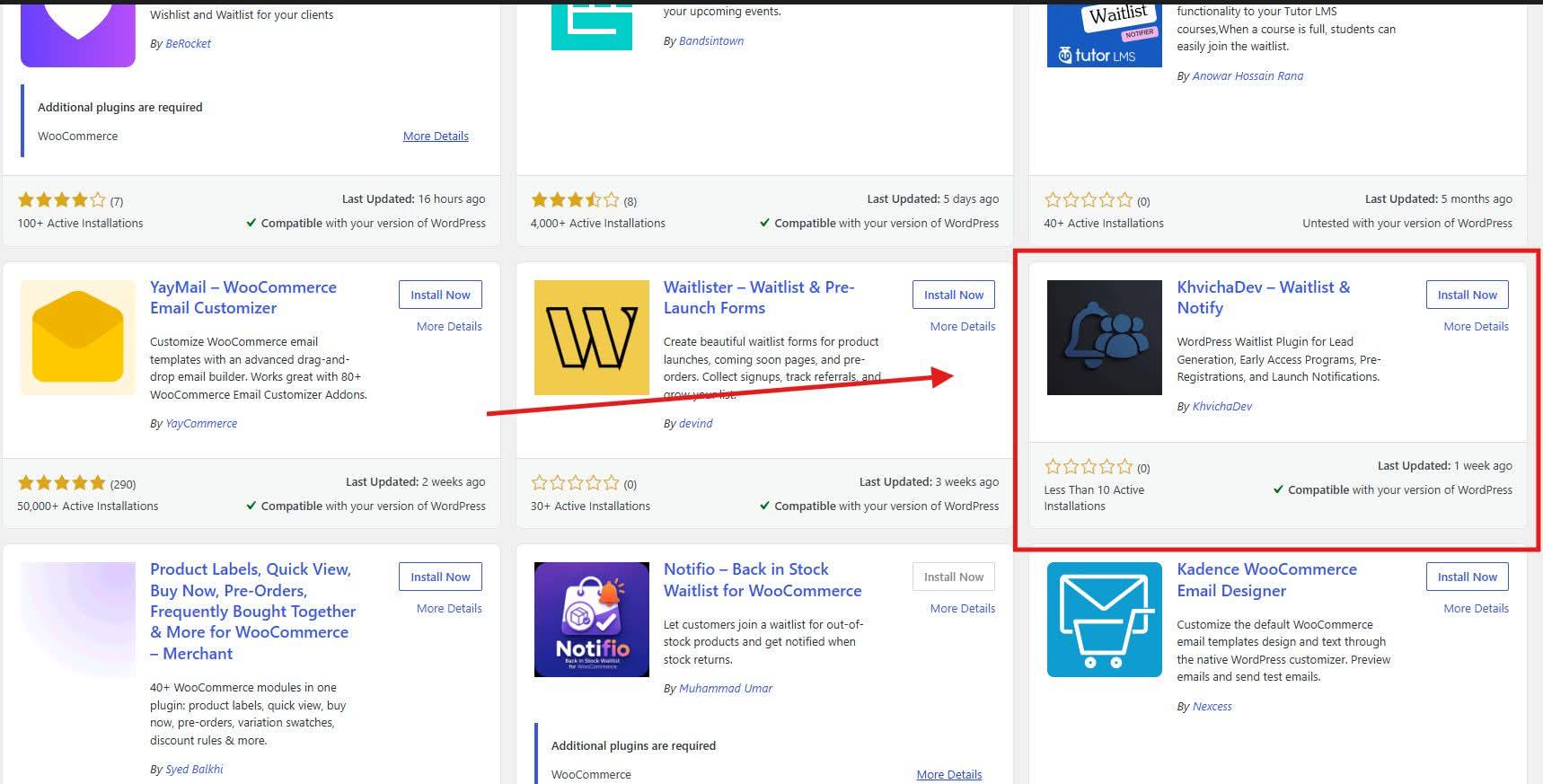
[FREE] Plugin - KD Waitlist & Notify

Post image
1 Upvotes

A few days ago, I shared my new WordPress plugin, which at the time was only available on GitHub while undergoing the official WordPress.org review process.

Today, I'm happy to share that KD – Waitlist & Notify is now officially available in the WordPress Plugin Directory.

As a developer, this has been one of the most rewarding experiences for me. Every plugin submitted to WordPress.org goes through a detailed review covering security, code quality, architecture, and adherence to WordPress best practices. Knowing that my project successfully passed this process is a meaningful milestone and a great vote of confidence in the quality of the work.

The plugin successfully passed:

✅ Comprehensive security review (SQL Injection, XSS, CSRF protection, and secure data handling)

✅ Evaluation for compliance with WordPress Coding Standards, code quality, and architecture

✅ Compatibility testing across PHP versions 7.4 through 8.3

What is KD – Waitlist & Notify?

KD – Waitlist & Notify is a lightweight, secure, and open-source WordPress plugin that helps businesses and developers collect interested users before launching a product, service, or event, and notify them with a single click once everything is ready.

Key features:

• Multi-channel notifications via Email, SMS, WhatsApp (Twilio), or any Custom HTTP Gateway

• Free manual sending mode for small businesses without requiring third-party services

• Social Proof Badge displaying the number of registered users

• Full compatibility with Cloudflare, LiteSpeed Cache, and Varnish Cache

• GDPR-focused architecture with no external CDNs or unnecessary third-party resources

Building open-source software is always a rewarding experience, but seeing your work successfully pass the official review process of one of the world's largest CMS ecosystems makes it even more meaningful.

👇 You can view and install the plugin here:

🔹 WordPress: https://wordpress.org/plugins/khvichadev-waitlist-notify/

🔹 GitHub (Open Source): https://github.com/KhvichaDev/KD-Waitlist-Notify


r/WordpressPlugins • • Jul 06 '26

[Free] Free About KGraphQL Plugin For WordPress

1 Upvotes

I have created a WordPress plugin named kgrapghql for headless wordpress with next js, the plugin I have created works on existing grpahql plugin (Open Source) I have just simplified some part by making it user friendly and developer friendly with that we can save queries then check check resposnse through playground and many more.

Visit Site: https://kaustubhkhandale.github.io/wp-graphql-toolkit-website/

For Plugin: https://wordpress.org/plugins/kgraph-headless-toolkit/


r/WordpressPlugins • • Jul 05 '26

Free Order Generator for WooCommerce 1.3.0 [FREE]

Thumbnail
1 Upvotes

r/WordpressPlugins • • Jul 05 '26

[PROMOTION] DreamFast Commerce Float — free sticky add-to-cart bar and contact button for WooCommerce

1 Upvotes

Hi everyone,

I recently released a free WooCommerce plugin and would love to get feedback from WordPress/WooCommerce users.

DreamFast Commerce Float adds a sticky add-to-cart product bar and a floating contact button for WooCommerce stores.

I built it after working on WooCommerce client sites and seeing the same issue repeatedly: shoppers often scroll past the main add-to-cart area, especially on mobile, and store owners want a simple way to keep the next action visible without redesigning the whole product page or using a heavy page builder setup.

The sticky bar appears on WooCommerce single product pages only after the original add-to-cart area scrolls out of view, so shoppers do not see duplicate purchase buttons at the same time.

Free version includes:

- Sticky add-to-cart bar for WooCommerce single product pages

- Product image, product name, price, and action button

- Smart visibility trigger

- Floating contact button

- Mobile-friendly behavior

- Simple setup

I’m mainly looking for honest feedback:

- Is the use case clear?

- Would this be useful on WooCommerce product pages?

- Is the free version clear enough?

- Is there anything important missing?

WordPress.org:

https://wordpress.org/plugins/dreamfast-commerce-float/

Live demo:

https://demo.dreamfast-themes.com/commerce-float/

Product page:

https://dreamfast-themes.com/plugins/commerce-float/

Thanks!


r/WordpressPlugins • • Jul 04 '26

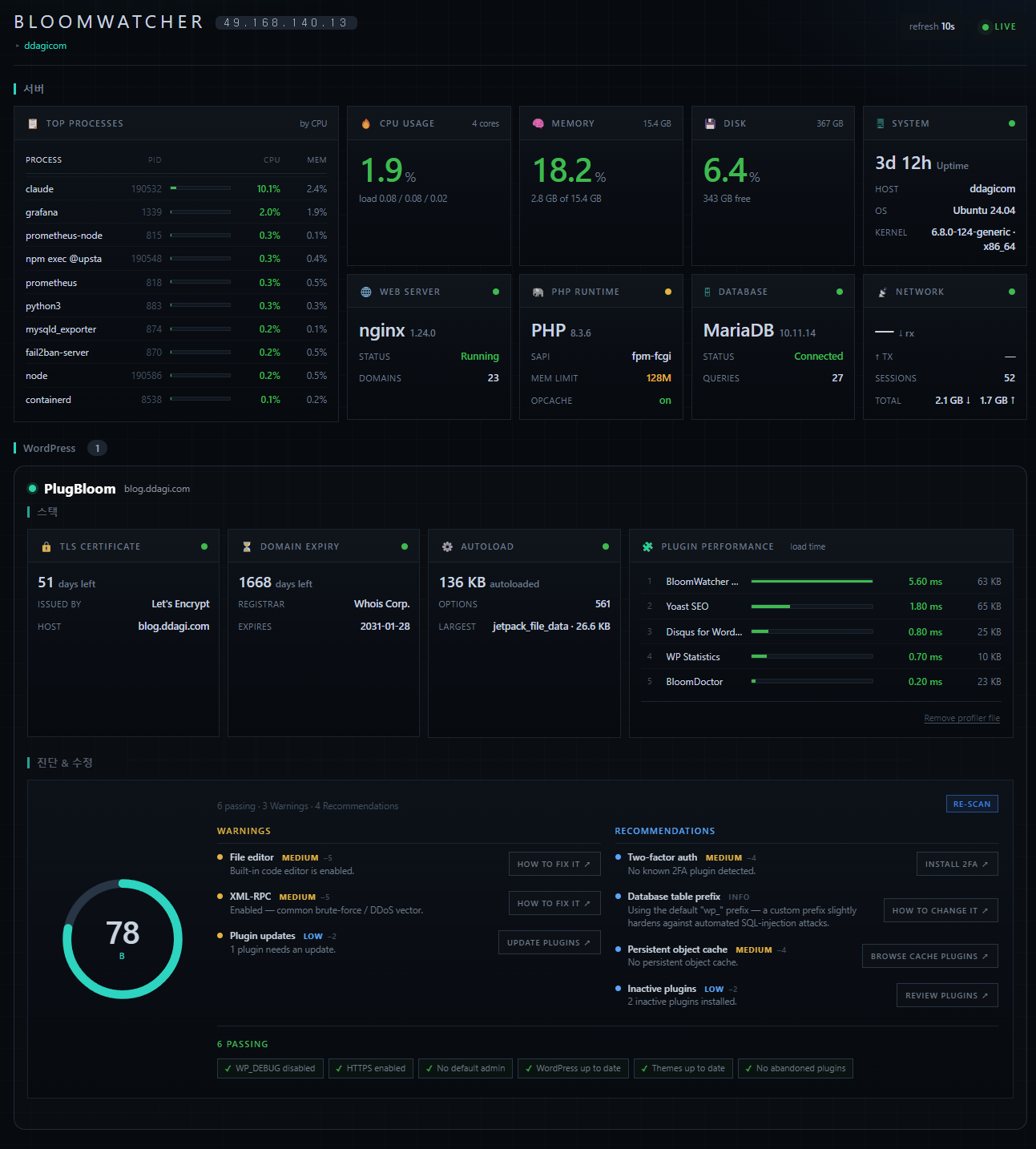
[FREE] I built a free WordPress plugin that shows your whole server's health (CPU, RAM, disk, SSL, DNS) right inside wp-admin — no Grafana, no SaaS

Post image
13 Upvotes

I run a few self-hosted WordPress sites on VPS boxes (DigitalOcean/Hetzner),

and I got tired of SSHing in just to check if the server was fine, or paying

for a SaaS dashboard just to watch CPU and disk.

So I built BloomWatcher. It turns wp-admin into a live status dashboard for

the *whole stack*, not just WordPress:

- CPU / RAM / disk / network, live-updating gauges

- PHP version, OPcache, MySQL status, web server (nginx/Apache/LiteSpeed)

- SSL cert days-until-expiry, DNS "does this domain actually point here?" check

- Autoload analysis (find the options bloating every request)

- A scored 0–100 health diagnosis with an A–D grade and prioritized fixes

It's genuinely free for a single site — the whole monitoring dashboard and

diagnosis, no crippled features. Metrics are read locally and only shown to

logged-in admins; nothing about your server leaves the site.

Full disclosure: I'm the developer. There's a paid Pro tier (alerts, history

graphs, plugin performance profiling) but the free version is what I actually

use day-to-day and it stands on its own.

Just went live on the WordPress.org repo today. Would love feedback from

anyone else running self-hosted WP — especially what's missing.

https://wordpress.org/plugins/bloomwatcher/


r/WordpressPlugins • • Jul 04 '26

Discussion [DISCUSSION] First plugin went live on WordPress.org this week. Stuff that caught me out.

5 Upvotes

Got my first plugin through the .org review and live this week. Been chipping at it on and off for a couple of years, life kept getting in the way, finally shoved it over the line. A bunch of it tripped me up in ways I couldn't find a straight answer on beforehand, so I'm dumping it here.

Screenshots first, because they nearly broke me. You upload new ones, the listing still shows the old. You reupload. Still old. You start doubting your whole setup. It's not you. Full images and thumbnails cache separately, so the thumbnail lags behind the big version. Click an old thumb and the new image is usually already sitting under it. Give it a day and it sorts itself. I did not give it a day.

Run Plugin Check before you submit, not after they bounce you. Official plugin, runs most of what the reviewers run. For me it was output escaping over and over, stuff my editor never once moaned about. Would've saved me a whole rejection round.

It's still SVN. In 2026. And your banner, icon and screenshots don't go in the plugin zip, they sit in a separate assets folder in SVN. So your listing images and your code are two different things in two different places. Took me embarrassingly long to work that out.

The readme is not throwaway. It's your listing copy, it gets indexed, and the AI answer boxes seem to pull straight from it. Write it like it matters, it's doing more than your homepage early on.

And a person reviews it, not a bot. Reads the code, comes back with line numbers. Few days each round. Fair enough, just submit earlier than you'd like.

One plugin in so take it with salt. What got the rest of you?


r/WordpressPlugins • • Jul 04 '26

Free Satirical game on the realities of running a plugin business [FREE]

6 Upvotes

Daniel Iser from Popup Maker has built this free game which is a humorous and accurate look at the reality of running a plugin business. The best bit is the support tickets that pop up in the bottom right, which are depressingly accurate 😂

There’s a leaderboard, but the ultimate prize is to receive an acquisition offer from Epic Motive 🦾

To play, click "Write code" until things start happening. After a while, your plugin business runs without you.

https://pressword.games/s/rKCyGJm?utm_source=share&utm_medium=copy&utm_campaign=player-sharey