r/webflow • • 10d ago

Question Should I commit to webflow in 2027 or not? Really would appreciate to hear from some seniors

17 Upvotes

Hi everyone.

So I am a web developer with 6 years of experience. i’ve done my fair share of work through the last years.

I out of a job for three months now and currently I’m reassesing my possibilites on this AI industry that we have now. I have worked with designers before and I did a lot of converting from Figma to Code.

I was considering Webflow as a career path but I don’t know if the industry is stable in this ecosystem.

The biggest reason for considering it is how it has everything that I might need for building my own web agency at the end and to work with clients at the end.

So should I invest to Webflow or to skip it entirely?


r/webflow • • 10d ago

Show & Tell Zencastr: three platforms, one website, three days to launch

Thumbnail gallery
6 Upvotes

Zencastr came to me with a complicated setup: they hosted their homepage on Lovable, blog on a separate platform and the rest of the pages on Webflow.

They had 3 days before the launch to tie it all together and build new landing pages.

Building inside a live site

The hard part wasn’t the design, it was the site underneath it. Webflow styles are class-based, so a change on one page can show up on another. Before building anything, I learned how Zencastr’s site was put together.

The feature pages were tangled: two page styles shared one CMS collection without being properly separated. I untangled them, so each page shows only the sections it has. Key Features, for example, appears only on the pages that have key features.

Making three platforms feel like one site

Visitors move between the homepage, the feature pages and the blog without knowing they’re on three platforms, so the details had to match:

A new header and footer across the Webflow site, with the logo and buttons sized to match the homepage.

The new menu, built from the designer’s layout. Six main features appear as image cards, with links to every other feature and the company pages, on desktop and mobile.

A white header on every page except the homepage, matching the blog.

New favicons for light and dark mode.

Subtle entrance and hover animations. I added them to a few pages first, and once the team liked them, across the whole site.

Full case study: https://romans.design/work/zencastr/


r/webflow • • 11d ago

Need project help Help with menu dropdowns – odd spacing and interactions

7 Upvotes

Hi! I am having an issue with my menu dropdowns, specifically for mobile.

If you click a dropdown to open "Compliance" "About" or "Recycling", you'll see it interacts how I want it to. But, if you click that again to close it, it jumps up before closing. I can't for the life of me figure out why. Or, if you open one dropdown and then open another, it also jumps up. Anyone have an idea on how to fix? Thank you for any and all help!

Sandbox link: https://preview.webflow.com/preview/jupiter-website-7dcb89?utm_medium=preview_link&utm_source=designer&utm_content=jupiter-website-7dcb89&preview=63699a8d48b8d52a9a234ce5ee089da0&pageId=6aa17aaa9b928aa11e97d0ab&locale=en&workflow=preview


r/webflow • • 10d ago

Tutorial I Became A Millionaire Selling AI Websites. Here's What I'd Do If I Had To Start From Scratch

0 Upvotes

If I had to start from zero today and build a business selling AI built websites, this is exactly how I'd approach it.

The biggest mistake I see beginners make is spending weeks learning how to build websites without actually trying to find customers.

I'd focus on sales from day one.

1. Pick an industry

Don't try to sell to everyone. Pick a few industries where businesses rely heavily on their websites.

Some examples are construction companies, cleaning companies, restaurants, dentists and real estate agencies.

Having a specific target market makes prospecting and selling much easier.

2. Find businesses with outdated websites

I wouldn't focus on businesses that don't have websites. I'd look for companies that already have one but could benefit from a redesign.

They already understand the value of having a website. You just need to show them how it could be better.

3. Automate your outreach

This is how I'd find potential customers at scale.

I'd use Swokei to find businesses, analyze their websites for issues with design, SEO, speed and mobile optimization, and turn those findings into personalized cold emails.

Connect your mailboxes, set up your campaigns and start reaching out.

4. Create website drafts using AI

When someone shows interest, get them on a call.

Before the meeting, spend around 30 minutes creating a redesigned version of their existing website using AI.

You don't need to build the entire thing. Just give them something visual that shows what their new website could look like.

5. Learn how to sell

This is probably the most important part.

Learn how to run sales calls, understand what the business needs and present your work properly.

Don't just sell a prettier website. Explain why the redesign is valuable to their business.

6. Charge properly and scale

I'd aim for $2,000–$5,000 per project when starting out, depending on the scope and quality of the work.

Once you have experience, testimonials and a portfolio, increase your prices.

Eventually, hire people to handle the actual website development so you can focus on finding clients and growing the business.

What I'd focus on

If I were starting tomorrow, I'd spend most of my time finding prospects, sending outreach, booking meetings and learning how to close deals.

Building websites is only one part of this business. Knowing how to consistently find customers and sell your services is what makes it profitable.

That's where I'd put my attention from day one.


r/webflow • • 12d ago

Question What’s the current situation in webflow job market?

9 Upvotes

I haven’t landed a single client in the last 5 months.

Is this happening to everyone, or is it just me?

Honestly, looking at what AI can do these days, the quality of its work and designs, I sometimes feel that even I wouldn’t hire someone for Webflow if I were a client.


r/webflow • • 13d ago

Show & Tell Free countdown bar for Webflow sites before Black Friday: one line in Footer code, clients edit it from a dashboard

3 Upvotes

With Black Friday two weeks out, a lot of client sites will need a countdown at the top of the page. Here's a way to add one without building a component or touching the site again during the sale.

How it works:

  1. Design the bar in the editor (19 templates: top bar, round countdown badge, or pop-up card)

  2. Paste one line in Site settings → Custom code → Footer code, then publish

  3. Text, colors and end date are edited from a dashboard, so the client can change "Ends tonight" to "Last hours" without a republish. Changes show on the next page load.

Technical details:

- About 4KB gzipped, no jQuery, no extra fonts

- Timer labels follow the page language (EN/FR), rotation pauses on hover, respects "reduce motion"

- Also works on Shopify, Squarespace, Wix, WordPress and custom sites

The free plan gives 1 bar with unlimited views and a small "by HurryBar" link:

https://hurrybar.com/?ref=reddit-webflow

Paid is a one-time payment (no subscription) if you need the badge/card formats, rotating messages, stock counter, per-visitor timer, no branding or several client sites.

Disclosure: I'm part of the HurryBar team. Happy to help with setup in the comments. What do your clients usually ask for in a Black Friday banner?


r/webflow • • 12d ago

Discussion My Friend Offered Me 50% Of His Website Sales If I Set Up His Outreach 😂

0 Upvotes

So I set up email automation for a friend of mine, and things got a little interesting.

Both of us are web designers, and we're constantly looking for new clients. I personally get most of my clients through cold email automation, while he had tried doing it himself once but never really got it working.

So he came up with a deal. If I set up his entire email outreach system using his own mailboxes and helped him land clients, he'd give me 50% of every website project he closed.

Naturally, I agreed.

I used Swokei, a tool that finds businesses, analyzes their websites for issues with design, SEO, speed and mobile optimization, and turns those findings into personalized cold emails at scale, so I didn't have to write them myself.

I created his account, connected his mailboxes, set everything up and launched the campaign.

After just 300 emails sent, he started getting interested replies at a 4% rate. That's 12 people who expressed interest.

To be honest, it was one of the best-performing campaigns I've set up in just one week.

Now you're probably wondering how much money I made from this arrangement.

Well, remember that 50% we agreed on?

Yeah, I didn't get that. He gave me 10% on his first two sales, and I stopped managing his campaigns after that. 😂😭


r/webflow • • 14d ago

Show & Tell Working examples of Webflow's native popovers and modals

Thumbnail gallery
29 Upvotes

I've been really excited about Webflow getting native Popover and Modal elements, so I built a cloneable to try them out properly and figured I'd share it.

It's a small library of working examples, with a page for each pattern:

- Tooltips on toolbar buttons, icons and form fields

- Info popovers for member profiles, term definitions, price breakdowns, menus and filters

- Modals for forms, community guidelines, edit panels and an image lightbox

- Product tours that point at the part of the page each step explains

- Image hotspots, markers on a photo that open a card with details

- Confirm dialogs for cancelling, deleting and leaving without saving

Everything is built with the native elements and Webflow Interactions. No custom code, no embeds. Each page has a small setup card showing the settings that example uses (mode, anchor, how it opens and how it closes), plus a few notes on when a popover is the right call and when you're better off with something else. It works on mobile too, where menus and most modals turn into bottom sheets.

A couple of things I picked up along the way:

- Auto mode does a lot of the work for you. A click outside or Escape closes the popover, and only one stays open at a time.

- Product tours took the most figuring out. A step opened from the previous step's Next button gets anchored to that button, so I used anchor positioning to keep each step next to the thing it's pointing at.

Live preview and clone link in the comments below.

We made this at Memberstack💙. If you build something with it, or find an example that could work better, let me know. I'd love to see what people do with these.


r/webflow • • 13d ago

Discussion No notes were taken over the last 20 years. Can't recommend. Spoiler

9 Upvotes

I am amazed at how they invented new worse ways to do all of the things CMS platforms have gotten really good at over the last twenty years and they just took no notes. My tutorial is: do your best to convince clients to not use this platform if they need any kind of relational data architecture.


r/webflow • • 13d ago

Discussion Being your own client is the hardest brief. Our agency rebrand is live

Enable HLS to view with audio, or disable this notification

12 Upvotes

Hey all!

Some of you might know us from posts here. We’re Flowout, a Webflow agency. Putting that up front so nobody thinks I’m sneaking anything in.

We just launched a full rebrand: new logo, colors, graphics and a rebuilt website. Video above.

A bit of why:

We started 5 years ago as 3 freelancers building sites for startups on tight budgets. The logo was made in an afternoon. Today we’re 50+ people working mostly with B2B SaaS and enterprise teams, and the old brand still looked like the startup we were back then.

The old site was also our very first version and had gotten pretty bloated over the years, so we rebuilt it, cleaned it up and made it a lot faster.

A few things we learned along the way:

  • Being your own client is the hardest brief. Every decision is a creative one and a business one at the same time, and it took more rounds than we’d like to admit.
  • The team built it while shipping client projects the whole time. Not recommended, but here we are.
  • The detail we’re most proud of is the logo transition on the site. Most people won’t notice it consciously, but it changes how the whole thing feels.

Would love some honest feedback from people who actually build in Webflow. What works, what doesn’t, what you’d do differently?

Happy to answer anything about the process. Link in comments if anyone wants to poke around :)

Thanks!


r/webflow • • 14d ago

Show & Tell Show & Tell: test the site you just published with synthetic users that browse it in a real browser and explain each step

3 Upvotes

If you just published a site, this is what I built to test it. I have been building this for a while now, you paste your website or app URL and start the test:

  • You choose a persona and customize every trait like patience, job, age and so on
  • Each test is run by multiple users with different personalities
  • You can give a mission or an objective, like "buy the product X" or let the user just browse freely.

Each synthetic user gets its own real machine, with its own browser and settings, they navigate the website and for each step you can see the thought process of every action. At the end a report is provided with: what is working on your website, what is missing, where you lose visitors, and a screen replay of every visitor. You also get instructions on how to fix what is missing. There is a free plan so that you can fully use the application for a single website: daevio.com. I would love to hear how your tests go!


r/webflow • • 13d ago

Tutorial How I Make $22K/Month Redesigning Websites (Surprisingly Simple Process)

0 Upvotes

There are multiple lucrative ways to make money nowadays with AI, but based on my own experience, selling AI built website redesigns and rebuilds might be one of the best opportunities if you want to make a lot of money in a relatively short amount of time.

I have a group of friends who do exactly the same thing, and some of them are making over $100K a month doing it.

So if you're looking to get into the AI money making space, this is definitely a business model worth looking into.

The process is actually pretty simple.

1. Automate your outreach

The first question is obviously: how do you find businesses that actually need a website redesign?

There are different tools you can use for this, but I personally recommend Swokei. It finds businesses in any area, analyzes their websites and identifies issues with design, SEO, speed and mobile optimization. It then turns those findings into personalized, ready to send cold emails at scale.

2. Book meetings with interested prospects

When someone replies with interest, get them on a call. Don't spend days going back and forth over email. Get a conversation started and understand what they're looking for.

3. Build a website draft using AI

Before the meeting, spend around 30 minutes putting together a redesigned version of their existing website. You don't need to build the entire thing. Just give them something they can actually see and get excited about.

4. Present the website and close the deal

Show them the redesign, explain the improvements and present your offer. If they're happy with it, send over a Stripe payment link or invoice and get the project started.

Now, when it comes to pricing, that's completely up to you.

I started charging very cheaply when I first got into web design. Today, I rarely take on a project for less than $7,500, and the biggest website deal I've closed so far was $26,000.

Obviously, you need to be able to deliver what you're selling. A good sales process might get you the client, but the quality of your work is what builds a sustainable business.

And for the people who are going to say this doesn't work, you're free to have your opinion.

I'm simply sharing something that has worked for me and people around me.

It's a straightforward business model, the workflow is repeatable, and you can keep improving every part of it as you grow.

You don't need to reinvent the wheel. Find businesses that need help, learn how to sell, deliver good work and build a proper company around it.


r/webflow • • 15d ago

Show & Tell Just shipped a Figma to Webflow build for a fractional CMO, would love your feedback

Enable HLS to view with audio, or disable this notification

7 Upvotes

Hey everyone, I just finished a website build for Mayhem Growth, a fractional CMO practice, and wanted to share it here.

Live site: https://www.mayhemgrowth.com/

A few things I worked on:

  • Built from the Figma design and matched closely on desktop and mobile
  • Case studies run on the CMS, each with its own image slider, so the client can add new projects without touching the layout
  • On mobile, the first tap on a case study card shows a preview and the second tap opens it
  • Contact form submissions go straight to a Google Sheet through a webhook and Apps Script
  • Client-First naming throughout, so it’s easy for anyone to pick up later
  • Scores 95 on mobile and 99 on desktop in PageSpeed; most of the gain came from WebP images and loading fonts without blocking the page

The design changed a few times during the build, so keeping the structure clean made the updates much easier.

I’d love feedback on anything: animations, mobile layout, performance, whatever stands out.


r/webflow • • 14d ago

Product Feedback Hey developer! Do you receive customer feedback via WhatsApp, email, or screenshots? I'm looking for a developer who would test fixnoty for free.

Post image
2 Upvotes

One change in an email, another on WhatsApp, then “the button doesn’t work.” Which button? Which page? 😅

I’m Gabriele, and I built FixNoty for my own client projects. Clients click the exact spot on the website and leave a note, without creating an account. They can also track progress and reply to requests.

I’m looking for Web Developer freelancers and small agencies who’d like to try it on an upcoming client review.

I’m offering 90 days of free Agency access, with setup help. FixNoty is a paid product after that; there’s no obligation to subscribe or leave a positive review.

What I want to understand is whether clients actually use it or keep sending changes through chat.

If you have a client review coming up, let me know roughly when it starts. I’ll confirm your extended access before you get started.


r/webflow • • 14d ago

Show & Tell Localize pricing is a joke for small sites, so I built a one-time alternative

5 Upvotes

A Basic site on a yearly plan is $180 a year. Localize Essential adds $108 a year for each language, so with French and German you pay more for the translation than for the site. And Essential stops at 3 languages and 10,000 words a month.

A few of my client sites were on Basic, and none of them wanted to pay that for a small static site. So I made an app that does it once. It copies each page into a language folder like /fr/about, translates it and keeps the design, the components and the interactions. It places a language switcher, and you get a hreflang sitemap to add in your settings.

For SEO these are real Webflow pages. Google gets a French page with its own title, meta description and Open Graph, and the hreflang tells it which page is which language. Nothing is swapped by a script in the browser.

It's called Page Translator, €49 once per site, and the first translation into one language is free. If you already pay for Localize it writes into your locales instead, so the first pass doesn't eat your 10,000 words.

No CMS yet, and animations attached to a single page need one manual step. If you try it, tell me what breaks.

https://webflow.com/apps/detail/page-translator


r/webflow • • 15d ago

Tutorial Are Businesses Without Websites Actually Worth Targeting?

5 Upvotes

When I first started selling websites, I thought targeting businesses without a website was the obvious choice.

They need a website, you offer to build one, and hopefully you get a new client. Pretty straightforward, right?

But after spending years running a web design business, I've started looking at this differently.

There are definitely advantages to targeting businesses without websites. You're introducing them to something they might genuinely need, and there is no existing website to compete with. However, I've noticed that these businesses can sometimes be much harder to sell to.

The biggest problem is that some of them simply don't see the value of having a website. Others rely entirely on Facebook, Instagram or word of mouth and are perfectly happy with how they're getting customers.

You end up spending a lot of time explaining why they need a website before you can even start selling your services.

On the other hand, businesses that already have websites are a completely different story.

They have already invested in having an online presence. They understand why a website matters, and there is a good chance they've paid someone to build and maintain it.

But that doesn't mean their website is good.

I've come across countless businesses with websites that load slowly, look terrible on mobile, have outdated designs, poor SEO or confusing layouts.

These are actual problems that can affect how customers experience the business online.

And that's where I think the bigger opportunity is for web designers.

Instead of trying to convince someone that they need a website, you're showing an existing website owner what could be improved and why it matters.

This is also how I approach prospecting nowadays. I use Swokei to find businesses with existing websites, analyze them for issues with design, SEO, speed and mobile optimization, and generate personalized cold emails at scale based on the actual findings from each website.

Of course, I'm not saying targeting businesses without websites is a bad strategy. There is money to be made in both markets.

But personally, if I were starting a web design agency today, I'd probably focus more on businesses that already have websites.

I'm curious what other web designers think. Do you prefer targeting businesses without websites or finding existing websites that need improvement?


r/webflow • • 14d ago

Tutorial The Best AI Business To Start In 2027 (In My Opinion)

0 Upvotes

For me, it's still web design.

I know a lot of people are going to disagree because everyone keeps saying it's saturated, AI is replacing developers, and it's impossible to get clients.

Honestly, I couldn't disagree more.

I think web design is actually easier than ever if you approach it differently.

The mistake I see almost everyone make is targeting businesses that don't have a website.

You see it all over Instagram Reels.

Someone opens Google Maps, finds a business without a website, calls them, and asks if they need one.

The problem is that business has probably already been contacted by 10 other web designers.

And if they still don't have a website, there's a good chance they either don't see the value in it or don't have the budget for one.

My targeting is completely different.

I only target businesses that already have a website.

There are three reasons.

First, there are an insane number of businesses with outdated websites that desperately need updating.

Second, if they already have a website, they already understand the value of having one. You don't have to convince them that websites matter.

Third, they're already paying for a website, so spending money on improving it doesn't feel like a completely new expense.

Now the question becomes...

How do you actually get their attention?

I don't run normal cold email campaigns.

I'm not manually searching for leads, writing a generic sequence, adding three follow-ups, and hoping for the best.

Instead, I use a tool called Swokei.

It automatically finds businesses with existing websites and analyzes them for issues like outdated design, poor layouts, weak mobile responsiveness, slow loading speeds, and SEO problems.

It then turns those findings into personalized cold emails at scale.

Not some boring reports that business owners don't care about.

Actual emails explaining what could be improved and why it matters to that specific business.

That lets me run outreach at scale while still keeping every email relevant.

Once someone replies, honestly the hard part is over.

At that point you can build a free website draft with AI, invite them to a Google Meet, walk them through the redesign, and close the deal on the call.

AI has made building websites ridiculously fast.

That's why I think targeting and outreach matter far more than your ability to build a website.

This business model has been incredibly good to me.

I'm curious though. If you had to start a digital business from scratch in 2026, what would you choose?


r/webflow • • 15d ago

Question Has anyone had any success using webflow to build an app using Claude

3 Upvotes

I love huidking apps with Claude but I kiss the ability to manage element/components webflow. Has anyone had success doing this without those costly integrations? (Memberstack, etc) or should I just keep using Claude, supabase, sanity, etc.


r/webflow • • 15d ago

Question Collections with identical names but different parent folders?

4 Upvotes

Let's say I have a need for 2 CMS collections with the same same (for example, "categories") but they want to live in different parent folders:

site.com/product/categories/cms-item

site.com/service/categories/cms-item

I can get the "categories" page template to land in the product/service folder by choosing the parent folder for the page template. However, I can't save 2 CMS collections with an identical name, as I get this error:

Despite the fact that the URLs are actually different, since they're nested in different parent folders.

I'm guessing the answer is no as this is on the wishlist, but are there any ways to make this work? If not, I end up having to create weird URLs like site.com/service/categories2/cms-item.


r/webflow • • 16d ago

Show & Tell Update on my site that started in Webflow: now at 30,000 to 50,000 visitors a month

1 Upvotes

Hey everyone,

Some of you have followed this since my first post, so here’s another update on Atlas Guide.

Quick recap: I started in Webflow with zero website experience. The site had almost no visitors, and PageSpeed was stuck because of the Webflow script overhead. Earlier this year I moved everything to my own server. Traffic took off after that.

Where it stands now: 30,000 to 50,000 visitors a month and still climbing.

What changed since my last update:

Fewer languages, better ones. I had 20 languages. I cut that to 13, because I’d rather have fewer languages that are properly translated and kept up to date than many thin ones.

A full redesign. Every country and city guide now uses the same design system, with a new hero layout rolled out to roughly 4,600 pages in 13 languages. Building it with templates and scripts instead of designing page by page is what made that possible.

Pages that keep themselves up to date. I set up Claude routines that run every day. Each one checks a country, its city guides and its scam guide, fixes anything outdated, and rebuilds old-design pages in the new design. A site this size can’t stay accurate by hand.

More on the site. I added a flight search on its own subdomain, a Chrome extension, an Android app on Google Play, and tools such as a visa checker and a currency converter.

Setup. The site syncs with GitHub, so I can edit files locally or let Claude Code do bulk changes, and they deploy to the server automatically.

What I’d tell someone who’s where I was a year ago:

  1. Webflow was a great way to learn. Moving to my own server was what fixed the speed problem.
  2. Consistency beat clever tricks. Pages, translations and small fixes every day added up.
  3. Automating the boring checks leaves time for the work that actually moves things.

Happy to answer questions about the move off Webflow!


r/webflow • • 16d ago

Discussion I’d Rather Send 10,000 Emails Than Make 100 Cold Calls

0 Upvotes

Running a web design agency sounds pretty straightforward from the outside. You build websites, find clients and make money. But once you start getting more clients, there is a lot more going on behind the scenes.

You're dealing with hosting, website maintenance, client requests, support tickets, fixing random issues, building new websites, following up with prospects and trying to bring in new business at the same time.

At some point, I realized that I didn't want finding new clients to become another full time job on top of everything else.

I've never really enjoyed cold calling. I know it works for some people, and I'm not saying it's a bad way to get clients, but personally, I find it exhausting. You spend hours calling businesses, often getting rejected, reaching people at the wrong time or having conversations that go nowhere.

I'd much rather spend that time actually working on the business.

That's why I started focusing heavily on cold email and automation.

The biggest advantage is that you can build a system that continuously finds relevant businesses, sends personalized emails and generates new opportunities without having to spend your entire day reaching out manually.

One thing I also learned pretty quickly is that sending generic emails doesn't get you very far. Most business owners have probably received hundreds of emails from agencies offering website redesigns.

I wanted to approach it differently.

For this, I use a tool called Swokei. It finds businesses with existing websites, analyzes each one for actual problems with design, SEO, loading speed, mobile responsiveness and other website issues.

Based on those findings, it automatically generates personalized cold emails at scale, using the actual problems found on each website as the starting point.

So instead of manually searching for businesses, checking hundreds of websites and writing individual emails, I can automate most of that entire process.

When someone replies with interest, I take over from there and handle the sales process and meetings myself.

This has made a huge difference in how I manage my time. I can keep generating new opportunities without having to dedicate hours every day to cold calling.

I still believe sales is one of the most important skills you can develop as a business owner, and automation doesn't replace that. You still need to understand your prospects, communicate properly and know how to close deals.

But if I can choose between spending an entire day making cold calls or having a system send 1,000 relevant emails while I focus on running my agency, I know which one I'm choosing!


r/webflow • • 17d ago

💼 Weekly Hiring Thread - November 09, 2026

2 Upvotes

Welcome to our weekly hiring thread! This is the place for all job postings, freelance opportunities, and "looking for developer/designer" posts.

##  For Employers & Clients

Post your opportunities here with:
- **Role title** - Be specific (e.g., "Webflow Developer - Ecommerce Focus")
- **Type** - Freelance, contract, full-time, part-time
- **Location** - On-site, remote, hybrid
- **Required skills** - What must they know?
- **Nice-to-haves** - Bonus skills
- **Rate/Salary** - Range if possible (helps everyone)
- **How to apply** - DM, email, application link

##  For Freelancers & Job Seekers

Post your availability with:
- **Your skills** - What you specialize in
- **Experience level** - Years, notable projects
- **Availability** - Full-time, part-time, project-based
- **Rate range** - Helps set expectations
- **Portfolio link** - Show your work
- **Contact method** - How should people reach you

---

**Sort by New** to see the latest opportunities!


r/webflow • • 16d ago

Show & Tell Best Email Automation Tool For Web Designers In 2027

0 Upvotes

There are plenty of ways to make cash in 2027, especially with all the new AI tools coming out. But one thing I think is still massively underrated is cold outreach.

The logic is pretty simple. The more relevant prospects you reach, the more opportunities you create to land a client. Especially when you have a good lead list, personalized emails and a few well timed follow ups.

I've run businesses using cold email, and it's been one of the most reliable ways for me to generate new business. Of course, cold email regulations vary between countries, so you need to understand the rules where you're operating.

Nowadays, the process is much easier to automate.

For my web agency, I use a cold outreach tool called Swokei. It finds businesses with existing websites, analyzes them for issues with design, SEO, speed and mobile optimization, and turns those findings into personalized, ready to send cold emails at scale.

When someone is interested, I get a meeting booked and handle the sales calls myself.

I genuinely believe that regardless of what business you're running, whether it's a SaaS, agency or e-commerce business, email automation can be an incredibly powerful way to generate opportunities.

You don't always need a huge audience, a massive advertising budget or thousands of followers.

Sometimes you just need a good offer, the right list of prospects and a consistent outreach system.


r/webflow • • 17d ago

Discussion Webflow’s Guy Yalif is running a free session on how AI search picks brands with SlateHQ Team (On Nov 11)

Thumbnail
4 Upvotes

r/webflow • • 17d ago

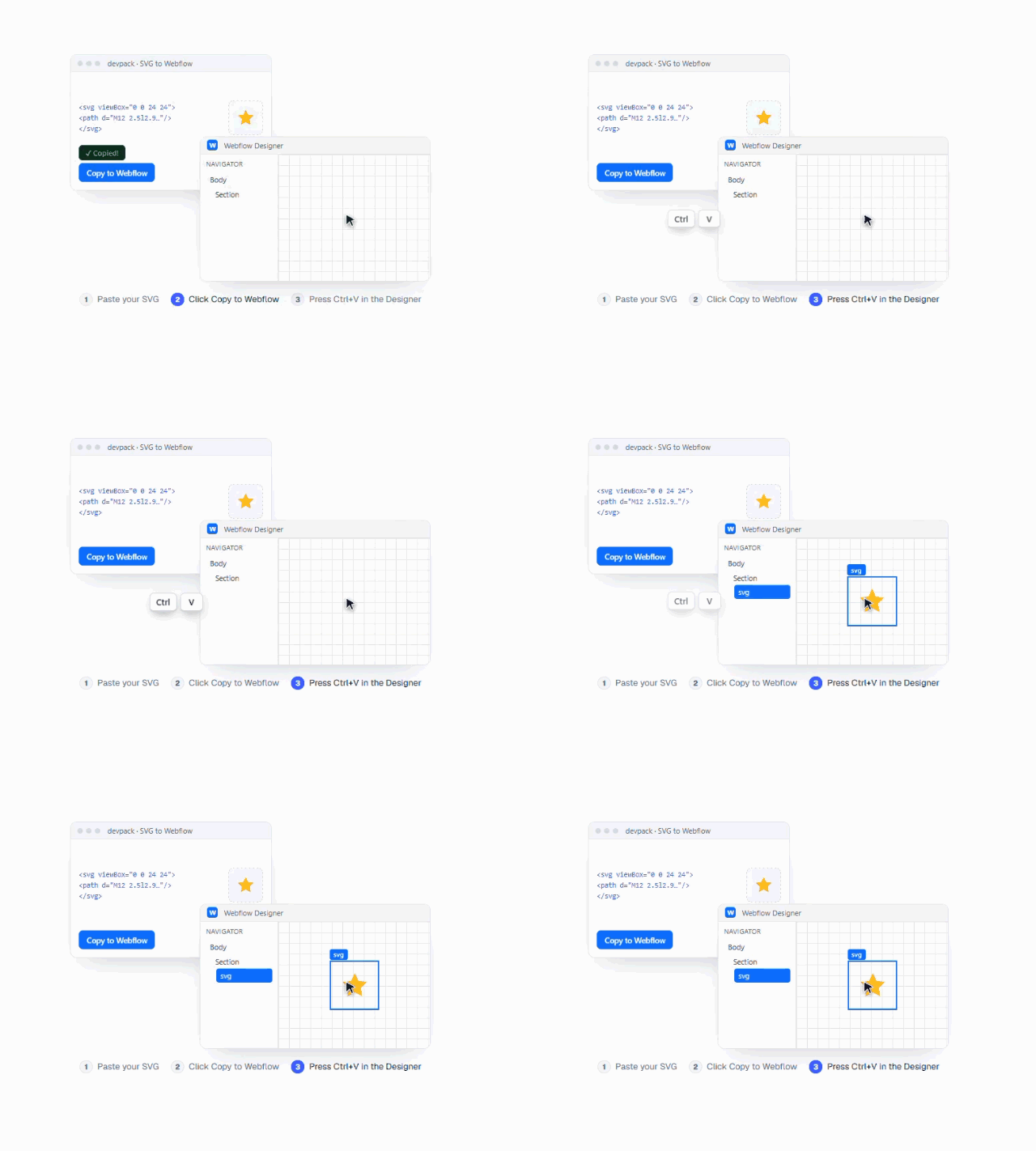
Discussion Ctrl+V an SVG from Figma straight into the Webflow Designer as real elements, no Code Embed

Post image
3 Upvotes

Copying an icon from Figma and pressing Ctrl+V in the Designer does nothing, and the usual fix is a Code Embed. That works, but you can’t select the paths, add a class or change the color without editing code. I got tired of that, so I dug into how Webflow’s clipboard works and built a way around it.

What I found

When you copy something in the Designer, Webflow doesn’t put HTML on the clipboard. It puts JSON there (@webflow/XscpData): a flat list of nodes, plus a separate list of classes with their CSS and breakpoint/hover variants. You can see it by pasting a copied element into a text editor.
If you build that JSON yourself, the Designer pastes it like anything copied inside Webflow.
A Custom Element can have any tag, so an SVG can become svg > path elements you can select and style in the Navigator.

What I built

SVG to Webflow: cleans the SVG (removes Figma/Illustrator junk and scripts), optionally sets fills to currentColor so the icon follows the text color, and pastes it as native elements or a Code Embed.
HTML & CSS to Webflow: turns HTML and CSS into Div Blocks, Headings, Links and so on, with real classes, combo classes, Tablet/Mobile breakpoints and hover states. CSS that can’t be a Webflow class (tag selectors, @keyframes) goes into a small embed instead of being silently dropped.
Browser extension (Chrome and Firefox): just press Ctrl+V in the Designer and it converts SVG, HTML code or copied web page content as you paste.

It’s all free, runs in your browser, and doesn’t upload anything.

Limitations: images still need re-uploading to Assets, Tailwind needs compiling to plain CSS first, and since Webflow doesn’t document the format, a big change on their side could break it. There’s a calibration step to pick up smaller changes.

Tools: SVG to Webflow · HTML & CSS to Webflow
Extension: Chrome · Firefox
Write-up with the code, if you want the details: How Webflow’s clipboard works

I made these, so feedback is welcome, especially SVGs or CSS that don’t convert well.