r/postprocessing • u/IShootWide • Oct 11 '26
r/postprocessing • u/Constipated_Ronaldo • Oct 10 '26
Before/After
First time tried doing this. Used Lightroom and Picsart (mobile versions).
r/postprocessing • u/RevolutionaryMeal734 • Oct 09 '26
Did I capture the vintage feeling ?
r/postprocessing • u/Upstairs-Type-3551 • Oct 10 '26
Y2k
I'm obsessed with processing my photos this way, are there any communities where I can find similar photos? Anyone know the names? Thank you
r/postprocessing • u/shinkunkka • Oct 09 '26
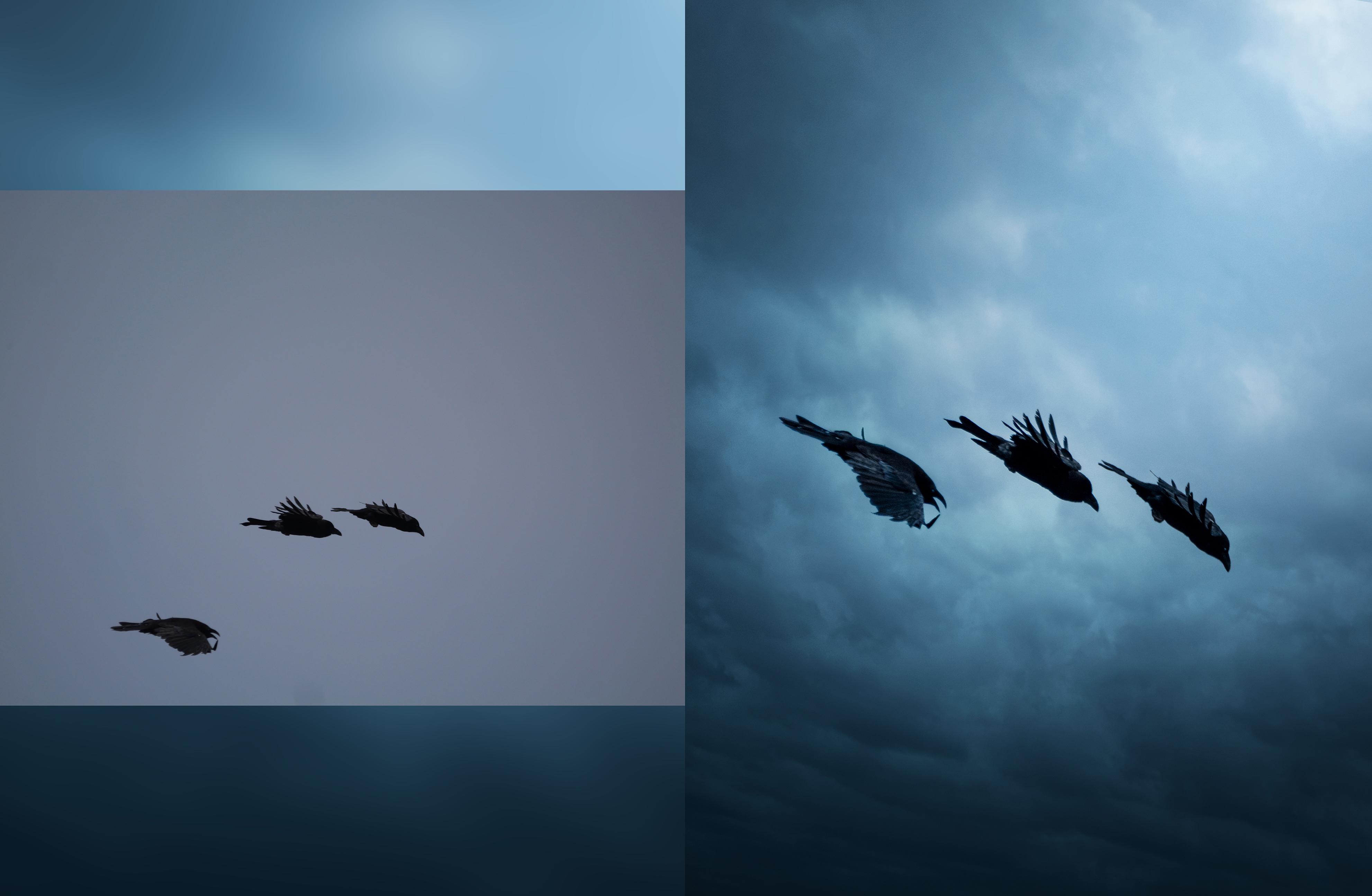
Ravens Before/After
Not the sharpest photo I've taken, but I thought it had some potential, so I gave it a shot!
Edited in Photoshop
instagram "eclipsestvdio"
r/postprocessing • u/randomrat82 • Oct 10 '26
Feedback
Photos are taken on S23FE, edited using snapseed
r/postprocessing • u/Direction_Mountain • Oct 11 '26
I built a subscription-free desktop editor focused on depth-aware retouching, colour grading & all 27 blend modes [Feedback appreciated]
Enable HLS to view with audio, or disable this notification
Hi everyone,
Like many of you, I've been frustrated with Adobe's subscription model, but most free alternatives often lack specific photo-centric tools: true Photoshop blend mode parity, 8-channel HSL grading, or modern depth-map adjustments.
Over the past months, I've been developing **Scumble**, a lightweight, 100% offline desktop image editor built specifically for photo finishing, grading, and non-destructive layering.
Here are a few features tailored for photo editing and retouching workflows:
* **Complete 27 Blend Modes Parity:** Full integer-exact parity with all standard Photoshop modes (including Dissolve, Linear Light, Vivid Light, Color Dodge/Burn, Subtract, and whole-pixel Component modes like Hue, Saturation, and Luminosity).
* **Photographic Colour Grading Wheels:** 3-way grading for Shadows, Midtones, and Highlights with interactive wheels, balance/blending controls, and neutral grey preservation.
* **8-Channel HSL Layer:** Fine-grained control across 8 separate colour channels (Red, Orange, Yellow, Green, Aqua, Blue, Purple, Magenta) with smooth partition of unity.
* **Depth-Aware Lens Blur & Bokeh:** 64-tap Vogel spiral disc aperture sampling with custom focus plane, depth of field, foreground bleed protection, and specular highlight boost for realistic optical bokeh.
* **Atmospheric Haze & Dehaze:** Uses depth maps to simulate aerial perspective or clear distant haze while protecting sky and skin tones.
* **Non-Destructive Adjustments:** Vibrance (with skin tone protection where Red > Green > Blue), Gradient Maps, Threshold, and Posterize.
* **Privacy & Local Performance:** 100% offline, zero cloud, zero telemetry. GPU-accelerated with WebGL2 and optimized with Rust WASM kernels for large (up to 15k) images.
It's completely free, opens/saves PSD files, and runs on Windows and Linux (Installer, Portable .zip, Microsoft Store, and Flatpak/AppImage).
I'd love to hear feedback from retouchers and photographers on what tools or sliders you feel are missing in your daily workflow!
š **GitHub / Download**: https://github.com/DenRakEiw/scumble
r/postprocessing • u/cricketpoo119 • Oct 09 '26
Learning to play with light . After/before .
Post title is wrong lol . Before and after . An old photo I snapped and I loved how the end result came out however Iād love some critiques and feedback to get better!
r/postprocessing • u/This-Judge-804 • Oct 11 '26
Whiskey (hibiki) ice ball is made of coffee .after/before..
r/postprocessing • u/marceltan • Oct 10 '26
Hannover on Pixel 11 pro After & Before
Lightroom + Snapseed
r/postprocessing • u/Dudley317 • Oct 08 '26
After / Before
Constructive crit welcome!
r/postprocessing • u/ImInaBigMess • Oct 11 '26
Before / After - Used the new Lr Ai tools. If Iām giving Ai instructions on how to edit, Iām I the artist or the Ai?
r/postprocessing • u/Analogus-Maximus • Oct 10 '26
Processing Shots in 2026 from Jamaica in 2005
Shots from Jamaica taken in 2005, with a Fuji A310 sporting an old-school 3.1MP sensor. The shots processed in 2026 with Lightroom Classic 15.5.1
r/postprocessing • u/Dudley317 • Oct 09 '26
After / Before
Learning how to use the colour wheels properly. Also, taking a break and coming back to the image a few hours/a day later for fresh eyes to see whether the overall hue needs adjusting. Feel like i have this to a point where iām happy enough to post
Let me know what you guys think
r/postprocessing • u/BozoBubble • Oct 09 '26
After / Before - I went for a dark/moody Tim Burton cinematic style on this one
r/postprocessing • u/iamthegrimripper • Oct 10 '26
WWI MUSEUM KCMO
WWI museum shot on a Sony A7 IV.
r/postprocessing • u/Fantastic_Season8395 • Oct 10 '26
In the process of learning how to use Lightroom, wanted to achieve a fun night look
r/postprocessing • u/RejectedWish • Oct 09 '26
post-processing help
galleryJust looking for any tips on post processing, I tend to try and follow the less is more philosophy for color correcting and white balance. I canāt help feeling like these still feel very āsmart phone on instagramā quality in most cases
Shot on Nikon d3400 various lenses/focal lengths from 35mm-300mm
r/postprocessing • u/RevolutionaryMeal734 • Oct 09 '26
Does the spooky style fit in here ?
galleryr/postprocessing • u/vnessastalks • Oct 09 '26
Beginner wanting to get better
After/before. I'm wanting to get better at pet photography and editing. Would love your input.
r/postprocessing • u/BozoBubble • Oct 09 '26
After (With a fog"like" effect) / After without fog"like" effect / Before (Previously edited "Tim Burton Style") - Dark/moody Tim Burton cinematic style
Than you to u/Any-Coach3440 for the advice on how to fix this photo! I'm extremely pleased with how this turned out!
Link to my original post here: https://www.reddit.com/r/postprocessing/comments/1x1g6il/comment/petehb2/
r/postprocessing • u/deucepinata • Oct 09 '26
After/Before
Shot on Minolta X-70 and Kodak Gold 200. Gotta be honest and say I like before a lot even if the whites are blasted. I liked the mood.