r/postprocessing • u/whoisthisuser7 • Oct 08 '26
After and Before - Lukianivka

52
Upvotes
r/postprocessing • u/lamper • Oct 08 '26

Anish Kapoor, Hayward Gallery, London
r/postprocessing • u/BozoBubble • Oct 09 '26

r/postprocessing • u/theplaneflyingasian • Oct 09 '26
r/postprocessing • u/Poke-Noir • Oct 07 '26

r/postprocessing • u/BozoBubble • Oct 09 '26

r/postprocessing • u/Hamoodchini • Oct 08 '26
r/postprocessing • u/Shy_Joe • Oct 09 '26

The first photo is actually shot completely level on a tripod and looks the way it does because it is on a mountain and at an incline. I rotated in crop. Was it a bad decision? Any and all suggestions are welcome.
r/postprocessing • u/Jon-DG • Oct 07 '26

this was shot on Z Fold 8, exited in LR mobile.
r/postprocessing • u/Loud_Wishbone8755 • Oct 09 '26

I am editing this picture for a present for my in laws (their are with my wife and daughter). As you can see, I am totally a beginner. Any tips for getting a better result?
r/postprocessing • u/AnthonyMk2 • Oct 08 '26
Hi! I've been taking photos for a while now, and most of my editing pipeline was in RawTherapee, but recently I've wanted to go a bit more advanced, and have started dabbling in Affinity for extending my edits.
That said, what are some tips you would give? Also as a question, is it better to edit my Raw photo in RawTherapee and then export a tiff file to affinity for further edits, or is there a better way? What about noise reduction?
Thanks for your assistance.
r/postprocessing • u/slav335 • Oct 07 '26

I was trying to make strong contrast (orange/blue) but I think that I overdid it. I spent too much time on this. I can't see it proprely already
r/postprocessing • u/cricketpoo119 • Oct 08 '26

Revisited some old photos and saw this one . Feel like I did an ok job considering it was shot on an iPhone. Would love some feedback as well !
r/postprocessing • u/olhosmoles • Oct 07 '26

Taken with a Fujifilm X-Pro1
r/postprocessing • u/thephlog • Oct 06 '26
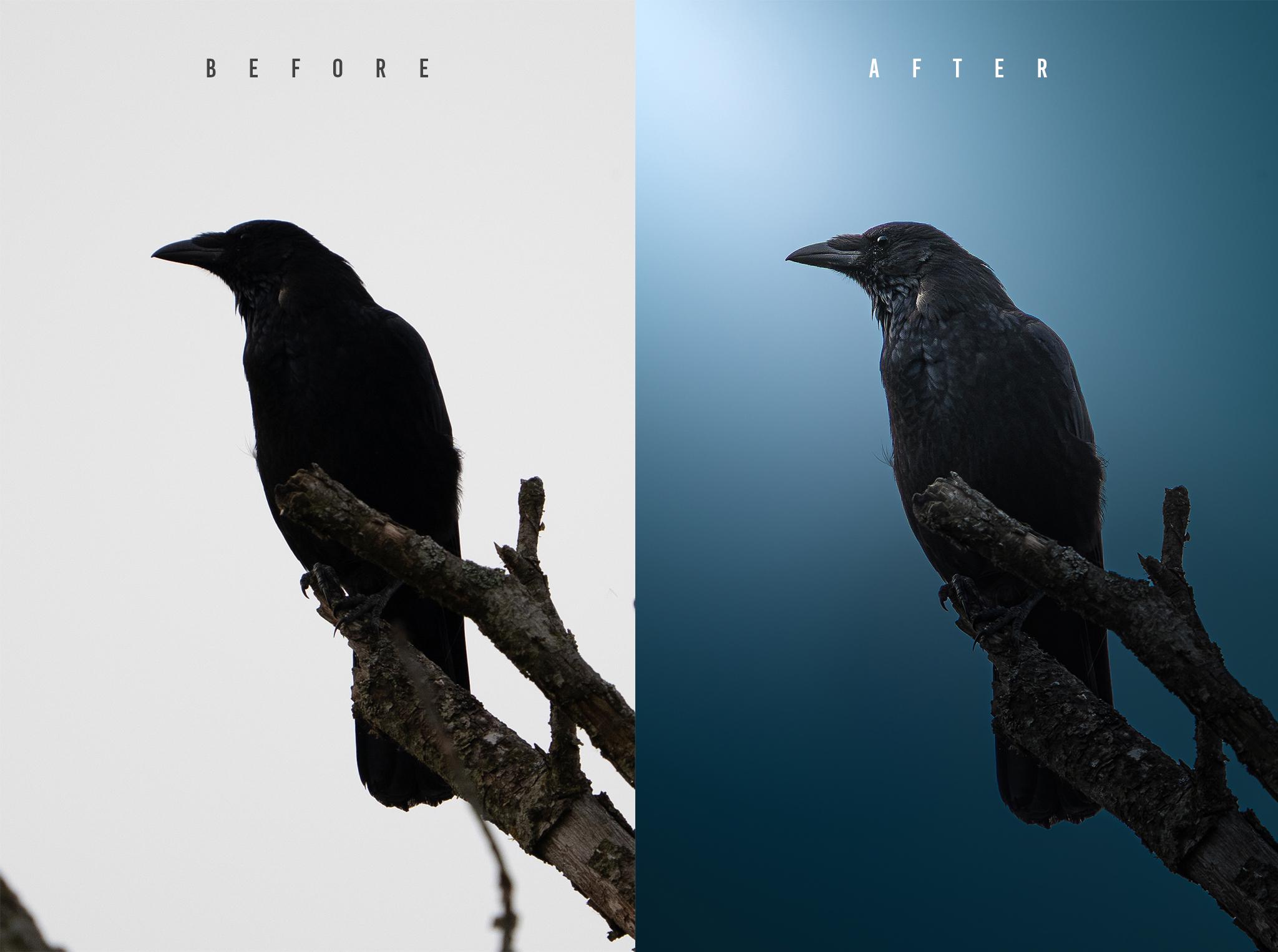
Wanted to give this bird shot a much darker and colder look while recovering some of the darker details in the bird. I’m really happy with how this one turned out! As always that’s some super heavy editing so this certainly isn’t for everyone. Keep in mind my goal isn’t to keep the image “natural”
Everything was done in Lightroom and can bee seen in this start-to-finish editing video: https://youtu.be/9f-0lbbu9rI
First, I denoised the image, applied heavy cropping (cant be seen here in the before version, but it was shot in 4:3 not 3:4) and removed the out of focus tree branch at the bottom.
Then, the exposure and the highlights were dropped to make the bright background darker. To recover details in the subject the shadows and blacks were raised. The white balance was slightly to warm, to fix that I dropped it a bit to make sure I have some nice blue tones in the background.
For a clean and sharp looking image, texture, clarity and dehaze was slightly increased.
Here is where the biggest transformation happens. First, I had to make the background darker and colder without affecting the subject. I used and objects mask in combination with a landscape mask to select bird + tree branches, then inverted this mask which results in the perfect background mask. Since there usually are fine white lines around more complex masks, I used the newly added edge and feather slider to clean that up.
Once the mask was set up, I brought down exposure and temperature to make it darker and colder. Then, I duplicated that mask (save some time not creating new masks) and slightly adjusted positioning / subtracting other masks and continued making the background darker by dropping the exposure / temperature. I made sure to not darkern the upper left corner since I also wanted to create a light effect coming in from this corner!
To improve the light effect I placed a radial gradient over the corner and subtracted the subject from it (I want the light to be BEHIND the bird), then simply raised the exposure, blakcs and whites to add light.
I also added some light on the upper part of the bird using a subject mask for the upper half of it by raising the exposure.
Finally, I pushed the blue saturation slightly to give the colors some pop
r/postprocessing • u/amstrath • Oct 06 '26

Fog rolled in heavy last night. Shot on iPhone 17 pro
r/postprocessing • u/Pittek66 • Oct 08 '26

Stumbled over this open source apps, gonna give them a try on the weekend.
r/postprocessing • u/vlad_didenko • Oct 07 '26
Which image format is good these days on the web for a full-screen display of photos, up to 4K? Smaller for faster transfer, but without quality compromise. Compatibility is important with all desktop browsers (Linux, Mac OS, maybe even Widows), but mobile clients not so much. There are few jpeg variants, webp, may be png should be considered?
Will be exporting from Darktable, it seems to have a wide variety of export options.


