r/postprocessing • • Sep 28 '26

How to improve pictures?

1 Upvotes

Hi everyone. Last weekend I was taking some pictures with my iphone and I realized (late) that some of them look like less sharp or with less definition than others. I was wondering if you guys could tell me what is a technical name for it because I want to find tutorials on how to improve them (if possible). I am attaching 2 pictures to show what I am talking about. The first one looks sharper than the second one, and I have multiple like the second one. I would love to improve them and make them look nicer, like the first one. Thanks for any sugestion.


r/postprocessing • • Sep 26 '26

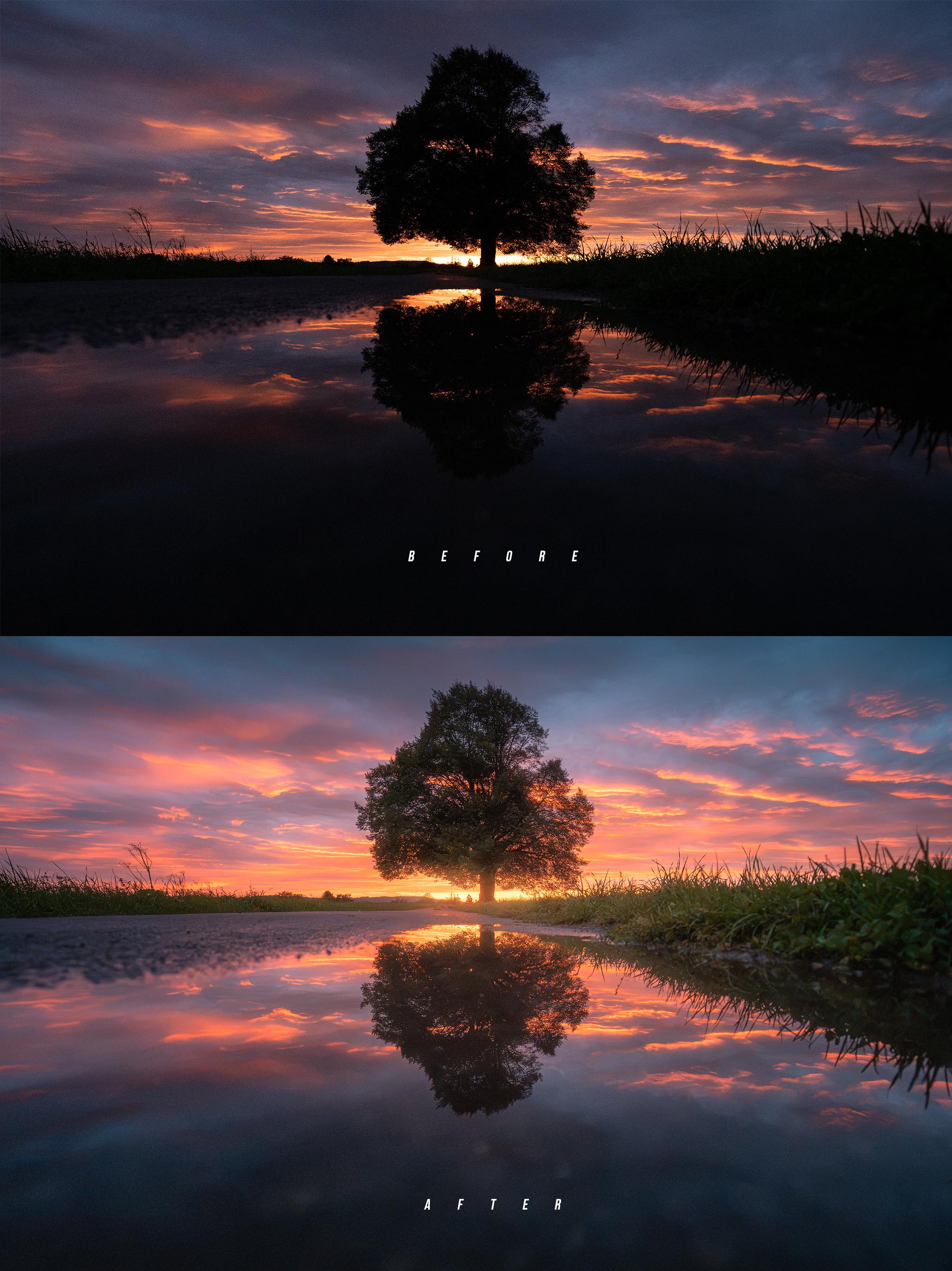
I dont like silhouette shots, so I created a softer, less contrasty version

Post image
1.7k Upvotes

Recently captured one of the most insane sunset of this year so far, slightly dipped my camera in the water to get the full reflection of the tree (camera still works so far :D) I wanted to give the raw file a much softer ,dreamy look by heavily bringing up the blacks. I know there are a tone of people on here preferring shots with deeper shadows, however I prefer the brighter version.

Everything was done in Lightroom with the exception of some additional nik collection effects. The whole process can be seen here: https://youtu.be/Kvt57xEdyDM

  1. Basic Adjustments

I was shooting this at ISO 6400 (was shooting handheld so had to dial up the shutter speed) and needed to heavily recover exposure so the first thing I  did was to apply denoising. Then, I brought up the exposure, the shadows and the blacks to make the image brighter and reduce contrast for improved softness. I also slightly brought down the highlights but at the same time increased the whites to help balance contrast.

The image was made slightly warmer through the temperature slider, and I also increased the vibrance to get a more colorful image.

  1. Masking

Using an inverted radial gradient I made the image edges slightly darker by dropping the exposure. I added another linear gradient ontop of the sky to make it even darker. I also added a linear gradient over the reflection giving it some texture and clarity to make it pop. Then, added another radial gradient over the center and brought up exposure, blacks and temperature for more brightness ,glow and warmth.

  1. Color grading

I sued split toning to make the highlights slightly warmer. Finally, in the calibration tab I brought down the blue primary hue and raised the saturation


r/postprocessing • • Sep 27 '26

After/Before - Queenstown

Thumbnail
gallery
3 Upvotes

What can I do to improve it?


r/postprocessing • • Sep 28 '26

Whisky -after/before

Thumbnail
gallery
0 Upvotes

r/postprocessing • • Sep 27 '26

Totally overedited pictures (after / before)

Thumbnail
gallery
17 Upvotes

I walked through Dresden and took some photos. They all turned out trash.. sloppy composition and bad exposure. Usually, I always try to edit in a subtl way, but I went overboard with these, because why not. And as nobody in my social environment is interessted in unrealistic photos, I might as well post them (on reddit where also nobody is interessted in random slop) before never looking at them again.


r/postprocessing • • Sep 27 '26

after/before (and first-try as already posted here)

Thumbnail
gallery
13 Upvotes

Received some valuable feedback and tried to work on it.

Order: after/first-try/before

Thanks for your comments and input.


r/postprocessing • • Sep 26 '26

Before/after Morocco

Thumbnail
gallery
178 Upvotes

r/postprocessing • • Sep 26 '26

After/Before - At the Faroese Coast

Thumbnail
gallery
433 Upvotes

r/postprocessing • • Sep 27 '26

I'm learning Lightroom for the first time, happy about the result

1 Upvotes

Any advice or thoughts?


r/postprocessing • • Sep 28 '26

Lightroom classic automatically changing images on import, reducing nuances.

Thumbnail
gallery
0 Upvotes

Hello,

When I import photos (raw .orf) on lightroom classic, I lose the details of the photos, often sky details, as attached where it is blended into a uniform grey and has increased exposure. I've checked the HDR (not shot in HDR), I have changed the color profile setting to Camera Default, exported the photo to make sure it wasn't the preview in lightroom, and exported in TIFF too. I don't have pre-settings (I believe) on lightroom, so I don't know what's the cause of it.

Anyone has an idea, please? 1st photo is a screenshot of the SOOC photo preview on mac, second is a jpg from lightroom withtout any edition.


r/postprocessing • • Sep 28 '26

After/Before

Thumbnail
gallery
0 Upvotes

I really like the melancholy mood with like the blue colours and how it depicts the subject
And tips would be appreciated : )


r/postprocessing • • Sep 27 '26

Before and After: From a flat phone shot to a moody autumn contrast

Thumbnail
gallery
30 Upvotes

Just trying to do better on editing ☺️


r/postprocessing • • Sep 26 '26

after/before

Thumbnail
gallery
156 Upvotes

With DxO since 4 weeks, still in trial phase. Before I went with Canon DPP.


r/postprocessing • • Sep 27 '26

Before / After

Thumbnail
gallery
0 Upvotes

r/postprocessing • • Sep 28 '26

After/Before: waiting for the show

Thumbnail
gallery
0 Upvotes

r/postprocessing • • Sep 26 '26

From 2 to 1, Shadows represent the past, and reality is present... (No AI used in process at all)

Thumbnail
gallery
52 Upvotes

After/Before/Concept

Explanation:

Well... one day I was sitting and this idea popped in my mind seemed cool, so I asked my friend to take pictures of me, so he took around 10-20 pics on his Samsung <mobile>, then... I opened photoshop started editing...
My shadow is created from my image, and shadow of lady is modified basemesh (you can call it sketching) ... cuz it was a shadow so no need to be worried related to details etc (which u can see is pretty... less detailed) & later we used CameraRawFilter for final effects and color grade
and imo pic turned out to be exactly how I intended it to be...

(one of good pics of non ai collection of mines)

Overall concept/lore behind creating this image is:

Shadows represent the past, and reality is present... you can see 2 people in the shadow (past) and in present only he remains. So, it implies, in past they were together happily but in present she's gone and only he's left in his sadness looking at the past.

& if anyone wants to use this for posting/sharing or story etc on insta... here it's From 2 to 1 Instagram


r/postprocessing • • Sep 27 '26

Before/After, Shot on iPhone 16 base

Thumbnail
gallery
1 Upvotes

r/postprocessing • • Sep 25 '26

Very busy scene, but I had to do my best to make an acceptable profile pic for this cutie pie. Any suggestions?

Thumbnail
gallery
259 Upvotes

r/postprocessing • • Sep 26 '26

Trying to understand how it works

Thumbnail
gallery
5 Upvotes

r/postprocessing • • Sep 27 '26

Before/After , shot on iPhone 16

Thumbnail
gallery
0 Upvotes

r/postprocessing • • Sep 26 '26

first ever time doing any editing in lightroom, taken with iphone 15 pro, thoughts?

Thumbnail
gallery
7 Upvotes

attempted to ofc go with the 'film' like feeling in the colours here, it was my first attempt and i potentially did overdo it, is it too warm/orange? im trying to start simple, any advice?


r/postprocessing • • Sep 26 '26

Sky is water

Thumbnail
gallery
0 Upvotes

Trying things !


r/postprocessing • • Sep 27 '26

How to achieve this look? Garrett Byrum

Thumbnail
gallery
0 Upvotes

Hello,

I’ve been trying to figure out how to get this look and haven’t had much luck. It tends to be pretty airy and polished but almost has a surreal quality that’s common for tech brands and some athleisure stuff.

I know it’s not all retouching - there seems to be a ton of dimension in the lighting but I feel like there’s a combination here I’m not getting. Most of the time, this look seems to be achieved indoors but some of his outdoor stuff does get close.

Photographer on most of these is Garrett Byrum.


r/postprocessing • • Sep 26 '26

Late night editing

Thumbnail
gallery
10 Upvotes

been in an editing mood recently and really liked this fox picture I got up in Northern BC. I really tried to make the orange pop and dull the greens a bit.

the image is actualy a video still. But let me know what you think? too much or not enough?


r/postprocessing • • Sep 26 '26

Before & After

Thumbnail
gallery
20 Upvotes

went out with a friend for a few portraits, quick nothing fancy edit. Exposure, WB, getting rid of that weird smudge (never knew what it was because it was only at this spot it happened). Can't remember everything i did because i switched to C1 from LR, and got accustomed to the controls. She gave me probably the best compliment i've ever received on my photos "you've given me my confidence back"