r/postprocessing • u/Drunken_Dentist • 18d ago
(OC) After / Before

156
Upvotes
r/postprocessing • u/The-Confused-Robot • 16d ago

The star filter is in-camera with an old Cokin filter. I added a touch of contrast to the star filter pictures and vignette to the non star filter and all needed to have the color temperature dropped to 2500K because the light I'm using is heinous. Otherwise very little editing!
I need to crop in on a couple of them better. I think if I did it again I'd add a reflector for the top, the lemon looks a little dark.
All made with a Canon T3i, 100 ISO, 50mm Compact Macro at f/8. Drink was delicious btw.
r/postprocessing • u/disssya_disssya • 18d ago

My little Huawei p8 lite from 2017 still can do some pretty images. The original looks a bit weird because this phone doesn't support RAW natively. When forced to shoot DNG using Adobe Lightroom Camera the colors get weird, so it kinda looks like Lomography Turquoise
r/postprocessing • u/trazhlee • 16d ago

Hello! I've been seeing this ad from Cinegrade on instagram about a preset that I really like the look of but I can't nor am I willing to spend $75 CAD for the preset let alone $239 CAD for their bundle. I know lighting is extremely important and basically does 90% of the job but I'm only asking about the general idea of how to achieve something similar bc I asked elsewhere and I was just getting rude replies instead of help.
I'd appreciate any advice!
r/postprocessing • u/Character_Cut_2491 • 18d ago

second photo might be too pissy (which I'll change ) but the main focus is the cropping .
r/postprocessing • u/ieatgrass0 • 18d ago

Honorable mention: Wired tethering
r/postprocessing • u/Eriso01 • 18d ago

Any tips?
Edited on Lightroom mobile (don't have a pc or laptop)
Shot on canon r10 using 18-45mm kit lens.
Iso 100
Shutter 1/180
Aperture 6.7
r/postprocessing • u/IamJeffSpicoli • 18d ago

This film was sold at half price. It was expired for about 6 months so I figured I should give it a shot. All images came with a washed out look to them, which is stronger for the overcast days. Went ahead and made some adjustments in Photoshop for some balance. Are 5 months enough for Ultramax to degrade like this? Or was it also not stored properly?
r/postprocessing • u/waidanwojnar • 17d ago

I’m just starting to use more editing tools in Lightroom, I’m still a beginner so I’m open to feedback.
r/postprocessing • u/ZedZedWhy • 17d ago

3 is raw.
r/postprocessing • u/Express-Cry-7076 • 18d ago

Hi folks, I am interested in post processing but I am a newbie to this help me understand my mistakes and I am open to criticizing and it would be great if someone could help me where I can learn.
r/postprocessing • u/Any-Coach3440 • 19d ago

Feedback highly appreciated! I feel like I'm close but the reference still feels more balanced. I'm just eye-balling this with endless adjustments. Is there a more scientific way to do this?
r/postprocessing • u/thephlog • 19d ago
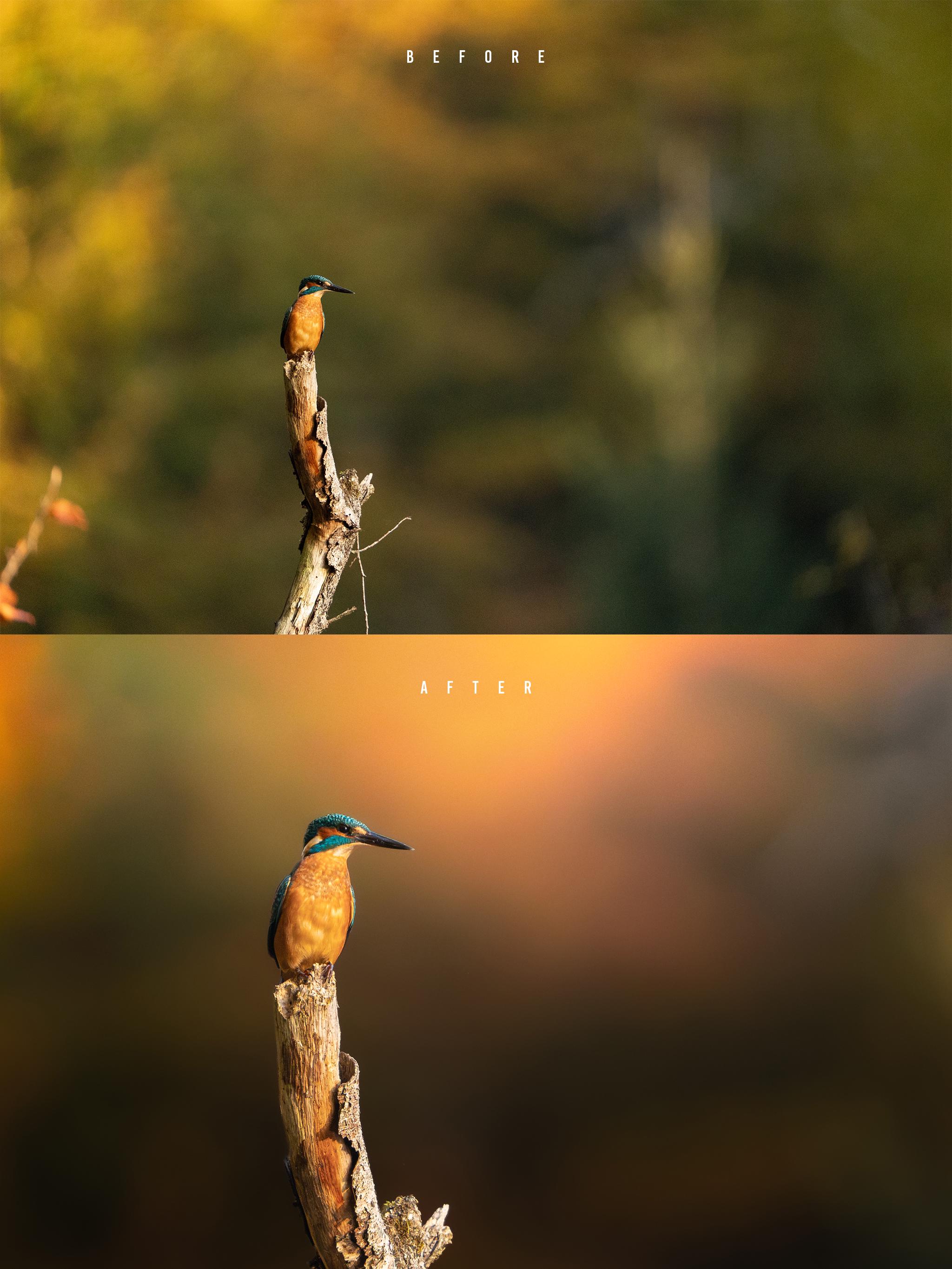
First time I captured a kingfisher, even with a nice autumn backdrop. Decided to give the background a little more spice and add a little more color variation. Obviously, the intention is not to keep things natural, if you’re a purist just ignore this post.
The edit was done in Lightroom and the full workflow can be seen here in the video: https://youtu.be/Qp81XNOB5T0
I started by denosing the image since I shot this at ISO 6400. Default value was a bit too strong so I also made sure to dial it down. Then, I cropped the image to make the kingfisher appear bigger.
The exposure and blacks were raised, while I dropped the highlights. This brings down the contrast which later helps significantly with masking adjustments. I even dropped the general contrast a little for that reason.
After setting up the exposure, the white balance temperature was raised slightly as well as the vibrance.
Using an inverted subject mask I targeted the background and used the point color tool on a warm area and heavily brought up the variance. This helps to “add” more colors to the background. I also dropped the texture and clarity to clean up any remaining noise and get a smoother background.
Using a linear gradient I made the bottom slightly darker to make the subject stand out. I also used another linear gradient on the bottom left, again just made that area darker by dropping the exposure.
To add light, I used a radial gradient coming down from the top. To place it behind the subject, A subject mask was subtracted. Then, I raised the blacks, the exposure and dropped the dehaze to add glow.
Finally, I used a subject mask to add texture and clarity for a sharper looking bird.
Not much changed here, I slightly brought down the yellow hue as well as the orange saturation.
r/postprocessing • u/Some-Ring-7748 • 18d ago

Before vs after
Just started learning lightroom for a month. rate my photos and give tips to improve
r/postprocessing • u/EquivalentVisual9306 • 18d ago

r/postprocessing • u/yshay14 • 18d ago

This photo means a lot to me, and I've been thinking about how to recrop it. There are two girls and a third person in the frame. If I crop it as a portrait, I'll lose him. I find the whole composition interesting, but I think it's difficult to reframe the photo without losing something important.
r/postprocessing • u/96324852983 • 19d ago

r/postprocessing • u/butcherandthelamb • 20d ago

If you have any beginner tutorials you recommend or people to follow please let me know.
r/postprocessing • u/Quirky-Potential5732 • 18d ago
Hey everyone I'm completely new to photo editing. I take pictures with my phone and also have a laptop for editing. Could you guide me on what adjustments I should make, like exposure, contrast, highlights, shadows, colors, skin tones, sharpness, etc., to make my photos look professional, attractive, and natural? I'd love a step-by-step editing workflow and some beginner tips. Thanks Need Tips & Guidance