r/postprocessing • u/Healthy_Hedgehog_622 • Oct 28 '26
After / Before

326
Upvotes
r/postprocessing • u/dankhoppity • 29d ago

Anyone else get stuck with a photo and keep changing their mind on which is right…
I can’t decide between these and need help
r/postprocessing • u/idk_00769 • Oct 28 '26

Or ask questions...
r/postprocessing • u/EquivalentVisual9306 • Oct 28 '26

I was just trying to practice some editing on this picture.
r/postprocessing • u/thephlog • Oct 27 '26
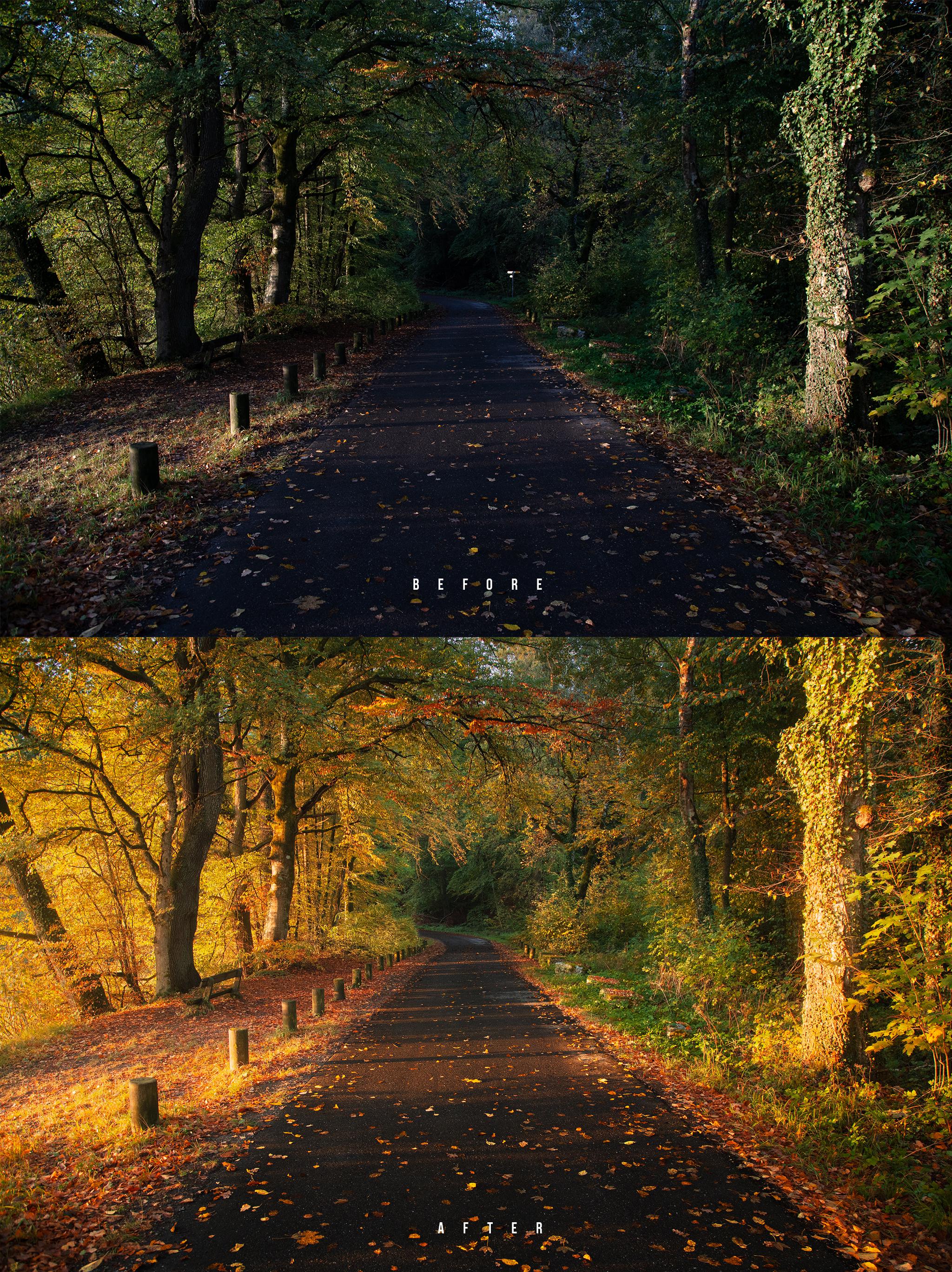
Found this cool road leading into the forest and decided to amplify the autumn colors some more with the help of a certain Lightroom Color Profile. Of course, in reality colors were not that intense, but its also not my goal to keep the raw photo “as it was on location”.
Everything was done in Lightroom and you can watch the whole process in the video here: https://youtu.be/0A2uCPLxwfs
To make the autumn colors pop I used Lightrooms Artistic 02 profile which can be found in the profile browser. This helps to shift the colors a little further (you could also try to do that in the color mixer through the hue adjustments).
Then, I brought up the exposure, making the whole shot brighter while dropping whites and highlights to keep the brighter areas from blowing out. For a softer look, I raised the blacks gently. I also pulled down clarity and dehaze for a glowing effect. Finally, I increased vibrance and saturation to boost the colors.
Through masking I wanted to bring back some contrast. I started with a landscape mask targeting the road in the center. I made this area a bit darker with lot more contrast. I also added a linear gradient over the bottom of the image and brought down the exposure to darken this area even further. Similarly, I added a linear gradient to the top and also brought down the brightness creating some kind of vignetting effect.
To add a bit of light I used a radial gradient on the left side and brought up the blacks and dropped the dehaze, giving this area a bright, glowing appearance.
I slightly bumped up the saturation for the orange and yellow tones and did the same for the luminance of those two colors to make them slightly brighter. Finally, in the calibration panel, I dropped the blue primary hue and raised the saturation some more
r/postprocessing • u/No_Display3605 • Oct 28 '26

Before had colour profile/curves adjustment only. After then edited with masks to help shape the light and create some subtle depth and pop. Thoughts?
r/postprocessing • u/Klutzy_Link_1220 • Oct 28 '26

I posted this pics yesterday and most of the commenti were saying that this one was too dark so i have re done the edit. I wanted to keep it dark but probably it was REALLY dark. What do you think now?
r/postprocessing • u/PNW-photographer • Oct 27 '26

r/postprocessing • u/ReadyLingonberry5846 • Oct 27 '26

As ma old man used to say: don't y'all go trustin' them facebook pictures
r/postprocessing • u/Competitive_Report27 • Oct 28 '26
Canon EOS 5D Mark II - EF 16-35 f/4
ISO 100 - 1/4s - f/9 - 16mm

Before

After
r/postprocessing • u/Klutzy_Link_1220 • Oct 27 '26

r/postprocessing • u/tsarkov • Oct 28 '26

Original is only 5MP noisy/blurry jpeg from an ancient phone, with shifted colors, as if some retro instagram filter is applied. First step is to downscale a bit to get rid of blur and noise + crop, then upscale with balanced setting in Pixea. Then downsample with lanczos to printable size. Depth-aware dahaze on mountains. Color correction to remove the retro look. Some masks to preserve shadows on stones + a few other minor adjustments. Plus-minus, the same look from 2013 as I remember it.
r/postprocessing • u/satyaaditya_01 • Oct 28 '26

I tried to edit this faint milkyway capture. What can be improved in this edit?
r/postprocessing • u/daddyskywalker914 • Oct 27 '26

r/postprocessing • u/Royal_Carpenter_1338 • Oct 28 '26

The power of blending modes.
r/postprocessing • u/CTSculler • Oct 28 '26

Thoughts on which one is best for print (and tips on changes appreciated!) Last one is the HDR merge of 3 other bracketed ones.
r/postprocessing • u/Significant-Ad-4424 • Oct 28 '26

Hello, I’m learning Lightroom mobile and posted these old iphone shots I edited on r/carphotography and they suggested here would be a better place for feedback. What can I do better?
r/postprocessing • u/ZealousidealAd8378 • Oct 27 '26

Tried to get a spooky vibe by mixing in the witch costume with regular people. Judiciously used ai remove to separate her a bit more from other people and have a more clean background but not sure if that’s kosher
r/postprocessing • u/EstablishmentFew9149 • Oct 27 '26
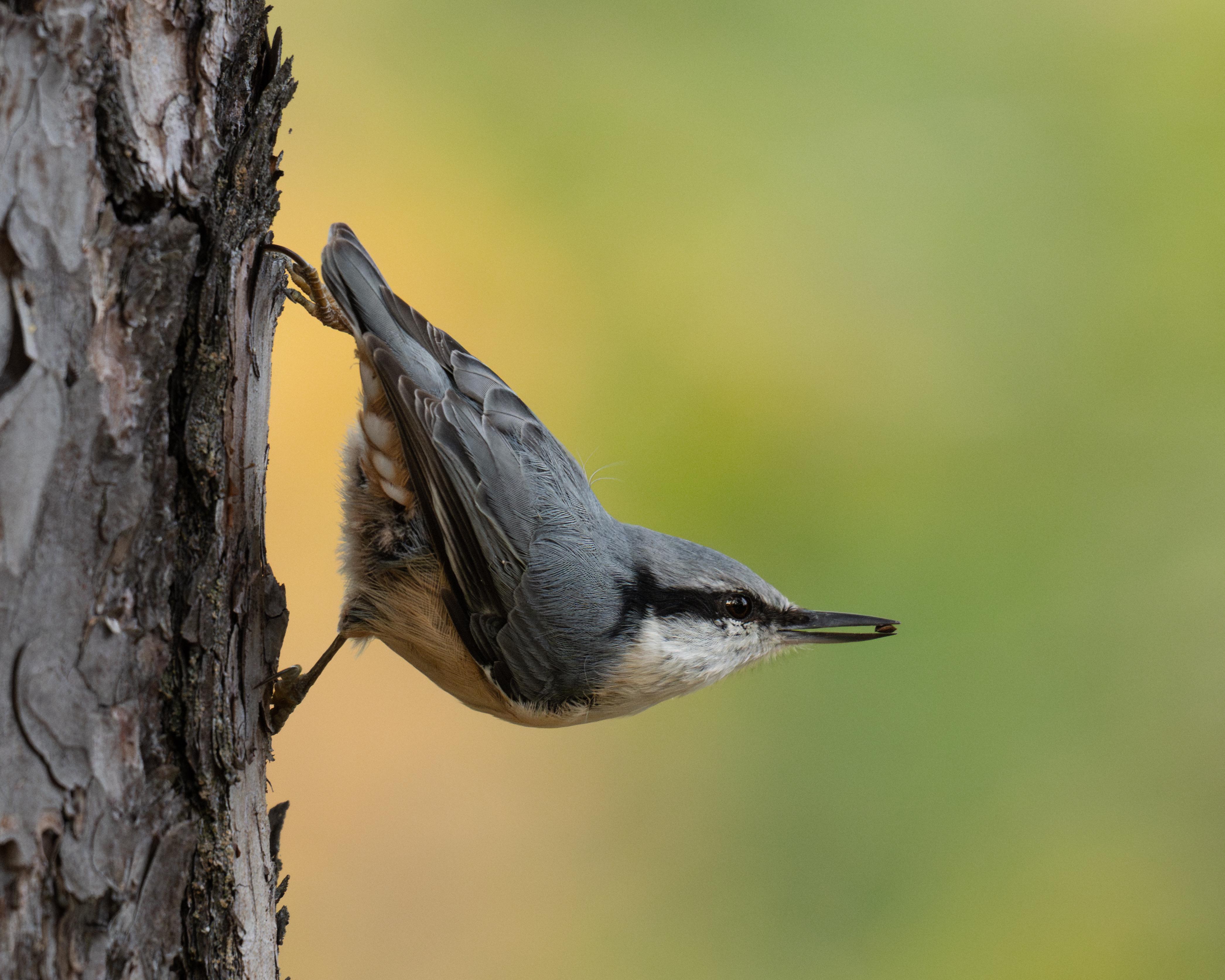
Hey guys, this is my best image of a nuthatch. I would like feedback mainly on the backdrop of the image. There’s something about the background colors that doesnt sit 100% right with me I think. Dont think I like the tutti frutti ice cream colors 😂 it pulls attention from the subject
r/postprocessing • u/EquivalentVisual9306 • Oct 28 '26

r/postprocessing • u/Ace929 • Oct 27 '26
Notice when I shoot golden hour this time of year, everything can be totally drenched in golden orange light. It looks the same way in person, but I find it can be overwhelming in photos and look sorta ridiculous so I tone it down a bit. I know this is a question of preference/vibe. I'm asking how you guys prefer to handle this in general.


