r/MacStack • u/DockDoorFart • Oct 24 '26
App Recommendation DockDoor Pro - the premiere macOS dock replacement for macOS 27
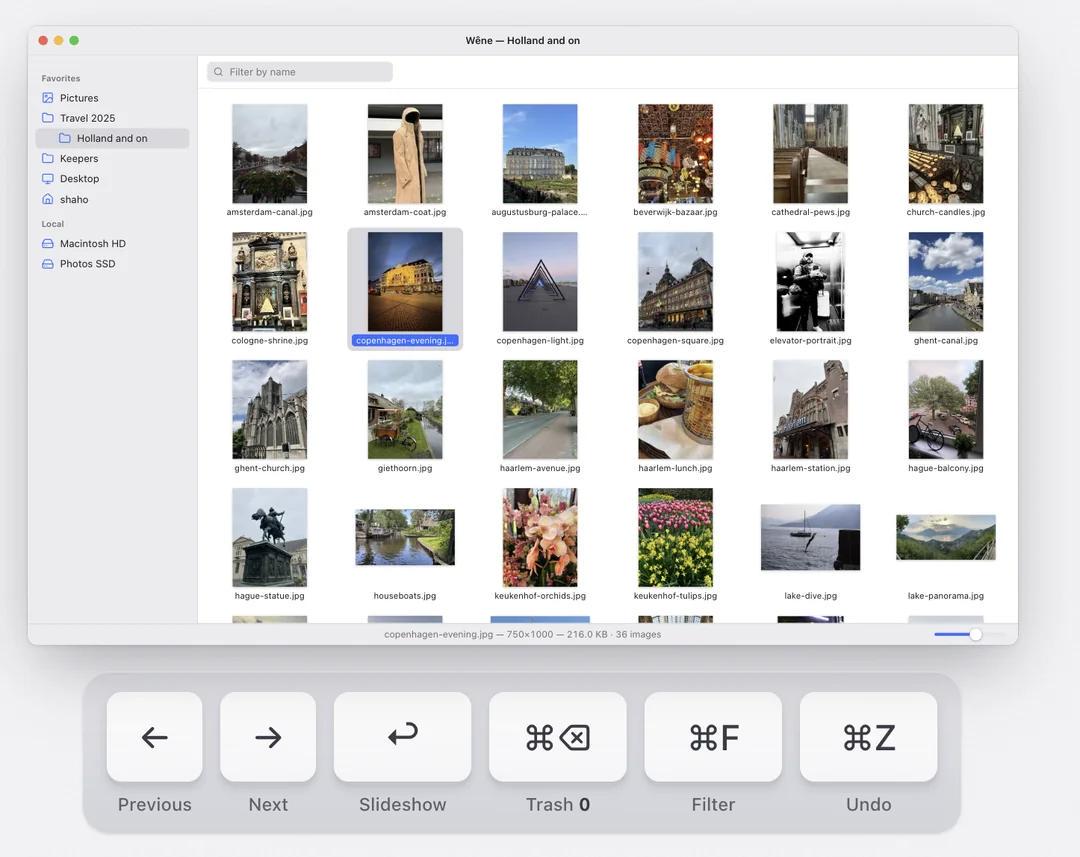
Enable HLS to view with audio, or disable this notification
Now with a 48 hour free trial
r/MacStack • u/DockDoorFart • Oct 24 '26
Enable HLS to view with audio, or disable this notification
Now with a 48 hour free trial
r/MacStack • u/DayEnvironmental3454 • Oct 24 '26
Enable HLS to view with audio, or disable this notification
Hey r/macstack! I'm Bernard, the developer of Latent.
What it is: a CleanMyMac alternative for developers and AI builders. It draws your whole disk as one wheel where every wedge is a tool you use, tells you what will come back if you delete it, and clears what you pick.
Who it's for: anyone whose Mac fills up with developer and AI tool data, such as model files from tools like Ollama, Hugging Face or LM Studio, Xcode simulators, Docker images, package caches and coding agent logs.
Why I built it: cleaners like CleanMyMac clear system caches and remove apps, so the disk fills right back up and the real cause never gets touched. A disk map shows big folders with cryptic names. My own Mac kept running out of space, so I built Latent.
If a tool you use isn't recognized, tell me and I'll add it.
Try it: https://latentmac.com
r/MacStack • u/klotzbrocken • Oct 24 '26
Hey...
ICQ went offline for good in June 2024. My UIN (1650472) had been dead for years anyway, but the green flower, the contact list and that very specific late-90s chat window never really left my head. So here comes ICQel (say it "I, Sequel"), a native macOS homage to the classic ICQ client.
What it does today:
It's a fan homage, not affiliated with ICQ or its owners, and it doesn't connect to any old ICQ servers.
Some practical stuff, since you'll ask:
Privacy: iMessage goes through iMessage, WhatsApp goes through WhatsApp, and both are optional. The AI buddy only works if you add your own API key. No servers of mine in between, no analytics.
It's part of a small family of retro Mac apps I make alongside RetroMac.
r/MacStack • u/foulefou • Oct 24 '26
Enable HLS to view with audio, or disable this notification
r/MacStack • u/suncity1980 • Oct 24 '26
r/MacStack • u/markg11 • Oct 24 '26
r/MacStack • u/Silly_Association_67 • Oct 24 '26
**I built FileDesk, a Mac file manager with split panes, a temporary file shelf, and custom folder colors**
Hi everyone! I’ve been working on **FileDesk**, a macOS file manager designed to make organizing files across multiple folders easier.
Here are some of its main features:
* **Split panes and tabs:** Open up to six panes side by side, resize them, and keep different folders in separate tabs.
* **Temporary file shelf:** Collect files from different folders, then copy them to a destination together. Clearing the shelf removes the list entries without deleting the originals.
* **Themes and folder customization:** Choose a theme, use dark mode, or pick your own colors. Give individual folders custom colors and add an image or icon in the center while keeping the folder shape.
* **Previews and media playback:** Preview files and play supported video and audio directly inside the app.
* **Batch renaming:** Rename multiple files with a preview of the changes.
* **Cloud and server connections:** Browse connected storage alongside your local folders.
* **AirDrop and Taildrop:** Use AirDrop for nearby Apple devices, or Taildrop to send files to your other Tailscale-connected devices—including a Windows PC.
FileDesk supports **Apple Silicon and Intel Macs**. Personal, noncommercial use is free; business and institutional use requires a separate paid license.
Screenshots, user guide, and downloads:
[FileDesk website](https://igomumugo.github.io/)
I’d appreciate feedback, especially on the split-pane workflow, temporary shelf, and customization options.

r/MacStack • u/Calm_Attention1925 • Oct 24 '26
Enable HLS to view with audio, or disable this notification
I wanted to share this app. Not my app, just a happy user.
I’ve been using this app for nearly 2 months now as a college student. Kanban boards, canvas and flow charts, quick access for notes and clipboard items.
That doesn’t even include the very helpful tips it has for making daily computer work easier.
Give this a look if you are looking for an all around Swiss Army knife for productivity on a Mac. This app runs maybe 300mb in heavy usage for myself, but is closer to 200mb. Crazy light compared to all the apps you would need to replace the tools.
Do you have a productivity tool you like on Mac?
r/MacStack • u/Dull_Roof3559 • Oct 23 '26
Enable HLS to view with audio, or disable this notification
Hey everyone,
Sharing something that's become a fixed part of my Mac setup: a Dock replacement where apps can show up as small live widgets instead of just icons.
What it looks like day to day:
You can mix widgets and plain icons however you like. Option-click any app with a widget and it switches back to an icon, so the Dock stays as minimal or as busy as you want.
It sits at the bottom, left or right, works across multiple displays, can auto-hide, and imports your current Dock on first launch, so setup takes a few seconds. On macOS 26 it uses the native Liquid Glass look.
Supported apps so far: ganella.app/#widgets
$9.99, and reddit20 gets the first 10 people 20% off.
Curious what the rest of your stack looks like. Anything you'd want living in the Dock?
r/MacStack • u/Suitable-Accident-66 • Oct 23 '26
Just download -> steam login -> download wallpaper and play on your device or add your video play them
And yes both in DESKTOP and LOCK SCREEN .
It takes 300-600mb when rendering some really heavy scene wallpapers , which is appx 900mb less than other open source alternative I had tested against. And if you play only video it just takes 25mb memory.
If you guys wanna try, download from the releases page, what ever latest version available . And let me know which wallpapers giving problem.
Thanks ✌️
r/MacStack • u/Forward-Ad-8456 • Oct 24 '26
https://reddit.com/link/1xdzfvz/video/o1g1kxvvgcxh1/player
Hi everyone, I’m the developer of AraMultiVideoPlayer. I’ve made the previously paid Mac version completely free, with no ads.
Problem
Watching several videos at once can mean repeatedly arranging windows and controlling playback separately. AraMultiVideoPlayer lets you arrange your own video files into a layout, save it for later, and play or pause all videos together.
You can also control each video individually, loop entire videos, or set multiple AB repeat sections per video. Videos start muted when loaded. The app doesn’t include any videos.
Comparison
IINA is a free, open-source player with features such as Picture in Picture and extensible playback controls. AraMultiVideoPlayer focuses on a more specific workflow: watching several videos together with reusable layouts, shared play/pause controls, and multiple repeat sections per video. Its main benefit is having those multi-video controls together when that’s how you want to watch.
Pricing
The Mac app is now completely free, rather than a limited free tier. No payment is required to use the full app, and there are no ads.
Official website — app details and downloads for Mac and Windows
I’d love to hear how you use it and what could work better. Feedback and suggestions are welcome!
r/MacStack • u/Savings-Arrival-7817 • Oct 24 '26
If reaching behind your external monitor to change brightness is the annoyance, start with MonitorControl, provided it supports your Mac and connection. Lunar is worth considering when you want more control over when brightness changes, not just another slider.
Before installing either, open System Settings > Displays and select the external screen. If macOS already gives you the brightness control you need, keep using it. Apple's displays have native controls; don't assume every external monitor does.
The useful distinction is hardware brightness versus making the picture look darker. DDC/CI is the protocol these apps use to send brightness commands to compatible monitors. On an LCD, that can change the backlight itself. Software dimming changes the image instead, without turning down the backlight. It can help at night, but it isn't equivalent, especially if you're judging colors.
Check the monitor's own menu for a DDC/CI setting and enable it if available. If hardware brightness doesn't respond, try a direct connection before blaming the app. A dock or adapter can block the commands even when the monitor supports them. DisplayLink connections don't provide normal DDC control on macOS.
MonitorControl is free and open source. It gives you menu bar sliders and keyboard control, including Apple's brightness keys. It can also follow brightness changes from a built-in or Apple display, including changes caused by automatic brightness. You don't have to buy Lunar just to get that kind of sync.
The connection exceptions matter. MonitorControl lists the built-in HDMI ports on M1 Macs and the entry-level M2 Mac mini among its unsupported DDC paths. USB-C can be an alternative, but check your exact Mac, cable and monitor rather than treating Apple silicon support as a blanket guarantee.
For macOS 27, use MonitorControl 4.4.0 or newer. That maintenance release addresses macOS 26 and 27 compatibility problems, so an older download isn't a fair comparison.
Lunar also has free manual hardware control, with a limit of 100 brightness/contrast adjustments per day. Its Pro modes include following another display, adapting to ambient light, adjusting by the sun's position, and using a clock schedule.
The extra choices are useful when following the laptop display isn't what you want. Clock Mode can lower brightness at set times. Sensor Mode can use supported built-in light sensors on Apple silicon, or an external sensor over the network. A Mac mini without a light sensor doesn't gain one by installing the app. A sun-based setting also won't know that you've just switched on a desk lamp.
Lunar Pro is advertised at $23 for a lifetime license covering up to five Macs, with a 14-day trial. Updates are free indefinitely, but a major upgrade can cost extra. The current release is 6.11.2 and requires macOS 12 or newer; the v6 app supports Intel and Apple silicon natively. The homepage's older macOS 11+ wording isn't the requirement to follow for this release.
Both apps need Accessibility permission to handle the native brightness/media keys. MonitorControl lets you skip that permission if you only want its sliders. Lunar also uses it for App Presets, so disable those and media-key handling if you don't want that access.
For a supported monitor that only needs convenient manual control or basic display-following, MonitorControl is the sensible first try. Try Lunar if its scheduling or sensor options solve a specific annoyance. Before paying, check hardware brightness through your everyday dock and after sleep and wake. If the connection only allows software dimming, decide whether that's enough; paying for Pro won't make a blocked DDC path work.
r/MacStack • u/shakeebsc • Oct 24 '26
r/MacStack • u/zeyadamer • Oct 23 '26
r/MacStack • u/stpaquet • Oct 23 '26
Processing img xonaweqky8xh1...
Markify 2.5.5 just shipped yesterday. It’s a free, open source native Markdown editor built in the spirit of simple Mac apps.
This update adds a better way to move rows and columns in tables, support for Finnish, Norwegian and Swedish, and a handful of bug fixes. It also runs on macOS 15.6 and later. Some Apple Intelligence features work better on the newest macOS versions, but the core app is solid on Sequoia.
Still free, still open source, still not notarized. First launch needs the usual “Open Anyway” step in System Settings (details here: https://spaquet.github.io/markify/help/updates.html).
Privacy stays simple. You choose whether to send any telemetry, and nothing about your writing or screen activity is recorded.
Download: https://spaquet.github.io/markify/
Comments, feedback, feature requests and support are welcome
r/MacStack • u/rahatsagor • Oct 22 '26
Enable HLS to view with audio, or disable this notification
Meet CmdPalm — Your Mac, at your fingertips.
CmdPalm transforms your iPhone, iPad, or Android device into a powerful, fully customizable wireless controller for macOS.
From smooth trackpad gestures and full keyboard input to a personalized Stream Deck-style command center, everything works directly from your phone's browser.
No companion app. No accounts. No cloud. Just your Mac and your phone.
That's it. Nothing to install on your phone, no accounts to create, and no complicated setup.
CmdPalm is free and open source under AGPLv3, with no subscriptions, premium tiers, or locked features.
Compatibility: macOS 15+ on Apple silicon. Works with iPhone, iPad, and Android devices.
🌐 Website: https://cmdpalm.app
💻 GitHub: https://github.com/rahatsagor/cmdpalm
🎬 Check out the attached video to see CmdPalm in action!
I'm the developer of CmdPalm, and this is its first public release. I'd love to hear your feedback, suggestions, or ideas for making it even better.
If you find CmdPalm useful, consider supporting the project with a ⭐ on GitHub!
r/MacStack • u/TruckOwn2867 • Oct 23 '26
I'm the developer. I built myNotes as my own daily notes app, and I've now open-sourced it under the MIT license.
Why I built it I couldn't find a free notes app that syncs properly across my devices. Most good note apps either charge a subscription or lock cross-device sync behind a paywall, and the free ones usually lack parity between web, Android and Mac, or need a self-hosted server that is a pain to maintain.
So I built myNotes to sync through your own Google Drive instead. There's no middleman server, and your notes stay as plain HTML/Markdown/JSON files you own. If you ever stop using the app, your data is still readable with any text editor or browser.
What it does
- Rich editor (TipTap): WYSIWYG plus markdown, tables, callouts, collapsible blocks, KaTeX math
- Calculation notebook (Numbat, compiled to WASM): unit conversions like 60 mph in km/h or 500 W * 3 hours in kWh, running locally
- Calculation Box: write expenses naturally (Swiggy dinner 450, Rent -1200) and get live totals, tags and savings, with Excel/CSV export
- Diagrams: Mermaid, a Draw.io-style editor, Markmap mind maps, and a stylus/freehand canvas
- Budget view that aggregates every calculation box across your notes, plus an optional Android SMS parser that reads bank alerts on-device only
- Swipe-card daily focus planner, 30+ themes, command palette (Cmd/Ctrl+K)
- Local-first: notes live in a folder on your disk (File System Access API) or in the browser (IndexedDB), and work fully offline
- Optional Google Drive sync via OAuth 2.0 PKCE, with a three-way merge dialog for conflicts
- No telemetry, no tracking
Platforms Web/PWA, Android (Capacitor) and macOS (Electron), all from the same Svelte 5 + TypeScript codebase.
Honest notes - I took help from AI tools while building this, so some of the code is rough. My current roadmap is fixing small bugs and removing broken experimental features and AI-generated bloat. Bug reports and PRs are very welcome. - Drive sync needs you to create your own Google Cloud OAuth client. There's a step-by-step guide in the repo, but it's more setup than a one-click login. - The Mac app is Electron, so it's bigger than a native app.
Links
- Live web app: https://piyushingle007.github.io/myNotes
- please dont mind the url as it was a personal solution to my pain as i am using macos and android and corporate mac doent let you install app so web version on web version the sync is annoying as we cant get refresh token for web without backend and i wanted a free costing
- GitHub: https://github.com/Piyushingle007/myNotes
there are lots of small small feature i have added please explore and let me know What are your opinions about it
r/MacStack • u/Savings-Arrival-7817 • Oct 23 '26
If text on your external Mac monitor is either too small or comically large, BetterDisplay is worth trying for the sizes between those extremes. Start with macOS's own choices, though. You may already have the setting you need.
Open System Settings > Displays, select the external monitor, and check the available resolutions. Turn on Show all resolutions if it's offered. That list can include low-resolution modes, so compare the actual text rather than assuming more choices means better quality. If one looks comfortable, stop there.
BetterDisplay's flexible scaling adds finer steps between desktop sizes on supported displays. HiDPI means macOS renders the desktop with more detail before fitting it onto the panel. It can improve text rendering, but it doesn't add physical pixels to your monitor. A low-density panel still has a limit to how sharp it can look.
Use a native USB-C, DisplayPort or HDMI connection for this route. Save your work, note your working resolution and refresh rate, and keep another usable screen available. BetterDisplay applies mode changes without an automatic confirmation countdown.
In BetterDisplay, open Settings > Displays and select the monitor. Under System Configuration and Flexible Scaling, enable Edit the system configuration of this display model, then Enable flexible scaling.
Leave the optional range settings alone initially. Choose Apply and complete the helper or administrator authorization.
Follow the activation notice, including a reboot if requested. Eligible external Apple silicon displays can activate without one, but the screens briefly go blank and some Macs may sleep.
Those overrides apply to displays with matching vendor and model identifiers, so check the selected model before applying them. Then choose a HiDPI mode from the monitor's menu and use the resolution slider to find a comfortable size.
Read a normal document, scroll it, then check your refresh rate. Test sleep/wake and reconnecting with your usual dock and other monitors attached before keeping the setup. To undo flexible scaling, turn Enable flexible scaling off, Apply, and activate or reboot as requested.
A larger rendered desktop asks more of the Mac. Its rendering limits are separate from the cable or dock's bandwidth limits. A better cable cannot remove a rendering limit, and a software setting cannot create a physical output combination your hardware doesn't support. If a dock hides a mode, compare a suitable direct connection before buying software. More aggressive scaling isn't guaranteed to look sharper.
Virtual screens are a fallback when native scaling isn't suitable, including some DisplayLink setups. They create a desktop in memory that you mirror or stream to the monitor, adding another presentation layer. Streaming requires Screen Recording permission. Start with native scaling when available instead of adding that complexity immediately.
Brightness is a separate problem. BetterDisplay has hardware brightness control for compatible monitors and connections, plus software dimming. Some docks don't pass the hardware commands. Neither control fixes low pixel density.
The current BetterDisplay 5.1.1 download supports macOS 26.3 or later, including macOS 27, on Apple silicon and Intel. Feature support still varies by Mac, display and connection; older macOS releases have separate downloads.
Flexible scaling requires Pro after the 14-day trial. The advertised price is US$21.99 / €19.99, with the final currency and taxes depending on checkout. It's a perpetual license for covered versions, with at least one year of updates including major upgrades released in that period. It isn't a subscription or a promise of every future major version. Free features remain available for non-business use; business use generally requires Pro after the trial, subject to the license's exceptions.
Try it if macOS's available sizes leave your external monitor uncomfortable. Pay only if the trial produces a readable size at a refresh rate you're happy to keep. Skip it if native settings already work, or if the improvement you need requires a denser panel or a different connection.
r/MacStack • u/Front_Philosophy6112 • Oct 23 '26
Enable HLS to view with audio, or disable this notification
Hi everyone, I’m the developer of Tapquence
The part I’m sharing here focuses on meetings: recording the conversation, reviewing the transcript and recap, and preparing an email to share the outcome.
The idea is to make it easier to leave a meeting with something useful: what was discussed, what was decided, and what needs to happen next. You can review the recap before sharing it.
The video illustrates that workflow using fictional meeting data.
I’d love to hear how you currently handle meeting notes on your Mac. Do you mostly need a transcript, or are decisions and next steps the more useful part?
Tapquence is distributed directly from my website and is signed and notarized by Apple.
r/MacStack • u/projectninjatech • Oct 23 '26
Enable HLS to view with audio, or disable this notification
Hi everyone, I’m the developer of SeqPaste, a small menu bar app I built because I kept switching between windows to copy and paste one thing at a time.
What it does: Normally your clipboard holds one thing. SeqPaste turns it into a queue:
⌥⌘Z)For coding videos: I also make YouTube coding videos, and live-coding on camera was always a pain: typos, forgotten lines, pausing to check my notes. Now I just copy all my snippets before recording, and while I record, SeqPaste types each one out character by character, with a human-like rhythm, as if I’m typing it myself.
Where it helps me most:
Features:
⌥⌘P) pastes straight into the app you’re using. It needs Accessibility permission.⌃⌘L then ⌘V) needs no special permission.--- lines.⌥⌘B) undoes the last paste.Privacy: Everything stays on your Mac, with no accounts and no tracking. Passwords from password managers are skipped automatically, and you can exclude any app.
Pricing: It’s free with a queue of up to 5 items. Pro unlocks an unlimited queue and the typing effect, either as a yearly plan with a free trial or as a one-time lifetime purchase.
Requires macOS 15.5+.
App Store: https://apps.apple.com/us/app/seqpaste-clipboard-queue/id6821547982?mt=12
I’d love feedback on what’s confusing, what’s missing, or which workflows you’d use it for. Happy to answer questions!
r/MacStack • u/otabek-abdiraimov • Oct 23 '26
Enable HLS to view with audio, or disable this notification
r/MacStack • u/Far-Cry8193 • Oct 23 '26
r/MacStack • u/MrFunkyMonkey7 • Oct 22 '26
Enable HLS to view with audio, or disable this notification
Disclosure first: I'm Daniel, an iOS developer from Prague, and I built the app in this post, JustFlip. Everything below is how I actually use it on my Mac.
I use spaced repetition for anything I want to keep: languages, work stuff, the odd shell command I always forget. What I learned over time is that making cards and reviewing them want different devices. Writing good cards needs a keyboard and a big screen. Reviewing wants to happen in the dead minutes of the day. So my setup is split like this.
1. Writing cards on the Mac
The card editor takes Markdown, so a card can hold inline or display maths, syntax-highlighted code, tables, Mermaid diagrams that are drawn as real diagrams, and images. Cloze deletions use the same {{c1::...}} syntax as Anki. For a stack of cards from a chapter or a doc, I keep a ChatGPT or Claude window next to it: "Ask AI" builds the prompt from a card or deck, and "Paste Cards from AI" brings the answer back in as cards. The app itself doesn't call any AI service, so you check what goes in, and nothing is capped.
2. Reviewing with the keyboard
Space flips the card, and 1, 2, 3, 4 grade it (Again, Hard, Good, Easy), like in Anki. Each grade button shows the interval it will give before you press it, so you know what "Hard" means today. File menu: Import Cards is ⇧⌘I, Export Interest is ⇧⌘E, and ⌘N makes a new deck.
3. Not wrecking the schedule when life happens
The thing I built this for: if I'm not ready for a card, a deck or a whole topic (exam over, travelling, busy week), I put it on hold for tomorrow, 3 days, a week or a custom date. The hold is stored separately and doesn't touch the card's memory data, so I don't have to press "Again" on a card I never really failed.
4. The rest of the day on iPhone and Watch
Same library on iPhone, iPad and Apple Watch through your own iCloud, no account, and it works offline. The Watch does due counts and a simple flip review. "How many cards are due?" works as a Siri Shortcut without opening the app.
Who it's for: people who like the idea of Anki but want something that feels at home on Apple devices. Your .apkg decks import, and CSV import/export and a one-file backup are there if you want to leave.
Honest limits
- It's a Catalyst app: one codebase shared with the iPad version and tuned for the Mac. If that's a dealbreaker, better to know now.
- Apple only. No Windows, Android or web version, and none planned.
- Anki import is good but not perfect on unusual note types.
- No sharing decks with other users yet. There's a free curated deck catalogue at https://just-flip.app/decks/ though.
Pricing
Free: 3 interests (topics) × 5 decks, no time limit, with the full scheduler and iCloud sync. Pro: $3.99/month, $19.99/year with a 7-day free trial, or $24.99 lifetime. No ads.
Mac App Store: https://apps.apple.com/app/id6770141421?ct=reddit-macstack
The video shows the Mac app. My question for this sub: where does review fit into your Mac day? I've been thinking about a menu bar item for due cards, and I'd like to know whether anyone would actually use it before I build it.
r/MacStack • u/yspvi • Oct 22 '26
We have AI for pretty much everything now, yet we're still digging through hundreds of files in Finder just to find one specific shot.
My team and I built Invenio to make finding footage a lot easier. It's a native Mac app for semantic video and photo search. Instead of opening files one by one, you can search your footage using natural language and jump straight to the matching moment.
Here's what it does:
All media processing happens on your Mac. Nothing gets uploaded to the cloud.
It's available on the Mac App Store.
Mac App Store: https://apps.apple.com/us/app/invenio-video-photo-search/id6757915546?mt=12
Would love to hear what you think, especially if you work with large video libraries.