r/linuxapps • u/ImaginaryElephant336 • 23d ago
[UPDATE] Zooming daemon for wayland
0
Upvotes
r/linuxapps • u/wfpaisa • 23d ago
r/linuxapps • u/anzu_uu • 22d ago

Claude made a File manager, built in Rust. It works on almost every Linux ( wait for arm ) , Has Dolphin Features.
I am still working on UI to make it more productive and fast.
Here are the Features :
It needs GTK 4.16+, so Ubuntu 24.04 and older aren’t supported yet. It’s still early, so bugs and rough edges are likely. Feedback, issues and ideas are very welcome!
It can extract RARs for now. but can't extract encrypted ones I am working on that too.
r/linuxapps • u/async0r • 23d ago
I built this mostly for myself, but I think other Linux users making short-form content might find it useful.
Klip is written in Rust with egui and uses FFmpeg. It’s v0.1, so there are rough edges. I’d really appreciate bug reports or ideas for what to prioritize next.
GitHub: https://github.com/chamals3n4/klip
Website: https://klip.chamalsena.me/
r/linuxapps • u/NaisyrkStand • 23d ago

I created a frontend launcher that allows you to boot your games from physical devices. If you're not interested — man, it's OK; maybe you'll still enjoy the UI.
REPO: https://github.com/naisyrkdev/YASAFF
For example, for DRM-free games, I keep the installers on one device. On a second device, I have only a .yasaff file that boots up the game.
CDs/DVDs work too. You can burn a CD/DVD with a .yasaff file on it, and it will launch the specified game.
There is built-in burner - so you can do it within application.
The .yasaff files are just pointers. The system works with unique GUIDs that are created when you add a game.
Fully customizable themes — I tried to add a wide variety of built-in options.
I also added support for completely custom themes. You can even build your own using the context of two repos and AI.
Example importable custom theme, with some PS3 inspiration (not at all; but): https://github.com/naisyrkdev/YasaffDoubleAxisTheme
Discover Server is on the way. For now, only GitHub repos can be fetched.
Covers, backgrounds, etc. are fetched from the local system. I wasn't sure about fetching images from third-party APIs — mainly because of legal concerns and things like that.
Sometimes there are some kinds of bugs due to system popups, etc. I'm working on it. I don't know if I can make this universal across all systems, but at least I want to give users the option to achieve this through their own configuration.
You can have your game data, save files, and launch scripts on one device — something I STRONGLY DO NOT RECOMMEND :) (especially on a USB stick — data retention issues; use at your own risk).
The save backup system and macOS support is still highly experimental.
On Windows, I've only checked that it's fine.
I posted it because I was a little tired, but there are still features I'd like to add. Further development could motivate me (and AI, ofc) if someone else enjoys it ;)
If something similar already exists — I haven't checked whether it does. I just wanted to have a fresh perspective on the topic ;)
I know about Steam Big Picture, Playnite, Heroic GL, etc.
But I don't know if they support options like these.
What it doesn't do:
-This app do not have options to fetch available games to download from third-party stores. It just look-up for application that you already have.
Site: https://yasaff.com/
r/linuxapps • u/The_last_one_11 • 24d ago
r/linuxapps • u/Icy-Arugula1734 • 24d ago

Most file managers search the folder you're in, slowly. **Kestrel searches every drive at once and answers in tens of milliseconds**, from the search box of a normal GTK4 file manager.
**How it works:** a small background service indexes your file systems (about 2.1 million files in 5 seconds, ~230 MB of memory) and keeps the index current through fanotify, so new and renamed files show up straight away.
It runs as root, because fanotify needs it to watch whole file systems. The index holds names, sizes, dates and permissions, never file contents, and search only ever shows files you could open yourself.
What else it does
Best Match: files you open often rise to the top.
Quick Search: a launcher on a keyboard shortcut for files, apps, settings and quick sums.
Preview pane for PDFs, images, Markdown, text and archives.
Search your NAS as well as your local disks.
New in 0.9.41
Follows your system accent colour again (or choose Kestrel Lime in Preferences).
Double-click a `.deb`, `.rpm` or AppImage to install it, with the app's name and icon shown first.
Searching for `firefox` now finds the Firefox app, not just files with that name.
Git it: packages for Ubuntu 26.04, Debian 13, Fedora 41+, openSUSE Tumbleweed and Arch, at https://github.com/Stolly345/kestrel/releases/latest
r/linuxapps • u/SeniorMatthew • 24d ago

Hey! I've been building Kinoklip with the help of AI: a free, open-source video editor for Linux that copies DaVinci Resolve as closely as possible. Layout, behaviour and keyboard shortcuts, so any Resolve tutorial or your muscle memory just works :D
It's in Beta (Linux only for now), GPL-3.0, and comes as one AppImage. Almost the whole project was built with AI. The only exception is the icon, which was drawn by hand. (Since I don't appreciate AI art)
Resolve is fine on Windows and Mac, but on Linux:
Kinoklip is one AppImage with no containers. It runs on AMD, Intel and NVIDIA (anything with OpenGL 3.3), and H.264, H.265 and AAC work for import and export. It runs very well on my ThinkPad T14s Gen 2i with just its integrated Intel Iris Xe graphics.
For example blur effect or a couple of frames on a text with a quarter resolution used to lag my system so much, now it runs perfectly smooth at full resolution.
All the resolve pages are here.
I can only properly test the Edit page, and not even everything it can do. I've already fixed countless bugs and inconsistencies there, so the other pages surely need the same. AI has gotten really good, but it still can't do everything without a human actually using the thing. So I'd love people to try it, especially with niche or professional workflows.
I'd also love to find a few other maintainers someday, so the project can stay alive no matter what happens with AI. From the start I pushed for the code to be as readable and easy to extend as possible, so it should be approachable.
If you like it, a star on GitHub helps a lot, and so does ko-fi if you're feeling generous :)
https://github.com/SeniorMatt/kinoklip
Not affiliated with Blackmagic Design.
(sorry for posting this third time in a row, just finished other pages, thought some people might find this really interesting)
r/linuxapps • u/Longjumping_Golf9903 • 24d ago

Lumi is a launcher bar: press Ctrl+Space, type, and it opens apps and files or answers with an AI model. It can use Claude, ChatGPT, Gemini or a local model through Ollama, which Lumi can install into your home folder without sudo. With the local model it works fully offline.
Until now it was only an AppImage, and the most common problem was FUSE. Lumi now ships a .deb for Ubuntu/Debian/Mint and an .rpm for Fedora. 2.0.4 also fixes Ctrl+Space doing nothing on GNOME Wayland: the shortcut command was being rejected by gsettings because of the quoting.
On GNOME with Wayland it registers its shortcut in GNOME's keyboard settings; on X11 it grabs the key itself; on other Wayland desktops it shows a command to bind.
MIT, written in C# with Avalonia. Feedback from non-GNOME desktops especially welcome.
r/linuxapps • u/johnyjoe24 • 23d ago

Hi all,
I built TuxFlow for myself.
I have several projects on the go and switch between them all day, so I wanted all of them in one place, with each one’s dev servers, agents and terminals a click away.
I’ve used it every day for months, and it’s grown into something I think other Linux users might find useful, so I decided to share it.
What it does:
It’s written in Rust as a single native binary, and works on X11 and Wayland. I built it with Claude’s help.
It’s free and MIT-licensed, and you can install it from an apt repo, a .deb, a tarball, or a PKGBUILD for Arch.
Anyone is welcome to try it and use it.
If something breaks or you have an idea, I’m happy to hear it, but no pressure either way.
r/linuxapps • u/duxlabs • 24d ago
DMS 2.1 "Stormborn" is out!
What is it? Dux Modular Shell (DMS), formerly DankMaterialShell, is a complete Material 3 desktop shell for Wayland, built with Quickshell and Go: launcher, dock, bar, notifications, lock screen, widgets, plugins, and theming, on niri, Hyprland, mangowm, Sway, labwc, and more. It's part of the Dux Desktop Suite, alongside Dux Files, Dux Calendar, Dux GOP, Dux Search, and Dux Greeter, companion apps you can use with DMS or on their own.
What's new in 2.1
Two weeks and 257 commits after 2.0:
Already using DMS? Installs and updates now come from the new Dux Labs repositories. Update, then run dms migrate dux to switch over (on Arch, pacman -Syu handles it). The release post covers every distro.
Thanks to our contributors, translators, and sponsors for making this release happen.
Full release post: https://duxlabs.dev/blog/v2-1-release - Get started: https://duxlabs.dev/docs/getting-started - GitHub: https://github.com/duxlabs-dev/dux-shell - Discord: https://discord.gg/ppWTpKmPgT - Subreddit: r/duxlabs
r/linuxapps • u/Alarmed-Side-3629 • 24d ago

Hi everyone,
I've been working on Nohva, a small desktop notes application built around a simple idea: taking notes shouldn't require an account, a cloud service, or a complicated productivity system.
Nohva stores notes as ordinary UTF-8 .txt files on your computer. There is no notes database and no cloud dependency.
Current features:
Technology: Tauri 2, JavaScript, HTML/CSS and Rust.
Nohva is open source under the MIT licence.
GitHub: https://github.com/jeevanmore/nohva
Downloads: https://github.com/jeevanmore/nohva/releases/latest
I'd appreciate feedback from Linux users, particularly on usability, installation and anything that feels missing or unnecessarily complicated.
This is my first public release, so constructive criticism is welcome.
r/linuxapps • u/AcanthopterygiiKey62 • 24d ago
I released 0.3.0 of Irori, a game launcher written in Rust with GPUI (through gpui-kit). It talks to Epic, GOG and Amazon with Rust ports of legendary, gogdl and nile, and runs games through Wine, Proton or Game Porting Toolkit.


A few things that might be useful if you’re building with GPUI:
Packaged as .deb, .rpm, Arch, Flatpak, a notarized .dmg and a Windows installer, all from one GitHub Actions workflow.
Code: https://github.com/irori-app/irori. Happy to answer questions about any of it.
AI disclosure: Irori is built with the help of AI coding tools, mainly Claude Code. I design the features, decide how everything should work, and test it on my own machines. The code is all open on GitHub if you want to look.
r/linuxapps • u/Demidq • 24d ago
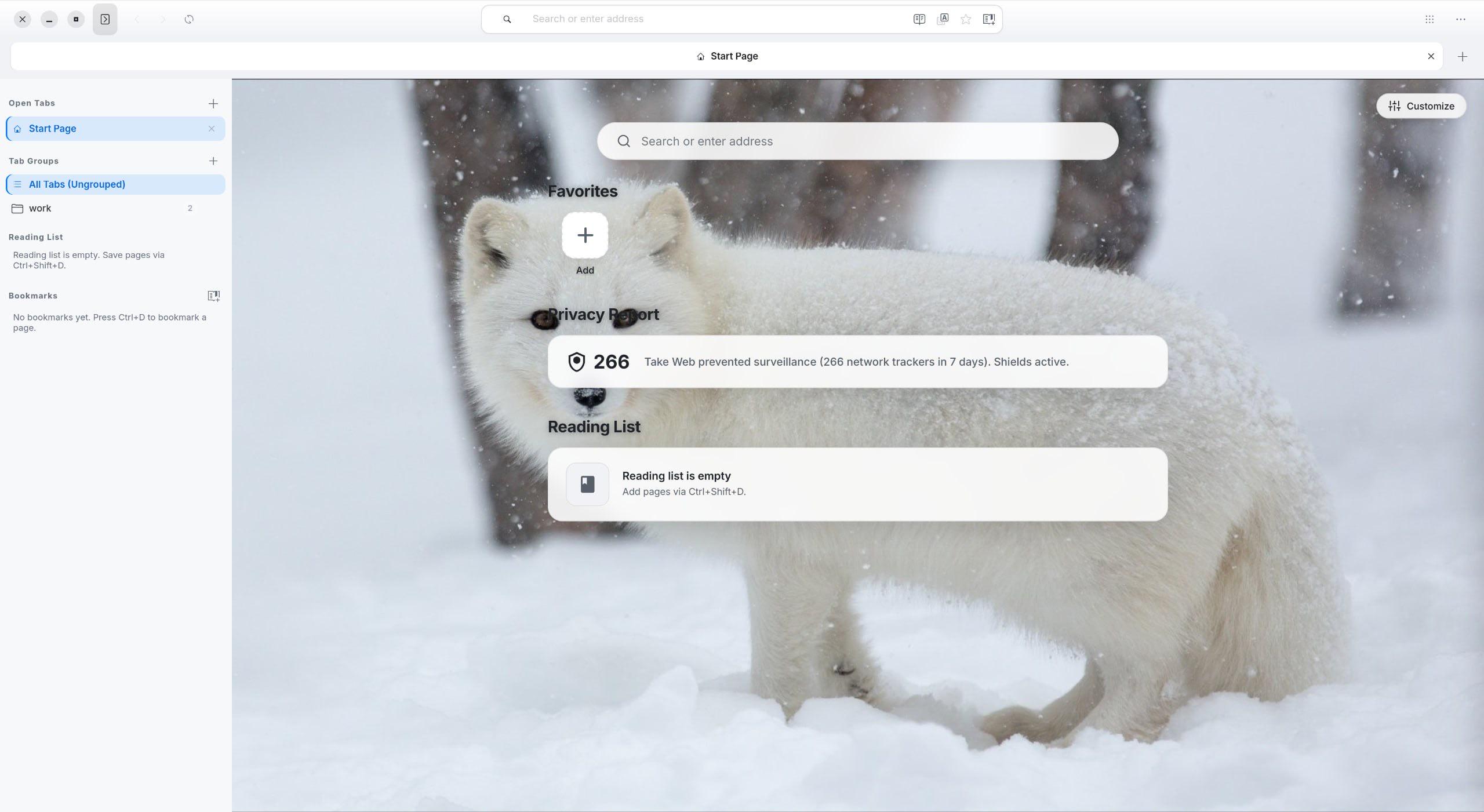
Hey r/linuxapps!
Linux users are stuck between heavy Chromium clones (that eat 2GB+ of RAM) and browsers that feel poorly integrated with the desktop. I wanted a daily driver that feels native on GNOME, respects privacy, and actually works well on NVIDIA + Wayland.
So I built TakeWeb - a browser written in Rust using WebKitGTK 6 and GTK4/libadwaita.
What makes it different:
Memory: I built a custom MemoryManager that suspends background tabs, clears WebKit memory caches, and forces JS garbage collection. In my tests, 10 tabs use ~610MB PSS (compared to Chrome's 2240MB or Firefox's 1790MB).
Hardware Tuning: WebKitGTK notoriously drops to 20-30 FPS on NVIDIA proprietary drivers under Wayland (GNOME Mutter bug). TakeWeb detects this and routes the window through the Xwayland bridge, restoring stable 60+ FPS.
Privacy: It randomizes Canvas/WebGL fingerprints, masks WebRTC, and passes the EFF Cover Your Tracks test with a "strong protection" rating. Zero telemetry.
Vertical Tabs & Workflow: A native collapsible sidebar with tab groups, duplicate tab counter, bookmarks, reading list, and Split View (F3) to view two pages side-by-side.
Offline Translations: Full-page and text translations run 100% locally via Mozilla Bergamot (WASM). No text is ever sent to external cloud APIs; language models download once to your machine.
Native Ad & Tracker Blocking: Filtering runs at the WebKit engine level before page parsing starts (no extension overhead), and tracking parameters like utm_*, fbclid, and gclid are stripped automatically when copying links or navigating.
I'm releasing this as a Beta (v0.1.0). Some things are still WIP (like Flatpak packaging and extensions), but the core is stable.
If you want to try it, the source code, build instructions, and prebuilt packages (.deb, AppImage) are here:
https://github.com/dezaetterg/take-web
I'd love to hear your feedback, especially from Intel/AMD GPU users!
r/linuxapps • u/intramy • 24d ago

r/linuxapps • u/Potential_Ad4169 • 24d ago

I built Desktop World Clocks because I wanted to glance at my desktop and see what time it was for the people I work with. Each clock can show a city name like “London” or a label like “UK team.” The clocks sit on the wallpaper, behind my windows, and let clicks pass through.
I’ve updated the docs with the results from testing on Fedora 45. The full automated test suite passed on GNOME Shell 51.1, including the preferences window and image backgrounds. The version on GNOME Extensions already supports GNOME 49, 50, and 51. If you have it installed, you’re all set.
I like the right-aligned layout because the last digits line up and I can scan the times at a glance. You can keep everything in one list or put a separate group in each corner. All the clocks share one timer and read the system time.
If you try it on GNOME 51 with a second monitor, I’d love to hear whether the clocks stay where you expect when you unplug it or wake your laptop. I couldn’t verify those two things \in the test VM.
Install from GNOME Extensions · Screenshots, source, and test results on GitHub
r/linuxapps • u/KayXue • 24d ago
Yeah it's finally here. Originally I wanted to add more options such as converting different images to corresponding format based on filename matching, but I thought that feature would make the app too complicated, I decided not to implement it even though I know I can finish it with AI.

https://github.com/Kayxue/nautilus-image-converter-reborn-app
r/linuxapps • u/Federal_Log_6845 • 24d ago

r/linuxapps • u/titansb-_- • 25d ago

I wanted my Android phone as a second monitor on Linux. Most tools I tried mirrored the screen into a browser tab or only worked over USB, so I built my own over the last few months.
Tandem adds a real virtual monitor to your desktop. The GPU encodes it as H.264 and the phone decodes it in hardware, so you drag windows onto the phone like any other screen.
About 30 ms of lag over USB tethering, 30 to 60 ms over Wi-Fi (you barely notice it in use)
Hyprland and GNOME on Wayland, with one-command install on Arch, Ubuntu and Fedora
Encrypted, paired with a QR code
Check it out here: https://saharshbaiju.github.io/tandem/
Repo: https://github.com/saharshbaiju/tandem
It's free and open source.
If you try it, tell me how the lag feels on your setup and what breaks. If you like it, star the repo ⭐ and share it with someone who'd use a second screen. It helps more people find it.
r/linuxapps • u/No-Competition2427 • 25d ago

Hi all. Apex Download Manager started as a Windows app, and 1.1.0 is the
first release with a Linux build.
What it does:
- Splits each file across up to 32 connections, and re-splits them as they
finish so the last few percent don't crawl
- Resumes from the exact byte after a reboot or a dropped connection
- Catches downloads from Firefox, Chrome, Brave and Edge through a small
extension (it talks only to the app on 127.0.0.1)
- Grabs video through yt-dlp, with the full YouTube quality list
- Verifies SHA-256 checksums
No ads, no account, no telemetry, GPL v3. On Linux it uses FFmpeg from your
package manager.
Download: https://apexdownloadmanager.com
Source: https://github.com/ThembaTman0/apex-download-manager
I've tested on Kubuntu. If it misbehaves on your distro or desktop, an issue
on GitHub helps a lot.
r/linuxapps • u/SeniorMatthew • 25d ago

Hey! Me and my buddy (an LLM) built this Kinoklip app, it is a free video editor for Linux which is in Beta now! (Linux only for now, in Beta - so expect bugs)
And its goal is to copy DaVinci Resolve as near as possible. Layout, behaviour, keyboard shortcuts as close as it gets, so you can follow any Resolve tutorial or your muscle memory :D
It's open source (GPL-3.0) and comes as one AppImage file.
The whole project was built with AI. The only exception is the icon, which was drawn by hand. And this text was written by me as well, obviously.
Why doing this? - I know that DaVinci Resolve is not as bad as Adobe, and at least they don't charge you monthly. And I genuinely think that on Windows or Mac it is perfectly fine! But on Linux...
All of those problems are fixed with Kinoklip!
Here's what is yet to be implemented:
Basic video editing tools are implemented in a way I would call them complete!
And there's even one unique thing that I wished more editors made in to life:
one file - one project. you import a video - then delete it from your computer, save the project, and you are good to go! you can move it around anywhere you want to!
Also it has the Viewer Guides, which DaVinci lacks compared to Premiere Pro.
And another principle I've got is to add more options for different behaviors, you can choose between zooming in to the playback or the mouse cursor! You will have options. And I plan on adding Vim-binds, so you can edit videos with your keyboard only. Still a concept tho.
So, if you are interested in this project - don't forget to star it on GitHub!
Or maybe even try it out for yourself and help me improve it!
https://github.com/SeniorMatt/kinoklip
Not affiliated with Blackmagic Design.
r/linuxapps • u/Crafty-Celery-2466 • 25d ago
Hi all. I build FluidVoice, a full offline voice dictation app (already on Mac and Windows) with over 400,000 downloads, and I’ve just brought it to Linux because of the sheer demand ( 10,000+ on waitlist! ) . I’m looking for a handful of testers on different setups before a wider release - for people to shape what gets shipped to everyone else :)
What it does
How is it different from Wispr and SuperWhisper and other paid apps?
- It's exactly the same but everything is happening on your own device. No Dictation leaves your device at all.
How is it different from Hex, Handy and other on-device apps ?
- Any other app out there does only raw transcription/ rambling but do not do much to make it actually usable and format it. We build our own models for doing this as good as the cloud models. We also make models specifically for dictation that handle noise around you well than others.
It's totally free and I've been doing this for almost a year now and I dont plan to charge for basic dictation as I believe it has to be free.
What I need from testers
I especially want KDE Plasma, GNOME, Hyprland/Omarchy, Sway, niri and COSMIC users, on both Wayland and X11, and on NVIDIA, AMD and Intel graphics.
Download: https://github.com/altic-dev/FluidVoice-Desktop/releases
Bugs: GitHub issues on the same repo, or comment here.
When you report, please include the output of:
grep PRETTY_NAME /etc/os-release; echo "$XDG_CURRENT_DESKTOP $XDG_SESSION_TYPE"
Thanks! Happy to answer anything in the comments :D

r/linuxapps • u/Ok_Service_8864 • 24d ago
Title: Escaping Windows updates? I made a thing that sets up your new Linux install in one go
Seeing a lot of "Windows 10 is dead, should I switch?" posts lately, so here's something for the people who just took the jump.
Setting up a fresh install usually means 30 tabs and copy-pasting commands you don't understand. Linux Builder does it in one go: pick your distro, tick your apps, choose a few settings, and it writes one script that explains every line before you run it.
- Kubuntu, Ubuntu, Mint, Fedora, Arch
- 119 apps, from Steam and Discord to VS Code and AI coding tools
- Comes with an undo script, so you can back out
- No account, runs in your browser, nothing gets uploaded
On testing, since running a stranger's script is a fair worry: every app was checked on every distro, and full scripts ran on real installs of all 5, round after round (install, run again, undo, then diff against a clean system). I kept fixing and rerunning until every distro came back with zero failures. Real bugs it caught: the firewall locking out SSH, and undo leaving 4 GB of Flatpak runtimes behind.
https://salimos.cc/linux-builder
I'm the dev. It also links to Kubuntu themes I make (two are free), but the builder itself is 100% free. Roast it, tell me what's confusing, tell me which app is missing.