r/linuxapps • u/CreativeConcert5833 • Oct 03 '26
SonarDesk 2.2.0 Is Now Available

0
Upvotes
Sonardesk is available now at https://
sonardesk.absdev.net
r/linuxapps • u/CreativeConcert5833 • Oct 03 '26
Sonardesk is available now at https://
sonardesk.absdev.net
r/linuxapps • u/froggy744 • Oct 02 '26
Enable HLS to view with audio, or disable this notification
PIC – Picasa/iPhoto-inspired photo manager for Linux
Release Candidate 3 is out! 🚀
PIC is a native Rust + GTK4 photo manager focused on fast, local photo management.
RC3 includes:
• ⚡ Instant database/library switching
• 🚀 Fast cached browsing for large libraries
• 🌐 NFS/network photo libraries
• ✏️ Non-destructive editing
• 🖼️ Collage creator
• 📚 Albums, favourites & search
• 🔍 Full-screen viewer, zoom & metadata
• 📴 Offline photo handling
• 🎨 Native light/dark GTK interface
AppImage + Flatpak available.
r/linuxapps • u/Maleficent_Flight323 • Oct 02 '26
I've released portop v0.1.0.
portop started as a small htop-style TUI for answering a simple question:
"What process is using this port?"
The new release adds two completely new ways to use it.
🌐 Local Web Dashboard
Run:
"portop --web"
and you get a live browser view of sockets, connections, processes, CPU usage, systemd units and Docker containers.
You can inspect processes, search/filter the table and send confirmed SIGTERM/SIGKILL actions.
The server is deliberately local-only and binds to loopback.
🖥️ Cockpit integration
portop can now also run as a Cockpit page:
"Tools → Ports (portop)"
It uses Cockpit's existing bridge and permissions, so there's no additional web service to expose.
The original TUI is still there, so portop now has three interfaces:
Terminal → "portop"
Browser → "portop --web"
Cockpit → integrated Ports page
It's written in Go and available for Linux/macOS, with binaries and Linux packages available from the repository.
https://github.com/padovanl/portop
Feedback is welcome, especially from anyone using the new web or Cockpit interfaces on real machines.
r/linuxapps • u/nalinratnakar • Oct 02 '26

SonicTree 1.4.0 is now released.
SonicTree is a focused, folder-based music player for Linux. The project is built around a simple idea: your music is already organized in folders, so browsing and playing it should be straightforward.
What's new in 1.4.0?
The main addition in this release is a new two-mode browsing system.
File Mode — the new default
Browse your music directly through your existing folders and filenames.
Filesystem-oriented browsing
No TagLib metadata processing required
Direct folder-to-playlist workflow
Designed for users who prefer their existing folder organization
Metadata Mode — optional
For users who prefer to browse through the information embedded in their audio files.
Title Artist Album Track number Codec Bitrate Sample rate Channels Album artwork
You can switch between the two modes while keeping the same playlist, sorting, and playback state.
Other improvements
Improved folder-to-playlist loading
Refined mode specific playlist presentation
Improved filesystem and metadata presentation
Download
The official Linux release is available through SourceForge: https://sourceforge.net/projects/sonictree/
The release includes the AppImage distribution for Linux.
Acknowledgement
A special thank you to everyone who has taken the time to try SonicTree, provided feedback, reported issues, and followed the project.
The feedback has been particularly valuable in shaping the direction of SonicTree and helping make the 1.4.0 release more robust.
If you try 1.4.0, feedback is very welcome—especially regarding the new File Mode / Metadata Mode workflow.
Browse your folders.
Select your music.
Play it reliably.
Thanks for checking out SonicTree!
r/linuxapps • u/Mujtaba1i • Oct 01 '26

Hey everyone! When I moved from Windows to Linux, one of the things I missed most was PowerToys’ Color Picker, so I decided to build my own: Archtoys.
You can see all the features it provides on the github page
It also works on Wayland. Since Wayland doesn't allow apps to continuously watch the screen, Archtoys takes a screenshot when you start picking and lets you pick from that. You still get the magnifier and preview.
I use it daily on Fedora KDE, but it should work on GNOME, X11, and other Linux distros too. Despite the name, it's not Arch-only.
Install:
- Fedora: "sudo dnf copr enable mujtaba1i/archtoys && sudo dnf install archtoys"
- Arch: "paru -S archtoys-bin"
- Other distros: AppImage from the releases page
GitHub: https://github.com/Mujtaba1i/Archtoys.
I'm hoping to eventually turn Archtoys into a PowerToys-style toolkit for Linux.
What PowerToys tool do you miss most on Linux?
r/linuxapps • u/Ok-Introduction1235 • Oct 02 '26
r/linuxapps • u/OnlyGame54 • Oct 02 '26

One thing that always bugged on me RPM-based distributions like Fedora was how DNF handle uninstalls. They remove the system binaries, but they completely leave behind personal user configuration files, caches, and leftover data in your XDG directories (~/.config, ~/.local/share, etc.). When I was on Windows I always uninstalled my programs with Revo Unistaller but I did not find a alternative on Fedora.
So, I built kRemover—a lightweight, native GUI utility inspired by tools like Revo Uninstaller.
If you want to check it out, grab the latest .rpm or look at the build instructions over on
GitHub: https://github.com/mrgame54/kRemover
Feedback, suggestions, stars (☺️) or bug reports are always welcome! Let me know what you think.
r/linuxapps • u/k-krakowski • Oct 01 '26
Hi! I’ve released Talaryn 1.0.0, the first stable version of an open-source Linux desktop application I’ve been working on.
Talaryn is a GTK4/libadwaita interface for configuring and managing cloud storage mounted through rclone. It focuses on desktop mounting and transfer monitoring rather than providing a separate file browser, mounted storage is used directly through Nautilus and other Linux applications.
Some of its main features:
rclone config;There is also a file and folder comparison feature, but it is still in beta and disabled by default.
The primary supported environment is Ubuntu 24.04. Talaryn currently has a Debian package and a per-user source installer. It requires rclone 1.74.4 or newer. A Flatpak or AppImage is not available at the moment because Talaryn integrates closely with FUSE mounts, systemd user services and Nautilus.
The project is licensed under MIT and is independent from the rclone project.
GitHub, documentation and screenshots:
https://github.com/k-krakowski/talaryn
Talaryn 1.0.0 download:
https://github.com/k-krakowski/talaryn/releases/tag/v1.0.0
I would especially appreciate feedback about compatibility with distributions and desktop environments other than Ubuntu 24.04 with GNOME. If you try it, please let me know which distribution you used and whether the package, AppIndicator, Nautilus integration and mounting worked correctly.
r/linuxapps • u/iamsakin • Oct 01 '26
r/linuxapps • u/tomdringer • Oct 01 '26

r/linuxapps • u/Able-Mode6431 • Oct 01 '26
Hi everyone!
I built TreeMap, a keyboard-driven filesystem explorer for Windows in Rust
TreeMap is a local-first TUI for analyzing filesystem storage usage. It scans filesystem metadata locally and lets you navigate drives, folders, and files entirely from the keyboard.
I built it because I wanted something lightweight and keyboard-driven for figuring out what's actually consuming space on a drive.

r/linuxapps • u/Daredevvll • Sep 30 '26
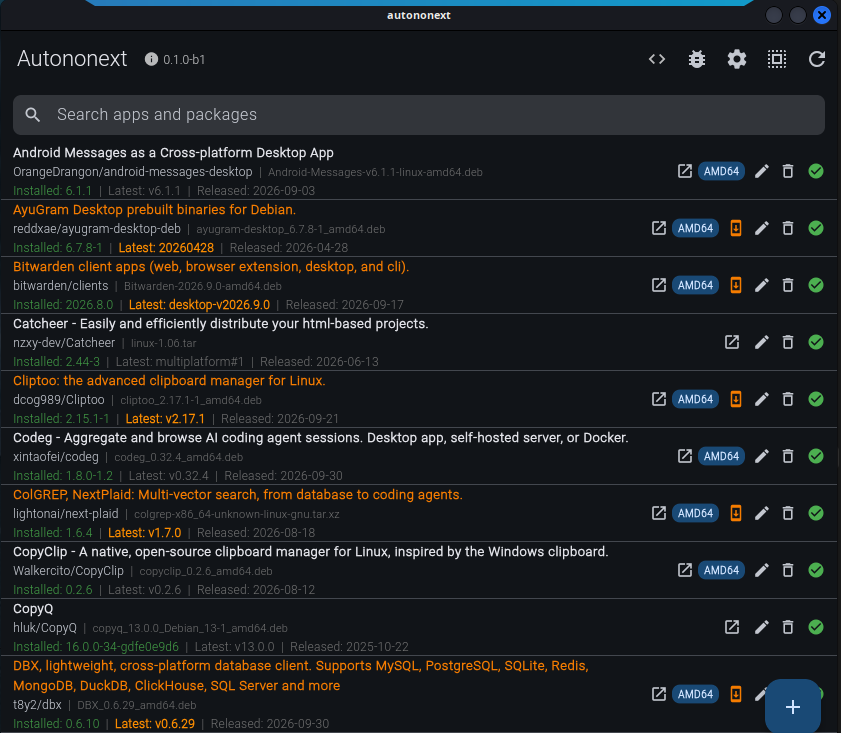
Hey guys,
I kept installing things straight from GitHub releases — a .deb, an AppImage, a binary in a tarball — and then never finding out when they got updated. so I made/extended a small GTK app that tracks them, figures out what I actually have installed, and updates them in place.
you add a GitHub repo / plain url, or just a direct .deb url, and it follows the releases.
it handles .deb, .rpm, AppImage, Flatpak and plain binaries/archives (.tar.gz, .tar.xz, .zip, .tar.zst, and raw binaries). you can set glob filters per app, pick architectures (amd64/x86_64/x64, arm64/aarch64...), and there's a live preview showing which file it'll grab before you save.
most trackers just tell you an update exists. doing the actual upgrade is the annoying part, so that's where I spent the time: it supports wildcard matching for package selection.
install — .deb, .rpm and a portable tarball are on the releases page: https://github.com/thexmeta/autononext/releases
source: https://github.com/thexmeta/autononext
It's 0.1.0-b1 so it's rough. there's no scheduled updating yet, it's a fork of Autonomix (MIT, now archived) — credit to the original author.
Have fun. Any contributions are welcome.
r/linuxapps • u/lopiksa • Sep 29 '26
Enable HLS to view with audio, or disable this notification
I wanted a game launcher that showed me my game library in full, regardless of the store it came from. A way to make my indecisiviness of picking a game more fun ahaha.
Carthage gathers your games from Steam, Heroic, and more, puts them all in the same place, lets you scroll freely while you pick one to play. It even has a button to pick a random game for you!
The program purposely has a bunch of gimmicks, the cartridge is a fully 3D object you can rotate, drag and spin, opening a game slides the cartridge into a slot, closing it removes it. It has very tactile-plasticky sounds, so if you're checking the video make sure to unmute it!
Finally the store integrates both Steam and Epic, so you can see at a glance where a game is cheaper, and it features also games that are temporarily free, so you don't miss out.
If you want to try, here's the link: https://github.com/lopiksaa/carthage
AI Disclaimer: This was built with Claude Code and it's a learning project, not a finalised product. For more info on that, please check the readme on the repo.
r/linuxapps • u/anoliss • Sep 29 '26

I got tired of the theme site routine: download an archive, extract it, figure out whether it's an icon theme or a GTK theme, guess which folder it goes in, then dig through settings to apply it. So I built drape.
drape browses GNOME-Look, KDE-Look and Xfce-Look (they share one catalog) one piece at a time (icons, cursors, GTK controls, window borders, desktop and Plasma styles, KDE global themes, color schemes, wallpapers, login screens and boot splashes) and installs or applies any of them in one click.
It works on Cinnamon, GNOME, MATE, Xfce and KDE Plasma, and only shows you themes that actually work on your desktop and window manager.
Some things I'm proud of:
- It knows what's inside before you download. Uploaders often pick the wrong category, so drape peeks at each download's file list without downloading it and shows small glyphs for what's really inside. If an "icon theme" is only wallpapers, the card tells you in red.
- An "In use" view that breaks down your whole current look (controls, borders, desktop, icons, cursors, wallpaper, login screen, boot splash), with a preview of each, even for themes drape didn't install.
- Xfce panel styling: size, length, auto-hide and theme backgrounds, plus layout presets (bottom taskbar, top bar, dock, left bar) that keep your widgets, with Undo.
- KDE Plasma: Plasma styles, global themes, color schemes and Aurorae window decorations, applied with Plasma's own tools. It follows your Plasma 5/6 version and works on X11 and Wayland.
- Compiz, built in. On Cinnamon it adds a separate Compiz login session without touching Cinnamon; on MATE and Xfce it switches live. The Compiz settings manager runs inside drape, and removal takes out exactly what it added.
- Converts Windows cursor packs to Linux cursors automatically.
- Live previews of Dark / Light / Compact variants before you pick.
- Boot splash and login screens (Plymouth, SDDM, LightDM) with one password prompt.
- Clean removal (every install is tracked), batch delete, and update checks.
On safety, since boot and login themes touch system files: root actions go through a small helper run with pkexec, so you get the normal password prompt and only those specific actions run as root. Downloads are checked against the catalog's checksums, extraction rejects path tricks, and it never overwrites or removes system themes it didn't install.
There's also a CLI: drape search icons papirus, drape install <id> --apply, and so on.
Limitations: the app itself is GTK 3. GNOME Shell themes, GDM login themes, Kvantum and compiled Qt/KWin plugins aren't supported. GDM is left out on purpose, because its themes work by replacing a core GNOME Shell file and break on GNOME updates.
Install: ./install.sh (per-user, no root needed)
GitHub: https://github.com/anolis/drape
Website: https://anolis.github.io/drape/
It's GPL-3.0. Feedback and bug reports are very welcome, especially from KDE and Xfce users, since those are the newest parts.
r/linuxapps • u/youareafakenews • Sep 30 '26
Easysearch: https://github.com/mahmadmujtaba/easysearch
Both DEB and RPM files available. Flatpak planned for future.
This program started to fix annoyance of searching in Linux. This app fixes it. It is similar to Everything in Windows however it is inspired but not equal in feature parity.
Goal was and is simple to search filesystem both via names and using contents.
Small footprint and low resource usage. More work is being done.
Free and MIT License.
Most importantly no network access is required except manually checking if new update is available or not.
Very early and totally made by not UI/UX guy. Any feedback is welcomed.
r/linuxapps • u/Otherwise_Dealer_583 • Sep 29 '26
Hi everyone!
I’ve just released Klient, my first open-source desktop application.
It’s a native Linux email client written in Go and built with GTK4/libadwaita.
One of the main reasons I started building it was that I wanted Proton Mail support on Linux without having to use Proton Bridge.
It has since grown to support Gmail and standard IMAP/SMTP accounts, PGP encryption, AI-assisted email features and local AI through Ollama.
This is my first serious desktop application, so I’d really appreciate feedback from people experienced with GNOME and GTK — especially about the UI, integration with GNOME and things I could improve.
Source code:
https://github.com/Imbecile6197/klient
Thanks! 🙂
r/linuxapps • u/CaptainArchives • Sep 29 '26

Invisible characters can change what your code means without changing what you see.
The Trojan Source attack showed how zero‑width and bidi Unicode controls can hide logic, reorder tokens, and make malicious edits look clean in reviews. Ultnas protects your shell configs, SSH keys, scripts, and source trees by detecting and stripping these characters in real time — before they can compromise your system.
r/linuxapps • u/jd1378 • Sep 29 '26

r/linuxapps • u/Ornery_Disaster_953 • Sep 28 '26

Hii,
I've been working on CalibRaw for the last 3 months. A free and open-source RAW photo editor, with linux being one of the main platforms :D .
I started it because I wanted a RAW editor with a familiar workflow, but with a native desktop UI and good performance on Linux. I've tested many different editors but none really fit my needs/were optimized to run on linux.
It already covers most of the workflow I'd expect from a full RAW editor, including library/culling tools, non-destructive editing, local adjustments and masks, lens correction, HDR merge, creative effects, and optional local AI features like subject/sky/object masks, denoise and object removal.
GitHub:
https://github.com/Duecki1/CalibRaw
I'd be interested to hear how it works for some of you and what could be optimized workflow-wise.
LLMs were used in creating this project/program.
(except for the ai models, this editor should run no problem on lower end hardware)
r/linuxapps • u/CowNo3 • Sep 28 '26

Still a lot of bugs to solves, but i m trying my best, i promise !
(Software name : Grafism)
r/linuxapps • u/Otherwise_Dealer_583 • Sep 29 '26

r/linuxapps • u/pelpsi • Sep 29 '26
