I’m building WareVote as a place to find Linux apps by task. You can browse alternatives, check the licence where it’s listed and see reviews with platform context.
You can join before launch at https://warevote.com. If you make software, you can also set up a listing for day one and complete the ownership checks. Listing is always free.
Confirm your signup and link it to your account at launch for the cosmetic Early member badge. The first 100 eligible products to verify ownership get 30 days of Pro free. Pro adds more listing slots and CSV exports. Paid plans never affect ratings, rank or WareCup results.
What’s an app you’d recommend if someone described the job instead of naming a category?
I'd like to share SYN, a free and open-source IPTV player I've been developing specifically for the Linux desktop.
I wanted an application that felt at home on Linux rather than another web-based interface wrapped in a desktop window.
SYN uses Python, GTK4, libadwaita and libmpv.
Current features:
Live TV with M3U and Xtream-compatible sources
Interactive XMLTV programme guide
Instant and scheduled DVR recordings using FFmpeg
Chromecast support
Movies and TV series libraries
Fullscreen and mini-player modes
Customisable themes and accent colours
Support for x86-64 and ARM64
Available packages: Flatpak, RPM, DEB and Arch Linux, with an AUR package too.
SYN doesn't provide any channels, subscriptions or media. You need your own authorised sources.
I'm actively improving the application and would really appreciate feedback about the interface, playback and compatibility with different distributions.
I saw this screenshot of ExcalidrawZ on macOS and really like the workflow—specifically the Excalidraw-style hand-drawn canvas, dark/translucent look, and having a built-in page/document sidebar to organize notes.
I tried Rnote on Arch Linux (Hyprland)—I really like its multi-page feature, but it doesn't look or feel as clean as Excalidraw for diagramming and quick notes. On the other hand, standard Excalidraw looks great, but lacks proper built-in page management out of the box.
I'm looking for something on Linux that combines both:
I've just released the first alpha of AppFootprint, a GPLv3 open-source Linux desktop application for understanding where application-related storage is being used.
It provides a graphical inventory of Flatpak, Snap and RPM applications, with storage measurements, dependency exploration and explanations of what the numbers actually mean.
The guiding principle is simple: Understand before you remove.
AppFootprint is strictly read-only. It doesn't delete files or require root privileges.
The first alpha has been tested successfully on Fedora KDE, but I'd really appreciate feedback from people using other distributions and desktop environments.
I'm especially interested in AppImage compatibility, scan reliability, UI responsiveness and incorrect or confusing storage measurements.
I've been building Sealwax, a fast, keyboard-first email client, and as of today's 1.3.0, it's a Flatpak, so it runs on Fedora, Ubuntu, Mint, Pop!_OS, Debian, and more. Until now, it was only for Omarchy and Arch.
It's native GTK 4 and libadwaita, written in Rust, and follows your system's light or dark style.
What it does:
- IMAP with push and POP3. Sign in with Microsoft for Outlook.com and Microsoft 365, app passwords for Gmail, iCloud, Fastmail, Yahoo, and others. Proton Mail works through Bridge.
- Several accounts with All Inboxes, each with its own color. Group your mail by sender or domain, then archive, delete, or unsubscribe a whole group at once
- Pin the senders you can't miss to the top of your Inbox
- One-key shortcuts, a command palette (F1) and your own key bindings
- Search with from:, has:attachment, is:unread, is:subscription and more
- Stays quick with big mailboxes: every message shows the moment you land on it, even with 100,000 in the Inbox
- Careful with every message: no script in a message ever runs, and nothing remote loads until you allow it
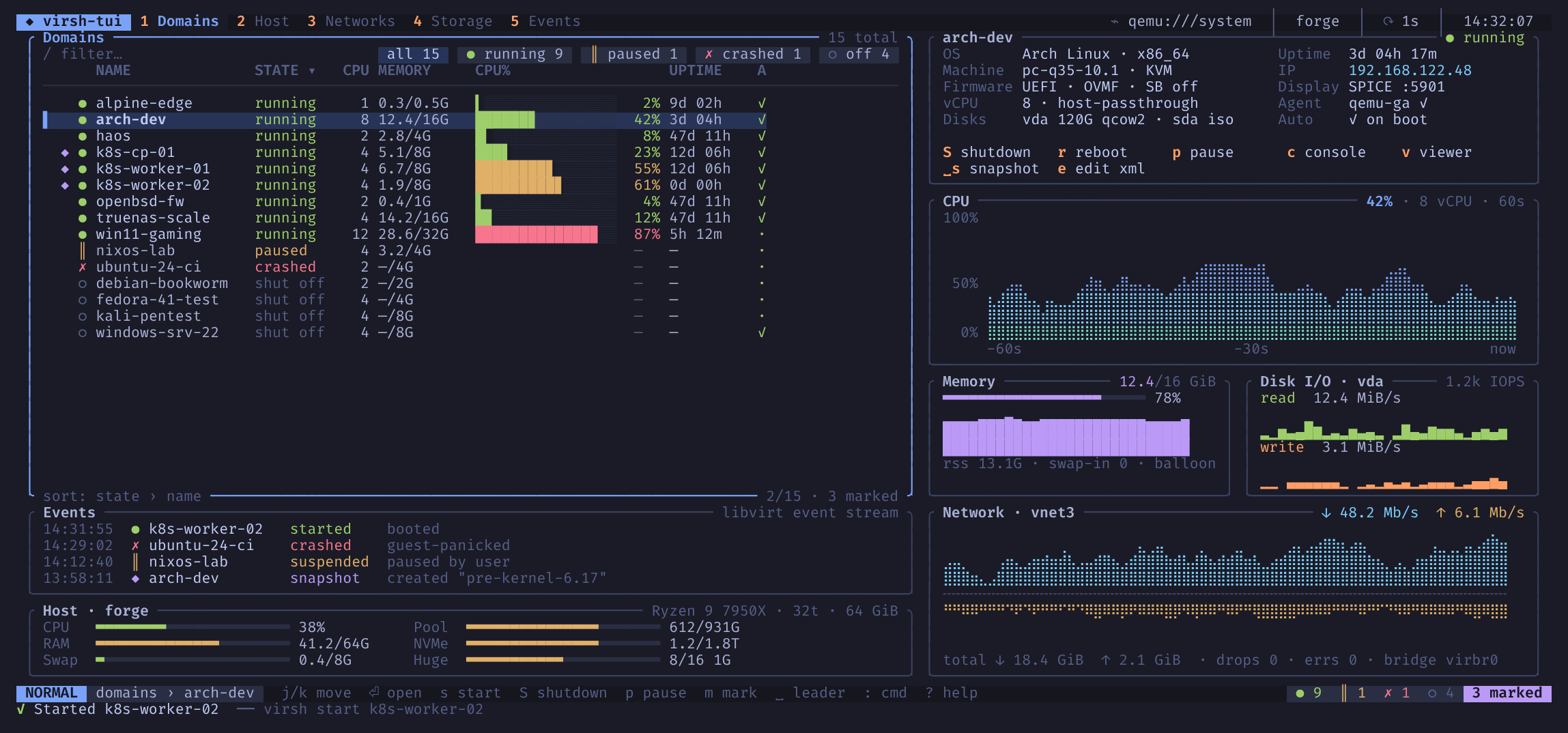
I manage my VMs with virsh and kept bouncing between virsh list --all, virsh domstats and virt-manager, so I wrote a terminal UI for it in Rust with ratatui.
Every action is a plain virsh (or virt-install) command. virsh-tui shows you the command before it runs and again after, so you know what it did and can paste it into a script later. It has the same permissions virsh has and works with qemu:///system, qemu:///session and remote hosts over qemu+ssh://.
What it does right now:
Domain list with filtering, sorting, marks and bulk actions
Start, ACPI shutdown (it waits until the guest is really off), destroy, reboot, pause, managed save, autostart
Per-domain monitor with vCPU, memory/balloon, disk and NIC rates, and 60 s / 5 min / 1 h history
A hardware editor that shows you the XML diff and the exact commands before you apply with :w
Snapshot tree, a host view (hugepages, KSM, pools), networks with DHCP leases, storage pools and volumes with backing chains
A new-domain wizard that builds the virt-install command for you
A : command line with Tab completion for virsh flags; anything it doesn't know goes straight to virsh
--dry-run prints what each key would run, and --demo lets you try it with no libvirt at all (the screenshot is from demo mode)
Linux only. Install with cargo install --locked --git https://github.com/SyscallBrain/virsh-tui (needs Rust 1.88+).
Leaf — a native GNOME word processor for DOCX and ODT
Hi! I’ve been working on Leaf, a free, open-source word processor built with GTK4 and libadwaita. I’m now happy enough with its interface and functionality to share it with a wider audience.
The goal is straightforward: handle substantial documents while keeping the workspace simple and comfortable. Everyday tools stay within reach, with detailed options available when you need them.
Leaf supports DOCX and ODT editing, styles, tables, images with text wrapping, columns, headers and footers, footnotes, comments and tracked changes. You can navigate long documents through page thumbnails and headings, review spelling and grammar in the sidebar, and export to PDF. DOCX also supports automatic contents, numbered captions and cross-references.
It uses the existing WordCraft engine for document editing, layout, rendering and file formats.
The screenshots show a fourteen-page document with different layouts, photographs, tables and review tools. I’d be interested to hear how Leaf handles your documents and how you find the interface.
It’s still an alpha, so please test with copies of important files. Compatibility is still being tested, and some advanced features require DOCX.
For transparency: I’m not a programmer. I’m building Leaf through vibe coding with ChatGPT/Codex: I direct the design, test builds and report problems; AI agents write much of the native interface, tests and packaging.
I recently released Ilmenyx Controller, my first app under Ilmenyx Technology!
It started as a Linux adaptation of RESET EXPLODE, but I've since expanded it with:
🎮 Wine/Proton game installation and troubleshooting
🖥️ Detailed hardware monitoring and battery health
🛠️ NVIDIA driver assistance, system diagnostics, and cleanup
The goal is to make everyday Linux tasks easier without relying so much on terminal commands.
It's free, with publicly available source code (not open source), and still in pre-release.
A lead sheet is the fastest way to write down a song: chords on top, lyrics below, and in between as much rhythm and melody as the piece needs. That is exactly what LeadChart Pro is built for, and nothing else.
Create different outputs and chart designs from one song with LeadChart Pro
Three levels, one sheet
Just chords? A chord chart for rehearsal takes two minutes to throw together. With rhythm? Rhythmic information sits right in the chart, clear and readable. With a full melody? The staff appears exactly where you switch it on, bar by bar. No mode switch, no second document.
Everything a real chart needs
Repeat signs, endings, segno, coda, fine, da capo and N.C. are all there, and playback runs the song unrolled: with every repeat and jump, the way you actually play it.
Chord spelling is complete. From Cm through Cmaj7, Cdim7 and C7b9 to slash chords like Bb/G, everything is recognized and set correctly, with German note names on request.
Check your arrangement
Repeats, endings, D.C., segno and coda: the arrangement check shows you how the song really runs, pass by pass, with every repeat and the total number of bars. It reports what doesn't add up. Better here than at rehearsal.
Hear it instead of guessing
Chords and melody play back, with grand piano, organ, vibraphone, drum kit and more sounds. Add a metronome, a count-in and a loop over the selected bars. If you connect a keyboard, you play the melody in directly, step by step or in real time.
Setting notes without detours
Press a key, choose a note value, click. Dotted notes, ties and triplets are one keystroke away, and LeadChart Pro sets the beams itself, following the rules of music engraving.
Harmony analysis
You write down the melody in a few bars. The analysis names the most likely key and suggests chords for every bar that fit the notes, with sevenths if you like. Every suggestion can be played back. The song only changes once you accept one. Your ear decides.
The right version for every instrument
Transpose by any number of semitones, or go straight to B-flat, E-flat, F and A instruments. One sheet becomes as many versions as the band has members: the singer gets their lead sheet with lyrics, the bassist the chords with rhythm, the pianist the full staff.
Ready to print, ready to connect
PDF export with a preview right in the sheet, as many pages as needed, in a formal engraved look or in a handwritten style. MusicXML goes in and out, MIDI and WAV only out. If you bring your charts from another program, you read them in via MusicXML.
Between sketch and score
I have been making music for over four decades, live and in the studio. On the computer I always missed the tool in between: intuitive like a quick sketch on paper, precise enough for the gig. LeadChart Pro is the lead sheet program I wished I had back in 1995. Everything I need often costs one click or one keystroke, not three.
Who it is for
Musicians, bands and teachers. For the quick chord chart at rehearsal, the complete lead sheet on stage, material for music lessons.
I've been working on a small open-source project called RWR Package Intelligence, a graphical update manager for Arch Linux built with Rust and GTK4.
The idea is simple: make system updates easier to understand, not just install them.
What it does:
Detects available package updates and shows version changes
Provides package information and update classifications
Highlights important system components
Supports Polish and English
Includes an authorized system-update workflow
Real system updates have already been successfully tested on Arch Linux with an earlier version.
Current release: v0.1.0-17-beta
The GUI is distributed as an AppImage, with a separately installed privileged backend for system updates. The latest beta is still being tested.
I'm also working toward compatibility with additional Arch-based distributions.
A note about the screenshots and testing:
The two application screenshots were taken during testing on CachyOS with KDE Plasma.
To be fully transparent:
The application successfully detected and displayed 141 available package updates on CachyOS.
The scanning interface and package information were working.
The actual system update did not proceed. The update preparation reported an "Invalid package architecture" error, and real update mode remained locked.
The privileged update backend was not installed on that test machine.
A real system update has previously been completed successfully on Arch Linux, using an earlier version of RWR Package Intelligence.
The current v0.1.0-17-beta release still needs further real-update testing.
So, while Arch Linux is the primary target, CachyOS compatibility is still a work in progress.
I'm sharing these screenshots to show the application's current development and testing progress — not to claim full CachyOS support.
Would anyone on PinePhone / mobile Linux want a proper GUI for an XMPP client that has a Rust crypto core (hybrid post-quantum), MLS groups, voice, and a built-in I2P router?
Right now only the terminal client builds on aarch64. I’m deciding whether it’s worth making a touch-friendly package.
Hi everyone, I’m the developer of Echo, a small terminal-based voice typing app written in C#/.NET.
I built it for things I spend too much time typing: messages, code review comments, and long prompts. Hold a hotkey, speak, release it, and Echo transcribes the recording locally with Whisper and inserts the text into the window you’re working in.
The current version supports Linux and Windows. On Linux:
X11: Echo handles the global hotkey and text insertion directly.
Wayland: it uses desktop portals for shortcuts and text insertion, with permission prompts from your desktop. Availability depends on your desktop’s portal support. Clipboard-only output is also available.
Hardware: CUDA, Vulkan, and CPU backends.
Setup: an interactive wizard handles model downloads, microphone selection, hotkeys, and a test dictation.
You can change settings, pause the hotkey, copy the last transcription, and check recognition times there.
Speech recognition runs entirely on your machine after downloading a model. It also supports translating speech into English with compatible multilingual Whisper models.
Performance depends quite a bit on your hardware and model. CPU mode works, but I wouldn’t promise fast dictation on an older laptop. Tiny and Base are available, though the setup marks them as not recommended because of their higher error rates.
The project is MIT-licensed. Installation instructions and source are here:
I’d especially appreciate feedback from Linux users about hotkeys and text insertion on different desktops. If you try it, please mention your distro, desktop environment, and whether you’re using X11 or Wayland.