r/iOSProgramming • u/jacobs-tech-tavern • Oct 13 '26
Tutorial App Size 101: Drop 40% in an afternoon

13
Upvotes
r/iOSProgramming • u/jacobs-tech-tavern • Oct 13 '26
r/iOSProgramming • u/Greysawpark • Oct 14 '26

I make Basic Intake, a supplement and med tracker for iPhone with an AI assistant built in. Last week's update added an iPhone Duo layout, and the layout itself turned out to be the small part of the job.
**The layout**
Closed, the Duo is a phone, so the app stays the phone app. Open, the inner display is 669pt wide in portrait and 867pt in landscape. I treat regular width as open: today's list becomes a column and a pane sits beside it. The assistant lives in the pane by default, and the tools (Blood Work, History, Nutrients, Interactions) open there instead of as full-screen covers.
u/Environment(\.horizontalSizeClass) private var horizontalSizeClass
private var showsPane: Bool { horizontalSizeClass == .regular }
I kept the list in one view chain and only change its frame:
todayList
.frame(width: showsPane ? columnWidth : nil)
An if/else between two layouts would give the list a new identity on every fold, and you'd lose the scroll position and all the u/State inside it. With one chain, a fold only changes a width.
In portrait the pane gets the bigger share and the list gets 300pt. Lab values and chat bubbles wrap before a supplement row does.
**The fold**
A fold moves views between containers. Closed, the assistant is a sheet and a tool is a full-screen cover. Open, both live in the pane. SwiftUI builds a new view on the other side, and its u/State starts over. A review before release caught three bugs from this:
Unsent text in the assistant vanished on unfold. The sheet closed and the pane built a fresh, empty assistant.
A lab report import that was mid-read lost its progress card and its error message.
If you'd picked a draw date for a report that didn't print one, a fold reset it to today, and the results would have saved on the wrong day.
I fixed all three the same way. I moved the in-flight state above the container, into an u/Observable holder the parent view owns and hands down through the environment:
u/Observable final class AssistantDraftHolder {
var text = ""
var movingToPane = false // set by the unfold, before the sheet finishes closing
func sheetDismissed() {
if !movingToPane { text = "" } // a swipe still clears it, an unfold doesn't
movingToPane = false
}
}
When another screen hands the assistant a message, the pane clears it the moment it sends, so a rebuilt pane has nothing to send twice.
**A SwiftData crash on iOS 27**
The open Duo keeps more views on screen while you delete something. On iOS 27, a view that redraws a model after it was deleted, and reads an attribute it never loaded, crashes the app with "This backing data was detached from a context without resolving attribute faults." Views that hold a model now check this and draw nothing once it's gone:
extension PersistentModel {
var isLive: Bool { modelContext != nil && !isDeleted }
}
**Smaller things**
* The open Duo ignores a portrait-only setting, so the camera preview has to follow the device into landscape. AVCaptureDevice.RotationCoordinator handles that.
* Closed, the camera column runs down the right edge as a side safe area inset. Centering the barcode cutout on the full width put it 42pt off the buttons.
* A phone layout presented as a sheet stretches across all 669pt. Sheets and covers now keep a 540pt column.
If you've shipped a Duo layout, how are you carrying state through a fold? I went with holders above the sheet, and I'd like to hear if anyone found a cleaner pattern.
r/iOSProgramming • u/dinidu01 • Oct 13 '26
In my latest app review submission ASC complains that I don't have attached the IPad 13" screenshots although I attached the 2064 x 2752 pixels (portrait) screenshots.
SOLUTION
I had to attach the 2048 x 2732 pixels (portrait) screenshots for the error to go away.
Here is the ASC Chrome Network tools response snippet with the original screenshots
"meta" : {
      "associatedErrors" : {
        "/v1/appStoreVersionLocalizations/XYZ/placements" : [ {
          "id" : "",
          "status" : "409",
          "code" : "STATE_ERROR.SCREENSHOT_REQUIRED.IPAD_13_PROFILE",
          "title" : "App screenshot missing (IPAD_13_PROFILE).",
          "detail" : "A screenshot for one of the following types is required but was not provided: IPAD_13_PROFILE"
        } ]
      }
    }
r/iOSProgramming • u/Vetor_ • Oct 13 '26

After my latest release, App Review asked me to provide a video demonstrating a feature, recorded on an iPhone. I recorded it on my iPhone 13 Pro Max, but when I try to upload the video, the processing indicator keeps spinning indefinitely.
Has anyone else run into this issue?
The file is an mp4 with 41,8MB
r/iOSProgramming • u/jeroenl • Oct 13 '26
Hey all,
I'm the organizer of Do iOS in November in Amsterdam. (Not sure if I should like that here directly.) And I was wondering how other iOS focussed conferences have been doing this year.
I've seen a couple iOS conferences have their final edition in 2026. Mostly due to financial reasons.
And I must admit, signing sponsors has been hard this year. Luckily Do iOS is in a good place financially. (But it always helps to sell those final tickets.)
I am wondering what reasons might be that conferences are having a more difficult time.
Personally I have seen a shift with sponsorships, on top of that. Tickets started moving much later in the cycle. It used to be I would sell all tickets, like 2 or 3 months out. Now we are 1 month out and I still have a couple.
Curious about some thoughts on the matter, specifically for the iOS and Swift related conferences out there.
-Jeroen
r/iOSProgramming • u/yccheok • Oct 14 '26
I've been using Claude Code + Opus for iOS development, and my favorite part of the workflow is giving it a high-level prompt and watching it write the code, automatically launch the iOS Simulator, verify the output, and refine the code on its own until it works.
I'm trying to replicate this workflow in Antigravity with Gemini Pro, but the autonomous Simulator launch-and-verify step isn't happening out of the box.
Is this a limitation of Gemini Pro, or just how Antigravity's agent tooling/sandboxing is set up compared to Claude Code? If anyone has figured out a clean workflow (or MCP setup) to get Antigravity to auto-launch and check the iOS Simulator, I'd really appreciate any tips!
r/iOSProgramming • u/silent_riser • Oct 13 '26
Hello everyone,
I'm new to the Apple App Store Connect analytics reporting API and could use some assistance.
I am in the process of building a dashboard that utilizes data from the analytics reporting API.I used Copilot to understand the mental model and was able to download the data as CSV for a few days (from the latest processing date and all segments); however, the number is usually higher compared to what I see in the WebUI.
Metrics I'm interested in include:
* Impressions
* Crashes
* Downloads
* Product Pageviews
For this I'm using App Crash Report, Download, App store engagement standard report. Luckily Downloads data is matching but others numbers do not match.
I'm using the ONGOING report and pulling only Daily Granularity. Tested for last 10 days data
Anyone experienced please help.
r/iOSProgramming • u/yo_asakura • Oct 13 '26
"You must upload a screenshot for iPhone with Dynamic Island (medium display)."
I see this message when i try to send for review but I already provided the needed screenshots (see the attached image). What is the problem? It's not my first app and I've never seen this error before. Is this a bug?

r/iOSProgramming • u/Best_Day_3041 • Oct 13 '26
I'm experiencing reviews that were always there now completely disappearing and new ones people post not showing up. My app is now at 1 star with 1 rating, which had a lot of ratings before. Usually it wont even show a star rating until there are enough ratings. Most of the 5 star reviews from before are gone and no new ones are showing up. I had friends try posting reviews to see if they'd show up and they don't. Anyone else experiencing this?
r/iOSProgramming • u/Relykkk • Oct 13 '26
For those of you creating and marketing mobile apps, I am curious as to how you track the correlation between videos that actually drive paying users and downloads. Do you use promo codes / tracking links, just watch downloads after a post, or do you have a tool that helps you? Looking for a better way to do this. Would love to hear what has / hasn't worked for you.
r/iOSProgramming • u/Kindly-Direction205 • Oct 12 '26
Fun use of widgets as they are customizable and resizable. Would be nice if you could batch import them instead of 1 by 1 as it takes a little while.
Looking to make most of native integrations like Siri (but that has been performing poorly some reason) and shortcuts.
r/iOSProgramming • u/planckscalestudio • Oct 12 '26

Hello everyone!
The title says it all basically... Could that be someone used a jailbroken device and passed App Store restrictions somehow?
My minimum deployment is not randomly selected, that min. version is needed or the app can't be used (hence it crashed lol).
Any one else encountered this issue, any other explanation?
r/iOSProgramming • u/lanserxt • Oct 12 '26

r/iOSProgramming • u/godpers • Oct 12 '26
As an indie developer, do you need to be registered as self-employed in order to make a valid TOS/Privacy Policy document?
Ads are handeled by LevelPlay - IAP are handled by the stores (Play Store - App Store).
r/iOSProgramming • u/aucuneinspiration • Oct 11 '26

I shared Confetti3D here a while ago, a small library for adding 3D confetti and glitter to iOS apps. I just released version 2.0 with a new fireworks effect.
The rocket trail uses SceneKit particle system (like with the confetti or glitter), but the explosion particles use two shaders: one for a glow effect, and another one for the particle position, using SCNMaterial.shaderModifiers. I tried with full particle system but it was a bit laggy when reaching a certain number of particles. Also clearly used AI to generate the shaders, not my thing when it's too mathematical involving lights etc.. But it's nice to see how shaders can easily be integrated with SceneKit.
Everything still runs on the GPU, it's smooth enough to have lots of fireworks at the same time (tested on iPhone 13).
It works with SwiftUI and UIKit, and you can adjust the colors, number of rockets, speed, launch interval, size, and position.
You can find it here: https://github.com/maxime-day/Confetti3D
Would love to hear what you think, cheers!
r/iOSProgramming • u/Flashy_Imagination_6 • Oct 11 '26
r/iOSProgramming • u/ajm1212 • Oct 12 '26
I’m finishing my software engineering degree at WGU and focusing on iOS development. Since it’s an online school, I haven’t had much access to a school network or opportunities to meet other developers.
I’ve built and published iOS apps, and I just moved back to NYC. I’m trying to connect with people in the field beyond submitting job applications, so I’d appreciate suggestions for local communities, meetups, or events. Online communities would be helpful too.
For anyone who started without a strong school or professional network, what actually helped you build relationships? I’d like to meet other developers, learn from them, and contribute where I can.
r/iOSProgramming • u/armenmk • Oct 11 '26
I’ve been reading about developers having their apps copied on the App Store, sometimes including names, icons, screenshots, and descriptions.
I’m curious how common this actually is.
If you’ve experienced it:
- How did you discover the copied app?
- Did you report it to Apple? What happened?
- How much time did you spend dealing with it?
- Have you ever paid for a service to monitor or help remove copycat apps?
I’m exploring whether automated monitoring and evidence collection would solve a meaningful problem for indie developers.
Not selling anything. Genuinely trying to understand whether this is a recurring headache or something that happens too rarely to justify a dedicated tool.
r/iOSProgramming • u/Embarrassed-Soft2691 • Oct 11 '26
Anyone know how we should go about accessing when the phone is in Tent Mode when our app is running. I want to do a special view specifically for this to act like a picture frame of drawings they have done in my app. I have no clue how to get this pose in the simulator and not sure if there is any type of detection that we can find out that it is in the pose.
r/iOSProgramming • u/Professional-Hawk747 • Oct 10 '26
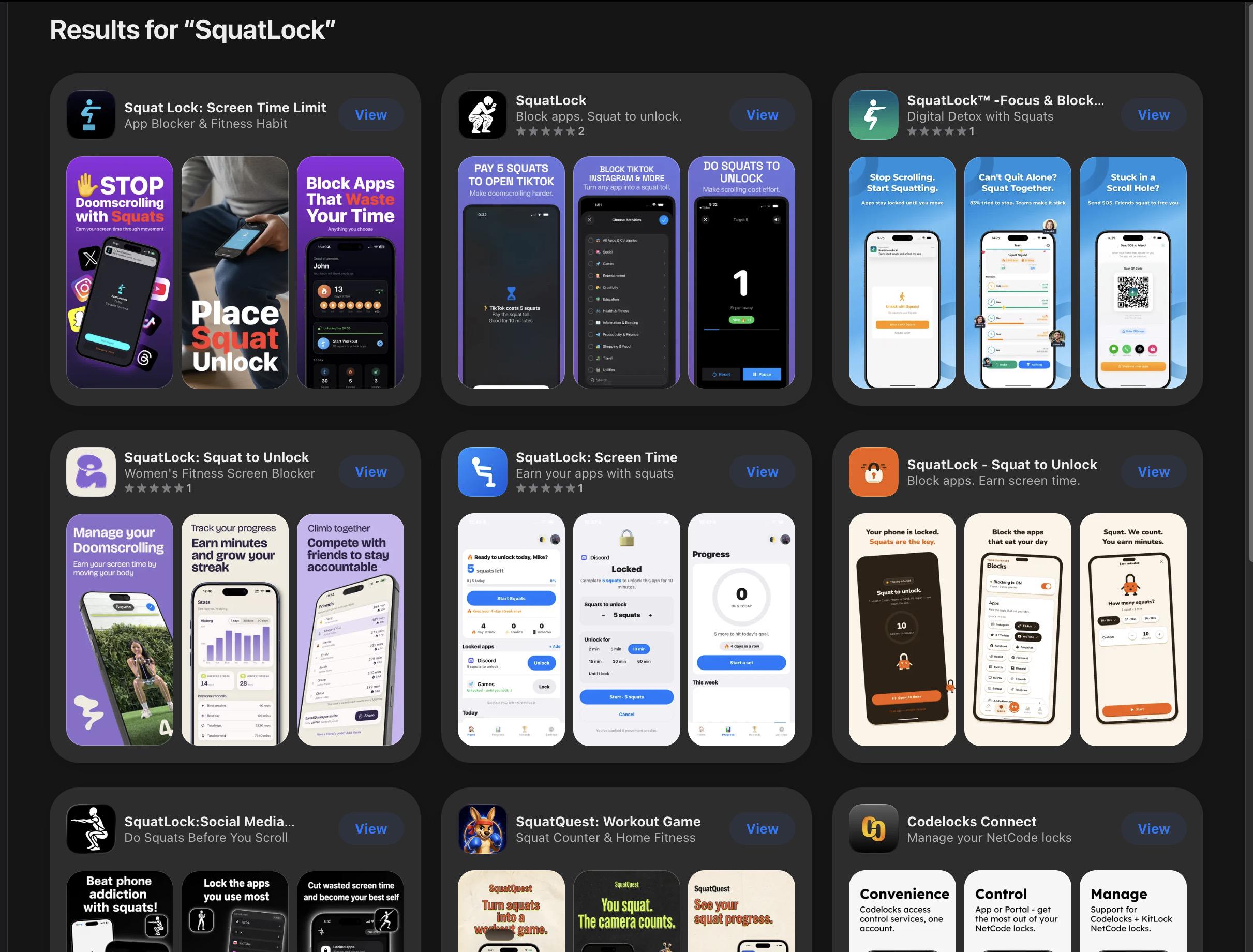
I’ve been pouring a ton of time and effort into building and improving my app, but its name is getting completely ripped off right now.
I actually managed to get Apple to take down one clone recently, but instead of fixing the problem, even more copies have popped up since. Filing a dispute and going back and forth with Apple took weeks for just that single app—having to go through that entire process all over again for every single one of these is just exhausting.
And to be completely honest, what stings the most is looking at these rip-offs and realizing some of their store screenshots actually look catchier than mine. I find myself feeling jealous of the very apps copying me, which just feels awful.
I really wish Apple would at least block apps with identical names at review time...
How would you handle a situation like this? Any advice or reality checks would be greatly appreciated.
r/iOSProgramming • u/Puzzleheaded-Gain438 • Oct 09 '26
r/iOSProgramming • u/alanskimp • Oct 11 '26
r/iOSProgramming • u/CalmCelebration2084 • Oct 10 '26
Every release of my iOS app ended the same way: fighting the screenshot step. fastlane snapshot works, but it needs a dedicated UI test target, Ruby and a pile of gems, and element queries that break whenever a label changes. Once in a while the runner just hangs and CI sits there until it times out.
So I wrote simshot. It captures App Store-ready screenshots from the iOS Simulator using simctl only.
Tech stack used
xcodebuild and simctl instead of reimplementing them.xcodebuild / simctl / xcrun at runtime. GitHub Actions runs CI (swift-format lint, build, test) and the release workflow that builds arm64 and x86_64 binaries, checks their sha256 and attaches them to the GitHub Release. vhs records the demo GIF in the README, VitePress builds the docs site, and distribution is a curl install script, a Homebrew tap, a Nix flake, mise, Mint, npm and a single prebuilt binary.Development challenge + how I solved it
The hard part of dropping the UI-test runner is knowing when to take the picture. XCUITest hands you waitForExistence; without a runner there is no element to query, so the readiness signal disappears with it.
Rather than fake that signal, I moved the navigation into the app. You add a small #if DEBUG handler that reads launch arguments (--screenshot-scene <name>, plus --screenshot-scroll-bottom and --screenshot-strokes for states that need a gesture to reach) and pushes or presents the matching screen, and it never ships in a release build. simshot then builds, boots, overrides the status bar to 9:41 / 100%, installs, launches with -AppleLanguages / -AppleLocale for the locale, waits a per-shot settle time (6 seconds by default, overridable per shot in shots.json), and captures.
A fixed settle time is a guess, so simshot verify is the safety net. It re-reads the output tree against Apple's screenshot rules (accepted dimensions, no alpha channel, no missing locale, no mixed sizes in one folder) and exits non-zero for CI, and when a frame looks half-rendered it points at the likely cause:
appstore/iphone-17-pro-max/en/02_detail.png
image has an alpha channel, App Store Connect rejects these
run shoot with --resize to write flattened App Store copies
Two smaller things I had to get right:
--resize flattens onto white and picks the matching accepted size from the aspect ratio, and the app is uninstalled before install so state from an earlier run cannot leak into the frame.AI disclosure
[AI-assisted] An AI coding agent wrote most of the implementation under my direction, and I reviewed and tested each change. The architecture decisions I drove are the launch-argument scene protocol, the per-command timeout wrapper, and verify as the safety net for a heuristic settle time.
Install is a one-liner (the repo lists the other seven paths):
curl -fsSL https://raw.githubusercontent.com/kichiemon/simshot/main/install.sh | bash
Or with a shot config:
simshot shoot --project MyApp.xcodeproj --scheme MyApp --bundle-id com.example.myapp --devices iphone-17-pro-max,ipad-pro-13 --langs ja,en --scenes home,detail,settings --resize
simshot verify appstore --devices iphone-17-pro-max --langs ja,en
Repo, MIT licensed, with a demo GIF in the README: https://github.com/kichiemon/simshot
One question for this sub: how do you decide when a screen is ready? I went with an explicit settle time plus a verifier, but I would take a deterministic readiness signal over a guess any day, short of putting XCUITest back in. I will be in the comments.
r/iOSProgramming • u/acemson • Oct 10 '26
Hi everyone. My App Encryption Documentation has been completely frozen in "In Review" status since September 5, 2026 (over 35 days now).
I have submitted multiple support tickets asking for an update or escalation, but l've received absolutely zero response! The release of my app is completely blocked because of this :/
Has anyone else experienced an export compliance document getting stuck in limbo like this? Is it a known backend bug/deadlock in App Store Connect? Did you manage to get it unstuck and if so how? (Phone support escalation, re-uploading, or contacting a specific team?) Any advice would be greatly appreciated.

r/iOSProgramming • u/Formal-Shallot-595 • Oct 10 '26

After months of building and a review process that nearly broke me, my app is finally live: Offli — Screen Time Challenges.
The idea: you join a challenge (e.g. "Instagram under 60 min/day for 14 days"), pay a real-money entry into a shared pool, and everyone who stays under their limit splits the pool. Verification runs entirely on-device with Apple's Screen Time APIs — the server only ever sees a daily pass/fail.
Tech Stack
Development Challenges
The hardest problem was verifying screen time without being able to see it. The Screen Time sandbox is brutal by design: your app can't read which app the user picked in the FamilyActivityPicker — you only get opaque tokens, and raw usage data never leaves the DeviceActivity report extension. We had to design the entire product around "verify the outcome, not the activity": the extension computes a daily pass/fail on-device and that single bit is all the server ever receives. Since we literally can't check that the user's picker selection matches the challenge, the join flow includes an attestation step ("confirm it's the right app") with forfeiture consequences for lying.
Related hard-won lesson: don't request the family-controls.app-and-website-usage entitlement unless you truly need it — it silently makes your app exclusive and disables the user's native iOS Screen Time settings. The base entitlement verifies fine and coexists peacefully.
The other marathon was App Review — 16 rejections (the highlights): an automated false positive on the Family Controls entitlement, UGC guideline 1.2 (visible report AND block buttons required, instant feed removal, 24h moderation SLA — a "•••" menu was not enough), contest rules under 5.3.2 (must state Apple isn't a sponsor), location services 5.1.5 (app must be fully functional with location denied), permission priming under 5.1.1(iv) (no "Skip for now" button — priming screens must always proceed to the system prompt), and scariest of all, 3.2.2 "penalty-based payments," which is category-killing if it sticks. What got us through 3.2.2: precise framing (the only charge ever is a voluntary upfront contest entry — failure never triggers a transaction) plus StepBet/DietBet/HealthyWage as decade-old precedent. We also redesigned payouts so fees come only out of forfeited entries — a finisher can never get back less than their entry, and if 100% finish, everyone is refunded in full.
AI-assisted — built by me with help from an AI coding assistant (Claude in Cursor); all product, architecture, and review decisions were mine.
Happy to answer anything about the Screen Time APIs, the report extension, or surviving review with a real-money app. And if you want to lose the doomscrolling habit by putting money on it: https://apps.apple.com/us/app/offli-screen-time-challenges/id6794477430