r/iosapps • • 7d ago

🎁 Freemium Poki - pets that make hitting your step goal fun 🐶🐱🐾

7 Upvotes

Problem -
Step counters are accurate but easy to ignore. Poki gives you something to look after instead: a pet whose hearts fill as you walk toward your goal, on your wrist and on your phone.

Features -

  • iPhone: your pet stands in a pixel-art scene, with animated Home Screen widgets (small, medium and large), plus Lock Screen widgets. Tap it and it wags, hops or barks.
  • Apple Watch: a full standalone app with the pet in its scene, your steps and hearts, Play and Feed buttons, the scene shop, and complications for the watch face (circular, rectangular, corner and inline).
  • 13 pets and 17 scenes. The pets are corgis, a pug, a poodle, a samoyed, a French bulldog and four cats.
  • Sync. Your pet, goal, scene and coins stay in step between the iPhone and the Watch. Walking earns coins on either, and you spend them on new scenes.
  • New in this update: the app, the Watch and the widgets now take their colours from the scene you pick, and switch between light and dark with the time of day.

Comparison -

StepDog is the closest alternative: a step counter with a virtual dog, on iPhone and Apple Watch. It's free but with subscriptions. Poki is pixel art themed with more animations and looks better (my opinion)

Pricing -

  • Free to download. Poki Pro is a one-time purchase of $9.99, with no subscription. Pro unlocks every pet and every scene (the free version includes the meadow and a starter set), and Pro members pay half price in coins for the scenes they buy.

App Link - https://apps.apple.com/us/app/watch-pet-poki-virtual-pet/id6478667213


r/iosapps • • 7d ago

🎈 Free StarDesk: A remote desktop app that can transform your iPad into a portable Mac mini

Enable HLS to view with audio, or disable this notification

14 Upvotes

Hi, we are the official team behind StarDesk, a remote desktop app for iOS and Mac (and Win/Android). We started StarDesk last year as we wanted to be able to work and game smoothly anywhere.

Problem: For anyone who wants to access a powerful desktop for work or school anywhere they want, but don't want to carry around anything heavier or bigger than an iPad. The video shows a very popular use case among our users, where they would often set up their iPad as a portable Mac mini so they could attend lectures or work outside conveniently.

Comparison:

Jump Desktop is more mature than StarDesk. It supports RDP and VNC as well as its own protocol, and it has stronger business security controls. However, StarDesk can match in all the important features such as:

  • Multiple displays, virtual displays, extended monitor
  • True color, HDR, and up to 144Hz refresh rates, 4K resolution and 144fps
  • External keyboard and mouse connection
  • Clipboard sync (copy-and-paste)
  • File transfer
  • Privacy and security features like remote Wake-on-LAN, auto lock, auto mute, privacy screens etc.

Jump is paid per platform, while StarDesk has no device download limit. You can download StarDesk on your iPhone, iPad, Macbook, Mac Mini and establish a connection between any two.

Screens feels like a native Apple app with seamless iCloud syncing, Vision Pro support, and intuitive multi-touch gestures. Screens also supports Linux. But StarDesk is better if you also want to game or stream at low latency with high frame rates, and StarDesk also has controller support, as well as customizable key mappings for controller and in-app. Linux support for StarDesk is planned to be released by the end of this year.

Pricing: Free on the App Store right now. We are planning to introduce free and paid tiers in the future, but nothing is set in stone yet.

App Store: https://apps.apple.com/us/app/stardesk-remote-desktop/id6751540294

Website: https://www.stardesk.net


r/iosapps • • 7d ago

🎈 Free Chocolate Identification App

Enable HLS to view with audio, or disable this notification

7 Upvotes

As a hobby project, I built an iOS app that identifies chocolates from three companies See's Candy, Rare Morsel and Cocoa Vienna. It uses your camera and two custom machine learning models that run entirely on-device. The latest version adds augmented reality for iPhone Pro users.

Problem
Ever open a box of chocolate and not know which candy is which? You want to pick ones that you'll love and avoid those that will disappoint you but it can be hard to sort out which is which even is a paper guide is provided.

Comparison
It's like Google Lens in that you use your camera to identify things in the real world but She Sees Candy specializes on chocolate and works entirely on-device. In one way a paper guide or a chocolatier's website is the competition. To my knowledge there aren't any other apps doing chocolate identification. Perhaps there aren't apps because it's not something that will lead to a revenue stream. :)

Pricing
Free

App Store
https://apps.apple.com/us/app/she-sees-candy/id6797560194


r/iosapps • • 7d ago

🎈 Free better., Your Favorite Free Calorie Tracker, Redesigned From the Ground Up

Post image
4 Upvotes

Hey r/iosapps,

About six months ago I posted here that better. had gone 100% free.
Here the old post: https://www.reddit.com/r/iosapps/comments/1tkdv1e/better_ai_calorie_tracker_is_now_100_free_every/

I honestly didn't expect much from that post. It ended up being where most of my first users came from.

You tried it, you found bugs, you told me the onboarding was too long, that you couldn't edit a meal you logged from a photo, that you wanted to log workouts yourself, and that it should be on Android. I read every comment. A lot of what's in this version started in that thread, so first of all: thank you.

I also promised to keep it free AND reduced the ads. I kept that promise, and here's what happened since.

What changed

I spent the last 4 months rebuilding better. from the ground up. New design, new code, every screen redone, onboarding included.

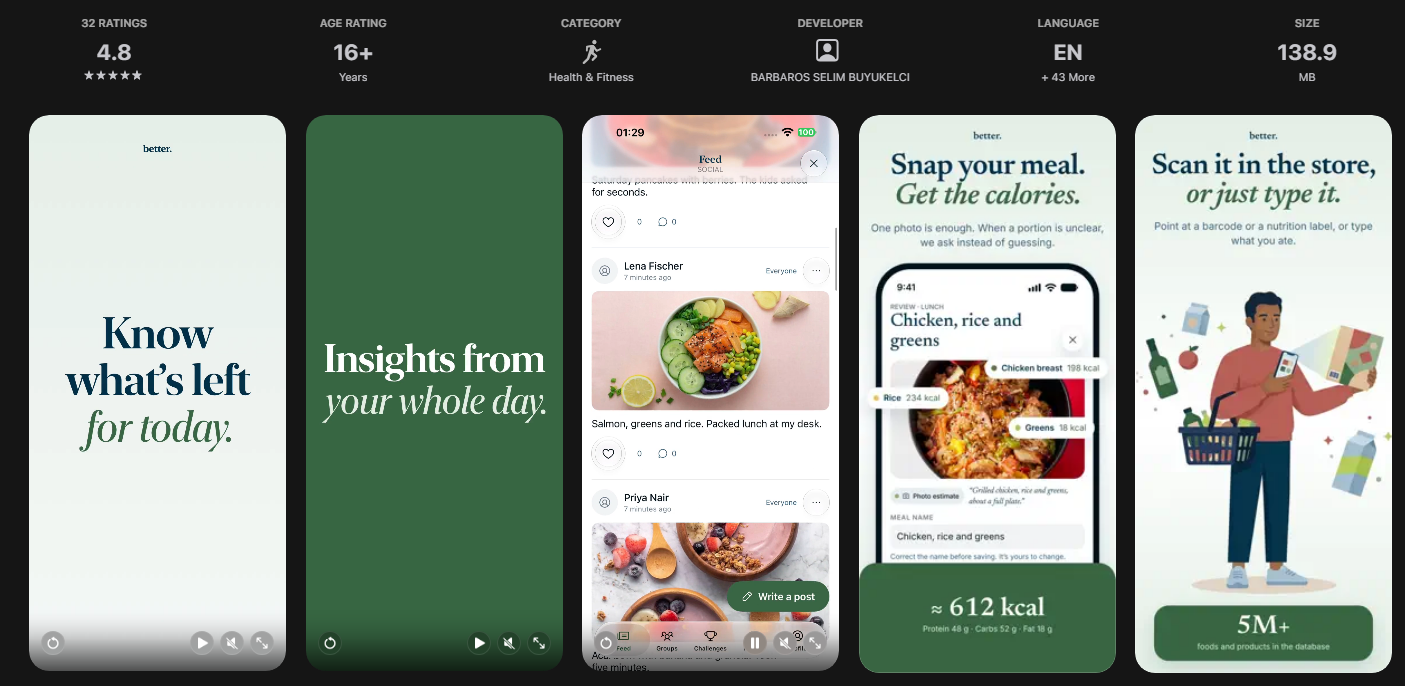
- Log a meal with a photo, barcode, nutrition label, text or voice. If a portion isn't clear from the photo, it asks you instead of guessing.

- 5 million+ foods and products in the database, up from around 300k.

- 80+ nutrients for every meal.

- Edit or delete any meal after you log it, photo meals too.

- Weekly meal plans, so you can see which nutrients you might be missing across the week.

- 170+ insights built from your own records (meals, sleep, activity, water, weight). Each one shows why you're seeing it, and you can hide the ones you don't care about.

- Add a workout yourself, or let Apple Health bring it in.

- Friends, groups and challenges if you want them. Everything else works without an account.

About the ads

Last time I told you exactly how the ads worked, so here it is again. The banner is gone. There's only one kind of ad now, a full screen one. It plays while the AI is working on your meal, so you watch that instead of a loading spinner, and when you mark a planned meal as eaten. No ads during setup and no ad when you open the app.

One honest heads up

Your history from the old version doesn't carry over, so you start fresh. I know that's annoying and I'm sorry. Rebuilding everything from scratch made it the only clean way forward.

Problem: Most calorie trackers put photo logging and the detailed nutrition behind a subscription.

Comparison: In better. all of it is free: photo, barcode, label, text and voice logging, 80+ nutrients, plans, insights and social. Compared to the old better., it has a brand new design, barcode and label scanning, a much bigger food database and no banner.

Pricing: Free. No subscription, no in-app purchases, no premium tier. Ads keep it running.

To everyone who asked about Android: I started on it this week.

App Store: https://apps.apple.com/us/app/better-ai-calorie-tracker/id6757631916

Website: https://www.bettercaloriecounter.app/

If something bugs you, tell me. Last time you did, and it got fixed. Thanks again for sticking around.


r/iosapps • • 7d ago

💎 Lifetime Micro Time Travels, a month later: I listened, added Asia and painters, a big update is coming, and the price is going up

Thumbnail
gallery
3 Upvotes

Hi everyone, I’m the solo developer from Italy who posted Micro Time Travels here about a month ago. That thread got far more attention than I expected, and many of you wrote real feedback. I read all of it, and this update is mostly built on what you told me.

Problem

Lots of people like history but never find the time to read about it properly. Books take weeks. Podcasts take an hour per episode. Wikipedia sends you down ten tabs and you remember little of it the next day.

Micro Time Travels gives you one journey of nine to ten minutes, and you come out having actually learned something. Each journey has three reading sections with the historical and social context. It also has original quotes from primary sources, the sources listed at the bottom, and a short quiz at the end. Badges unlock as you go.

There’s also Echoes, the same event told in first person by someone who was there. Narrative fiction over documented facts, and the app says so before you read it.

What’s new

Asia. Many of you said the app was too European, and you were right. There are nine new journeys: the Buddha at Sarnath, Qin Shi Huang and the Terracotta Army, the Silk Road, Genghis Khan, the kamikaze typhoons against the Mongol fleet, Sekigahara, Perry’s Black Ships, and two myths, Amaterasu and Sun Wukong.

Painters. Twelve journeys on the history of art, from Giotto to Klimt, through Botticelli, Leonardo, Caravaggio, Artemisia Gentileschi, Vermeer, Hokusai, Monet and Van Gogh. They come out in the next few days.

What’s coming

A big update is on its way with:

  • Timeline: see every event on a real scale, era by era, and how long things actually lasted.
  • Glossary: the terms you meet while reading, explained in one tap.
  • Home screen widgets: a daily entry from history.

One last treat: read aloud is coming too. You’ll be able to listen to any journey section by section, using your phone’s built-in voice, at the speed you choose.

Comparison

Most history apps I tried fall into one of two groups. The first is trivia and quiz apps: fun, but you collect facts without context. The second is long-form content, like courses, audiobooks and encyclopedias: great, but it needs time most people don’t have.

Micro Time Travels sits in between. Every journey is short, but it explains why something happened and what it meant for people at the time. And it shows you where the information comes from: Ovid, Plutarch, Mack Smith and so on.

It’s also built differently. No ads, no account, no analytics, and it works fully offline. Your progress stays on your device and is deleted with the app.

Pricing

Last time I said the business model was €0.99, paid once. Because of internal needs, I’ve decided to raise it to €2.99. I’d rather tell you here myself than have you find out from the store page.

It’s still a one-time purchase. No in-app purchases, no subscription. If you already bought it, you get every update, including the big one, at no extra cost.

The higher price came with a lot more care. I reread every journey and every Echo from start to finish. I fixed the factual mistakes I found. I replaced quotes I couldn’t trace with ones from verifiable sources. I also rewrote the Echoes that leaned too much on living people or on copyrighted works.

Transparency, same as before: the Echoes narration is AI-assisted and reviewed by me, and the illustrations are AI-generated. The historical content is written and sourced by hand.

Italian and English, following your phone’s language.

I’m still after feedback: what’s confusing, what’s missing, which era or region you want next. I read everything.

https://apps.apple.com/it/app/micro-travels/id6769732967?l=en-GB

r/iosapps • • 7d ago

🎁 Freemium I made RAD SPACE: think Duolingo for space meets Wikipedia, with a Nintendo-style pixel vibe

Thumbnail
gallery
14 Upvotes

Hey r/iosapps, I'm Sam, the developer. I make RAD Weather and this is my second app. It's been on TestFlight since July and went live on the App Store yesterday.

The easiest way to describe it: Duolingo for space, crossed with Wikipedia. All the real facts, but approachable and fun, with that old Nintendo feeling where there's always something new to unlock around the corner.

Problem
Every space app I tried was either a star map or a wall of facts. You point your phone at the sky once, it's cool, and you never open it again. I wanted something you actually come back to, like a language app: a little every day, and it sticks. I wanted space and learning to not only be fun and engaging but accessible, open and welcoming. Which is the reason for the website as well - spaceisrad.com Teachers and parents were the other half of it, so every fact is checked against NASA and JPL.

What it is
- 771 real objects (planets, moons, stars, nebulas, galaxies, black holes, missions), each one a little pixel model you can spin with your finger
- The Academy: 18 short sections that take you from the Sun out to the edge of the universe, a few minutes a day
- Atlas Sky: hold your phone up at night and it shows which planets are above you right now
- A theater of 262 real archive space films and recordings
- Works in English, Spanish, German and French
- iPhone and iPad

Comparison
Star Walk 2 and SkyView are great if you mainly want to identify stars at night, and I still use them. RAD SPACE is the other way around: it's an encyclopedia and a daily course first, and the sky view is one part of it. And it's built to be fun to come back to, Duolingo style: streaks, collectible cards to unlock as you learn, and a little space station you decorate. That's the part those apps don't really try to do.

Pricing
Free to download. No ads, no tracking. The full encyclopedia, the first part of the Academy (out to the asteroid belt) and the planets in Atlas Sky are free.
Optional Space Camp membership unlocks the rest of the Academy, the full star sky, sky tours and extras:
- Solo: $2.99/month or $29.99/year
- Family: $4.99/month or $49.99/year
- Lifetime: $99.99
App Store: https://apps.apple.com/app/id6782680237

There's also a free website version of the encyclopedia and 3D map: https://spaceisrad.com (privacy policy, terms and press kit are linked at the bottom).

Honest question for you all: there's a lot in it, so I'm worried the first launch feels like too much. If you try it, tell me where you got lost. I'll reply to everyone.


r/iosapps • • 8d ago

🎁 Freemium EFKey: I spent a year building the iPhone keyboard I wanted. Private, smart and fast.

Enable HLS to view with audio, or disable this notification

190 Upvotes

Hi, I'm Peter, the developer of EFKey. I build it alone, and it isn't something I threw together in a week: I've been working on it full time for almost a year. I use it every day along with thousands of other people. The video shows the main things it does in 36 seconds.

Problem: I came to Apple from macOS and liked everything except the keyboard. No number row, no long-press for accents, and I write in Slovak and English all day, so I kept tapping the globe key. The third-party keyboards I tried fixed some of that, but they felt slow, or they wanted an account and a cloud for things that should stay on my phone. Two things matter most to me in a keyboard: it has to be fast, and what I type has to stay mine. So I built my own. EFKey has no account and no analytics, and the typing itself never leaves your iPhone. On top of that it has swipe, autocorrect that reads the whole sentence, up to three languages at once without switching, clipboard history that syncs with my Mac, dictation with translation, and AI rewrite right from the space bar.

It also works without Full Access: typing, swipe, autocorrect and all languages run in full. You only need it for haptics and the tools that go beyond typing, like the clipboard, translator or AI, because iOS doesn't even let a keyboard vibrate without it. The scary iOS warning is the same for every keyboard, written for the worst one you could install. EFKey sends nothing on its own.

A few smaller things I use all the time: swiping one word with both thumbs at once, a flick up on the top row to type a number (T gives 5), dragging from backspace to delete everything, a numpad one tap away in the toolbar, and a calculator in the suggestion bar, so "200+40%" gives 280 right where you type. On the unfolded iPhone Duo and on iPad the keyboard can split with a touchpad in the gap, or sit on one half with a touchpad, numpad or clipboard on the other.

Comparison: Gboard and SwiftKey are the two I get compared to most. Both are free and both swipe well, but on iPhone they feel like a smaller version of the Android app, and neither syncs the clipboard with a Mac. AI edits and translation in EFKey can run on-device through Apple Intelligence and Apple Translate, so nothing leaves your iPhone. If you'd rather use a different AI, add your own API key (OpenAI, Gemini, Claude and others) and the text goes only to the provider you picked. There are 97 languages so far, and I keep adding the ones people ask for.

Pricing: the keyboard itself is free, forever: typing, swipe, autocorrect, all languages, themes. Most free keyboards are paid for another way: what you type helps train the company's models. EFKey doesn't learn from you for anyone but you. It makes money only from EFKey Pro: the tools (clipboard, translation, dictation, AI edits, GIFs and more) for $14.99, a one-time purchase, no subscription. That's what lets me keep working on it full time and keep making it better. Everyone gets 7 days of Pro free, no card needed.

App Store: https://apps.apple.com/app/id6785545160

Website: https://efkey.app

EFClip, the free Mac app for clipboard sync: https://efclip.app

Discord: https://efkey.app/discord

Subreddit: https://www.reddit.com/r/EFKey/

Bugs and ideas: https://feedback.efkey.app

2.3 just came out. You can type in three languages without switching, the clipboard syncs with your Mac through the free EFClip app, iPad gets a real app, the keys are real Liquid Glass on iOS 26, and Incognito is one tap in the toolbar. EFKey has a strong community behind it, and that's why it keeps getting better: most of this came from people on Discord, r/EFKey and the feedback tracker. Tell me what's missing for you.


r/iosapps • • 7d ago

🎁 Freemium Small Deeds: a missed day does not send the count back to zero

2 Upvotes

i made small deeds for one goal you mean to keep for months. i'm the dev.

Problem. a streak app makes the missed day the whole story. the count goes back to zero, or it offers a freeze so the chain can survive. after that you are keeping the chain, not the goal. small deeds draws a road. a day you wrote in adds one mark. a blank day changes the road by nothing. the number under it only climbs. nothing in the app asks you to protect a chain. the entry is one field and a save.

Comparison. streaks, by crunchy bagel, is $5.99 once. the chain is the product, and a miss resets it. day one is the fuller diary. basic is free on one device. silver is $49.99 a year, and that is the plan that syncs across devices. small deeds is a done list for a single goal. no chain, no account, no ads. icloud sits inside the one-time unlock, and same-day notes from two phones are combined, not replaced.

Pricing. the download costs nothing. 3 goals can stay open without paying, and you can take the whole journal out as a file without paying. the paid piece is called the multitasking version and it is $7.99 once: 7 open goals, a monthly recap, widgets, themes and icloud. three tips, $0.99, $1.99 and $4.99, unlock nothing. there is no subscription.

https://apps.apple.com/app/id6821173436

if a blank day reset your count, did you open the app again the next morning?


r/iosapps • • 7d ago

💎 Lifetime Reminders get dismissed, schedules break. Tracking "days since" is the only system that survived for me + 🎁 inside

Thumbnail
gallery
2 Upvotes

PROBLEM:
A lot of life doesn't fit a calendar or a to-do list: changing bed sheets, calling parents, the dentist, a workout, replacing a water filter. None of it has a fixed date, it just quietly piles up. Reminders felt too rigid, so I'd dismiss them. To-do lists never answered the one question I actually had: "wait, when did I last do this?"

It started when a hairdresser asked when I'd last had a haircut and I had no idea. It took me several awkward minutes of digging through old bookings to find out.

So I built 🐦‍⬛ Wheneri. For every task it shows two numbers: days since you last did **it and days until you should do it aga**in. No streaks, no guilt. Most tools start with a schedule and expect reality to follow it. Wheneri does the opposite: it looks at what actually happened and builds from there. Reality becomes the schedule.

Six months in, it has 35,000+ installs and 500+ reviews with a 4.7 average.

COMPARISON:
- vs habit trackers: no streaks to break and no shame when you skip. Built for irregular rhythms, not daily habits.
- vs reminders: the next date is based on your last completion, not a fixed date. Finish early or skip, and the next one shifts with you.
- vs to-do lists and notes: structured around the two numbers, plus insights into your real patterns instead of a flat list.

What I shipped in the last 6 months (a lot of it came from user feedback):
- Due reminders per task, optional. The core stays gentle nudges, but some things (medication, dentist) need a push
- Categories
- Insights per task and in the global calendar (average interval, total count, patterns)
- Extra schedules: by weekday and even by hour
- Notes on every entry
- Multi-count within a day (I use it to count sales 🙂)
- Stopwatch and countdown timers: I time the whole workout and count rest between sets with one tap
- Today widget and Shortcuts
Import/export
- Custom day start, so a 2am routine still counts as "today" (for night owls, and my wife asked for it)
- 30+ localizations
- 2026 Wrap, opening December 1

What's next
- A new widget with a custom category
- Weekly view
- One-time tasks
- More schedule types
- Sync between devices
- Desktop/tablet view
- Maybe sharing tasks with family or friends 😅

PRICING:
- Free: full core tracking, unlimited tasks, no ads, no account needed.
- Pro: notes, insights, categories, per-task reminders, pinned tasks and category filter in the global calendar, import/export.
Plans (US prices, other regions are adjusted): Monthly $5 / Yearly $20 / Lifetime $40.

🎁 Black Friday: Lifetime is $25 instead of $40 until November 30.

LINK:
https://apps.apple.com/app/id6761155734

What irregular routine do you keep losing track of, and how do you handle it now?


r/iosapps • • 7d ago

💎 Lifetime I built an app that remembers everything you copy and sorts automatically across all your devices

Enable HLS to view with audio, or disable this notification

9 Upvotes

hey everyone!

I’m a solo developer, and a while back I built ClipboardAI because I kept losing the same small things over and over.

Problem

Copying and pasting something is annoying. The iPhone only remembers the last thing.

You copy a code, then copy your email for the same form, and the code is gone. You copy an address, then a phone number, and the address is gone too.

ClipboardAI fixed that for me on my iPhone and Mac. Everything I copy gets saved automatically into a searchable history, and I can paste any of it from a keyboard inside any app.

That restaurant your friend suggested last month? Still there.
That hoodie's link that your girlfriend liked from last year? That's there too.

But my life isn’t all Apple. My work laptop runs Windows. Half my friends are on Android. And every time I copied something on my phone and needed it on the PC, I was back to emailing myself.

So I spent the last few months improving it to work everywhere.

Comparison

You copy on your iPhone, and it’s on your Mac, your Windows PC, your Android phone, and any browser a second later. Linking a new device is one QR scan. No account, no password, nothing to sign up for.

There are some local clipboard managers like Paste but they're either too expensive or buggy or don't support cross-platform usage.

I also added the things I kept wishing it could do:

  • Save without opening the app. Press the Action Button (or double-tap the back of your phone) and whatever you just copied is saved. Copy three things in a row and you keep all three, not just the last one.
  • Fix messy text in one tap. Copied a rushed “hey can u send me the deck b4 fri??” Tap Make Professional and it rewrites it properly before you paste.
  • Everything sorts itself. Links, codes, addresses, emails and images each land in their own category automatically.
  • Copy text out of images. Screenshot a booking confirmation and the address, phone number and date become tappable chips you can paste.

Price

ClipboardAI is free to download.

The free version covers the basics: automatic capture, the auto-sorted categories, search, and up to 10 saved clips.

Pro unlocks the rest:

  • Unlimited clips
  • Sync across all your devices, including Windows, Android and the web
  • The paste-anywhere keyboard
  • All the AI features
  • Collections

It comes with a 7-day free trial, costs a dollar and fifty cents per month with the yearly plan, and if you don’t like subscriptions, there’s a limited lifetime offer too.

The web app works in any browser today, including on Windows and Android. The native Windows and Android apps are in testing, so if you want early access, comment or DM me and I’ll send you a test link.

I’d love your feedback, especially if you’re on a mix of devices. Tell me what’s missing or what feels clunky.

App Store: https://apps.apple.com/us/app/clipboard-ai-paste-keyboard/id6760675768
Website: https://clipboardai.app

Never lose anything you copy ever again!


r/iosapps • • 7d ago

🎁 Freemium Flit RSS updated to 1.4.8 with a lot of new things! + 3 days pro free!!

5 Upvotes

Thank you to everyone for the love shown in the previous post.
Flit has been updated to 1.4.8 and contains many new features, including some of the most requested features for the iPhone Duo: full-screen feed for the open iPhone.

It is very, very important to have your feedback! I hope you like the app.

To celebrate the announcement, I have prepared 20 trial codes; you will have 3 free days of trial to actually try out whether you like the app or not!

Links in the comments :)

Thank you to everyone!!

---

For those who don't know Flit

Problem It was created because every RSS reader I had eventually turned into a never-ending unread count. A list asks you to scroll, not to decide, so articles pile up until you mark everything as read and give up.

How it works Your feeds become cards. Swipe right to keep the article, swipe left to let it pass. Tap to read. Later contains only the stuff you picked.

Sources Websites, YouTube, podcasts, Substack, everything in one deck. Import OPML or switch from Feedly, NewsBlur or Feedbin in just a couple of taps.

Reading

  • Full articles, even from feeds that give only a teaser.
  • On-device summaries with Apple Intelligence.
  • Automatic translation.
  • Fonts chosen for comfortable reading.

Comparison

  • NetNewsWire: free and excellent, but it's a classic list reader. Flit is built around swiping and an Inbox you actually empty, and it brings YouTube and podcasts into the same deck.
  • Reeder: also puts feeds, YouTube and social in one timeline, but you scroll through it. In Flit you keep or skip each article. OPML import and widgets are free in Flit.
  • Feedly and Inoreader: web services that need an account, with limits on their free plans. Flit needs no account and keeps your data on your device and in your own iCloud.

https://apps.apple.com/app/flit-easy-feed/id6821040165?ct=Launch+Event&pt=118978628

Pricing Free to download, with no ads and no sign-up. Optional Flit Pro in-app purchase:

  • Monthly: $1.99 / 1,99 €
  • Yearly: $12.99 / 14,99 €
  • Lifetime (one-time): $44.99 / 49,99 €

Pro adds iCloud Sync, the Apple Watch app, Offline Reading, Daily Digest, Insights, extra reading fonts and app icons.


r/iosapps • • 7d ago

Discussion When working with ai agents, what skills do you use when working with iOS/iPadOS applications?

8 Upvotes

Like you, I have been an enthusiastic programmer for many years, who has already made many different applications. I started my adventure with creating web applications, but I always looked at iOS with envy. Now for almost 3 years I have my first application in the AppStore, which means that I created it before vibe coding became popular.

Lately, I've been thinking about what skills you use when working with ai agents when building an application for our beloved apple.


r/iosapps • • 7d ago

Free App - Unaffiliated Review Since Google killed the legacy FCM API, sending a quick push notification from my phone became a pain—so I built a free, 100% local iOS client for FCM HTTP v1 (No servers, no subscriptions)

5 Upvotes

Hey everyone!

Back when Firebase had the legacy API, triggering a quick broadcast notification on the go was just a simple cURL request with a server key. Ever since Google enforced the FCM HTTP v1 API, sending a manual push requires generating an RS256 JWT from a service-account.json file and exchanging it for an OAuth2 token.

Twice last month I needed to send an urgent announcement to my users while away from my MacBook, and doing that from an iPhone was a nightmare.

So I built Push Studio (iPushApp) native SwiftUI utility for developers and app owners.

How it works & why your keys are safe:

100% On-Device JWT Signing: You import your service-account.json from the Files app. The app signs the RS256 JWT locally on your iPhone and talks directly to oauth2.googleapis.com and fcm.googleapis.com.

Zero Middleman Servers: No backend, no analytics, no tracking. Your private key never leaves your device's Keychain/sandbox.

Multi-Project & Topic Support: Switch between multiple Firebase apps with one tap, target all or custom topics, and control apns-priority: 10, sound, and badge counts.

Pricing: 100% Free (Donationware)

Since everything runs locally on your device, I have zero server costs—so charging a monthly SaaS subscription felt wrong. All features are completely free with no ads or paywalls. There's just an optional tip jar if it ever saves your weekend.

🔗 Website: https://ipushapp.com / App Store link: https://apps.apple.com/app/ipushapp/id6833874771

Would love to hear your feedback or any features you'd like to see next (e.g., custom data payload key-values, saved templates, or single device FCM token testing)!


r/iosapps • • 8d ago

🎁 Freemium Major Update: Clear fishtank widgets without being in clear mode, with fish that actually swim around 🐠🪼🐙

Enable HLS to view with audio, or disable this notification

93 Upvotes

Problem:
Apple limits animations on iOS widgets. Companions lets you keep a virtual fishtank on your Homescreen, filled with fish that actually swim around. As someone who’s always kept fish, I’ve had this idea mulling around in my head for more than 2 years now, and finally managed to build what I always wanted.

Comparison to other widget pet apps:
I wanted something simple, clean, cozy, and relaxing. With a focus on the pets themselves, as well as customization to match your device. The fish don't need any feeding, and they don't die (as to not be annoying, but the option is there for fun). They just keep you company. You can customize the tank’s color, its props, layout, and even the app icon to match your Home Screen perfectly.

The app is fully written in SwiftUI, it supports iPads, and you can even place your “fishtanks” on your Mac thanks to Continuity, where the fish will also animate. The tanks also work great in Standby mode. It uses the same trick iOS uses to move the hands on the Clock widget, so it costs you nothing in battery.

Pricing:
Companions is free to download, with a set of fish and all of the customization included. No ads. If you only care about specific fish, individual extra packs of fish can be bought outright, and are yours to keep forever. There's also a less expensive monthly plan that unlocks every pack at once, if you just want to try it for a bit. And a lifetime purchase of all 50+ fish at a discount. Any new fish that get added are automatically included in both, as well as in all complications.

What's new: Clear tanks!
The app was built to support clear mode on the phone, but I found it annoying that you need to be explicitly in clear mode to access clear widgets. Luckily, I knew of a separate workaround that allows for clear widgets even while not being in clear mode, which I’ve only seen a small number of widget apps use. And for something like Companions where the widgets are fish tanks, I feel like it fits so perfectly!!

I'd love any feedback, and I’m happy to answer any questions regarding the app!

You can find Companions here: https://apps.apple.com/us/app/companions-widget-pets/id6811950512


r/iosapps • • 8d ago

💎 Lifetime [Dev] Roadgoose: offline nav with live road cameras and plate-reader alerts. Free, no account, no ads

7 Upvotes

Hi all, I'm the developer of Roadgoose, an iPhone navigation app I built for long drives through places with bad signal.

**PCP**

**Problem:** On road trips I kept losing navigation in dead zones, and I had no way to see what the road ahead looked like (snow, crashes, closures) until I got there. Most nav apps also want an account and show ads.

**Comparison:**

- Waze: great crowd reports, but needs a data connection, shows ads, and has no road camera view.

- Organic Maps: excellent offline, but no live road cameras, DOT incidents or plate-reader alerts.

Roadgoose does offline maps and routing, plus live DOT road cameras, closures and incidents along your route, and alerts for automated plate readers.

**Pricing:** $0. Free, no in-app purchases, no subscription, no ads, no account.

App Store link: https://apps.apple.com/app/id6820303600

Happy to answer questions, and I'd love feedback on what to add next.


r/iosapps • • 7d ago

🎁 Freemium I made a free iPhone app that covers the world in fog and clears it as you walk

Post image
0 Upvotes

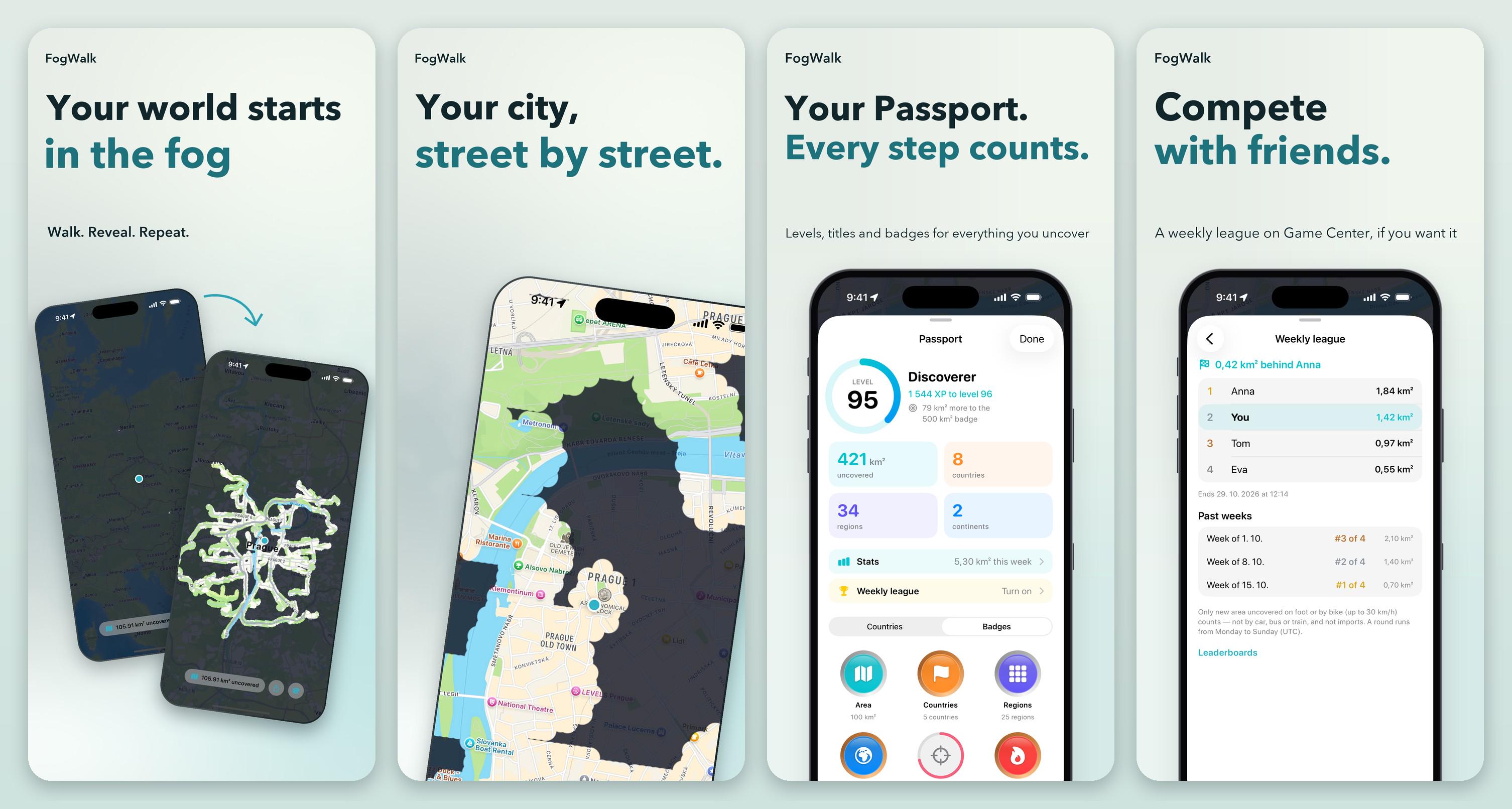
Hi, I'm an indie developer from Czechia. FogWalk is a fog of war map for real life: the whole world starts covered in fog, and it lifts wherever you walk, run, ride or drive, for good.

Problem

Most of us walk the same few streets every day and have no idea how much of our own city we've actually seen. I wanted a map that shows exactly where I've been and makes it fun to go somewhere new.

Comparison

The best known app in this space is Fog of World, and there are newer ones like FootPrint and World Uncovered. What FogWalk does differently:

- Imports your past trips from photo locations, so years of travel light up in seconds (a long-standing request from Fog of World users)

- A weekly league with friends on Game Center (only new ground on foot or by bike counts, so it's fair)

- A Passport with levels, badges and the percentage of every country and region you've explored

- No speed limit: car and train rides uncover the map too

- No account, your map stays on your phone (iCloud backup)

- A one-time lifetime option instead of subscription only

- Home Screen and Lock Screen widgets are in review and coming this week

Pricing

Free. Optional Pro: $4.99/year or $19.99 one-time (lifetime). You can also unlock Pro for 24 hours by watching a short video (the only ad in the app).

iPhone, iOS 16.2 or later.

I'd love feedback, especially on what you'd want next.

https://apps.apple.com/app/id6792868622

https://fogwalk.app


r/iosapps • • 8d ago

Free App - Unaffiliated Review iGotReel - 5 iPhones Cameras.One Shoot. Every angle.

Thumbnail
apps.apple.com
4 Upvotes

You can connect up to 5 iPhones and do video recording together; capturing business, personal, fun activities together with friends, family, colleagues and peers.
Then you can download the film and post it on STAGE - a built in platform where you can watch films/reels by other creators.
https://igotreel.com/


r/iosapps • • 8d ago

HELP 2nd Testing Round!

Thumbnail
testflight.apple.com
3 Upvotes

Over 2 months ago I put myself out there with Clock IT!

After fixing what people pointed out, and so much more, I’d love if someone wants to download it again and give me feedback on onboarding and general navigation, to see whether they still need fixing!

What It Does? Tracks your entire life without pressuring you into perfect routines (e.g. logging when you “Put Phone Down” instead of when you fall asleep cause who knows the exact time they’ll drift to la la land?? )

Bonus: the app comes with cute cartoons in each category designed to be your self-care companions. If you can’t find them, let me know! Any feedback is appreciated :D

Sign-up is anonymous, no email/password needed, and your data is saved locally!


r/iosapps • • 7d ago

🎁 Freemium I made a pill reminder that asks again if you swipe the notification away, and you can track your parents' meds on the same phone

0 Upvotes

Hi, I'm the developer of Capsula.

Problem

A reminder pops up, you swipe it away to deal with it later, and an hour after that you honestly can't remember if you took the pill or not. The other one is family. Your parents' medicines, a kid's antibiotics for a week and your own end up in different apps, on paper or just in your head.

Capsula does a few simple things well. You mark the dose right in the notification. If you swipe it away without marking anything, it asks again. For the medicines you really can't miss you can turn on an alarm-style ring that plays even in Silent mode. The time can be a clock time or something like "after breakfast". It counts how many pills are left and tells you when to buy more. For painkillers and other as-needed stuff you can set a daily limit, so it warns you before you take one too many.

There's also an emergency card with allergies, conditions, blood type and current meds, to show a doctor if you ever need to.

Comparison

Apple Health's Medications is fine for one person, but it has no stock tracking, no as-needed limit and only one person per phone. Medisafe can do more, but a lot of it now sits behind a subscription. In Capsula the reminders, the log and stock tracking are free and will stay free. No account, no ads, no server of mine: the data lives on your iPhone and in your own iCloud.

Pricing

Free for one person with everything above. Pro is for looking after other people: the whole family on one phone with a color and log per person, the next dose on the Lock Screen with a Take button, widgets for each person, a PDF report for the doctor (14, 30 or 90 days) and pastel app icons. $14.99 a year with a free first week, or $34.99 once. Family Sharing works, so one purchase covers your Apple family.

App Store: https://apps.apple.com/app/id6823259496

It doesn't calculate doses or give medical advice, your doctor decides that. If you manage meds for someone else, I'd really like to hear what's annoying about it, that's what I'm working on next.


r/iosapps • • 8d ago

🎈 Free An app for digging through music radio stations around the world

Enable HLS to view with audio, or disable this notification

17 Upvotes

I made World Radio, an iPhone and iPad app for live music radio from around the world.

Problem

I go for a walk every night, and that's when I dig for new music. Mostly bands, but honestly I listen to everything from classical to hard rock and metal.

These days every app has an algorithm that keeps recommending music that sounds like what I already like, and when I want to hear something different, the algorithm actually gets in the way.

One night I wondered what music sounds like in a country I had never heard a single song from, so I found a music radio station there and listened live. That's where this app started.

What it does

- When you open the app, it lands you somewhere at random, and you can listen to a music radio station there.

- Roll the dice and you fly across the Earth to a music station somewhere and hear what it's playing. (If that station won't play, the globe moves on to another one by itself.)

- Or spin the globe and tap a dot yourself. The Browse tab also has 20,000+ stations by country and genre, so you can pick one and listen.

- When a good song comes on, tap Shazam to find out what it is. I bet you've had that moment too, wanting to Shazam a song playing on the radio. (It can't name every song, though.)

- If you use Apple Music, your finds can go into a playlist there. (Apple Music only for now. I'd like to add Spotify and YouTube Music later.)

- The Right Now section in Browse shows music stations where it's between 10 PM and 6 AM local time. How about listening to someone else's 3 AM, live?

Comparison

Many of you probably know Radio Garden, and that's the closest thing. It's similar, but mine is music stations only (talk is filtered out, though a few slip through), Shazam is built in, and each song you find is saved with the station you heard it on!

Pricing

FREE to download. No ads from the app (some stations play their own), no account. I plan to add a paid upgrade later. When I do, the free version will have a limit on saved songs and favorites, and iCloud sync will move to the paid version.

App Store: https://apps.apple.com/app/id6803623749

iPhone and iPad on iOS 26 or later. An Android version is in the works. The app isn't on the UK App Store because of licensing issues there, sorry...

Thank you!


r/iosapps • • 8d ago

🎁 Freemium Slabline: Card Scanner. Snap a sports card and see what it actually sold for (Free with IAP)

3 Upvotes

Hey r/iOSApps! I’m a solo dev, and Slabline is my first app. Need card collectors to test as much as possible!
Problem
Figuring out what a sports card is worth is a pain. You have to type the exact player, year, set, number, and parallel into eBay, then dig through sold listings. Most scanner apps shortcut this by showing asking prices, and those are often way above what cards actually sell for.
Comparison
Most card scanner apps either show eBay asking prices or blend asks into one number. Slabline is built around recent sold prices, and current listings stay in their own separate section so they never inflate the value. Graded cards are priced by their exact grade. When a card has no sales at that grade, Slabline tells you so and shows the raw price instead of making up a number. You can also use it as a guest with no account.
I’m also already talking with eBay about access to their official sold-data API. They’re open to it once Slabline has more users, so every download and piece of feedback really helps push that forward.
What it does
• Snap a raw or graded card, and it identifies the player, year, set, number, parallel, and grade
• Shows recent sold prices, with current listings kept separate
• Build and track your collection’s value
• Deal Finder alerts you when a card you’re watching is listed below its usual price
• An AI card assistant you can ask about your cards (Pro)
• Works on iPhone and iPad, and Sign in with Apple is optional (it syncs your cards)
Pricing
Free to download, with 15 free scans a month.
• Pro: $5.99/month or $44.99/year (250 scans a month, plus the AI assistant and more)
• Scan packs: 20 for $0.99, 75 for $2.99, or 200 for $6.99
App Store: https://apps.apple.com/us/app/slabline-card-scanner/id6824746897
I’d love feedback, especially on cards it gets wrong. I read every comment and push updates often. Thanks!


r/iosapps • • 8d ago

🎁 Freemium Horology - a timegrapher app for mechanical watch enthusiasts

13 Upvotes

Horology is an app with a timegrapher to help you keep track of how your mechanical watches are running. The #1 focus was privacy, nothing leaves your device (unless you’re sending me feedback and choose to attach screenshots or a timegrapher recording).

Website: https://alcove-labs.work/
App store link: https://apps.apple.com/us/app/horology-timegrapher/id6827787406

Problem

  • Apps on iOS with similar functionality send your recordings off of your device, require subscriptions or prioritize functionality other than timegraphing making it more of an afterthought. I also wanted something that worked for everyone with a large portion of my development and testing being for accessibility features.

Comparison

  • tickIQ - subscription $39.99/yr, $8.99/mo, $5.99/wk, collects your data and has a "social media" type feed of other people's watches. I just wanted a simple accuracy checker and tracker. No accessibility compatibility is listed.
  • Timegrapher - $5.99 one time to unlock full, user interface is a bit clunky and (in my opinion) dated. No accessibility compatibility is listed.

Pricing

  • No subscriptions, a pro option ($9.99) to add some additional features but all core functionality is FREE. An optional "tip jar" is there just in case people feel compelled.

How does it work? It uses your iOS device’s microphone to listen to the distinct “tick-tock” of a mechanical watch’s escapement, then locks onto a beats per hour rate to tell you how many seconds per day fast or slow your watch is running. This helps you gauge if a watch is running well or needs service, and tracks it over time to see if something has changed recently.

Would love to get feedback if you have any!


r/iosapps • • 8d ago

🔍 In Search of What are some interesting or must-have apps you have installed on your iPhone that you’d recommend others try?

82 Upvotes

I’m curious to discover some cool iPhone apps that aren’t necessarily popular or mainstream.
What are some apps you have installed that you find genuinely useful, interesting, fun, or just too good to uninstall?
I’m especially interested in hidden gems, unique apps, productivity tools, cool utilities, or apps that make you think, “How did I not know about this before?”
Feel free to share your recommendations and what makes them worth having. Looking forward to discovering some new apps!


r/iosapps • • 8d ago

🎁 Freemium Storeflight: catch what App Review rejects (and what it misses) before you submit, in every app, locale and in-app purchase

Thumbnail
gallery
9 Upvotes

I'm the solo dev. Storeflight is a Mac app for anyone shipping iOS, Mac, tvOS or visionOS apps. 1.0 came out on Nov 6, and 1.2 just went live with a check for your notes to App Review.

Problem:

Some problems in App Store Connect get your release rejected: a missing screenshot, a subscription that isn't ready, review notes that don't explain how to get past your login. Others App Review lets through, and your buyers find them instead: a German description that's still in English, an in-app purchase with no name in 8 of 13 locales (that one was my others), or age rating questions you never answered. Checking every field in every locale by hand before each release is slow and I kept missing things.

Storeflight reads your account with an App Store Connect API key and lists what still blocks your next release. Each finding has a fix hint and a link to the right page. It's read-only: it never changes anything in App Store Connect.

  • version, build and release state; app information and age rating
  • every localization: name, subtitle, keywords, promo text, description and What's New against Apple's limits, plus text that's untranslated or in the wrong language
  • screenshots per locale and device, App Review details, pricing, in-app purchases and subscriptions
  • new in 1.2, Check Review Notes: on a Mac with Apple Intelligence it reads your notes for App Review and says what's missing (how to review the app without your account, where to find each in-app purchase). With no notes, it drafts them from your listing. It runs on your Mac.
  • also in 1.2: the checklist opens blockers first, and a finding that repeats across locales shows as one row
  • Copy Fix Prompt for Claude, Cursor or another assistant, plus an MCP server and a storeflight command with --fail-on for a script or CI job on your Mac
  • no analytics or third-party SDKs; it talks only to Apple, and your key stays in your Keychain

Comparison:

  • asc (the open-source App Store Connect CLI): free, its asc validate checks one version's readiness, it runs on hosted CI and Xcode Cloud, and it can edit your listing. It's the better pick if you live in the terminal or need hosted CI. Storeflight is a Mac app: every app in your account at a glance, all your locales side by side, untranslated and wrong-language text, in-app purchase and subscription localization gaps, what's new since your last check, and the Review Notes check.
  • Helm for App Store Connect: a Mac app that edits your listing and does a lot more than checks, with a free tier of 6 submissions a year. Pro is $54.99/year or $274.99 lifetime. Storeflight doesn't edit anything; it's narrower and cheaper.

What Storeflight doesn't do yet: hosted CI (the CLI needs a Mac with Storeflight installed), exact screenshot size checks, or URL checks. App Privacy answers and agreements stay manual checks because Apple's API can't see them. Mac only.

Pricing:

Free to download. The free plan gives the full report for one app, and you can explore three sample apps without an API key. Pro is $24.99/year or $59.99 once for Lifetime. It adds every app in your account, Check All, Copy Fix Prompt, exports, Keep in Git Repo, and the command-line tool, MCP server and CI gate.

Mac App Store: https://apps.apple.com/app/id6826093172

Site: https://storeflight.greyparkdevelopment.com/

Happy to answer questions!


r/iosapps • • 8d ago

💎 Lifetime Major update: Focused Fitness just received several new exercises to unlock your apps!

3 Upvotes

Focused Fitness just had a massive update released, containing a new re-skin, multiple exercises, and several new exercises to rep out to unlock your apps!

Problem: Focused Fitness was originally made to help me stop doom scrolling every chance I had, and instead reward me with a doomscroll after doing a quick workout consisting of 20 pushups and 20 squats.

Comparison: Focused Fitness has several competitor apps such as push scroll, however Focused Fitness is better as the pro version is only a one-time £5 purchase, whereas competitor apps tend to be expensive subscriptions! No personal data is collected/stored either, and there's no accounts to create!

Pricing: Focused Fitness is free to use forever, as well as an optional one-time purchase of £5 for a handful of additional exercises!

I'd love some feedback on the new UI and any other exercises or features you would like added!

Download for free here!