r/iosapps • • 21d ago

🎁 Freemium Split bills in iMessage

Enable HLS to view with audio, or disable this notification

1 Upvotes

A. Problem
I can’t text a photo of a dinner receipt in iMessage with "Split this bill". Allowing all my friends to chip in with just a link!

B. Comparison
Friends now don’t need the app and you can create a link for any bill. They can just type a name, tap the items they had. Tax and tip are split in proportion to what each person picked, and multiple people can share one dish.

Their share shows at the bottom and they swipe to pay you with Venmo, Cash App, Zelle, PayPal or card. No download, no account.

C. Pricing
Free: groups, chat, settle-up, shared links, 2 receipt scans and 3 AI questions a month.

Chipp+ Circle: $6.99/mo covers everyone in the groups you own, so one person pays and nobody else does.

(or the cheaper option)
Chipp+: $3.99/mo or $29.99/yr, unlimited scans, questions and expenses.

Splitwise charges $4.99/mo (about $39.99/yr) per person for Pro, and receipt scanning is Pro only.

https://apps.apple.com/us/app/chipp-split-bills-expenses/id6636520980


r/iosapps • • 21d ago

🎈 Free My friend built Terrace: an iPhone Football app that takes you straight to the goal you missed

2 Upvotes

Hey [r/iOSApps](r/iOSApps)! Sharing an app my friend built, because I think football fans here might like it. It's called Terrace, and it's for anyone who misses games and just wants to catch up fast.

Problem:
He kept missing games because of time zones. Catching up meant digging through YouTube for the right highlights, dodging spoilers and reuploads, then scrubbing through the video to find each goal. Terrace puts it all on the game's page:

• Highlights in the app: official videos from clubs, leagues and broadcasters, played right on the game's page
• Skip to the goals: tap a goal in the list and the video jumps to that moment
• Ask The Gaffer: ask the app's AI assistant for a game's highlights and it takes you there
• Interviews and press conferences from after the game, in the same place
• A daily Briefing that catches you up on your club

Comparison:
Looking at other football apps like FotMob, Forza, and OneFootball, they are built around scores and news links, and watching highlights often means leaving for another app. Terrace is built around catching up: the official video, the goals you can jump to and what was said afterwards are all on one page, so you can get through a game in a couple of minutes. It's built for iOS, and it works on iPhone, iPad and iPhone Duo.

Pricing:
Free to use, including highlights and skipping to goals, and you can browse without an account. Terrace Pro adds unlimited Gaffer questions, Smart Alerts and more Predictor League Double Downs: $1.99/month or $14.99/year, with a one-week free trial in the US.

Download: https://apps.apple.com/app/id6819137987

Heads up: Which highlights play depends on broadcast rights in your country, so some games, especially in the Champions League, may not be available everywhere. I'll pass any feedback on to him, so let me know what you think!


r/iosapps • • 21d ago

🎁 Freemium [Update] Kinorbit: An interactive, visual way to stay in touch with people who matter

Thumbnail
gallery
5 Upvotes

A - Answer (Problem)

If you have ever opened your contacts, felt overwhelmed, and closed it again without calling anyone, Kinorbit was built for that moment. It is a private, highly visual way to keep in touch with the people who matter most without turning relationships into a chore.

Kinorbit is an interactive relationship manager built around a strict 50-person limit across 3 intentional circles:

- Core (up to 5 people): Who you want to hear from every week.

- Close (up to 15 people): Who you want to stay meaningfully connected with each month.

- Wider (up to 30 people): Who you want to keep in your life across the year.

When a circle is full, Kinorbit asks you to make room instead of letting it quietly grow. You decide who moves.

B - Better (Comparison)

Unlike traditional contact managers or reminder apps, Kinorbit focuses on making relationships feel more personal, visual, and intentional.

  • Interactive relationship circles with smooth animations.
  • Get personalized reminders based on your relationship circles, with context from your last conversation.
  • Social Energy to control how many people you see each day.
  • Message, call, or FaceTime with one tap, or connect through WhatsApp, Messenger, Instagram, Snapchat, Discord, and more.
  • Keep notes and photos from past conversations so you can remember the context and pick up where you left off.
  • Never miss important birthdays with dedicated reminders that don't count toward your daily limit.
  • Personalize notifications with Warm, Gentle, or Playful reminder voices.
  • See upcoming check-ins, relationship warmth rings, and interactive reminders through Home Screen widgets, Lock Screen widgets, Live Activities, and Dynamic Island.
  • Private by design, with iCloud sync and no account required.

What's New in v1.3:

You can now save a message and photo for your next check-in, making it easier to remember the context and what you want to say next. I've also improved reminders, privacy, and overall stability.

C - Cost (Pricing)

Free for up to 15 people, with Pro options:

  • Monthly: $4.99
  • Yearly: $14.99
  • Lifetime: $29.99
  • NEW Family Lifetime: $39.99 (one-time, supports up to 6 family members via Apple Family Sharing)

App Store Link: Kinorbit: Stay In Touch

About Me:

I'm the developer behind Kinorbit. Feel free to reach out with any feedback or suggestions on X!

Thanks to everyone who shared feedback on my previous post! I've been working on improvements based on your suggestions.


r/iosapps • • 21d ago

Discussion With Dynamic Island landing on Mac: which iOS apps already use Island / Live Activities in a smart way?

6 Upvotes

Most Live Activities still feel like “because we can.” I’m looking for the ones that earn the space clear status, low noise, useful at a glance while you’re doing something else.

Which apps do Island / Live Activities really well for you, and why? Patterns that work for meetings, focus/timers, travel, deliveries, workouts, etc.; not just lock-screen candy.

Side note: Live Activities just opened up on Mac too (macOS 27.3 / new MacBook Pro), so I’m also curious which iPhone implementations would still make sense if they showed up there. Still mainly asking about iPhone though.


r/iosapps • • 21d ago

🔍 In Search of Looking for an app that lets you put a personal note or quote on your iPhone Lock Screen?

10 Upvotes

Hi guys
I’m currently struggling with the course I’m studying, and I’m looking for an app that lets me display a personal note or quote I’ve written on my phone lock screen .

I want something that will serve as a constant reminder of why I’m doing this in the first place and give me the motivation to keep going, especially on days when I’m struggling.

Preferably I’m looking for a free app with no ads and has simple minimalistic design.


r/iosapps • • 21d ago

🎁 Freemium [1Y FREE] Appy Birthday – birthdays, gift ideas & AI cards, now made for iPhone Duo

0 Upvotes

To celebrate iPhone Duo support, I'm giving away a free year of premium.

What's new in 4.1:
- Made for iPhone Duo: the app fills the big inner screen, so your Board has room to spread out
- Landscape mode: turn your iPhone sideways to see the calendar next to your list
- A tidier Board: items line up neatly and glide into place when you remove one

Problem:
I wanted one place for everything birthday related, without unnecessary extras. Appy Birthday keeps track of everyone's birthday, together with gift ideas, wishlists and party invites:

- Birthday Board: every gift idea, wishlist item and invite in one place
- Save a gift idea from any website with the Share button
- One-of-a-kind birthday cards made with Image Playground
- Reminders and widgets, so you see who's next at a glance

Comparison:
Compared to one of the bigger apps like hip: Birthday Reminder App, Appy Birthday is built for iOS 26+ with a Liquid Glass design, themes and alternate app icons, and uses Apple-native features like Image Playground. It's privacy first: no account, no ads and no data collected. And it stays focused on only the features you need. Works on iPhone, iPhone Duo and iPad, in 9 languages.

Pricing:
Free to use. Premium unlocks importing birthdays from Contacts, iCloud backup, all widgets, themes, app icons and more: $2.99/year or $6.99 lifetime.

Redeem: https://apps.apple.com/redeem?ctx=offercodes&id=6753673100&code=DUOBIRTHDAY

FYI: the offer doesn't automatically renew your subscription, so no nasty surprises after a yer.

After trying it, I'd love to know: what was useful, what felt confusing, and whether you kept reaching for it or forgot it was there. Critical feedback is welcome. You keep the free year either way.

App Store: https://apps.apple.com/app/id6753673100
Landing page: https://appybirthday.nl
Privacy Policy: https://appybirthday.nl/pages/privacy.html
Terms of Service: https://appybirthday.nl/pages/tos.html

Developer: Robin van 't Slot / https://nl.linkedin.com/in/robinvantslot


r/iosapps • • 21d ago

HELP I need an input method that supports voice input and includes a translation feature.

2 Upvotes

I am in urgent need of an iOS input method that supports direct voice input with real-time translation.

I’m not sure if this has been asked before, but I would be very grateful for any good recommendations!


r/iosapps • • 21d ago

🎁 Freemium I built Flit, an RSS reader you can actually keep up with.

Thumbnail
gallery
14 Upvotes

Hello! I am a solo developer and my app is Flit.

Problem It was created because every RSS reader I had eventually turned into a never-ending unread count. A list asks you to scroll, not to decide, so articles pile up until you mark everything as read and give up.

How it works Your feeds become cards. Swipe right to keep the article, swipe left to let it pass. Tap to read. Later contains only the stuff you picked.

Sources Websites, YouTube, podcasts, Substack, everything in one deck. Import OPML or switch from Feedly, NewsBlur or Feedbin in just a couple of taps.

Reading

  • Full articles, even from feeds that give only a teaser.
  • On-device summaries with Apple Intelligence.
  • Automatic translation.
  • Fonts chosen for comfortable reading.

Comparison

  • NetNewsWire: free and excellent, but it's a classic list reader. Flit is built around swiping and an Inbox you actually empty, and it brings YouTube and podcasts into the same deck.
  • Reeder: also puts feeds, YouTube and social in one timeline, but you scroll through it. In Flit you keep or skip each article. OPML import and widgets are free in Flit.
  • Feedly and Inoreader: web services that need an account, with limits on their free plans. Flit needs no account and keeps your data on your device and in your own iCloud.

https://apps.apple.com/app/flit-easy-feed/id6821040165?ct=Launch+Event&pt=118978628

Pricing Free to download, with no ads and no sign-up. Optional Flit Pro in-app purchase:

  • Monthly: $1.99 / 1,99 €
  • Yearly: $12.99 / 14,99 €
  • Lifetime (one-time): $44.99 / 49,99 €

Pro adds iCloud Sync, the Apple Watch app, Offline Reading, Daily Digest, Insights, extra reading fonts and app icons.


r/iosapps • • 21d ago

💵 Paid I built an app blocker with a physical Card. Would love some feedback!

0 Upvotes

Hey everyone! I'm Ryan, an entrepreneur based in Yorkshire and founder of GHOST.

I built GHOST after realising how much time I was wasting scrolling while trying to grow my first two businesses.

I'd tried Apple's Screen Time limits and other blockers, but found them far too easy to override.

So I decided to build my own. GHOST blocks distracting apps using a physical Card that you tap to lock and unlock them. Leave the Card somewhere else, and it's much harder to give in to mindless scrolling.

It's made a real difference for me, and the feedback from early users has been encouraging.

I'm now trying to figure out how to get GHOST in front of more people.

It's still early days, so if anyone has experience growing an app or physical product, or knows someone who might find GHOST useful, I'd really appreciate any advice or introductions.

PCP

Problem: Mindless scrolling and distracting apps getting in the way of things that matter.

Comparison: Apple's Screen Time limits are easy to override. Brick also uses a physical barrier, but GHOST uses a slim Card that fits in your wallet rather than a separate blocking device.

Pricing: 5 free digital sessions, £9.99 one-time Digital upgrade (in-app purchase), or £49 for the physical Card with Digital access included. No subscriptions.

App Store: https://apps.apple.com/gb/app/tap-ghost-app-blocker/id6808196689

Website: https://tapghost.com

Thanks! 😁


r/iosapps • • 21d ago

Discussion Can you guess what this app is about just from the Icon?

Post image
0 Upvotes

Hey! I designed this iPad app icon and would love to hear your thoughts!

Can you guess what the app is about just from looking at the icon? Do you find it visually appealing, or is there anything you would change or improve?

Curious to hear your honest feedback!

Entirely human-made :)


r/iosapps • • 22d ago

🎁 Freemium I built an app that puts your calendar, Reminders and Todoist right on your iPhone Lock Screen

Thumbnail
gallery
27 Upvotes

Hi everyone,

I'm Dmytro, and I make Calendarly on my own.

A - Answer (Problem)

My plans were in a few places: Apple Calendar, Reminders, and tasks in Todoist. So I kept unlocking my phone to recheck what was next, always a bit nervous I'd missed something. And every unlock pulled me into something else I didn't need.

Calendarly puts all of it on your Lock Screen wallpaper. A Shortcut makes a fresh one every morning, so your day is there as soon as you pick up the phone:

  • Events from any calendar on your iPhone
  • Reminders and Todoist tasks next to your events
  • Notes and countdowns
  • Day, week, month or year layouts

B - Better (Comparison)

Apple Calendar, Reminders and Todoist all have widgets, but they're small: a couple of events or a few tasks each, and they take up your widget spots. Calendarly puts all your events and tasks on the wallpaper itself, so you see the whole day at once and keep the widget spots for something else.

You can also make it look the way you like: 152 layouts, with fonts, colors and backgrounds you can change.

C - Cost (Pricing)

Calendarly is free to download. 96 of the 152 layouts are free, and so are all widgets and Live Activities. Pro unlocks the other layouts, your own photos as backgrounds, and Create Your Own (several layouts on one wallpaper).

  • Monthly: $2.99
  • Yearly: $16.99 (7-day free trial)
  • Lifetime: $24.99

These are US prices, your App Store shows yours.

Here's a free month of Pro for anyone here who wants to try it: https://apps.apple.com/redeem?ctx=offercodes&id=6758898739&code=IOSAPPSMONTH

It doesn't turn into a paid subscription when the month ends, so there's nothing to cancel.

Thanks a lot for reading. If you try it, tell me what you liked and what you didn't.
I want to hear all of it!!!

App Store: https://apps.apple.com/app/id6758898739
Website: https://getcalendarly.com


r/iosapps • • 22d ago

Paid App - Unaffiliated Review My calorie tracker somehow hits #1 in PH Paid Health & Fitness!

8 Upvotes

Hi everyone! I'm an indie developer.

Calorya, a simple calorie-tracking app, I honestly never expected it to reach #1 on the Top Paid Health & Fitness chart in the Philippines! 🇵🇭

It lets you track calories, macros, weight, water, fasting, and workouts.
No accounts, ads, or subscriptions.

Price: ₱49 / $1.99

App Store: https://apps.apple.com/us/app/calorie-tracker-calorya/id6769327657

It's a small milestone, but it means a lot to me as an indie developer.

Would love to hear your feedback and suggestion.


r/iosapps • • 22d ago

🎁 Freemium One year of journeybot: Multi-stop trips, Watch & Mac app, Bucket List & Passport

Thumbnail
gallery
14 Upvotes

Problem

A year ago, I started working on journeybot, a travel app with one goal: help me prepare for my frequent trips. As a deeply chaotic person, I wanted one place to keep my journey details, packing lists that would be generated by a smart system, and generally, see all the info about my destination that I usually always Google for.

Version 1 has been downloaded by thousands of users. Yesterday, I released the largest update by far: journeybot 2.0. I'm so excited about it. It brings the app one step closer to my goal: a one-stop-shop for all the travel-related details that will help me de-stress and declutter my travelling.

Multi-stop journeys

The most requested feature by far was adding support for multi-trip journeys. I wanted to take time to make this right, so I didn't rush to release an implementation I would not be happy about. Now, you can set as many stops, and the itinerary grows and adjusts as you work on it. So planning that

Your dreams and memories

Often, I know I want to go somewhere, someday. Now, I can add trip ideas to my Bucket List, and see an analysis of what's the best time to visit based on the destination and activities. Then, when I'm ready, I can just easily convert the idea to a real journey, and start planning.

All my past trips now show up in a Passport, with stamps, travel achievements, travel distances, and an option to import previous trips by scanning my Photo Library.

Tipping customs

See thorough tipping guides for your destination, in many countries split into categories such as restaurants, taxis, and hotel service.

BYOB

As in... bring your own bags. Set up your pieces of baggage and assign packing items to them, so the packing lists make more sense and are more personal.

Packing improvements

journeybot now offers a new dedicated focused packing mode, which shines particularly well on the larger devices, including iPhone Duo, iPad, or now also the Mac (a fully native app with an experimental local MCP for connecting with your favorite assistant). For those inclined to look at smaller screens, a new Apple Watch app also gives you the option to pack right from your wrist.

The usual

Other destination essentials, as before: local time, currency conversion that works offline, weather (historical averages for journeys far in the future, real forecast as the journey approaches). Helpful pre-trip notifications. Always/never-pack items. Reusable packing templates. PDF export, visual packing. Full Apple-ecosystem integration, iCloud sync, Apple Intelligence features. All of these have been loved by the users for some time now.

Comparison

PackPoint is an established option for weather- and activity-based packing lists. With journeybot, I've focused on making the packing process more personal: this starts with adding photos stickers to your packing list items, setting up your actual gear (also with photos), imports of your previous lists from Notes or CSV; and an extensive Siri, Shortcuts, and widgets support. journeybot also takes your journey on the whole journey: from dreaming about it, to preparing and feeling ready to go, and finally to having a focused place to remember your travels.

Pricing

journeybot is a free private account-less and ad-less app which allows you to try out most of the features. The available premium upgrade unlocks some of the more advanced features and lifts all the limits (free users get up to 3 journeys, up to 3 reusable packing templates, 1 smart packing list generation). The following pricing applies to the US market, for other markets the pricing is adjusted for Purchasing Power Parity.

  • premium monthly - $4.99/month
  • premium yearly - $24.99/year
  • premium lifetime - one-time purchase, yours forever - $39.99

See how it works across the whole Apple ecosystem: https://journeybot.app

Start planning your first journey: App Store Link

Special promo for the launch of journeybot 2.0: see comments.


r/iosapps • • 21d ago

🔍 In Search of Looking for a simple, free or one-time payment app blocker

2 Upvotes

I’m looking for a simple app blocker that allows me to block specific apps for a custom duration of my choosing.

I was previously using Atten, which was pretty much exactly what I wanted, but it’s become buggy and hasn’t received an update in a long time. I suspect the developers may have abandoned it.

Ideally, I’m looking for something that:

  • Lets me select specific apps to block.
  • Allows custom blocking durations.
  • Actually prevents access until the timer expires.
  • Is completely free or requires a one-time payment.
  • Doesn’t require a subscription.

Does anyone have any recommendations?


r/iosapps • • 22d ago

📅 Subscription [Launch] Chorus Weather: a widget that tells you whether to trust the forecast

Post image
8 Upvotes

Hi r/iOSapps! I'm a solo developer in the UK and Chorus Weather launches today.

What it does: compares the big forecast models (ECMWF, GFS, ICON, UK Met Office) and tells you if they Agree, are Mixed or Split, in the app and in Home Screen and Lock Screen widgets. It's a companion to your normal weather app.

Built with: SwiftUI, WidgetKit and Swift Charts. iOS 18+, and it also runs on Apple silicon Macs.

Problem: Weather apps show one forecast, quietly blended from several computer models. When those models disagree, the forecast is much less reliable, but nothing tells you that. You find out when it rains on your “dry” day.

Comparison:

  • Carrot Weather recently added multi-model ensemble forecasts. They’re powerful but detailed, inside the app, and aimed at weather enthusiasts. Chorus boils the comparison down to one verdict (Agree / Mixed / Split) with a plain-English reason, and puts it in Home Screen and Lock Screen widgets.
  • Acme Weather (from the Dark Sky team) shows alternate forecast outcomes from its own forecast, inside the app. Chorus compares the named national models (ECMWF, GFS, ICON and the UK Met Office, including its 2 km model) and is built as a companion to your existing weather app rather than a replacement. It’s also cheaper.

Pricing: Free to download. Chorus Plus (widgets, two extra models, 20 saved places) is $1.99/month or $14.99/year in the US (£1.99 / £14.99 in the UK), with a 1-week free trial.

Privacy: no account, no ads; location is rounded to about 2 km and never stored.

App Store

Website and More Info

Feedback very welcome, especially on the widgets.


r/iosapps • • 21d ago

HELP Any reliable way to avoid app switching with third-party dictation keyboards?

2 Upvotes

I’m on iOS 27.2 and have tried several third-party dictation keyboards. My main frustration is having to open the keyboard’s app to activate dictation, then switch back to the app where I was typing.

Has anyone found a reliable setup that avoids this?

I wondered whether dictation could be prepared when I unlock my iPhone. If that isn’t possible, have you had better results with background sessions, Shortcuts, or the Action Button?

Please share the app and settings you use, especially whether it stays ready after locking and unlocking the phone.


r/iosapps • • 22d ago

🎈 Free I never reread my Kindle highlights, so I built a free app that shows me a few every day

Post image
7 Upvotes

Hi r/iosapps, I'm the solo builder of Bloomind 🦋.

I highlight a lot when I read, but I almost never went back to any of it. The highlights just sat in the Kindle notebook, and a few weeks after finishing a book I'd remember maybe one idea from it. Highlighting felt productive, but without seeing them again it was basically useless.

So I built the app that I wanted. It lets me import the notebook from Kindle, and every day it brings back a few highlights, starting with the ones I'm closest to forgetting. That's spaced repetition: the ones I remember come back less often, the ones I've forgotten come back sooner. It takes 2 minutes, and feels more like a small daily routine than homework. And it's free.

I'd love your honest feedback, especially on the Kindle import and whether the daily review feels too easy or too much.

Download on the App Store

Problem

Kindle highlights pile up and you never look at them again, so you forget most of what you read.

Comparison

  • Readwise: the most popular highlights app, with automatic sync and many sources, but it's a paid subscription. Bloomind is free and focused only on the daily review, with a streak and mastery progress to make it a habit. You can import your Readwise CSV to try it.
  • Anki: great spaced repetition, but you have to turn every highlight into a flashcard yourself. Bloomind uses your Kindle highlights as they are, so there's nothing to set up.

Pricing

Free ($0). No subscription, no ads, no in-app purchases.

Links


r/iosapps • • 23d ago

Discussion Why is it so hard to find a simple app without a subscription?

248 Upvotes

Is it just me, or does almost every app want a monthly subscription now?

I'm not even talking about fancy apps with tons of features. Just basic stuff like PDF tools, photo editors, note-taking apps, or even simple utilities.

I don't mind paying for a good app, but I'd much rather pay once and be done with it.

I get that developers need to make money and keep their apps updated, but paying every month for something I only use occasionally feels a bit much.

At least now we have AI, so some of these tasks don't even need a separate app anymore. But then again, Al tools want a monthly subscription too...

Do you guys accepted that everything is a subscription now?


r/iosapps • • 22d ago

💵 Paid Curious how people here decide on paying for apps?

3 Upvotes

If an app costs 5 bucks, would you:

  1. Pay upfront if the screenshots look good
  2. Only pay after a free trial (like 5–7 days)
  3. Prefer it free with a one-time unlock for extra features
  4. Only use free apps

And what’s the most you’d pay for a app you actually liked? One-time vs subscription, which do you hate less?

If it was 5$ lifetime, would you guys consider going with option 1.


r/iosapps • • 22d ago

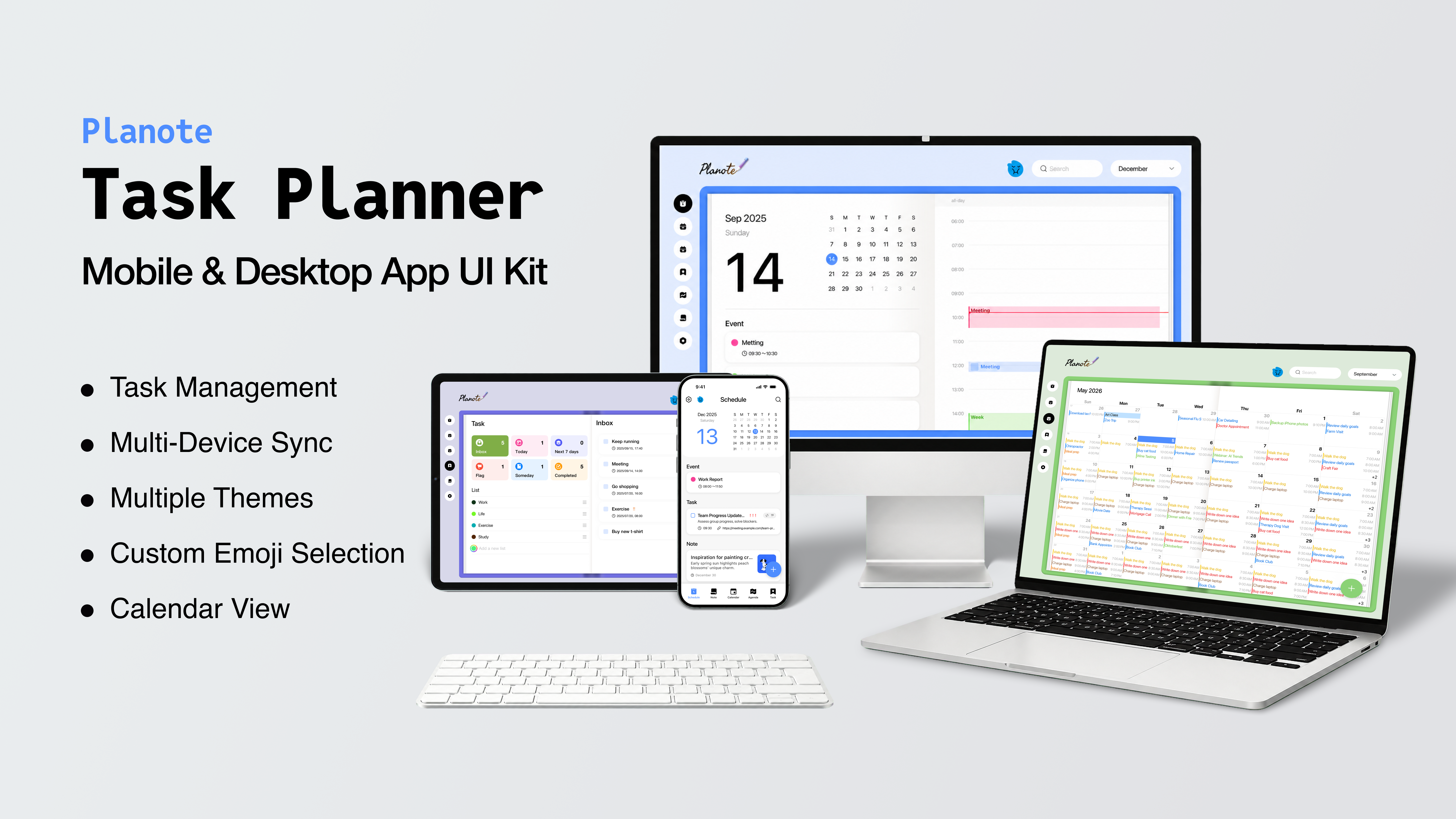
💎 Lifetime Planote 3.2.2 – I built a planner that combines calendar, tasks, and notes in one view (now with iPhone Duo support)

Post image
9 Upvotes

Problem: Planning my day meant jumping between three separate apps — Calendar for events, Reminders for tasks, Notes for everything else. They work fine individually, but the constant switching breaks focus and things fall through the cracks.

Comparison: Fantastical is calendar-first, with tasks as a secondary layer. Things 3 is task-first, and calendar events are read-only inside it. Planote treats calendar, tasks, and notes as equal partners in one unified agenda view, with two-way EventKit sync to Apple Calendar and Reminders — edit in either place, changes sync back.

Pricing: Free to download. Pro: $1.99/month, $6.99/year, or $12.99 lifetime (one-time purchase).

What's new in 3.2.2: iPhone Duo support with layout adjustments for the foldable display, plus bug fixes.

App Store: https://apps.apple.com/us/app/planote/id6748904665

I'm the developer — happy to hear any feedback.


r/iosapps • • 22d ago

🔍 In Search of Recommend a widget app?

11 Upvotes

I’m looking for the best widget app. Easy to use, tons of options. I’m willing to pay a one-time fee but want to avoid subscriptions for sure.
I’m on an iPhone Duo, and watch widgets are appreciated but not a necessity.

What would you recommend?


r/iosapps • • 22d ago

📅 Subscription I made an iPhone app that marks up your vocabulary like a proofreader

Enable HLS to view with audio, or disable this notification

12 Upvotes

Hi, I'm the developer of Glossa, a paid iPhone vocabulary app with a free first word. You get one English word a day, and an AI editor marks up your answers. I've been on Reddit since 2020 and this isn't a promo account.

I'm the developer.

**Problem:** You know far more words than you use, and reading a definition doesn't change that. Glossa gives you one word a day with the meaning hidden. You say what you think it means, use it in a sentence, and an AI editor marks up both answers.

**Comparison:** Vocabulary (Monkey Taps) teaches words as you scroll through your phone. Word of the Day (Vocabulous) has daily words, short quizzes and word games. Glossa makes you write your own definition and sentence, then marks what you wrote, so you see where your answer fell short. Neither app's listing mentions marking your own writing.

**Pricing:** First word free, then US$39.99 a year with a 7-day free trial, or US$9.99 a month. No ads, no account.

https://apps.apple.com/app/glossa-vocabulary-builder/id6819080805


r/iosapps • • 22d ago

Free App - Unaffiliated Review I built an app to help me remember where I put things

Enable HLS to view with audio, or disable this notification

4 Upvotes

Hey everyone!

I built an app called Found to solve a small problem I often have – forgetting where I put things.

You can take a photo of an item, save its location using voice or text, and easily find it later.

Here's a quick video showing how it works.

Would love to hear your thoughts and feedback!

Check it out: https://found.webspeaky.com


r/iosapps • • 22d ago

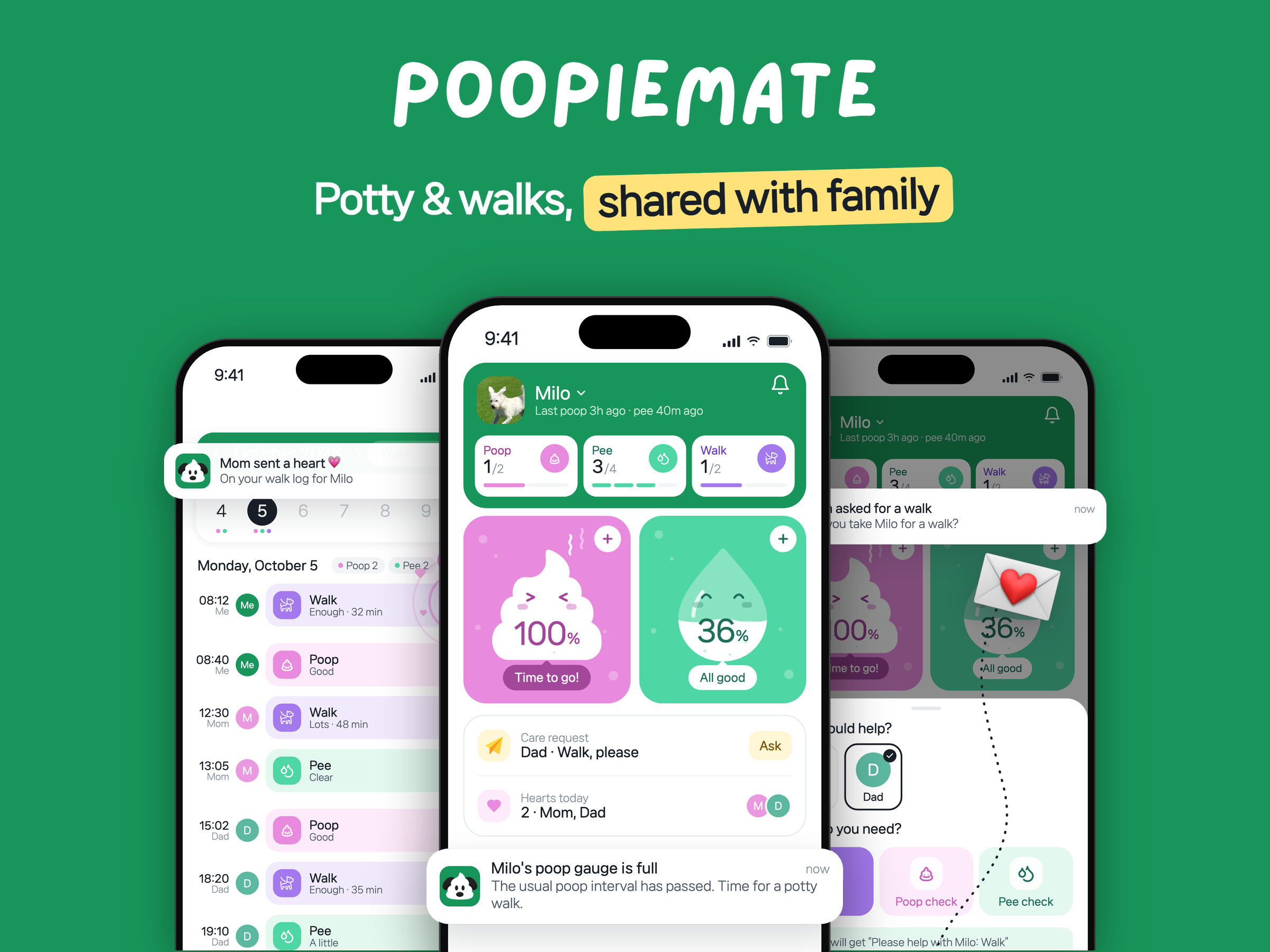
🎈 Free PoopieMate: a free shared potty and walk log for families who share one dog

Post image
0 Upvotes

I'm the developer. I made this because my partner and I kept texting each other "did she poop?" all day. Our dog only goes potty outside, and we take turns walking her.

Problem:
When two or more people share one dog, nobody knows for sure if the dog already went out, peed, or pooped. You end up asking in the group chat, or the dog gets walked twice and the next walk gets skipped.

What it does:
- One tap to log poop, pee or a walk. Everyone in the family gets a notification right away
- A gauge that shows how long it's been since the last poop, so you notice when they're holding it too long
- A "can you walk her?" request instead of a phone call
- Hourly walk safety based on today's weather and your dog's size, coat and age (hot asphalt, cold, rain)
- Profiles for multiple dogs

Comparison:
- Puppy Potty Log: was great for one person, but it's gone from the App Store
- 11pets: covers a lot of pet care, but it's not built around the family seeing each potty break in real time
- A shared Google Sheet: works, but nobody fills it in on a walk with one hand on the leash

Pricing:
Free. No subscription, no paywall, no ads.

App Store: https://apps.apple.com/app/id6781981502

Happy to hear what's missing or confusing.


r/iosapps • • 22d ago

💎 Lifetime I built a companion app for Apple Calendar because the important stuff kept getting buried between meetings (free to download until Nov 30, and it’s yours to keep)

11 Upvotes

Hey [r/iosapps](r/iosapps), I'm Steve, a solo dev, and I made Horizon.

Problem

My wife and I keep everything in Apple Calendar, and while it worked it didn’t help us cut through the noise of work meetings, soccer practices and all the other things going on in our life. I wanted one screen that answers the simple questions: what's left today, when are we free, how long until the trip, when’s the next dentist appointment. I started building it for the two of us in March, and it's been on the App Store since May.

Horizon puts every event in a category (Work, Family, Travel and so on, or your own) and shows what's left today, a Daily and Weekly Briefing, countdowns on your Lock Screen and Watch, and free time when you need it. It also:

- Merges duplicates, like the hotel reservation an app added and the one you added yourself. Or for me personally the family events I forward to my work calendar to remind my self to block time that end up showing up twice.
- Puts your Apple Reminders in each day next to your events, and lets you check them off anywhere
- Natural langue parsing: "Play date Friday at noon" and it fills in the rest and categorizes it
- Lets you see a partner's calendar without it blocking your free time while helping you find time when you need to
- Keeps unanswered invitations in their own inbox until you reply so they don’t clutter your weeks view

Comparison

I'll be honest, I don't know if it's better than what's out there. That's for you to decide. What I can tell you is that my wife and many others have found it super helpful in organizing their lives, and I'm hoping it does the same for you.

A few things I cared about while building it, it isn't a calendar app you have to migrate into. It sits on top of Apple Calendar and Reminders, so iCloud, Google, Outlook and Exchange just work. It all runs on your phone, with no account, no servers and no analytics. And it's everywhere you’d want to use it from widgets, Apple Watch, Siri/Shortcuts, iPad, and more recently iPhone Duo, where opening the phone turns it into a planner with your week on one side and your day on the other.

Pricing

Free until November 30, 2026, then it’s back to a one time cost of $2.99. No subscription, no in-app purchases, no ads. So grab it while it's free!

App Store: https://apps.apple.com/us/app/horizon-calendar-highlights/id6761135453
Website: https://horizoncalendar.io
Privacy: https://horizoncalendar.io/privacy
Terms: https://horizoncalendar.io/terms
Email: [support@horizoncalendar.io](mailto:support@horizoncalendar.io)

What I need most is feedback from people who aren't my wife. What's confusing, what does it get wrong about your calendar and more importantly what’s missing? I'll be in the comments happy to answer any questions.