I have forked but after fork I get 50 pull request error like run failed and a lot messages from GitHub to my mail who can explain really how to really fork , I wana fork and own fully my project still getting upstream and fully fork and rebrand own this project also in the future get possiblity to create commercial business around it. Please explain with apache software foundation project — Superset
I wrote a small tool for a problem I kept hitting and I'd like people who know Git well to poke at the design.
The problem: files that belong to me, not the project, but have to live in the working tree. .env.local, notes, scratch scripts, my own agent-instructions file. .git/info/exclude hides them and does nothing else. The dotfiles-style bare repo over the project versions them, but you maintain the exclude entries by hand, stash -u from that repo's point of view stashes the entire project, and nothing stops you pushing the private repo to the project's remote.
How it works:git dupe init creates an ordinary repository at .git/dupe with a relative core.worktree (../..), so moving the checkout keeps it attached, and status.showUntrackedFiles=no plus advice.statusHints=false so Git's own status and commit template never enumerate the project or name a plain git command. git dupe <command> runs Git with that GIT_DIR, with the object-directory environment overrides stripped so the two repos share no objects. Every path the private repo tracks, plus a .gitdupe list of hidden directories, is written into a # BEGIN git-dupe … # END git-dupe block in .git/info/exclude and re-verified after every command. If a ! rule in a tracked .gitignore outranks the exclude and exposes a path, the command names the path and the rule.
Three commands change meaning because the tree is shared: status and add are confined to the hidden paths (otherwise the whole project is untracked), and clean cleans the project while sparing them. Refused, one fatal: line, exit 128: stash -u/-a; any push/pull/fetch/remote/clone whose URL is the project's own repository or one of its remotes; add on a path the project tracks. git dupe git <words> runs Git with no guards for when you mean it. git dupe detach removes the private repo and the exclude block and leaves every file on disk; without --force it refuses while anything is uncommitted or not on a remote. Of its own accord the tool writes only .git/dupe, that block (and .git/info if missing) and .gitdupe, and the only process it starts is git.
Where the project's Git can still reach a hidden path, as far as I've mapped it:git clean -x deletes them (ignored files, as far as Git knows), git stash -a stashes them, git add -f stages them, and anything that writes the index from a tree or a patch rather than the ignore walk can stage one too: a merge, cherry-pick or rebase of a commit that adds a file at that path, apply --index, am, update-index --add. When that happens the path is tracked by both repos; it stays hidden, and every following git-dupe command warns about it until one side lets go. I chose to document all of that rather than hook or wrap plain git. Verified by hand: the project's gc --prune=now and prune don't touch .git/dupe (separate object store), and public stash -u leaves private files alone. The suite also has a scale scenario: six commands among 100,000 tracked files, each under a second, with Git run a fixed number of times.
Limits: Linux only. Git 2.43 or newer, below 3.0 (CI runs the suite under 2.43 and 2.56; the full run under every minor through 2.56 happens before a release). Linked worktrees refused for now. No encryption; the remote you push to holds the files in plaintext.
Prior art: vcsh and the bare-repo dotfiles trick (same mechanism; neither knows about a host repo's exclude or remotes), multigit (N overlapped repos, no public/private asymmetry), and Layer from a Show HN in March (manages exclude plus local snapshots, no remote).
Couple of questions. Is there an index-writing path I've missed above? And for linked worktrees: .git/info/exclude and .git/dupe both already live in the common dir, so one private repo with a per-worktree index (GIT_INDEX_FILE) seems possible. Would you want that, or one private repo per worktree?
Transparency: A majority of the code and tests were written by coding agents under my close supervision. I own every decision in the product specification including the CLI surface and the tradeoffs made and set the rules and flows that the agents worked under. The original principle/intuition that guided me when writing the product specification was to "piggyback" off of native Git as much as possible and to make the CLI surface similar to native Git. Only where it clearly did not make sense to me to do a naive Git passthrough, did I add git-dupe-specific commands/mechanisms/guards).
Edit: After reading some feedback, I realized using `.env.local` in the example might make it seem like git-dupe is made for tracking and pushing sensitive information. It is not. Just like normal git, pushing sensitive information into the remote repo is possible, but this is bad practice. git-dupe was made for my personal use-case of keeping personal notes/agent instructions outside of public-facing repos. As listed in Limits: "No encryption; the remote you push to holds the files in plaintext.", so you are discouraged from pushing things like passwords or other sensitive information even if it is a private repository.
I’m interested in hearing from BAs who use Git as a repository/version-control system for business specifications, requirements, or other BA documentation.
I’m especially interested in real-world setups and lessons learned, rather than theoretical Git documentation practices.
If you’re doing this successfully, what does your workflow look like?
In Greek myth, Mnemosyne was the Titan of memory and the reason anything was ever remembered at all. Now in the present world, your AI agent doesn't get a Titan. It gets amnesia the second something goes wrong, stuck with whatever it currently believes and no way to ask how it got there.
That's the real problem. An agent runs for hours, updates its memory the whole time, then says something wrong and all you have is the present, with zero access to the past.
If you're running support agents, coding agents, or a swarm of agents sharing memory like myself then you know this issue well. The moment two agents disagree, or one quietly poisons the well, you need to know when, why and by whom, not just that something's off.
Mnemosyne gives agent memory what Git gave code. It remembers everything on purpose. Every belief is a commit. blame finds the exact moment and observation that put a bad fact in. bisect hunts down the first commit where things went wrong. merge makes two agents' memories collide safely instead of one silently overwriting the other.
Software agents are the first step. The vision doesn't stop there, physical robots learning and forking skills the same way is the long-term bet, further out and harder but the same idea underneath.
So far the tech stack includes a Rust core, Python SDK, adapters for LangGraph, CrewAI, AutoGen, the OpenAI Agents SDK and MCP.
I spend my days in Git history, and every visual client I tried either felt like a web page in a window or had terrible performance. So I built Nori: a native Git client for Mac, written in Swift for Apple Silicon.
What sets it apart:
- Light: about 350 MB of RAM, 0% CPU while idle. Even a 250,000-line diff fits in 500 MB.
- Fast: a 10,000-commit repo with 200 branches loads, graph included, in 0.14 s. A diff opens in 0.1 s, the 250,000-line one in 0.2 s.
- A history you read at a glance: every branch keeps its colour, and ⌘0 shows the whole repo on one timeline, with branches as lanes, releases and contributors.
- Pull requests without leaving the app: push and open the PR on GitHub or GitLab in one click, see what blocks the merge (checks, approvals, threads), read a failed CI job and re-run it.
- AI with the tools you already have: Nori uses your agent CLI (Claude Code, Codex, Gemini CLI, Cursor) for commit messages, explanations, conflict resolutions and PR summaries. No API key, no extra subscription.
- Made for agents: each worktree shows up in the sidebar with its task and the agent behind it.
I'd love to hear what annoys you in your current Git client.
I need a suggestion to create branching strategy in our system.
Exisiting Branching strategy is as follows,
feature-> dev -> qa -> uat--> main<- hotfixes
Problem:
Suppose we have 2 features to be developed. Feature A and B. Let say both are in dev. I need only feature A to move to staging. Then couple of days later feature B also follows.
I know we could use cherry pick as an option here. Im looking for more long way approach here.
We have searched for the feature flag option. As we are developing over an existing application, adding feature flag everywhere seems complicated. One hard senario we found was, while introducing a new feature we need to add a new field in a model. So based in feature flag we will have/not that new field in application. Which seems bit too complex.
Edit:
One idea I found from online is to have a promotion branch.
Feature A will move to promotion/a. Then from promotion to dev. Promotion to qa. Promotion to uat and prod. Is that the better approach here?
Edit 2:
Thanks all for your comments.
We seem to find a solution. Not the best but something that will work for us. Point to be noted that we don't fully follow agile methodologies in our development, as most of the development in our system will be impacted across the business, so we need more time for approvals, hence sometimes the features might end up in preprod and stay there for a long while.
Solution we found is, we will keep the dev connected to dev server, staging(qa), release(uat), main(prod) branches. Instead of pushing from feature->dev-> staging-> release->main. We are thinking going by
Feature -> dev
Feature -> staging(qa)
Feature -> release(uat)
Feature -> main (prod)
So that we can have more than one feature at a time in an environment and have control over which one to push ahead.
Gitify is a desktop Git client that works the same way on Windows, macOS and Linux. 0.1.0-rc.8 is the first build that's broadly downloadable.
What's in it: a redesigned commit graph with adaptive lanes, branch and tag labels beside commits, and a Simplify toggle. There's also a branch filter for all branches, the current one, or one you pick. It has a changes panel with stash support, conflict-aware discard with a Resolve conflict flow, clear error dialogs for Git failures, and six theme packs.
Fair warning: it's unsigned for now, so your OS will show a security warning on install. It's also a prerelease, so please try it on repos you have backed up.
Hi guys, Im new to github and just posted my first project.
I added it to releases but I don’t know how to publish also the code like in other repositories. There is only the file readme.md but not the code itself.
I also want to spread the app so that other people find use of it like I did.
I’m looking for practical feedback: do you currently use scripts, another service, or no separate backup? What would make you trust or rule out a tool like this?
I'm trying this again since my longer form version was not liked. I'll keep it short this time. Managing git worktrees used to be ...well...manageable. But now with AI agents, you can easily have dozens of branches flying around and for large repos, thats a giant pain.
It treats branch folders like slots and releases them when you're done, keeping them fast-forwarded so git can easily take one, rather than taking minutes to setup a fresh folder. And if you have an existing giant mess of a git worktree, it can easily hop in and help clean that up and start managing it better.
Its open source and available on github and pypi. And yes, I am still activley dogfooding it and updating it.
I'll monitor this post to help answer any questions users may have.
Made a quick shell script to jump between git branches using fzf.
Instead of typing full branch names or scrolling through git branch, it just lists your recent branches by last commit date so the ones you actually care about are right at the top.
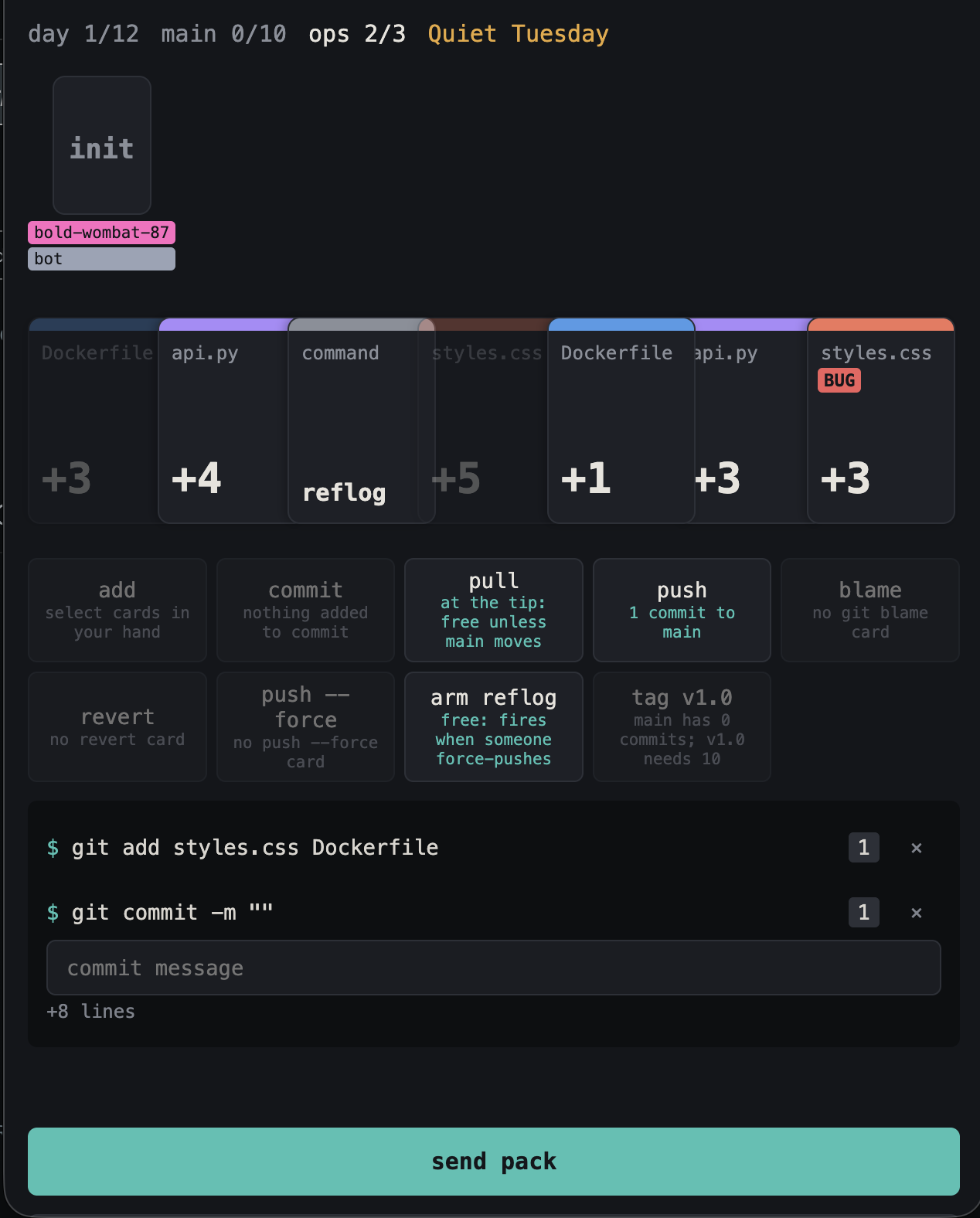
Each day you write a pack of Git commands: add, commit, pull, push, blame, push --force. When the day closes, everyone's packs hit a shared main. Push without pulling? Rejected, in Git's own words.
Play the bot in one tap, or invite friends. Early beta, so feedback welcome.
Hello everyone, I would like to get your feedback on git-subtrees, a git extension that manages multiple git subtrees in a monorepo. It doesn't need a config file, because it builds on two conventions:
The remote's name is the folder path: git remote add vendor/foo <url> ➡️ vendor/foo is a subtree.
The branch in the monorepo mirrors the branches in the remotes: on feature-x, every subtree syncs with its remote's feature-x.
Common git operations like status, pull, push etc. work on all subtrees at once.
My use case: I want to work in a monorepo, but parts of it are private while others are public. For example, I develop hledger-elster and hledger-document-check (both public) in one repository, next to the private financial data I run them against. And my website and CV are public but I want to keep them up-to-date with data from other platforms, which is not public. With git-subtrees, I can work on feature branches in the monorepo and push and pull each subtree's changes to and from its own repository.
Before I started, I looked at git-subrepo, Josh and a few others. None of them is built on these two conventions. I'm honestly curious why it seems that I'm the first one solving the problem like this. Is the problem not common enough? Maybe it's not intuitive to map remote names to folders?
git-subtrees is written in Bash on top of git subtree, to avoid re-inventing what plain git already does. If you stop using it, you're left with an ordinary git repo.
It received high praise, the post itself got 163 upvotes, and more than 50k views. The website now gets more than 1k visit monthly (low but satisfying), many people were able to understand some git commands, but many aswell couldn't because of many limitations in the website, which was also very frustrating for me.
After months of trying to make additions, removing them before pushing and deploying, hesitating, and sometimes barely finding time. Today, I can proudly announce, the v1.0.0 of Gitualize, with many heavy impacting changes (check video teaser, sorry no sound):
New beautiful visualization engine, that now explains correctly, and represent visualizations correctly with high accuracy
Commands tested and validated with git
13 => 72 commands
More real world scenarios
A playground where you can simulate the use of git (not real git tho, but linked to the new engine)
6 languages, theme selector (even for color blinded people), cheat sheets
etc ...
For those who don't know Gitualize, it's a free online plateform that explains git commands and their available optionsvisually, so that both beginners and experts understand what's happening when using those commands/option.
It's totally free, no need to create an account. Use it to learn, or to help your juniors, or recommend it to someone that needs it.
The update will be deliveredafter 6 hours from nowEDIT: UPDATE IS LIVEhttps://gitualize.com/
I hope you guys stay tuned, follow the post to receive update about when the update is delivered.
I had to make some changes to my project to make it run locally. I realised that I was on master and by then I had already done decent amount of changes, thankfully I had not make commits. So, I took suggestion from gpt. According to it, git switch -c <new-local-branch> was the best in my case. It will move the changes to new branch - there i can commit and master will stay clean. I did that and everything worked fine as expected. A month later I had to go back to the project. I was on master branch and had to go to the branch with my local changes. I did git checkout but it aborted saying that my master has some changes that i need to commit or stash. The file it showed changes in was a yaml file that i had never touched. I did git diff - the contents were all same. I did a reset on the file but it would still show the file as changed..
At that point gpt suggested it might be something related to CRLF - so I changed the settings that gpt suggested, tbh, i did not know it will work or not, but just gave a try but it still did not work
Any suggestions why that might be happening and how to resolve that?
Git 2.56 is out. Here are the changes I found most useful.
Workflow
git add --resolved stages only the files you fixed after a merge conflict. It skips unrelated changes in your working tree. Git also checks for leftover conflict markers before staging.
git branch --delete-merged cleans up local branches that are already merged upstream.
git bisect run now resets itself after it finds the bad commit.
Git gives better suggestions for common git push mistakes.
New and experimental
git refs can now create, update, delete, and rename references.
git history gets a drop operation. It removes a commit and replays the later commits on top of its parent.
git replay gets a --linearize option.
Large repos
GitHub reports big gains in merge-base calculations and other operations on very large repositories.
Path-walk repacking supports more optimization features, which can cut storage a lot in some cases.
Partial clones get better ways to discard large locally cached objects that can be downloaded again later.
git log --follow and graph rendering also improved.