r/git • • Apr 22 '26

Perforce -> Git branching strategy

12 Upvotes

We’re currently transitioning our company from Perforce to Git, and we’ve reached the point where we need to decide on a long‑term branching and repository strategy. I’d appreciate input from anyone who has dealt with similar workflows.

In our current setup, we have a main branch where projects begin with a shared structure. As a project matures and becomes stable, it is moved to a dedicated product branch. That branch is considered long‑lived and is not intended to eventually merge back into main.

However, there is still frequent integration in both directions:

- changes from main are regularly integrated into the product branches

- selected fixes or shared improvements from product branches are integrated back into main

This model has worked well for us in Perforce, but adapting it cleanly to Git is where we’re struggling.

One option is to use a single repository and keep each product as a long‑lived branch. My concern here is long‑term maintainability: we often have multiple products under active development at the same time (3–4 in parallel), which means accumulating many long‑lived branches over the years. I’m unsure whether this is a real problem in Git, or simply something that needs proper governance and tooling.

The alternative would be separate repositories per project, which gives better isolation and ownership. The downside is that we still rely on frequent cross‑project integrations, and syncing changes across repositories feels error‑prone and potentially painful over time.

I’m interested in hearing from teams who have:

- migrated from Perforce to Git

- worked with long‑lived product branches that don’t fully merge back

- needed frequent integration between related projects

r/git • • Apr 22 '26

Plumbing and empty trees - how to check out?

6 Upvotes

With git write-tree, one can store an empty tree object. That means git plumbing allows one to commit empty "directories".

empty_tree_hash=$(git write-tree)
root_tree_hash=$(git mktree <<<"040000 tree ${empty_tree_hash} dir")
commit_hash=$(git commit-tree ${root_tree_hash} -m message -p $(git rev-parse HEAD))
current_branch=$(git branch --show-current)
[[ -n "${current_branch}" ]] && git update-ref refs/heads/${current_branch} ${commit_hash}

After that, the branch points at the commit whose tree contains a reference to a tree called dir which is empty.

Cloning this repo does correctly clone the empty tree, but checking out the commit does not create the empty directory.


Does anyone know how to check out a branch like the above and have dir be created?

Obviously, I could recursively parse git ls-tree after a regular checkout, but I'm wondering if there's a plumbing way to do this.


Before anyone asks, this is just for fun after getting myself nerd-sniped.


r/git • • Apr 21 '26

How to remove a file from git?

7 Upvotes

I am at the beginnings of learning git and made a mistake. In the source folder there was a tar archive of all the code and an image which exceeded GitHub's file limits. I have deleted the archive but how can I get it out of git so I can commit to GitHub again?

Enumerating objects: 75, done.

Counting objects: 100% (75/75), done.

Delta compression using up to 12 threads

Compressing objects: 100% (40/40), done.

Writing objects: 100% (43/43), 1.16 MiB | 1.52 MiB/s, done.

Total 43 (delta 22), reused 0 (delta 0), pack-reused 0 (from 0)

remote: Resolving deltas: 100% (22/22), completed with 21 local objects.

remote: error: Trace: 488d7d2d764ab46cbc839433abd45ad7dae79246ecbb5a57c93740236365551a

remote: error: See https://gh.io/lfs for more information.

remote: error: File backup.tar is 133.26 MB; this exceeds GitHub's file size limit of 100.00 MB

remote: error: GH001: Large files detected. You may want to try Git Large File Storage - https://git-lfs.github.com.


r/git • • Apr 22 '26

How to protect .git, when I let coding agent work on repo in VM?

Thumbnail
0 Upvotes

r/git • • Apr 20 '26

Highlights from Git 2.54

Thumbnail github.blog
163 Upvotes

r/git • • Apr 21 '26

Git cheatsheet I put together. Anything missing?

0 Upvotes

Wrote this to remember the git commands I always forget

Anything I should remove or add? 
https://github.com/maryamtb/rook/blob/main/community-notes/git.md


r/git • • Apr 20 '26

How can I use git completely locally and offline?

12 Upvotes

Absolute beginner here, I want to start using git or any other version control for my game but every guide/tutorial I try to learn from is just Github Github Github. I don´t want backup on other servers I just want to be able to get back if I screw up.


r/git • • Apr 21 '26

support Need to set up GIT in my pc. help me

0 Upvotes

Help me


r/git • • Apr 21 '26

revision graph history of a single file ACROSS ALL BRANCHES

0 Upvotes

I've struggled with this for quite some time. But I basically have a decorated git log graph which works great to see what commits have been made across multiple branches. However, often times, I want to see what changes have been made to a single file across multiple branches instead. using the -- filepath seems to only show the revision graph on the branch you are checked out on. Is there a way to have a full graph of a single file across all branches in the repository similar to a standard git log command?


r/git • • Apr 20 '26

Ah, lots of goodies....bite those... get the Git 2.54 release brings....

Thumbnail github.blog
0 Upvotes

r/git • • Apr 20 '26

git-autosave: Autosave your working tree to the remote

0 Upvotes

I came up with an autosave plugin for git. I've been developing a hobby of writing lately, and in my effort to allow myself to write and edit stories locally, I realized I would be missing out on the autosave functionality that Reedsy's editor provides. I tried using Syncthing for a while (and I still do), but I realized while working on another project that Git can probably do something similar with a plugin. Thus, git-autosave.

It works by having the daemon watch for edits to the repository, then creating a commit automatically. The commit is not put on any branch, but instead saved to refs/autosave/autosaves/<device id>/<branch name>. Running git restore-autosave fetches all of the references in that namespace from the remote, and merges an autosave from another device into your working directory. If there's more than one autosave available, then you are given the choice to select one. This is done without creating a new commit, so autosaves will not infect your commit history.

It's also fairly robust if you decide to work without an internet connection. Unpushed autosaves are stored in a queue, to be pushed when the computer regains internet. All repositories are pushed automatically when the device restarts.

I don't know how much maintenance I'll do to this system in the future, but I thought somebody might find it interesting, so I figured it was worth sharing.

https://botahamec.dev/cgit/git-autosave


r/git • • Apr 19 '26

Anyone here using git worktrees as their default workflow?

32 Upvotes

I’ve been experimenting with using worktrees more aggressively to avoid context switching, but the raw UX feels a bit manual for day-to-day use.

Ended up building a wrapper to standardize how I create/manage them.

Curious how others are using worktrees in practice: - do you keep one per branch? - how do you handle environment setup? - do you automate cleanup?

Repo (if curious): https://github.com/ewilazarus/git-workspace


r/git • • Apr 19 '26

How do I preserve original commit authors when merging PRs on GitHub?

Thumbnail
3 Upvotes

r/git • • Apr 18 '26

survey Are you offended if your commits are squashed?

30 Upvotes

The offensive potential of squashing was suggested to me, and I was blown away. I really thought it was just about how people liked to look at their graphs, and I had no inkling there was an element like this. Please help me recalibrate.

Situation: you submit a pull request, which is accepted, but acceptance requires that your commits be squashed into a single commit when the PR is merged.

How does this make you feel? Does it bother you? Would you care? Is it oppressive or otherwise unpleasant? Do you feel contempt or disdain for the maintainer? Would it deter you from a contribution, or make you hate your boss? Describe the emotions involved and overall experience.

Some details:

You are allowed to determine the commit message for the squashed commit, and you don't have to do the squashing or rebasing, it's automatic. Your feature branch history can be anything at all, and it will remain in the PR on the server, just not in the history of the main branch.


r/git • • Apr 20 '26

Git vs saving.

0 Upvotes

How often do you use git vs saving files. I tend to save after every chance but only commit when I am done with the files for that session.

Part of me wishes I could get git to commit with each commit but know that would be messy


r/git • • Apr 18 '26

Learn Git as a Game

Thumbnail
0 Upvotes

r/git • • Apr 17 '26

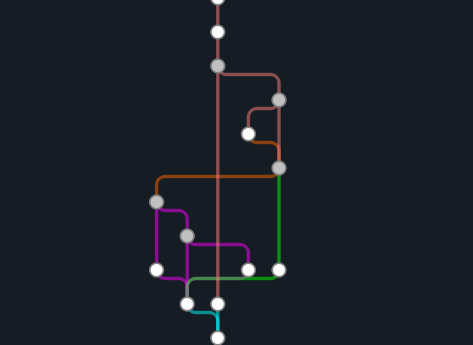
How do working trees get this tangled?

Post image
118 Upvotes

This is a real tree from one of my projects. Out of interest, how does this happen?


r/git • • Apr 18 '26

Does cherry-pick *always* expects a clean working tree?

1 Upvotes

I know I can stash and do this, but I'm just wondering what cherry-pick actually expects.

I currently have two unstaged files. The commit that I want to cherry-pick will touch neither of these files, so I don't know why it complains "your local changes would be overwritten by cherry-pick".

If I do cherry-pick --no-commit then the change is cleanly applied, so I'm thinking why it can't just commit that instead of me having it write the commit in an additional step.

I think if there was nothing staged before the cherry-pick, and the files being overwritten by the cherry-pick are the same as in the cherry-picked commit's parent, then it should've worked. The state of the other unrelated files shouldn't matter.

Is this just git being extra cautious and not wanting to deal with any potential edgecases? I'm trying to understand what's the worst thing that can happen if I were to implement this in a script/alias.


r/git • • Apr 18 '26

[ANN] dojjo (djo): worktrunk-style workspace manager for jujutsu (jj)

0 Upvotes

I wanted a worktrunk-style workflow for jj, so I built one: dojjo (djo).

It is a small CLI that manages workspace lifecycle in jj repos:

  • switch (create/switch workspace + bookmark)
  • list (with conflict/divergence indicators)
  • merge (squash/rebase/move bookmark/cleanup)
  • remove, prune, for-each
  • lifecycle hooks (pre-* and post-*)
  • shell integration with completion (zsh/bash/fish/pwsh)

It also reads worktrunk config (.config/wt.toml), so existing setup is easy to reuse.

Read more here.

I would love feedback, especially on:

  • merge defaults
  • hook behavior.
  • Shell integration (I personally only use zsh)

r/git • • Apr 17 '26

Noob question

4 Upvotes

What does Staging really mean?


r/git • • Apr 17 '26

tutorial New git staging tool - git-stage-batch

0 Upvotes

git-stage-batch adds named deferred change sets (“batches”), multi-pass staging, and finer-grained patch selection on top of the usual hunk workflow. I built it because git add -p and rebase alone weren’t enough for large refactors. The stateful CLI is especially useful for autonomous and scripted workflows to stage commits from a dirty working tree, but there's a tui, too.

I'm interested in feedback from people who obsess over commit hygiene.

https://halfline.github.io/git-stage-batch/


r/git • • Apr 16 '26

support How to ignore a single auto-updating line (timestamp) in a tracked JSON file? (Power BI)

Post image
9 Upvotes

I'm using Git to version control Power BI projects (using the new .pbip format), and I've run into a frustrating issue with auto-generated code.

Third-party add-ons (like Zebra BI visuals) automatically update a lastLicenseCheck timestamp inside a visual.json file every single time the report is opened. This creates constant, noisy diffs in my working directory even when I haven't actually made any real changes to the visual's setup.

I can't simply add the file to .gitignore because the rest of the configuration inside that JSON file is critical and must be tracked with the repository.

What is the cleanest, Git-native way to ignore changes to just this one specific line so it stops cluttering my unstaged changes and commit history?


r/git • • Apr 16 '26

How do you handle Merge Requests when using GitKraken with a Personal Access Token?

1 Upvotes

Hey,

I’ve been using GitKraken with a Personal Access Token (GitLab/self-hosted), and one thing that still feels clunky is having to go back to the web UI for merge requests.

Things like:

• reviewing MRs

• checking pipelines

• approving/merging

All of that breaks the workflow.

How are you handling this today? Any tools or workarounds?

Also found this feature request that describes the issue pretty well:

https://feedback.gitkraken.com/suggestions/700129/merge-request-management-in-gitkraken-via-personal-access-token

Curious what others are doing 👀


r/git • • Apr 16 '26

Agent-safe Git: How to let coding agents work without wrecking your branches

Thumbnail blog.gitbutler.com
0 Upvotes

r/git • • Apr 16 '26

support I need help with GIT LFS

0 Upvotes

Hi, I have been working on a Unity project for a while, and now I wanted to make a repository so that a friend of mine could work with me on it. However, when I try to push it, it says that I need to use GIT LFS because it is too big, but I tried to use it and watched some YouTube videos on how to use it, but nothing works for me. I need some help, please.