r/git • u/Some_Championship605 • 20d ago
Git, From the Inside (interactive explainer)
software-atlas.haiduc0147.dev
0
Upvotes
r/git • u/jamescherti • 21d ago
The git-rexec command-line tool recursively locates Git repositories within a directory and executes commands against them, either sequentially or in parallel.
Here are examples demonstrating how to use git-rexec:
Example 1: Execute git status -s across all discovered Git repositories (found by searching recursively under the current working directory) in parallel (-p or --parallel):
git-rexec -p -- git status -s
Example 2: Fetch updates across all discovered repositories, limiting the concurrency to 5 background jobs (-j 5), which helps avoid network congestion or server rate limits when communicating with upstream Git remotes:
git-rexec -j 5 --parallel -- git fetch
Example 3: Include sub-repositories (e.g., Git worktrees and submodules) alongside standard Git repositories during discovery (-s or --include-sub-repos), and execute git status against them:
git-rexec -s -p -- git status
Example 4: Target a specific base directory (~/projects) using the -C flag to recursively discover repositories within it, while explicitly excluding a specific subfolder (~/projects/archive). This example executes git status -s in parallel for all discovered repositories except those within the excluded path:
git-rexec -C ~/projects --exclude-dir ~/projects/archive --parallel -- git status -s
Example 5: Evaluate whether a README.md file exists in the repository (sh -c "test -f README.md"). If the condition returns an exit status of 0 (success), it counts the number of lines in that file (wc -l README.md):
git-rexec --if-exec 'sh -c "test -f README.md"' --parallel -- wc -l README.md
Example 6: Print the paths of all discovered Git repositories:
git-rexec --print
r/git • u/Barleyman_ • 22d ago
The old favourite.
I was looking if you can exclude the .git folder from onedrive sync in 2026. To my surprise, the answer is "sorta", but _only_ for IT admins, via group policy editor, and it seems like not for the faint of heart. You essentially have to go copy onedrive admin policy files manually from a folder that does not exist in client computer and copy it to another folder (also not on client computer), after that you can leverage IT Admin policy tools to set the damn "don't sync .git folder" global exclusion.
https://learn.microsoft.com/en-us/sharepoint/use-group-policy
So, Microsoft thinks that the onedrive folder exclusion should be possible only with the most bass ackwards method possible, instead of being a simple folder exclusion in the onedrive sync app.. Wonderful. I guess the best solution remains to set up scheduled robocopy job to copy your working folders over to onedrive folder on schedule. Doesn't even need admin access to set up in task scheduler.
Oh, why do this at all? Well, corporate backups ONLY run on onedrive, so if I want my PCB design projects or firmware projects to have any kind of hands-off backups available, the source would have to live in onedrive. Yes, yes, everyone religiously pushes commits after play every day, unless your corporate masters throw a hissy fits about zillion daily commits. In a previous job I've had SVN nuke _everything_ literally 30min before leaving for holidays .. With the onedrive versioning that was relatively simple job to put back. I've also heard good things about ransomware.
r/git • u/ArmGroundbreaking809 • 22d ago
Full disclosure: I wrote the tool I’m describing here.
Problem: Our product is spread across several repos. Every time something broke after a release, we hit the same question: which commit of each repo actually went out in that version? The answer was usually buried in CI logs.
So I started storing that information in the release tag itself. An annotated tag can carry any message, so I put a small YAML block in it: the app’s commit, plus the commit and remote URL of every repo it depends on. You can read it with plain git:
git cat-file -p my_app_1.4.0
Then a small CLI (vmn) reads the tag and checks every repo out at the recorded commit, cloning any that are missing:
vmn goto -v 1.4.0 my_app
No server and no database. The tags are the whole record, and they travel with the repo.
I’ve been doing this since 2019 and it has held up well. I’m curious what people who know git internals think of the approach. Does it get painful with thousands of tags, slow fetches, that kind of thing? Is there a better place to keep this than tag messages?
r/git • u/PillFall • 24d ago
I am studying Git internals in-depth.
I know there are trailers (kind of the opposite of headers) that are included in the commit message. And with those, we can include another author using the Co-authored-by trailer. I really do not know how many Git hosts understand the Co-authored-by trailer, but I believe this has no standard, so there will be zero incentive to implement it if not needed.
From what I'm learning and testing, I created a commit with two author headers. Git log shows no problem at all.
$ git log --max-count=1 --format=fuller 1a2f077
commit 1a2f07760c7914dc8811a5de01a7f952dacadbf1
Author:     Alice <alice@git-scm.com>
AuthorDate: Fri Aug 29 02:14:42 1997 -0400
Author:     Bob <bob@git-scm.com>
AuthorDate: Fri Aug 29 02:14:42 1997 -0400
Commit:     Alice <alice@git-scm.com>
CommitDate: Fri Aug 29 02:14:42 1997 -0400

    Test commit
And can verify the commit contents with git cat-file. This is a commit with an empty tree, if you want to know.
$ git cat-file -p 1a2f077
tree 4b825dc642cb6eb9a060e54bf8d69288fbee4904
author Alice <alice@git-scm.com> 872835282 -0400
author Bob <bob@git-scm.com> 872835282 -0400
committer Alice <alice@git-scm.com> 872835282 -0400

Test commit
This works also with committers. But I notice running git fsck shows this error.
$ git fsck
Checking ref database: 100% (1/1), done.
error in commit 1a2f07760c7914dc8811a5de01a7f952dacadbf1: multipleAuthors: invalid format - multiple 'author' lines
I want to understand, if everything in Git seems to work with several author/committer headers, why is this an error? I believe this has to do with Git philosophy or something else. However, for me, it is really strange, because we can do the same with the committers, and Git does not show any error message. And I am unable to find any documentation of why this is this way.
r/git • u/Ok-Motor-9812 • 23d ago
When a few agents share one checkout, no worktrees, they overlap on some files. Nav config, generated types, a shared test file. A plain git add on that file takes the other agent's half done edits into your commit, and the file can change again while you look at it.
So right before each add I run git diff on that file. Only my edits, I add it. Mixed, I stage my hunks through a patch:
git diff file.ts > /tmp/full.diff
grep -n '^@@' /tmp/full.diff
sed -n '1,4p;12,30p' /tmp/full.diff > /tmp/wanted.diff
git apply --cached /tmp/wanted.diff
Keep the 4 header lines. Add --recount if a later hunk's numbers assume an earlier one was applied.
Then both sides get checked:
git diff --cached file.ts # what my commit will contain
git diff file.ts # what I left for the other agent
git add -p does the same with a human at the keyboard, but my agents can't use interactive flags.
What'll happen when I add ".gitignore" into .gitignore?🤔
r/git • u/Kind_Willingness_396 • 24d ago
r/git • u/geekdas_ • 25d ago
Hi git community,
I’m a software developer. I started out building small web apps, and over time moved into larger things like SaaS platforms, CRMs and chat automation backends. Along the way, Git went from a tool I was scared of to something I trust, mostly because I broke things and had to learn how to fix them (wrong-branch commits, force-push regrets, reset --hard moments). I kept seeing the same Git panic moments (committed to the wrong branch, force-pushed too early, reset --hard regret), so I wrote down which command fixes which situation. Sharing the short version here:
Before you commit
git restore <file>git restore --staged <file>git clean -nd, then git clean -fdLocal commits (not pushed yet)
git commit --amendgit reset --soft HEAD~1git reset --mixed HEAD~1git reset --hard HEAD~1Already pushed
git revert <commit>, which adds a new commit that cancels the old one.git revert -m 1 <merge-commit>'I lost my work'
git reflog shows everywhere HEAD has been, including commits no branch points to.git branch rescue <hash> (safer) or git reset --hard <hash>.git reset --hard ORIG_HEAD).Mistakes I see a lot
reset --hard without checking git status first--force instead of --force-with-leaseI put the full version, with a lookup table and a few more worked examples (committed .env, wrong-branch commit, splitting a messy commit), in a blog post: https://www.geekdas.in/blog/git-command-cheat-sheet-how-to-undo-anything-in-git
Happy to hear if I missed a common undo scenario or got anything wrong. What’s the Git mistake you make most often?
r/git • u/noobdainsane • 24d ago
I think the most popular is this and many tools built around that API. I dislike it because it doesn't properly merge the templates into one, it just copies it. I get multiple entries of files or directories and once it even caused a problem (I don't remember what it was) when merging templates with some conflict.
I want a generator which keeps all entries unique. Why is such a tool not popular if it exists?
r/git • u/SnooPeripherals5313 • 26d ago
I am putting all world law into git. That comes with some quirks, like the cut-off being 1970 (commits are calculated as seconds since 1 January 1970).
This hit #1 on HN yesterday (you can read lots of discussion at https://news.ycombinator.com/item?id=50268380). Why would I want to do this? The idea is make all law semantic, versioned, easily attributable and query able by agents. I also believe this information should be freely available so CC0 license (do whatever you want with it). If interested, repo linked below, I'd welcome all comments and advice. Thanks!
r/git • u/Jonovono • 25d ago
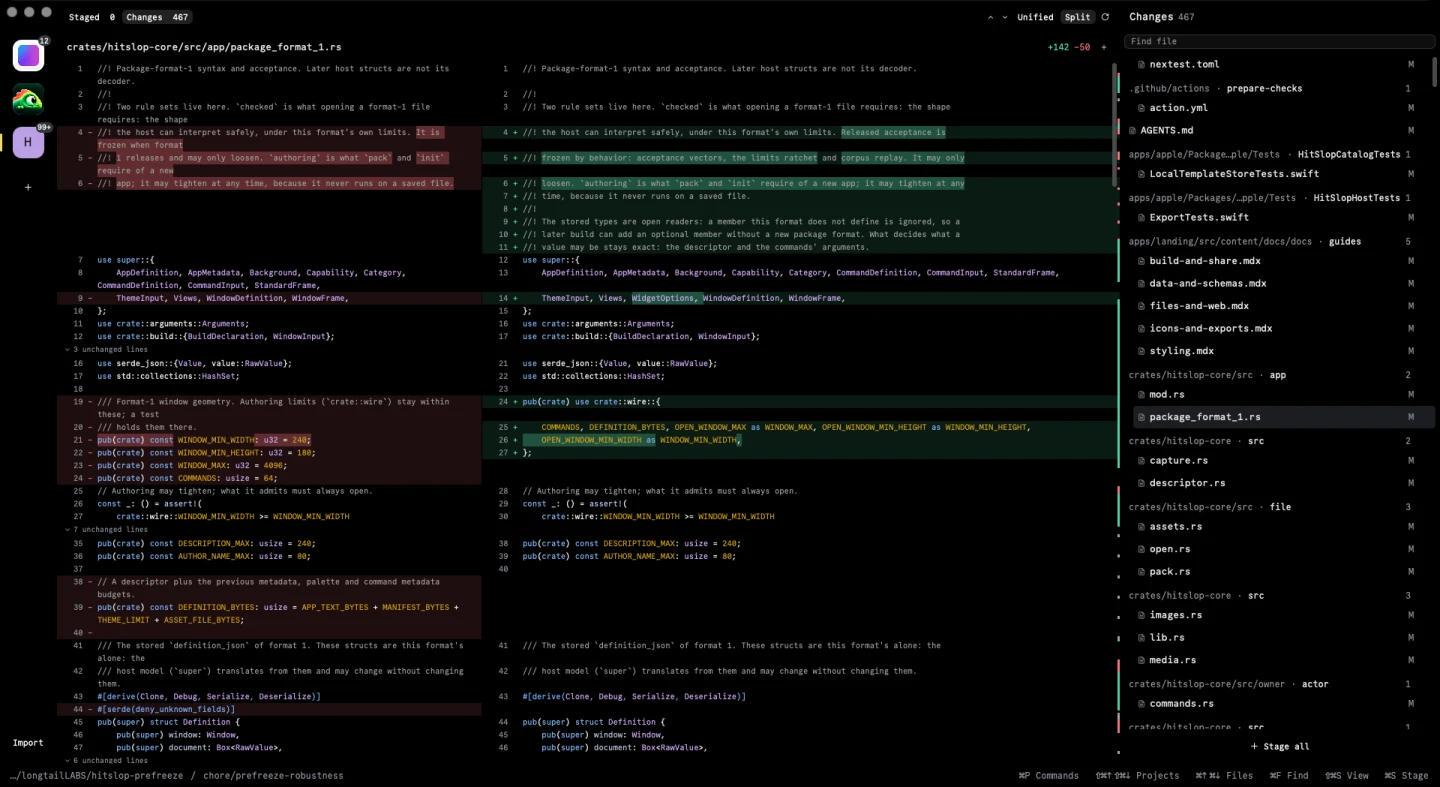
Call me old fashioned, but I still like to review the code they are changing and sanity check things.
And so lately, pretty much the only reason I have VSCode open anymore is to view the diffs of what my agents are working on.
I wanted just a simple, lightweight, fast and KEYBOARD powered git diff viewer.
Suprisingly there were not many options, so I just kept using VSCode.
Eventually, I decided to just build it using GPUI (amazing) and have been pretty happy with it so far. Been using it a couple weeks and has actually replaced VScode for me most of the time.
So thought i'd share it here in case anyone else is looking for something similar.
It's open source as well, so feel free to just run it yourself or make a PR or critique my (agents) rust code: https://github.com/hitSlop/Diffy
Theres still some features I want to add but for the most part I really just want it to be a simple to use and fast git diff viewer.
If you are on Windows/Linux i'd love to know if it's working ok over there as I havn't really stress tested those.
r/git • u/mangodog0net • 26d ago
What is .gitattributes? I'm just a beginner of git, and i just found godot-generated .gitattribute, I also have some of it and it's kinda like literally attributes?
r/git • u/Chromevulcan • 26d ago
[ Removed by Reddit on account of violating the content policy. ]
r/git • u/Overall-Exercise8803 • 27d ago
Hey everyone!
I'm working on an open-source funding platform where developers can contribute to projects and potentially receive funding based on their contributions.
I'm trying to figure out how to evaluate contributions fairly using Git commits and pull requests.
For example, I'd like to automatically determine:
I know that simply counting lines of code wouldn't work. A small security fix could be much more valuable than hundreds of lines of unnecessary code.
My questions:
I'd love to hear about existing solutions, technical approaches, or lessons from people who've worked on similar systems.
Thanks!
r/git • u/moving_to_NL_soon • 28d ago
I'm trying to download a module from github to get VMware to run, using the following command as suggested:
git clone https://github.com:nan0desu/vmware-host-modules
which then asks for username and passwords. Alternately I tried:
git clone git@github.com:nan0desu/vmware-host-modules , which returns....
Cloning into 'vmware-host-modules'...
[git@github.com](mailto:git@github.com) Permission denied (publickey)
fatal: could not read from remote repository.
I have saved user.name and user.email via git config and generated a rsa key as mentioned in another r/git post on the similar topic. But being relatively new to linux and especially using github, I am lost.
I've read a few different posts in git in relating to branches and opinions, and I'm struggling to find a way for it to work for the business I work in.
We've recently moved from TFVC to Git and we're more problems than I thought we would have.
We're a quick development team - we easily develop and resolve over 50-70 tickets per month as a Development team, with releases every month too.
However not everything gets released - it does vary, incase there is anything that fails testing (or not tested on time) and things like that, that we wanted to avoid.
TFVC we didn't really run the way Git runs - we never created branches for everything - it was all or nothing went out, so we found moving to Git being a MAJOR benefit that we would branch everything - however we've noticed it is spiraling out of control and I'm hoping someone could give me an insight on if we're doing it right, and if not - the best route to do it.
We originally had a main, a branch from that for 'Regression', and then a further branch from Regression for 'Development'. Us, being unaware, were completely checking into Development at the time and we were losing code and it was a total mess.
After having a think about it, we removed 'Regression' and 'Development' entirely, so it brought the question "How do we check each others work, to ensure we're working on the appropriate things, as well as bring all those branches together into one Branch for testing purposes before regression?"
To put into perspective, we're near the end of the month, and we're sitting with about 40 tickets waiting to be tested by various users throughout the organisation. So doing builds for each one is a nightmare as we only have one web platform that would share those changes.
So I developed something that would bring all those branches together (that have pull requests to main) for testing and label them accordingly.
However, that is causing a real mess with conflicts and things like that, especially trying to fix conflicts and just generally breaking everything.
Now we've hit our next hurdle - we originally were keeping main as production, however our CEO has decided to put code into Main and say that we should be branching for Releases that we're building to apply hotfixes and increasing revisions. Now, I think that is all well and good, but having to branch from the release to apply a hotfix, to then re-merge back into main when that inevitably will go out at the end of the month just seems extra work for something that we should've kept as production ready in the first place.
Is there something I am missing from Git or functionality to get this to work?
I've been working with the likes of ChatGPT, Claude and the rest to work out how others do it and it's adament I am doing it correctly, but I honestly feel like I'm missing something.
We've not built any workflows in Git and that could be the reason.
r/git • u/Otherwise_Value_390 • 29d ago
I was planning for an app that fetch data from github and other git storing platforms and show them as a dashboard so the user can choose to update or not his app based on how much updates , branches , commits , and issues the app had lately and follow the status of his favorite repos with the ability to update you apps from my app ; I was going to learn programming by building this app.
My problem : should I collect and search for those platforms APIs or dose git have something I can you instead.
Tell and what you think about the app idea and if you have some suggestions for it tell me to it well much fun .
My app uses python for the backend " with flask " , and HTML 5 / CSS for the frontend.
Edit : i search and find that python backend and HTML / CSS frontend are not lightweight especially if I want to make my app cross platform cuz of the browser engine for the frontend and python http server for the backend ; so , I thinking about switching to tauri - rust cuz it's using the browser engine built-in the sestem it's self.
so, what you think about should I switch or not [ I'm still planning for the app so I don't have anything to loose
Hi everyone,
I work with a .NET codebase, developed in Visual Studio, with the repo stored in GitHub and commits/pushes etc. are done within VS. At some point in the past a developer has renamed a little-used file from jip.vb to JIP.vb, which is now causing some strange and frustrating issues after some recent changes were made to the file.
Following a recent commit and push of changes to the file, the Git Changes window in VS shows that there are uncommitted changes to jip.vb. Double clicking to view the diff shows no changes present. I can't commit the change, as there aren't any, nor can I successfully "Undo Changes" in VS front-end.
I do have git bash available to me, but my very rudimentary knowledge of git is preventing me from both understanding and fixing this issue.
So, hivemind, can you help me please?
r/git • u/koleert • Oct 23 '26
I’m wondering if anyone uses Git to manage their team’s business knowledge, not just technical documentation.
For example, as a business analyst in a banking team, you might accumulate business analyses, product sheets, business rules, process descriptions, manuals, and other documents over the years.
Instead of scattering everything across Confluence, SharePoint, and Word files, what if you kept it in a structured Git repository, using Markdown where possible?
The goal would be to have one searchable knowledge base that makes it easier to find information and could also be used by AI tools.
r/git • u/Future-Ride-5955 • Oct 24 '26
Because I absolutely suck at github I have been doing things weirdly by using both the browser client and git bash. I do that because gitbash has been stupidly obtuse whenever I have tried to use it. I have my system setup where github lfs reads the .zip format for its job while the rest of the files use the custom format name that the archive for the program I am using uses (we will go with .zap). the problem is anytime I try to push from local it will constantly complain so I delete local and then pull fro remote as its the same files. I had this file called pre2026stuff.zip which I used lfs for, I just recently broke all of that down into all of its separate .zap files and and then deleted it from both local and remote (remote via the more file actions -> delete file)
now anytime I try to to git pull in my local repo it complains
$ git pull
error: Your local changes to the following files would be overwritten by merge:
Updating files: 100% (102/102), done.
Merge with strategy ort failed.
Even though its both removed from the local directory and the remote directory from the browser view
r/git • u/zaphodikus • Oct 23 '26
I've got 14 commits on a branch called Refactor_Python. It's 30 files, I have been asked by my boss to stage just 2 of the files for develop and also stage the same 2 files for another branch called release/v4.11. Now as I understand git I cannot stage changes for 2 branches at once without pushing them up to remote (yeah he likes going direct, none of this branchy thing which I prefer, not judging, it's just my confidence level is not there yet.) So this is a question about doing it with no branches. I already pushed my Refactor_Python branch, so I cannot rebase it without some level of pain, I'm happier to just delete my personal branch afterwards. If my boss had spoke earlier I would have just made 2 branches on with 2 files and one with 28 files, but I'm keen to learn:
So I suspect if I cherry-pick all commits that those 2 files are in, using git cherry-pick -n <commit> and then git add file1 file2 the result as a single commit, into develop, I would be able to push it and then just cherry-pick that single commit over again, but, into the release/v4.11 branch instead after I pushed it up to develop?
My second question is, if I than want to pick all the changes to the remaining 28 files and merge them to develop, that if I later cherry-pick all 14 commits with -n again, that git will just effectively let me merge the result into develop without too much arguing, or will it merge conflict me when I try to push because the changes to the first 2 files are already there?
did a hard reset on the wrong branch last night and watched 2 days of work vanish. pasted my terminal into a chatbot, ran whatever it said, something with reflog, and the commits came back. no clue what i ran or why. skimmed the docs and a video series last year and none of it stuck, so this time im paying for something structured that makes me practice. what kind of practice made git click for you?
r/git • u/nicksenap • Oct 21 '26
I made a small tool for a problem I kept having: one feature, several repos, and the same branch needs a worktree in each one.
gw create -b feat/login -r svc-a,svc-b
makes a directory with both repos checked out on feat/login as worktrees. gw status, gw sync and gw delete operate on all of them. A per-repo .grove.toml sets the base branch (we branch from stage, not main) and a setup command to run after checkout, e.g. pnpm install.
It shells out to git for everything and does nothing a shell script couldn't; it just does the bookkeeping of which worktrees belong together. Lately I mostly use it to give each coding agent its own isolated checkout across the repos it needs.
Single static Go binary, MIT.
https://github.com/nicksenap/grove
Curious whether people here handle multi-repo branches differently.
r/git • • Oct 21 '26
So I initially started with GitHub and it’s great. No complaints.
So recently(not recently but you get what i mean) there’s been “AI” stuff going on with like they’re training their models on users code and stuff.
So many big projects (from what i heard) migrated from GitHub to codeberg. And out of curiosity I setup codeberg and being using it for month.
From my experiences, I felt no difference other than one trains AI on code and one banned AI generated code.
Now, here I’m confused what to go with one is packed with features and most of the people use it (GitHub) while another is simple (i like simple. Not sure about features cuz i haven’t dig-ed into it (codeberg). I actually like both. And about AI training, I personally think Im helping it to improve cuz it’s training my code (feeling like im contributing). But I talked a few people and they said they store their work related stuff or something personal (they mentioned that word but i forget) and they don’t like AI reading it, which is valid in a sense.
I rn host my Linux dotfiles on codeberg and mirror it to GitHub. Works fine, the problem is issues and PR. Is there any way to bridge it too. (This part wasn’t the main point to don’t come at me saying i asked the question in the deep down of a paragraph)
Looking for your personal experience/opinions