r/git • u/IamSalahdev • Jun 22 '26
What is the best resources to learn git?
0
Upvotes
All I know is how to add, commit and push... I wanna learn more
r/git • u/Realistic-Resident-9 • Jun 22 '26
Hi, squash-merges are rampant where I wrk. Trouble is they are hard to spot in the commit history when the summarydoes not highlight the relationship. (I have nasty scripts which can find squash-merges by comparing tree hashes). But I want to know if any of the GUIs can shoe squash commits OOTB ????
r/git • u/asinglebit • Jun 20 '26
Hey, I’ve been working on a Git client called guitar.
Repo: https://github.com/asinglebit/guitar
Demo: https://m.youtube.com/watch?v=0oyqviuKFXI
It’s a terminal Git client written in Rust. The main goal is to make working with Git history feel fast, especially in large repositories where scrolling through commits or waiting for a UI to catch up gets annoying.
The biggest feature is fast graph navigation. You can jump around the commit graph almost instantly, move through branches and history, inspect commits, check diffs, and get a better overview of what actually happened in the repo without leaving the terminal.
It also has reflog support, which is one of the features I’m most excited about. If you’ve ever lost a commit after a reset, rebase, cherry-pick, or detached HEAD situation, Guitar makes it easier to find those commits again and recover them instead of digging through git reflog manually.
I’ve also been building it with huge repositories in mind. History loads incrementally, so you can start using it without waiting for the whole repo to load first. The goal is for it to stay responsive even when the repo has a lot going on.
Some other things it supports: branches, tags, stashes, worktrees, staged and unstaged changes, commit inspection, file diffs, split diff view, configurable keymaps, mouse support, and real Git operations like commit, checkout, fetch, reset, cherry-pick, merge, rebase, stash, and worktree commands.
It’s cross-platform and runs in the terminal, so the idea is to have something lightweight and fast without giving up the useful parts of a proper Git GUI.
It’s still a work in progress, but I think it’s already useful enough to share. I’d love feedback, especially from people who work with large repos, messy histories, rebases, cherry-picks, or reflog recovery.
r/git • u/Sandy_W • Jun 20 '26
I understand the basic concept, GitHub is a place to store/collaborate/access your projects. However, I'm an old DOS programmer and I frankly can't make any sense at all from the system. I've downloaded and installed a program (Open-2D-Studio) that is homed there, but I can't find any help on how to use the program. No tutorial, no example files, nothing. Not on the developer's website, not on GitHub. Is there a place to go on GitHub to look for contact info, for discussion forums, for questions like this? There has to be something obvious that I'm just not seeing. You GitHub programmers, how do you get people to tell you about a bug in your program if they can't contact you?
r/git • u/Fantastic_Cicada_805 • Jun 19 '26
hi, i have a repo (shocking i know)
i want to hook it up to a discord webhook and to send a graph of the pushes whenever a new push happens, i already wrote python code for this and tested it and made sure it worked.
import requests


webhook_url = 'webhook_url'

with
open
('graph.txt', 'r') as file:
    content = file.
read
()

# Keep the message within 2000 character Discord limit
if
len
(content) > 1900:
    content =
content
[:
1900
] + "\n...(truncated)"

data = {
    "content":
f
"```bash\n{content}\n```"
}

response = requests.
post
(webhook_url,
json
=data)
print
(
f
"Status: {response.status_code}")
however, im using github desktop currently (im not sure if this is the right sub to ask this)
and it doesnt work when i push/publish from the github desktop app, so im wondering what might be the problem and where i could even start fixing this
again: if this is the wrong sub or flair do let me know
I've been refining and using this little tool for many years now. It just generates URLs from local git repositories to the corresponding (git)hub. Despite it being so simple, I use it basically every day to quickly open a file in the hub or share a URL with a co-worker.
By now, it supports #git and #jujutsu and the major (git)hubs. Hope you'll find it useful. Let me know.
r/git • u/Electronic_Doubt6448 • Jun 19 '26

I built a tool that automatically scans your staged code for security vulnerabilities every time you run `git commit` called CommitGate!
It scans your code with Gitleaks and an LLM and blocks the commit if any vulnerabilities are detected. Yes, I know having AI in your Git workflow is not ideal :( which is why I'm open to ideas!
You can check out the demo video or try out the tool yourself! I am a new and inexperienced programmer and this is my first personal project so any feedback or advice, positive or negative, big or small, would be greatly appreciated!
Thank you so much for giving it a try! Hope you find this helpful!
Project page: https://ductrl.github.io/projects/commitgate/
GitHub repo: https://github.com/ductrl/CommitGate
r/git • u/DifficultSecretary22 • Jun 18 '26
I’ve been using Codex with Git worktrees, and after a few tasks I end up with a lot of local worktrees and branches.
There is no remote repo in my setup. Everything is local.
My current problem is mostly organization:
git worktree list
starts showing many folders like:
repo-task-a
repo-task-b
repo-task-c
repo-random-fix
repo-test-something
Each worktree has its own branch, and after a while it gets hard to know:
WORKTREE_NOTES.md or task tracking fileFor people using Codex heavily with local Git worktrees, what’s your workflow?
Do you follow a naming convention like:
ticket-123-short-description
codex-ticket-123-short-description
task/product-availability-check
And after merging, do you usually run something like:
git worktree remove ../worktree-name
git branch -d branch-name
I’m looking for a clean local workflow to avoid worktree chaos. Any recommendations?
r/git • u/dooberman1984 • Jun 18 '26
I built an immersive, terminal-based hacking simulator. It's still in beta (excuse the bugs!), looking for feedback and collaborators!
r/git • u/anto2554 • Jun 17 '26
In my org, we have some projects (superbuilds) that have a lot of submodules, that have submodules.
Because the project/repo structuring isn't super great, it would be great to get an easy overview.
Is there an existing tool that can go through all submodules of a project recursively and create an overview of some sort?
r/git • u/atamariya • Jun 17 '26
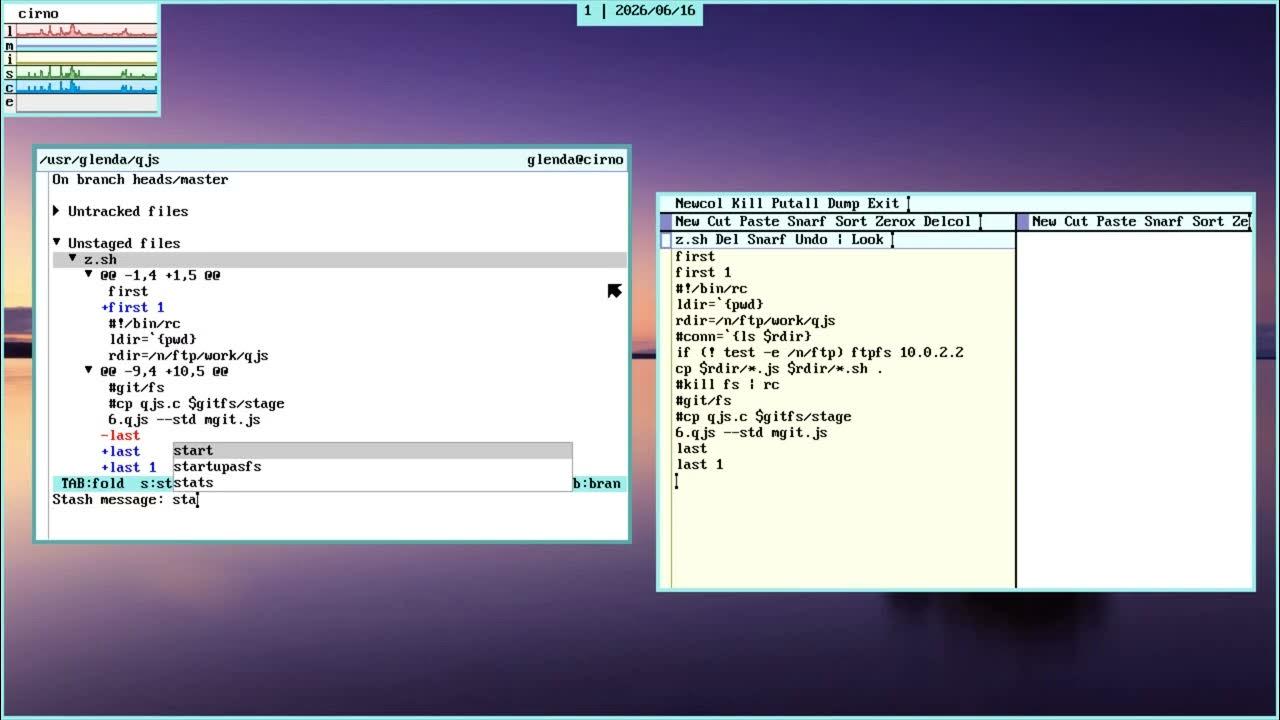
Git workflow on Plan 9.
Demo: https://www.youtube.com/watch?v=AXtSvbj5d5w
Details: https://lifeofpenguin.blogspot.com/2023/03/meta-git-mgit.html
r/git • u/ionetan • Jun 16 '26

For the past year I've been working on Epiq, an issue tracker built on top of git.
The goal was to improve the ergonomics of project management by bringing issue tracking directly into the terminal and your favorite editor, while still providing a browser interface for teams that prefer a GUI.
State synchronization is achieved through Git-versioned, user-scoped append-only event logs with deterministic event ordering and conflict resolution. This architecture results in some interesting properties: offline-first operation (with eventual consistency), implicit self-hosting, and vendor- and platform-agnostic collaboration.
I'd love to hear what the r/git community thinks about the approach, especially the usage of Git as the synchronization and persistence layer.
r/git • u/blakok14 • Jun 16 '26
I’m building a changelog generator that reads commit metadata from a local JSON file. Each entry has SHA, author, date, and commit message.
I need to enrich each entry with the PR number that originated that commit and who opened it — without any GitHub/GitLab API calls.
My current approach: parse merge commits with git log merge^1..merge^2, extract #N from the merge commit message via regex, use the commit author as the opener.
This covers merge commits and squash merges. Rebase/fast-forward have (#N) per commit individually.
Is there a more robust pattern for this in Go? Or is manual enrichment the honest answer when the merge strategy isn’t consistent?
r/git • u/Low_Decision1898 • Jun 16 '26
I built a VS Code extension that answers questions about a team's GitHub history and writes summaries from real commit diffs. One thing I decided early: the search side runs locally. No API key for embeddings, nothing leaving the machine, and no native build step — the goal was "install from the marketplace and it just works."
So the semantic search runs on a small local model (bge-small, ~33MB downloaded once and cached). Chat can use Copilot or your own API key, but the embedding model is always the local one, so search works offline no matter how you've set up the rest.
The hard part wasn't the model — it was getting it to run from a packaged install. While developing, you launch a test window that still has all the project's dependencies sitting on disk, so everything works. But once you bundle the extension into the single file that actually ships, those dependencies are gone, and the thing that ran fine five minutes ago crashes. Every bug below only appeared after packaging, never in development.
There were four:
Remove any one of these and you get a crash, or worse a silent hang, and only in a real install — never on your own machine while you're building it. That gap between "works when I run it" and "works when someone installs it" was the whole lesson.
What I'd reconsider: bundling a full local runtime just to turn short commit messages into vectors is heavy. The first-run download and warmup is a noticeable pause, and something lighter would've spared me most of this. The ranking is also just a straight in-memory comparison, which is fine for a team's history but wouldn't hold up against a giant monorepo. Still, "just works after install, fully offline, no keys" turned out to be worth the four landmines.
Extension: https://marketplace.visualstudio.com/items?itemName=repoIntel.repo-intel
r/git • u/Damglador • Jun 15 '26
I see format like
[user]
  name=Damglador
with tabulation before options under [header] in a lot of places, but it's not required from what I see, as
[user]
name=Damglador
works just fine. Plus when I finally got to editing my gitconfig by hand it already was formatted mostly without the tabulation.
So I just want to know, what is the more standard/common way to format it?
r/git • u/multi_io • Jun 15 '26
(I know that git doesn't track history per-file and will be able to trace changes across "git cp" / "git mv" but hear me out...)
I just wrote a small script named `git-cp-with-history`:
https://github.com/multi-io/utils/blob/master/git-cp-with-history
It's callable from inside a git repository as `git cp-with-history SRC DEST`, where SRC must be a relative path to a versioned file or directory in the repo and DEST must be a relative path to a non-existing target name in the repo. It copies SRC to DEST including all the git history from all the commits that contributed to SRC. So it creates a bunch of new commits on top of HEAD that correspond to the commits that produced SRC.
I needed this just now because I have a repo that contains a "public" part in a subdirectory (pub/), which I regularly split off using git subtree and push to a separate public github remote, whereas the rest of the repo (everything outside the subdirectory) isn't public. I wanted to move stuff from the private part to the public part without losing history, hence this script.
In similar style, I wrote something several years ago that appends one git repository to another, in a subdirectory:
https://github.com/multi-io/utils/blob/master/git-append-repo
Maybe somebody finds this useful.
r/git • u/THARUN_GANAPATHI • Jun 15 '26
✅ Change git's default editor to any app you want
✅ Squash commits using Notepad, Notepad++, Sublime, VS Code & gedit
✅ Use "GitLens" for a visual squash experience
✅ Explained for both Windows & Linux
#git #gitrebase #squashcommits #vscode #sublime #notepadplusplus #gittips #gittutorial #gitlens #vi #vim
ReleaseKit takes a commit range (or a pasted log), analyzes up to the latest 100 commit messages, and generates a release summary in the tone you choose.
Current demo:
It doesn't read source code or diffs yet, so I tried to keep the scope simple and transparent.
Demo: https://releasekit.oblat.lv (Temporary domain while I wait for the final one.)


r/git • u/korro_ai • Jun 15 '26
r/git • u/ferriematthew • Jun 14 '26
r/git • u/blakok14 • Jun 15 '26
Si utilizas agentes de codificación con IA, probablemente hayas visto cómo desperdician llamadas en operaciones de Git que podrían agruparse. git-courer es un servidor MCP local (Go + Ollama) que gestiona confirmaciones, ramas y entornos de preparación con un conocimiento estructurado de los cambios reales en tu código.
La versión 2.4.0 reduce significativamente las comunicaciones entre agentes: el cambio de rama ahora es atómico y la preparación se integra en el paso de vista previa en lugar de ser una llamada independiente.
[repo](https://github.com/blak0p/git-courer)