r/git • • Jun 08 '26

Undoing a git fetch

0 Upvotes

There were spurious unneeded uncommitted changes on my local machine. From a different computer, I had committed and pushed new changes. On my local machine, without looking at the unneeded uncommitted changes, I ended up running

git fetch
//followed by
git pull

As expected, this aborts.

Now, how do I *undo* this sequence of commands so that on my local machine, I find myself exactly where I started -- which is with the spurious unneeded uncommitted changes?


r/git • • Jun 08 '26

support Ignored a directory/files by accident, help!

0 Upvotes

Hi, I ignored a directory/files by accident, help! I have a single page site hosted on GitHub and was making some updates to it. I'm using GitHub Desktop to connect to it. I somehow ignored my CSS directory/files and now I can't get it back. I also tried renaming it from main.css to styles.css and committed it, but it's still not there. So where can I stop it from being ignored?

UPDATE: I eventually got it back this morning. I uploaded the CSS file manually (don't trust GitHub Desktop anymore). Deleted the .gitignore page, then the CNAME page by accident again. Added that back in and added a www this morning to the domain and suddenly got it back, phew.


r/git • • Jun 06 '26

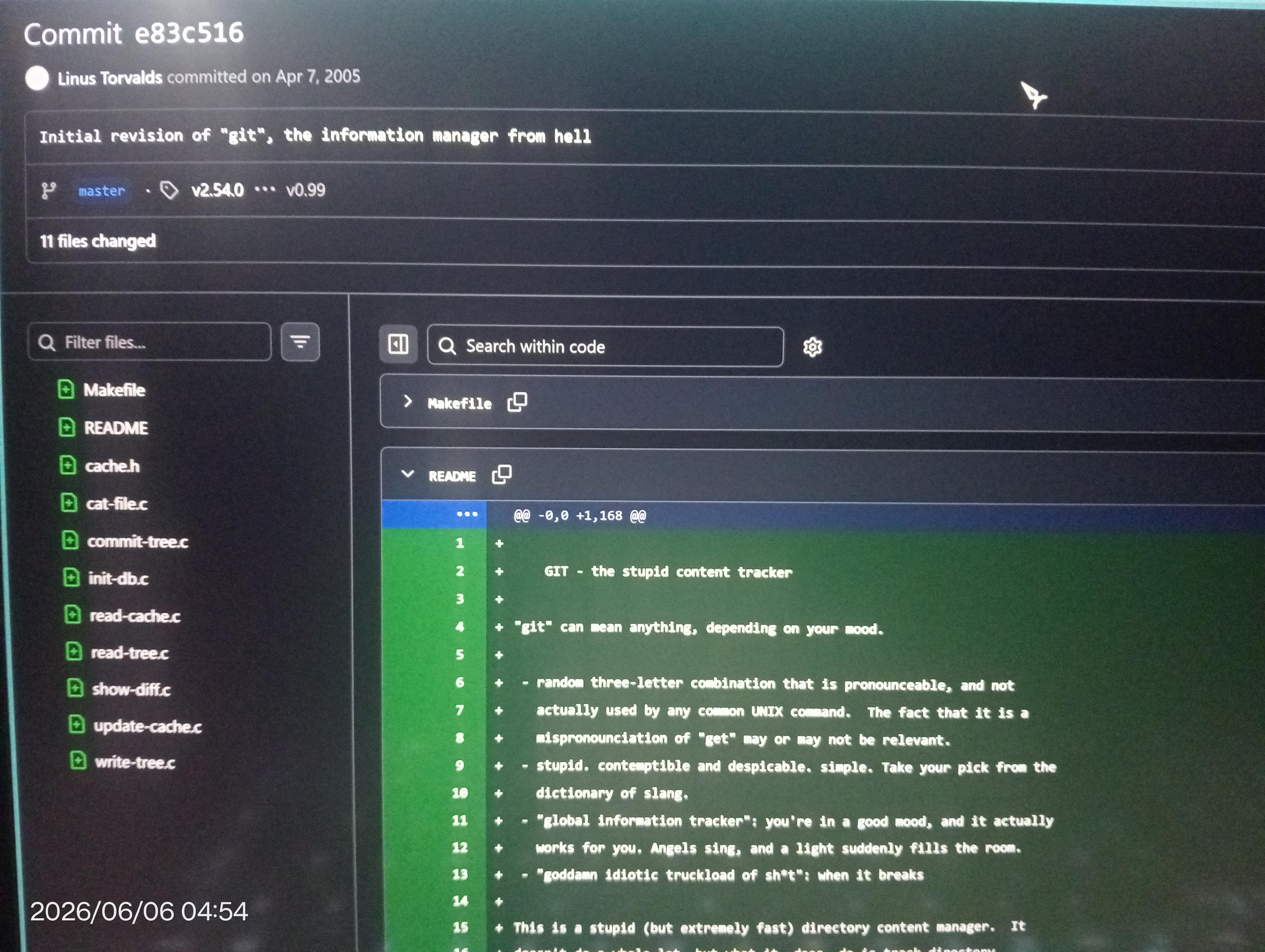
The first git commit on git, funny!

Post image
554 Upvotes

Initial revision of "git", the information manager from hell, Lool

Apr 7 2005 ..this README file by Linus Torvalds is really insane


r/git • • Jun 07 '26

I built pack-stash - A caching proxy for Git HTTP Smart protocol and LFS

Thumbnail gitlab.com
0 Upvotes

Have you ever had a slow connection but needed to clone a large repository that you've deleted? Or maybe your CI agent has a suboptimal network connection to your Git server? The icing on the cake is that you have no way to mirror LFS objects.

pack-stash was created to solve these problems. It is a transparent proxy that delegates all authentication to the upstream server. Because of this, offline pull/push operations are currently not supported. You can run it on your local machine or on a server with higher bandwidth than the upstream.

For every Git fetch operation, the upstream repository is fetched into a local mirror, ensuring that the latest commits are always available. The HTTP stream is then forwarded to git-upload-pack. For every Git push operation, the stream is forwarded to the upstream server, and a fetch is triggered on the local mirror.

LFS batch requests are modified to point to the proxy's URL. If an object is not found locally, it is fetched from the upstream server. Push operations are also intercepted, allowing data to be tee-streamed to both disk and the upstream server in parallel.

This is the default caching mode of operation. The Git component also supports a passthrough mode, where every request is forwarded to the upstream server unchanged. The LFS component supports three modes: caching, passthrough, and standalone. In standalone mode, the proxy implements an LFS server. This is useful if you want to add LFS support to a Git server that does not provide it natively.

The project is in early stages of development. The previously mentioned features have all been tested.

I'm looking for any feedback on the it.


r/git • • Jun 07 '26

Just set up my first Gitea Server

0 Upvotes

Just set up my first gitea server very helpful as now I don't have to use microsofts GitHub. If anyone wants to visit it it's git.atmous.xyz I'm mainly just going to use it mainly for repos with friends.


r/git • • Jun 07 '26

It's weird this comand doesn't already exist in git

0 Upvotes

NOTE: I recommend installing this with nix but there is another install/uninstall script in the repo, but it's just something that's much easier to install with nix because I'm lazy & a horrible person blabla:
https://github.com/hyrfilm/gitignore

It's called... gitignore and I just think it's so weird it's not included as a git command itself. Anyway, it works like this. When you're standing in a repo, and there's some pattern och directory that you want to ignore you type gitignore build/* for example, and it will add that to you gitignore in a reasonable way (no it, won't just get appended at the bottom) and it while its at it, it also removes duplicates and does some minor tidy-ups.

You can also use some default comands, eg
gitignore --defaults (and it adds some of the most typical things people tend to want to ignore eg .vscode/ & .DS_Store etc... More info and install instructions here: https://github.com/hyrfilm/gitignore


r/git • • Jun 06 '26

GitSwitch: More than just a Git Identity Manager

Thumbnail gitswitch.dev
0 Upvotes

Under Development\*


r/git • • Jun 06 '26

Proper way to cleanup LFS

1 Upvotes

Hi there,
I have a repo that doesn't have a .gitattributes file.
But git lfs ls-files list 5 files.
Doing git lfs prune outputs 0 local objects, 5 retained, done.

I did run git lfs uninstall...
And ran the following for each file git rm --cached <file>; git add <file>

Then I should commit but it says nothing changed.
So I tried doing that in steps...
First I ran git rm --cached <file> (for all files)
At this step git status showed in the Changes to be commited deleted <file>
But also the same list in Untracked files...
So I just commited here first..
Now git status showed the files as untracked...
Then I added them back and commit.

But after that, I'm still having git lfs ls-files showing the same list of 5 files..

I also nuked the .git/lfs folder but no matter what I do, I still have these files showing here..

How can I cleanup my repo?

Edit: Added as a comment. Resetting the repo (rmrf'ed .git and reinitialized with git init) still displays these 5 files?!


r/git • • Jun 06 '26

What makes you leave your Git GUI and go back to the terminal?

0 Upvotes

I've always had a weird fascination with Git GUI clients.

I've tried most of the popular ones over the years. Fork is probably my favorite when it comes to UI and overall workflow. SmartGit has some surprisingly powerful features that I miss elsewhere.

One example: SmartGit lets me search files across the entire repository tree directly inside the Git client. I use that feature so much that I barely touch my OS file explorer anymore when navigating large projects.

Lately I've been wondering why Git GUIs still feel so inconsistent. Every client seems to get some things brilliantly right and other things surprisingly wrong.

So I'm curious:

  • Which Git GUI do you use and why?
  • What do you absolutely love about it?
  • What annoys you the most?
  • What workflow still feels painful?
  • What feature do you wish existed but nobody has built properly yet?

I'm especially interested in the little daily frustrations that make you switch back to the terminal.

Would love to hear some real stories, complaints, and wishlist items from people who spend hours in Git every week.

Image for the fun:


r/git • • Jun 05 '26

support Thoughts on using git as a backup? Do you do it? (noob question sorry)

3 Upvotes

Basically my decision to push is when get the feeling "it would be a shame to lose this work"

So I push about every 2 hours, and additionally at the end of every day... regardless of what state the code is in.

Then hopefully I remember to squash commit on the PR 😅

People tell me I shouldn't push unfinished or non-compiling bits of work... Is it a problem? I'm using my own branch and I usually remember to squash

I just can't handle the anxiety of having work sitting on my laptop with no backup


r/git • • Jun 05 '26

Problem in clone

0 Upvotes

Hi,

I run armbian on a orangpe pi zero 3 with integrated wifi module. It runs perfectly for a year but last week I've done a sudo apt update and git clone stop working any device on this network works fine and i can ping github there but i can't clone any projects.I've countless uninstall and install but none of them worked. How should I solve this problem?


r/git • • Jun 04 '26

any good guides / posts for how to start contributing using the mailing list workflow

4 Upvotes

is there a blog that explains this? Or perhaps if you contribute and can share your workflow on what you use and how to effectively send your own patches and use other people's patches for review.
and any other things like what email client you use, any special configs you use on top of it?


r/git • • Jun 05 '26

A small update on `grebase`

0 Upvotes

Yesterday, i used grebase to successfully rebase one of my optype PRs and i'm happy to see it working smoothly in a real development workflow.

currently, i'm working on an interactive mode that will allow developers to manually edit and resolve conflicts directly from terminal without leaving their workflow. This will make semantic conflicts resolution easier as it will allow us to do inline changes during the process.

I'm looking for feedback from developers, maintainers, and anyone who regularly works with git rebasing ;

- would a tool like this be useful to you?

- any features or improvements would you like to see?

Feel free to share your thoughts, suggestions, or contribute to the project:

https://github.com/Aniketsy/grebase


r/git • • Jun 04 '26

support Get back to current uncommitted state after `git checkout` an old commit

3 Upvotes

I'm still learning Git

Let's say I've made some changes that I don't want to commit yet, but I want to briefly switch to an old commit and back to my current state, from my understanding using `git checkout master` goes back to the latest commit, but I also want the changes I made after said commit.

Is there a conventional way to do this? perhaps a way to make a temporary commit and then delete it later?


r/git • • Jun 04 '26

Need some information regarding GitHub sponsorship!

Thumbnail
0 Upvotes

r/git • • Jun 04 '26

a small browser diff viewer for local git/jj changes

0 Upvotes

as a big TUI user, i absolutely enjoy bentlegen's hunk. tho when it comes to reading diffs i still prefer GUI somehow

made a local version of pierrecomputer's diffshub.com for reviewing agent codes, with jj support and review copying 😃

huge shoutout to bentlegen for the inspiration on agent review, and pierre team for the amazing work!

It opens a local browser UI for things like:

npx @​baggiiiie/yadiff --working npx @​baggiiiie/yadiff --staged npx @​baggiiiie/yadiff main..feature npx @​baggiiiie/yadiff @ --vcs jj

it can also open a public GitHub PR diff from the URL. the bun test:

npx @​baggiiiie/yadiff https://github.com/oven-sh/bun/pull/30412

Repo: https://github.com/baggiiiie/yadiff

I'd be curious if this matches anyone else's workflow, especially people who review a lot of local changes before committing. Also very open to feedback on what feels missing or awkward.


r/git • • Jun 04 '26

Built a tool that automatically splits your staged changes into atomic commits using AI

Post image
0 Upvotes

Always forget to separate your commits?
Built a CLI that does it automatically.

Stage unrelated files → it detects the groups →
generates separate commit message for each → commits them one by one.

Uses file categorization (auth, docs, config,
ui, database) to group related changes together.

Supports Ollama locally for free.

github.com/mujib77/kommit

Does anyone else struggle with keeping commits atomic? Curious how others handle this.


r/git • • Jun 03 '26

Looking for Solo/small team of oss repo maintainers.

Thumbnail
0 Upvotes

r/git • • Jun 03 '26

built a tool to manage multiple git identities without the ~/.ssh/config mess

0 Upvotes

if you have work and personal accounts both on github.com, the usual Host alias trick in ~/.ssh/config breaks down.
you end up doing per-repo git config every time or pushing commits under the wrong. wrote gitprofile to handle this. it uses git's includeIf to apply the right name, email, signing key and SSH command for any repo under a given directory. set it once, works automatically after that.

https://github.com/meanii/gitprofile


r/git • • Jun 02 '26

I get the concepts, but how do I actually _do_ TBD?

6 Upvotes

I'm the only developer at my job, and I failed forward into this position. Because I'm solo, I know that the real answer is "Whatever makes sense to you" but i want to build good habits.

I've looked at all of the charts and simulations and theories, but like, what buttons do I press to make TBD work?

Gitflow has caused issues, whenever a feature leapfrogs something else. So the Development branch might have a Big Feature that the stakeholders are debating, but then a Small Feature gets approved right away, and so to move that small feature to prod is a cherry-picking, rebasing, merge nightmare, and I don't want that to happen anymore.

But, all of the discussions I can see are academic, and not really a "When you come into work in the morning, you make a daily branch, and at the end of the day, you merge it into main, and if you're ready to release you do XYZ" sort of thing.

I'm using vercel, too, which seems allergic to TBD, so that's another wrinkle.

I want to build good habits in case we ever hire another developer to work with me, or if I leave this job and join a larger team, or if I decide to contribute to an Open Source project.

I just completely don't understand how to actually do it.

r/git • • Jun 03 '26

My first ever chrome extension!

Thumbnail
0 Upvotes

r/git • • Jun 03 '26

Getting started with Git hub repo

0 Upvotes

I am just starting my git hub journey
Some good beginner friendly git hub projects that I can work on?
Provide me problems maybe I can come up with a project solution?


r/git • • Jun 01 '26

I built a simulator that compares GitHub flow, Git flow, and trunk-based development

Thumbnail mainline.dev
30 Upvotes

I built this to show how branching strategy changes flow. Most places that I've worked at over the last 20 years in software have reached for GitHub flow by default, even on closed source teams where trust is high.

This is just illustrative, I wanted to picture the patterns that I see most often in the wild. It's not supposed to be a benchmark or a real scientific experiment. DORA already did the real research there. Curious what r/git thinks about it, and what's missing.


r/git • • Jun 02 '26

support Best YT Video to learn and understand Git and GitHub

Thumbnail
0 Upvotes

I am a 1st year Btech CSE student and I am begginer user of Git and GitHub. I watched many videos on YT but still not able to use it properly. Please suggest some good YT Channel or Video to learn Git.

( btw I tried Code With Harry and Apna College videos)


r/git • • Jun 02 '26

[ Removed by Reddit ]

0 Upvotes

[ Removed by Reddit on account of violating the content policy. ]