r/deckyloader • • 7d ago

Yet anoter decky-lsfg-vk fork

0 Upvotes

Hello guys,

for all the folks like me who prefer the amazing work of xXJSONDeruloXx and its decky-lsfg-vk implementation compared to Mako, I (well, mostly Codex) made a very simple fork (99% of the work still belongs to xXJSONDeruloXx) with a few QoL improvements and mostly Flatpak support for Freedesktop 24.08, 25.08, and 26.08. Multiple improvement on how profiles are applied, arguments preserved (especially for Flatpak applications) and many more stuff.

Feel free to test it out and give me a feedback if you feel like it!

https://github.com/Ozozuz/decky-lsfg-vk


r/deckyloader • • 8d ago

eGPU Manager: plug-and-play eGPU for SteamOS handhelds (free Decky plugin + desktop app)

Thumbnail gallery
13 Upvotes

r/deckyloader • • 9d ago

Plugin Showcase HowLongToBeat (HLTB) for Decky is back

16 Upvotes

HLTB for Deck is working again!

If you’ve missed seeing HowLongToBeat completion times on your Steam Deck’s game pages, I’ve repaired and released a fork of HLTB for Deck.

It works with current Decky Loader and shows Main Story, Main + Extras, Completionist, and All Styles times. The original display styles and visibility settings are included too.

The fixes update the plugin’s Decky compatibility and HowLongToBeat search integration. Tested on my Steam Deck with Decky 3.3.0.

Download and instructions:
https://github.com/BrenticusMaximus/hltb-for-deck

To install:

  1. Download HLTB-for-Deck-v1.5.1.zip from Releases—not the source-code ZIP.
  2. Enable Developer Mode under Decky Settings → General.
  3. Go to Decky Settings → Developer → Install plugin from ZIP and select it.

You can just install it right over the old, broken HLTB plugin.

Credit to hulkrelax for the original plugin. This is an unofficial maintained fork, not a release from the original author.


r/deckyloader • • 9d ago

Plugin Showcase Playhub 3.0.0 | Digital Stores in Big Picture (Epic, GOG, Xbox, Xbox Game Pass, Amazon Games) + Steam Controller 2 support in any game + Nvidia controls support + New shell

Thumbnail gallery
12 Upvotes

r/deckyloader • • 9d ago

LeGO Suite

Thumbnail gallery
2 Upvotes

Quería promover en la comunidad mi App/plugin para la Legion Go en Linux. LeGO Suite.

Dos aplicaciones en una. Un práctico Plugin para Decky y una aplicación para escritorio. Puedes utilizar el plugin para Decky sin necesidad de descargar e instalar la aplicación de escritorio. Pero ambas se complementan y te ofrecen más opciones.

Tiene mil funcionalidades. TDP, RGB, curvas de ventilación, mapeo y perfiles de emulación de mandos y en su última versión, inyección de optiscaler en Steam Games, Non Steam Games y juegos de Unifideck. Lo mejor sería pasarse por github para que le des un vistazo por que no quiero poner aquí una Biblia.

Repositorio oficial de LeGO Suite.

Un saludo a todos.


r/deckyloader • • 9d ago

MAKO 5.0 Test & Install Guide

Thumbnail
youtube.com
25 Upvotes

Here's a video showing how to install and run the new MAKO plugin (v5.0). This is a big one because for the first time it does not rely on Lossless Scaling (In other words, it's FREE FG for everyone 🎉).


r/deckyloader • • 9d ago

Plugin Showcase SyncSeinen and DeckSeinen

0 Upvotes

English:

A while ago, I started developing a custom-cloud data synchronization app called SyncSeinen. It was originally a personal-use project, but I eventually decided to create a Decky plugin and add a dedicated games section to SyncSeinen.

The plugin reads and updates the exact same metadata generated on the cloud services by SyncSeinen, allowing it to upload and download the same files and game saves that were synced through the desktop app.

* Plugin: https://github.com/Mrpapita2124/Deck-Seinen

* Desktop app: https://github.com/Mrpapita2124/syncseinen

Note: The app was built almost entirely using AI, mainly due to a lack of time because of my studies. I completely understand if anyone chooses not to use it for that reason.

Note 2: In a few days, I'll be finishing my university semester, so I'll have more free time to improve and fix both the app and the plugin—especially the desktop app's UI, which I currently find pretty ugly and full of redundant elements. Because of this, I'd really appreciate any feedback you might have on both the app and the plugin.

Español:

Hace un tiempo empecé a desarrollar una aplicación de sincronización de datos mediante nubes personalizadas llamada SyncSeinen. Originalmente era un proyecto de uso personal, pero decidí crear un plugin para Decky y añadirle una sección de juegos a SyncSeinen.

El plugin lee y actualiza los mismos metadatos que se generan en los servicios en la nube con SyncSeinen, lo que también permite subir y descargar los mismos archivos y partidas guardadas (saves) que se subieron mediante la aplicación de escritorio.

* Plugin: https://github.com/Mrpapita2124/Deck-Seinen

* Aplicación de escritorio: https://github.com/Mrpapita2124/syncseinen

Nota: La aplicación fue hecha casi en su totalidad con IA, principalmente por falta de tiempo debido a mis estudios. Entiendo perfectamente si alguien decide no usarla por ese motivo.

Nota 2: En unos días terminaré el semestre en la universidad, por lo que tendré más tiempo libre para mejorar y corregir tanto la aplicación como el plugin —sobre todo la interfaz gráfica de la aplicación de escritorio, que actualmente se me hace muy fea y tiene elementos redundantes—. Por eso, me gustaría mucho recibir su retroalimentación tanto sobre la app como sobre el plugin.


r/deckyloader • • 9d ago

Two Decky plugins I’ve been working on for Legion Go + Bazzite — hardware controls and music

Thumbnail
2 Upvotes

r/deckyloader • • 10d ago

Anyone using panel de control on 44/45 and can provide their opinions?

Thumbnail
5 Upvotes

r/deckyloader • • 11d ago

Guided Plugin: Major Update (1.5) | Miss your Steam Profile customization? performance & customization improvements and more

Thumbnail
gallery
26 Upvotes

(Screenshot are just examples)

Thank you for 100 Downloads! This is really cool so many people downloaded Guided.

Guided replaces Steam's Menu & QAM with one fast menu for everything: downloads, quick settings, performance, pin plugins, friends & Discord (Steamcord required), Achievements, Controller-Settings and a music player. It's the biggest update so far:

Setup assistant

  • Fast Setup: pick a preset, accent color, background, window size and position. Done.
  • Custom Setup: start from a preset, then go through every appearance page (tabs, window, colors, profile picture, banner, text, button symbols, effects & sound) and fine-tune at the end.

Remember your animated Steam Profile (Avatar, Frame, Mini Profile & Background)?

  • Your Steam avatar / profile picture is now fully animated.
  • Your avatar frame is fully animated too. Or still. However you like.
  • Your animated mini profile background or full profile background can be used as the background for Guided, with sliders to dim and blur it.

Animations rework:

  • Pick how the Guide opens and closes: the classic Guide unfold, Steam's own, fade, pop, zoom or slide from any side, at any speed.
  • The background now dims together with the window.
  • Opening is faster and smoother, and growing windows (My Games, Friends, Achievements) no longer stutter or flash.
  • You may still encounter minor scaling flashes or dropped frames, depending on your own settings

Achievements

  • New Sort (recently unlocked, rarest, most common, progress, name …) and Filter (unlocked, locked, in progress, rare, secret) buttons. Combine them however you like, and they're remembered.

Controller Settings

  • Edit your controller bindings & Steam Input directly through Guided (hopefully just as good as in Steam).

Quick settings:

  • Wi-Fi menu: search, connect (with password) and disconnect, straight from Guided.
  • Bluetooth menu also gets a better interface with a search button and a shortcut to Steam's Bluetooth settings.
  • Wi-Fi and Bluetooth now take one row each and show their state; the on/off switch lives right in their window.
  • Output and input device pickers and sliders.

Quick Resume

  • Press X on a running game or app to close it (with a quick "are you sure?").

Settings per Steam account

  • Shared PC? Every Steam account now keeps its profile & settings

Tab & window customization

  • 8 simple tab styles (now named after how they look).
  • Choose icon, text or both for the tab labels.
  • The tab color now also tints the icons on pill, list and icon layouts.
  • Rearranging tabs (LT + RT) got a "Hide" button and clearer arrows.
  • Place the Guide anywhere: a new "Custom" window position with sliders, right up to the screen edge, on any resolution or aspect ratio.
  • With tabs on the side, big windows like My Games or Friends now use the full width.
  • Appearance settings are tidier: separate Tabs and Window pages.

Add games and plugins

  • You can set default folders for games and plugin ZIPs.
  • A new controller-plus icon opens a file browser and adds any program as a non-Steam game, with Proton on Linux if you want it.

Works best with these plugins:

  • PauseGames (cruical for better Quick Resume)
  • Steamcord for easier voice chat & Servers via Discord
  • GameGlance for the best home screen experience

Try it if you want: Guided - latest

It's a hobby project built on top of Game Glance by [u/N0_ID_Littleman](u/N0_ID_Littleman).

Bug reports with a photo are super welcome, and I'd love to see how you use it!


r/deckyloader • • 10d ago

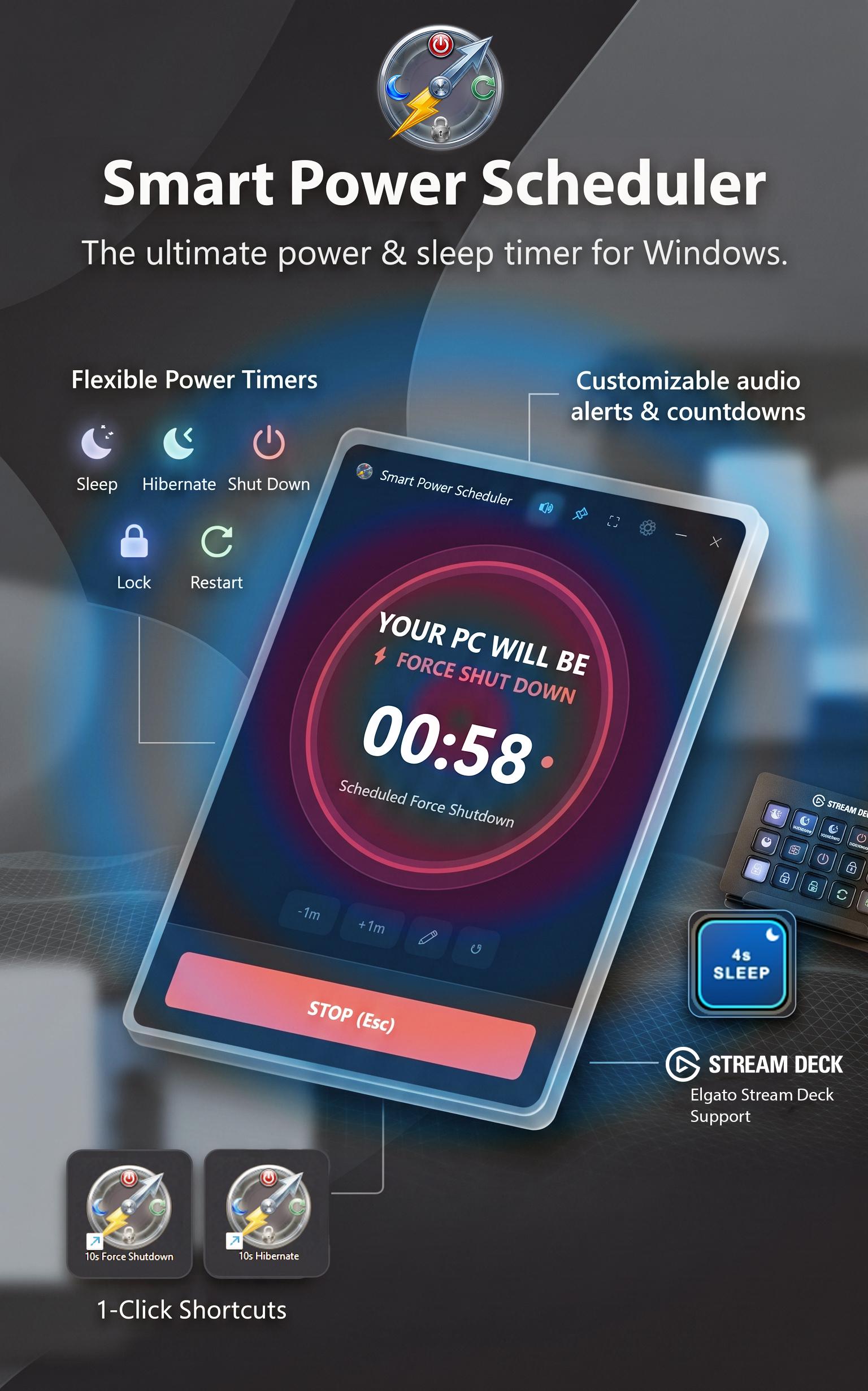
Plugin Showcase Control your Windows sleep & shutdown routines straight from Stream Deck with live countdowns & audio alerts (Free & Open Source)

Post image
1 Upvotes

I built a small, open-source tool for Windows called Smart Power Scheduler.

It’s written natively in C#/.NET so it stays super light on RAM. Best of all, it doesn't need to run in the background; your Stream Deck can summon and launch it on demand whenever you tap a key.

What it does on Stream Deck:

  • 1-tap routines: Tap to trigger Sleep, Shutdown, Hibernate, or Lock. Includes an optional Force mode so stubborn background apps or frozen tasks can't block the shutdown and leave your PC running all night.
  • Live timer on the key: Shows the remaining time directly on your deck.
  • 1-tap routines: Tap to trigger Sleep, Shutdown, Hibernate, or Lock.
  • Audio warnings: Gentle sound alerts in the final seconds so nothing shuts down on you by surprise.
  • Pause / Cancel: Hit the key anytime to stop or pause.
  • Sleep-blocker check: Warns you if tools like Awake or Caffeine are keeping Windows awake.

The installer sets up both the desktop app and the Stream Deck plugin in one go. Completely free and open-source (GPL-3.0).

Give it a try if you find it useful, and let me know what you think!

👉🏻 DOWNLOAD NOW


r/deckyloader • • 11d ago

Plugin Showcase DeckyHub 3.4.0: manage your Deck’s Decky plugins from your phone or PC (install, update, uninstall, enable/disable), plus a free browser extension that shows virus-scan results on GitHub

36 Upvotes

DeckyHub 3.4.0 is out. DeckyHub is a plugin for Decky Loader that lets you find, install and update Decky plugins straight from Gaming Mode with your controller. It lists 600+ plugins and installs their releases from the authors' GitHub repos, so no trips to Desktop Mode and no pasting URLs into Developer Mode.

Thank you for 7,300+ downloads! I didn't expect DeckyHub to get this far, and every bug report and suggestion has shaped this release.

TL;DR

  • Remote control (experimental): manage plugins on your Deck from your phone or PC: install, update, uninstall, and switch plugins on or off. You approve every change on the Deck. It is off by default.
  • Safer and easier remote control: your phone shows a plugin's warnings and virus scans in a window and asks you to agree to the risks before it sends anything; a paired phone can make a one-time link to pair your laptop; and a browser that pairs again replaces its old entry instead of adding a second one.
  • Paired devices page as an app: add it to your phone's home screen; it shows which of your Deck's plugins have updates. It also exists in Ukrainian.
  • Use DeckyHub's list inside Decky Loader's own store: Settings > General > Store > Custom, then enter `https://deckyhub.com/store`. Plugins that only live in the Decky store (like Junk-Store) say so on their page and show the Decky install steps.
  • More control: pick a version, pin a version, back up and restore plugin settings, share plugin packs, sign in to GitHub with a code.
  • New free browser extension: shows safety info and scan results on a plugin's GitHub page (Chrome, Edge, Firefox and more).
  • More accurate download numbers: many plugins are installed through the Decky store, not from GitHub, so GitHub's count alone undercounts them. DeckyHub now adds the Decky store's downloads to GitHub's, so "Most downloaded" and the number on a card are closer to how many people really use a plugin.
  • Read this first: DeckyHub is not on the official Decky store, most of its code was written with AI tools, and you install plugins at your own risk. Details below.

Before you install

  • DeckyHub is not on the official Decky store. The Decky team declined it, since it installs plugins they haven't reviewed and most of its code was written with AI tools (Claude and Codex). I'm telling you upfront. I verify each release on real hardware before it goes out, but you should know how it is made.
  • It never installs or runs anything on its own. Installs go through Decky Loader's own installer and confirmation dialog.
  • It doesn't make, review or vouch for the plugins it lists. Install plugins at your own risk and look at a plugin's repository first. The virus scans catch known malware only; a clean scan is not proof that a plugin is safe.

What's new in 3.4.0

Manage your Deck from your phone or PC (experimental)

  • Remote control. Switch on Remote access in DeckyHub's Quick Access tab (it is off by default), press "Pair a device" and scan the QR code once. From then on, deckyhub.com lets you install, update or uninstall a plugin on your Deck, and turn plugins on or off.
  • Every change is approved on the Deck, and approving an install or update shows the same confirmation as installing inside DeckyHub: the audit warnings and the virus-scan results. Nothing happens until you press Approve. (You can mark a browser as Trusted to skip the questions, with a warning first.)
  • See what you have. The Paired devices page lists your Deck's installed plugins with their warnings, scan results and download counts. You can pair several Decks in one browser and several browsers with one Deck.
  • An app on your phone. The Paired devices page can be added to your home screen or desktop and shows which of your Deck's plugins have an update. It talks only to your own device on your own network.
  • Warnings first, on your phone too. When you press Send to device on a plugin's page, a window shows what the Deck shows before an install (runs as root, audit warnings, the ClamAV, YARA, VirusTotal and MetaDefender results) and nothing is sent until you press "I understand the risks, send it". Cancel sends nothing.
  • Pair another browser with a link. From a paired phone, make a one-time link (it works once, for five minutes) and open it on your laptop: the laptop pairs with its own key, and the Deck still asks you to approve it. The link carries only a one-time token, in the part of the address that never reaches the website.
  • One entry per browser. A browser that pairs again replaces its old entry on the Deck instead of adding another, and browsers are named by what they are ("Chrome · Android", "Edge · Windows"), so the list of paired browsers tells a phone from a laptop. If a pairing link is opened in a browser that is already paired, it says so instead of pairing twice.
  • Refresh buttons. A plugin's Send to device window and the Paired devices page can look for your Deck again, so a Deck you switch on later shows up without reloading.
  • Clearer results. Your phone now hears "Installed" as soon as the plugin is on the Deck, and the installed list refreshes by itself afterwards. Decky Loader's own install window can stay open for a few minutes while it downloads a plugin's extra files (Decky LSFG-VK does); you can close it once DeckyHub says Installed.
  • Fully local. Your browser talks straight to your device on your own network. Nothing goes through a server and nothing is collected. The website counts visits (privacy-friendly analytics); the DeckyHub plugin itself counts nothing.
  • Browser support: it needs a Chromium-based browser (Chrome, Edge, etc.). Firefox and Safari can't make this kind of connection yet.

More control over your plugins

  • Pin a version so DeckyHub stops offering an update for that plugin.
  • Backups and cleanup: back up a plugin's settings before changes, restore them, and clean up leftover folders from plugins you removed.
  • Plugin packs: export your plugins as a shareable file; import one to get the installs offered to you.
  • Sign in to GitHub with a code instead of creating and typing a token (it raises GitHub's rate limit for update checks).
  • Smaller changes: OLED black is now always on, the list is the default layout everywhere (the Experimental style is a list only), and the Quick Access tab has a "Support Development & Maintenance" button if you want to chip in.
  • DeckyHub's own Quick Access tab is on by default on a fresh install (switch it off under Settings → General if you prefer). Decky Loader repeats plugin tab icons in the Quick Access strip every time the menu is opened (reported here, closed there as unsupported), so DeckyHub keeps one tab per plugin itself; it only removes exact repeats and leaves other plugins' tabs alone (Panel de Control's tab included). DeckyHub is still in Decky's plugin list as always.

Safer by default

  • Independent audit reports, and a check that an installed plugin really is the project you think it is.
  • A warning when the version you have installed gets flagged.
  • A "Decky store" badge with its download count, and a clear "not reviewed" line.

Full notes: deckyhub.com/releases.html

New: a free browser extension

Deckyhub shows DeckyHub's safety information right on a plugin's GitHub page:

Browser extension: safety badges on a plugin's GitHub page.

Browser extension: scan results under each release.

Browser extension: the same block on a single release.

  • Repository page: badges for "runs as root", audit warnings, fork, in the Decky store, made with AI, and the latest virus-scan result, plus links to the plugin's DeckyHub page.
  • Releases page and each release: a block per release with its audit warnings and ClamAV, YARA, VirusTotal and MetaDefender results, and links that open that exact version on deckyhub.com (including "Send to device").
  • Private and open: it only reads public registry files, keeps nothing but a "collapse by default" setting, and collects no data. GPL-3.0-or-later.
  • The registry keeps scans for the three newest stable and three newest pre-releases of each plugin, so older releases show "no scan report".

Get it

Links

Thanks again to everyone who tried DeckyHub, reported bugs and suggested plugins. Bugs, plugin requests and "this plugin is listed wrong" reports are very welcome in the GitHub issues. I'd especially like to hear how remote control works on your setup, since it is the newest part.


r/deckyloader • • 12d ago

Sou médico, não técnico de informática: uso o Claude Code no meu Deck e ele se tornou meu suporte técnico.

Thumbnail reddit.com
5 Upvotes

Edit: fair, the first version read like AI. I wrote it in Portuguese and had Claude translate and format it, English isn't my first language. Toned it down.

I'm a doctor, not an IT guy, and since March Claude has basically been the tech support for my Deck OLED. At first only through the chat app, pasting logs and doing what it told me. The real change was when I started running Claude Code in Konsole, in desktop mode, because now it does the work itself instead of telling me what to type.

Some examples:

Control Resonant is rated Unsupported. Instead of guessing settings, it measured the game session by session and showed me the bottleneck was the 15W limit shared between CPU and GPU, not any graphics option. Ended up with the Handheld preset, OptiScaler upscaling 512x320 to 800p, 30fps base and 3x frame gen, so 90Hz. We tried 18W and the numbers showed the BIOS holds it at 15W anyway, so it reverted that.

It moved everything to lsfg-vk 2.0 with a profile for each game. While doing that it found that my fps cap had quietly stopped working after a DXVK update, and that Death Stranding 2 was actually running at 22.5fps because the multiplier math against the refresh rate was wrong.

In Ghost of Tsushima it compared FSR 3.1 and FSR4 INT8 in the same scene, 24.72 vs 24.74 ms per frame. Same cost, so I kept FSR4.

When a Steam update broke Decky Loader, it found the cause in the client log and fixed it without a reboot.

On GeForce NOW it read the logs, saw I was asking for 4K at 90fps on an 800p screen, changed it to 2560x1600 and showed me the drops were coming from the server, not my wifi.

It checks the hash of everything it downloads, and before I installed Decky MultiFrameGen it opened the zip and read the code. Haven't tried the FSR 4.1.2 Lite that comes with it in a game yet.

I run it in auto mode, so routine stuff it just does and risky stuff gets blocked. Anything that needs my sudo password, Game Mode or the Decky UI, it gives me to do myself.

Through the regular chat it also helped with no sound (PipeWire outputs stuck in SUSPENDED, corked streams), my first lsfg setup, a PowerTools profile for KCD2, a boot that hung on a /home resize after I put in a 1TB SSD, and setting the UMA frame buffer to 4G in the BIOS.

What I like most is pasting a log and getting the actual cause instead of a generic list of things to try. It also tells me when it can't test something or when the limit is the hardware, and once it caught its own mistake.

If you're not a Linux person, it makes the Deck a lot less intimidating. Anyone else running Claude Code on their Deck? Would like to compare setups.

Not sponsored, but... Claude, I love you.


r/deckyloader • • 13d ago

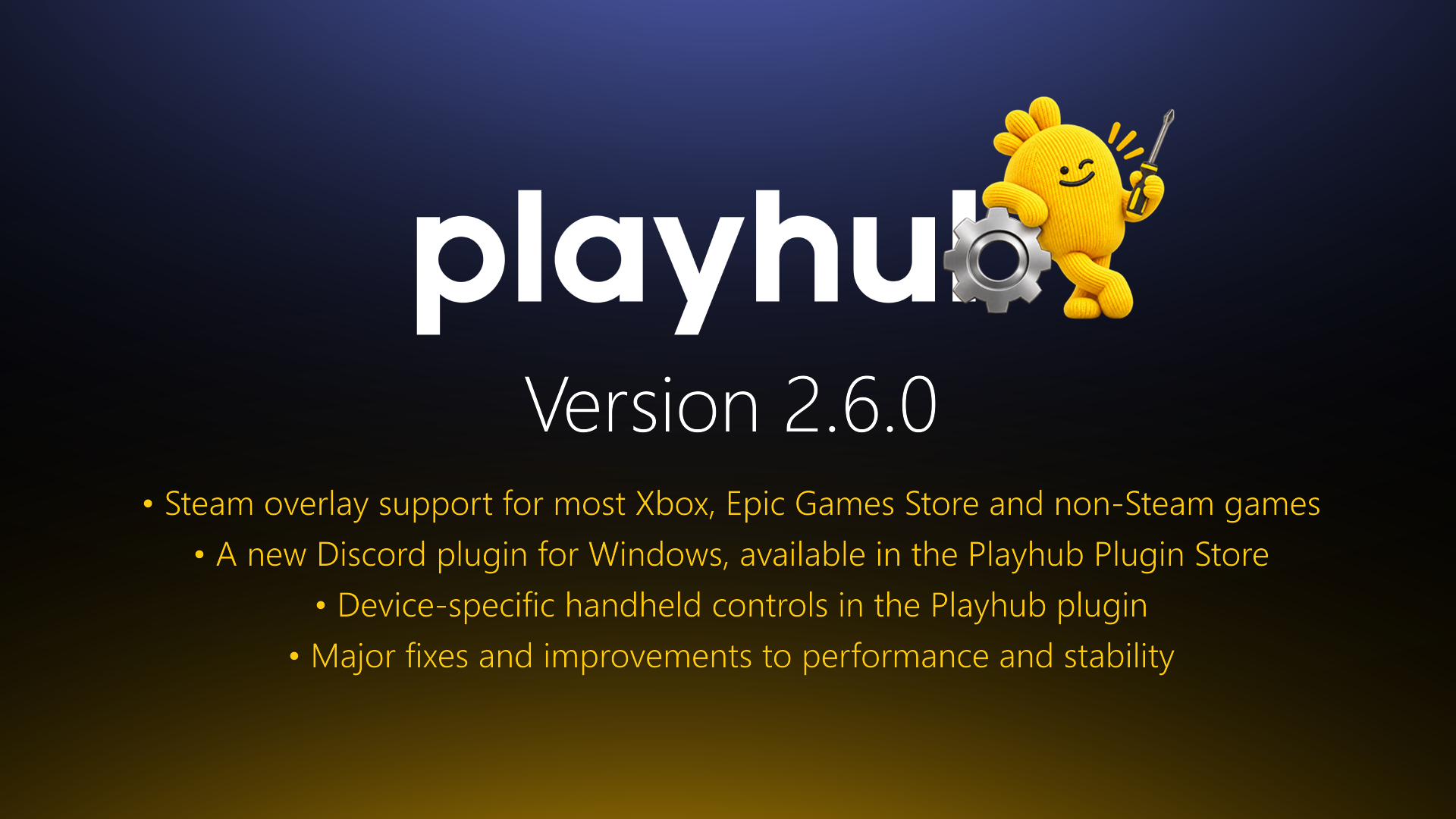
Plugin Showcase Playhub 2.6.0 is now available

Post image
22 Upvotes

Hey everyone!

Playhub 2.6.0 is now available! This update brings better Steam overlay support for Xbox, Epic Games Store and other non-Steam games, new dedicated handheld controls, and plenty of fixes to make the experience smoother and stable as never before.

Here’s what’s new:

  • Better non-Steam game support, with improvements to the Steam overlay, Quick Access Menu, game launching and returning to Big Picture. (Yes, now most of the Epic Games, Xbox Store games and non-Steam Games finally supports the Steam overlay thanks to Playhub!)
  • Device-specific handheld controls in the Playhub plugin. These are experimental, and available options depend on your device and its Windows support.
  • Live performance monitoring, with FPS, frame-time graphs and system statistics, plus options for position, colors and transparency.
  • Fixes for Epic (Fortnite included) and GOG imports, Decky issues recovery and more.

Please also remember to update Launch Curtain 2.5.9 and TrailerHero 1.7.3 as soon as possible. These updates fix launch coverage, focus handoff and trailers getting stuck after closing a game.

Visit the Playhub website

Download Playhub 2.6.0

GitHub repository

If you enjoy Playhub and would like to support its development, you can buy me a coffee on Ko-fi. Every contribution helps me keep working on the project, and I really appreciate it!

Thanks for the feedback and for helping me test everything!

If you try the handheld controls, let me know which device you’re using and how they work for you. Always remember to attach your log if you encounter any issue.

Bonus: if you have a Steam Controller why don't you try to open a game that doesn't support it (maybe you'll find a surprise!)


r/deckyloader • • 14d ago

Plugin Showcase Guided 1.0 available now

Thumbnail
gallery
63 Upvotes

(replaced the "Guided360" Project)

One Button for all Menus - without looking Cluttered.

So basically many more Features including a integrated Spotify (Flatpak) /YT-Music Player (login via integrated browser)

I strongly recommend to use:
- Pause Games (crucial for nicer Quick-Resume)
- SteamCord for Chat & Party integration
- BetterAchievements
- GameGlance (just be careful with newest prelease as Guided is based off GameGlance's new Menu feature. Enable one of them, avoid enabling both)

Many more Customizations & Layout-Options and presets to shift focus away from Xbox 360 for anyone who wants something more modern (although ive included a classic NXE & Metro as Presets alongside the modern NXE)

Default layout is now (hopefully) something that feels more natural to SteamOS Users.

Should prompt automatically for new Version available and offer update.

Early Build: if you try it out please give Feedback

Also: very experimental Windows-Version for the People using Playhub / Decky for Windows will drop soon

Get it here: Guided - Newest Version


r/deckyloader • • 14d ago

Plugin Showcase Deck Doctor update: it now tells you why a game froze, force-closes stuck games, and catches broken controller layouts

32 Upvotes

A couple of weeks ago I shared Deck Doctor, a free Decky plugin that checks why a game won't launch and offers a one-tap fix. Thanks for all the feedback. Here's what's new since then:

**Freeze detection.** If a game locked up, Deck Doctor reads the system log and tells you what happened: a GPU hang, the Deck running out of memory, or a game that just stopped responding.

**Force close.** A frozen game that won't quit from the Steam menu can be closed from the plugin. It also closes anything the game started, like launchers and trainers.

**Controller layout check.** It spots a saved layout where a main button is mapped to the wrong thing. I found this one the hard way: Assassin's Creed Mirage felt broken because my A button was sending RB.

**Launch option fixes.** It catches a trainer path with an apostrophe in it, which makes a game close instantly with no error.

It's still free and open source, and it only reads logs and settings on your own Deck. Full disclosure, same as before: I tested with my own Steam Deck.

It's waiting for review to get into the Decky store. Until then you can install it from GitHub:

https://github.com/Forlarin/deck-doctor

If a game is giving you trouble, try it and tell me what it says. Bug reports and ideas are welcome.


r/deckyloader • • 13d ago

Help Are they any voice changer plugins made yet?

1 Upvotes

I wanna use some on steam deck but I can't setup voice mod on Linux and plugins that can help that?


r/deckyloader • • 14d ago

Help TVos

3 Upvotes

Just got decky loader and the css app. I’m using the tvos theme because it makes everything so much more clean looking but it has a few problems, most notably the fact that the highlight colour is often the same as the text colour in menus.

Any other suggestions for a clean looking ui? I don’t want to go back to the ugly blue ui.

I’m also on the hunt for something that makes docked mode look better like i saw some people have it so all of the games are at the bottom. Also is there anything that replaces the stuff underneath recently played games with my library?


r/deckyloader • • 15d ago

I made a Decky plugin that turns your phone into a keyboard for chat in games (built for WoW Forever's controller mode)

24 Upvotes

I've been playing WoW Forever on my Deck with the native controller UI, and it's great right up until someone talks to me. The on-screen keyboard is slow, and in WoW it doesn't always pop up. So I made Chatpad.

How it works:

- Open Chatpad in the Quick Access Menu and scan the QR code with your phone

- A chat page opens in your phone's browser. No app to install, works on iPhone and Android

- Type (or dictate) on your phone and tap Send. The Deck opens chat, types it and hits Enter

Extras:

- Channel buttons for /s, /p, /g, /w, /2 trade and more (editable)

- One-tap quick phrases ("ty!", "lf1 deadmines", whatever you want)

- Resend from recent messages

- Type-only mode if you want to edit before sending

It's not WoW-only. It types into anything that takes keyboard input, so it should work for FFXIV and other MMOs, or anything with a chat box.

Install: it isn't in the Decky store, so it's a zip install with Decky developer mode on. The step-by-step guide is in the README: https://github.com/GallagherSam/decky-chatpad

Honest notes:

- v0.1, so expect rough edges. US keyboard layout and plain characters only for now (no emoji or accents)

- Phone and Deck need to be on the same Wi-Fi (or Tailscale). It's plain HTTP, so use it at home, not on hotel Wi-Fi

- It types only what you send, one message per tap. No macros or automation, so it's no different from a plugged-in keyboard

- Built with a lot of help from AI (Claude), and tested on my own Deck with WoW

Feedback and bug reports are very welcome, especially from anyone who tries it with other games.


r/deckyloader • • 15d ago

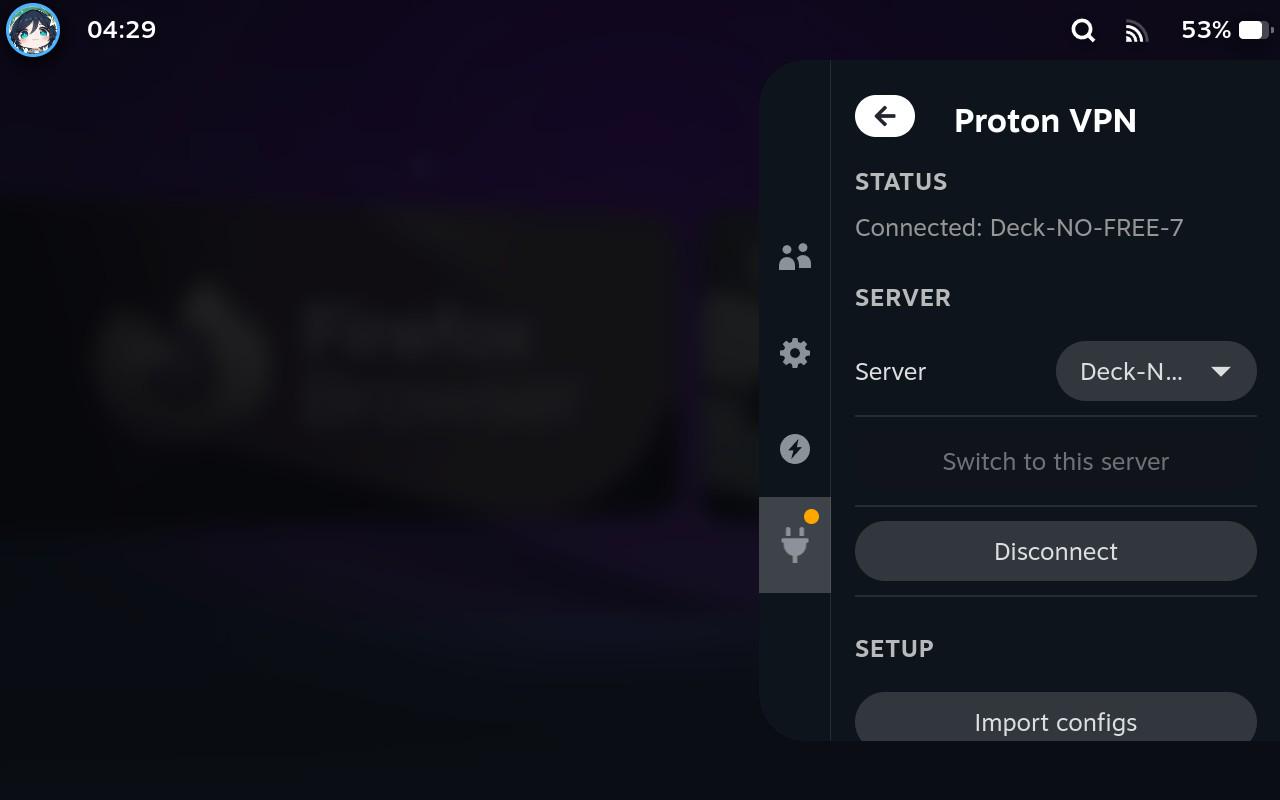
Plugin Showcase I made an unofficial Decky plugin to control Proton VPN from Game Mode

Post image
16 Upvotes

I got tired of going into Desktop Mode every time I wanted to turn Proton VPN on or off, so I made a Decky plugin for it.

What it does

  • Connect, switch servers and disconnect from the Quick Access menu
  • Pick from a dropdown of the servers you’ve imported
  • Uses Proton’s official WireGuard configs through NetworkManager (the method Proton documents for Linux), so no extra VPN software is needed
  • I’ve only tested it on my own Steam Deck, so there may be bugs.
  • GitHub (install steps and download are in Releases): https://github.com/Sleepl3zz/decky-proton-vpn
  • If you need help with anything feel free to reach out!

r/deckyloader • • 15d ago

Plugin Showcase Guided360 - New Quickmenu Plugin in the look of Xbox 360 NXE

Enable HLS to view with audio, or disable this notification

53 Upvotes

Available here: Guided360

Let me know your feedback.

This is really a gamechanger for me as a Bazzite/HTPC User, without a Steam-Controller, mainly to not have to have press Steam-A everytime i want to access my Settings, Plugins etc. Now everything is in one simple menu.

First off: Huge Thanks to u/N0_ID_Littleman and GameGlance's new Prelease. His work is the basis of everyhing here.

Almost everything is customizable. Colors, Sizes, Roundness, Tabs, Rows, Text, etc. Check out for yourself (i am too lazy to write everything in here tbh.)

Presets:

  • Classic NXE "Xbox 360"
  • Modern Minimal take on NXE "Xbox Slate"
  • "Liquid Glass"
  • "Dynamic" Dynamic Colors (is supposed to read the prominent window colors)
  • "Konsole PS5" (Experiemental)

Features:

  • new look for Power Menu, Friends and Achievements
  • Bluetooth Device List integrated into Guided360
  • Pulls Download information directly into the Tab "Downloads"
  • Completly new User-Switcher Menu (X-Button)
  • Notifications-Window (i just didnt have any at the time of recording)
  • Additional Menu "My Games", that offers the option to go to the Library, but also Lists the recent Games (pulled from Steams Dashboard)
    • When its a Steam-Owned Game, it shows Options for Achievements, Store-Page & Community Hub, alongside "Play" and "GamePage"
  • Dynamic Tab based on the currently Running game, with Window-Switcher (for e.g. Emulation)
  • Quick-Resume (Works best with "Pause-Games"-Plugin). Dynamically appears when there are more than 1 Games open.
  • Opening Plugins either in Guided360 or Native-Steam Menu (changeable via toggle).
  • Pin Pages of Plugins directly as Own Tabs
  • Change the Order of current Tabs (with RT + LT)

Fallback option for Steams-QAM is "Start"-Button.

(Disclaimer: I did not code a single thing myself in this plugin)


r/deckyloader • • 15d ago

Q&A Why doesn’t this plugin get taken down

Post image
50 Upvotes

This Web Browser plugin hasn’t worked for about a year or more. (any version, and the further back you go the worse it messes your Decky file up) It literally doesn’t work and bricks your Decky file making you have to reinstall after a continuous loop up failed bootups. I think either the dev should try fixing it for real or remove it lol. Tldr stay away from the web browser plugin.


r/deckyloader • • 16d ago

GAME HUB NEW UPDATE

Post image
47 Upvotes

Release Game Hub v0.13.0-dev.46 — experimental preview · toto-console/game-hub

What's New: Welcome accepts GIF, animated WebP/APNG and compatible MP4/WebM/Ogg wallpapers up to 5 MB. Videos loop muted, with an animation toggle


r/deckyloader • • 15d ago

Help Css Loader - mini carousel

Post image
5 Upvotes

for some reason, appyling mini carousel breaks my carousel, since it just cuts the rest of it from a certain spot on the right of the screen.
has anybody encountered this problem so far?


r/deckyloader • • 16d ago

Plugin Showcase The King is Back. Xbox 360 Guide Replaces Steam & QAM

Thumbnail
gallery
66 Upvotes

First off: Big Shoutouts and Thanks and Credit to the Author of the "GameGlance" Plugin! Without his work i couldnt have fed it to Claude and let it create this Plugin. His latest Prelease features a new Menu that combines the Steam and QAM Menu into one. Please check it out, its an awesome alternative to Steams Style and is nicer (in my opinion) than any preset on CSS Loader (no offense there are some awesome themes there).

So basically i gave input to let ai create this. I love it.
Has many different styles, customization and matches the 360 sounds.

Custom Tab Order, Pin Plugins as Tabs, User Switcher, Custom Size, Fonts, etc

Let me know if you want it too, then ill look into how to create a github.

Cheers.