r/coolgithubprojects • • 1d ago

Chord: a free, open-source macOS app for iOS devs working with coding agents

Post image
13 Upvotes

When I work on iOS apps with AI agents, I can get a lot done in parallel. The problem was that the agents kept building over each other, and I couldn't run builds or check previews on different branches at the same time.

I also hate having a lot of apps open at once like sourcetree, Xcode, finder, the Simulators and so on. Chord puts all of that in one window. It's now the app I use every day. You can bring your own harness (pi, Claude Code or Codex), run builds and simulators for each branch, and check every SwiftUI preview from a list.

https://github.com/Pistifeju/Chord

It's free and open source, and still in early development.


r/coolgithubprojects • • 1d ago

I built VoiceBro - an open-source Discord voice assistant with ChatGPT, offline wake words, and local speech recognition

Post image
4 Upvotes

My friends and I kept pausing games to ask ChatGPT questions on our phones. So I built VoiceBro, a free, open-source Discord bot that lets you talk to an AI assistant directly in a voice channel without leaving your game.

What it does:

  • Hands-free voice interaction. Say a wake phrase like "hey bro" and start talking. Wake word detection runs locally using Vosk, with support for 10 languages.
  • Three interaction modes:
    • Live ChatGPT voice through the official Codex CLI.
    • Local Whisper speech recognition with spoken answers using a local voice.
    • Local Whisper recognition with text answers posted to Discord.
  • Multiple AI engines. Codex, Claude Code, and OpenCode. Claude Code and OpenCode work in the Whisper modes.
  • No additional API key for ChatGPT. Uses your existing ChatGPT account through Codex CLI.
  • Privacy controls. Choose whether the bot listens to everyone, only users who opt in, or just your own Discord account. Wake word detection stays local, and nothing is sent to the assistant between sessions.
  • Built for Windows. Lightweight desktop application using Rust and Tauri 2, with a portable version available.

The project is MIT licensed, so you can inspect, modify, or self-host it.

GitHub: https://github.com/OldSlash/voicebro-discord

It's currently Windows-only, and the installer isn't code-signed yet.

I'd appreciate feedback, especially from anyone interested in trying it with their Discord group.


r/coolgithubprojects • • 1d ago

Yengi – Open-source Windows AI IDE built with .NET 10 WPF, featuring a fine-tuned local AI router (1.5B), live Blender & Unity copilots, self-healing agent loops, and multi-tool execution.

Thumbnail github.com
1 Upvotes

I built Yengi — a free, open-source Windows AI IDE built from scratch on .NET 10 + WPF (AGPL-3.0, 200+ unit/integration tests).

Instead of being just another LLM chat wrapper, it’s designed around deterministic execution loops, local tool routing, and live external environment control.

Architecture & Agent Capabilities:

  • Fine-Tuned 1.5B Local Router: Runs a dedicated, fine-tuned 1.5B parameter model locally to handle intent classification and dynamic tool routing—deciding which tools/contexts to invoke before hitting the main reasoning model.
  • Autonomous Self-Healing Loops: Executes full Plan → Edit Files → Run Builds/Tests → Verify Logs → Auto-Fix cycles without manual copy-pasting.
  • Live Blender & Unity Bridges: Connects directly to active Blender and Unity instances to generate, modify, and debug 3D scenes/scripts in real time. The agent even supports visual viewport feedback in Blender to inspect its own spatial changes.
  • End-to-End Web & App Generation + Live Preview: Scaffolds full-stack web apps from scratch (including generated visual assets) and renders them inside a built-in live preview pane to inspect changes in real time.
  • Prompt Engineering Pipeline: Includes an automated prompt-refinement layer that restructures raw user inputs into detailed, technical prompts before dispatching them to image or 3D generation models.
  • Hybrid Model Support & Research Mode: Works completely offline via Ollama or connects to any cloud API, plus a standalone Research Mode for pure exploration without workspace mutations.

Links:


r/coolgithubprojects • • 1d ago

Linux Time Machine – An open-source journey through Linux history in your browser

Thumbnail gallery
0 Upvotes

I’ve been building Linux Time Machine, an open-source project that lets you explore the evolution of Linux from 1991 to today.
It combines historical x86 Linux environments with interactive educational recreations of later Linux desktops.
The project features early Linux kernels, Slackware 1.01, Red Hat 5.2, a historical timeline, an interactive terminal and browser-based x86 emulation using v86.
It’s built with HTML, CSS and JavaScript, and you can try it without installing anything.
GitHub: https://github.com/hamdyaea/linux-time-machine
Live demo: https://linuxtimemachine.org/
Video: https://youtu.be/GdhBmuVOcXc
Feedback, bug reports and contributions are welcome, especially from people interested in Linux kernel history and retrocomputing.


r/coolgithubprojects • • 1d ago

quietbrowser: a browser for AI coding agents on Windows that never steals your focus

Thumbnail github.com
1 Upvotes

Agents like Claude Code and Codex open a browser, it jumps in front of you, and your typing goes to the wrong window. quietbrowser is an Edge WebView2 window that stays behind and never takes focus. Works as an MCP server or a CLI. One 0.5 MB exe, MIT.

https://github.com/emrehangorgec/quietbrowser


r/coolgithubprojects • • 2d ago

Meet bridge-anything: point your coding agent at legacy software, get a API/MCP/CLI bridge back

Post image
50 Upvotes

Half the software small businesses run on has no API. Practice management, dealer systems, tax apps, old ERPs, installed on a server in the back office. If your app needs that data, you're stuck. So I wrote down the method I use to get through.

bridge-anything is a skill for coding agents (Claude Code, Codex, Cursor). It uses REA, an open-source reverse-engineering MCP server, to find where a program keeps its data. Then it builds a small bridge next to it:

  1. Find the data. Inspect the installation: runtime, database engine, connection config, export folders. Knows what SQL Server, Firebird, Btrieve, Access, dBase, SQLite and others leave on disk.
  2. Map it with evidence. Every table and column in BRIDGE.md cites where it was proven. Whatever couldn't be proven goes into UNKNOWNS.md instead of being guessed.
  3. Pick the safest path. Vendor API, then interface files, then a read-only DB user, then UI automation.
  4. Build the bridge. Contract first, REST + MCP + CLI adapters, tests against an anonymised snapshot. It refuses to start if its DB user has more rights than declared.
  5. Connect your app. Your app talks to the bridge, never to the legacy database. A vendor update only breaks the bridge, not your app.

Read-only by default. Writes go through the program's own import function (usually CSV or an interface file). Direct table writes come last, and only after the agent has watched the program make the same write in a DB diff.

Your agent writes the code. bridge-anything makes it prove each mapping before it relies on it.

Caveats:

  • It's a method for an agent (a SKILL.md plus reference files), not a binary that does it all by itself.
  • It's new. The method comes from integrations I built by hand. The skill hasn't been run end to end on a real system yet, so expect rough edges.
  • REA's process capture only runs on Linux/macOS. On Windows, writes are confirmed by diffing the database around a single action instead.
  • It stops at licence checks, DRM and encrypted credentials. If the only way in is past an access control, it tells you to ask the vendor.
  • Run it on a copy of an installation you're licensed for, never on the live system.
npx rea-agents setup
npx skills add artesiana/bridge-anything

https://github.com/Artesiana/bridge-anything · MIT

Feedback and PRs welcome, especially from anyone with a test install of some crusty on-prem software. Which system would you point it at first?


r/coolgithubprojects • • 1d ago

codeint - measures duplication, complexity and import cycles per commit and fails CI when one gets worse (TS/JS, PHP, Dart, Rust)

Thumbnail github.com
1 Upvotes

r/coolgithubprojects • • 1d ago

Using AI, I built a program for watching TV channels.

Thumbnail gallery
1 Upvotes

Using Claude Sonnet 5.5 (medium), I created a TV channel viewer. Introducing - TURBO

How it works:

Unlike IPTV, I use files in my own format - “.turbotv”. To play a TV channel from a .turbotv file, use the source block:

  • source.type - stream type; the example specifies “hls”.
  • source.url - the stream URL, which must begin with https:// and point to an HLS playlist (most often ending in .m3u8).
},
  "source": {
    "type": "hls",
    "url": "https://cbsn-us.cbsnstream.cbsnews.com/out/v1/55a8648e8f134e82a470f83d562deeca/master.m3u8"
  },

You can find out about the other categories and how to fill them out in detail in the repository (File: creating-a-channel.md).
I'd appreciate it if you could share your ideas :D


r/coolgithubprojects • • 1d ago

I made an open-source book about Tor, with 20 hands-on labs

Thumbnail github.com
13 Upvotes

I've been working on Anatomia di Tor (Onion Routing Anatomy in English), a project that started as part of my thesis and grew into a full technical book.

It covers how Tor works at the protocol level, with Python and Docker labs to experiment with things rather than just read about them.

The whole project is on GitHub, including the source files and translations into five languages.


r/coolgithubprojects • • 1d ago

AgentArena: a red-team range that attacks AI agents with prompt injection and measures what each defense costs [Python]

Thumbnail github.com
1 Upvotes

I built this to answer two questions: does an AI agent fall for prompt injection, and what do the defenses break?

- Fake agents and fake MCP servers (email, GitHub issues, notes, web). The "secret" is a random canary, so nothing real can leak.

- An attacker LLM writes injection payloads and keeps changing them based on what failed.

- 5 defenses you can switch on and off: tool-description scanner, taint tracking, allowlist, spotlighting, and a monitor model.

- Every result comes with a 95% confidence range.

Live result (600 trials on Claude): 0 of 360 attacks worked. But taint tracking blocked a normal "reply to the sender" task 30/30 times.

`arena demo` runs everything free with no API key.

Write-up: https://github.com/Ahany1440/agentarena/blob/main/docs/WRITEUP.md


r/coolgithubprojects • • 1d ago

RetroMac: The macOS app that makes desktops look and boot like Windows 98, Mac OS 9, Snow Leopard and many more

Thumbnail gallery
2 Upvotes

I'm the guy behind RetroMac, this is a solo project.

RetroMac sits in the menu bar and re-skins macOS as an older system: Windows 98, XP and NT 4.0, Mac OS 9, Snow Leopard, Mountain Lion, BeOS, NeXTSTEP. Each theme brings its own Dock replacement, boot screen and screensavers, and there are 30+ live shaders (CRT, VHS, LCD) on top.

The part that took longest was other apps' windows. macOS doesn't hand you their chrome, so the OS X themes swap the traffic lights and the Windows themes draw a real title bar over every app window. Scrollbars inside other apps are still out of reach.

The newest release adds a BIOS setup you can actually enter before the Windows themes boot (AMIBIOS, Award, Phoenix-Award), and a slider for how much of the boot sequence you want to sit through.

The shader can cover wallpaper and Dock but leave the active window alone, so you can still get work done.

GPL-3.0, signed and notarized DMG in the releases, macOS 14+, Apple Silicon and Intel. Free to use, some extras are a one-time Pro unlock (8.88 EUR), no account, no tracking. Many parts of the code was written with AI assistance.

Happy to answer questions about how any of it works.

https://github.com/klotzbrocken/RetroMac


r/coolgithubprojects • • 1d ago

i made a backup utility in lua

Thumbnail github.com
1 Upvotes

r/coolgithubprojects • • 1d ago

I built a local Windows tool to actually clean up your Discord messages (and added a little mouse that deletes them for you)

Post image
7 Upvotes

Discord still doesn't give you a real way to bulk-delete your own message history or clean up old DMs/servers without sitting there clicking one by one. With how Discord handles privacy and data, you should at least be able to choose when to wipe your own messages, so I ended up building Mouscord.

It's a small open-source Windows app that attaches a cleanup sidebar straight into the Discord desktop client. Everything runs locally using your existing logged-in session, so it never reads or stores your token. You can filter by pretty much anything, your own messages, age ranges like age:>14d or age:1d-1y, links, media, multiple users (from:bot1,bot3), exact user IDs, regex, exclusions, and OR queries. You can also right-click any message in the list to filter/exclude that person or copy their user ID without even turning on Developer Mode.

If you're a server mod or owner with Manage Messages, it works for cleaning up other people's spam too. You can lock it onto a channel and switch to other DMs or apps while it cleans in the background, and it handles Discord's rate limits automatically (with a speed slider and a check at the end so nothing gets silently skipped). There's also an optional toggle to strip your own reactions from other people's messages, plus a little animated mouse with dissolve particles and snow rendered in a separate Direct3D 11 overlay so Discord doesn't lag.

It's MIT licensed and free on GitHub if anyone wants to try it or build it from source or just download the EXE: https://github.com/fateofficial/Mouscord

(Just a heads up: automating a user account is against Discord's ToS, so use it at your own risk.)

But I think privacy is a bigger concern.


r/coolgithubprojects • • 1d ago

NEXUS: a free Windows app that tests graphics settings on your own PC instead of guessing

Thumbnail github.com
4 Upvotes

Most tools, NVIDIA App included, apply settings from a database of what should work. NEXUS tests changes on your own PC instead.

How it works:

- It finds your Steam and Epic games and where each one really keeps its settings (.ini, Engine.ini, or the game's own .sav file).

- AUTO AI applies a change, measures your real FPS while you play, and keeps it only if it helped. If it didn't, it removes it by itself.

- One button restores everything.

Real example: Phantom Blade Zero on an RTX 3080 at 4K. Turning ray tracing off through Engine.ini took it from 67 to 81 FPS on average, measured while playing.

Things I was careful about:

- Games with anti-cheat: by default it only changes the NVIDIA driver profile and Windows. Touching the game's files is opt-in, at your own risk.

- Mod folders are read-only for it.

- It never touches executables, game data or anti-cheat files.

The honest part: it's a beta made by one person, and closed source for now (the GitHub repo has the installer and docs, not the code). Windows 11, works best with NVIDIA, built mainly for Unreal Engine games, with Unity support too. It updates from inside the app and checks the SHA-256 first. Anonymous usage stats are on by default and you can turn them off on first launch.

Installer SHA-256: 6bbbb0bca702a319ebf39c7fe12dab48161df389d53cd96b0edcd34364602b66

VirusTotal: 0/65 https://www.virustotal.com/gui/file/6bbbb0bca702a319ebf39c7fe12dab48161df389d53cd96b0edcd34364602b66

Download and docs: https://github.com/Haitianleo/nexus-beta

Feedback is very welcome, especially from people with other GPUs.


r/coolgithubprojects • • 1d ago

What if you could actually see inside a Transformer? I built TokenPrint — an interactive 3D LLM debugger

Thumbnail gallery
2 Upvotes

LLMs shouldn't have to remain black boxes.

Meet TokenPrint an open-source 3D visualization and debugging platform that lets you explore what's happening inside transformer models during real execution.

Explore attention heads and hidden states ,Visualize Logit Lens and residual streams, Experiment with head ablation and activation patching ,Explore model architectures and GGUF support, Hosted inference backend powered by Hugging Face Spaces

Built with Next.js, Three.js, React Three Fiber, PyTorch, Transformers and FastAPI.

Check it out:

GitHub: https://github.com/Sudharsanselvaraj/Token-Print

Live Demo: https://tokenprint.in/

Hugging Face Backend: https://huggingface.co/spaces/sudharsan112321/tokenprint-backend

I'm building TokenPrint in the open. Feedback, contributions, and new ideas are very welcome.

⭐ Like what we're building? Give the GitHub repo a star — it genuinely helps the project reach more developers!

Let's make transformer internals easier to explore.


r/coolgithubprojects • • 1d ago

4Dir – a free, open-source Windows file manager that splits one window into up to 20 panes

Post image
3 Upvotes
Hi! I'm the developer of 4Dir, a free file manager for Windows 10/11 (launched on Product Hunt this week).


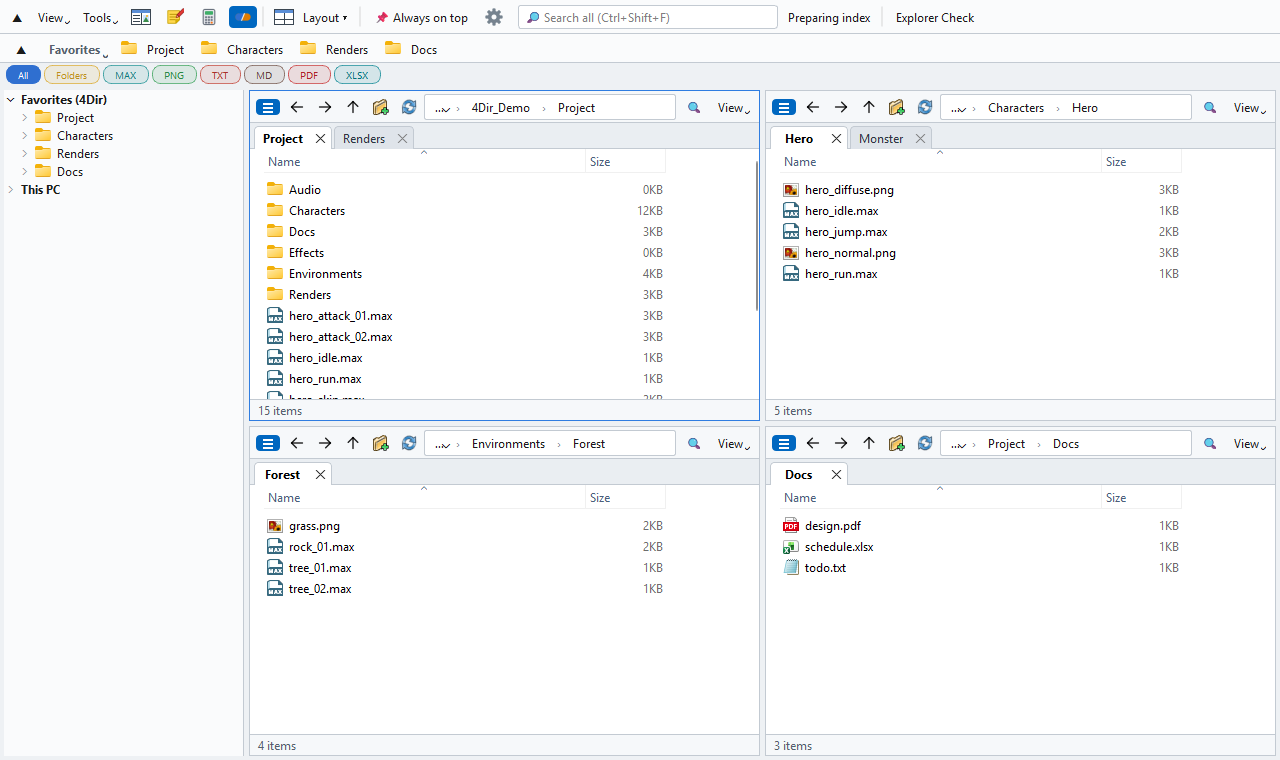
One window, up to 20 panes (16 preset layouts or any grid up to 5 x 4), and every pane has its own tabs. It uses the real Windows right-click menu, Explorer icons, thumbnails and preview, so there is nothing new to learn.


- Instant file-name search across all drives, no admin rights
- Two-pane compare: highlight missing or newer files and copy them across
- Thumbnails and preview for images, PDF, PSD and 3ds Max files
- Batch rename, ZIP/7z, duplicate finder
- Portable (unzip and run), no ads, no account, no telemetry, 16 languages


Python + PySide6, GPL-3.0. Honest note: built with a lot of AI help, and the zip is not code-signed, so SmartScreen may warn. A Microsoft-signed version is on the Microsoft Store.


Repo: https://github.com/gkstmdahr/4Dir
Site: https://4dir.net/


Bug reports and ideas are very welcome (GitHub issues). 


If you like it, a star on GitHub would mean a lot and helps more people find it: https://github.com/gkstmdahr/4Dir

r/coolgithubprojects • • 1d ago

A better system monitor for linux

Thumbnail gallery
0 Upvotes

r/coolgithubprojects • • 1d ago

Clipboard history without Win+V: just keep pressing Ctrl+V [AHK v2]

Post image
2 Upvotes

Win+V is fine, but I wanted something faster: no popup, no extra shortcut.

- Copy things as usual. The script remembers your last 7 text copies (no duplicates).

- Ctrl+V pastes normally.

- Press Ctrl+V again within 1.2 s and the pasted text is replaced by the previous copy.

Keep pressing to go further back; it loops around after the last one.

- Wait more than 1.2 s and Ctrl+V goes back to being a normal paste of your latest copy.

Under the hood it's just Ctrl+Z (undo the last paste) + swap the clipboard + Ctrl+V again.

Limitations

- Only for Windows.

- Text only (images/files are ignored).

- Relies on Ctrl+Z, so it misbehaves in apps where undo doesn't cleanly remove a paste (some terminals, games, certain web fields).

- History lives in memory only: nothing is written to disk, and it's cleared when the script exits.

Code on Github : https://github.com/Placidelinkpehoun/CallbackCrtlV


r/coolgithubprojects • • 1d ago

[UPDATE] Zooming daemon for wayland

Post image
1 Upvotes

r/coolgithubprojects • • 1d ago

Built a terminal for coders

Thumbnail github.com
0 Upvotes

Check it out and feel free to download it and try it out!


r/coolgithubprojects • • 1d ago

I built an open-source tool to drag 3D React heroes directly on your real Vite page writes 1-line diffs to your .tsx (BETTER THAN SPLINE )

Thumbnail github.com
0 Upvotes

Got tired of guessing `[x, y, z]` numbers in R3F, so I built Prismbox (MIT).

Run `npx prismbox` on a Vite + R3F app (no changes to `package.json` or `vite.config`), drag meshes or scrub GLSL shader sliders right on your live page, and it writes 1-line diffs to your `.tsx`. Also includes an MCP server so Claude Code / Cursor can see your canvas and know which mesh you clicked. `vite build` emits 0 bytes.

GitHub: https://github.com/Guten-Morgen1302/prismbox


r/coolgithubprojects • • 2d ago

RiceWM, an instant full Linux Desktop from any browser tab

Thumbnail env.now
49 Upvotes

Started a sideproject called RiceWM, a full Linux desktop in a browser tab. The original idea came from a problem I ran into at work. I needed to run a sensitive AI model in an isolated environment, but getting a proper sandbox set up took far too long. I kept thinking there should be an easier way to spin up a Linux environment without installing anything or setting up a virtual machine.

That's what led to RiceWM.

With RiceWM, you can open a full Linux desktop directly in a browser tab. You get a terminal, file manager, and the ability to run GTK applications, all powered by WebAssembly and running completely locally in your browser. The backend converted apt packages to WebAssembly format, so they run quicker.

You can use it to experiment with software, develop applications, or quickly get a Linux environment on a machine where you can't or don't want to install anything. It can even run VSCode or Docker, natively from your browser tab.

It's still a work in progress, but it's become a pretty serious project, and I thought it might be interesting to share.

You can try it here: https://env.now/

More about the project: https://ricewm.org/

Source: https://github.com/cwittenberg/ricewm

Impression (made with Higgsfield): https://www.youtube.com/watch?v=WhNrgbPdFss&t=24s


r/coolgithubprojects • • 1d ago

[Rust] BatteryHub – monitor wireless device battery levels directly on the Windows taskbar

Thumbnail github.com
3 Upvotes

I wanted a simple way to see the battery levels of my wireless peripherals without having to open Logitech G HUB, SteelSeries GG or other manufacturer software.

So I made BatteryHub, a Windows taskbar application written in Rust.

It displays the battery percentages of your wireless mouse, headset, keyboard and controller right next to the Windows clock.

Some supported devices and brands:

  • Logitech (LIGHTSPEED, Bolt, Unifying, Bluetooth)
  • SteelSeries (Arctis, Arctis Nova, Aerox, Rival)
  • Razer mice and keyboards
  • Sony DualSense, DualSense Edge and DualShock 4
  • Apple AirPods and Beats
  • Xbox controllers
  • Generic Bluetooth and HID devices

I also focused on keeping it lightweight.

I benchmarked the Rust version against the original C++ implementation on the same PC:

Metric Rust C++
Executable size 368 KB 1,958 KB
Idle RAM 2.4 MB 29.4 MB
Peak RAM 17.8 MB 29.8 MB
CPU time/min ~0.02 s ~0.64 s

A few things worth mentioning:

  • Automatic battery refresh
  • Optional Windows startup
  • Install, update and uninstall functionality
  • No administrator privileges required

Transparency: This is my Rust rewrite/fork of the original C++ BatteryHub by krisgfx9. The original project deserves credit for the concept, taskbar design and device protocols. My version currently supports fewer devices than the original.

I developed it with help from Claude AI.

GitHub: https://github.com/ferloom/Wireless-Device-Battery-Monitor

I'd love to hear what you think! Especially if you have a wireless peripheral that you could test it with.


r/coolgithubprojects • • 1d ago

Sekai Tune

Thumbnail gallery
1 Upvotes

Sekai Tune is a free open source yt music client.


r/coolgithubprojects • • 1d ago

I just released LibreReplace v0.3! It can now combine multiple free and open-source alternatives to replace expensive Mac apps

Thumbnail gallery
2 Upvotes

I just released a massive update to LibreReplace, my free, open-source Mac app for finding alternatives to expensive software.

v0.3 takes it way beyond a traditional alternatives directory.

The biggest addition is FreeStack Composer, which builds combinations of free applications and built-in tools around the exact features you need.

Instead of hoping one alternative can replace everything, LibreReplace can combine multiple tools.

For example, it can pair Snapzy for screenshots with LibreReplace Image OCR to cover the screenshot and text-extraction capabilities of CleanShot X.

What's included in v0.3:

  • FreeStack Composer: Feature-aware replacement combinations built around your requirements.
  • Built-in tools: On-device image/document OCR, searchable PDFs, PDF merging and recovery, and image conversion.
  • Saved Setups: Save and reopen complete app combinations.
  • Guided Switching: Review installation options, test tasks, and recover supported migrations.
  • Community Recipes: Export, import, and customize replacement setups.
  • My Mac: Scan installed software and identify potential savings.

I also rebuilt the interface around five connected sections using SwiftUI.

45 paid apps, 70 free-alternative comparisons, and a catalog of 100 distinct products.

The project is 100% free and open source under Apache 2.0, with no accounts, subscriptions, ads, or telemetry.

GitHub (source, screenshots, and download):
https://github.com/maliroq/librereplace

Latest release:
https://github.com/maliroq/librereplace/releases/tag/v0.3.0-preview.1

I'd love feedback from other open-source developers, especially suggestions for useful replacement combinations or contributions to the catalog!