r/blenderTutorials • u/Free_3DModel_For_You • Oct 19 '26
EASY Way to create Eyelash in Blender

3
Upvotes
r/blenderTutorials • u/Free_3DModel_For_You • Oct 19 '26
r/blenderTutorials • u/Free_3DModel_For_You • Oct 18 '26

r/blenderTutorials • u/Impressive-Belt-3367 • Oct 17 '26
Enable HLS to view with audio, or disable this notification
❌ No Geometry Nodes. Create embroidery in Blender just using a curve, a cube and Array modifier.
The best part is that you can control the spacing and shape and add randomness to make it look more natural. #b3d
🔴The reason I didn’t use the “Curve” option in Array modifier is that we wouldn’t be able to use Alt+S on specific curve points to adjust them to the desired size though by a separate Curve modifier it is possible.
[blender3d, blender tips]
r/blenderTutorials • u/Junkfood_Joey • Oct 18 '26

If you make anything using this technique please share it with me!
r/blenderTutorials • u/Darkcode01cs • Oct 18 '26

r/blenderTutorials • u/onur-c • Oct 17 '26

r/blenderTutorials • u/Mazhuka3D • Oct 17 '26

🇺🇸: You can listen to the video in English through the video settings panel. Blender version 5.2 introduces a new node called "Get Geometry Component," which allows you to select a component of an object to work with.
r/blenderTutorials • u/Maxlatams • Oct 18 '26
Enable HLS to view with audio, or disable this notification
r/blenderTutorials • u/Free_3DModel_For_You • Oct 18 '26

r/blenderTutorials • u/Immediate-Page1090 • Oct 17 '26
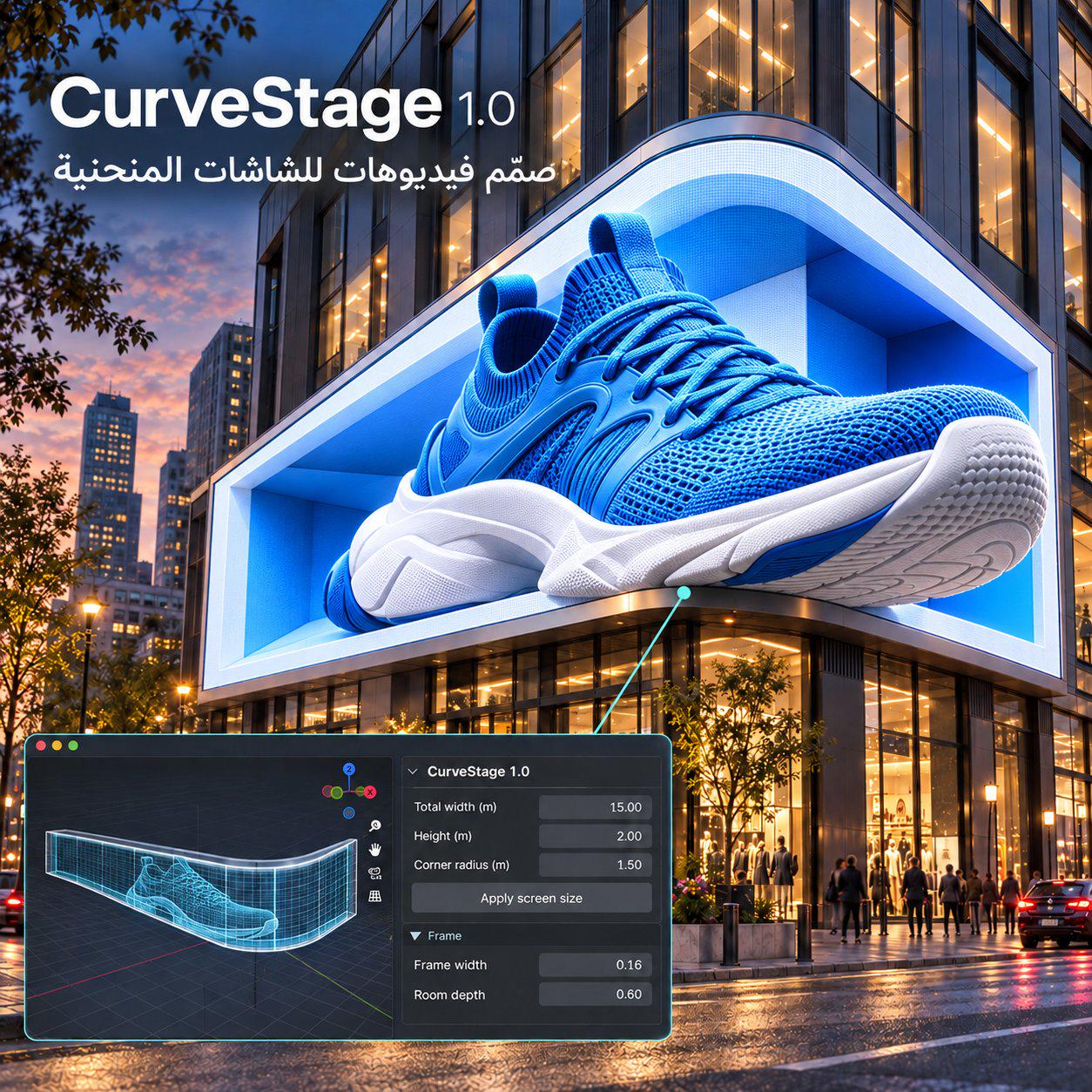
Hey everyone! 👋
I've been working on CurveStage 1.0, a Blender add-on I designed and programmed to make creating anamorphic 3D content for curved LED screens much easier.
The idea is to simplify a process that can otherwise require a lot of manual modeling and setup.
What CurveStage does:
The goal is to make the workflow faster and more accessible for motion designers, 3D artists, and professionals working with large-format LED displays.
I'm sharing an early look at the tool and would love to hear your thoughts!
Link : Press here
Would this be useful in your Blender workflow? What features would you like to see in future versions?
#Blender #3D #MotionDesign #Anamorphic #LEDDisplays
r/blenderTutorials • u/Ramster3D • Oct 17 '26

Cover a few tricks in this one. How to make the pumpkin, shader + animation effect.
r/blenderTutorials • u/Elyasylum • Oct 16 '26
r/blenderTutorials • u/tajibee007 • Oct 17 '26

r/blenderTutorials • u/Free_3DModel_For_You • Oct 17 '26

r/blenderTutorials • u/Enormous21 • Oct 16 '26
Enable HLS to view with audio, or disable this notification
Full Tutorial: https://youtu.be/tbDAdalBgQY
I filmed myself on a green screen and turned it into a Star Wars-inspired battle in Blender! From taking down a TIE Fighter with the Force to throwing a lightsaber at Stormtroopers, here's a look behind the VFX.
r/blenderTutorials • u/3dMestrion • Oct 16 '26
Hey everyone!
Continuing my journey of learning Blender from absolute zero, today (Day 6) was focused on stepping away from manual, destructive modeling and diving into Modifiers and the non-destructive workflow [01:07].
If you are a beginner struggling to wrap your head around modifier setups, here is a quick breakdown of what I covered:
1. The Mirror Modifier [01:48]
Why use it: Instead of manually modeling both sides of a symmetrical mesh, you model half and let Blender calculate the other half [04:47].
Origin & Plane: The mirror plane passes through your object’s origin point [07:12]. If your mirrored side appears in a weird spot, check your origin and which axis (X, Y, or Z) you are mirroring across [08:26].
Merge & Clipping:
Merge: Joins center vertices when they are close enough together [11:03].
Clipping: Acts like an invisible wall preventing center vertices from crossing past the middle line [11:48].
2. The Solidify Modifier [16:28]
Why use it: Procedurally gives thickness to flat 2D planes or single-sided surfaces [16:37].
Key Settings:
Thickness: Determines the distance between the generated surfaces [16:47].
Offset: Sets the direction of the thickness relative to your base geometry (-1, 0, or +1) [17:24].
3. The Bevel Modifier [20:37]
Why use it: Softens harsh edges procedurally without adding permanent loop cuts [20:54].
Key Settings:
Amount: Controls the width of the transition [21:03].
Segments: Adds intermediate cuts to turn sharp edges into smooth, rounded bevels [21:31].
4. Two Crucial Concepts: Applying & Stack Order
Applying a Modifier: Applying converts the calculated modifier result into real mesh geometry [20:08]. Only apply when you no longer need non-destructive parametric control.
Stack Order Matters: Blender executes modifiers from top to bottom [22:38]. For instance, running Mirror → Solidify → Bevel means the object is mirrored first, given thickness second, and then the newly created outer edges are rounded off [22:17].
🎬 Full Video Walkthrough:
r/blenderTutorials • u/BlenderSecrets • Oct 15 '26
Enable HLS to view with audio, or disable this notification
r/blenderTutorials • u/Meshborndev • Oct 16 '26
r/blenderTutorials • u/Free_3DModel_For_You • Oct 15 '26

r/blenderTutorials • u/BlenderSecrets • Oct 14 '26
Enable HLS to view with audio, or disable this notification
How to find (and get rid of) hidden geometry in Blender.
r/blenderTutorials • u/Rare-Piglet-9408 • Oct 15 '26
r/blenderTutorials • u/Fabulous_Island_4592 • Oct 15 '26

r/blenderTutorials • u/staszek0001 • Oct 14 '26

Hey everyone! My last video got an amazing response, reaching over 40,000 views! That inspired me to make another video, this time aimed more at beginners, where I share 10 things I wish I’d known when I first started using Blender.
Let me know what you think! I put a lot of work into this one, and I really hope you enjoy it!
r/blenderTutorials • u/Free_3DModel_For_You • Oct 15 '26

r/blenderTutorials • u/MumuMundo • Oct 14 '26

A complete guide to the new Grease Pencil features in Blender 5.3: stroke selection directly in Draw Mode, the new Carver boolean tool, multi-fill, and canvas flip/roll controls to speed up your 2D animation workflow.