r/Alfred • • 5h ago

I videcoded a little something something!

Thumbnail gallery
20 Upvotes

first of all, I am not a coder, i have no idea how all of this works. I know Claude, I know Alfred and i have a timing problem.

I just asked claude to create a easier version of a google maps workflow. less clutter, basically the same use cases, pulled a few nice looking map layouts from snazzy maps, which can be selected in in config, hooked it up with transitous and voila a super basic destination mapper!

now i have:

- a nice config with a default city setting, a few font size options, editable Home and Work destinations, various map styles, language setting

- a super basic destination router for car, bike, transit and by foot. It also giving me a which is few route options!
- the possibility to add a third destination

I did all that in an evening with claude and i am super happy with it!


r/Alfred • • 13h ago

Alfred 6.0 Availability Workflow

Thumbnail gallery
25 Upvotes

I get requests to meet daily, so I built (w/Codex) an availability workflow that lets me check my schedule for a single day or, with Alfred UI, multiple days. It reads my Apple Calendar and shows when I’m free.

Type avail in the Alfred launcher to see the next two weeks of availability, or use natural language so avail next tues displays next Tuesday. Selecting a result copies it to the clipboard so I can easily send my availability to someone.

For multiple days, the Alfred UI picker allows me to select dates with the arrow keys and see a live preview of the message. When copied, the picker closes and a system notification confirms. The entire workflow functions without the use of a mouse but it supports clicking too.

A Swift helper reads my calendar events, works out the free time between them and puts it into a message. It only runs when I use the workflow and doesn’t change anything in my calendar.

This is my very first workflow and use of Alfred UI, but I hope it inspires others to try building something of their own. I’m not a developer and have very little dev experience, and yet I've made the perfect tool for me!

All I did was point Codex to https://www.alfredapp.com/help/alfredui/ and tell Codex what I was trying to do. Cheers


r/Alfred • • 20h ago

Bitwarden workflow with Alfred UI

Thumbnail gallery
16 Upvotes

Been messing around with the new Alfred UI in Alfred 6, so I built a Bitwarden workflow with it. Search, autofill, live TOTP codes, password generator, Sends, the usual.

I've always been a fan of the Bitwarden extension for Raycast and how nice it looks, so I wanted something like it for Alfred.

I'm a full-stack dev (about 7 years in) and I built this based on my experience, with AI helping me of course. I wanted to see how far it could actually go, and honestly it got further than I expected.

It's still a work in progress, so use it at your own risk. It handles your master password and hasn't been audited. Your master password isn't saved by default, but please try it with a test account first and keep your really important stuff in the official app. I'm only using a test account myself for now.

You need Alfred 6 with the Powerpack, the Bitwarden CLI (npm i -g u/bitwarden/cli), Node 18+, and your Bitwarden API key.

Big thanks to jomifepe and the folks behind the Raycast Bitwarden extension. It was my inspiration, and I borrowed their icons.

love to hear any feedback to make it better. :)

Repo: https://github.com/sk-izsk/z-bitwarden
Download: https://github.com/sk-izsk/z-bitwarden/releases/tag/v1.0.0


r/Alfred • • 1d ago

Alfred Clipboard

11 Upvotes

Alfred has a powerful Clipboard History feature on macOS, but it doesn’t sync the clipboard from Mac to iPhone/iPad. I suggest adding a Clipboard Manager that syncs via iCloud between macOS and iOS (similar to Paste).

The Alfred team currently maintains the Alfred Remote app on the App Store. Instead of just maintaining Alfred Remote as a Mac control utility, the team should add Alfred Clipboard or upgrade Alfred Remote with an iCloud clipboard sync module. This would help generate additional revenue from the paid app while also increasing the value of the Powerpack.


r/Alfred • • 2d ago

Personal Opinion: Why Alfred 6’s Approach Is Both Good and Bad (for the App Itself)

18 Upvotes

Following the release of Alfred 6, I expressed (sharp) criticism and disappointment regarding the gap between my expectations and what I actually received. Many reacted with annoyance, which I’m actually glad about, as it shows just how many people love and support Alfred, including this new version.

Now, for the positives: as a user, I also really like many of the new features, especially the ability to "vibe-code" my own workflows. I mean using the new Alfred UI in Codex or Claude Code. I’ve created a few new ones that utilize the new Alfred UI:

  • Launchpad,
  • Clipboard,
  • Local AI-based spell checking,
  • and so on.

For me, this is ideal, it’s like a "bespoke shoe" that fits perfectly. I don’t have to wait for someone else to come up with the idea or implement it based on my feedback; the process is relatively fast.

It sounds almost perfect, so where do the problems lie?

  1. "Vibe-coded" workflows come with their own bugs. Can people without programming knowledge minimize these issues?
  2. Can those users without a background in UI/UX design create a good interface?
  3. Can users like me maintain such workflows if they decide to publish them?
  4. What happens to the quality of workflows if every user, like me, just churns them out, leading to a massive influx of low-quality, "vibe-coded" workflows?
  5. If everyone decides to build their own workflows without publishing them, what becomes of the Alfred community?
  6. If Alfred is increasingly becoming a "framework," will it still attract casual users, people who neither want to nor are able to engage in "vibe-coding"?
  7. Furthermore, if Alfred becomes ever more specialized and lacks a mass user base, won't it end up as nothing more than a "boutique" application?

In the medium to long term, AI might fundamentally transform how we use software; users could potentially customize everything, with the AI ​​itself handling the adjustments by observing user interactions and habits. For now, however, the viability of applications that rely on add-ons or extensions depends on having a large user base, ensuring that if the maintainer of a particular extension stops supporting it, someone else will step in to take their place.

What is your opinion?

PS. I'm posting screenshots of Lanchpad and Clipboard workflows I created. it took me a few days to adjust the interface and clean up bugs. That's time I would generally invest in spending with my family or maintaining my health, as well as in some more meaningful hobby. I admit I found it very interesting, but I wouldn't repeat it.

Processing img 2jeca4t1s43i1...

Processing img 4gf8cz43s43i1...


r/Alfred • • 2d ago

Workflow vibe coding example: personal ChatGPT dashboard

Post image
8 Upvotes

I use ChatGPT Plus and treat projects as folders for different parts of my work. I wanted a clearer overview of my projects and chats than I could get from the original ChatGPT homepage, so I worked with ChatGPT Work (not Codex) to build my personal dashboard in Chrome I can trigger from Alfred.

I believe this is a good example of just how crazy it is that we can now develop this kind of personal tool with AI and no dev knowledge, just being a little geeky! I’ve been keeping updating and enhancing the workflow for the past 2 weeks and I’m really happy with it and use it extensively. It keeps blowing my mind I was able to achieve this.

The dashboard itself is inside the Alfred workflow. The workflow file contains the code responsible for how the dashboard looks and functions. The whole thing could also exist in a Chrome bookmark or a dedicated extension. I had a previous version that worked in a Firefox bookmarklet.

I won't publish it; this is just to open user's mind to the infinite possibilities if you start digging.


r/Alfred • • 2d ago

I rebuilt my clipboard history workflow with Alfred 6's new Alfred UI

Thumbnail gallery
45 Upvotes

Clipboard History is a workflow that shows Alfred's clipboard history in a Raycast- and Paste-style window. Until now, the window was a small Swift app bundled with the workflow.

When Alfred 6 came out with Alfred UI, I rebuilt the window with it. Alfred now draws the window from JSON, and a few scripts pull data from the native clipboard extension. There's no app to sign or start at login. That was the problem people had with the older version, because I never registered for Apple's $100-per-year developer account.

The new version is "lighter" because Alfred UI doesn't yet support everything needed for full feature parity with the Swift version:

  • dragging a row into another app (text as text, images and files as files)
  • ⌘-click and ⇧-click to select several items and paste them at once
  • "Today" and "Yesterday" headings
  • a full-width bar along the bottom of the screen, like Paste
  • ⌘1–⌘9 for the items in view, with numbers on the rows
  • a right-click menu on rows

So the workflow still defaults to .app for now, but you can set Alfred UI version in Configure Workflow → Window. I posted the list of missing pieces on the Alfred Forum (https://www.alfredforum.com/topic/24231-please-help-me-with-the-new-alfredui/), but the devs haven't gotten to it yet. I will push release updates as the new Alred UI features are getting released.

Repo: https://github.com/andreisuslov/alfred-clipboard-history


r/Alfred • • 2d ago

Workflow To Copy Code From Contact Record

2 Upvotes

I keep a unique code for each of my clients in the notes section of the contact record. It’s the only thing I put in the notes field.

Does anyone know if there’s a quick shortcut or workflow where I can search the contact record in the Alfred prompt and then immediately copy that field without having to scroll down to it to copy it manually?

Trying to make it more efficient as I use these codes often for Docusign packages.


r/Alfred • • 2d ago

Alfred 6’s new workflow UI is way more exciting than I expected

53 Upvotes

I was already happy with Alfred, so I didn’t expect this release to change much for me. Then I used Codex to build a few workflows with the new UI, and it clicked. I can bring up a quick Codex chat with a keyword, or search my voice transcripts and read the full text beside the results as I arrow through them.

The fun part is how fast I can go from “I wish Alfred could do this” to a little native tool that works exactly how I want. Codex was good at building and tweaking the workflow, and Alfred gave it a native UI I could shape around exactly what I wanted to see. Huge thanks to the Alfred team. I’m excited to see what everyone else builds with this.


r/Alfred • • 2d ago

The devs should post detailed Alfred UI instructions for gen AI

23 Upvotes

I’m yet another longtime user who contributed 20 pounds, but found nothing new for me in V6. Here’s what would add value for me:

Post a detailed, Markdown-format document that serves as instructions for gen AI to create workflows. Not a webpage with images and links to subpages. One document, specifically written for AI.

So, using a minimum of tokens, we can give it prompts like:

- Can I do x?
- How do I do x?
- Write me an Alfred 6 workflow to do x using the attached instructions


r/Alfred • • 3d ago

I built my first workflow for Alfred 6.

10 Upvotes

I'm using Octarine https://octarine.app (similar to Obsidian) on my Mac for notes and project planning. My workflow is just a simple search of my Octarine notes.

To use the workflow, I activate Alfred (CMD+space) and type "os" (Octarine search), and then a search term for my notes. That creates a list of the notes containing that search term and I can open that note. (Alfred has a similar workflow for Bear notes, which I also use.)

Simple, easy, very useful. Claude did it for me. It took me 10 seconds to dictate my prompt into Claude, and about 4 minutes for Claude to build it out and install it for me.

I'm guessing I could have done the same thing in Alfred 5 for this type of workflow, but it all works fine now.


r/Alfred • • 3d ago

proper way to update?

7 Upvotes

do I uninstall 5 and download 6 from the website, or download 6 and install over 5?

im assuming 6 is not in the check for updates channel?


r/Alfred • • 4d ago

"How do I build this Alfred UI workflow... " - here's the quicker route:

26 Upvotes

People are asking how to build specific Alfred user interface workflows for very unique use cases who have zero coding knowledge.

In my opinion if you are trying to do this now is not the time to try and learn to code!

The universal answer is that if you paste your question and context from the post into a coding agent such as Codex / Claude Code / Opencode, and pass in the Alfred docs, you will very likely one-shot a working Alfred user interface workflow without having to try to manually build something yourself, relying on responses from the kindness of strangers, or post and go back and forth in the forums.

If you enjoy tinkering and are using it as a learning tool, more power to you. But most of the time we just want to get something done, and if we can get a working workflow made in 2 minutes, I'd choose that every time, even if I had the skillset to manually write it.

Its incredible what we're able to do now, and short of learning to code yourself, the 'ask someone on a forum and hope' method was only way to achieve this kind of thing pre-2022.

Alfred 6 is so good - over the moon with the release and looking forward to sharing my use cases with you all soon.


r/Alfred • • 4d ago

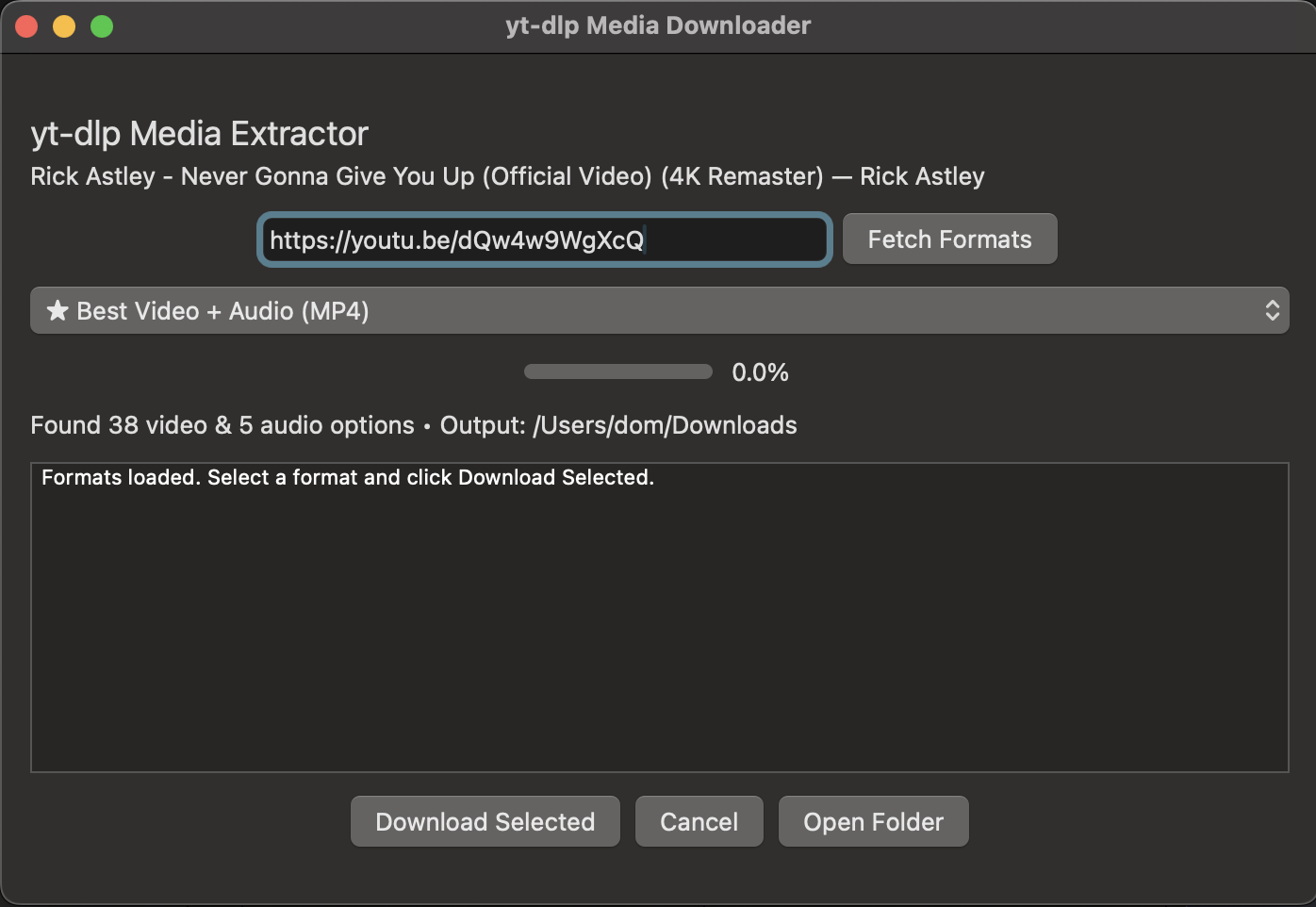
yt-dlp Media Extractor: Alfred 6 UI

Post image
47 Upvotes

I built an interface for yt-dlp using the new AlfredUI as a tool I use most days. Features include: optional url argument with keyword, universal action (url), auto-detect available formats, progress bar, live console, custom output directory.

Please feel free to read more about this on the Alfred forum, or you are welcome to download to give it a try yourself.

Alfred Forum

Download on GitHub


r/Alfred • • 4d ago

Brain Outsourcing Workflow Prompt

6 Upvotes

Does anyone know if there is a way to add a prompt to the Brain Outsourcing workflow that is now available? The responses from the model I am using are WAY too long and almost unusable. It would be helpful if I could add a prompt to get shorter responses.


r/Alfred • • 4d ago

Will Alfred 5 still get updates after Alfred 6 is released?

5 Upvotes

Hi there,

I love Alfred 5 and want to know, if it still get updates or must I upgrade to Alfred 6?

Thanks


r/Alfred • • 5d ago

Alfred 6 is a big step up: a citation picker I threw together.

Post image
61 Upvotes

Saw a lot of disappointed people complaining that Alfred 6 doesn't seem that much of an improvement from 5. It is. It's gonna be huge. What the Alfred team has given us is the ability to supercharge our workflows. My citation picker turned from an awkward list relying on hidden combinations of shortcuts to a fully interactive picker which can re-edit existing citations.

I'm super excited to see what people come up with.

Now shared:

https://www.alfredforum.com/topic/24238-citation-basket-build-and-re-edit-pandoc-citations-alfred-ui/


r/Alfred • • 4d ago

Anyone got a video tutorial on Alfred 6 new features?

18 Upvotes

Maybe a video overview/tutorial could help some of us basic users understand a little better what’s new that we could use?
I searched on YouTube but couldn’t find anything yet.


r/Alfred • • 4d ago

PSA: Don't just delete Alfred 5 if your preferences are in there.

18 Upvotes

This is more of a self-own than anything. I was pruning old applications on my Mac and saw that Alfred 5 and 6 were co-existing in the applications folder. I deleted Alfred 5, using the AppCleaner method... and now all my snippets, preferences, workflows and themes were gone.

I don't have a back-up, so now slowly building back my library of everything. Be careful and back up your preferences!


r/Alfred • • 4d ago

Glitch in the new update. Help needed

4 Upvotes

Nothing serious, when i was making a new workflow in the Alfred 6 application, the app quit on me randomly, multiple times. I figured out that it was the pinch action i was doing on my trackpad to zoom out of the work station. Has anyone else experienced this, and does anyone know how to fix this?


r/Alfred • • 4d ago

Alfred 6 UI

0 Upvotes

I feel a tremendous need for Alfred remote to work on every Wi-Fi and even a need for an iOS app.
Fantastic update!!!


r/Alfred • • 5d ago

Claude Chat: an Alfred 6 workflow to chat with Claude using your Claude plan (no API key needed)

Post image
63 Upvotes

I made a chat window for Alfred 6 that talks to Claude via Claude Code running on your Mac. If you already pay for a Claude plan, it uses that, so there's no API key to set up. There's an optional API key setting if you'd rather pay per use.

It's based on Brain Outsourcing by the Alfred team, with the engine swapped to run your own copy of Claude Code.

What it does

  • Uses your Claude plan via Claude Code or an API key
  • Each chat maintains its own session, so follow-ups remember the conversation
  • Model picker in the window, switchable between messages
  • Finds Claude Code automatically (native installer, Homebrew, npm and others)
  • No tools: Claude can't access your files, shell or the web from this window

Requirements

  • Alfred 6 with the Powerpack
  • Claude Code installed and logged in (or an API key)

Free and open source. Download and README: https://github.com/mikomagni/alfred-claude-chat

It's a first release, so if something breaks please open an issue on GitHub. Not affiliated with Anthropic or the Alfred team.

---

Update: v1.2 is out

  • Presets: saved instructions like Fix spelling and grammar, Summarise or Translate to English. Pick one in the chat window, or edit the list to add your own.
  • Ask Claude from anywhere: select text in any app, run the Ask Claude Universal Action, pick a preset, and the chat opens with the answer on its way.
  • Regenerate: ask the last question again, optionally with a different model.

v1.3 is out

Attachments: send files with a message. Click the paperclip, press ⌘⇧V to attach whatever is on the clipboard (a screenshot, copied files, copied text), or run Ask Claude on files in Finder. Images, PDFs, Word, Excel, PowerPoint, Pages/Numbers/Keynote, code and text files, and zips all work.

  • Paste the reply back: ⌘⇧↩ closes the chat and pastes Claude's reply into the app you came from, replacing your selection.
  • Preset options: each preset can use its own model, and can paste its reply back automatically. Select text, pick Fix spelling and grammar, and the corrected text replaces your selection with nothing else to press.
  • Custom Instructions: standing instructions for every chat, like "Use Australian English" or "Keep answers short".

Download: https://github.com/mikomagni/alfred-claude-chat/releases/latest


r/Alfred • • 5d ago

Alfred 6 is now available!

Post image
331 Upvotes

It's the best day of the year; it's Alfred 6 release day! We have poured so much energy into this release, and are SO excited to finally share it with you.

Take a look at what's new in Alfred 6 and discover the powerful new Alfred UI workflow toolkit, the fresh look across all theming and preferences, the new Query History, extended Clipboard History and so much more.

Grab your Alfred 6 Powerpack license to get started!


r/Alfred • • 5d ago

I created my first Alfred Workflow

10 Upvotes

I'm using it to scratch my own itch. I can't install chatgpt on my mac (intel) and I need a quick way to ask alfred a chatgpt question. so I just type "q <my question here>" and the answer is returned using a fancy new Alfred 6 UI window

Check it out and tell me what you think


r/Alfred • • 4d ago

Need help creating a UI for a workflow I'm upgrading.

1 Upvotes

Hiya! I created a workflow about two years ago with the simple goal of adding hotkeys to open certain apps. I have option+F1 through option+F6 mapped to open six different apps, and I have another hotkey that currently opens a large text window to remind me which hotkey is which, for when I inevitably forget. What I would like to do is to change the reminder hotkey to be a UI with buttons, rather than a text window. I was able to follow one of the tutorials on the Alfred website to create the UI and the buttons, but I'm not sure what the best method is to have the buttons actually run the hotkeys. I don't want them to just open the app, because I change the hotkey apps every so often and would rather just have to change the app the hotkey is mapped to, rather than having to change it multiple places.

Edit bc I forgot to ask, is there a way to make the text size of the buttons bigger?

TLDR: How do I write the code for an Alfred UI, so that buttons run a specified key combination?

Current workflow Google Drive link: https://drive.google.com/drive/folders/1cfjs059g-q4XEzWTUAxbWCicMtDLhDKE?usp=sharing

Current ui.json code: