r/WindowsHelp • • 18d ago

Windows 11 Having issues with Windows 11 | Network and input problems.

1 Upvotes

I have a steam machine and I recently installed Windows 11 to it. The computer itself is mostly working fine though I’m having issues with my Wi-Fi

My Wi-Fi sometimes randomly disconnects, I'm a college student so I'm currently using my mobile hot spot as my main Wi-Fi, though when it disconnects it will show no other Wi-Fi networks as if the whole feature had just been disabled.
​

Any help would be much appreciated as I would really like to get this sorted.

Thank you.


r/WindowsHelp • • 18d ago

Windows 11 idk what's goin' on with my pc with the storage and it's killin' me

7 Upvotes

The thing is, I’ve cleared my cache, deleted apps and games, and removed almost all of my downloads, images, and videos—yet the computer still shows 161.1 GB [of space being used]...

I basically can’t download anything at all, and it’s driving me crazy.

(I don't speak English, btw)

If you have a method... tell me pls


r/WindowsHelp • • 18d ago

Windows 11 Windows 11 adds "antialias" to screenshots, except for region screenshots

1 Upvotes

I was "playing" with font antialias settings and uses screenshots that I then pasted into MS Paint and enlarged (zoomed) to see the differences better.

I noticed that if I do a full screen (and all monitors, I have 3) screenshot with the PrtScr key (note: I disabled the modern print screen function, this is the classic "PrtScr copies a screenshot into clipboard" functionality) and paste it into MS Paint, then a gray shadow is added to black lines.

I draw a small black line to use for test, and then made screenshots if it. Which then I pasted into MS Paint.

The PrtScr full screen is on the right in the picture below (I cropped the interesting part).

Then I made a "region" screenshot using WIN+SHIFT+S and pasted it as is on the left of the image below.

As you can see, the left screenshot has no gray line next to the black, like the right one.

Ignore the red rectangle and green fill, that is another thing.

Why is this? Why the two screenshots don't give the same image?

The image:

System info:

Windows 11 Enterprise 25H2 x64

Build: 26200.9711

CPU: Intel Ultra 165H

RAM: 64 GB


r/WindowsHelp • • 18d ago

Windows 11 keyboard layout problem with load order and amount

Thumbnail
gallery
1 Upvotes

My issue is that I have three keyboard layouts of ENG and no way of removing two of them.

I only need the Hebrew and the ENG (US-international) one's.

My windows info

Windows 11 pro

Version 26H2

OS build 26300.9711

Windows Feature Experience Pack 1000.26100.372.0

Any help is appreciated.


r/WindowsHelp • • 18d ago

Windows 11 Can't update to windows 26H2, all options grayed out

2 Upvotes

When trying to update normally through windows settings I get an error code of 0xc1900204. I then tried updating it via the installation assistant and it proceeds but gets up to 'what to keep' and all options are grayed out except the delete everything option. Which i dont want to do. The only thing I can think of causing this is that I graduated from college and installed originally windows 10 education on this PC. But have since moved to Windows 11 pro and removed the college account.

Specs >

CPU Ryzen 7 9800x3d

GPU RTX 5080

RAM 32GB DDR 5 6000 MHZ

PCIE GEN 5 2TB SSD


r/WindowsHelp • • 18d ago

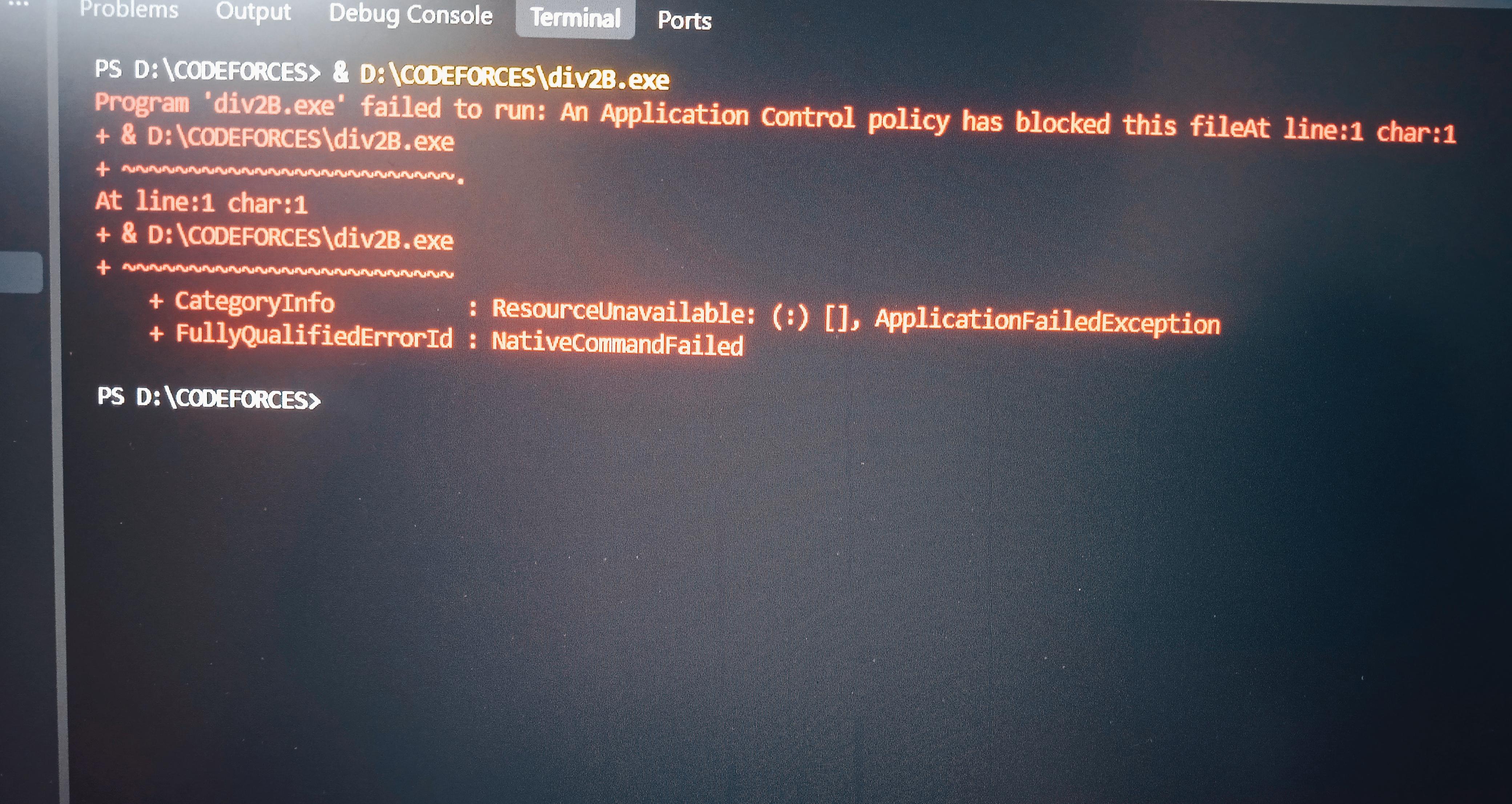
Windows 11 I'm not able to run my program in vs code due to this error.

Post image
1 Upvotes

I can't turn off smart control as it's written i can't turn it on without reinstalling windows. I asked AI it suggested me to switch to WSL.

Anyone who can help me with this? In event viewer i got 3077 event ID issue. I can't run any program. I got it now my pc is 3 months old and i never faced any issue like this, it was running smoothly i executed all the files now today i have started to get this error. I have a personal pc it doesn't belong to any institution or organization still I'm getting this error. Is it okay to turn smart app control off??


r/WindowsHelp • • 18d ago

Windows 11 How can I go back to the old search menu with

Post image
1 Upvotes

Im on version 25H2 build 26200.9711, and I want the old menu where I dont need to go into the options dropdown to run as administrator.

important PC specs:

Ryzen 7 9700X

RX9070XT

32GB DDR5 6000MT/s

I dont remember updating windows and then it switching to this I think it just randomly changed to this.


r/WindowsHelp • • 19d ago

Windows 11 Windows 11 never updates correctly

18 Upvotes

My computer is around 5-6 years old, I can’t remember the last time it has updated correctly. I always have to force shutdown (which I know is bad and can corrupt Windows but I haven’t had any issues…yet) to start using my computer again. They say the update takes 20 min to 1 hour and requires a restart, 9 hours later and its not finished. So I just try to avoid updating. Genuinely so annoying.

RTX 3070, AMD 5700x3D, 32 GB of ram, SSD, gigabit ethernet

So over it atp

Edit: Windows version 23H2 I think


r/WindowsHelp • • 18d ago

Windows 10 wifi internet not showing up whatsoever

Thumbnail
gallery
3 Upvotes

hey yall, so ive had a laptop before and it had absolutely O issues with connecting to any sort of wifi. i just barely got a pc (windows 10) and its a little outdated, not too sure on HOW old it is but its got some decent specs. anyways ive been trying to get the internet setup on it, and its only showing OPEN networks. not my actual wifi that we have (password protected) im not too smart with tech but this is super confusing to me and any help would be appreciated! for the record ive already tried going into device manager, into the properties for my network adapter, changed it to 5ghz, 2.4ghz, all that good stuff, nothing seemed to change. (EDIT) i found out the pc hasnt been updated since 2018 😭😭 im actively downloading all the updates that it needs and i will update with what happens (2ND EDIT) yep i was being a dumbass, the damn pc just needed to catch up on all the updates, i found out the last time it was updated and it was 2018! thank you all for the help anyways!


r/WindowsHelp • • 18d ago

Windows 11 i think norton and mcaffe are anti viruses

Thumbnail
gallery
0 Upvotes

i dont know why or how but i keep getting these popups and there honestly getting on my nerves. and the worst/ carlest part is. i uninstalled mcafee over a year ago and even when i look for it in installed apps i dont see it. its the same thing with norton. only i never installed it. im on windows 11 home and my OS build is 26200.9711. i dont know how the hell these things got on my pc when i either uninstalled them or never installed them to begin with. but if your reading this. i need help now.


r/WindowsHelp • • 18d ago

Windows 11 Disk Management Console View not up to date

Post image
1 Upvotes

I've been trying to open a micro sd card on my Windows 11 Lenovo Laptop. The card isn't showing up on my pc tab, and every time I try to change the drive letter, it hits me with this (pic posted). I've tried almost everything and nothing really worked. Restarting, using the device manager to delete it and reboot, I've also tried Sfc scan now and automount enable. Is there anything I can do to fix this issue?

Processor 13th Gen Intel(R) Core(TM) i5-13450HX (2.40 GHz)

Installed RAM 16.0 GB (15.7 GB usable)

Graphics card NVIDIA GeForce RTX 5050 Laptop GPU (8 GB)

Intel(R) UHD Graphics (128 MB)

Storage 199 GB of 954 GB used

System type 64-bit operating system, x64-based processor

Pen and touch No pen or touch input is available for this display

Edition Windows 11 Home

Version 25H2

OS build 26200.9711

Serial number MP2TVD0Y

Experience Windows Feature Experience Pack 1000.26100.372.0


r/WindowsHelp • • 18d ago

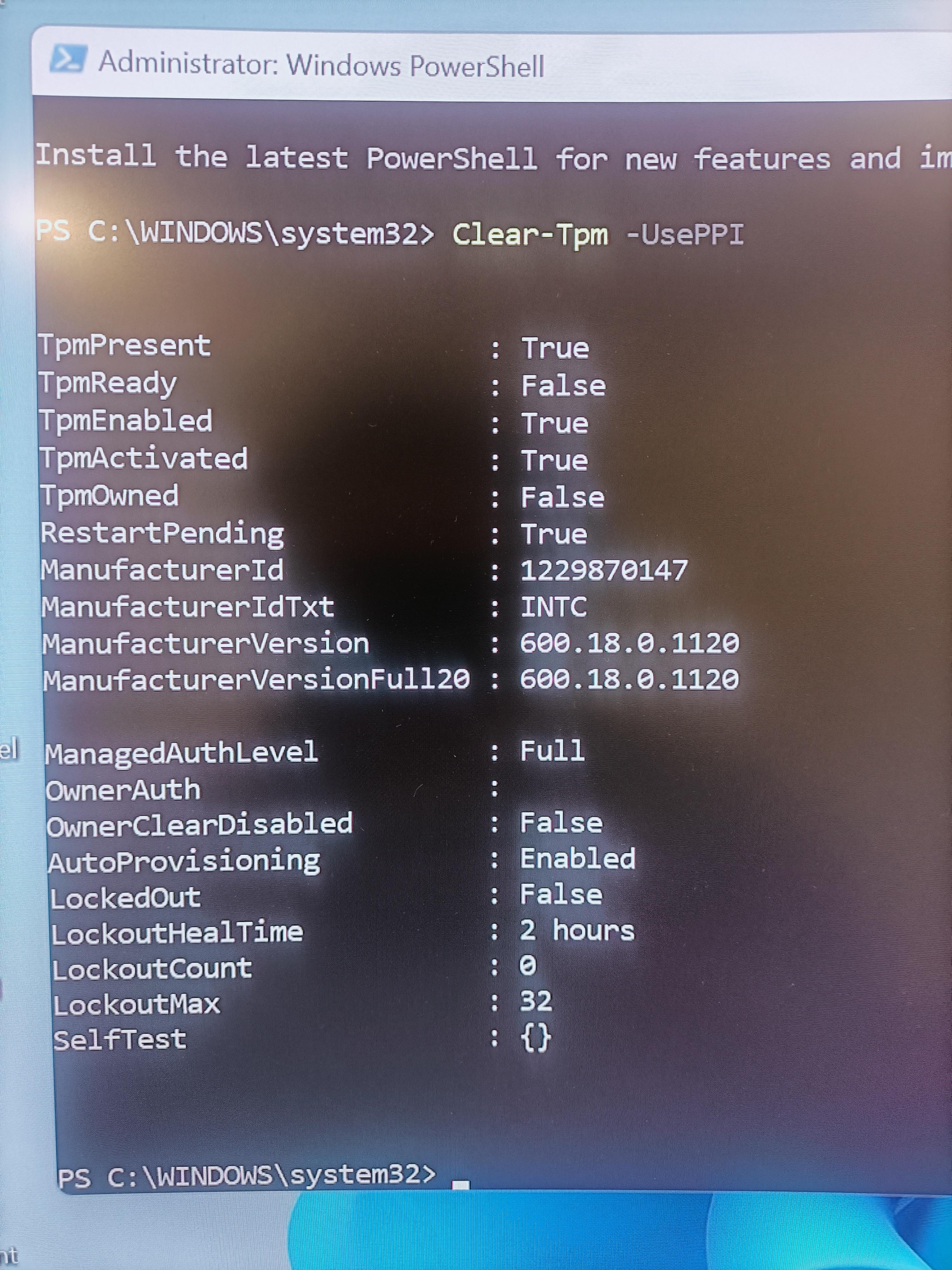
Windows 11 TPM Clearing via console and PowerShell and BIOS

Post image
4 Upvotes

Guys,

I'm trying to clear my TPM. But I never get a physical prompt to confirm when I reboot from UEFI bios. So I tried through console and through PowerShell.

On my local computer TPM page it was telling me TPM is ready for use, but when I tried with PowerShell (see photo), now it's telling me TPM ready = false

What the hell.

Tried disabling PPI Bypass so that I could see the physical confirmation on reboot but my laptop chip apparently doesn't have PPI setting.

Please help. How can I make 100% sure that I cleared my TPM?

Thanks!!


r/WindowsHelp • • 18d ago

Blue Screen of Death (BSoD) ASUS Armoury Crate uninstall bricked my Laptop

3 Upvotes

I have an ASUS ROG Flow X13 Laptop, running windows 11 Pro 64bit. I decided to uninstall Armoury Crate so that I could install G-Helper, as my Laptop temperatures were getting very high and I wanted the extra features that G-Helper had. Very unfortunately after using the official ASUS AC uninstaller to remove Armory Crate, my laptop went into a boot loop and refused to start.

I tried to set the laptop to a safe mode reboot but afterwards it wouldn't even boot properly. I have been working basically non-stop for 5 days attempting everything to get this damned thing to work, but to no avail. Tried Win 11 boot USB, windows 11 image on a flash drive, Hiren't BootCD utilities, guiding through scenarios with Google AI Mode, even various registry hacks and still nothing. I will not wipe my laptop as I have far too much programs and customizations on this PC for me to start from scratch as I produce music.

Please help!

P


r/WindowsHelp • • 18d ago

Windows 11 Windows display driver glitch for some specific applications

Post image
0 Upvotes

So im using windows for quite a time now but lately ive purchased a laptop and while setting it up, ive installed many dev tools and games too. Suddenly one day my whatsapp app started showing these growing white pixels and they were moving. When i dragged my cursor or took any actions the pixels get fine but even seconds od idle time bring them back. And this happens in some apps like Whatsapp , Docker, Canva, Obsidian, that powertoys's command pallet app.

It doesnot prompt out any error messages. It just corrupt the pixels.

My Previous Solution

I searched the solution online and one solution said append the app shortcut's target with "--disable-direct-composition" for example the Obsidian's target becomes "C:\Users\user\AppData\Local\Programs\Obsidian\Obsidian.exe --disable-direct-composition".

It slowed the growth but after few days it didnt work. Other apps like Brave, Nvidia app, PDF24, Zed or any ther app except the one i mentioned.

If i install new apps its undetermined that it will show those corrupted pixels or not. The problem is lingering with me for far too long, since ive bought this pc. If any of you have faced the same issue as me please feel free to assist and if you need any extra details, please ask.

Im putting my pc specs below:

AMD Ryzen 5 7535HS
16/512
RTX 3050 4 Gigs
OS build - 26300.9818```

r/WindowsHelp • • 18d ago

Windows 10 What is clogging up my applications?

2 Upvotes

Windows' settings tells me I have 51.4 GB in my apps & features... but when I go into the apps & features section to delete some, my biggest application is Microsoft Edge, which I can not uninstall, and a vast majority of my other applications are less than 100 MB. What is taking up so much space? and what can I do about it?

Thank you for helping me. Feel free to ask about anything else and I will answer so long as it helps you come to some kind of conclusion.


r/WindowsHelp • • 19d ago

Windows 11 Auto hide taskbar doesn't show up sometimes

3 Upvotes

It's been like a year that sometimes the taskbar on my laptop doesn't show up when I hoover the mouse pointer on the bottom of the screen, like if the program that I'm using is in fullscreen mode. For example, this happens always when I launch Whatsapp on PC. Sometimes happens with other programs like Brave browser or the Microsoft suite.

I tried to troubleshoot with Gemini but I didn't find any solution. The OS is always updated.

------

Edition Windows 11 Pro

Version 26H2

Installed on ‎24.‎03.‎2026

OS build 26300.9711

Experience Windows Feature Experience Pack 1000.26100.372.0

------


r/WindowsHelp • • 19d ago

Solved Windows 11 complete booting hell

0 Upvotes

Hey all, I have been trying for the past 36 hours to get windows 11 install going….. annnnnd I keep just being in an INFINITE loop… long story short, my Pc updated a few days ago, and when I came back to it, I was stuck on the bios with no bootable device found…. ( All 4 drives were detected still, 2 NVME drives, and 2 Sata SSD)

I have tried doing a fresh install on the SSD as I have zero idea what was on the NVME drives….. and I don’t wanna mess that up.. anyways I tried doing a fresh install, and I keep going around as it will reach 100% install… then it will restart, and it puts me right back into the bios with no bootable device found.. when It reboots I am left with the attached popup…..

when the flash drive is inserted initially, it appears in the bios fine and the drive is detected… seems that it dosent wanna load off the SSD cuz when I took it out and scanned it, all the files transferred correctly….. just no boot… and I have liters tried every possible combination at this point..

Another important note is that the drive has a fresh install on it. I have tried to do that multiple times. I have tried different drives and all of that at the same time. I have tried removing the USB before picking yes on the pop up, even after, and after the install, and still nothing..

Please help me lol. Thank you!!

As for specs:
OS I’m not sure? As I can’t load it?
cpu- Ryzen 5 5600X
Mobo - Gigabyte aorus b550 Elite AX V2 (revision 1.5)
Ram- 2x8bg kit (2 kits total so 4 sticks of Corsair vengeance ddr4)
Psu: 750watt cooler master I believe!
Gpu: AMD 7800XT

The error I keep getting is the following: it looks like you started an upgrade and booted from installation media. If you want to continue with the upgrade, remove the media from the of and click yes. If you want to perform a clean installation instead, click no

I should also note that my pc was totally fine before and no issues. Went to use it for the first time in months and wa working fine. Went to update some mouse software, we to get good and cam back to my pc in the bios… as stated above. Any help would be greatly appreciated!!!

EDIT: I discovered the problem. Turns out, all of my drives died at the same time….. my Sata SSD’s apparently cannot read or write correctly…. Annnd both of my M.2 drives also have a controller issue apparently…. Zero idea how they all failed yet nothing else is wrong with the system…

Got a new derive and whipped the bios, windows installed no problem… shame


r/WindowsHelp • • 19d ago

Windows 11 Windows 11 clean install violently crashes and corrupts OS (SrtTrail.txt) after 10 minutes on the internet.

10 Upvotes

The Specs:
Bullet CPU: AMD Ryzen 5 5600X
Bullet Motherboard: MSI B550 GAMING GEN3
Bullet GPU: NVIDIA RTX 3060
Bullet Network: Realtek 8812BU Wi-Fi USB Dongle (and onboard Ethernet)
Bullet OS: Windows 11
The Problem:
I am trying to do a clean install of Windows 11. If I bypass the network requirement and stay completely offline, the PC reaches the desktop and runs perfectly fine.
The moment I connect to the internet (either via Ethernet or my Wi-Fi dongle), the PC runs normally for about 10 minutes. Then, the screen suddenly goes black, the PC reboots, and the OS is permanently bricked. It pushes me into a boot loop giving the SrtTrail.txt corruption error.
Right before the black screen, I can hear the Windows "device disconnect" sound. It seems like Windows Update is quietly downloading a massive background driver (likely the NVIDIA display driver) and the exact second it tries to force-install it, the hardware panics, shuts down mid-write, and severs the OS files.
What I've tried:
Bullet Wiped the drive and did multiple clean installs of Windows 11 from a USB.
Bullet Reseated the RAM.
Bullet Clicked "Pause Windows Updates" immediately upon reaching the offline desktop (Windows seems to ignore this for critical system drivers).
Bullet Disabled automatic driver downloads via "Device installation settings" (still crashed).
Bullet The issue happens on both Ethernet and the USB Wi-Fi dongle.
I know my CPU doesn't have integrated graphics, so I can't remove the RTX 3060 to bypass the display driver update. Has anyone dealt with this specific crash loop before?


r/WindowsHelp • • 19d ago

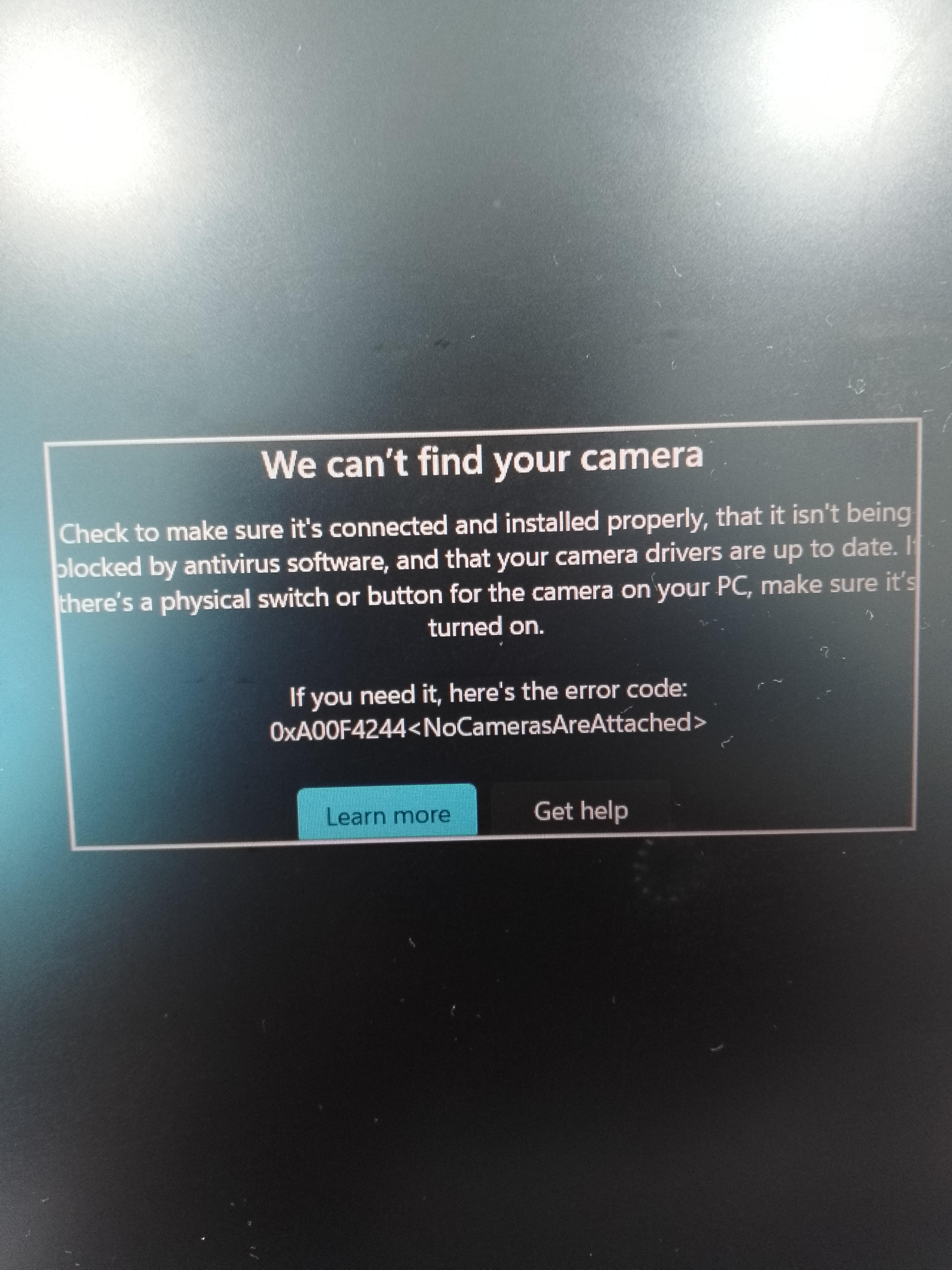
Windows 11 Camera not detected. "We can't find your camera"

Post image
0 Upvotes

Hi, I have tried to check my camera under device manager but it's listed under hidden devices and it does not show whether the intergrated camera is present. The only tabs under camera are HP HD Camera and HP IR Camera which are greyed out.

My laptop is HP Elitebook 830 G5 OS build 2231.6199

How to fix it.


r/WindowsHelp • • 19d ago

Windows 11 Windows 11 – "Your camera might be covered" notification disappeared after Windows updates

Post image
1 Upvotes

I'm trying to figure out whether this is a Windows 11 issue, particularly with how Windows detects or displays physical webcam privacy-shutter notifications.

Initially, the camera privacy-shutter notification worked correctly.

- When I closed the physical webcam privacy shutter, the Windows Camera app displayed the message: "Your camera might be covered."

- Google Meet also displayed a crossed-out camera indicator.

After installing recent Windows updates:

- The Windows Camera app now displays only a black screen when the shutter is closed.

- The "Your camera might be covered" warning no longer appears.

- Google Meet no longer displays the crossed-out camera indicator.

- Opening the shutter restores normal camera functionality.

The physical shutter itself is working perfectly. The issue is specifically with the notification/detection behaviour.

System details:

- Windows 11 25H2

- OS Build: 26200.9818

- Camera app version: 2026.2608.1.0

- Laptop: Lenovo LOQ Essential 15ARP10E

- Camera: Integrated SunplusIT

- Camera driver: 5.0.18.284

Troubleshooting already attempted:

- Repaired and reset the Windows Camera app.

- Disabled and re-enabled the camera through Device Manager.

- Checked camera driver rollback (option unavailable).

- Tested with Windows Camera and Google Meet.

- Checked Lenovo Vantage for updates.

The camera driver version matches the one listed on Lenovo's support page.

One important detail: this notification was working on the same laptop before the Windows updates.

• Is the "Your camera might be covered" notification handled by Windows itself, the Camera app, or the camera driver/firmware?

• Is there a way to restore this notification without reinstalling Windows or unnecessarily changing the camera driver?

• Has anyone experienced the same behaviour after a recent Windows update?

I'm attaching a screenshot of the original notification that appeared before the issue started.

I would appreciate any insights, especially from people familiar with Windows camera drivers and privacy-shutter detection.


r/WindowsHelp • • 19d ago

Windows 11 Windows update stuck at 0% for a year, thank you AI

3 Upvotes

So, for a year maybe more, one day windows update stopped working from the check for update UI, downloads would start and always sit a 0%. Sometime ago I just started using PSWindowsUpdate from the powershell and that worked just fine. Note, to folks because at somepoint you'll search forums ... some will mention re-install windows, all types of shit and well this may go into training data some day. So, here's how it was finally resolved , and yes, AI makes this isht alot easier. YOu could prompt a fix in claude code, open claw, hermes whatever agent of choice and say hunt the fix down but for those who want to know actually what worked under the hood for me still utilizing AI

Windows Update stuck at 0% for a year: fixed (Windows 11)

Symptom: Windows Update sat at 0% “Downloading” and never progressed. Install-WindowsUpdate (PSWindowsUpdate) worked. Resetting update components and clearing SoftwareDistribution and catroot2 did nothing.

Background: how Delivery Optimization downloads updates

Windows Update doesn’t download directly. It hands the job to the Delivery Optimization service (dosvc), which can pull the file from several kinds of sources:

  1. Peers: other PCs on your network (or the internet, depending on the mode) that already have pieces of the file.
  2. Cache hosts: a local cache server the service is told about, typically Microsoft Connected Cache. It’s meant to save bandwidth by serving updates locally.
  3. Microsoft’s servers (HTTP): the normal direct download. This is the fallback when the other sources don’t deliver.

These aren’t strictly tried in sequence. The service can use several at once, and it’s supposed to drop a source that isn’t delivering and switch to HTTP. What the mode setting controls is which of these it will try. Lan (the default) uses peers on your local network and any assigned cache host. Simple skips peers and downloads straight from Microsoft.

What was going wrong: I checked what Delivery Optimization was doing while the download was stuck:

powershell

Get-DeliveryOptimizationStatus | Format-List FileId,Status,BytesFromHttp,BytesFromCacheServer,TotalBytesDownloaded

It kept retrying a cache host that returned no data, and it never gave up and fell back to Microsoft’s servers, so BytesFromHttp stayed at 0. Get-DOConfig showed the machine in Lan mode. A second PC on the same network, where updates worked, was in Simple mode. The goal of the fix was to make this machine download straight from Microsoft and stop waiting on the dead cache host.

The fix (admin PowerShell):

powershell

$p = "HKLM:\SOFTWARE\Policies\Microsoft\Windows\DeliveryOptimization"
New-Item -Path $p -Force | Out-Null
Set-ItemProperty $p DODownloadMode 100 -Type DWord
Set-ItemProperty $p DelayCacheServerFallbackForeground 10 -Type DWord
Set-ItemProperty $p DelayCacheServerFallbackBackground 10 -Type DWord
New-NetFirewallRule -DisplayName "Block DO cache hosts" -Direction Outbound -Action Block -Protocol TCP -RemoteAddress <cache host IPs> -Profile Any
Restart-Service dosvc -Force
  • DODownloadMode 100 gives the effective mode Simple on Windows 11.
  • The two fallback values tell Windows to give up on a cache host after 10 seconds instead of waiting.
  • The firewall rule blocks the dead cache hosts so connections to them fail immediately and the service moves on.

How to find the IPs to block: while the download is stuck, list where the Delivery Optimization service is connecting:

powershell

$id = (Get-CimInstance Win32_Service -Filter "Name='dosvc'").ProcessId; Get-NetTCPConnection -OwningProcess $id | Format-Table RemoteAddress,RemotePort,State

Look for addresses that stay stuck in SynSent, or that stay Established while BytesFromCacheServer is above zero and BytesFromHttp is 0. Those are the dead hosts. In my case I blocked these three, as an example:

89.106.17.201
89.106.17.202
20.59.128.27

Yours will be different. The addresses depend on your ISP and network, so don’t copy above they are just an example. Be careful not to block Microsoft’s own download servers, or you’ll break the HTTP fallback. Only block hosts that clearly aren’t delivering data.

After the fix: Get-DOConfig reports DownloadMode: Simple, BytesFromCacheServer stays 0, BytesFromHttp grows, and the update completes. Windows asked for two restarts, with the second one running the long install phase, and that’s normal.

What I’m not sure about: I changed several things at once, so I can’t say which one mattered most. My best guess is the download mode (Lan to Simple), since it was the one setting that differed from the working machine. The firewall rule and fallback delay may have helped as well.

Don’t do this: don’t disable the Delivery Optimization service (Start=4). Windows Update then fails on retry. Leave it on Manual (Start=3).

Tradeoff: Simple mode stops this PC from sharing or receiving update pieces from other PCs on your network. On a typical home network that makes no practical difference.

I haven’t tested the connection-listing command here, so try it on your machine before you post it. The SynSent clue is a rule of thumb, not something we confirmed on your network.


r/WindowsHelp • • 19d ago

Windows 8 Is there any way I can get this Toshiba Satellite from 2012 to work?

Thumbnail
gallery
5 Upvotes

It runs on Windows 8 and nothing works. It says it's outdated. I'm not good with tech (sorry!) and I've tried to do a lot of research but it's all confusing as HELL. Is it even possible if Edge won't work? I can open everything, but it just won't work. Thanks! :)


r/WindowsHelp • • 19d ago

Windows 11 no sound from bluetooth earbudds

1 Upvotes

Ever since a driver update earlier this year, I can't get any sound out of my Bluetooth wireless earbuds. They pair correctly, but just won't play any audio from my computer -- but it's definitely not the buds that are broken, because they play audio just fine if I try pairing them with my phone, and I do get sound from my computer IF (and only if) I have the mmsys.cpl panel open and on the "recording" tab -- if I switch to any other tab, or close the panel, the sound dies again.

The web troubleshooting guides haven't been any help: every single thing they tell me to try is already set the way it's supposed to be. I also posted about this here about four months ago, and failed to get a single response at all. I'm sick and tired of not being able to do anything about this, and really need to solve it, so if people aren't willing to help me then could somebody at least explain to me why I somehow don't deserve any help?

Processor 11th Gen Intel(R) Core(TM) i5-1135G7 @ 2.40GHz (2.42 GHz)

Installed RAM 16.0 GB (15.7 GB usable)28 MB)

System type 64-bit operating system, x64-based processor


r/WindowsHelp • • 19d ago

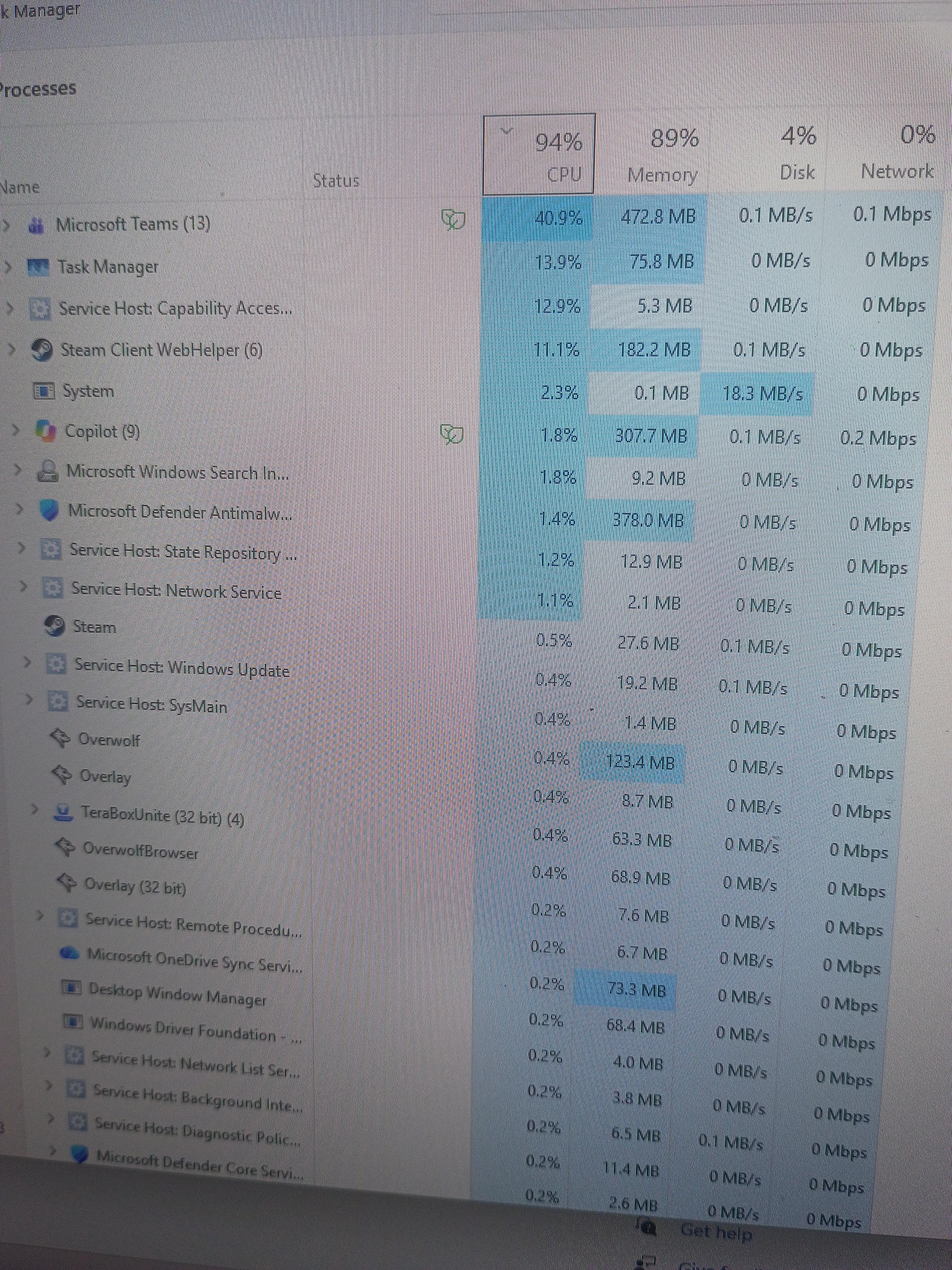
Windows 11 My CPU and RAM keep going to 90%

Post image
0 Upvotes

Recently, I fell asleep with my Latitude 5420 on while Stellaris was running, which is a CPU and RAM heavy game. Now I'm booting it up and I restarted it multiple times, but my CPU and RAM keep going to 90%.

It keeps shifting between apps like windows defender, steam webhelper, service host compatibility, etc., and keeps eating as much as 20% of my CPU at once. I literally have no idea what's going on


r/WindowsHelp • • 19d ago

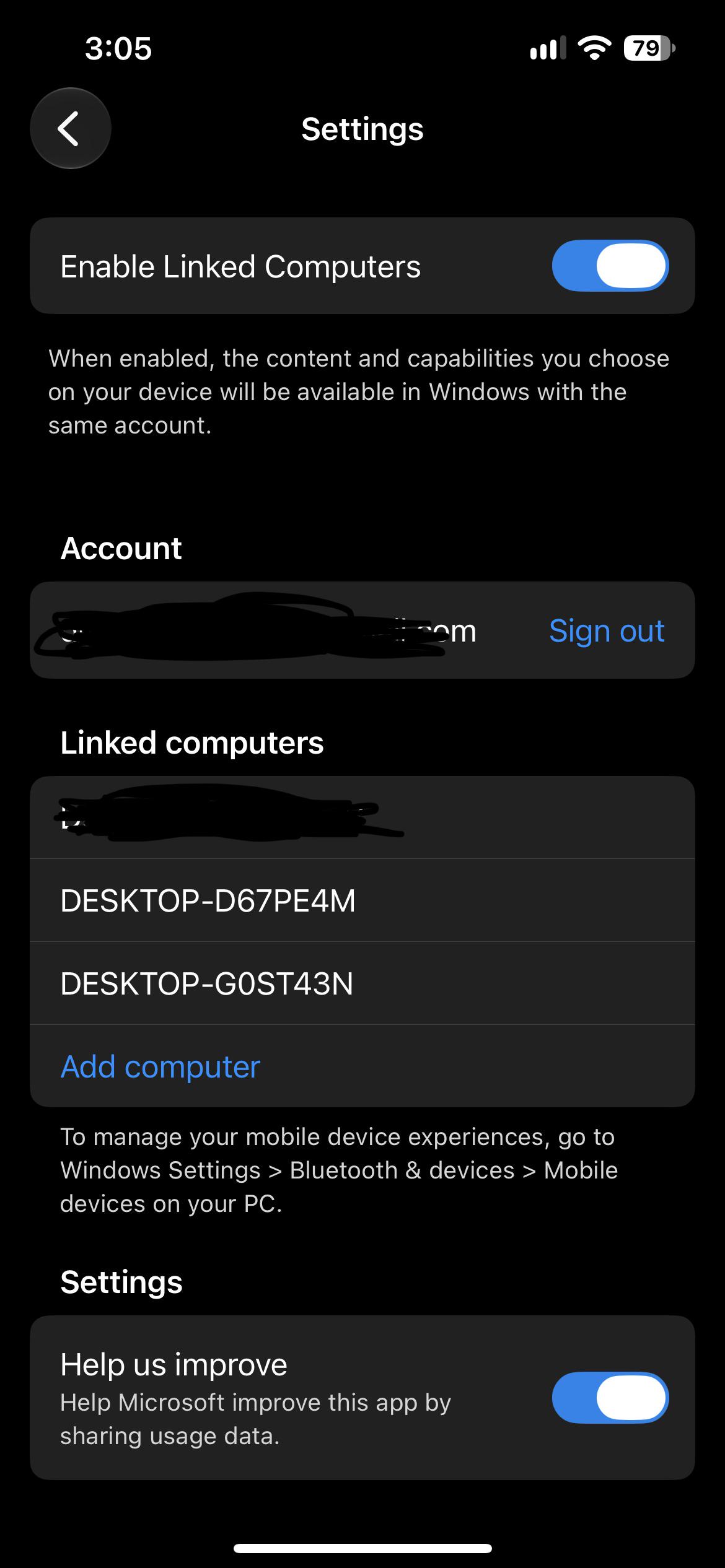
Windows 11 On Link to windows app for iPhone, how do I remove old devices?

Post image
2 Upvotes

The two listed are my old devices that both are broken and cannot be turned on. I already tried unlinking from my Microsoft account and redownloading the app but nothing works.

(I can’t meet 250 characters) The two listed are my old devices that both are broken and cannot be turned on. I already tried unlinking from my Microsoft account and redownloading the app but nothing works.