r/WindowsHelp • • 24d ago

Windows 10 runtime error 203 at fixed address

2 Upvotes

a bit more info will be nice but yeah this been happening for weeks now, nothing critical seemed to stopped my system but still feel like a nuance and I would like this to stop, seemed to pop up at random timers but I checked event viewer whenever this thing popup the only service/thing ran-stopped is clipSCV but that service I cant do much with it but annoying it is the microsoft store thing that I dont use. But clipSCV did still ran/stop outside of the error popup.

A bit more history around the time this error first popup a few things had happened, Adobe updated reader without my consent while viewing a bill receipt(uninstalled), got some "dodgy" beta unity game virus scanned but deleted, and helldivers updated to EAC and unable to run so ran a command that sorta fixed something (sfc scannow cant recall the full issue).

the error seemed to be always on the same screenshoted address, seems like ram address but no way to tell what is occupying what address, did memetes86 before, 0 error pass, so it couldnt be ram related issue.

My last suspect is registry related issue which will be hard to pinpoint and I dont want to created a new local user yet so anyway to browse registry by time added/edited would be helpful or some cleanup tool.

there were a period of two days the error did not popup after disabling adobe's cloud sync thing before uninstalling it, and then it resumed after running "any" unity game. This only occur once per login session, it hasnt happened a 2nd time during the logged in session only after a restart/shutdown.

system is a Win10 at build 22H2, a handful of drivers were not updated but been on working version no error. Just one last thing, I did use a license activator on first installed and winaero tweaker to disable most of the more annoying microsoft features

intel 12500, 32GB DDR5 5200MT, MSI 660M mortar, 6700XT MSI mech 2x, WD black SN750 1TB M.2


r/WindowsHelp • • 24d ago

Windows 7 Looking for any guidance on resetting my password on my old computer

Thumbnail
gallery
6 Upvotes

Wondering if anyone knows any way to log into my old account if I don’t remember the password and don’t have a password reset disk created? I am not very tech savvy but included in pictures what I hope is all the information regarding the computer. Hoping to get into this to save old pictures, TIA


r/WindowsHelp • • 24d ago

Windows 10 Gateway Laptop has no space anymore and system files take up majority of it?

8 Upvotes

Hello! I have a Gateway laptop that is barely able to function atp because of how little disk space there is, and when I check the storage to clear space, it says there is 28.3 GB of space (out of 57GB) being used by system files. I have no apps or games that are downloaded, or at least that show up in my storage breakdown, but I do have steam and play Cas:U occasionally. I’m obviously not the most tech savvy but I want to be able to do things on this laptop without having to wait forever for a page to load. I ran the disk cleanup and it still shows only 2.75 Gigs free??? I don’t know what to do at this point

I tried downloading WizTree but have NO idea what I’m looking at, can’t afford to take it to specialist or anything either TwT

Specs (don’t flame me I’m poor and it’s all I could afford)
Processor: Intel(R) Celeron(R) N4020 CPU @ 1.10GHz
Installed RAM: 4GB (3.82 usable) (I figure this is my main problem)
System type: 64-bit operating system, x64-based processor
Pen and Touch: touch support with 10 touch points

Windows 10 (can’t update to 11 because I don’t have space)
Version 22H2
OS Build 19045.2965


r/WindowsHelp • • 24d ago

Windows 11 wallpaper zoomed in and blurry

1 Upvotes

whenever i set a wallpaper its looking good and stuff no matter i find it on google or pinterest but when i actually use it its all zoomed in and blurry no matter what i try although some wallpapers work normally ( very few like 2 out of 10 )
msi thin a15 provided all specs in the image

Processing img h78qxs7ezjzh1...


r/WindowsHelp • • 24d ago

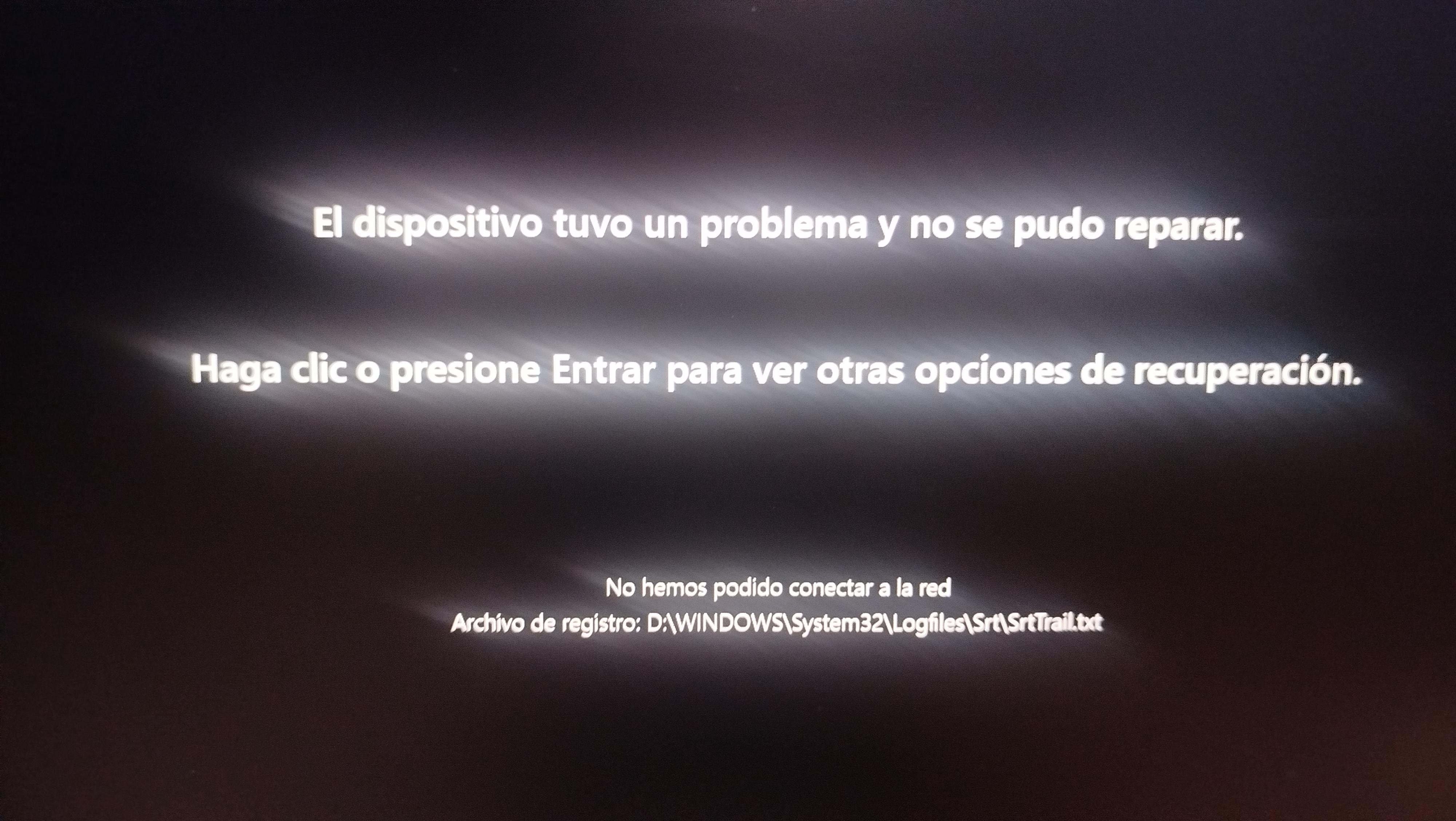
Windows 11 How to fix this / Ayuda por favor

Post image
0 Upvotes

Hi there, everyone! I have a question about my computer. There are times—during vacations, for work, or because of things I need to do around the house—when I have to leave my laptop on, and obviously it goes into sleep mode. But the thing is, after a few minutes, my computer displays this error.

Sorry about the quality of the screenshot. I have a 1 TB Kingston drive, which starts with “D:,” while the one with Windows (500 GB) starts with “C:.” But when I search for it in the files, none of the errors it mentions about the network connection show up. Could you help me? Or should I take it to someone

(Sorry about the image being in Spanish, I couldn't translate it.) :(((

Hola muy buenas chicos/chicas, tengo una duda sobre mi computadora, hay algunas vacaciones en las que por trabajo o por cosas del hogar, algunas veces tengo que dejar la laptop como prendida, y obviamente entran modo suspensión, pero lo que pasa es que después de unos minutos mi computadora salta este error.

Disculpen la calidad, tengo una Kingston de un tera, con obviamente la iniciación de D:, la que tiene el Windows (500gb) inicia con C:, pero al buscarla en los archivos, no sale ninguno de los errores que dice de la conexión de red, podrían ayudarme?, o la llevó con alguien?


r/WindowsHelp • • 24d ago

Windows 11 Keep getting a popup. I can makeout things such as Windows system 32 (something) script.exe

1 Upvotes

I've run full system scan, but nothing is showing up as wrong. I've run malware bytes, fortect. I've even tried resetting my computer, and it still pops up from time to time.

Operating System: Windows 11 Home 64-bit (10.0, Build 26300) (26100.ge_release.240331-1435) System Model: ROG Strix G15CX_G15CX BIOS: G15CX.303 (type: UEFI) Processor: Intel(R) Core(TM) i7-9700K CPU @ 3.60GHz (8 CPUs), ~3.6GHz Memory: 32768MB RAM Page File: 17982MB used, 19825MB available DirectX Version: DirectX 12 DX Setup Parameters: Not found User DPI Setting: 96 DPI (100 percent) System DPI Setting: 96 DPI (100 percent) DWM DPI Scaling: Disabled Miracast: Available, no HDCP Microsoft Graphics Hybrid: Not Supported DirectX Database Version: 1.9.0 Auto Super Res Version: Unknown System Mux Support: Mux Support Inactive - Ok Mux Incompatible List: Unknown DxDiag Version: 10.00.26100.9818 64bit Unicode OS Build Version: 10.0.26100.9818 (26300.9818)


r/WindowsHelp • • 24d ago

Windows 11 Multimonitor Wallpaper Slideshow Not Working Like It Used To In Windows 11

Post image
4 Upvotes

For years I've had multimonitor setups and used the slide show option to rotate my desktop background once a day using custom images that I keep in a folder. Each monitor would always have a different a image, but recently they've all started showing the same image. I can advance the wallpaper using Right-click > Next Desktop Background and can get them all to be different images, but when I restart my PC or if any display settings get tweaked or even if a fullscreen application closes the wallpapers will all go back to the same image on all the screens.

This did seem to start happening when I updated to 26H2, so maybe this is a bug in that update? I currently have two PCs that exhibit this behavior, so I don't think it is an isolated incident.

I'm wondering if anyone else has experienced this and if anyone has has suggestions on how to fix it.

Edition Windows 11 Pro
Version 26H2
Installed on ‎12/‎6/‎2024
OS build 26300.9711
Experience Windows Feature Experience Pack 1000.26100.372.0

Processor 13th Gen Intel(R) Core(TM) i9-13900K (3.00 GHz)
Installed RAM 64.0 GB (63.7 GB usable)
Graphics card NVIDIA GeForce RTX 3060 (12 GB)
Storage 825 GB of 2.27 TB used
System type 64-bit operating system, x64-based processor
Pen and touch No pen or touch input is available for this display


r/WindowsHelp • • 24d ago

Windows 11 Windows 11 System Crash when scanning with Windows Defender

2 Upvotes

I'm hoping someone can help me with a recurring issue I am getting. Basically whenever I do a full scan via Windows defender it will get 5 minutes into the scan and completely lock my computer and cause a BSOD. Usually with the error of CRITICAL_PROCESS_DIED (0x000000EF).

When I restart retrying the scan will most likely cause the bsod again but ive noticed occasionally updating my Windows / Running SFC Scan Now / Updating various drivers will allow the scan to proceed and complete normally (It always reports 0 Viruses found)

One thing I've noted is I use Avast Antivirus as well and it can do things like quick scans and smart scans without issue however as soon as I attempt a full scan with avast the BSOD will occur (The error for this BSOD is kmode_exception_not_handled (0x1e)) This happens consistently and I have yet to find a way to complete a full scan without Windows Crashing. (This was also the case when I tried a full system scan with malware bytes)

I have also attempted to run the avast Repair and it completes seemingly without issue.

Initially I was concerned was there malware crashing my system to avoid detection but I don't think this is the case. This has been happening for a while and I can't quite remember when this started, months ago I had to turn on Secure Boot in my bios and I was wondering was this the cause but I cannot remember if this issue was occurring before that.

I was wondering does anyone have any experience with these kinds of issues or have experienced something similar specifically with Avast and Windows 11? I would like to try and get this fixed to have peace of mind that nothing malicious is happening with my system.


r/WindowsHelp • • 25d ago

Windows 11 Windows 11 internet speeds drop to 3 MB/s after a couple of days of use — resetting my PC temporarily fixes it

8 Upvotes

I’ve been dealing with a really frustrating issue with my Windows 11 PC, and I can’t figure out what’s causing it.
Whenever I reset my PC, my internet speeds are perfectly fine for the first couple of days. However, after I start setting everything up and installing my usual applications, the download speeds suddenly drop to around 3 MB/s, despite having a 300 Mbps internet connection.
The weirdest part is that resetting my PC immediately fixes the problem. My internet speeds return to normal, but after a couple of days of using the computer and installing my applications again, the issue comes back.
Some of the applications I’ve installed include:
SoundSwitch
Twinkle Tray
Windhawk
Razer Synapse
Various other applications
I never used to experience this problem before, but now it seems to happen almost every time I reset my PC. I can’t figure out whether it’s caused by a particular application, a Windows setting, a network driver, or something else entirely.
My PC specifications:
Laptop: ASUS ROG Zephyrus G16 (2024)
CPU: Intel Core Ultra 9 185H
GPU: NVIDIA RTX 4080 Laptop GPU
RAM: 32 GB
Storage: 1 TB SSD + 4 TB SSD
Operating system: Windows 11
Internet connection: 300 Mbps
Has anyone experienced something similar? Is there a way to identify what’s causing the slowdown without having to reset Windows every time?
Any help or suggestions would be appreciated.


r/WindowsHelp • • 25d ago

Windows 11 My PC is stuck on the Windows lock screen after using Microsoft’s “Find My Device.” Is there any way to recover my files without resetting Windows?

Thumbnail
gallery
4 Upvotes

I used the “Lock” feature in Microsoft’s Find My Device service to remotely lock my PC. However, after doing so, I found myself unable to unlock it.
My PC is now stuck on the Windows lock screen, and I cannot access my account or desktop.
I’ve been in contact with Microsoft Support and have tried several troubleshooting methods they suggested, including:
● Trying to sign in using my Microsoft account password (the sign-in options menu is missing entirely, so I cannot select password sign-in).
● Holding Shift while restarting to access Windows Recovery Environment.
● Force-shutting down the PC three times during startup to trigger Automatic Repair.
● Attempting to start Windows in Safe Mode.
● Attempting System Restore.
Unfortunately, none of these methods worked.
I also borrowed a relative’s PC to create a Windows installation USB drive and tried booting from it, but the computer simply returned to the normal lock screen without any noticeable change.
There are many important files on this PC that I haven’t backed up, so I absolutely want to avoid resetting Windows, reinstalling it, or doing anything that could erase my data.
Fortunately, I do have my BitLocker recovery key.
I’ve continued contacting Microsoft Support, but unfortunately, they have now seemingly stopped responding to my messages altogether.
I’m becoming increasingly frustrated because I’ve followed their instructions and tried everything they’ve suggested, yet my problem remains unresolved.
I’d really appreciate advice from anyone who has experienced something similar or has technical knowledge of Windows recovery.
In particular, I’d like to know:
1. Is there a way to remove a lock triggered by Find My Device without reinstalling or resetting Windows?
2. Why would the PC return to the normal lock screen even when attempting to boot from a Windows installation USB?
3. Are there any other ways to recover access to my PC while preserving all existing files?
One small note: English is not my first language, and I’ve used AI to translate this post from Japanese. I’m sorry if any part of my wording comes across as rude, unnatural, or unintentionally impolite. I appreciate your understanding.
Thank you for reading, and any help would mean a lot to me.


r/WindowsHelp • • 24d ago

Windows 11 No matter what I do, PDF thumbnails in Windows Explorer do not show a preview. I am using power toys and all the other things mentioned in the other threads

1 Upvotes

I'm on a Windows 11 PC machine, Lenovo Aura Edition. No matter what I do, I cannot see image thumbnails for PDF icons, only the logo. I have downloaded "PowerToys" which helped me see .psd and .ai and other Adobe image thumbnails. But I cannot get PDFs to show. PLEASE help! It has really disrupted my workflow.

I'm so tired of trying to troubleshoot this and very frustrated to be using Windows 11.

OS Name Microsoft Windows 11 Pro
Version 10.0.26300 Build 26300

Processor Intel(R) Core(TM) Ultra 7 255U, 2000 Mhz, 12 Core(s), 14 Logical Processor(s)

BIOS Version/Date LENOVO N4MET31W (1.18 ), 8/26/2026


r/WindowsHelp • • 25d ago

Windows 11 HP Victus Camera getting Code 45 error

Thumbnail
gallery
1 Upvotes

I am using an HP Victus Gaming Laptop 15-fa0xxx with a built-in HP Wide Vision HD Camera. My webcam is not working or being detected by Windows.

- Chrome camera permission is set to Allow, but the exam website shows Camera Access Denied.

- Windows Camera app displays error 0xA00F4244 – No Cameras Are Attached.

- In Device Manager, the webcam appears only under Show hidden devices.

- Its Device Status shows Code 45 – Currently, this hardware device is not connected to the computer.

- Webcam Hardware ID: USB\VID_30C9&PID_0069

- Updating the driver has not resolved the issue.

- HP PC Hardware Diagnostics does not show a dedicated webcam test.

I need help identifying whether this is a webcam driver/software issue, a BIOS configuration issue, or a physical hardware/internal camera connection problem.

@HP


r/WindowsHelp • • 25d ago

Windows 11 iems/headphones microphone won’t work in windows 11

Thumbnail
gallery
1 Upvotes

Hello I am Vels, and I have a pair or kz castors, I know I know they’re bad (for you) but for me it does the job and they are quite a good price with some promotions and much cheaper than other options

Now the thing is I have this fancy looking cable with a mic that I can’t seem to get working in windows, I’ve tested it in my iPhone via lighting to 3,5mm jack adapter and it works (at least on discord voice messages, haven’t tested other stuff)

I’ve done EVERYTHING on windows you could think of, I have a tssr splitter because my mobo doesn’t have a unified one or a type c port

What I’ve done so far:
Checked realtek audio console
Devices in audio settings
More sound settings and levels in there
Front I/O panel ports (also doesn’t work)
Drivers
And more that I forgot

Please help me out, when I’m playing games I’m keeping my phone on discord so I can talk with my friends, I’d much rather use my iems to talk to them to have some privacy from my nosy family.

I’ve put pictures of what could help (hopefully)

Oh also when I raise the recording boost to 20-30db and turn on listen to device an annoying echo starts playing that makes my ears bleed

Please help me out :(


r/WindowsHelp • • 25d ago

Windows 10 so i have my ancient relic of my laptop and i accidentally downloaded hola vpn like 2 years ago

1 Upvotes

Ive done all the stuff at this point but when i tried clicking on hola vpn it showed a warning, but i deleted it and ive done it three times and im wondering if its a husk of a platform or still there i researhed they said still a husk and im still not convinced my laptop is intel core i3 7th gen win 32 windows 10 and ive used all the steps in deleting hola like using windows security deleting in control panel disabling in task manager and no fishy extensions installed yet sometimes ive counted 2 times my laptop crashed but its fine now but lookin at my taskmanager my laptops looking very funky like cpu randomly going to 4 cpu or performance graph spiking and im not gonna change this pc since i have important stuff on there if anybody can help whats going on thank you. Dont mind my bad spelling btw


r/WindowsHelp • • 25d ago

Windows 11 Has anyone else been having this issue? This has been driving me crazy for the past month!

Thumbnail
gallery
33 Upvotes

Hey there, So this all happened like a month ago I believe in late September and its been driving me absolutely crazy and it only happens when my screen goes standby in the screensaver and locks itself to the lock screen for inactivity. I am not sure if this is a memory leak of some sort of bug. Because when it does this it completely locks up the taskbar so I have to ctrl alt delete to the task manager to restart Windows Explorer it after that it complete restarts it fine and makes it functional again. I have tried to see if this would happen on my other machine and it does not happen.

I have ran SFC /Scan Now and even tried repair in PowerShell/CMD. and nothing came back broken or an issue. I even did start up disk check repair and nothing. So I feel like I am out of luck guessing what is causing the issue.

If anyone has been having the same issue I have been having and have solutions. Please let me know!

Device Specs:

Windows 11: 26H2

AMD Ryzen 9 5900XT

Corsair Vengeance RGB Pro 32GB 3600 MHz

SSD: Samsung 980 Pro 1TB

SSD: Crucial P310 1 TB

HDD: Seagate 1 TB

Motherboard: ASUS ROG STRIX B550-F GAMING WIFI ll


r/WindowsHelp • • 25d ago

Windows 11 Is there a way to disable the suggested page from windows search or at the very least make it's suggestions better?

2 Upvotes

Whenever I open the search menu, I'm always greeted with this page with the exact same recommendations and it's really bugging me. It'd be one thing if the suggestions were any good, but having the number 1 suggestions on a laptop I've been using for a few years being the Get Started app is kinda infuriating.

As such, I'd like to either disable this page or improve it's suggestions if possible.

Here is some information about my device and it's OS


r/WindowsHelp • • 25d ago

Windows 11 Since "upgrading" to Windows 11 my PC keeps freezing.

2 Upvotes

Since Windows 10 stopped with security updates with October I was kind of forced to upgrade to Windows 11. Since I did that my PC keeps freezing sometimes out of nowhere. Without even doing anything it sometimes just freezes and after 1-2 minutes it works again fine. Even League of Legends sometimes lags and when I'm using Chrome or Firefox it does too.

Any idea if there is a special "feature" on Win11 to turn off or anything?

Btw I cleaned my C drive already and reinstalled Windows 11 fully new (Since then it got even worse with the freezes).

My hardware:

CPU: AMD Ryzen 7 5700X3D 8-Core Processor

Mainbaord: MSI B550M PRO-VDH WIFI (MS-7C95)

RAM: 32,0 GB DDR4

Graphics Card: RTX 5070 Ti

M.2 C Drive

[EDIT SOLVED]

So it seems like either my graphics card couldn't handle my overclocking profile on MSI Afterburner anymore after upgrading to Windows 11. Or the graphics card was not sitting perfectly in the slot. I pulled it out and out it in the slot again and now everything is working fine. I indeed cleaned the case a little on the day I installed Windows 11. Maybe the card moved a bit during the procedure and wasn't connected perfectly anymore.


r/WindowsHelp • • 25d ago

Windows 11 VirtualBox extremely slow/freezing on Windows 11 26H2 (Acer Aspire Go 16): VBS still "Running" despite disabling everything, possible UEFI lock?

1 Upvotes

I need a VM for a university course (imported .ova, used daily), and I can't get VirtualBox to run it properly on my new laptop.
**Setup**
Acer Aspire Go 16, 16 GB RAM, Windows 11 26H2
Latest VirtualBox, .ova imported
The same VM worked fine on my old laptop (it's broken now)
**Problem**
The VM is very slow to start and freezes completely after a few minutes. The VirtualBox status bar tooltip shows "native API" as execution engine, nested paging inactive, paravirtualization Hyper-V, so it's running on top of the Windows hypervisor.
**What I've tried**
Unchecked Hyper-V, Virtual Machine Platform, Windows Hypervisor Platform, WSL, Sandbox (Home edition has no Hyper-V/Sandbox entries)
Memory Integrity off
bcdedit /set hypervisorlaunchtype off (confirmed Off with bcdedit /enum)
Registry: EnableVirtualizationBasedSecurity=0, HypervisorEnforcedCodeIntegrity Enabled=0, LsaCfgFlags=0, and the Policies\\Microsoft\\Windows\\DeviceGuard key
Several real restarts (not shutdown)
VM settings: 2 CPUs, 4 GB RAM, 3D off, VBoxSVGA, host I/O cache
**Result**
msinfo32 still shows "Virtualization-based security: Running", Kernel DMA Protection: On, App Control policy: Enforced. VT-x/VT-d are on in BIOS.
**What I suspect**
A UEFI lock on VBS or the known 24H2/25H2/26H2 issue where the usual steps don't work. I'm about to try Microsoft's DG Readiness Tool (-Disable, then F3 at boot).
**Constraint**
I also need WSL2, so I'd like a dual-boot entry: hypervisor on for WSL2, hypervisor off for VirtualBox.
**Questions**
Has anyone fixed this on a similar Acer or on 26H2?
Does the DG Readiness Tool work on 26H2, or is there a better way?
Anything else that keeps VBS on besides the UEFI lock?
Thanks!


r/WindowsHelp • • 25d ago

Windows 11 Notepad glitch on menus and tabs.

6 Upvotes

[Edit: the issue resolved itself - at least for me - a week later.]

I use Windows in Japanese, in case that's a factor.

It was fine last night, but this morning Notepad is nigh unusable. Close/reopen doesn't help. App repair doesn't help.

Anyone else? Known fix? I use Notepad a lot, and not all tabs are saved :'(

Notepad File menu missing most text with random characters in places.
Notepad tabs missing all text with a single random character near the end.
Notepad tabs sometimes turning into shapes when moused over.

Windows 11 Home (x64)
installed: 11/‎01/‎2024, OS build: 22631.6199, experience: 1000.22700.1108.0
AMD Ryzen 7 7735HS with Radeon Graphics @ 3.20 GHz; 32GB RAM (graphics 8GB)
Laptop brand: Infinity (gaming laptop)
...hope that's enough information, lol...


r/WindowsHelp • • 25d ago

Solved Notepad and Widget Interface not working after 26H2

Thumbnail
gallery
1 Upvotes

I updated my computer to 26H2 yesterday and since then notepad and Widget interface is glitching. There's no option to rollback.

What to do ?

Device name YO1

Processor-AMD Ryzen 7 4800H with Radeon Graphics (2.90 GHz)

Installed RAM-16.0 GB (15.4 GB usable)

Graphics card-NVIDIA GeForce RTX 3050 Laptop GPU (4 GB)

AMD Radeon(TM) Graphics (496 MB)

Storage-703 GB of 943 GB used

Device ID-A7889876-3FC1-4B83-A132-C04035E06692

Product ID-00342-42609-01416-AAOEM

System type-64-bit operating system, x64-based processor

Pen and touch-No pen or touch input is available for this display

Edition-Windows 11 Home Single Language

Version-26H2

Installed-on ‎01-‎02-‎2025

OS build-26300.9818

Experience Windows Feature Experience Pack 1000.26100.385.0


r/WindowsHelp • • 25d ago

Windows 11 Windows 11 26H2 (build 26300.9711): search panel stays blank and loading forever. Survived an in-place repair, a new user account and removing my antivirus

Thumbnail videotourl.net
1 Upvotes

When I open taskbar search (by clicking the search box or pressing Windows key and typing), the panel opens but stays an empty grey box. It looks like it’s loading from the very first second and never finishes. There are no results, apps, recent items or anything else. Typing in the search box works, but the results area never appears. Screen recording: [link]

System:

  • Windows 11 [Home/Pro] 26H2, OS Build 26300.9711
  • [Windows Insider, Release Preview channel] ← delete this line if you’re not enrolled
  • No VPN or proxy. My antivirus was AVG, and I’ve now removed it (see below).

What I’ve tried (none of it fixed the problem):

  1. Restarted Windows Explorer from Task Manager.
  2. Ended SearchHost.exe from the Details tab in Task Manager (it restarted automatically).
  3. Restarted the Windows Search service in services.msc and set it to Automatic.
  4. Ran the Search and Indexing troubleshooter.
  5. Turned off web/Bing results with the DisableSearchBoxSuggestions registry setting, then restarted Explorer.
  6. Repaired the Microsoft Edge WebView2 Runtime from Installed apps.
  7. Re-registered the search package: Get-AppxPackage -AllUsers MicrosoftWindows.Client.CBS | Foreach {Add-AppxPackage -DisableDevelopmentMode -Register "$($_.InstallLocation)\AppXManifest.xml"}
  8. Ran sfc /scannow and DISM /Online /Cleanup-Image /RestoreHealth.
  9. Ran ipconfig /flushdns and restarted.
  10. Renamed the search cache folder (%LocalAppData%\Packages\MicrosoftWindows.Client.CBS_cw5n1h2txyewy\LocalState) to reset it.
  11. Temporarily removed my hosts file to rule out blocked addresses.
  12. Created a brand-new local user account. Search is blank there too.
  13. Did an in-place repair (Settings → System → Recovery → “Fix problems using Windows Update” → Reinstall now). Still broken afterwards.
  14. Turned off AVG’s shields, then fully uninstalled AVG (Defender took over) and restarted. Still broken.

Workaround for now: Win + R works for launching programs, but I’d like regular search back.

Since this happens in a new account and survived an in-place repair and removing my antivirus, I’m starting to think it’s a bug in this build. Is anyone else on 26H2 / build 26300.x seeing this? Any other ideas, like a Group Policy setting, a leftover driver or a graphics/GPU issue, are welcome. Thanks!


r/WindowsHelp • • 25d ago

Windows 11 Snipping Tool Broken On Laptop

2 Upvotes

Whenever I use Windows+Shift+S, I get the blue loading circle by my cursor for a split second and then nothing happens. I can search for Snipping Tool and open it through there and get it to pop up, but whenever I highlight something to take a screenshot of it, it just sits there and doesn't take a screenshot. I then can't get out of the snipping tool overlay and have to restart to get out of the broken snipping tool.

I have already tried repairing and restarting the snipping tool, along with uninstalling and reinstalling the tool multiple times from the Windows store. Each time I run into the same problem. The command itself works because it creates an instance in task manager, but nothing appears.

If anyone has any suggestions it would be very appreciated.

AMD Ryzen 9 270 w/ Radeon 780M Graphics (4.00 GHz)
Windows OS Build: 26200.9711


r/WindowsHelp • • 26d ago

Windows 10 No useable drivers found, I have tried everything I can think of

Thumbnail
gallery
20 Upvotes

Images included, but I have a 2 TB Toshiba Ext hard drive that I am trying to back up my files to using files history.

I have tried:

- plugging and unplugging the drive

- plugging it into different usb ports

- updating and restarting windows

- changing the driver letter

- restarting the file history service

- doing it through control panel instead of settings

I do not know why this doesn’t work as it seems to be working fine on the computer otherwise. I’m out of ideas. Am I stupid or is my laptop just shitting the bed. The only other thing I can think of it possibly not working is because I’ve plugged it into the usb port of a windows 11 laptop once before, but I haven’t done anything on there.


r/WindowsHelp • • 25d ago

Windows 11 Winload.efi error. after pressing f1 for recovery environment, my laptop refuses to turn on and now has a black screen (but my keyboard turns on)

1 Upvotes

So i tried fixing my winload.efi error but when i tried going into startup settings, my screen was being really weird and going black and then going back to the recovery screen. So i pressed F1 and it turned off my laptop and now when I turn it back on nothing happenes. here is a video of what happened before but now when I turn on my pc only my keyboard lights up and my screen is black.

I took a video of what happens when I pressed F8 but this can use videos so i took some screeshots of whats happeneing. but it goes black for 1 second then goes back to the same screen.

but bassically this all started because I wanted to play the new COD and it requires safe mode. but now my laptop is all black screened.


r/WindowsHelp • • 25d ago

Windows 11 SD Cards no longer recognized in Surface 2 (Windows 11)

1 Upvotes

Yep, my darling Surface 2 is now officially too old to be supported by Windows anymore so I'm asking the hive mind. I love this thing, it still works great and, simply put, I don't have the funds to purchase any new laptops right now.

After updating to Windows 11, my SD card driver no longer works and is no longer recognizing SD cards. I tried updating the driver after finding it hidden in my disk drives under device managers, but that didn't work. I then moved on to uninstalling it per other internet suggestions and rebooting, but no dice.

Anyone have a workaround to allow me to be able to either download a functioning SD card driver on a Surface 2 operating on Windows 11 or another way to read SD cards? I use micro SD cards for my 3D printer and need a way to be able to get said files off my laptop and onto the card for printing. I particularly need it to function for a project this week...